
Google Play Reviews Scraper — $0.08/1K, Any Language
Pricing
from $0.05 / 1,000 reviews
Google Play Reviews Scraper — $0.08/1K, Any Language
Know what users love and hate about any Android app. Export every Google Play review in any language, with stars, versions, likes, developer replies and feature ratings. Filter complaints, monitor new reviews, free insights report. $0.08 per 1,000.
Pricing
from $0.05 / 1,000 reviews
Rating
0.0
(0)
Developer

Fermaja
Maintained by CommunityActor stats
0
Bookmarked
1
Total users
1
Monthly active users
4 days ago
Last modified
Categories
Share
Google Play Reviews Scraper
Know exactly what users love and hate about any Android app: yours or your competitors'. Export every Google Play review in any language, with star ratings, app versions, likes, developer replies and the features users rated, to CSV, Excel, JSON or straight into your tools. $0.08 per 1,000 reviews, no start fee, plus a free insights report with every run.
Try it now: the form is pre-filled with Spotify. Click Start, and 100 fresh reviews are ready in about 3 seconds.
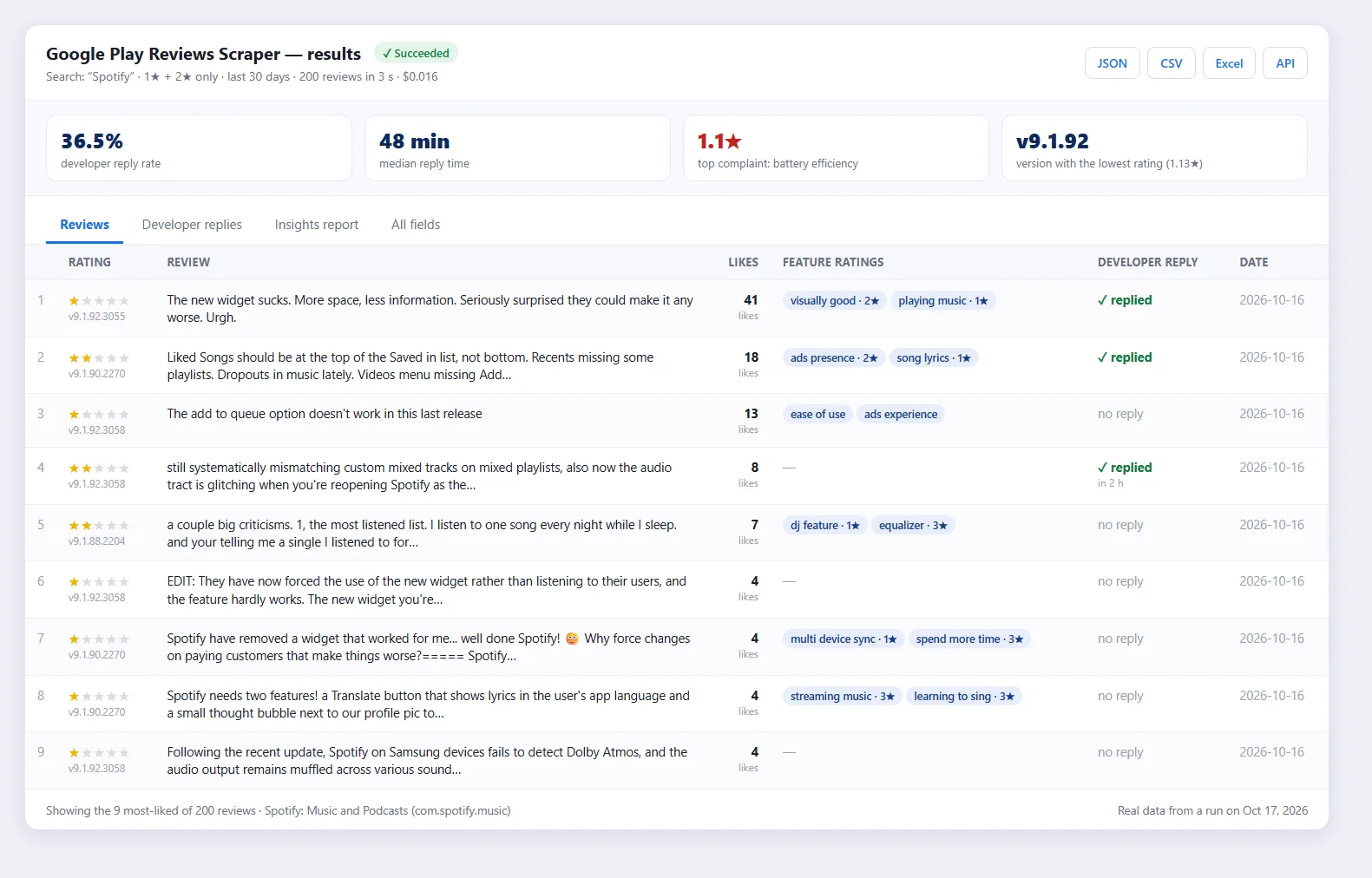
Real results: Spotify's 1★–2★ reviews of the last 30 days. 200 reviews in 3 seconds for $0.016. The most-liked complaint is about the new widget in version 9.1.92, and the insights show a 36.5% developer reply rate.
🆕 What's new (October 17, 2026)
- 🎯 Brand searches now find the brand's own app first. Searching "Spotify", "Notion" or "Duolingo" returns
com.spotify.music,notion.idandcom.duolingoas the #1 result, exactly like the Play Store. Before, Google's large "top result" card was skipped. - ⚡ Date filters are now instant on huge apps. A "last 30 days" request on Spotify (1.8 million reviews) now finishes in 3 seconds, whatever sort order you pick.
- ✅ Verified end to end on single apps, keyword searches, developer pages, wrong app IDs, multi-language runs and complaint filters.
Why teams choose it
- ⚡ Very fast: up to 4,000 reviews per request. 55,000 reviews from 7 apps took 14 seconds in our tests.
- 🌍 Every language in one run: Google Play groups reviews by language. Pick several, or all 25 major ones, and duplicates are removed for you.
- 🎯 Precise filters: star ratings, date range, words the review must mention, replied or unanswered.
- 💸 Pay only for what you keep: filters are applied before charging, so you never pay for reviews you filtered out.
- 🔔 Monitoring mode: schedule it and get only the reviews posted since the last run, for Slack alerts or support queues.
- 📊 Free insights report with every run (see below).
Who uses it
| You are… | You use it to… |
|---|---|
| 📱 Product & UX teams | Find which release dropped your rating and what users complain about most |
| 🔍 Competitive intelligence | Read your competitors' 1★ reviews: every complaint is a sales argument for you |
| 🚀 App store optimization (ASO) | Compare reply rates, reply speed and the features users praise or hate across your niche |
| 🎧 Customer support | Catch every unanswered negative review each morning |
| 📈 Market research & investors | Track user sentiment across a whole category over time |
| 🤖 AI & data science | Get large, clean, multilingual datasets for sentiment analysis, topic modelling, fine-tuning and RAG |
How it works
- Tell it which apps. Paste app IDs (
com.spotify.music) or any Google Play link: app pages, developer pages, categories and charts all work. Or type keywords likebudget appto scrape the top search results. - It reads Google Play's own review feed directly, the same data the Play Store app loads. That's why it's fast (thousands of reviews per request) and reaches the complete history of an app.
- Your filters are applied, and duplicates across languages are removed. You're charged only for the reviews that remain.
- You get one clean row per review, a free app snapshot (rating, installs, developer contacts…) and a free insights report. Download them or sync them to Google Sheets, Slack, Zapier, Make, n8n or your own API.
Free insights report: answers, not just rows
Open Output → Insights report after any run. From the Spotify run shown above:
| Insight | Spotify, 1★–2★, last 30 days |
|---|---|
| Developer reply rate | 36.5% of complaints get an answer |
| Median reply time | 48 minutes |
| Worst-rated features | battery efficiency 1.1★, battery heat 1.15★, ads intrusiveness 1.33★ |
| Rating by app version | v9.1.92: 1.13★, the lowest of the recent versions |
| Most-liked complaint | "The new widget sucks…" (41 likes) |
You also get the star distribution, reviews per week and the store rating vs. the reviews you scraped.
Ready-made inputs
Complaints from the last 30 days that mention crashes or bugs
Competitor research: the top 10 apps for a keyword
Every review of one app (full history)
All apps of a developer
Global coverage: the 25 most common languages
Daily monitor: only reviews posted since the last run
Example result
The most-liked review from the run above (one row of the dataset):
💡 reviewEditedAfterReply: true tells you this user rewrote their review after the developer had already replied (in 2023). Google dates a review by its last edit, so this flag finds the customers who came back angry.
All data fields
| Field | What it is |
|---|---|
appTitle, appId | App name and package ID |
rating | 1–5 stars |
text, title, textLength | The review |
date | When it was posted (or last edited) |
thumbsUp | How many people found it helpful |
appVersion | The app version the reviewer used |
userName, userImage | Public reviewer name and avatar |
hasReply, replyText, replyDate, replyAfterHours | The developer's answer and how fast it came |
reviewEditedAfterReply | The user changed their review after the developer replied |
featureRatings | Features the reviewer rated in Google's review form, e.g. battery heat, ads frequency, offline maps |
language, country, reviewUrl | Review language, store country and a direct link |
Free app snapshot for every app (in the SUMMARY record): store rating, exact rating histogram, number of ratings and reviews, installs (including Google's exact install count), price, genre, content rating, release and update dates, version, and developer email, website, address and phone.
Pricing
$0.08 per 1,000 reviews on the Free plan, and less on paid Apify plans (down to $0.05 per 1,000). No start fee. The app snapshot and insights report are free.
| You want | Reviews | Price |
|---|---|---|
| Quick check of one app | 100 | $0.008 |
| Last month's complaints of a big app | 200 | $0.016 |
| One app, deep dive | 10,000 | $0.80 |
| A whole niche (10 apps × 5,000) | 50,000 | $4.00 |
| Daily monitor, ~50 new reviews/day | 1,500 / month | $0.12 / month |
You only pay for reviews saved after your filters. Set a maximum cost per run and the Actor stops exactly there.
Monitoring new reviews
Turn on Only new reviews since the last run and schedule the Actor (for example every morning). It remembers the newest review it saw for each app and language, so each run saves, and charges, only fresh reviews. Then connect:
- Slack / Microsoft Teams / email: every new 1★ review in a channel
- Google Sheets: a live review log
- Zapier, Make, n8n: a support ticket for every unanswered complaint
- Webhooks: the data in your own backend
The first run saves the newest reviews (up to Max reviews per app) as a starting point. Keep that limit above the number of reviews the app gets between two runs; the log warns you if it was too low. Use a different Monitor name for each scheduled task watching the same app.
API and integrations
It also works from AI agents through the Apify MCP server, so Claude, ChatGPT or Cursor can pull reviews on request.
FAQ
How many reviews can I get? All of them. Google Play serves the full review history: for example, all 57,548 reviews of the Wikipedia app come back in a couple of minutes. Most people leave a star rating without text, and Google Play only publishes written reviews. That's why an app with 36 million ratings has about 1.8 million reviews.
Why pick a language, not a country? Google Play splits reviews by language: English reviews are the same in the US, UK and India. Pick several languages, or use All major languages, to collect reviews from everywhere. The country setting controls the app data (price, availability).
Can I sort by "most relevant" and filter by date?
Yes. When you set Reviews from, reviews are read newest first, so the run can stop at your date instead of reading the app's whole history. To see the most-liked reviews first, sort the dataset by thumbsUp.
Do I need a proxy? No. The Actor connects directly and switches to Apify Proxy by itself if Google ever slows it down, at no extra cost to you.
What happens with a wrong app ID? It's skipped and listed as "not found" in the summary; the rest of the run continues. You're never charged for apps that don't exist.
Can I get iOS / App Store reviews? This Actor is for Google Play only.
Is scraping Google Play reviews legal? The Actor collects only publicly visible reviews. Reviewer names are public personal data, so if you are in the EU or handle data of EU residents, make sure you have a legitimate purpose under GDPR and don't store more than you need. When in doubt, ask a lawyer.
Need a field or found a problem? Open an issue in the Issues tab. Issues get answered fast, and the October 17 update came directly from real runs.


