
Google Play Scraper — Apps & Developer Emails
Pricing
Pay per event
Google Play Scraper — Apps & Developer Emails
Search Google Play by keyword, app link or developer: 37 fields per app, incl. rating, installs, last update and the developer email, phone, address and website (email on 10 of 10 apps in our test). $0.24 per 1,000 apps + $0.40 per 1,000 contacts found. Runs daily or weekly with n8n, Make or Zapier.
Pricing
Pay per event
Rating
0.0
(0)
Developer
FERMAJA
Maintained by CommunityActor stats
0
Bookmarked
1
Total users
1
Monthly active users
2 hours ago
Last modified
Categories
Features
Share
Google Play Scraper — Apps & Developer Emails
Search Google Play by keyword, app link or developer and get one flat row per app with rating, installs, last update and the developer's email, phone, postal address and website, exactly as Google Play publishes them.
- 📧 Developer contacts: developer email, support email, phone, postal address, country and legal company name from the app's "About the developer" and "App support" sections
- 📱 App data: name, package, link, category, star rating, number of ratings, install band, price, version, minimum Android version
- 📅 Freshness signals: first release date, last update date and days since the last update
- 🌍 Any country and language: search the US, German, UK or any other Play Store, in English or the local language
- 🔗 Built for workflows: flat rows that map straight into n8n, Make, Zapier, Google Sheets or your CRM
Try it now: the prefilled input (search word "invoice", 10 apps) returns 10 apps with 10 developer emails, 10 phones and 10 addresses in about 12 seconds of run time.
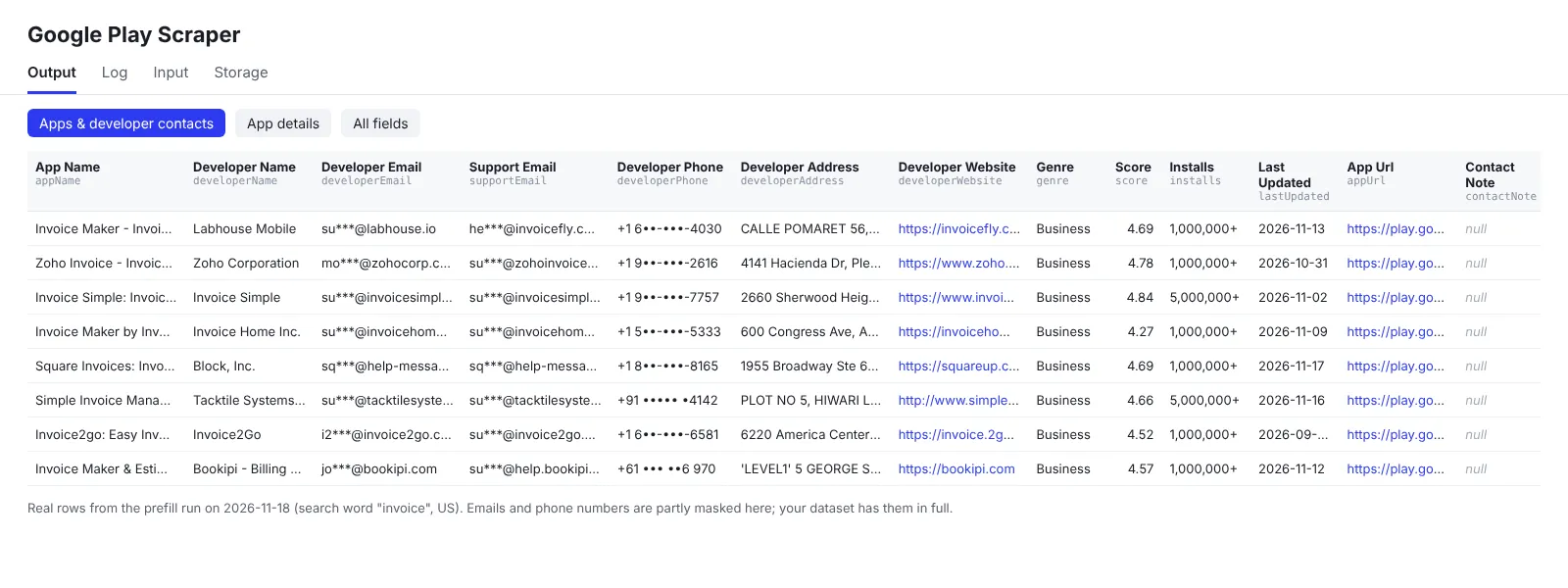
This is how your results look: the "Apps & developer contacts" view of the Output tab, with real rows from a run on 2026-11-18 (search word "invoice", US Play Store, 10 apps). Emails and phone numbers are partly masked here; your dataset has them in full.
✨ Why people pick it
- ✅ Contacts in every row: in our tests on 2026-11-18, 81 of 81 apps (search words "crm", "habit tracker", "dentist appointment") had a developer email, 81 an address, 72 a phone (89%) and 73 a website (90%).
- ✅ One row per developer on request: switch on "One row per developer" and every row is a different company.
- ✅ Type it like a human: search words, Play links with tracking parameters, package names,
market://links, developer pages, country and language names ("Germany", "German") all work. - ✅ Fair billing: you pay for complete app rows, and the contact add-on only when an email or phone is found. Unknown apps and pages that could not be read are free rows marked "Not charged".
- ✅ No login, no browser: reads the public Google Play pages over plain HTTP, so runs are fast and cheap.
👥 Who uses it
| Who | What they do with it | |
|---|---|---|
| 🚀 | Agencies and SaaS sellers (ASO, user acquisition, analytics, payments, localisation) | Build lists of app publishers in a category with email, phone and website for outreach |
| 💼 | Investors and market researchers | Track apps in a niche: installs, ratings, release and update dates |
| 🛠️ | Product and growth teams | Monitor competitors' versions, release notes, ratings and installs every week |
⚙️ How it works
- You type search words, paste Google Play links, package names or developer pages, or chain a dataset from another Actor.
- The Actor reads Google Play's public search or developer page for the apps (about 30 per search word, in Google Play's ranking order).
- It opens each app's public page and reads the app data and the developer contact block. No Google account, no login, no browser.
💡 Tip: Google Play lists about 30 apps per search word. For bigger lead lists, add several specific words ("invoice maker", "invoice app for contractors", "estimate app") and switch on "One row per developer".
🧾 Input recipes
Lead list: one row per developer of invoicing apps, only with an email:
Actively maintained, popular apps in the German Play Store:
Every app of one developer, or a list of known apps:
📦 Example output
A complete real row from a run on 2026-11-18 (search word "invoice", US Play Store). recentChanges and description are cut with "…" here (the Actor keeps up to 1,000 and 4,000 characters).
| Field | What it is |
|---|---|
developerEmail | Email in "About the developer" (the developer's contact for Google Play) |
supportEmail | Email in "App support" (often a help desk address) |
developerPhone, developerAddress, developerCountry, developerLegalName | Contact block as Google Play publishes it |
contactCharged | true when the "Developer contact found" add-on was charged for this row |
contactNote | Plain words on any empty contact field, and on charges |
status | ok (charged), partial or not-found (free) |
The Output tab has two views: "Apps & developer contacts" (lead columns) and "App details" (ratings, installs, versions, dates). Download as CSV, Excel, JSON or HTML, or read it through the API.
🔗 Use it in n8n
Install the official Apify node (n8n Cloud: search "Apify" in the nodes panel; self-hosted: install @apify/n8n-nodes-apify under Settings > Community Nodes) and add your Apify API token as the credential.
-
App publisher lead list into your CRM. Manual or Schedule Trigger -> Apify "Run an Actor and get dataset" (this Actor) -> Filter (
developerEmailis not empty) -> HubSpot / Pipedrive "Create contact" or Google Sheets "Append row". Custom input:{ "searchTerms": ["habit tracker", "meditation"], "maxResultsPerSearch": 0, "onePerDeveloper": true, "onlyWithEmail": true }Map
developerName,developerLegalName,developerEmail,developerPhone,developerAddress,developerCountry,developerWebsite,appName,appUrl,installs. -
Keywords from a Google Sheet, every Monday. Schedule Trigger (Mondays) -> Google Sheets "Get rows" -> Aggregate (field
keyword, so all keywords go into one run; set the Custom input field to Expression) -> Apify "Run an Actor and get dataset" -> Slack "Send message" withappName,developerName,lastUpdated,score,appUrl. Custom input:{ "searchTerms": {{ JSON.stringify($json.keyword) }}, "updatedAfter": "last 7 days", "maxResultsPerSearch": 0 } -
More contacts from the developer websites. Run this Actor, then a second Apify node running Website Contact Scraper with
{ "datasetId": "{{ $json.defaultDatasetId }}", "datasetField": "developerWebsite" }to collect more emails, phones and social profiles from each developer's site. To feed this Actor from another dataset instead, pass{ "datasetId": "{{ $json.defaultDatasetId }}", "datasetField": "appUrl" }.
⏰ Run it on autopilot: daily, weekly or monthly
Two ways, no code:
- On Apify: save your input as a task, open Console > Schedules and run it daily, weekly or monthly. Send results anywhere from the task's Integrations tab (email, Google Drive, Slack, webhooks). No workflow tool needed.
- From n8n, Make or Zapier: trigger the Actor on a schedule and push the rows to your CRM or sheet.
Popular rhythms: weekly updatedAfter: "last 7 days" to catch apps that just shipped an update (active teams worth contacting), monthly lead lists per category with "One row per developer", and a weekly competitor watch on a fixed list of app links.
📋 Ready-made tasks
- Google Play app developer emails (lead list): one row per developer of invoicing and receipt apps, with email, phone, address and website.
- Recently updated fitness apps: popular fitness apps updated in the last 30 days, with developer contacts.
- CRM app competitor monitor: versions, ratings, installs and release notes of HubSpot, Pipedrive, Zoho CRM and Salesforce, ready for a weekly schedule.
💵 Pricing
Pay per result: a start fee of $0.005 per run, a price per complete app row, and a developer contact add-on charged only when Google Play shows the developer's email or phone (100% of 81 apps in our 2026-11-18 tests). Not-found and unreadable rows are free.
| Your Apify plan | Per app row | Contact add-on (only when found) | Per 1,000 apps | Per 1,000 contacts |
|---|---|---|---|---|
| Free | $0.00024 | $0.0004 | $0.24 | $0.40 |
| Starter (Bronze) | $0.000211 | $0.000352 | $0.21 | $0.35 |
| Scale (Silver) | $0.000192 | $0.00032 | $0.19 | $0.32 |
| Business (Gold) and up | $0.000173 | $0.000288 | $0.17 | $0.29 |
Worked example on the Free plan: 1,000 apps, all with a developer email = 1,000 × $0.00024 + 1,000 × $0.0004 + $0.005 start fee = $0.645.
Just testing or comparing scrapers? You're very welcome. The prefilled run (10 invoice apps) took about 12 seconds of run time and costs about $0.011 on the Free plan. Apify's free plan includes $5 of credit every month, enough for about 7,800 apps with their developer contacts.
❓ FAQ
Where do the emails and phones come from? Google Play shows an "App support" section and an "About the developer" block (legal name, email, address, phone) on every app page. The Actor reads those public sections. If a developer left a field empty, contactNote says so.
Is it legal? The Actor reads only public Google Play pages, with no login. You are responsible for using the data in line with your local laws (for example GDPR and anti-spam rules for outreach).
Which countries and languages work? Every Play Store country (2-letter code or name) and language (code or name). Search results, prices and availability follow the country; app texts follow the language. Contacts are the same everywhere.
Why do I get about 30 apps per search word? That is what Google Play's public search page lists. Add more specific search words to get more apps; duplicates across words are removed.
Can I get reviews too? Use Google Play Reviews Scraper on the appUrl column of this Actor's output.
Do I need a proxy? No for normal runs. For very large runs, turn on Apify Proxy (datacenter); the Actor switches to it automatically if Google rate-limits the direct connection.
⚠️ Limits
- About 30 apps per search word (Google Play's public search page), up to 3,000 apps per run.
installsis Google Play's install band (e.g. "1,000,000+"), not an exact number.- Apps not available in the chosen country are saved as free
not-foundrows; set "Country" to a store where the app is sold. - Apple App Store links (e.g. from an Apple App Store Scraper dataset,
datasetField: "appUrl") are looked up on Google Play by the app name in the link: one best match per link, so you can find the Android version of iPhone apps. CheckdeveloperNameto confirm it is the same developer. Links without a name (apps.apple.com/app/id123) are skipped.
🆕 What's new
- 2026-11-23: an app name typed into "App links" (e.g.
Spotify) now returns just that app (Google Play's top match) with a note, instead of a full 19-app search. - 2026-11-21: a date that does not exist (
2026-11-31,31.02.2026) is read as the last day of that month, with a note in the status message (before: it silently rolled over to the next month). - 2026-11-19: package names typed in the wrong letter case (com.slack, com.Spotify.Music) are now matched to the real app instead of "not found".
- 2026-11-18: first release.
🧩 Related Actors
- Apple App Store Scraper: apps and EU trader contacts from the Apple App Store.
- Google Play Reviews Scraper: reviews, ratings and developer replies of Android apps.
- Website Contact Scraper: emails, phones and social profiles from the developer websites in this Actor's output.


