

Telegram Channel Scraper: Monitor Posts & Keyword Search
Pricing
from $0.22 / 1,000 posts
Telegram Channel Scraper: Monitor Posts & Keyword Search
Monitor public Telegram channels for new posts, or find channels by keyword through a web search: text, date, views, reactions, media, cashtags, Slack or Discord alerts. Input: channel names or keywords. No login. $0.30 per 1,000 posts on Free, $0.22 on Business.
Pricing
from $0.22 / 1,000 posts
Rating
0.0
(0)
Developer

Fetchwright
Maintained by CommunityActor stats
0
Bookmarked
1
Total users
0
Monthly active users
3 hours ago
Last modified
Categories
Features
Share
What does Telegram Channel Scraper do?
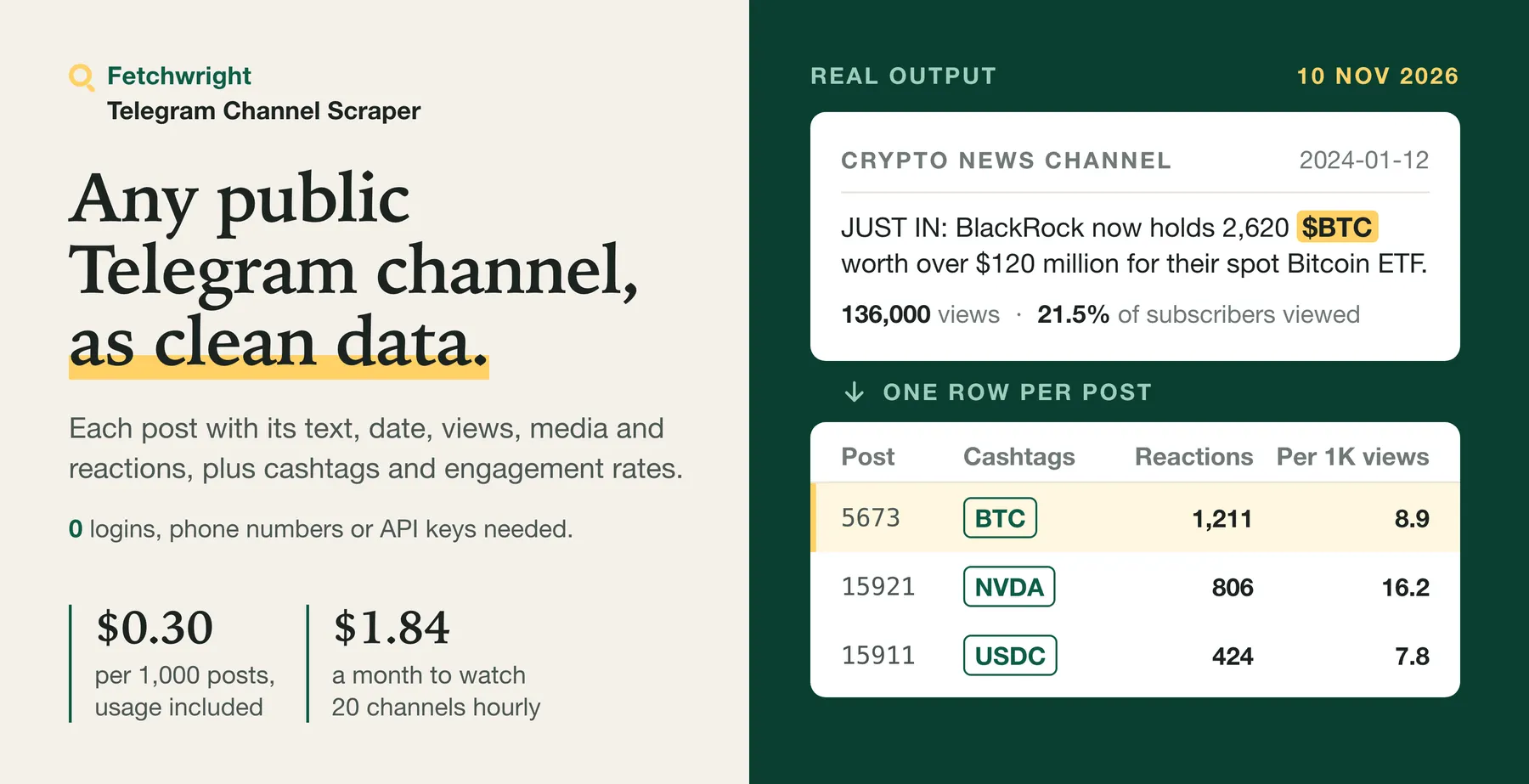
Telegram Channel Scraper reads the public Telegram channels you name and can watch them for new posts, or finds channels and posts by keyword through a web search (not Telegram's own search), with no Telegram account, phone number or session to set up or lose, for $0.30 per 1,000 posts on the Free plan ($0.22 to $0.27 on paid plans; keyword results are free for now). You give it channel names or links, or keywords. Get one row per post with its text, date, views, photos, videos, files, polls, link cards and reactions, where it was forwarded from and which post it replies to, plus cashtags ($BTC) and engagement rates, normally newest first within each channel (a watch catching up returns its pending older posts first), and one free row per channel with its exact subscriber count where Telegram shows it and its numeric channel ID where the page encodes it. For the channels you list, a named watch (one run at a time, settings unchanged) skips posts it has already returned, unless saving its memory failed, and can report subscriber, title and description changes. Hourly monitoring of 20 channels with about 200 new posts a day costs about $1.84 a month on the Free plan. Try the prefilled example: it returns the latest 20 posts of Telegram's own news channel.
Built for crypto and news desks that watch channels around the clock, traders and analysts tracking tickers and keywords, market researchers comparing channels in a niche, and developers and AI agents that need Telegram posts through an API.
| What you get | Details |
|---|---|
| 📣 Read any public channel | durov, @durov, https://t.me/durov or a post link, all in one list |
| 🔎 Search inside channels | Only posts that contain a word, phrase or hashtag, or any of up to 20 keywords at once, each post returned once with the keywords it matched |
| 📈 Engagement and cashtags | Reactions per 1,000 views, views per subscriber, total reactions, and cashtags such as $BTC on every post; keep only posts about the tickers you follow, and get a per-channel count of every ticker mentioned |
| 📅 Limit by date | Posts newer than a date, from the last N days, or older than a date: any exact window such as "October only" |
| 🚫 Exclude noise | Skip posts that mention a giveaway, an ad or any word you list, and pay nothing for them |
| 🎬 Filter by content | Photos, videos, round video messages, files and audio, stickers, polls, links or text-only posts |
| 🆕 Get only new posts | For the channels you list, with one run of a watch at a time and its settings unchanged, a named watch skips posts it has already returned; a failed or interrupted save of its memory can repeat some, and a watch catching up returns its older posts first |
| 🔍 Find channels by keyword | Each keyword returns the public channels and posts web search has found for it, and the matching posts of the first channels found are read; a subscriber range keeps only channels and public groups of the size you want |
| 👁️ Minimum views | Leave out posts with fewer views or no view count; they are counted in the run summary and not charged, and an only-new watch does not look at them again when their views grow |
| 📈 Channel changes | With Report channel changes and Include one row per channel on a named watch: subscriber growth or loss, a new title or description, and a name now used by another channel, for the channels you list, at no charge |
| 🆔 Stable channel ID | The channel's numeric Telegram ID where the public page encodes it reliably, on post and channel rows; it stays the same when a channel renames itself |
| 🔔 Get an alert in Slack or Discord | Paste a webhook address and each run posts what it saved: posts per channel, the first three with text and link. With a keyword or cashtag filter this is a keyword alert. |
| 📊 Channel details | Title, description, subscribers, photo, video, file and link counts, verified badge, avatar |
| 🔗 Chain runs | Read channel names from another run's dataset |
| 💾 Export anywhere | JSON, CSV, Excel, or through the API |
No Telegram account, phone number or login is needed. The Actor reads only what Telegram shows to anyone on the web. Because it runs on Apify you can also schedule it, call it through the API, send results to Google Sheets or Slack, and use it from AI agents through MCP.
Why choose Telegram Channel Scraper?
- No Telegram account or session required. Scrapers that sign in with a Telegram account can stop on session and rate-limit errors. This Actor signs in to nothing; a scheduled run depends only on Telegram continuing to show the channel and its posts on the web. The trade-off is scope: it reads public channels only, where an account-based tool can also reach private chats and comments the account is allowed to see.
- Low price per post and per schedule. $0.30 per 1,000 posts on the Free plan ($0.22 to $0.27 on paid plans) with platform usage included, less per post on the Free plan than the four channel scrapers compared below (Free-plan prices read 10 November 2026), and a scheduled run with no new posts costs only its start event of $0.00005 per GB of run memory (rounded up, at least one GB).
- Cashtags and engagement rates (reactions per 1,000 views, views per subscriber) on every post, which none of the compared listings offer.
- Exact subscriber counts in a free channel row, where Telegram shows them.
- A new-posts-only mode for monitoring. With one run of a watch at a time and its settings unchanged, it returns only posts the watch has not recorded as returned, and catches up on its own after a run that stopped early.
- You pay per post saved, plus a start event of $0.00005 per GB of run memory per run. Channels that cannot be read, filtered posts and failed requests are never charged.
Find Telegram channels and posts by keyword
Don't know which channels to read? Add keywords under Find channels by keyword. For each keyword the Actor returns the public Telegram channels and posts that web search has found for it, one row per page with its title, snippet, link, rank and the date shown, and then, unless you turn it off, reads the matching posts of the first channels found (10 per keyword by default), with views, reactions, media and cashtags. Only public channels and their posts are returned, plus one free row for each public group found (its title, description and member count, never its members or messages); users, bots and channels without a public preview are listed in the run summary, not returned. Channels and keywords work together or alone.
| What you set | What you get |
|---|---|
Find channels by keyword: bitcoin etf, remote jobs or "chatgpt" | One row per public Telegram channel or post found, ranked as the search ranked it |
Search country and language, for example US and en, or DE and de | Results as searched from that country, favouring that language |
| Found pages from: any time, past day, week, month or year | The search engine's own time filter: results it dates to that period |
| Also read the matching posts (on by default) | For up to 10 channels per keyword, the posts that match the keyword in the channel's own search, as ordinary post rows marked with the keyword |
Minimum / maximum subscribers, for example 1000 to 50000 | Only channels and public groups found inside that audience size; the others give no rows, cost nothing and are listed per keyword in the run summary |
What it costs: found pages are free for now. Posts read from the channels found are charged as posts, $0.30 per 1,000 on the Free plan. A channel found by keyword has its matching posts read once per run, and no channel gives more than Maximum posts per channel posts in the whole run. With the default settings one keyword can read up to 10 channels × 100 posts = 1,000 posts, at most $0.30 on the Free plan, and each further keyword can add as much again; turn off Also read the matching posts to get only the pages found, with no post charges. Keywords that find nothing and keywords that cannot be searched are listed in the results and never charged.
About personal data: a found page's title and snippet come from the web search and can contain names or other personal data, as posts can.
What it covers: web search shows only the Telegram pages a search engine has indexed. It is not a complete search of Telegram: a channel or post the search engine has not indexed is not found, and the same keyword can give different pages on another day or from another country. The SUMMARY record says this too, and lists per keyword the result pages read, results, channels found and read, posts saved and what stopped it.
How much does it cost to scrape Telegram channels?
$0.30 per 1,000 posts on the Free plan, $0.22 to $0.27 on paid plans. You pay per post saved, platform usage is included, and there is no monthly rental.
| Your Apify plan | Price per 1,000 posts |
|---|---|
| Free | $0.30 |
| Starter (Bronze) | $0.27 |
| Scale (Silver) | $0.25 |
| Business (Gold) and above | $0.22 |
A run also costs a start event of $0.00005 per GB of run memory (rounded up, at least one GB). A scheduled run that finds no new posts costs only that start fee: measured on 10 November 2026, a new-posts-only run on 2 channels with nothing new was charged $0.00005 in total.
Keyword search: the Telegram pages found by keyword are free for now; the posts read from the channels found are charged as posts at the prices above.
Never charged: channel rows, rows for channels that could not be read (missing, private or not shown on the web), posts Telegram does not show on the web, channel events such as "Channel created", posts skipped by the content filter, posts outside your dates, with one run of a new-posts watch at a time, posts it has recorded as returned (two overlapping runs of the same watch, or a run killed before it saved its memory, can return and charge a post again), anything after a platform restart of the run, a row whose save could not be confirmed, failed requests, keywords that find nothing or cannot be searched, and Telegram pages found by keyword (free for now).
What typical jobs cost:
| Job | Posts | Cost on Free | Cost on Gold |
|---|---|---|---|
| Latest 100 posts of one channel | 100 | $0.03 | $0.022 |
| Ten channels, 1,000 posts each | 10,000 | $3.00 | $2.20 |
| Full archive of a busy channel | 50,000 | $15.00 | $11.00 |
| Hourly monitoring of 20 news channels, about 200 new posts a day (720 runs) | 6,000 a month | $1.84 a month ($1.80 posts + $0.04 start fees) | $1.36 a month |
| Hourly check of quiet channels, no new posts (720 runs) | 0 | $0.04 a month | $0.04 a month |
| 5 keywords, 20 found pages each, matching posts of 10 channels per keyword, at most 20 posts per channel | up to 1,000 (100 found pages free) | up to $0.30 | up to $0.22 |
| 1 keyword, 50 found pages, matching posts off | 0 (50 found pages free) | $0.00005 | $0.00005 |
Apify's free plan includes $5 of credit each month, which is about 16,000 posts with this Actor.
Set Maximum posts per channel to cap a run. If you set a maximum charge for the run in Apify, the Actor stops when it is reached, keeps every saved post and never charges past it. The post that reaches your maximum is still delivered, without charge, and the SUMMARY record names it.
How do I scrape a Telegram channel?
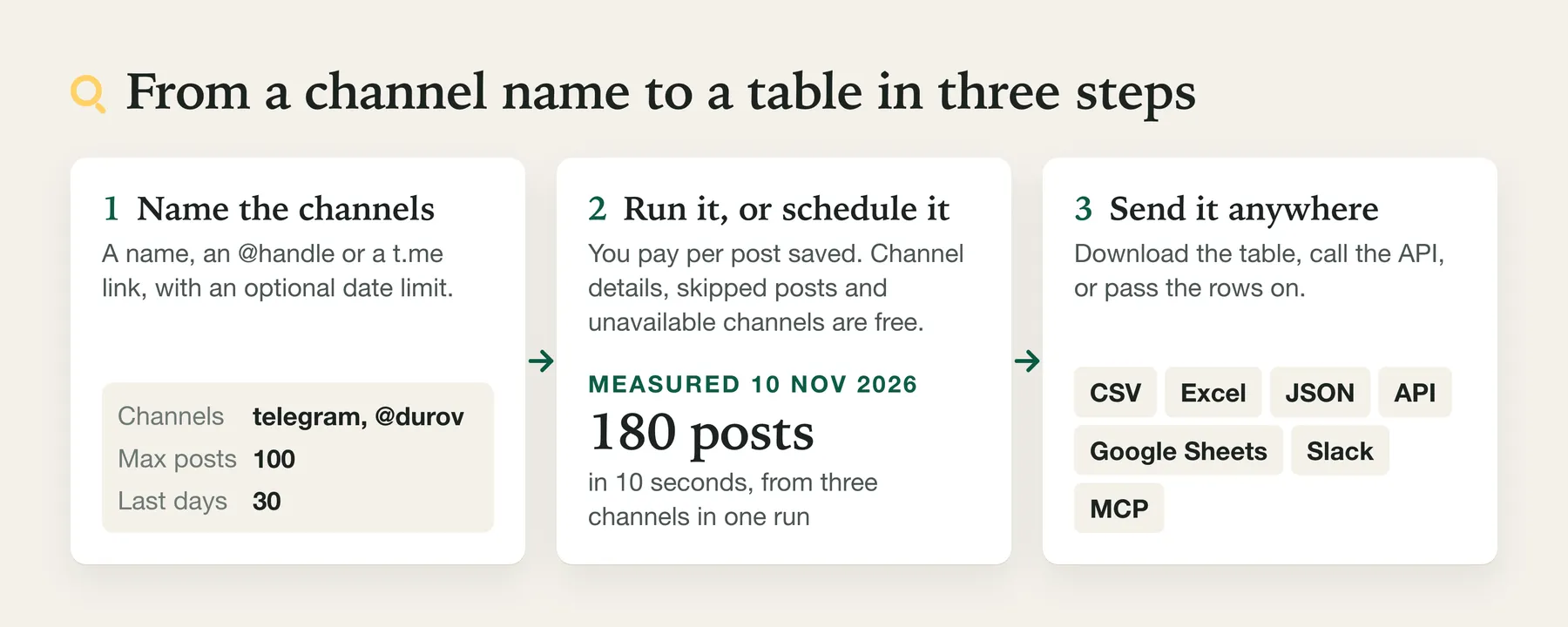
- Create a free Apify account.
- Open the Actor and add one or more channel names or links.
- Optionally set a maximum, a search word, a date window, content types or words to exclude.
- Click Start.
- Download the results as CSV, Excel or JSON, or fetch them through the API.
Run it on a schedule. For monitoring, run it hourly or daily, with only new posts. Apify's short video shows how to set up a schedule:
⬇️ Input for Telegram Channel Scraper
| Field | What it does |
|---|---|
| Channels | Names, @names, channel links or post links. Duplicates are removed. |
| Maximum posts per channel | Caps results and cost. Default 100, up to 100,000. |
| Only posts containing | Search text, applied inside each channel. |
| Only posts containing any of | Up to 20 keywords at once, such as TON, Bitcoin ETF and #airdrop. A post that matches several is returned and charged once, and matchedKeywords lists the ones it matched. |
| Posts newer than / Only the last N days | Start of the date window. Older posts are never returned or charged. |
| Posts older than | End of the date window, for example 2026-10-31 (that whole day is included). Newer posts are never returned or charged. |
| Content types | Photo, video, round video message, document or audio, sticker, poll, link, text-only. |
| Minimum views | Keep only posts with at least this many views as Telegram shows them; posts with fewer views or no view count are left out, counted as belowMinViews (per channel, and per keyword for channels found by keyword) and not charged. On an only-new watch a post left out is not returned later, even when its views grow. |
| Only the channel's own posts | Leave out posts forwarded from another channel or user (Telegram marks them "Forwarded from"); they are not saved or charged and are counted as forwardedLeftOut in the run summary. On an only-new watch a forwarded post left out is not returned later. |
| Only posts mentioning these cashtags | Tickers such as BTC and NVDA, with or without the $. Posts without them are skipped, never charged, and counted in the SUMMARY record. |
| Exclude posts containing | Words or phrases to skip, such as giveaway or sponsored post. Not case-sensitive; single words match whole words only. Skipped posts are never charged and are counted in the SUMMARY record. |
| Only posts not returned in earlier runs | New-posts-only mode for scheduled monitoring. Each saved task keeps its own memory. |
| Monitor name | Gives a watch its own memory. Set it for runs started through the API, which otherwise share one memory per channel, search text and content filter. A named monitor is shared by every task that uses the same name, so give each task its own name, or leave it empty in a saved task. |
| Report channel changes | With a Monitor name or in a saved task: each run compares every listed channel with the copy the watch kept at its last run, and reports subscriber growth or loss (number and percent), a new title or description (with the old text) and a name that now belongs to another channel. The changes are on the free channel row, in the run summary (channelChanges) and in the alert. In new-posts-only mode a channel that changed gets its channel row even when no post is new. Needs channel rows on; no extra charge. |
| Include one row per channel | One free row per channel with its details. On by default. |
| Post text format | Plain text only (default), or also each post's text with its formatting as HTML (textHtml) or Markdown (textMarkdown). No extra request or charge. |
| Read channels from a dataset | Take channel names or links from another run's dataset. |
| Channels read at once | How many channels are read in parallel. Default 5, up to 10. Each channel's posts stay newest first. |
| Find channels by keyword | Words or phrases to find Telegram channels and posts by, such as bitcoin etf or "chatgpt" (quotes keep a phrase together). Up to 100. Channels are optional when you set them. In the API the field is findByKeyword; an input field keywords given with no channel and no channel dataset is read the same way, while keywords given with channels keeps meaning words to search inside those channels. |
| Maximum results per keyword | Found pages per keyword. Default 20, up to 200; at most 50 while found pages are free. |
| Search country / Search language | Where the search is made from and the language it favours, for example US and en. UK is accepted for GB. |
| Found pages from | Any time (default), past day, week, month or year. |
| Also read the matching posts of each channel found | On by default. Searches each found channel for the keyword and saves the matching posts, charged as posts; once per run for each channel. Off: only the pages found, no post charges. |
| Channels read per keyword | Default 10, up to 50, in the order the search found them. |
| Minimum subscribers / Maximum subscribers | Keep only channels found by keyword with an audience inside this range (for public groups, their member count). A channel outside it gives no found page, post or channel row and is not charged; the run summary lists it under outsideSubscriberRange for the keyword. The range is compared with the exact count while channel rows are on, otherwise with the figure the channel's page shows (rounded above 1,000, as in 632K). A channel whose count is not shown is left out. Channels you list by name are always read. |
A keyword search, with or without channels:
⬆️ Output from Telegram Channel Scraper
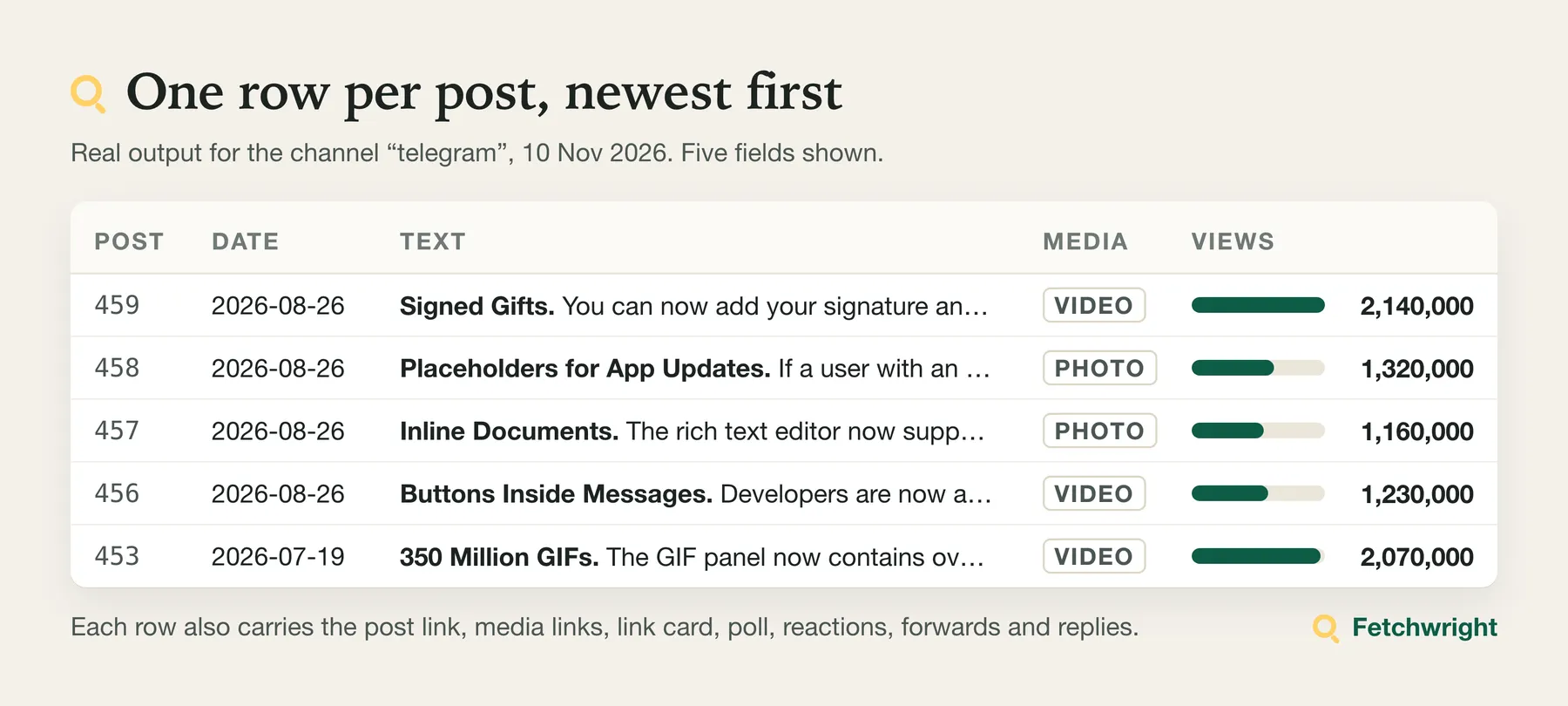
Rows come newest first and are saved as they are read, so a stopped run keeps everything collected so far. A real post row (from Telegram's news channel, collected on 10 November 2026; long file links shortened here):
A post with a cashtag (from a crypto news channel, collected on 10 November 2026; other fields left out):
Other posts carry the parts they have. A poll (from the Telegram Info channel):
A channel row (free):
A channel that cannot be read gives one free diagnostic row, and the run still succeeds:
A Telegram page found by keyword (from a search for bitcoin etf, results page saved on 11 November 2026):
postId is null when the page found is the channel itself, for example https://t.me/glassnode. When a result names its channel but not the exact post, the row links to the channel's page, postId is null and linkFromBreadcrumb is true. Posts read from a channel found by keyword are ordinary post rows with one more field, foundByKeyword. A keyword that finds nothing gives one free diagnostic row with status: "no_results" and the keyword.
statuson diagnostic rows isnot_found,preview_unavailable(the channel exists but Telegram does not show its posts on the web),not_a_channel(a group),private(an invite link) orfailed.- A public group, listed or found by keyword, also gives one free row with
type: "group":username,title,description,members(the member count its public page shows, such as 26885, withmembersApproximate),avatarUrl,urland, when found by keyword,foundByKeyword. Its members, messages and online count are not read. Group rows come with channel rows (on by default). channelIdis Telegram's numeric ID of the channel, on post and channel rows, as the public page encodes it (nullwhen it does not; on the channel row also when the page's posts carry another name than the channel's header, such as an older alias, since such a page could show another channel's posts); it stays the same when a channel changes its username. The public page does not mark pinned posts, so no pinned flag is returned.lastPostAton the channel row is when the channel's newest post was published, read from the channel's newest page at no extra request. It isnullwhen the page read was a search inside the channel (a run with Only posts containing, or a channel found by keyword whose matching posts are read), or when that page shows no post. On a later run of an only-new watch that first reads older posts still owed from an earlier run, it can also benullfor that run. Channel rows of channels found by keyword carryfoundByKeyword.viewsand reaction counts are as precise as Telegram shows them: large numbers are rounded (1.67M becomes 1670000), andviewsApproximatesays when.reactionsTotalis the sum of all reactions, paid stars included.paidStarsis the paid stars alone (money spent on the post, not ordinary reactions) andreactionsWithoutPaidStarsis the rest; use that one to compare engagement between channels.reactionsPer1000ViewsisreactionsTotaldivided by views times 1,000. All counts are as Telegram showed them atscrapedAt, and the subscriber count is the one shown at that moment.viewsPerSubscriberPercentis views divided by the subscriber count, as a percentage with one decimal. It uses the exact subscriber count when the run has read it for that channel, otherwise the rounded figure on the channel's page (Telegram rounds above 1,000, as in 12.3K). Views are rounded by Telegram above 1,000 as well, so treat all three as close estimates; older posts have had longer to collect views. Values above 100% are normal: a post that is forwarded widely is seen by many people who do not subscribe.textHtmlandtextMarkdown(with Post text format) give the post's text with its bold, italic, strikethrough, code, quotes, links and line breaks, and in HTML also underline (Markdown has no underline, so underlined text is plain there). They are written anew from the post, never copied as markup: every piece of text is escaped, only those few tags (or Markdown marks) are written, and links keep an http(s) address only (hashtag and search links become plain text). In Markdown the post's own Markdown characters are escaped, so they read as written. Spoilers and emoji are given as their plain text.textis unchanged and shows the same words.cashtagslists tickers written as$BTCor$TON, without the$. Dollar amounts such as$120are not included. TheSUMMARYrecord also hascashtagCountsfor every channel: each ticker and how many of the saved posts mention it, most mentioned first.matchedKeywordslists the search keywords a post matched, when you searched inside channels.- Round video messages appear in
mediawith typeround_video, a thumbnail and their duration, and invideoUrls. - A post Telegram does not show on the web arrives as a free row with
status: "not_viewable_on_web"andnotViewableOnWeb: true, so you know it exists; open its link in Telegram. Channel events such as "Channel created" are skipped. subscriberson the channel row is the exact count (9149950, withsubscribersApproximate: false) when Telegram's public page for the channel shows the full figure; otherwise it is the rounded count from the channel's page (9.15M becomes 9150000) withsubscribersApproximate: true. Reading it takes one page per channel at no extra price, and only while the channel row is on.subscriberCounton every post row is its channel's subscriber count, so posts from many channels can be compared without joining the channel rows. It is the exact figure when the run read it for that channel (subscriberCountApproximate: false, channel rows on), otherwise the rounded figure shown with the posts (subscriberCountApproximate: true), andnullwhen Telegram showed none.medialists every photo of an album (checked on albums of 2 and 10 photos), videos, stickers, files and audio. Videos too large for the web have a thumbnail and duration but no file link, andnotOnWebReasongives Telegram's reason as the page states it ("Media is too big").- File details come free from the same page, with no extra request:
fileFormat(the file type the link names:jpg,mp4,webp,ogg),durationSecondsfor videos and voice messages, andpreviewWidthandpreviewHeightfor single photos and videos. These are the size at which Telegram's web page shows the item, which can be smaller than the original; album tiles have none. For a file,sizeTextis Telegram's own size text when the page states one. No size is given for photos, videos, voice messages or stickers: the page states none, and the Actor does not request the files to find one. - Media links expire, and files are not stored. The
urlof a photo, video, voice message or sticker is Telegram's own link. It works for a short time only: Telegram serves it with a cache lifetime of 3 hours, fresh links still worked after an hour, and links saved on 10 November 2026 answered "not found" on 12 November. Save a file promptly from its link if you have the right to. This Actor stores no copies of media. Telegram's content licensing terms prohibit access to user content outside ordinary use of Telegram, and they leave compliance with the owners' copyright to whoever uses the content, so copies are left to you and your rights. - A run summary (posts per channel, why each channel stopped, request count) is stored under the key
SUMMARYin the run's key-value store. For each channel,coveragesays how much of what you asked for was read:complete(read to the end of the channel, your date bound or the last run's newest post),source_search(the same for a keyword search: the matches are the ones Telegram's own channel search returns),capped(stopped at your maximum; more may exist),scan_limit(a filter matched too few posts before the scan allowance ended),partial(stopped by your maximum charge, the timeout, an error, a save that could not be confirmed or a charge that reported an error) orunavailable. Onlycompletemeans nothing was left out. With an alert address,notification.deliveryStatusissent,failedornothing_to_send, with the number of tries. If a run reaches your maximum charge or its timeout, it stops cleanly, keeps every saved row and lists the channels it did not complete underunfinishedChannels. If Apify restarts a run or moves it to another server while it runs, the restarted run reads nothing more from Telegram, saves and charges nothing more, and ends with "Partial" in its status message; the run summary saysrestartedByPlatformand how many rows were saved before (rowsSavedBeforeRestart). The rows already saved are kept. Start the run again for what is missing; a new-posts watch carries on from what it recorded, and a post saved after its last record can be returned again. This is tested, but has not yet been observed on the platform. If saving one row fails, the run checks its dataset: when the row is there, it counts once (a post is charged once). Otherwise the row is not charged and not written a second time, and the run stops withstoppedByuncertain_write: no new row is written after that, though saves already under way on other channels finish and count normally.uncertainWritein the run summary names that row. If the row did land although the run could not confirm it, it stays in the dataset, uncharged although itschargedfield saystrue. In new-posts-only mode that post is not recorded as returned, so the next run of the watch returns it and charges it; if it had landed, it then appears in both runs' datasets, charged once in all. If a row is saved but charging it reports an error, it may or may not have been charged: it counts as saved (a watch does not return it again), it is listed underchargeErrorsin the run summary, and the run starts no new work (stoppedBycharge_error).
How does Telegram Channel Scraper compare with other Telegram scrapers?
Against four Telegram channel scrapers on the Apify Store, as offered in their own listings (input and output fields, README and price) read on 10 November 2026: the one with the nearest price, two others that read channels, and the most-used Telegram actor. "Offered" means the listing has the field or option; we did not test whether the rivals fill it. "-" means we did not find it in that listing.
| This Actor | Nearest price (102 monthly users) | Channel scraper (91 users) | Channel scraper (224 users) | Most-used (564 users) | |
|---|---|---|---|---|---|
| Price per 1,000 posts, Free plan | $0.30 | $0.35 | $0.447 | $1.00 | $2.50 |
| Start fee per run, at 1 GB of run memory | $0.00005 | $0.01 | $0.005 | $0.005 | $0.00005 |
| Several channels in one run | Yes | One channel per run | Yes | Yes | Yes |
| Hourly monitor of 20 channels, about 200 new posts a day, per month (from listed prices) | $1.84 | about $146 | about $6.28 | $9.60 to $38.40 | - |
| Search across all of Telegram | By keyword, among the pages web search has indexed | - | - | - | Yes |
| Keyword inside a channel | Yes | - | Yes | Yes | - |
| Several keywords in one run | Yes, up to 20 | - | One keyword | Yes | - |
| Exclude keywords | Yes | - | Yes | Yes | - |
| Posts newer than a date / last N days | Yes | Yes | Yes | Yes | Yes |
| Posts older than a date | Yes | - | Yes | Yes | Yes |
| Content-type filter | Yes | - | Yes | Yes | - |
| Only new posts on schedule | Yes, automatic, resumes after an early stop | - | Per-channel post ID you supply | Per-channel post ID you supply | - |
| Exact view counts | Rounded above 1,000 | Yes | Rounded | Rounded | Offered |
| Total reactions per post | Yes | - | Yes | Yes | - |
| Reactions per 1,000 views, views per subscriber | Yes | - | - | - | - |
| Cashtags ($BTC) | Yes | - | - | - | - |
| Filter and count posts by cashtag | Yes | - | - | - | - |
| Comment text | No, by design | - | Yes | Yes | - |
| Comment or reply counts | - | Yes | Yes | Yes | - |
| Forward counts | - | Yes | Yes | - | - |
| Polls with percentages | Yes | Yes | - | Yes | - |
| Exact subscriber count | Yes, free | Yes | Yes | Yes, $2 per 1,000 | Offered |
| Free row for a channel that cannot be read | Yes | - | In its run summary | A profile row | - |
| Groups and forums | Group profile only (title, description, member count), free | Yes | - | Profile only | - |
| Read channels from another run's dataset | Yes | - | - | - | - |
The monthly figures multiply each listing's prices for 720 hourly runs and 6,000 posts; the 224-user rival's range depends on whether its channel-info charge applies on every run. This table compares what listings offer and cost. It is not a measured test of speed, reliability or completeness.
Limits of Telegram Channel Scraper
- Public channels only. Channels whose posts Telegram shows on the web without login. Of a public group only what its public page shows is returned (title, description, member count); private channels, group messages, users, bots, comments and member lists are not available, by design.
- Some channels hide their posts from the web. Their owners turned this off, or Telegram restricts them in some countries. In a test on 10 November 2026 one large news channel that exists was not shown this way. These channels return a free diagnostic row.
- Rounded numbers. Views and reactions are rounded by Telegram above 1,000; engagement rates inherit that rounding. Subscriber counts, on channel rows and in
subscriberCounton post rows, are exact where Telegram shows the full figure and the channel row is on; views per subscriber uses the exact count when the run has read it for that channel, otherwise the rounded figure. - Posts Telegram does not show on the web. Some posts are visible only in the Telegram app. They arrive as free rows with a link and no content.
- Shared monitor memory outside tasks. Each saved task keeps its own new-posts memory. Runs started outside a task, for example through the API, share one memory per channel, search text and content filter unless you set a Monitor name.
- Media links expire. Photo and video links point to Telegram's file servers and carry an access key; download files soon if you need them.
- Search is Telegram's own. Results for Only posts containing are what Telegram's channel search returns for that text, up to your maximum per channel. An empty result means Telegram's search returned nothing for that text; it is not proof that the channel never mentioned it. The run summary marks these channels
source_search, orcappedwhen your maximum stopped the search. - Alerts are best effort. The Slack, Discord or webhook message is tried up to three times when the receiver is unreachable or busy; when the receiver does not answer in time it is not sent again, so you do not get the same alert twice. If it fails, the run succeeds, the posts stay in the run's dataset, and the run summary and log say the alert was not delivered. In new-posts-only mode those posts count as returned, so the next run does not send them again: open the run's dataset to see them.
- Keyword search covers what web search has indexed. It is not a complete search of Telegram. Channels and posts the search engine has not indexed are not found, results change from day to day and by country, and a run returns at most 200 pages per keyword. On three saved result pages the results pages listed about 9 to 10 distinct Telegram pages each.
- Keyword search can be refused. If the web search refuses the run or asks for a verification, it is not answered: that keyword is listed as
blocked, the remaining keywords are listed asnot_searched, nothing is charged for them, and the run keeps everything already saved. Run them again later. - Subscriber range. It applies to channels and groups found by keyword, not to channels you list. With channel rows off it is compared with the rounded figure on the channel's page, so a channel close to a bound can fall on the wrong side of it.
- Channel changes need a watch. Subscriber, title and description changes are reported only with Report channel changes and a Monitor name or saved task, for the channels you list (not for channels found by keyword), with one run of the watch at a time. Two names that lead to the same channel share one stored copy. The channel photo is not compared.
- Keyword reading limits. Matching posts are read for at most Channels read per keyword channels (10 by default) per keyword. A channel found by keyword has its matching posts read once per run, and Maximum posts per channel holds for the whole run, across keywords and the channels you list, also after a restart. If Telegram asks the run for a verification, it is not answered: the run stops reading Telegram, the keyword is marked
partial, and the channels not read are listed in the run summary. New-posts-only mode and alerts apply to the channels you list, not to channels found by keyword. - Content filter scan limit. With a content filter, the Actor examines at most 20 times your maximum (at least 1,000 posts) per channel, so a filter that rarely matches cannot run for hours. The
SUMMARYrecord says when this limit was reached. - Changing a watch starts a new one. In new-posts-only mode, a different search text or keyword list, content types, cashtags, excluded words or end date starts a new watch. Its first run returns only the newest posts (up to your maximum per channel), and the run log says so.
- Very short run timeouts. The Actor keeps the last part of each run free to stop cleanly and save its summary. A run whose timeout is too short to read even one page (about 15 seconds or less) stops at once with a clear message instead of returning an empty result. Give runs at least 60 seconds.
- New-posts-only mode and large backlogs. If a channel published more new posts than one run returns (your maximum, maximum charge or timeout), the next run returns the rest before anything newer. With the watch's settings unchanged and one run of it at a time, a post it has recorded as returned is not returned again; a run killed before it saved its memory can return a post again. Clearing a large backlog can therefore take several scheduled runs; the status message says when posts are still pending.
Who uses Telegram Channel Scraper, and for what?
📰 Crypto and news desks: hourly monitoring of new posts
- Add the channels you follow.
- Turn on Only posts not returned in earlier runs.
- Schedule the Actor every hour.
- Send new rows to Slack, email or Google Sheets with an Apify integration.
After the watch's first run, which returns and charges the newest posts up to your maximum per channel, each run costs its start fee plus the posts the watch has not recorded as returned, with one run of the watch at a time and its settings unchanged; two overlapping runs of the same watch, or a run killed before it saved its memory, can return and charge a post again, and a different search text or keyword list, content types, cashtags, excluded words or end date starts a new watch.
🔎 Traders and analysts: track tickers and keywords across channels
Add a list of channels and your tickers under Only posts mentioning these cashtags, for example BTC, ETH and NVDA, or several words under Only posts containing any of. Combine it with Only the last N days for a weekly report. Every run's SUMMARY record counts the tickers each channel mentioned, so you see at a glance which coins and stocks a channel talks about.
📊 Market researchers: find the channels that matter in a niche
Turn on channel rows and add a list of channels: compare subscribers, posting volume, views per post and reactions to find the channels that matter in a niche.
🎬 Media teams: collect photos and videos
Set Content types to Video or Photo to collect only posts with media, with file links, thumbnails and durations.
🧩 Developers: chain runs from a channel list
- Run any Actor that produces Telegram channel names or links.
- Start this Actor and pick that run's dataset under Read channels from a dataset.
- Every channel in the first run's results is read. No export or code is needed.
🤖 AI-agent builders: use it in Claude, ChatGPT or Cursor through MCP
Add this address as a custom connector (MCP server) in your AI app, sign in to Apify when the browser opens, and the Actor appears as a tool the assistant can call:
The input is small and the output is flat, so the Actor works well as a tool for Claude, ChatGPT, Cursor and other agents through the Apify MCP server. Ask the agent to "summarise what the durov Telegram channel posted this month" and it can call this Actor directly.
Use it in a pipeline: new Telegram posts to Slack with n8n
Runs are billed to your own Apify account at your plan's prices, wherever you start them.
Two ready-made n8n workflows run this Actor every hour in new-posts-only mode and post each new Telegram post to a Slack channel; the files and what they were checked against are under "Is there a ready-made n8n workflow?" in the FAQ below. The flow, if you prefer to build it yourself:
- Schedule Trigger every hour.
- Apify node (
@apify/n8n-nodes-apify), operation Run an Actor and get dataset, Actorfetchwright/telegram-channel-scraper, custom input:{ "channels": ["telegram", "durov"], "onlyNewPosts": true, "monitorName": "slack-alerts", "maxPostsPerChannel": 20 } - A Filter step that keeps rows whose
typeispost(the other rows are channel, group, search-result and diagnostic rows). - Slack: one message per post with its
channel,textandurl.
With one run of the watch at a time, the Actor does not return a post the watch has recorded as returned; two overlapping runs, or a run stopped before it saved its memory, can return one twice. What reaches Slack then depends on your workflow.
❓ FAQ about Telegram Channel Scraper
How fresh is the data?
Every run reads Telegram live, so posts published before the run starts are included, with their view and reaction counts at that moment. scrapedAt is when the row was collected.
How much does a run cost?
$0.30 per 1,000 posts on the Free plan, less on paid plans, plus a start event of $0.00005 per GB of run memory per run. See the tables above for worked examples.
How fast is it?
In two tests on 10 November 2026 with 3 channels read at the same time, 180 posts took 10 seconds and 360 posts took 46 seconds, so between 8 and 18 posts per second. Several channels are read at once (5 by default, set by Channels read at once).
Can I get comments, members or user profiles?
No. The Actor reads public channel posts only, and for public groups only what their public page shows about the group (title, description, member count). Comments, member lists, user profiles and phone numbers are out of scope on purpose.
Why does a channel return a diagnostic row instead of posts?
The name may not exist, belong to a user, bot or group, or be a private channel. A channel can also exist but hide its posts from the web; the reason field says which case applies.
Can I track channel growth and title or description changes?
Yes. Turn on Report channel changes with a Monitor name (or in a saved task) and schedule the run. With one run of the watch at a time, each run compares every listed channel with the copy kept at its last run:
subscriberChangeandsubscriberChangePercentgive the change againstsubscribersBefore, andpreviousCheckAtsays when that count was taken.subscriberChangeApproximateistruewhen either count is a rounded figure.titleChangedanddescriptionChangedgive the old text intitleBeforeanddescriptionBefore; spacing alone is not a change.channelIdChangedmeans the name now leads to another channel.lastPostAtBeforeis the last post the watch had seen.
On a channel's first check these fields are null. The run summary lists the changed channels under channelChanges, and the alert names them. In new-posts-only mode, a run with no new post still saves the channel row, free, when something changed. The stored copy is replaced after the row is saved, so a run stopped in between can report the same change again; a change is never lost. The channel photo is not compared: Telegram's address for the same channel's photo changed between our recordings of 10 and 12 November 2026, so a new address does not mean a new photo. No extra request is made beyond the one channel page and one profile page per channel that channel rows already use.
What does new-posts-only mode return?
With one run of a watch at a time, it returns the posts it has not recorded as returned. Two overlapping runs, or a run killed before it saved its memory, can return a post again. If a run stopped early, the next run first returns the posts it did not reach, then the newer ones. Each saved task has its own watch; for runs started through the API, give each watch a Monitor name. A watch with a content filter never uses up posts for a watch without one. Changing a watch's search text or keyword list, content types, cashtags, excluded words or end date starts a new watch, whose first run returns only the newest posts. To start over, use a new Monitor name.
Can I find Telegram channels by keyword?
Yes. Add words or phrases under Find channels by keyword, for example bitcoin etf or remote jobs, with or without channels. Each keyword returns the public Telegram channels and posts that web search has found for it, ranked, with title, snippet and link, and by default the matching posts of up to 10 channels it found, with views and reactions. Choose the search country, language and how recent the pages should be. Found pages are free for now; posts are charged as posts. Web search shows only what a search engine has indexed, so this is not a complete search of Telegram.
Can I get posts from one month only?
Yes. Set Posts newer than to the first day and Posts older than to the last day, for example 2026-10-01 and 2026-10-31. Both days are included, and posts outside the window are never returned or charged.
Can I leave out giveaways, ads and other noise?
Yes. List the words or phrases under Exclude posts containing, for example giveaway, promo or sponsored post. Matching ignores upper and lower case, and a single word must appear as a whole word, so ad skips "New ad" but not "added". Excluded posts are never charged, and the SUMMARY record shows how many were skipped per channel.
Can I search for several keywords at once?
Yes. List up to 20 words or phrases under Only posts containing any of, for example TON, Bitcoin ETF and #airdrop. Each keyword is searched in every channel, and the results come back newest first in one list. A post that matches several keywords is returned and charged once, and its matchedKeywords field lists every keyword it matched.
Can I get only posts about the tickers I follow?
Yes. List them under Only posts mentioning these cashtags, for example BTC, ETH or $NVDA. Only posts that mention at least one of them are returned; the rest are skipped, never charged, and counted in the SUMMARY record. Every run also stores cashtagCounts per channel in the SUMMARY record: each ticker and how many saved posts mention it.
Can I get comment, reply or forward counts?
Not yet. Telegram does not show these numbers publicly on the web, and the Actor returns only what Telegram shows to anyone, without a login.
Can I download the results as CSV, or open them in Excel or Google Sheets?
Yes. Besides the full media list, every post has flat columns made for spreadsheets: mediaCount, firstPhotoUrl, photoUrls, videoUrls and documentUrls. The Overview table shows the first photo of each post.
A run reports that Telegram is limiting requests. What should I do?
Nothing, normally. The Actor slows down for the rest of the run and carries on. If Telegram keeps limiting it, the channels it could not read are reported with the reason and are not charged, so you can run them again later.
Is it legal to scrape Telegram channels? Is this allowed?
The Actor collects only posts that channel owners publish openly and that Telegram shows to anyone on the web, with no login and no account. Apify's overview of the topic is in Is web scraping legal? Posts can contain personal data such as names, author signatures and usernames, so data protection law such as the GDPR may apply to how you store and use them. Telegram's content licensing terms restrict how content from its platform may be collected and used. They cover more than training AI models: they also address collecting and aggregating content and using it in AI systems without the consent of the users concerned. Linking to the terms here does not give you permission. Use the Actor where you have a basis for it, such as your own channels, content you hold rights to, or permission from the channel owner, and check that your use fits those terms. You are responsible for how you use the results and for complying with Telegram's terms and the laws that apply to you. This is not legal advice.
Can I use it with the API or other tools?
Yes. Like every Apify Actor it can be run through the Apify API, scheduled, and connected to Zapier, Make, n8n, Slack and Google Sheets. See the API tab on this page for code samples.
Is there a ready-made n8n workflow?
Yes, two files you can import into n8n (Workflows, Import from file). Both run this Actor on a schedule in new-posts-only mode and send each new Telegram post to a Slack channel. With one run of the watch at a time and its settings unchanged, the Actor does not return a post the watch has recorded as returned; two overlapping runs, or a run killed before it saved its memory, can return one twice. What reaches Slack then depends on your n8n workflow.
- With the Apify node for n8n
- With n8n's built-in nodes only
- Both, with setup notes, on GitHub: github.com/Fetchwright/n8n-telegram-to-slack
The workflows escape &, < and > in post text, so a post cannot ping @channel or mention people in your Slack (updated 15 November 2026).
After importing, add your Apify credential, your Slack credential and channel, and your list of Telegram channels. Each run is capped at $0.10 by the workflow. Checked on 11 November 2026: the files' node types and field names match the current n8n and Apify node packages, and the input matches this Actor. Not checked: an import into a running n8n, so tell us on the Issues tab if a step fails.
Something is wrong or a field is missing. Where do I report it?
Open an issue on the Issues tab of this page.
Start monitoring Telegram channels
Open Telegram Channel Scraper and click Start on the prefilled example, then add your own channels and turn on Only posts not returned in earlier runs for a schedule. Apify's free plan credit covers about 16,000 posts a month. Missing a field you need? Ask for it on the Issues tab.
This Actor is not affiliated with, endorsed by or sponsored by Telegram.
More from Fetchwright
- Google Ads Transparency Scraper: the ads Google publishes for the advertisers you choose, with ad text, dates and impressions, and a new-ads-only mode for competitor monitoring.
- Google AI Overview Tracker: what Google's AI answers for a query, the pages it cites, and whether your brand is mentioned.


