

Google AI Overview Tracker: Brand Mentions & Citations
Pricing
from $2.05 / 1,000 searches
Google AI Overview Tracker: Brand Mentions & Citations
Track brands and citations in Google AI Overviews and AI Mode, with repeat-sample rates and 95% intervals. Search sections include places and top stories when supplied. On paying plans layout is null. $3.90/1,000 AI Overview searches on Free; $2.45 on Business.
Pricing
from $2.05 / 1,000 searches
Rating
0.0
(0)
Developer

Fetchwright
Maintained by CommunityActor stats
0
Bookmarked
2
Total users
1
Monthly active users
2 hours ago
Last modified
Features
Share
What does Google AI Overview Tracker do?
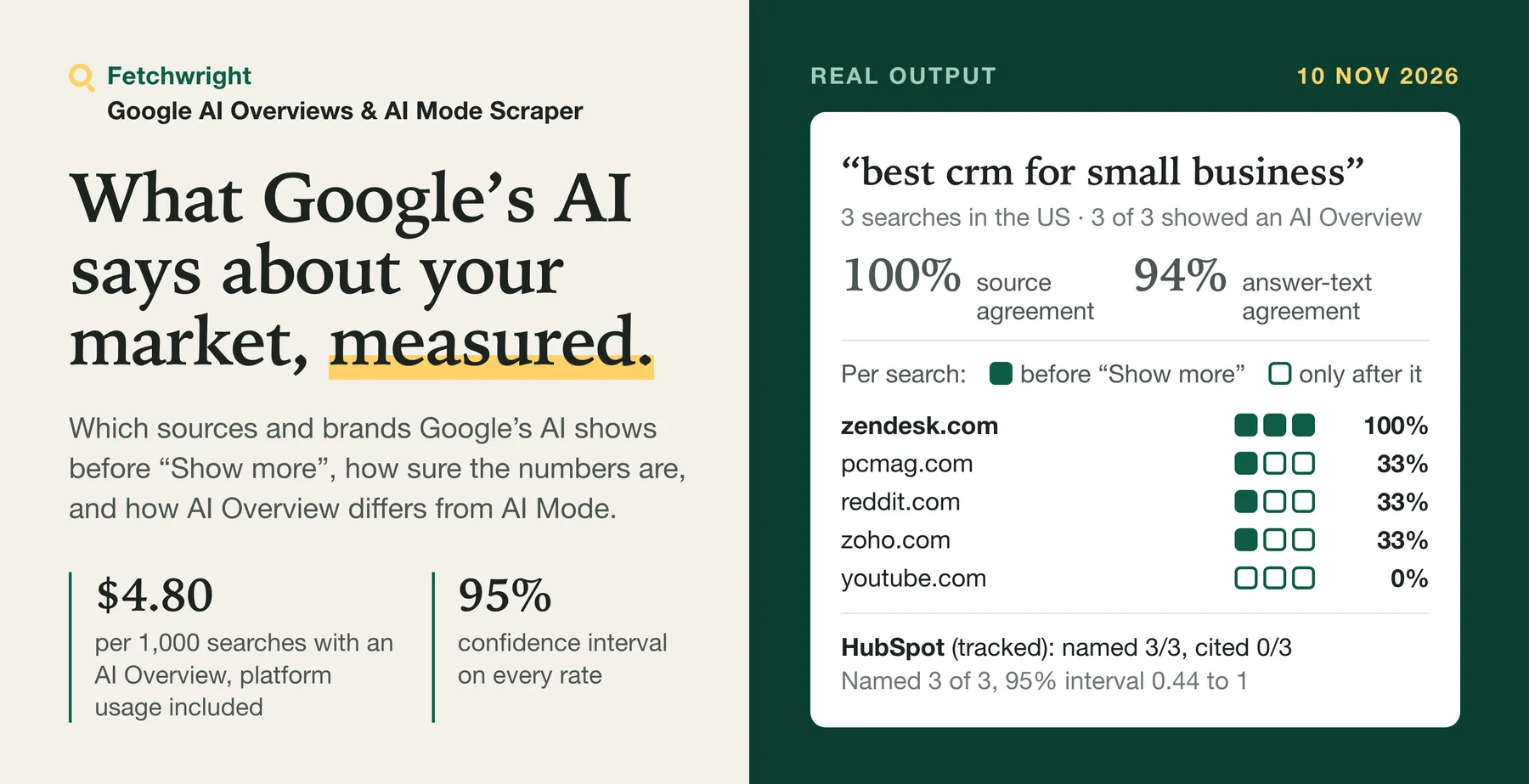
Google AI Overview Tracker shows whether Google's AI answers mention your brand and the competitors you list, and which pages they cite, for any list of keywords. Because the answer changes from one search to the next, you can repeat each search several times and see how often each brand and page appears, with a 95% confidence interval, and, where the results page shows it, which of them Google shows before the reader clicks "Show more" (included on Free; optional on paying plans at $0.90 per 1,000 searches). Optionally it also fetches the AI Mode answer for the same search, and with comparison turned on it reports what changed since the previous run. Each search also returns, when Google shows them, the full AI Overview text, the cited pages, People also ask and the organic results, and on English-language result pages up to 20 related searches and 10 forum threads. You give it keywords, and optionally the brands to look for. A search with an AI Overview costs $3.90 per 1,000 on the Free plan and $2.45 on Business, all-in: the supported search-page sections, organic results and People also ask come with that price; without an AI Overview a search costs $3.00 per 1,000 on Free and $2.05 on Business. The AI Mode answer is an add-on.
Built for SEO and GEO agencies reporting AI visibility to clients, brand and content teams deciding which pages to improve or pitch, and developers and AI agents that need Google's AI answers as structured data. One search tells you what Google showed once; this Actor tells you how often, and how sure you can be.
Your first check
- Open the example task Track your brand in Google AI Overviews, or paste your own: the keywords your customers search, your brand, and two or three competitors.
- Keep 3 searches per keyword: Google's AI answer changes between searches, and the rates below come from those repeats.
- Setup takes about two minutes. A typical first check, 10 keywords x 3 searches, costs about $0.12 on the Free plan and $0.07 on Business (30 searches with an AI Overview at $3.90 / $2.45 per 1,000, with the AI Mode and first-view add-ons off), and usually runs for a few minutes.
- Then schedule it weekly (Schedule in Apify Console) with Compare with the previous run on: from the second run on, each run says what changed since the last one: the sites that entered or left the AI Overview's sources, and the mention and citation rates before and now of each tracked brand both runs have a record for. Weekly, the same 10 keywords x 3 searches cost about $0.47 a month on the Free plan and $0.29 on Business. See How do I track changes over time?.
What you get back per keyword, abridged from a run on 15 November 2026 (one search shown; with 3 searches each rate rests on more observations, and first-view values appear when they are measured):
What you can answer with it: is your brand named in Google's AI Overview for a keyword, and before "Show more"? Which pages does it cite, yours or your competitors'? How often does that hold when the search is repeated, and what changed since your last scheduled run? First-view measurements are included on Free; on paying plans, enable the optional add-on at $0.90 per 1,000 searches.
| What you get | Details |
|---|---|
| 👀 Shown before "Show more" | First-view flags for matched cited pages and tracked brands, plus the first-view text. Included on Free; optional on paying plans at $0.90 per 1,000 searches. Unavailable measurements stay null. |
| 📏 Confidence intervals | A 95% interval and the number of samples behind every rate: AI Overview rate, each source's share, each brand's mention and citation rate. Samples requested, failed, still pending and decided are listed beside the rates. |
| ⚖️ AI Overview vs AI Mode | With the AI Mode add-on: sites cited by both, by only one, and an overlap score, per sample and per query. |
| 🔁 Agreement between runs | Source agreement and answer-text agreement, from 0 to 1, for each query you sample more than once. |
| 🧱 Which passage cites whom | The answer as ordered blocks (headings, paragraphs, list items, table rows), each with the sites Google cites for that passage. Passage visibility is null when unavailable; the first-view add-on measures matched passages, cited pages, tracked brands and first-view text. |
| 🔔 Alerts in Slack or Discord | Paste a webhook address and each run posts its result: AI Overview counts per query, how often each brand was named and cited, and what changed since the last run. |
| 📆 What changed since last run | For scheduled tracking: sites that entered or left the sources, the share of each site whose share changed and the mention and citation rates before and now of tracked brands both runs have a record for, with a change flagged when the runs are comparable and the two rates differ by more than their 95% intervals allow, for these samples at that time, country and language (a change indicator and rule of thumb, not a statistical test). Runs with different settings are labelled as not comparable and get no flag. |
| 📊 Cited vs ranked | Each cited page's position in the organic results of the same search, and the share of citations from sites that do not rank there. |
| 🧭 Source types | Each cited site classed as forum, video or social (user content), government or education, your brand, a competitor, or other, with shares per query. |
| 🤖 AI Overview answer | The full text, including the part behind "Show more", with headings, list items and table rows kept. |
| 🔗 Cited sources | URL, domain, page title and description of the pages the AI Overview cites. |
| 💬 Forum threads and related searches | Up to 10 threads Google shows under Discussions and forums (title, address, site, community, comment count and age where shown) and up to 20 related searches it suggests, read from English-language result pages, at no extra fee. |
| 🎯 Brand tracking | Mentioned, how often, in which order among your brands, cited, and share of voice. Aliases, domains and competitors supported. |
| ❓ People also ask | The questions Google shows for the query. |
| 📄 Organic results | Position, title, URL, domain, snippet and date, at no extra charge. |
| 🧪 AI Mode answer | Optional add-on: the reply from Google's AI Mode (experimental). |
No Google account or cookies are needed. Because it runs on Apify you can also schedule it, call it through the API, send results to Google Sheets or Slack, and use it from AI agents through MCP.
Why choose Google AI Overview Tracker?
It measures four things we found in no other Google AI Overview Actor on the Store (checked 10 November 2026):
- What Google places before "Show more". First-view flags for matched cited pages and tracked brands, and the first-view text itself. Included on Free; optional on paying plans at $0.90 per 1,000 searches.
- A 95% confidence interval on every rate, with the number of samples behind it, so a client report states how sure it is.
- AI Overview vs AI Mode for the same search: sites cited by both, by only one, and an overlap score.
- An agreement score for sources and for answer text between runs of the same query.
Sampling and brand tracking are offered elsewhere too; here the search includes brand tracking, the full answer text, organic results with their dates and People also ask. First-view measurements are included on Free and optional on paying plans at $0.90 per 1,000 searches.
A client-ready report, free. Switch it on and the run also saves a one-page report of what it found, with the answers quoted as proof.
Why sample the same query more than once?
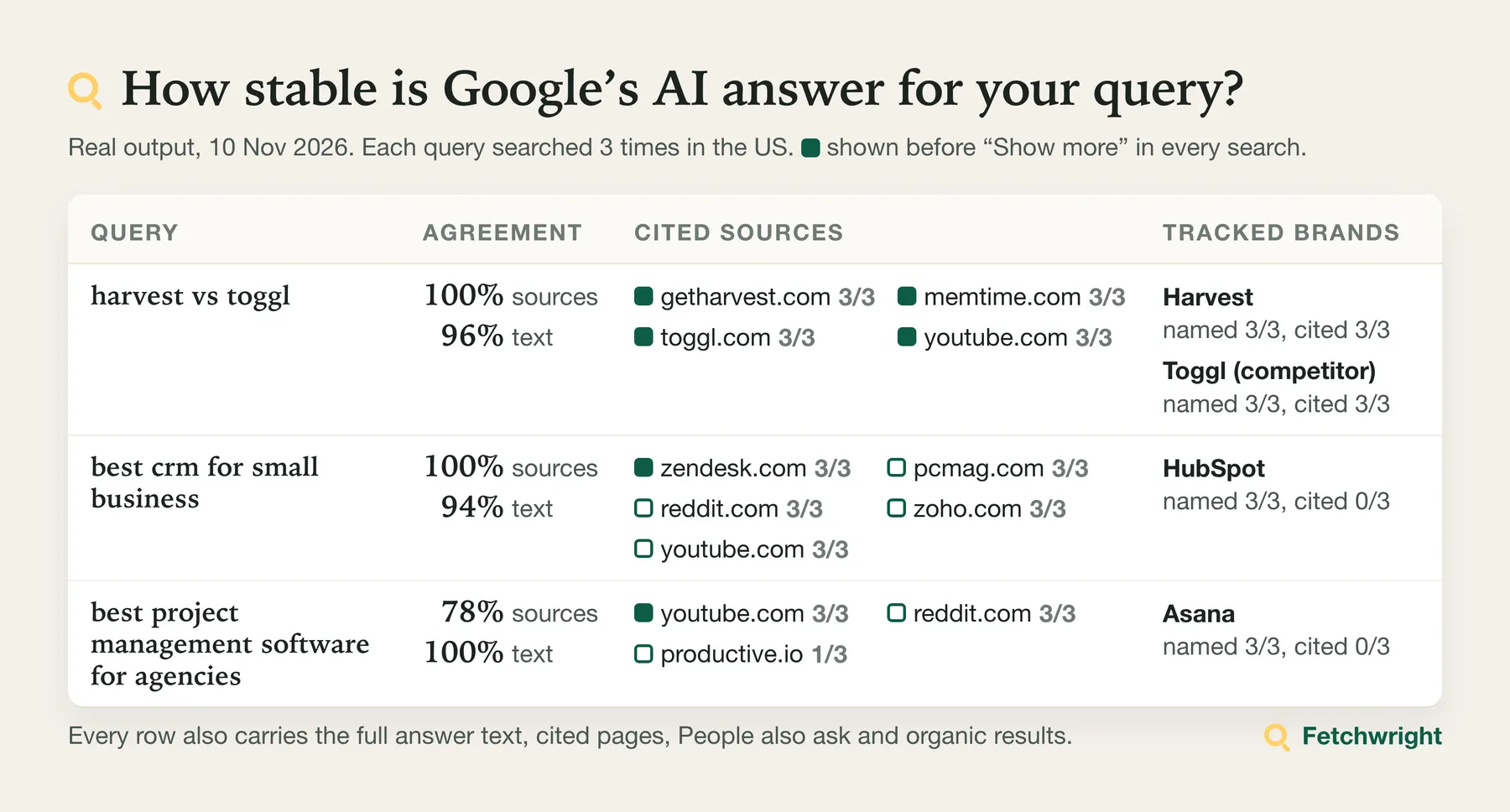
Google's AI answers are generated anew for each search, so the text, the cited pages and even whether an AI Overview appears can differ from one search to the next. One search tells you what Google showed once; several searches of the same query tell you how often. With Samples per query set to 3 or more, the run summary reports for each query:
- how often an AI Overview appeared, with a 95% confidence interval (samples where Google was still preparing one are counted apart, under
pendingSamples, and the run's status message andtotals.aiOverviewsStillLoadingsay how many there were), - cited sites with the share of samples they appeared in, and first-view shares when measured (included on Free; optional on paying plans at $0.90 per 1,000 searches),
- source agreement: the average overlap of cited sites between runs, from 0 to 1,
- text agreement: the average share of sentences two runs have in common, from 0 to 1,
- for each tracked brand, how often it was mentioned, cited and shown first, and its share of voice,
- how often the first search of a sample showed an AI Overview, apart from the result after the free re-searches, and how many searches were made in all.
Every rate sits beside the count it is divided by, so no rate can be read without its denominator. Samples are searches of the same query made close together from one route: in a run on 10 November 2026 the four searches of each query fell within about 22 seconds and returned the same text each time. They are not independent measurements of what different people see, so treat the intervals as a guide to how stable Google's answer was during the run. The run summary gives, per query, samplingWindow: the number of saved searches, the time from the first to the last, and how many different answer texts they returned.
The interval tells you how far a rate can be trusted: 3 of 3 samples is an interval of 0.44 to 1, while 9 of 10 is 0.6 to 0.98. Every sample is also saved as its own row, so you can check the numbers yourself.
How much does it cost to scrape Google AI Overviews?
You pay per search delivered, and platform usage is included: no monthly rental. One search returns the supported search-page sections when present: organic results, People also ask, top stories, places and videos, with brand tracking and summary measurements. On paying plans, the primary search leaves layout null; it does not report the page-layout classification. Other unreported card details stay null. First-view measurements are included on Free; on paying plans they are an optional add-on at $0.90 per 1,000 searches. When Google shows an AI Overview, a small extra is added. On the Free plan a search with an AI Overview costs $3.90 per 1,000; on the Business plan it costs $2.45.
| Your Apify plan | Per 1,000 searches (supported page sections) | Extra per 1,000 AI Overviews returned | Per 1,000 searches with an AI Overview | Add-on: per 1,000 AI Mode answers |
|---|---|---|---|---|
| Free | $3.00 | $0.90 | $3.90 | $5.00 |
| Starter (Bronze) | $2.70 | $0.60 | $3.30 | $4.00 |
| Scale (Silver) | $2.40 | $0.50 | $2.90 | $2.50 |
| Business (Gold), Platinum and Diamond | $2.05 | $0.40 | $2.45 | $1.75 |
| First-view add-on | Included on Free | Optional on paying plans: $0.90 per 1,000 searches with a measurement | Off by default | Unavailable: no add-on charge |
A run also costs a start event of $0.00005 per GB of run memory (rounded up, at least one GB).
Searches run through a primary data route with a backup for isolated failures. Free-plan runs use the standard route. If the primary route becomes unavailable during a paying-plan run, the run stops starting new searches and ends with the stated partial status "primary route unavailable" in its run summary and status message. Completed results remain available; searches not done are not charged. An unavailable first-view check leaves its fields null with reason first-view unavailable, has no add-on charge and leaves the search result available. Unmatched cited pages keep null first-view flags.
Never charged: searches that fail, the AI Overview fee when Google shows no AI Overview or is still preparing it, AI Mode when it returns no answer, or an unavailable first-view check. Organic results, People also ask, brand tracking and the summary have no separate fee.
What typical jobs cost (AI Overview on 80% of searches; start event and optional add-ons left out):
| Job | Searches | Free | Starter | Scale | Business |
|---|---|---|---|---|---|
| 100 keywords, one sample each | 100 | $0.37 | $0.32 | $0.28 | $0.24 |
| 50 keywords sampled 3 times for a client report | 150 | $0.56 | $0.48 | $0.42 | $0.36 |
| 20 brand queries checked daily for a month | 600 | $2.23 | $1.91 | $1.68 | $1.42 |
Apify's free plan includes $5 of credit each month, which is about 1,280 searches with AI Overviews.
With a maximum charge, a search starts when the budget covers both its search fee and possible AI Overview fee, including searches already in progress. Each optional add-on needs room for its fee before it is requested. Unused amounts become available again; an add-on that does not fit is skipped. This can leave some of the budget unused.
How does the price compare?
Prices per 1,000 for this Actor and apify/google-search-scraper, checked 14 November 2026. This comparison covers exactly that actor and its search-page + AI Overview and AI Mode answer prices.
| Apify plan | This Actor: search + AI Overview | apify/google-search-scraper: search + AI Overview | This Actor: AI Mode answer add-on | apify/google-search-scraper: AI Mode answer add-on |
|---|---|---|---|---|
| Free | $3.90 | $7.50 | $5.00 | $200 |
| Starter (Bronze) | $3.30 | $4.50 | $4.00 | $5.00 |
| Scale (Silver) | $2.90 | $3.45 | $2.50 | $3.00 |
| Business (Gold) | $2.45 | $2.80 | $1.75 | $2.00 |
This Actor's listed prices are lower on these four plans for both outcomes. Platinum and Diamond use this Actor's Gold prices; no competitor price comparison is made here for those plans. AI Mode is an optional extra to the search. Prices change; check the linked listing before you decide. This is a price comparison, without a comparative results test.
How do the features compare?
Read on 11 November 2026 from the public listings of the four most-used Apify Store actors that return Google AI Overviews. "Not described" means the listing does not mention it; we did not run them, so they may do more than their listings say.
| This Actor | The four most-used others | |
|---|---|---|
| Searches each query several times in one run and reports rates with intervals | Yes, 1 to 10 samples per query | Not described |
| Reports what changed since the previous run | Yes, built in | Not described. Two tell you to store each run yourself to build a history |
| Counts how often a brand is named in the answer text | Yes, and how often its pages are cited | One reports whether your domains are cited, and says it does not report mentions. Others name brand tracking as a use but describe no brand input or count |
| Marks the sources shown before the reader clicks "Show more" | Included on Free; optional on paying plans at $0.90 per 1,000 searches | Not described |
| Google AI Mode answer | Add-on | Add-on in Apify's general search scraper. One other returns it as an option |
Where the others do more: Apify's general search scraper also reads ChatGPT, Perplexity, Copilot and Gemini answers, which this Actor does not. One of the others returns tables and lists inside the answer as structured blocks. The price comparison above applies to apify/google-search-scraper, without a price claim about the other actors.
How do I scrape Google AI Overviews?
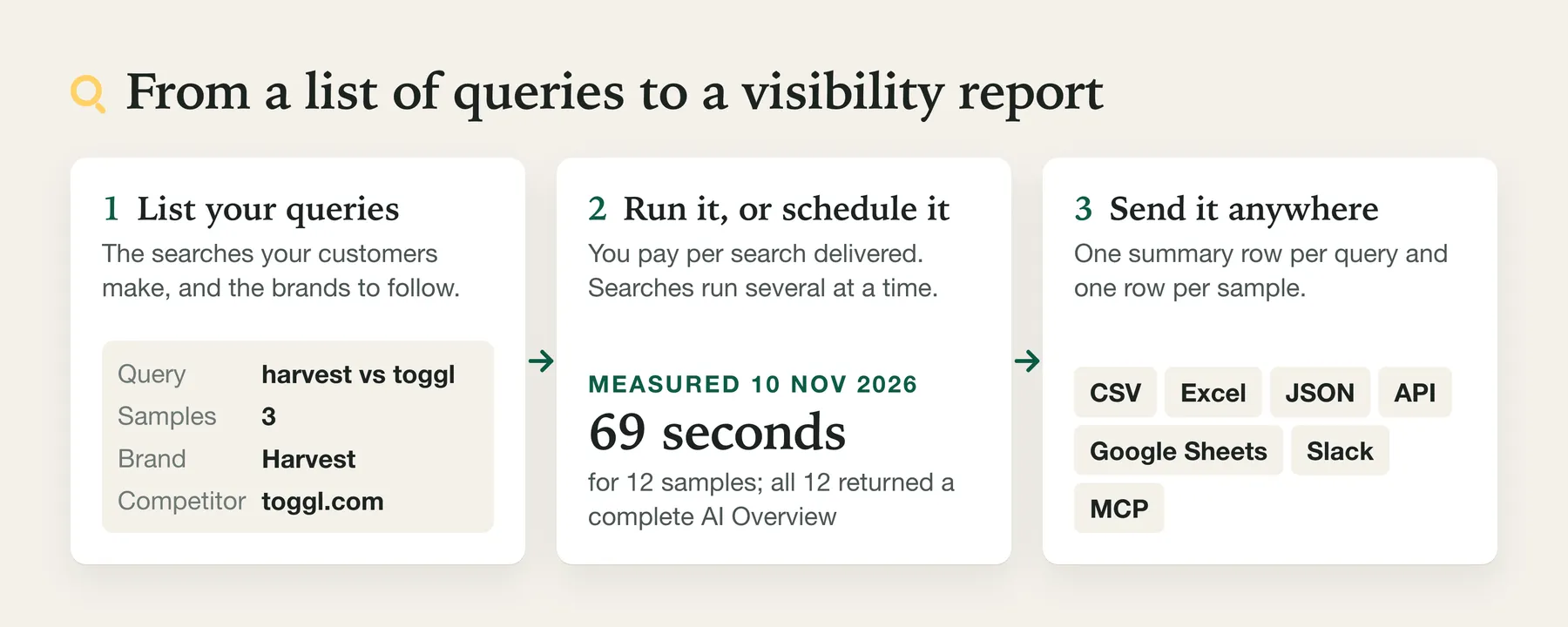
- Create a free Apify account.
- Open the Actor and enter your search queries, one per line.
- Choose the country and language.
- Optional: add brands or domains to track, and raise Samples per query.
- Click Start, then download the results as JSON, CSV or Excel, or fetch them through the API.
Run it on a schedule. For monitoring, run it weekly, with Compare with the previous run. Apify's short video shows how to set up a schedule:
⬇️ Input for Google AI Overview Tracker
| Field | What it does |
|---|---|
| Search queries | One Google search per line. Questions and comparisons get AI Overviews most often. |
| Samples per query ($) | 1 to 10. Each sample is a separate search. |
| Compare with the previous run | Adds, per query, what changed since the last run of the same watch. Give the watch a name to keep several apart. |
| Country | Two-letter code such as US, GB (or UK), DE. An unknown code stops the run at once, before anything is charged. |
| Language | Code such as en, de, pt-br. |
| Brands or domains to track | Names ("Harvest"), domains ("toggl.com"), or objects with aliases, domains and a competitor flag. No extra charge. |
| Add-on: Google AI Mode answer ($) | Also fetch the AI Mode reply and compare it with the AI Overview. Charged only when it returns one. |
| Search again when Google shows no AI Overview yet | On by default, no extra charge. The first result is kept in firstAiOverviewStatus. |
| Re-searches for a missing AI Overview | 0 to 3, default 1: how many times at most to search again. |
| Organic results to keep | 0 to 10 regular results per sample. |
| Read queries from a dataset | Take queries from another run's dataset, for example a keyword list (up to 5,000 items). |
A brand can be a plain name, a domain, or an object: name, aliases (other names to look for), domains (sites that count as the brand being cited) and isCompetitor. A plain name counts as cited when a cited site is called the same, for example Trane and trane.com.
⬆️ Output from Google AI Overview Tracker
The dataset holds one item per query sample, then one row per query with its rates. This sample item is real output for "what is a heat pump" with the AI Mode add-on, shortened where marked [...]:
Read it like this: Carrier's page is cited in the first view and ranks first, but the brand name itself appears only after "Show more"; the YouTube video is cited only in the expanded part; Lennox is cited without ranking in the organic results; and AI Mode cited a completely different site.
The run summary: rates, intervals and agreement per query
aiOverview.listedNames reports short names leading colon-bearing list items, including options you did not track; AI Mode samples also have aiMode.listedNames. Sample entries are {name, position} in first-appearance order, with spaced slashes split and repeats merged case-insensitively. The field is [] when text has no qualifying names and null when there is no text. AI Overview summaries in query_summary rows and SUMMARY include up to 20 names with {name, samples, share, shareOf, shareInterval}, sorted by sample count then position at first appearance. Shares use answered samples and the same 95% interval as cited sources. Usually products, brands or options, these names are not checked against any list: verify before using as brand data.
The run summary is stored under the key SUMMARY in the run's key-value store. Real output for two samples of "harvest vs toggl", shortened:
Fields added in version 0.1.34 (not in the output above):
| Field | Meaning |
|---|---|
aiOverview.requestedSamples | Samples asked for this query. |
aiOverview.failedSamples | Samples that returned no usable Google page; not charged and not in samples. |
aiOverview.decidedSamples | samples minus pendingSamples: the samples the AI Overview rate is divided by. |
answerRateOf | The denominator of answerRate (for the AI Overview, equal to decidedSamples). |
aiOverview.firstAttemptAnswered | Samples whose first search, before any free re-search, showed an AI Overview. |
aiOverview.firstAttemptRate, firstAttemptRateInterval, firstAttemptRateOf | That share with its 95% interval and its denominator: samples whose first search was not pending. |
aiOverview.totalSearches | Searches made for the saved samples, re-searches included. Each sample is charged once. |
citedSources[].shareOf, citedPublishers[].shareOf | The denominator of share: samples with an answer. |
brands[].rateOf | The denominator of the brand's mention, citation and first-view rates: samples with an answer. |
Fields added in version 0.1.52:
| Field | Meaning |
|---|---|
build | The Actor build that made the run. |
coverage | Every requested query, also those with no saved sample, with state: answered (3 or more AI Overviews), too_few_answers (1 or 2), no_ai_overview (Google showed none in any valid search), pending (still being prepared in every saved search), failed (no usable page), not_run_budget or not_run_time (not searched because the maximum charge or the time limit was reached). Each entry gives requested, searched, answers, noAiOverview, pending, failed, and notStarted with stopReason when some searches were not made. |
queries[].state | The same state for each summarised query. |
queries[].samplingWindow | observations (saved searches), firstAt, lastAt, seconds from the first to the last, answers, and distinctAnswerTexts: how many different answer texts those answers had. Several identical texts are one answer repeated, not independent evidence. |
changeSincePreviousRun.comparability | yes, no or unknown (the stored record has no settings). |
changeSincePreviousRun.aiOverviewTransition | lost or recovered on the run where the AI Overview disappeared or came back, otherwise null. |
With the AI Mode add-on, aiMode has the same summary and aiOverviewVsAiMode gives samplesCompared, the mean overlap, and the sites cited by both or by only one surface, each with the number of samples.
One row per query with the rates
After the samples, the dataset ends with one row per query you asked for, in your order, with rowType: "query_summary". Every sample item has rowType: "sample". If you use the API, an MCP client or Zapier, Make or a spreadsheet export, the last rows of the dataset are the per-query results: filter on rowType to keep them apart from the samples. These rows are free and are not searches.
Each row carries that query's entry from the run summary under the same field names: state and the coverage counts, the AI Overview figures as plain columns (answerRate, answerRateInterval, answersReturned, decidedSamples, pendingSamples, failedSamples, firstAttemptRate and the rest), samplingWindow, the full aiOverview summary with every brand's mentionRate and citationRate and their 95% intervals and the cited sources, aiMode, aiOverviewVsAiMode, and changeSincePreviousRun when "Compare with the previous run" is on. A query that was not searched or got no finished answer still has its row: its state says why, and its rates are null rather than 0, so "Google showed no AI Overview" (no_ai_overview, answerRate: 0) is never confused with "not determined". The dataset view "Results per query" shows these rows as a table.
This example comes from the Actor's test data, shortened where marked [...]:
In the same test data, "free crm software" was searched four times without an AI Overview: its row has state: "no_ai_overview", answerRate: 0 and answerRateInterval 0 to 0.49.
A real measurement you can inspect
One run on 11 November 2026 (US, English): three queries, five searches each, six brands to look for. It took 86 seconds and was charged 15 searches and 14 AI Overviews: $0.071 at the then-current Free-plan prices. The same 15 searches and 14 AI Overviews would cost about $0.058 at the current Free-plan prices, including one start event at 512 MB. Brands that no answer named are left out of this table; the file contains 18 rows.
| Query | Brand | Named in | Rate (95% interval) | Cited as a source in | Named before "Show more" |
|---|---|---|---|---|---|
| best crm for small business | HubSpot | 4 of 4 answers | 100% (51 to 100%) | 0 of 4 | 4 of 4 |
| best crm for small business | Salesforce | 4 of 4 answers | 100% (51 to 100%) | 4 of 4 | 0 of 4 |
| best crm for small business | Zoho | 4 of 4 answers | 100% (51 to 100%) | 4 of 4 | 4 of 4 |
| best project management software | Asana | 5 of 5 answers | 100% (57 to 100%) | 0 of 5 | 5 of 5 |
| best email marketing software | HubSpot | 5 of 5 answers | 100% (57 to 100%) | 0 of 5 | 0 of 5 |
| best email marketing software | Mailchimp | 5 of 5 answers | 100% (57 to 100%) | 0 of 5 | 0 of 5 |
What it shows, and what it does not: five searches per query are few. A brand named in every answer still has an interval that starts near 51 to 57%, and a brand named in none of five could still appear in up to 43% of answers (the interval for 0 of 5 is 0 to 43%), so a small run like this cannot show that a brand is absent or rank two brands against each other; use more samples for that. One of the fifteen searches was still loading its AI Overview when read and is counted as pending, not as "no answer". Download the rows: sample measurement (CSV).
Client report (free)
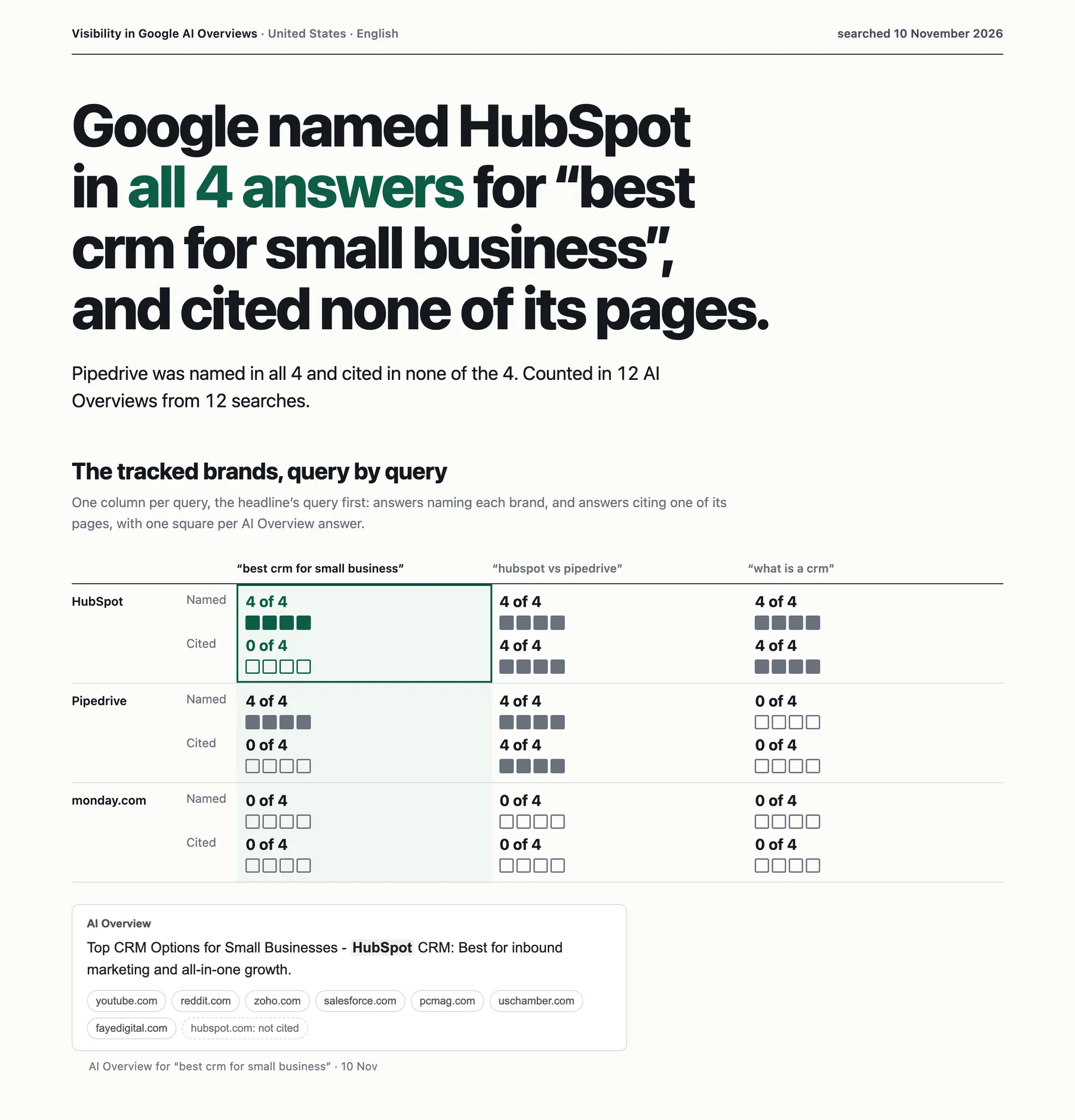
Open the full sample report, from the searches of a run on 10 November 2026. It was written again from the same saved searches on 11 November, after a review found that two cards in the first version counted eight cited sites where the list beside them had nine.
Open a report with a query Google did not answer, written by a run on 11 November 2026 and unedited: three queries were answered and for one Google was still preparing its answer in all three searches. The table at the end lists every query with what happened to it, so "Google showed no AI Overview" is not confused with "not determined".
Switch on Write a client-ready report and the run also saves REPORT.html, one page you can forward or print, and REPORT.md, linked from the run summary under report. It leads with the strongest true finding, shows how often each tracked brand is named and cited per query, and quotes the answers as proof. It is written about your brand when your tracked brands mark the rivals with "isCompetitor": true and leave one brand unmarked. Every figure is counted from this run's rows and every sentence comes from a fixed template; no AI model writes it. A report covers the queries with three or more searches per query that returned a finished AI Overview (set Samples per query to 3 or more); other queries are named as left out. A table at the end lists every query you asked for with its outcome (answered, no AI Overview shown, still being prepared, failed, not searched because the run reached its maximum charge, or too few answers for statistics), so "Google showed no AI Overview" is never confused with "could not be determined". A run stopped by its maximum charge still gets a report; a run stopped at its time limit does not. When no query qualifies, the run summary says why and what to change. It never changes the run's results or charges.
When a run has no report (the option is off, or the run does not have enough data), REPORT.html is a short note saying why. To tell the two apart in code, read report.status in the run summary: it is ok only when a report was written.
AI Overview status
aiOverview.status | Meaning |
|---|---|
available | Google returned an AI Overview. Text and sources are filled. |
partial | Google returned some text together with a notice that it could not generate the full answer. |
pending | Google was still preparing the AI Overview when the page was returned, even after the free re-searches, so there is no text. The AI Overview fee is not charged, and the sample is not counted as "no AI Overview": the summary lists it under pendingSamples and leaves it out of the AI Overview rate. |
not_available | Google said no AI Overview is available for this search. The AI Overview fee is not charged. |
absent | The page had no AI Overview at all. The AI Overview fee is not charged. |
aiOverview.blocks lists the answer passage by passage. Real output for "harvest vs toggl", shortened:
Use it to see which of your pages Google cites for which claim. The passage example above illustrates the visibility included on Free. On paying plans, the optional first-view add-on ($0.90 per 1,000 searches) fills cited-page and tracked-brand flags and first-view text; matched passages also receive visibility flags. A passage matches by its full normalized wording or at least eight consecutive complete words. Passages shorter than eight words need an equal observed passage. Unmatched passages stay null. Google often places one set of citations after a group of passages, so a passage without citations of its own is not necessarily unsupported.
Limits of Google AI Overview Tracker
- Alerts are best effort. The Slack, Discord or webhook message is tried up to three times when the receiver is unreachable or busy; when the receiver does not answer in time it is not sent again, so you do not get the same alert twice. If it fails, the run still succeeds and the results stay in its dataset; the run summary's
notification.deliveryStatusissent,failedornothing_to_send, with the number of tries. A change that was reported in a failed alert is not reported again by the next run: read it from this run's summary. - Some AI Overviews arrive too late to be read. For some queries and countries Google prepares the AI Overview after it returns the page. Those samples are marked
pending: no answer text, no AI Overview fee, and they are left out of every rate. In a test on 10 November 2026, "harvest vs toggl" returned a complete answer in the US and stayedpendingin the UK in 5 of 5 searches, and "best time tracking software for small agencies" stayedpendingin both. Check a few of your own queries before a large run. - Not every search has an AI Overview. The status field tells you which, and the AI Overview fee is charged only when an answer is returned.
- "Before Show more" follows Google's desktop page. The first view is the part of the answer and the source cards Google shows before the reader expands it. It is a property of how the page is built, not a measure of what people actually saw or read. On the lightweight page Google sometimes serves, nothing is held back, so everything counts as first view.
- Samples are not an audience survey. Repeated searches of the same query made back to back are not independent measurements of what different people see; the intervals describe how stable Google's answer was across those searches.
- Confidence intervals need samples. With one sample per query every interval is wide (for example 0.21 to 1); use 3 to 10 samples.
- AI Mode is experimental. It answered 14 of 20 queries in a test on 12 November 2026, 18 of 20 on 10 November and 5 of 10 on 9 November, so the rate varies. It is charged only on success. AI Mode sometimes names a source without its address; such sources are listed under the publisher's name with
urlnull, kept apart from cited sites in the summary, and left out of the AI Overview vs AI Mode comparison. - Brand matching looks for the names you enter. A name typed with a capital letter (
Square) does not match the ordinary word (square), but a brand that is also a capitalised word, such as a weekday, can still match at the start of a sentence. Add aliases and domains for the best results. - Dates on organic results are returned in their own field for English pages; in other languages the date stays inside the snippet.
- Organic result URLs can be missing. In some responses Google does not show the organic results' addresses on the page; the row is marked
"layout": "redirect_links". The Actor recovers the addresses Google makes available (11 of 26 in a test on 10 November 2026) at no extra charge. For the resturlis null and the site name is still returned. A URL is never guessed. AI Overview sources keep their URLs. When Google answers one of those address lookups with a verification page, a refusal or a rate limit, no further address is looked up in that run, and the rest stay null. - Google can disable the search backup. A CAPTCHA, verification page or refusal on the SERP fallback disables that fallback for the rest of the run. Primary searches continue when available; the primary route has not been refused. Searches that cannot return a usable result are failed and not charged.
SUMMARY.serpFallbackDisabledandserpFallbackReasondescribe the refusal. Free-plan runs use the standard search route and therefore have no primary route to continue on. A plain rate limit is retried after a short pause. - A run restarted by the platform stops. If Apify restarts or moves a run, the restarted run makes no further search and charges nothing more; what was saved before stays in the dataset, and the status message and
SUMMARYrecord say so. Start the run again for the searches that are missing. - Organic results: one results page, so up to about 10 per sample.
- People also ask returns the questions Google shows on first load, usually four.
- Related searches (
relatedSearches) are the searches Google suggests under People also search for or Related searches; Discussions and forums (discussions) lists the threads Google shows in that block (title, address, site, community, comment count and age as shown), one entry per thread and never the answers under it. Both come from the same page, at no extra fee, and are empty when Google shows no such block. - Places and Videos (
places,videos) list the blocks of those names on the same results page, at no extra request or fee. Places gives each business's name, rating, review count (exact when Google shows it, otherwise as shown inreviewsShown, such as 2.5K), price range, category and the address line as shown; review quotes, phone numbers and opening hours are not returned. Videos gives each video's title, source and channel as shown, age and duration; its address only when the card states it, as a direct link or the card's own video address (most YouTube cards on 12 November 2026 did not, and Google's redirect is not followed); the address line of a business is returned only when Google shows it as a line of its own, otherwise it is null. Top stories (topStories) lists the news cards of that block: title, publisher, age as shown, and the article's address only when the card links to it directly (Google's redirect is not followed). It appeared on 1 of 14 result pages we recorded on 12 November 2026, a news-style query. Featured snippets appeared on none of those 14 pages (AI Overviews took their place), so they are not returned. A business name in Places can be the name of a natural person, such as a sole trader; if you store or use these rows, data-protection duties such as those of the GDPR (lawful basis, retention, deletion) are yours as the controller of that use. - No login, no personalisation. Results reflect the country and language you choose, not any account.
- Speed. Several searches run in parallel; in a test on 10 November 2026, 12 samples took 69 seconds. With AI Mode on, 20 queries took 702 seconds on 12 November 2026 (about 35 seconds per query), and one slow AI Mode answer can take over two minutes.
Who uses Google AI Overview Tracker, and for what?
🎯 SEO and GEO agencies: brand visibility with numbers you can defend
- Enter the questions your customers ask ("best crm for small business", "harvest vs toggl").
- Add your brand and your competitors under Brands or domains to track, with
isCompetitorfor competitors. - Set Samples per query to 3 or more.
- Save it as a task, schedule it weekly, and send the summary to Google Sheets.
Report each rate with its interval: "mentioned in 9 of 10 samples (95% interval 0.6 to 0.98)" survives a client's questions.
👀 Brand managers: see what Google places before "Show more"
First-view measurements are included on Free; on paying plans, enable firstViewCheck at $0.90 per 1,000 searches. Sort measured cited sources by firstViewShare to see which pages Google places in the first view of the answer, and check inFirstView for your brand. This describes the page's structure, not what any reader actually looked at.
🔗 Content and PR teams: find the pages Google's AI relies on
Sort cited sources by share. Pages cited in every sample are the ones shaping the answer. citedOutsideOrganicShare shows how much of the answer comes from sites that do not rank on the same search: targets for outreach, digital PR or content updates. sourceTypes shows how much comes from forums and videos.
⚖️ Search strategists: decide whether AI Mode needs its own strategy
Turn on the AI Mode add-on and read aiOverviewVsAiMode: a low overlap means the two surfaces rely on different sites.
🧩 Developers: chain it from a keyword list to AI answers
- Run any Actor that produces keywords or questions.
- Start this Actor and pick that run's dataset under Read queries from a dataset.
- Every keyword is searched and its AI answer returned. No export or code is needed.
🤖 AI-agent builders: use it in Claude, ChatGPT or Cursor through MCP
Add this address as a custom connector (MCP server) in your AI app, sign in to Apify when the browser opens, and the Actor appears as a tool the assistant can call:
The input is one list of queries and the output is structured, so agents such as Claude, ChatGPT and Cursor can call this Actor through the Apify MCP server. Example prompt: "Check what Google's AI Overview says for 'best crm for small business' and tell me which sites it cites before Show more."
How do I get Google AI Overview data with Python, Node.js or the API?
Ready-made scripts for brand visibility and the sites the AI Overview cites: github.com/Fetchwright/google-ai-overview-tracker.
Python:
Node.js:
curl, waiting for the run and returning the rows (Apify waits up to 300 seconds; for a longer run, start it and read its dataset when it has finished):
Use it in a pipeline: AI Overview brand rates into Google Sheets with Make
Runs are billed to your own Apify account at your plan's prices, wherever you start them.
- In Apify Console, create a task for
fetchwright/google-ai-overviews-ai-mode-scraperwith your queries and brands, for example:
and give it a weekly schedule.{ "queries": ["best time tracking software", "harvest vs toggl"], "brands": ["Harvest", "toggl.com"], "samplesPerQuery": 5, "compareWithPreviousRun": true, "monitorName": "weekly" } - In Make, start the scenario with Apify's Watch Task Runs trigger on that task, so it reacts when one of the task's runs finishes (a run with several samples per query takes minutes, longer than a scenario should wait).
- Add Apify's Get Dataset Items with the run's default dataset ID.
- Add a Filter that keeps items whose
rowTypeisquery_summary(one row per query; the others are the individual samples). - Add Google Sheets Bulk Add Rows with
query,answerRate,answerRateInterval.low,answerRateInterval.highand the brand rates you track.
Each run returns one summary row per query for the scenario to write; whether each Make step succeeds is up to Make. A query's rate and interval are empty when none of its searches was decided (all still loading or failed). Checked on 13 November 2026 against Apify's Make integration documentation (docs.apify.com/integrations/make); the input fields and output columns are this Actor's own. Not run in a live Make account, so tell us on the Issues tab if a step fails.
❓ FAQ about Google AI Overview Tracker
Which products does the answer name that I did not track?
Read aiOverview.listedNames on sample rows, or on the query's summary row to see how often each name appeared across answered samples. AI Mode samples have aiMode.listedNames too when the add-on runs. This field reports the short labels that start the answer's list items (the text before a colon), including names outside your tracked brands; ranking labels such as "Best for small teams" or "Top pick" and meta labels such as Pros or Pricing are left out, while names like Best Buy or Top Hat stay. For a "best X" search these are usually products: in a test on 15 November 2026, "best crm for small business" gave HubSpot CRM, Pipedrive, Zoho CRM, Bigin by Zoho, Salesforce Starter and Less Annoying CRM. For a "how to" search they are often criteria instead ("how to choose a vpn" gave No-Logs Policy, Jurisdiction, Speed). Products mentioned in prose or ordinary table rows are outside this field. Verify the names against the answer text before using them as brand data.
Is there a Google AI Overview API or AI visibility tracker API?
Google offers no API that returns the AI Overview text or the pages it cites. This Actor works as one: send your queries and brands and get each answer, its cited sources and your brand's mention and citation rates back as JSON, from Python, Node.js or one HTTP call (see the API section).
How do I measure what appears before "Show more"?
On Free, first-view measurements are included. On paying plans, turn on Measure what Google shows before 'Show more' (add-on) (firstViewCheck, off by default): $0.90 per 1,000 searches with a measurement, added to the search price. It returns first-view text, flags for matched passages, cited pages and tracked brands, and source shares in the summary. The check runs when the primary overview is available or partial. It is charged when matching evidence decides at least one passage or cited-page visibility flag. With no such evidence, the check has no add-on charge and firstViewReason explains why; observed first-view text can still be returned. The search result remains available. The check is a separate observation, so Google can show different content. Cited pages match by exact normalized URL; unmatched pages stay null. Passages match by their full normalized wording or at least eight consecutive complete words; passages shorter than eight words need an equal observed passage. Unmatched passages stay null.
Why is a search priced above an AI Overview-only scraper?
Because a search includes the supported page sections when present: organic results, People also ask, top stories, places and videos, plus brand mention and citation rates. On paying plans, the primary search omits the page-layout classification (layout is null); unreported card details also stay null. You pay the AI Overview extra only when Google shows one.
How fresh is the data?
Every sample is a live Google search made during your run. fetchedAt is the moment it was made.
How fast is it?
Paid-plan runs allow up to 5 simultaneous primary searches by default; runs with less memory or AI Mode enabled can use fewer. The shared account limit is 25 simultaneous primary searches across runs. In a test on 10 November 2026, 12 samples took 69 seconds. With AI Mode on, a run of 20 queries on 12 November 2026 took 702 seconds, about 35 seconds per query. One AI Mode answer is tried up to three times, and a slow one can take well over two minutes. With AI Mode on, a run starts no new query sample in the last two minutes before its timeout (the default timeout is one hour), which leaves time for the samples already under way; the rows saved before the run ends stay in its dataset.
How sure can I be about a rate?
Every rate in the summary comes with a 95% interval and n, the number of samples it rests on, and a field ending in Of (for example answerRateOf) gives the same denominator beside the rate. If the intervals of two rates overlap a lot, the difference between them may be chance. More samples narrow the interval. The samples are repeated searches made close together, not independent measurements of different people, so read the interval as how stable Google's answer was during the run.
Why did a query return no AI Overview?
Google may show no AI Overview for a search, and sometimes it is still preparing one when the page is returned (pending). By default the Actor searches once more through the same route when Google reports none or is still preparing it, at no extra charge; maxAiOverviewRetries can raise that to three re-searches, and retryMissingAiOverview: false disables them. This applies to paying-plan primary searches too: re-searches incur provider costs, but a delivered search sample has one search fee, matching the standard route. After a query stays pending through re-searches, later samples of that query are not re-searched in the run. A sample that is still pending after that is not counted as "no AI Overview"; it is listed under pendingSamples in the summary and left out of the AI Overview rate. The row says what happened in aiOverview.status, and the AI Overview fee is not charged.
How do I track changes over time?
Schedule the Actor, turn on Compare with the previous run and use 3 or more samples per query. Each query in the run summary then has changeSincePreviousRun: sourcesGained, sourcesLost, the share before and now of each site whose share changed, and the mention and citation rates before and now of each tracked brand that both runs have a record for. Sites and brands are compared only when both runs returned at least one AI Overview; their shares and rates are out of the samples with an AI Overview, while the AI Overview rate is out of the decided samples. A change is flagged (significant: true on a source, ...Changed: true on a rate) when the two runs are comparable (same settings, a previous record that saved its settings, and decided samples in both runs) and the two rates differ by more than their 95% Wilson intervals allow: the intervals, rounded to three decimals, do not overlap (intervals that only touch do not count). The flag describes these samples, searched at those times for that country and language, not what Google shows everyone. Samples in one run are searched close together from one route and can move together, so they are not independent measurements, and the intervals can be narrower than the real uncertainty. Read a flag as a change indicator, a rule of thumb rather than a statistical test: a flagged change can still be chance, and with few samples a real difference can go unflagged. The field names keep the word significant; it means this flag, nothing more.
changeSincePreviousRun also gives previousRunAt and previousRunAgeHours, and the decided samples before and now. Each stored record keeps the settings it was made with (country, language, samples per query, re-search setting, AI Mode, tracked brand names and the record format). When they differ from this run, comparable is false, configurationChanged lists the settings that differ, and no change is marked significant. Records stored before version 0.1.34 have no settings: comparability is then unknown, comparable is false, the run says so, no change is reported (no significance, no sources gained or lost, no brand changes), and this run becomes the new baseline. Otherwise comparability is yes or no. When a comparison is not possible, reason says why; for example, a query with no decided samples in this run (all pending) reports no sources or brands as lost.
Only counts are remembered, in a key-value store named google-ai-answers-history in your own account. Every run with a valid result for a query becomes that query's new baseline, including a run in which Google showed no AI Overview: that is a result, not a gap. When the AI Overview disappears, aiOverviewTransition is lost once; further runs without one report no new loss; when it comes back, aiOverviewTransition is recovered once. A run whose searches for a query all failed or stayed pending reports no transition and leaves the earlier record in place.
How reliable is the AI Mode add-on?
It is experimental. In a test of 20 queries on 12 November 2026, AI Mode returned an answer for 14, after up to three attempts each; on 10 November it answered 18 of 20, and 5 of 10 the day before. You are charged only when it returns an answer, and failed attempts are marked in the row.
Why are some organic result URLs empty?
In some responses Google does not show the organic results' addresses on the page. The Actor recovers the ones Google makes available and marks the row "layout": "redirect_links". Where Google withholds an address, url is null and the title, site and snippet are still returned. AI Overview sources are returned with their URLs.
Do source titles and descriptions always come back?
AI Overview sources come with their address and site. The page title and description are filled when Google shows a source card for the page, which is the case for most sources; otherwise the title is the publisher's name and the description is null. AI Mode sometimes names a source without its address; then only the publisher's name is returned.
Is the AI answer personalised?
No account or cookies are used. Results depend on the country and language you choose.
Coming from another AI Overview or AI search actor?
Paste its input as it is. These field names are read as ours: prompts, customQueries, keywords, searchQueries and query as queries; runsPerPrompt, samples and repeats (a whole number above 0) as samplesPerQuery; brandName as your brand, with brandAliases and brandDomain as its other names (used only together with brandName), and each entry of competitors as a competitor brand; countryCode, languageCode and webhookUrl as country, language and notifyWebhookUrl; and includeReport set to true switches on the client report, also when writeReport is false. The run log says that another actor's names were read. Apart from that report switch, our own field wins when it holds a value; when it is missing or empty, or only holds its default (samplesPerQuery 1, country US, language en), the other actor's value is used, so "samplesPerQuery": 1 together with "samples": 10 runs 10 samples per query.
Is it legal to scrape Google AI Overviews?
The Actor collects only what Google shows publicly for a search and uses no login. AI answers can quote or name people and third-party content, so you are responsible for how you use the results and for complying with the laws that apply to you. Apify's overview of the topic is in Is web scraping legal? This is not legal advice.
Can I download the results as CSV, Excel or Google Sheets?
Yes. Each run's results are an Apify dataset, which you can export from the run's Storage tab or through the API as JSON, CSV, Excel (XLSX), XML, HTML or RSS. For Google Sheets, import the CSV or Excel file, or connect the run through a pipeline as described above.
Can I use it with the API or other tools?
Yes. Like every Apify Actor it can be run through the Apify API, scheduled, and connected to Zapier, Make, n8n, Slack and Google Sheets. See the API tab on this page for code samples.
Something is wrong or a field is missing. Where do I report it?
Open an issue on the Issues tab of this page.
Start measuring your brand in Google's AI answers
Open Google AI Overview Tracker, enter the questions your customers ask and your brand, set Samples per query to 3, and click Start. Apify's free plan credit covers about 1,280 searches with AI Overviews a month. Missing a measurement you need? Ask for it on the Issues tab.
This Actor is not affiliated with, endorsed by or sponsored by Google.
More from Fetchwright
- Google Ads Transparency Scraper: the ads Google publishes for the advertisers you choose, with ad text, dates and impressions, and a new-ads-only mode for competitor monitoring.
- Telegram Channel Scraper: posts from public Telegram channels, with views, reactions and cashtags, and a new-posts-only mode for monitoring.
- Google Trends Scraper: interest over time, by region and related searches for keywords, compared on one scale.


