

Google Ads Transparency Scraper: Competitor Ads Library
Pricing
from $0.11 / 1,000 ads
Google Ads Transparency Scraper: Competitor Ads Library
Google Ads Transparency Center scraper by domain, name or ID: dates, impressions, video and new-ad alerts. Base $0.14 per 1,000 ads on Free, $0.11-0.13 on paid plans, usage included. Optional ad text +$0.15 per 1,000 ads with text on every plan. Per-advertiser coverage in each run.
Pricing
from $0.11 / 1,000 ads
Rating
0.0
(0)
Developer

Fetchwright
Maintained by CommunityActor stats
0
Bookmarked
3
Total users
2
Monthly active users
2 hours ago
Last modified
Categories
Features
Share
What does Google Ads Transparency Scraper do?
Google Ads Transparency Scraper turns your competitors' Google ads, as Google publishes them for the advertiser accounts you choose, into one clean table for a base price of $0.14 per 1,000 ads on Apify's Free plan ($0.11 to $0.13 on paid plans), and can watch those accounts for new ads. Optional ad text adds $0.15 per 1,000 saved ads with text on any plan. Each run states, per advertiser, whether its list was read to the end, stopped at your maximum, or cut short. Enter a domain, advertiser name or advertiser ID and get one row per ad from the Google Ads Transparency Center, across Google Search, YouTube, Display, Shopping, Maps and Play: its format, first and last shown dates, preview and link, and on request its wording, video, countries and impressions. Try the prefilled example to request up to 100 of Nike's ads.
Your first check
- Open the example task Monitor your competitors' new Google ads, or paste your own competitors' domains (such as
nike.com), names or advertiser IDs. - Turn on Only ads not returned in earlier runs (the example task already has it on), run once to get and remember their current ads, then schedule it daily: each later run returns only ads it has not returned before.
- That task reads up to 50 ads for each of 3 domains, 150 ads, with ad text: about $0.044 on the Free plan and $0.039 on Business (ads at $0.14 / $0.11 per 1,000 plus ad text at $0.15 per 1,000 ads with text), plus Apify's start fee of $0.00005. Without ad text the same 150 ads cost about $0.02.
One ad, as saved by a run on 15 November 2026 (abridged):
Built for agencies that pitch and report on competitors, growth marketers who watch rivals' new ads, analysts and sales teams qualifying lead lists, and developers and AI agents that need ad data through an API. The Transparency Center website is made for looking up one advertiser at a time; this Actor turns it into data you can schedule, compare and export.
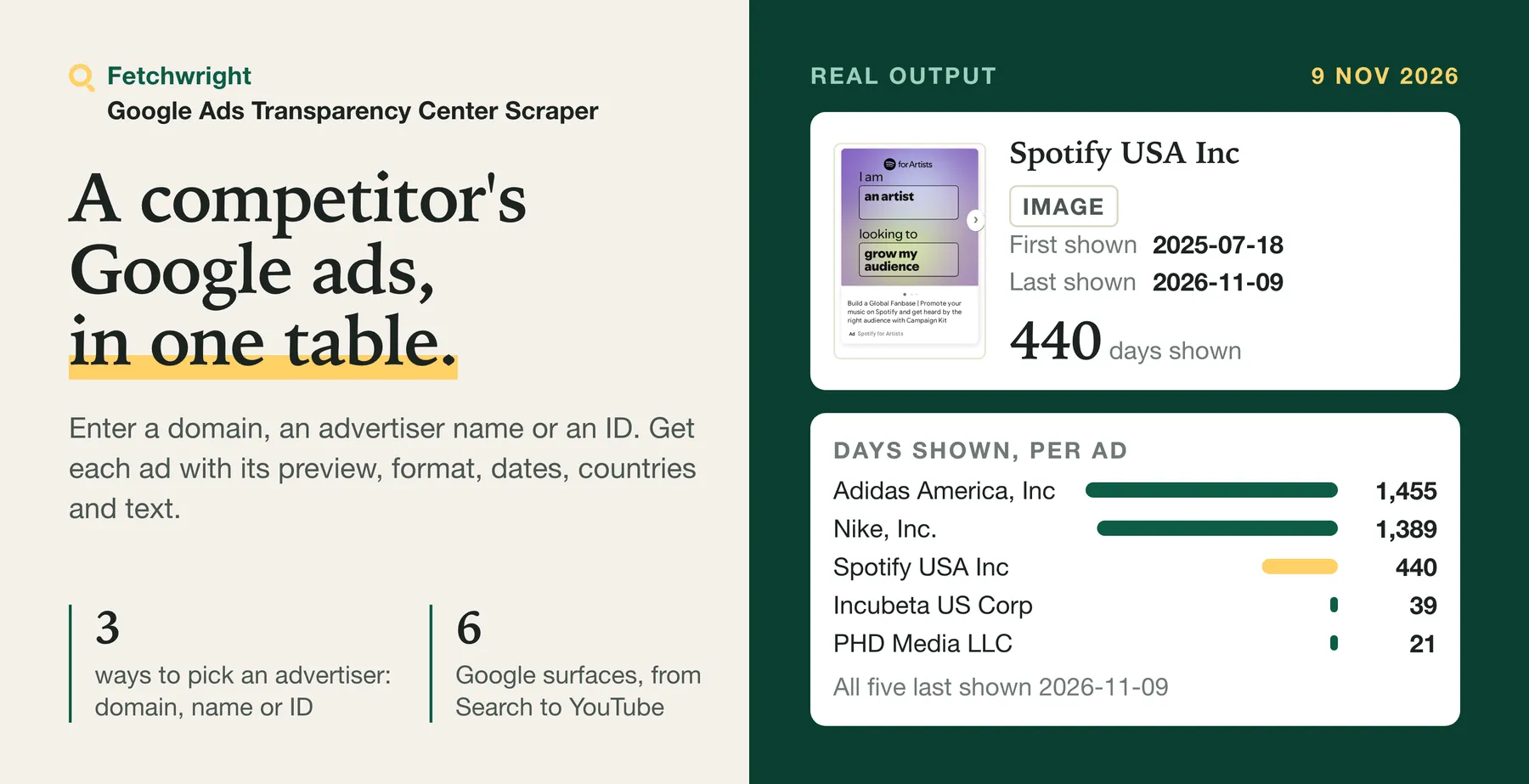
| What you get | Details |
|---|---|
| 🔎 Search by domain, name or ID | nike.com, Nike, AR16735076323512287233, or a Transparency Center URL |
| 🌍 Filter by country | Any two-letter country code, or all countries |
| 🎬 Filter by format and platform | Text, image or video; Google Search, YouTube, Shopping, Maps or Play |
| 📅 Filter by date | Keep ads whose running period overlaps your dates |
| 🆕 Get only new ads | Scheduled runs return just the ads not returned before |
| 🔔 Get an alert in Slack or Discord | Paste a webhook address and each run posts what it found: ads per advertiser, the first three with headline and link. The run summary says whether the alert was delivered |
| ✅ Know what you got | For each advertiser the run summary says whether its list was read in full, stopped at your maximum, or cut short |
| 🧩 Get variations, countries, impressions and platforms | Every variation of an ad, where it ran with first and last shown dates, the impression range Google publishes and the Google platforms it ran on |
| ✍️ Get the ad text | Headline, description and display URL of Search text ads: Google's exact text where its preview carries it, otherwise read from the ad image; description, call to action and destination URL of video and app ads; product, price and merchant of Shopping ads |
| 🏷️ See offers, and what is new since the last run | With ad text on, each ad lists the offers its wording states: free trial, discount, promo code, free shipping, demo, webinar, free plan, price, guarantee or deadline, each with the exact phrase. A scheduled watch reports per advertiser the offers newly observed since its previous run, with the ad that states them, and adds them to the alert |
| 🎬 Get the video | The YouTube video ID, link and thumbnail of video ads, the video's length where Google states it, and the app ID of app ads |
| 🪪 Get the advertiser's country and verification | Ad rows say where the advertiser is registered and whether it is verified, not verified or unknown; the run summary counts the rows where this is unknown |
| 🪟 Add Microsoft Advertising ads (EEA) | Set Ad network to Microsoft Advertising to get the Bing ads Microsoft publishes for ads shown in the European Economic Area, with wording, landing page and images, and on request dates, impression range, country shares, targeting types and payer. Same price per ad |
| 🏢 Check who advertises | Advertiser summary mode: one row per company with whether it runs Google ads, roughly how many, which accounts and which formats |
| 💾 Export anywhere | JSON, CSV, Excel, or through the API |
No Google account, cookies or browser are needed. The Actor reads only what Google publishes. It is an independent tool, not affiliated with, endorsed by or sponsored by Google. Because it runs on Apify you can also schedule it, call it through the API, send results to Google Sheets or Slack, and use it from AI agents through MCP.
Why choose Google Ads Transparency Scraper?
- Your limits hold. The maximum ads per advertiser is a hard cap, a maximum charge you set in Apify stops the run before it is exceeded, and a target that fails is charged only for the ads saved before it failed, so one that fails before any ad is saved is never charged; by default neither is a company without ads. Every run's summary says how fully each list was read, so a short result is not mistaken for a complete one.
- The ad's wording, not just its ID and dates. Headline, description and display URL of Search text ads (Google's exact text where it publishes it, otherwise read from the ad image), plus the video, app and Shopping details Google publishes.
- New-ads-only mode for monitoring. Schedule it and, with one run of a watch at a time, each run returns and charges for only the ads the watch has not recorded as returned.
- Who advertises, in one row per company. Advertiser summary mode tells you whether a company runs Google ads at all, roughly how many and in which formats.
- Counts you can check against Google's. In a test on 10 November 2026 on four advertisers in the US, the number of ads returned equalled Google's exact count for one advertiser (69 of 69) and fell inside the range Google publishes for the other three: 241 (Google: 200 to 300), 1,249 (1,000 to 2,000) and 123 (100 to 200). A count inside a range is consistent with a full list but does not prove it, so every run's summary says for each advertiser whether its list was read to the end (
listReadToEnd) and what stopped it if not. The 1,682 ads took 64 seconds without ad text or details. - A client-ready report, free. Switch it on and the run also saves a one-page report of what it found, with real ads as proof.
- Base price plus optional ad text. $0.14 per 1,000 ads on the Free plan and $0.11 to $0.13 on paid plans, with platform usage included; impressions, variations and the advertiser summary cost nothing extra. Ad text adds $0.15 per 1,000 saved ads with text on any plan. Ads a watch skips (one run of it at a time) or your dates filter out are not charged, and a failed target only for the ads saved before it failed.
How much does it cost to scrape Google Ads Transparency Center?
$0.14 per 1,000 ads on the Free plan, $0.11 to $0.13 on paid plans. You pay per ad saved, platform usage is included, and there is no monthly rental. Paid plans are cheaper per ad than the Free plan.
| Your Apify plan | Price per 1,000 ads |
|---|---|
| Free | $0.14 |
| Starter (Bronze) | $0.13 |
| Scale (Silver) | $0.12 |
| Business (Gold) and above | $0.11 |
A run also costs a start event of $0.00005 per GB of run memory (rounded up, at least one GB). Impressions, variations and the advertiser summary are included in the base price. Ad text +$0.15 per 1,000 ads with text, on every plan. The add-on is charged once per saved ad with non-empty wording successfully read, with Include ad text on. Ads without read wording and runs with that switch off have no ad-text charge.
Never charged: with one run of a new-ads watch at a time, ads it has recorded as returned (two overlapping runs of the same watch, or a run killed before it saved its memory, can return and charge an ad again), ads filtered out by your dates, and what was not read of targets that failed or did not finish (listed under failedTargets and unfinishedTargets in the run summary, never shown as "no ads"; the ads saved for them before they stopped are charged).
Companies without ads: by default they get no row and no charge, and are listed under noAdsTargets in the run summary. In advertiser summary mode with also save companies without ads on, each gets one row, charged as one row.
An ad whose extra details could not be read is still a saved ad: it is charged and carries detailsError.
What typical jobs cost:
| Job | Ads | Free | Starter | Scale | Business and above |
|---|---|---|---|---|---|
| One competitor's current ads in one country | 100 | $0.014 | $0.013 | $0.012 | $0.011 |
| Ten competitors, 200 ads each | 2,000 | $0.28 | $0.26 | $0.24 | $0.22 |
| Daily monitoring of five competitors, about 10 new ads a day (after the first run, which returns the current ads up to your cap) | 300 a month | $0.042 a month | $0.039 a month | $0.036 a month | $0.033 a month |
| Checking which of 1,000 companies advertise on Google | 1,000 rows | $0.14 | $0.13 | $0.12 | $0.11 |
These base costs exclude the optional ad-text add-on: +$0.15 per 1,000 ads with text on any plan (for example, +$0.015 for 100 ads with text). The start event adds $0.00005 per GB of run memory per run (rounded up, at least one GB).
Apify's free plan includes $5 of credit each month, which is about 35,000 ads with this Actor without the ad-text add-on.
Set Maximum ads per advertiser to cap a run. If you set a maximum charge for the run in Apify, the Actor stops when it is reached.
How does the price compare?
Prices per 1,000 ads of the five most-used Google Ads Transparency actors on the Apify Store plus every other actor with more than 10 monthly users, plan by plan, read from each actor's current pricing on the Apify API on 14 November 2026. Competitors are listed by monthly users; the feature table uses the same labels for the first four.
| Actor (five most-used plus every other actor with more than 10 monthly users) | Monthly users | Free (base) | Starter (base) | Scale (base) | Business and above (base) | Extras per 1,000 |
|---|---|---|---|---|---|---|
| This Actor | $0.14 | $0.13 | $0.12 | $0.11 | Ad text +$0.15 per 1,000 ads with text, on every plan; details and advertiser summary included | |
| Most-used | 1,652 | $2.00 | $2.00 | $2.00 | $2.00 | Details +$3.00, ad text +$2.00, advertiser rows $3.00, on every plan |
| Second | 883 | $1.90 | $1.60 | $1.30 | $0.90 | Video download +$4.00 (Free, Starter), +$2.00 (Scale and above); start event $0.00005 per GB of run memory |
| Third | 622 | $1.50 | $1.00 | $0.90 | $0.80 | None; a start event of $0.001 per GB of run memory |
| Fourth | 166 | $2.00 | $2.00 | $2.00 | $2.00 | None |
| Fifth | 159 | $1.48 | $1.24 | $1.00 | $0.77 | Start event $0.00005 per GB of run memory; its listing says platform usage comes on top |
| jaybird | 71 | $0.45 | $0.42 | $0.38 | $0.35 | Landing page +0.05; start event $0.00005 |
| automation_craft | 21 | $0.30 | $0.30 | $0.27 | $0.24 | Start event $0.0025 |
| maximedupre | 20 | $0.90 | $0.90 | $0.80 | $0.65 | None |
| jmlp | 15 | $0.17 | $0.17 | $0.15 | $0.15 | None |
| t2solutions | 12 | $0.50 | $1.10 | $1.00 | $0.90 | Start event $0.00005 |
The plan columns compare base per-ad prices; this Actor's Extras column shows the optional ad-text add-on.
On each plan, this Actor has the lowest price per ad of every Google Ads Transparency actor on the Apify Store with more than 10 monthly users (checked 14 November 2026).
Prices change; check each listing before you decide. We compared prices only, not results.
How do the features compare?
What the listings of the first four actors in the price table say, in the same order (by monthly users) and under the same labels, read on 11 November 2026. We read their listings and did not run them. "Not described" means the listing does not mention it, not that the actor cannot do it.
| This Actor | Most-used | Second | Third | Fourth | |
|---|---|---|---|---|---|
| Only the new ads on scheduled runs | Yes | Yes | Not described | Not described | Not described |
| Wording of Search text ads | Optional, +$0.15 per 1,000 ads with text on any plan: Google's exact text where published, otherwise read from the ad image | Optional, charged extra | Optional, read from the image | Not described | Yes, with each variation |
| One row per company: does it advertise, and roughly how much | Yes | Yes | Not described | Not described | Not described |
| Slack or Discord alert posted by the run itself, with no integration to set up | Yes | Not described | Not described | Not described | Not described |
| Says whether each advertiser's list was read to the end | Yes, for every advertiser | Says which target stopped part-way, and after how many ads | Not described | Not described | Not described |
| Report you can forward to a client | Yes, free | Not described | Not described | Not described | Not described |
Apify's own Slack, webhook and email integrations work with every actor on the Store, these four included.
Where the others do more: the second and fourth can save video and image files for you, the second can limit a search to political ads, the third states up to 50,000 ads in one run, and the fourth accepts Google account cookies to reach age-restricted ads. This Actor saves no media files, reads political ads only for the 12 countries of Google's political ads report, has been measured up to 1,249 ads for one advertiser, and never uses a Google account. Listings change; check each one before you decide.
How do I scrape Google Ads Transparency Center?
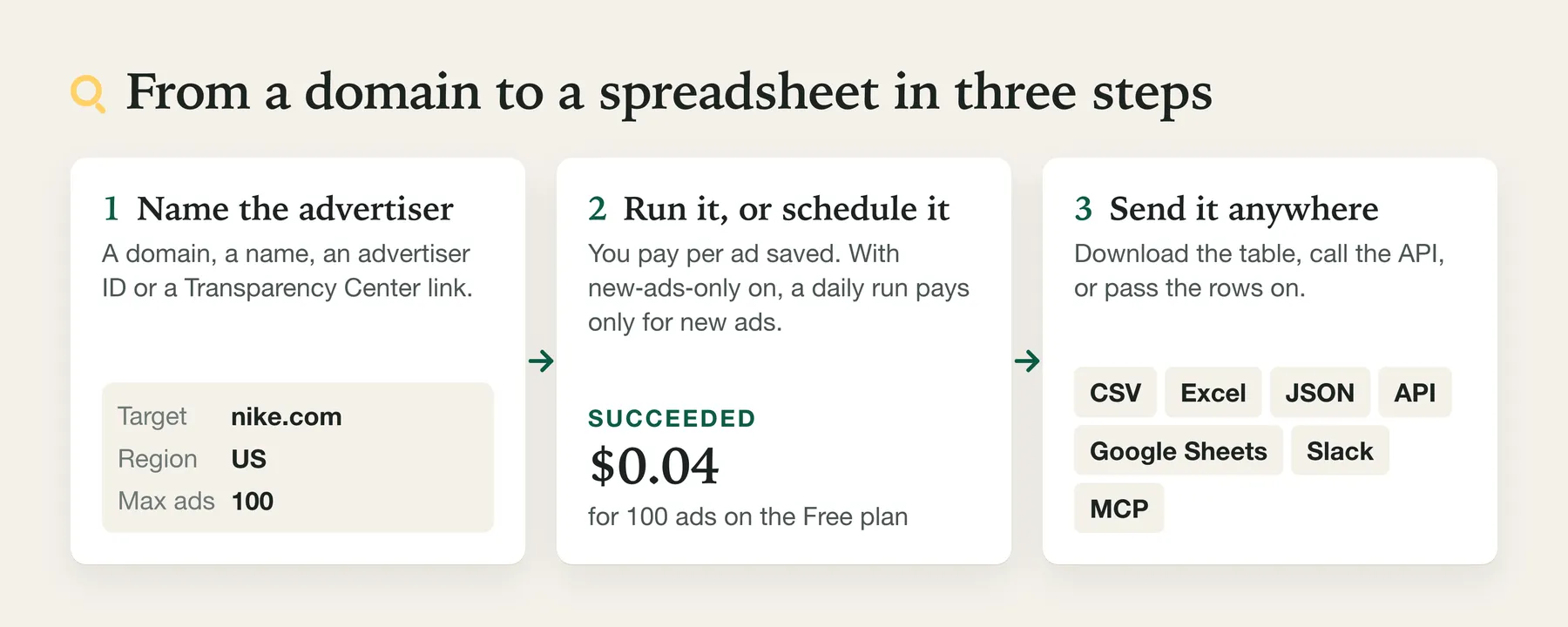
- Create a free Apify account.
- Open the Actor and add one or more domains or advertiser names.
- Pick a country and, if you like, a format.
- Click Start.
- Download the results as CSV, Excel or JSON, or fetch them through the API.
Run it on a schedule. For monitoring, run it daily, with only new ads. Apify's short video shows how to set up a schedule:
⬇️ Input for Google Ads Transparency Scraper
| Field | What it does |
|---|---|
| Advertisers to look up | Domains, names, advertiser IDs or Transparency Center URLs. Domains give the most complete results. |
| Country where the ads were shown | Country name or two-letter code such as US, GB, Germany, or ANYWHERE. |
| Ad format | All, text, image or video. |
| Maximum ads per advertiser | Caps results and cost. Default 100. |
| Maximum ads per run | Caps the whole run, across all advertisers, so a long list cannot multiply the cost. Empty by default: no run-wide cap. |
| Shown on or after / on or before | Keeps ads whose running period overlaps the dates. |
| Political ads only | Reads Google's political (election) ads instead of all ads, for one country Google's political ads report covers: AR, AU, BR, CL, GB, IL, IN, MX, NZ, TW, US and ZA. Each row adds the spend range and, with details on, the targeting. Same price per ad. See "Political ads" below. |
| Only ads not returned in earlier runs | New-ads-only mode for scheduled monitoring. |
| On a watch's first run | Return the current ads (up to the cap) or only remember them, so the next run starts from new ads. |
| What to return | Ads (one row per ad) or Advertiser summary (one row per company). |
| Include variations, countries, impressions and platforms | Adds each ad's variations, countries with dates, impression range and platforms. Slower: one extra request per ad. |
| Include ad text | Optional: +$0.15 per 1,000 ads with text on any plan. Adds the ad's wording, and for video ads the YouTube video. Fast for video and image ads; slower for Search text ads, about 3 seconds each. |
| Ad text for the first ads only | With ad text on, reads the wording for at most this many ads per advertiser (the ads Google lists first) and saves the rest without it. For example 25: a wording sample of each advertiser in about a minute, with the full list still saved. Empty reads every ad. |
| Monitor name | Optional name that keeps several new-ads-only watches apart. |
| Google platforms | Keep only ads that ran on Search, YouTube, Shopping, Maps or Play. Works for every country at no extra cost. |
| Read targets from a dataset | Take domains, names or advertiser IDs from another run's dataset. |
| Include advertiser country and verification | Adds advertiserCountry, advertiserVerified (verified, not verified or unknown) and advertiserLegalName to ad rows and advertiser summary rows. On by default, no extra charge. |
| Advertiser identity lookups per run | How many advertisers get that lookup. Default 25; raise it when you need it on every row. |
| Send an alert to Slack, Discord or a webhook | Posts a short message when the run saves ads. With Only new ads on a schedule, this is a competitor-ad alert. No extra charge. |
| Ad network | Google (default) or Microsoft Advertising, for Bing ads shown in the European Economic Area. |
| Advertisers per name search | A name can match several advertiser accounts; the one with the most ads is used. Default 1. |
Google connection settings
On Apify, omitting proxyConfiguration uses an Apify datacenter session shared by Google data reads. Set "proxyConfiguration": {"useApifyProxy": false} to go direct. Explicit custom or Apify proxy settings are respected; omitted local settings stay direct. Ad previews, images and ad-text fetches keep their existing route. If Google refuses the first connection on a datacenter session, the run retries once after 60–120 seconds on a fresh proxy session when time allows; no extra charge to you. There is no automatic residential fallback. A new session ID does not guarantee a different exit IP.
Pasted Transparency Center links
A link copied from the Transparency Center keeps its own filters. In https://adstransparency.google.com/advertiser/AR...?region=DE&format=VIDEO&start-date=2026-01-01&end-date=2026-03-31, the country (region), format (format) and dates (start-date, end-date) apply to that link's advertiser or domain only, so two links with two countries are each read for their own country, and searchRegion on each row says which.
- A link's filter is used only where you left the field unset (country
ANYWHERE, format all, no date). A country, format or date you set applies to every target, as before, and the run notes where a link asked for something else. - A link's filter only narrows what is read; it never adds countries, formats or dates.
- A link to one ad returns that ad. Its country is used for the lookup and in
searchRegion; its format and dates are not applied, and the run says so. - In advertiser summary mode only a link's country is used; its format and dates are not applied, and the run says so.
- The same advertiser pasted with different filters (for example two countries) is read once per set of filters, each up to Maximum ads per advertiser. An ad found for two targets is saved and charged once, under the first of them. Two targets that lead to the same advertiser account with the same filters (its ID and a name, or two names) read it once, in either result type: the second is listed under
sameAdvertiserTargetsin the run summary, not as a failure, and nothing more is charged for it (no second list of ads, no second advertiser summary row). - A link with
topic=other than all stops the run before any ad is read, because this Actor cannot filter by topic. Nothing is charged apart from the start event. platform,preset-dateand any parameter the Actor does not know are ignored with a note. Set Google platforms or the dates instead.- A new-ads watch keeps what it has already seen when a link's filters or a monitor name read from another field give it a new memory key: with one run of the watch at a time, ads it has recorded as returned are not returned or charged again; a run killed before it saved its memory can return an ad again.
- Every decision is in the log and in
inputNotesof the run summary.
Coming from another Google Ads scraper?
An input saved for some of the most-used Google Ads Transparency actors on the Apify Store (their input fields read on 11 November 2026) can be pasted here: the fields in the table below are read, a few are not applied, and two filters this Actor cannot enforce stop the run before any ad is charged. A field you set under this Actor's own name, to a value other than its default, wins. The run log and the run summary's inputNotes say how each field was read and what to set instead; when a filter stops the run, the reason is in the run's status message.
| Field you have | What happens here |
|---|---|
domains, advertiserIds, queries, searchTerms, searchQuery, startUrls, urls | Read as targets. A link's own country, format and dates apply where the input leaves them unset, with the exceptions described above |
maxAdsPerSearch, maxAds, resultsLimit, limitPerSource (a positive number) | Read as maxAdsPerTarget |
maxResults, maxItems (a positive number) | Read as maxAdsPerTarget, and also as maxAdsPerRun, because those actors count them over the whole run |
startDate, shownAfter | Read as dateFrom |
endDate, shownBefore | Read as dateTo |
adFormat, adFormats: ["Video"] (one format) | Read as format |
platform, and platforms spelt SEARCH, google_search or Google Search | Read as platforms |
skipDetails: false, includeRegionStats: true | Read as includeDetails: true |
monitorStoreName (a name other than ads-transparency-monitor) | Read as monitorName |
maxAdvertisersPerQuery, maxAdvertisersPerTerm (above 1) | Not applied, with a note: one advertiser account is read per name. Set maxAdvertisersPerName (up to 10) to read more |
resultsLimit: null, maxResults: 0 ("no limit") | Not applied, with a note: maxAdsPerTarget (default 100) applies |
downloadMedia: true, shouldDownloadAssets: true, shouldDownloadPreviews: true | Not applied, with a note: no files are saved; rows carry the image, preview and video links |
cookies | Not applied, with a note: this Actor reads only what Google shows without an account |
urlsFromFile, requestsFromUrl (a link list inside startUrls) | Not applied, with a note: paste the links themselves into targets |
monitorStoreName: "ads-transparency-monitor" (with new-ads-only on) | Not applied, with a note: it is another actor's default name. Set monitorName to keep the watch apart |
adFormats: ["Text", "Image"] (two of the three formats) | Stops the run before any ad is read; only the start event is charged. Set one format, or run once per format |
topic: "POLITICAL", political: true | Read as politicalAds: true: political ads only, for a country Google's political report covers (see "Political ads") |
topic: "COMMERCIAL" (any topic other than all or political) | Stops the run before any ad is read; only the start event is charged. Remove the field to read all ads |
region, resultType, includeDetails, includeAdText, onlyNewAds, dateFrom and dateTo have the same names here.
What differs, for five problems raised on those actors' Issues tabs (titles read on 11 November 2026):
- A limit that did not hold.
maxAdsPerTargetis a hard cap per domain you enter and per advertiser account and set of filters, however many advertiser IDs, names or links lead to that account (ads read for a domain count toward the domain), and a maximum charge set in Apify's run options stops the run before another ad would exceed it. The summary marks a capped listcapped, setsbudgetExhaustedwhen the maximum charge was reached, and lists what was not finished underunfinishedTargets. - Fewer ads than expected. When ads are returned, each advertiser that was read is listed under
targetsin the run summary withcoverage(complete,capped,partialorunknown) andlistReadToEnd;stoppedByis there when something stopped the list. Each of those entries also carries Google's approximate total for the search as sent, with the region, format, platform and date filters already applied:googleAdCountMinandgoogleAdCountMax(null when Google gives no bound). Compare it withadsto see how much a cap left unread; on an only-new run it still describes the whole matching list, not the new ads. Advertiser summary mode returns Google's range for the list in the selected region, without format, date or platform filters, asadCountMinandadCountMax. - Wording of Search text and image ads. With
includeAdTexton, the Actor tries to read each ad's wording: rows carryheadline,descriptionanddisplayUrlwhere it was read, andadTextStatussays where it came from or why it is missing (for example a read that failed). Ads beyond Ad text for the first ads only are saved without wording and withoutadTextStatus. Text read from an ad image carries a confidence score (adTextConfidence) and can contain small errors. An image ad that exists only as a picture gets its image link. - What a real run returned. A run on 12 November 2026 for
nike.comwithincludeAdTextandincludeDetailson saved 30 ads (25 Search text, 3 image, 2 video): wording was read for 25, 20 of them from the ad's image (adTextStatusread_from_image) and 5 from Google's preview data (found); 3 had no wording in the preview (not_in_preview) and 2 images could not be read reliably (image_unreadable). WithincludeAdTexton, the run summary'sadTextblock counts the ads with a preview and with wording, and why wording was missing. One of the 20, as saved: headline "Shop Nike Vomero Plus - Hit The Road Running", confidence 89, and a description that ends "Rating for nike.com Return policy 4.8 ke & wee & (61) Most items 30+ days", which shows the kind of small error text read from an image can carry. - No impressions. With
includeDetailson, each ad lists its countries with first and last shown dates (regions) and the impression range Google publishes (impressionsMin,impressionsMax). Google publishes impressions mainly for ads shown in the EU; elsewhere both are null. - A run that ends without data. An advertiser that cannot be read is listed under
failedTargetswith the reason and is not charged; if it failed part-way, the ads saved before that are charged and it is still listed underfailedTargets. An advertiser stopped by your maximum charge or the timeout is listed underunfinishedTargets, and the ads saved for it are charged. The run'soutcomeispartialorfailed, and a company without ads is listed undernoAdsTargets, not charged.
Defaults that can surprise:
- A name search reads one advertiser account, the one with the most ads (in your country, when one is set), unless you raise
maxAdvertisersPerName(up to 10). - Each advertiser stops at 100 ads unless you raise
maxAdsPerTarget. - Ads from all countries are returned unless you set
regionor a pasted link carries a country.
Price. This Actor charges $0.14 per 1,000 ads on the Free plan, $0.13 on Starter (Bronze), $0.12 on Scale (Silver) and $0.11 on Business (Gold) and above, plus a start event of $0.00005 per GB of run memory (rounded up, at least one GB); details and advertiser summary rows are included. Ad text adds $0.15 per 1,000 ads with text on any plan. The price comparison above covers the five most-used Google Ads Transparency actors plus every other actor with more than 10 monthly users, checked on 14 November 2026, with their plan prices and extras. Prices change; check each listing before you decide.
⬆️ Output from Google Ads Transparency Scraper
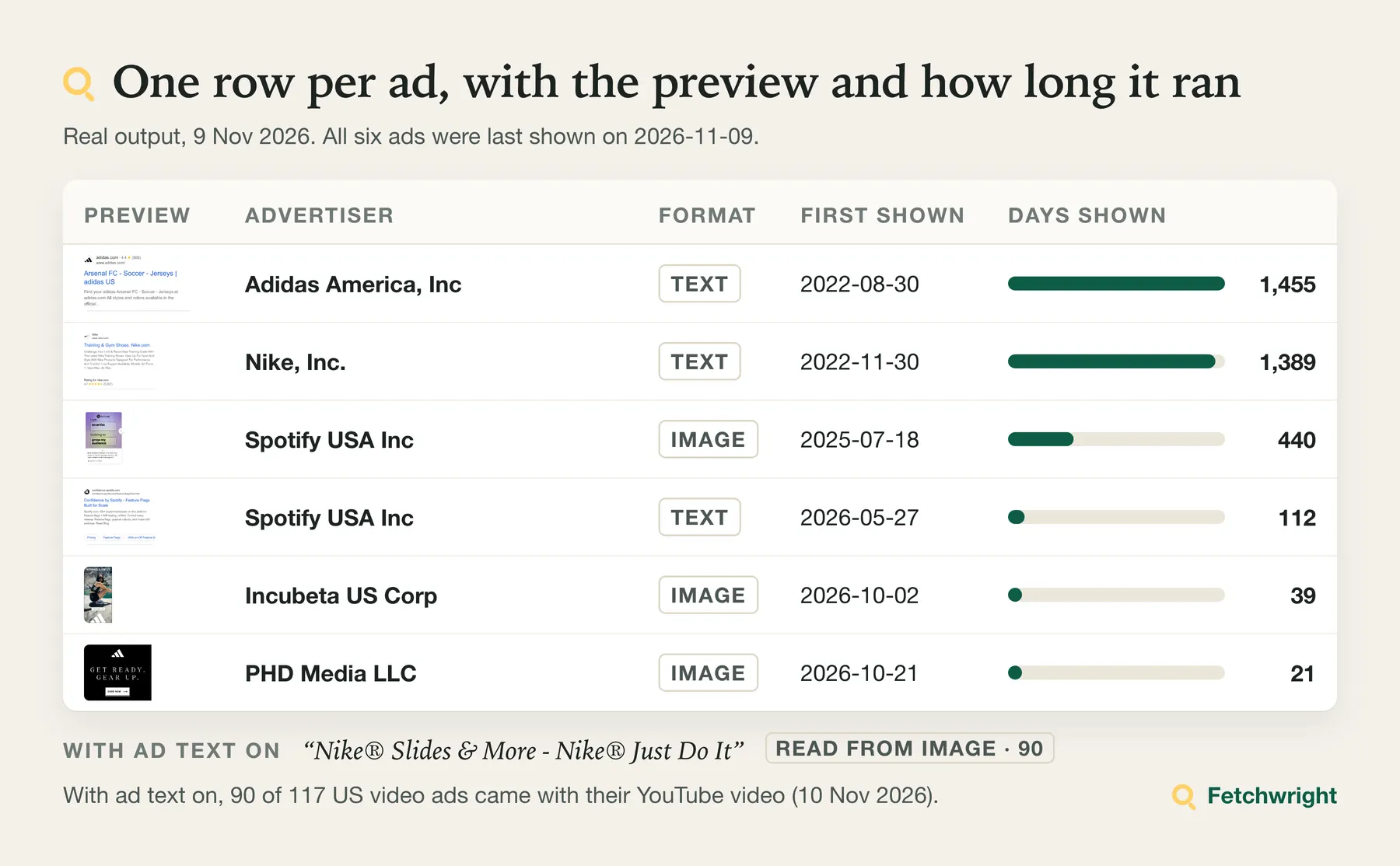
One item per ad:
Variations, countries, impressions and platforms
With Include variations, countries, impressions and platforms each item also has:
Google publishes impressions as a range, mainly for ads shown in the EU. A missing lower bound means "fewer than the upper bound"; a missing upper bound means "more than the lower bound". Both are null where Google publishes nothing.
Ad text
With Include ad text each item also has the wording:
adTextStatus says where the wording came from: found (Google's preview carried it), read_from_image (read from the ad image), no_wording (the preview gave a landing page, video or app, but no wording), or why it is missing (image_unreadable, not_in_preview, image_only, preview_unavailable).
Some Search text ads come with their wording inside Google's preview. For those the headline, description, display URL and sitelinks are Google's exact text (found), not a reading of the image, and sitelinks lists the sitelink titles.
Offers and what is new since the last run
With Include ad text on (+$0.15 per 1,000 ads with text on any plan), each ad also has offers: the commercial offers its wording states, with no separate charge for offers. Here is a real Search ad from monday.com in the US, as returned:
type is one of free_trial (value: its length, such as 14 days), discount (20%, $50), promo_code (the code), free_shipping, demo, webinar, free_plan ("free forever", "free plan", "free to start"), price (from $9/month, with currency and period), guarantee (30-day money-back, free returns, best price, lowest price), deadline (ends sunday, today only) or free_cancellation. A price cut stated without a figure ("reduced prices", "Prix cassés") is a discount with value null; "deals" or "save" alone are not offers. text is the exact phrase from the ad. Phrases are recognised in English, and the common forms in German, French, Spanish and Dutch; price guarantees, free cancellation and price cuts also in Italian. Only what the ad says is listed: a number on its own is not a price, and "free" on its own is not an offer. offers is empty when the wording states no offer, or when it was not read (adTextStatus says which).
The run summary has an offers object with, per advertiser, the offers observed in this run (observed: type, value, how many ads state it, and one ad as proof with its link and phrase). With Only ads not returned in earlier runs, the watch also remembers the offers it has seen, and the summary says what is new:
newlyObserved: offers this watch had not observed in earlier runs, each with the ad that states it. Up to three of them are added to the Slack or Discord alert.noLongerObserved: offers observed in earlier runs that no ad shown since the previous run states.
How to read them:
- A newly observed offer is one this watch had not seen before. It is not proof that the advertiser changed its offer: the offer may have run earlier in ads whose wording the watch had not read.
- On the first run of a watch, and on the first run with ad text of an older watch, nothing is newly observed: what it finds is the starting point, marked
baseline: true. - An offer is reported as no longer observed only when the run read the advertiser's list to the end and the wording of the ads shown since the previous run was read. Otherwise
noLongerObservedis left out andnoLongerObservedReasonsays why (baseline,list_not_read_to_endorwording_not_read_for_all_ads). - Offers can run side by side. A 30-day trial newly observed while a 14-day trial is still observed is two offers, not a change of trial length.
Microsoft Advertising rows carry offers too, read from their headline and description, and their run summary lists the offers observed in that run.
Advertiser summary
In Advertiser summary mode each item describes one company instead of one ad:
By default a company without ads gets no row and no charge, and is listed under noAdsTargets in the run summary. If you need the dataset to line up with your list, turn on Advertiser summary: also save companies without ads: every company then gets a row with hasAds and a targetStatus of has_ads, no_ads_in_region or no_advertiser_found, and each row without ads is charged as one row. Companies that could not be checked are never charged and never saved as "no ads": they are listed under failedTargets or unfinishedTargets.
Microsoft Advertising ads (EEA)
Set Ad network to Microsoft Advertising to read Microsoft's ad library instead of Google's. It holds Bing ads shown in the European Economic Area (the 27 EU countries, Iceland, Liechtenstein and Norway). Rows are charged at the same price as Google ads, through the same maximum charge, and the run summary has the same outcome, coverage, failedTargets and noAdsTargets, plus failuresByReason.
Microsoft details here are for small runs: with up to 25 Microsoft ads in the run (the example reads at most 20), details are included; on larger runs they are skipped (not charged) and the summary says so, and single-ad lookups, which always include details, run for the first 25 only, whether or not details are switched on. For details on more Microsoft ads use the Microsoft Ads Library actor, which includes them at no extra charge.
Targets are advertiser names as Microsoft lists them (often the legal name, such as Booking.com B.V.) or Microsoft's numeric advertiser IDs. A name can match several accounts: the account whose name matches exactly is read first, and the others are listed under otherMatches in the run summary; raise Advertisers per name search to read more. Microsoft cannot be searched by website, so a domain such as booking.com is reported for that target as not usable (not charged) instead of returning nothing.
Country: ANYWHERE (all EEA countries) or one EEA country such as DE, FR or NL. With a country outside the EEA (the form suggests US), the run searches ads shown in any EEA country and says so in the log and in regionNote of the run summary. A run stopped for another input problem, such as no target, writes no summary.
Each row has adNetwork microsoft and these fields:
The fields from firstShown to restrictionReason come with Include variations, countries, impressions and platforms on (one extra lookup per ad, no extra charge; for Microsoft only on runs of up to 25 Microsoft ads, see above); without it, firstShown and lastShown are null and the others are left out. images lists the images Microsoft gives for ads that have them, and imageUrl is the first. paidBy is filled only when Microsoft names a payer other than the account owner. Google rows have fundedBy instead, which Google states for every ad it covers, also when it is the advertiser itself; the two are not the same field, so a Microsoft paidBy of null means either that Microsoft named no other payer or that the ad's details were not read (option off, or the lookup failed); it is not a confirmed payer.
Not available for Microsoft ads, because Microsoft does not publish it: the ad format (format is always null), ads shown outside the EEA, search by website, and exact impression counts (only a range). Not offered for Microsoft ads in this Actor: the advertiser summary mode, new-ads-only monitoring, political ads only, and the format and platform filters (choosing any of these stops the run with a message, not charged). Microsoft does state how many ads an advertiser has (up to 1,000): Microsoft Ads Library Scraper gives that count as one row per advertiser, and has new-ads-only monitoring. The client report covers Google ads only; with Microsoft chosen the run says so instead of writing one. Ad text options are not needed: Microsoft rows always carry their wording.
Political ads
With Political ads only on (or another actor's topic: "POLITICAL" or political: true), the Actor reads the ads Google lists in its political ads report, for the country you choose. Google's political report covers AR, AU, BR, CL, GB, IL, IN, MX, NZ, TW, US and ZA, the countries it lists on 12 November 2026. The EU is listed there without a single country to read it by and is not offered. Any other country, or none, stops the run before anything is read. Each political row has the usual ad fields plus:
spendCurrency,spendMinandspendMax: the amount spent on the ad, as the range Google states, in the report's currency (USD for the US).spendMaxisnullwhen Google states only "Over" an amount.spendRangeslists every currency Google states; nothing is converted.impressionsMinandimpressionsMax: times shown, as Google states them.politicalRegions: the regions Google lists the ad under, such as["US"].- With details on (one lookup per ad, no extra charge):
targetingAge,targetingGenderandtargetingLocations. Each gives the values the advertiser included and excluded, as Google states them and isnullwhen Google states none. Locations are Google's own numeric location IDs (geoId); only an ID that is a whole country also gets its two-letter code inregion, and states, districts and other areas keepregion: nullrather than a guessed name. Like audience selection, this is the criteria the advertiser chose, not who saw the ad.fundedByisnullwhen Google's details state no funding name: the US political ads we read on 12 November 2026 stated none.
Political ads cost the same per ad as other ads, and the same caps, maximum charge and new-ads-only mode apply. A political watch keeps its own memory, apart from an ordinary watch on the same advertiser.
Personal data. Google's political ad data names the advertisers and the organisations that fund the ads, and can name natural persons, such as candidates or individuals who pay for ads. These names appear in the rows (advertiserName, fundedBy, searchTarget), in the run summary and in alert messages; ad text and images can contain names too. That Google publishes them does not end data-protection duties such as those of the GDPR. When you store or use this data, you decide why and how it is used, which usually makes you the controller for that use. You are responsible for having a lawful basis, for how long you keep it (retention), and for its deletion when you no longer need it, including the copies in your datasets, exports and alert channels.
Client report (free)
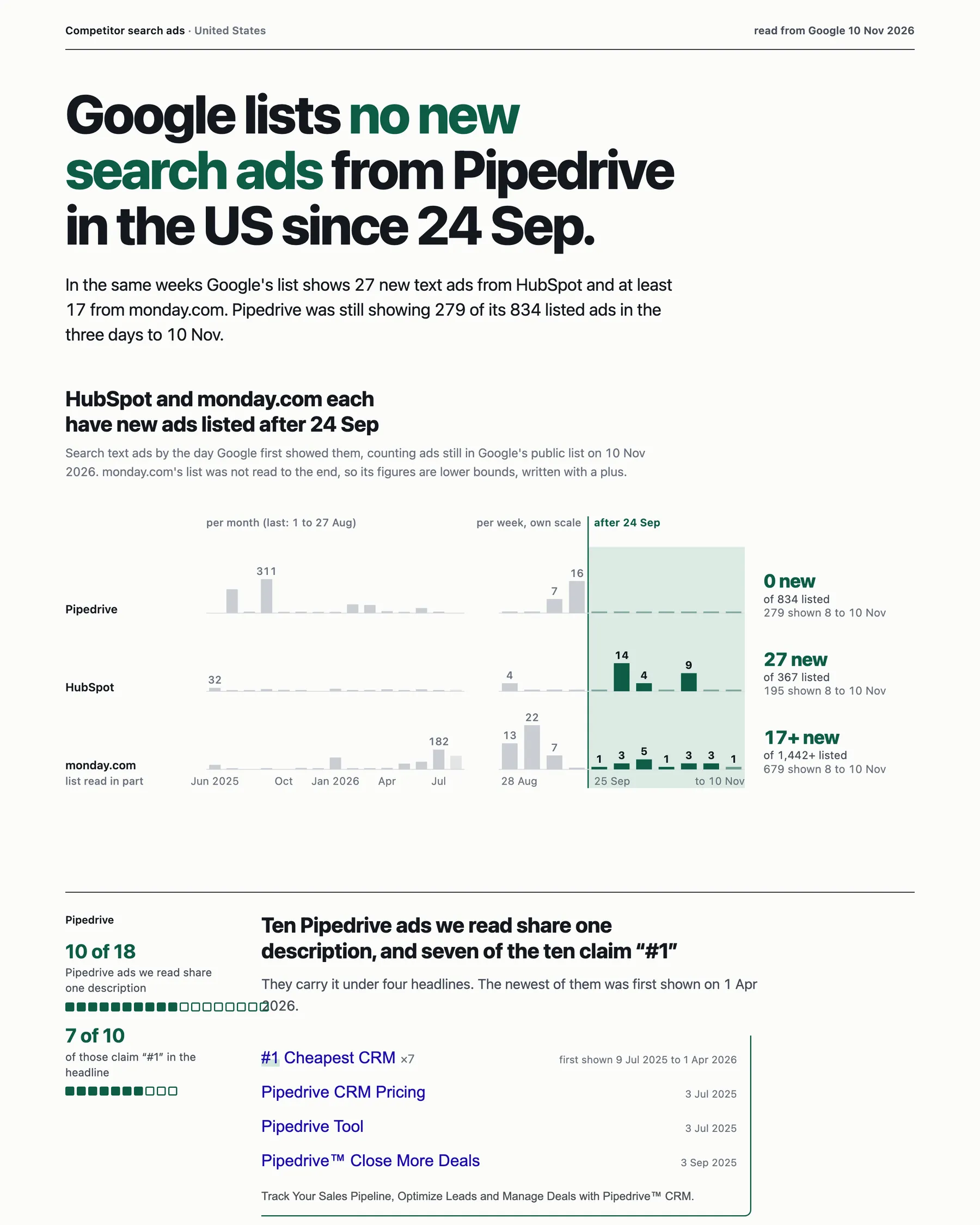
Open the full sample report, written by a run on 10 November 2026 and unedited.
Switch on Write a client-ready report and the run also saves REPORT.html, one page you can forward or print, and REPORT.md, linked from the run summary under report. It leads with the strongest true finding about the advertisers in the run and shows real ads as proof. Every figure is counted from this run's rows and every sentence comes from a fixed template; no AI model writes it. A report is written when the run has ads from two or more advertisers and at least one advertiser account has its whole list read or at least 100 ads saved. A domain's ads are often spread over several advertiser accounts, so with domains set Maximum ads per advertiser to 200 or more (500 reads most whole lists; you pay per ad saved, so a higher maximum can cost more). When no report is written, the run summary says why and what to change. It never changes the run's results or charges.
For a report that quotes real ads as proof, also switch on Include ad text and set Ad text for the first ads only to about 25: the run stays fast and the report shows what each advertiser's ads say.
When a run has no report (the option is off, or the run does not have enough data), REPORT.html is a short note saying why. To tell the two apart in code, read report.status in the run summary: it is ok only when a report was written.
Other fields and the run summary
- With details on, each ad also has
fundedBy: who funded the ad, as the Transparency Center's ad page states it ("Ad funded by"). It can differ from the advertiser account, for example an agency or another company of the group: one of Zalando SE's ads in Germany statesDQ&A Technology NL BV. It comes from the same detail lookup at no extra request or charge, and isnullwithout details, when the details could not be read, or when Google states none. - With details on, each ad also has
audienceSelection: for demographics, locations, contextual signals, customer lists and topics, whether the advertiser included or excluded criteria (included,excluded,included_and_excluded,not_used). Google publishes it for a minority of ads, mainly those shown in the EU; otherwise it is null. As Google says on the ad page, this describes the criteria the advertiser chose for its most recent campaign, not who saw the ad; a category isnot_usedwhen Google lists it without criteria or leaves it out, and the whole field isnullwhen Google publishes no audience selection for the ad. impressionsMinandimpressionsMaxare what the ad page calls "Times shown". When Google has not published them yet,timesShownAvailableFromgives the day it says they will be (for example2026-11-27), and both arenull; nothing is estimated.googleCustomerId,googleCreativeId,adGroupIdandversionIdare filled when Google's preview link carries them, andimageWidthandimageHeightfor image ads.advertiserCountryis the advertiser's registered country.advertiserVerifiedistruewhen the Transparency Center shows the advertiser as verified,falsewhen it shows "hasn't verified their identity yet", andnullwhen unknown; nothing is guessed. Both come from Google's advertiser search, one lookup per advertiser, for up to 25 advertisers in a run by default. They are unknown for advertisers beyond that number and for advertisers the search does not return. The run summary'sidentityobject counts rows with and without identity and says when the lookup limit was reached. To get identity on every row, raise Advertiser identity lookups per run above the number of advertisers in your run; accounts found by a name search carry it without a lookup. Turn the fields off with Include advertiser country and verification.advertiserLegalNameis the advertiser's legal name: for an advertiser that verified its identity with Google, the Transparency Center lists its account under the name it verified, and that name is returned here (Nike, Inc.). It isnullwhen the advertiser has not verified, when its status is unknown (beyond the lookup limit, or not returned by Google's advertiser search), and on Microsoft rows. It comes from the same lookup as the country, at no extra request or charge. In advertiser summary mode each account inadvertiserscarries it too, and a summary row for an advertiser ID or name has it at the top level.- Paste a single ad's Transparency Center link to get just that ad.
- An ad that matches two of your targets (for example a domain and the company name) is saved and charged once.
- With ad text on, video ads carry
youtubeVideoId,videoUrl,videoThumbnailUrland sometimesvideoDurationSeconds; app ads carryappIdandappStoreName; ads for a business location carrybusinessName,businessCategoryandadvertiserDomain. daysShownis the number of days Google reports the ad as shown.- The earliest
firstShownwe have seen from Google is 25 October 2021, and long-running ads of different advertisers share exactly that date. Read afirstShownof 2021-10-25 as "on or before", anddaysShownfor those ads as a minimum. imageUrlis set for image ads and for text ads that Google renders as an image. Video ads and some responsive ads have apreviewUrlinstead.
The run summary
Each run stores a summary under the key SUMMARY in its key-value store: ads saved per advertiser, targets that failed (failedTargets, charged only for ads saved before the failure) and targets it did not finish (unfinishedTargets). If a run reaches your maximum charge or its timeout, it stops cleanly and keeps every saved row. Two fields say how the run went, and they answer different questions:
| Field | What it says |
|---|---|
outcome: complete, partial or failed | Whether the run did what you asked. complete means every target finished, even if it stopped at your Maximum ads per advertiser. The status message of a partial run starts with "Partial:". |
maxPossibleChargeUsd | The most the run could cost on its price, worked out before anything was read: the start event plus your caps times the base price per ad and, with ad text on, the ad-text add-on. A ceiling, not an estimate; also in the run log. Empty when the price was not available. |
coverage: complete, capped, partial or unknown | How much of each advertiser's list was read. complete: read to the end (for a new-ads watch, up to where an earlier full read had reached). capped: stopped at your maximum. partial: stopped by your maximum charge, the timeout or an error. unknown: none of these can be stated. |
Each entry under targets has its own coverage, and the run's coverage is the least complete of them. So a run can have outcome complete and coverage capped: it did what you asked, and Google has more ads than your maximum let through. Raise the maximum to read the rest.
With ad text on, the summary also has offers (see Offers and what is new since the last run). It also has identity (rows with and without the advertiser's country and verification, advertisers looked up, and stoppedBecause when the lookup limit was reached) and notification (see below).
Alerts to Slack, Discord or a webhook
The alert is sent after every row is saved, and it is best effort: a receiver that is busy or briefly failing is tried up to three times (one that does not answer in time is not tried again, so the same alert is not posted twice), and a failed alert never changes the saved rows or the charge. The run summary's notification object says what happened:
status:sent,failed,not_configured(no address given) ornothing_to_send(no ads saved and Alert even when nothing was saved off)httpStatus: the receiver's HTTP answer, or null;error: why it failed, or null;attempts: how many times it was tried
If an alert fails, the ads are still in that run's dataset: open the run, or read its dataset through the API, and send them on yourself. In new-ads-only mode the ads are remembered as soon as they are saved, so the next run does not return them or alert about them again; read them from the run whose alert failed.
Limits of Google Ads Transparency Scraper
- What Google lists. You get the ads Google publishes in the Transparency Center for the advertiser accounts you choose, within your filters and your maximum. An advertiser there can be verified, not verified, or of unknown status. A company with no advertiser account of its own returns nothing.
- Counts are approximate. Google reports an advertiser's total as a range (for example 8,000 to 9,000 ads), and that is what the advertiser summary returns.
- Impressions are EU-only. Google publishes impression ranges mainly for ads shown in the EU. Elsewhere those fields are empty.
- Ad text: exact or read from the image. Some Search text ads come with their wording in Google's preview; for those you get Google's exact text (
found). The rest are read from the ad image (read_from_image), which can contain small errors. In a test on monday.com in the US on 11 November 2026, wording was returned for 39 of 40 ads. Each row read from an image has the reader's own confidence score, which is not a measured accuracy. - Video ads. With ad text on, in tests on 10 November 2026 the YouTube video (
youtubeVideoId,videoUrl,videoThumbnailUrl) was returned for 90 of 117 video ads in the US and 102 of 134 in Germany, across four and five advertisers. The share differs between advertisers.videoDurationSecondsis filled for a minority. The preview link is always returned. - Image ads. In the same US test, 53 of 127 image ads had preview data: 50 returned wording (product title and merchant, or a headline) and 3 a landing page only. The other 74 exist only as a picture; for those you get the image link.
- Platforms per ad. The platform filter works for every country. The per-country platform breakdown inside ad details, however, is published by Google mainly for ads shown in the EU.
- If Google asks for verification. If the first Google request on an Apify datacenter session meets a verification page or HTTP 429, the run retires that session, waits 60–120 seconds and retries the same request once on a new session, when the run timeout permits. A longer requested wait ends the run instead; HTTP 403 is final. Custom proxy settings and direct runs do not get this restart. If that retry fails, or Google later answers with a verification, CAPTCHA or block page under any HTTP status, a web page where data, an ad preview or an ad image was expected, or a refusal (HTTP 403), the run sends nothing more to Google for any advertiser, ad details, previews and ad images included. Ads already read are saved without the details and wording not yet fetched (
detailsErrorandadTextStatussay so); unread targets are not charged. TheSUMMARYrecord givesroute(directordatacenterfor those routes;customoruser_proxyfor your other proxy settings),sessionsUsed,firstRequestRetried, andreasonplussourceRefusedafter a final refusal. Safe failure diagnostics (status, content type, length and matched phrases, without the page itself) are kept inREFUSAL_PAGEandGOOGLE_SESSION_FAILURES. A later ordinary HTTP 429 without a verification page retains bounded retries on the existing session. There is no extra charge for the session restart. - If saving a row cannot be confirmed. Each row is sent once and never sent again by itself. If saving a row reports an error, the run checks its own dataset: a row that is there counts once (and against your maximum charge); a row that is not there, or a dataset that cannot be checked, stops the run at that row, so no row is saved or charged twice. The run summary describes it under
uncertainWrite, and the advertisers not finished are listed underunfinishedTargets. - If the platform restarts a run. Apify can restart a run, for example to move it to another server. A restarted run asks for nothing more and saves nothing more, so no ad is saved or charged twice; its status message and run summary (
restartedByPlatform) say how many rows it saved before the restart. Start it again for the rest: a new run starts from the beginning. - Microsoft Advertising ads. EEA only, recorded since June 2023 and sometimes 1 to 3 days behind. Microsoft serves at most about 1,000 ads per advertiser and query; an advertiser at that limit has
coverageunknown, notcomplete, andsourceLimitReachedin the summary. In a check on 11 November 2026, a single-country query for a very large advertiser was not answered by Microsoft within about two and a half minutes. The Actor now waits at most 60 seconds for a single-country list; such a target is reported as failed (source_timeout) and not charged, and the message says to try ANYWHERE. When Microsoft limits how often it is asked (HTTP 429), the run pauses, slows down and continues. When Microsoft refuses a request, answers with a page saying the request is blocked (under any status, 429 included), or keeps limiting the run after two pauses, the run asks Microsoft nothing more and lists the advertisers not finished as unfinished; what was not read is not charged. - Offers. Read from the wording only, never from images or videos, and only for phrases the Actor recognises (English, and common forms in German, French, Spanish and Dutch, plus Italian for price guarantees, free cancellation and price cuts); an offer worded another way is not listed. Wording read from an ad image can contain small errors, and so can an offer read from it.
- Speed. Google reads keep their existing pace and continue in the same session up to your item, charge and timeout limits. An eligible first-request restart adds a 60–120 second wait. Earlier measurements: about 400 to 600 ads a minute without extras; ad text for 117 video ads took 41 seconds, and for 140 Search text ads, most of whose wording was read from the ad image, 412 seconds in tests on 10 November 2026. With details on, 60 ads took 49 to 55 seconds in tests that day. These historical measurements are not a runtime guarantee.
Who uses Google Ads Transparency Scraper, and for what?
🆕 Growth marketers: daily competitor ad monitoring
- Add your competitors' domains.
- Turn on Only ads not returned in earlier runs.
- Schedule the Actor to run every morning.
- Paste a Slack or Discord webhook address under Send an alert to get a message whenever a competitor launches new ads, or send the rows to email or Google Sheets with an Apify integration.
After the watch's first run, which by default returns and charges the current ads up to your cap, each run costs its start fee plus the ads the watch has not recorded as returned, with one run of the watch at a time; two overlapping runs of the same watch, or a run killed before it saved its memory, can return and charge an ad again.
🏢 Sales teams and analysts: qualify a lead list by Google ad activity
- Paste your list of company domains.
- Set What to return to Advertiser summary.
- Each domain that advertises comes back as one row: approximate ad count, formats, most recent ad. Domains with no ads get no row and no charge and are listed under
noAdsTargetsin theSUMMARYrecord (or, with also save companies without ads on, one row each, charged as one row).
A list of 1,000 domains costs at most $0.14 on the Free plan ($0.11 to $0.13 on paid plans), plus the start fee of $0.00005 per GB of run memory.
🎨 Agencies: creative research, client reports and pitches
Pull all image or video ads for the leading brands in your category in one country, then sort by daysShown. An ad that has run for hundreds of days is one the advertiser chose to keep, which makes it worth a closer look; Google publishes no clicks or results, so it is not proof that the ad performs. Export a prospect's active ads to Excel before a pitch, or a client's competitors for a monthly report.
For a weekly competitor brief, schedule a watch with Include ad text on: each run's summary lists, per competitor, the offers newly observed since the previous run (a new discount, a longer free trial, a webinar), each with the ad that states it.
🔗 Developers: chain it from a company list to their ads
- Run any Actor that produces company domains, or this Actor in Advertiser summary mode.
- Start a second run and pick that run's dataset under Read targets from a dataset.
- The second run lists the ads of every company in the first run's results. No export or code is needed.
🤖 AI-agent builders: use it in Claude, ChatGPT or Cursor through MCP
Add this address as a custom connector (MCP server) in your AI app, sign in to Apify when the browser opens, and the Actor appears as a tool the assistant can call:
The input is small and every row is one ad, so the Actor works well as a tool for Claude, ChatGPT, Cursor and other agents through the Apify MCP server. Ask the agent to "get the ads nike.com is running on Google in the US" and it can call this Actor directly.
How do I get Google Ads Transparency data with Python, Node.js or the API?
More runnable examples (Python, Node.js, curl, a daily new-ads job): github.com/Fetchwright/google-ads-transparency-center-api.
Run the Actor from your own code and read the ads back as JSON. You need an Apify API token (Settings > API & Integrations in the Apify Console).
Python
Node.js
curl, one call
The one-call form waits for the run and returns the ads directly; it suits runs that finish within five minutes. For a daily job that returns only new ads, add "onlyNewAds": true and a "monitorName". To check which companies on a list advertise at all, set "resultType": "advertisers".
Use it in a pipeline: new competitor ads to Slack with n8n
Runs are billed to your own Apify account at your plan's prices, wherever you start them.
- In n8n, install Apify's node (
@apify/n8n-nodes-apify) and add an Apify API credential with your Apify API token. - Add a Schedule Trigger that fires once a day.
- Add the Apify node with the operation Run an Actor and get dataset, choose
fetchwright/google-ads-transparency-scraper, and set the custom input:{ "targets": ["competitor-one.com", "competitor-two.com"], "onlyNewAds": true, "monitorName": "competitors", "maxAdsPerTarget": 100 } - Add a Slack node that posts one message per item, for example
{{ $json.advertiserName }}: new {{ $json.format }} ad, first shown {{ $json.firstShown }}, {{ $json.url }}.
With onlyNewAds, each run returns only ads this watch has not returned before, with one run of the watch at a time and none is stopped before it saves its memory. What reaches Slack then depends on your workflow (a failed or repeated n8n step is outside the Actor's control). The first run returns the current ads; set On a watch's first run to Only remember if you want the first message to hold only ads that appear later. Checked on 13 November 2026 against Apify's n8n integration documentation (docs.apify.com/integrations/n8n); the input fields and output columns are this Actor's own. Not run in a live n8n account, so tell us on the Issues tab if a step fails.
❓ FAQ about Google Ads Transparency Scraper
Is there a Google Ads Transparency Center API (or Google Ads Library API)?
Google's programmatic access is a BigQuery public dataset (bigquery-public-data.google_ads_transparency_center), queried with SQL. It covers ads shown in the European Economic Area and Turkey, while the Transparency Center website searches all regions, so an advertiser can show far fewer ads in the dataset than on the website (Google developer forum). This Actor reads the Transparency Center itself for the region you choose and works as an API: send a domain, an advertiser name or an ID and get the ads back as JSON, from Python, Node.js or one HTTP call (see the API section).
How fresh is the data?
Every run reads the Transparency Center live. lastShown is the last day Google recorded the ad as shown, usually today or yesterday for running ads, and scrapedAt is when the row was collected.
How fast is it?
Google reads retain their existing pace, with no per-session request cap. A test run on 9 November 2026 saved 600 ads from two advertisers in 58 seconds. In tests on 10 November 2026, ad text for 117 video ads took 41 seconds, and for 140 Search text ads, most of whose wording was read from the ad image, 412 seconds. An eligible first-request restart adds a 60–120 second wait. These historical measurements are not a runtime guarantee.
With Microsoft Advertising, allow about 20 seconds per request before source response time and any slowdown. Runs with details are slower because each ad needs an extra request. This pacing is not a promise of a Microsoft quota or a completed run.
Microsoft ad details (dates, impressions, targeting) are included here for runs of up to 25 Microsoft ads; on larger runs they are skipped, not charged, and the run summary says so. For details on any number of Microsoft ads use the Microsoft Ads Library actor, which includes them at no extra charge.
How long does a scheduled new-ads run take?
After a watch's first run, a run reads only the ads shown since the previous run and stops there, so a daily check of a large advertiser does not page through its whole history again.
Does it return all of an advertiser's ads?
It returns the ads Google publishes for the advertiser accounts you choose, within your filters and your maximum, and each run says per advertiser whether the list was read in full (coverage in the run summary). In a test on 10 November 2026 we compared the ads returned for four advertisers in the US with the count Google publishes for each of them: toggl.com 69 of 69, getharvest.com 241 (Google says 200 to 300), pipedrive.com 1,249 (1,000 to 2,000) and duolingo.com 123 (100 to 200). Set Maximum ads per advertiser high enough, and leave the date and format filters empty, to get them all. Run the advertiser summary first if you want Google's count before you start.
Why does a company return no ads?
Google lists ads by advertiser account. A company with no account of its own in the Transparency Center, or one that advertises under a different legal entity or agency, returns nothing for its name. Try the domain instead.
A name returned ads from the wrong company. Why?
A name can match several advertiser accounts: regional entities, agencies and unrelated companies with a similar name. With a country chosen, the Actor checks the five largest matching accounts and reads the one with the most ads in that country, so a search for a brand in the United States reads its US account and not a bigger account that advertises elsewhere. With all countries, it reads the account with the most ads overall. Every ad row carries the advertiserId and advertiserName it came from, and the run summary lists the accounts the name also matched but that were not read (otherMatches, with country, verification and ad count range) so you can see whether the right one was chosen. Use the domain or the advertiser ID when you need one exact account, or raise Advertisers per name search to read several.
How accurate is the ad text?
Some Search text ads come with their wording in Google's preview: for those the text is Google's own (adTextStatus found). The rest exist only as images, and their wording is read from the image (read_from_image). In a test on 10 November 2026 on 52 text ads from four advertisers, text was returned for 47; six of those had visible defects such as stray characters or extra callout text, and ten of the other 41, compared with the ad image word for word, all matched. Those ten were chosen after the visibly defective ones were set aside, so they are not a measure of overall accuracy. The latest measurement, on monday.com in the US on 11 November 2026: wording was returned for 39 of 40 ads. Rows read from an image carry the reader's own score in adTextConfidence; it is not a measured accuracy. Treat image-read text as a close transcription, not an exact copy. For video and app ads the wording comes from Google's own preview data and is exact, but only some ads carry it.
Why are impressions empty for some ads?
Google publishes impression ranges mainly for ads shown in the EU, and only per country. Ads shown only elsewhere have no impression data in the Transparency Center.
How does new-ads-only mode remember what it returned?
It stores ad IDs in a key-value store named google-ads-transparency-seen in your own account, per advertiser, country and format. On a watch's first run it returns the current ads up to your cap and remembers up to 10,000 further ads without charge, so later runs return only ads that are new since the watch started. For larger advertisers it tells old from new by the first-shown time. Each watch remembers at most 50,000 ads per advertiser, country and format. The ads it has returned are never forgotten; to make room it forgets only ads it remembered without charging them, oldest first, and tells those apart by their first-shown time. When the ads a watch has returned reach 50,000, it returns no more new ads for that advertiser, so none is returned or charged twice: the target is listed as unfinished with stoppedBy watch_full and a watchFull note in the run summary. Start a new watch (another Monitor name) to continue. Choose Only remember for the first run if you want nothing returned until there is something new. Give each watch a Monitor name to keep several watches apart. Progress is saved while a run works, so after an interrupted run the next one does not return the ads already recorded; ads returned after the last save can come again. Avoid running the same watch twice at the same moment: the memory of both runs is kept, but an ad that appears during the overlap can be returned by both. Delete that store to start over.
Can a run cost more than I set?
Not for the ads. Apart from each run's start event ($0.00005 per GB of run memory), you pay only per ad saved, and two limits bound that. Maximum ads per advertiser is a hard cap for each domain you enter and for each advertiser account with the same filters, however many of your targets (its ID, names or links) lead to it: a list longer than your cap stops there and is marked capped in the run summary. If you let one name match several advertiser accounts, the cap applies to each account. A maximum charge set in Apify's run options stops the run before another ad would exceed it; the rows saved so far are kept and the run summary lists what was not finished. A target that fails is charged only for the ads saved before it failed, and companies without ads are not charged unless you switch on the option that saves a row for them. Details and the client report add no charge. Ad text adds $0.15 per 1,000 ads with text on any plan; the maximum charge must cover both the ad and its text before that row is saved. In a test on 11 November 2026, a run with a cap of 5 on two advertisers that have hundreds of ads saved 10 ads and reported both as capped.
How do I keep a long list from costing more than I expect?
Three limits, and the run applies all of them. Maximum ads per run (maxAdsPerRun) caps the whole run, across every domain, name and advertiser; the targets it does not reach are listed under unfinishedTargets with stoppedBy max_ads_per_run and are not charged. Maximum ads per advertiser caps each domain and advertiser account, so on its own it multiplies with the length of the list. A maximum charge set in Apify's run options stops the run before another ad would exceed it. At its start every run logs the most it can cost (maxPossibleChargeUsd in the run summary). For example, without ad text, on the Free plan ($0.14 per 1,000 ads), a list of 10,000 domains with the default 100 ads per advertiser could cost up to $140 plus the start event; with Maximum ads per run set to 5,000 it costs at most $0.70 plus the start event ($0.00005 per GB of run memory (rounded up, at least one GB)). With ad text on, add up to $0.15 per 1,000 ads with text on any plan; the ceiling includes that add-on.
A run reports HTTP 429. What should I do?
For Google on Apify, leave the proxy field omitted to use the default datacenter session, or set "proxyConfiguration": {"useApifyProxy": false} to go direct. Your explicit proxy settings are respected; omitted local settings stay direct. A blocked first request on a datacenter session gets one delayed restart when time allows, with no extra charge. A second block or a later refusal ends Google reads. Run unfinished targets again later. With Microsoft Advertising, allow about 20 seconds per Microsoft request; runs with details are slower because each ad adds a request. This pacing does not establish a Microsoft quota. The run paces its reads, and pauses, slows down and continues when Microsoft limits it (unless its answer is a page saying the request is blocked, which ends the Microsoft requests of the run at once); if Microsoft keeps limiting it, the advertisers not finished are listed under unfinishedTargets and not charged for what was not read, so run those again later.
Is it legal to scrape the Ads Transparency Center?
The Actor collects only what Google publishes for public transparency and uses no login. Apify's overview of the topic is in Is web scraping legal? Advertiser names are usually companies, but some advertisers are individuals, so their names can be personal data. Ad wording (headline, description, businessName and text read from ad images) and alert messages, which quote headlines and name the advertisers, can contain the names, phone numbers or addresses of advertisers who are individuals. You are responsible for how you use the results and for complying with the laws that apply to you. This is not legal advice.
Can I see a competitor's Google Shopping ads?
Yes, the Shopping ads Google publishes for that advertiser. Enter the competitor's domain or name, set Google platforms to Shopping, and turn on Include ad text: Shopping ads then carry the product, price and merchant where Google's preview shows them, beside the usual dates and link. Ads that Google does not list in its Transparency Center cannot be returned.
Can I download the results as CSV, Excel or Google Sheets?
Yes. Each run's results are an Apify dataset, which you can export from the run's Storage tab or through the API as JSON, CSV, Excel (XLSX), XML, HTML or RSS. For Google Sheets, import the CSV or Excel file, or connect the run through a pipeline as described above.
Can I use it with the API or other tools?
Yes. Like every Apify Actor it can be run through the Apify API, scheduled, and connected to Zapier, Make, n8n, Slack and Google Sheets. Python, Node.js and curl examples are in the section above, and the API tab on this page has more.
Something is wrong or a field is missing. Where do I report it?
Open an issue on the Issues tab of this page.
Start tracking your competitors' Google ads
Open Google Ads Transparency Scraper and click Start on the prefilled example to see 100 of Nike's ads, then swap in your own competitors. Apify's free plan credit covers about 35,000 ads a month without the ad-text add-on. Missing a field you need? Ask for it on the Issues tab.
More from Fetchwright
- Microsoft Ads Library Scraper: the same competitor-ad view for Bing, from Microsoft's EU Ad Library, with ad text, payer, dates and impressions.
- Google AI Overview Tracker: what Google's AI answers for a query, the pages it cites, and whether your brand is mentioned.
- Telegram Channel Scraper: posts from public Telegram channels, with views, reactions and cashtags, and a new-posts-only mode for monitoring.
- Google Trends Scraper: interest over time, by region and related searches for keywords, compared on one scale.


