

Welcome to the Jungle Jobs Scraper | Salary & Remote
Pricing
from $0.76 / 1,000 job listing with full details
Welcome to the Jungle Jobs Scraper | Salary & Remote
Get Welcome to the Jungle (WTTJ) jobs: title, company size, numeric salary range with currency, remote policy, contract, location with GPS, benefits, full description and apply URL. Many search terms per run; country, city, radius, salary, contract and date filters. No login.
Pricing
from $0.76 / 1,000 job listing with full details
Rating
0.0
(0)
Developer

Flowo
Maintained by CommunityActor stats
0
Bookmarked
2
Total users
1
Monthly active users
5 days ago
Last modified
Categories
Features
Share

Get job listings from Welcome to the Jungle (WTTJ) as flat rows: job title, company name with size and founded year, salary range with currency and period, remote policy, contract type, location with GPS coordinates and benefits. With the default settings each row also has the full job description, the external apply URL, the ATS, skills and the office street address.
What does Welcome to the Jungle Jobs Scraper do?
You give it one or more search terms and filters (country, city or radius, remote policy, contract type, minimum salary, experience, posting language, company, date posted). It searches welcometothejungle.com and returns one row per job, ready for a spreadsheet, a database or an AI agent. It is built for recruiters and sourcing agencies, job-market and salary analysts, job aggregators and job-alert products.
How to scrape Welcome to the Jungle jobs
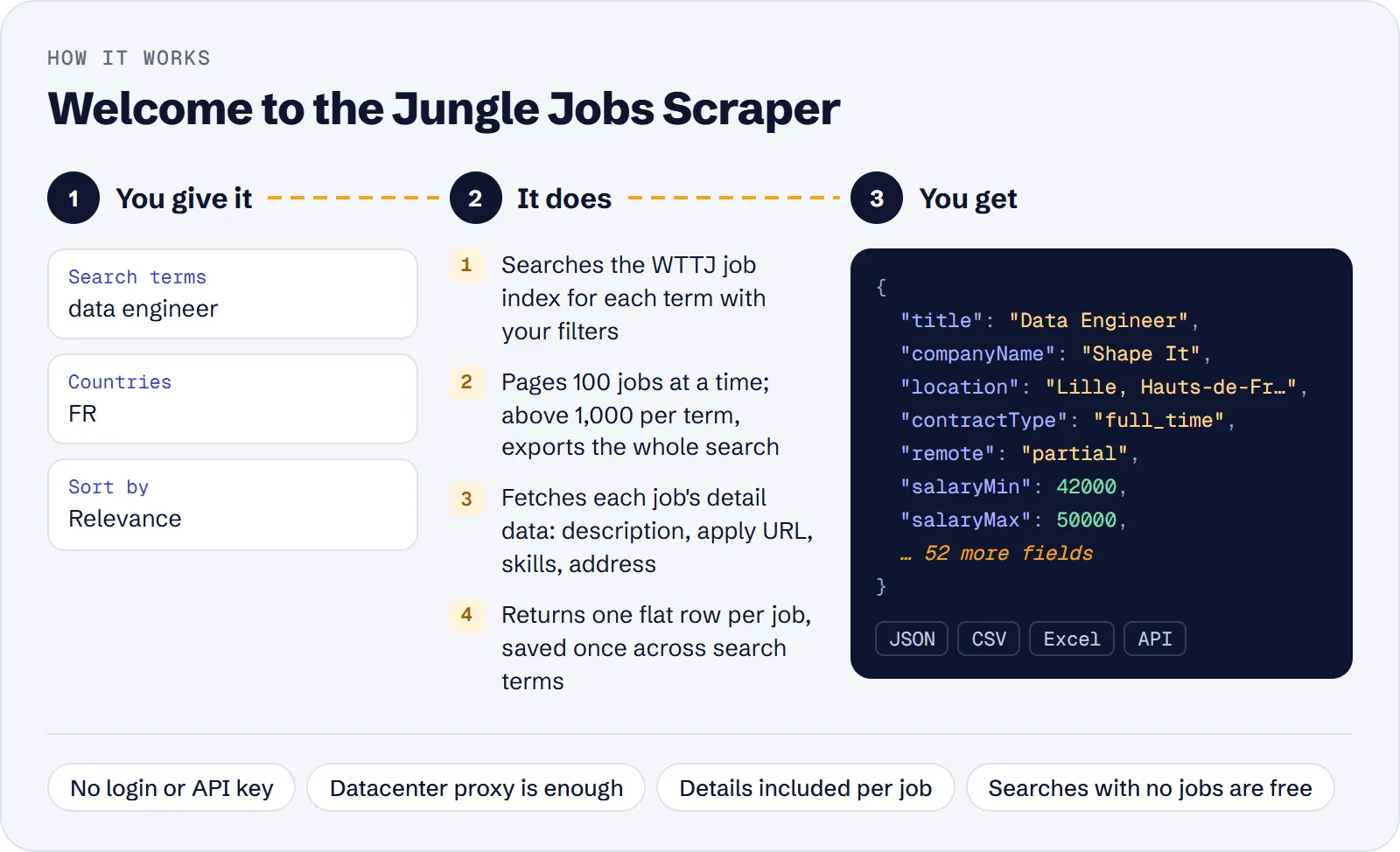
- Open the actor in Apify Console.
- Type your search terms, one per line (for example
data engineer), or leave the list empty to list all jobs that match the filters. - Pick filters: countries (
FR,US…), cities, remote policy, contract types, minimum yearly salary, published within N days. - Set Max jobs per search term and Max jobs in total (both 100 by default).
- Click Start and download the results as JSON, CSV, Excel or HTML, or read them through the API.
No login, account or API key for Welcome to the Jungle is needed.
How much does it cost to scrape Welcome to the Jungle?
Price per event by Apify plan:
| Event | Free | Bronze | Silver | Gold and above |
|---|---|---|---|---|
| Job listing with full details | $0.90 per 1,000 | $0.81 per 1,000 | $0.72 per 1,000 | $0.63 per 1,000 |
| Actor start | $0.00005 | $0.00005 | $0.00005 | $0.00005 |
A test run with the API example input below returned 100 rows in 24 s.
You pay per job row saved to the dataset. The full description, apply URL, skills and address are included in that price — there is no separate event for details, and turning details off does not change the price. Searches that find no jobs are not charged. A run also has the small Apify actor-start event (one per GB of memory; the default 256 MB run is one event).
| Scenario | Events | Cost on the Free plan |
|---|---|---|
| Default run: 100 data engineer jobs in France | 100 jobs + 1 start | about $0.09 |
| Salary benchmark: 1,000 product manager jobs in the US | 1,000 jobs + 1 start | about $0.90 |
| Company monitor: 5,000 open jobs of several companies | 5,000 jobs + 1 start | about $4.50 |
| Daily remote-jobs feed: 200 jobs a day for 30 days | 6,000 jobs + 30 starts | about $5.40 |
Input
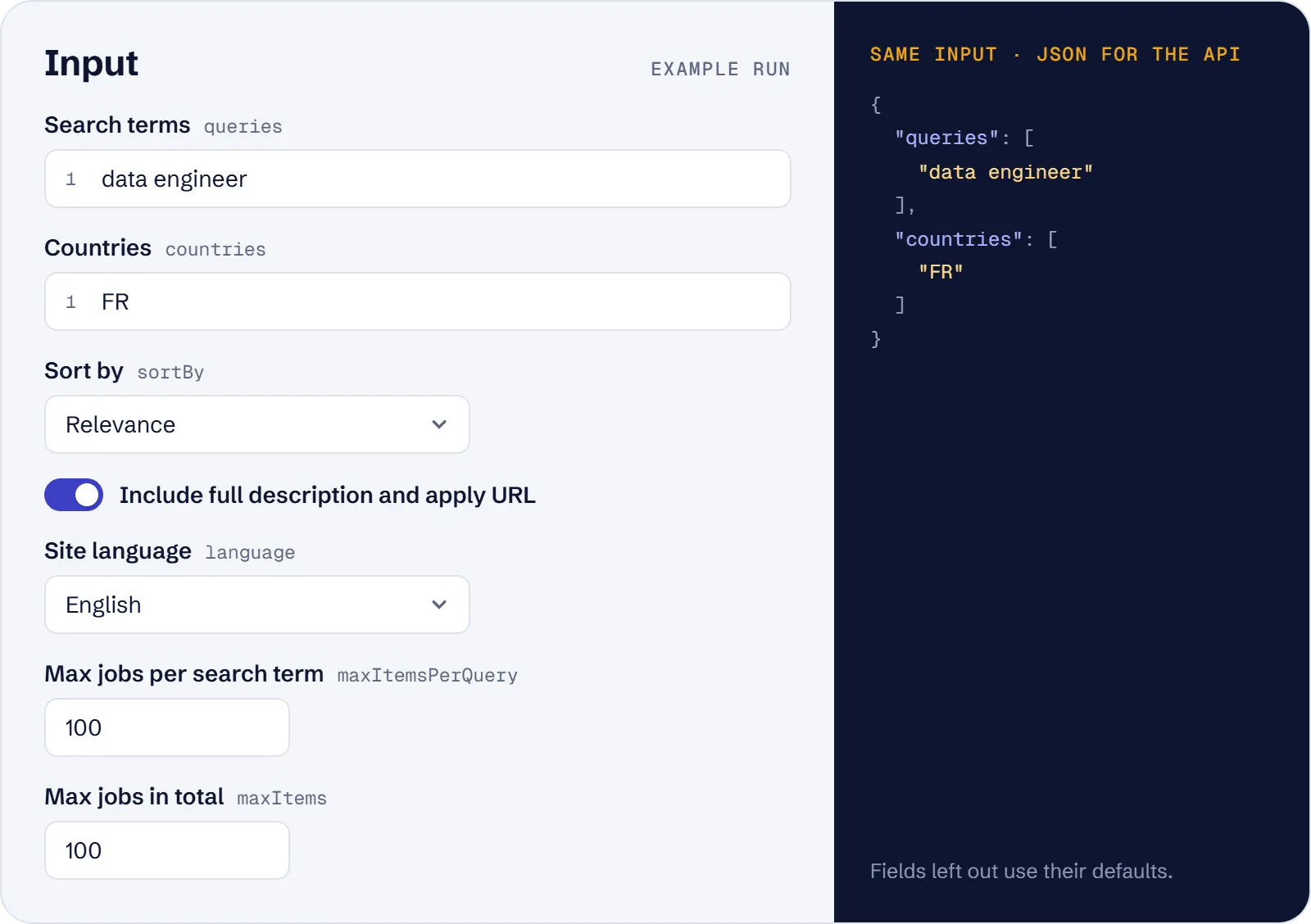
All fields are optional. {} returns the 100 most relevant jobs worldwide with details.
| Field | What it does |
|---|---|
queries | Search terms, each one a separate search with all filters |
countries | ISO two-letter office country codes, e.g. FR, GB, DE |
cities | English city names as WTTJ writes them, e.g. Paris, Munich |
aroundLatLng + radiusKm | Radius search around "lat,lng" (25 km when no radius is set) |
remote | fulltime, partial, punctual, no, unknown |
contractTypes | full_time, internship, temporary, freelance, apprenticeship, part_time, vie, graduate_program, other, volunteer |
minSalary | Minimum published yearly salary in the job's currency |
maxExperienceYears | Maximum required years of experience |
jobLanguages | Language the posting is written in: en, fr, de, es, it, pt, nl, cs |
companySlugs | Company slugs or company page URLs, e.g. thales |
publishedWithinDays | Only jobs published in the last N days (1–365) |
sortBy | relevance (default) or date (newest first) |
includeDetails | Full description, apply URL, ATS, skills, address (default on) |
language | Site version en, fr, es, cs: job URL path and label language |
maxItemsPerQuery / maxItems | Caps per search term and per run (100 each by default) |
Example — hybrid or full-remote data jobs in France paying at least €50,000, published in the last week:
What data can you extract from Welcome to the Jungle?
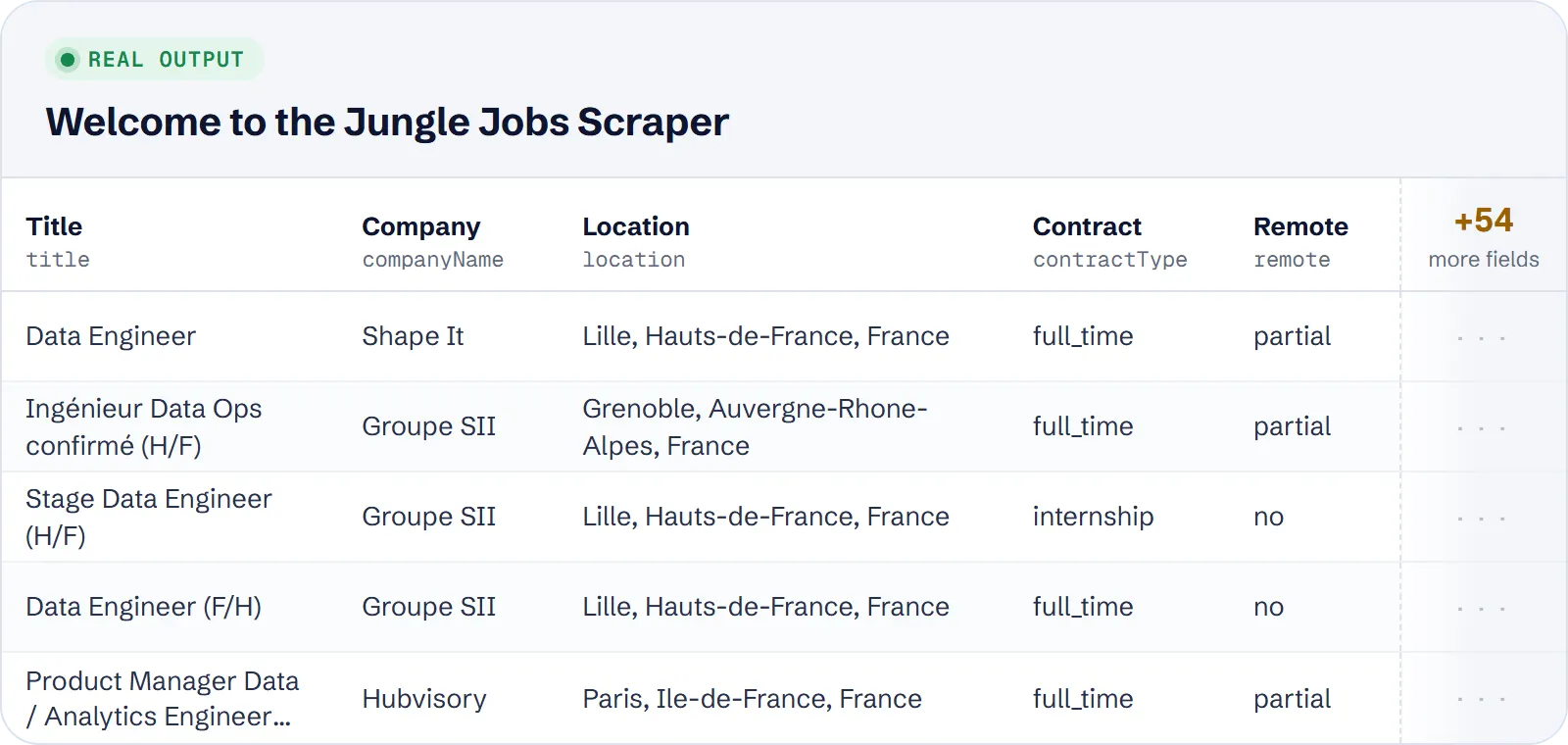
Each row has 59 flat fields. The main ones:
| Field | Meaning |
|---|---|
title, url, id | Job title, WTTJ job page, job id |
query, position | The search term that found the job and its rank in that search |
companyName, companySize, companyFoundedYear, companyLogoUrl, sectors | Company data |
salaryMin, salaryMax, salaryCurrency, salaryPeriod, salaryYearlyMin | Numeric salary range; salaryYearlyMin is WTTJ's yearly-normalised minimum |
remote, contractType, experienceMinYears, educationLevel | Work conditions |
location, city, region, country, latitude, longitude, locations | First office and all office locations |
description, summary, keyMissions, profile, recruitmentProcess | Job texts |
applyUrl, ats, skills, address, postalCode | Detail fields (when details are on) |
benefits, category, subCategory, profession, language, publishedAt | Benefits, job category and posting date |
A real row (shortened):
Use cases
- Recruiting and sourcing: track which companies hire data engineers in France and how they pay.
- Daily job feed: schedule a run with
remote: ["fulltime"],sortBy: "date"andpublishedWithinDays: 1to collect today's full-remote jobs. - Salary benchmarking: pull product manager jobs in the US with
minSalary: 100000and comparesalaryMin/salaryMaxper company. - Company hiring monitor: list all open jobs of
thalesandlorealwithcompanySlugs. - Juniors and interns: internships and apprenticeships within 20 km of Lyon that ask for at most one year of experience.
Limitations
- Only about a third of WTTJ jobs publish a salary, so
salaryMin,salaryMaxandsalaryCurrencyare often empty. SettingminSalaryexcludes jobs without a salary. remoteisunknown(not specified) on many jobs.- Internship salaries are often monthly: compare with
salaryPeriodorsalaryYearlyMin. - A country filter matches any office of a job, so the first office (
city,country) can be in another country;locationslists all offices. applyUrlisnullwhen the job is applied for on WTTJ itself;companyDescriptionandrecruitmentProcessare rarely filled by the source.- Sorting by date or relevance applies to the first 1,000 jobs of each search term. Above 1,000 per term the actor exports the whole search, and the order is not guaranteed.
- Detail requests take about 1–3 seconds each, so 100 jobs with details take about a minute. Without details a run takes seconds.
- If a job's detail request fails, the row is still saved with the listing fields and
detailsFetched: false.
Tips and troubleshooting
- More results: raise Max jobs per search term and Max jobs in total; above 1,000 per term the full export starts automatically.
- Only new jobs: use
sortBy: "date"withpublishedWithinDays: 1on a daily schedule. - 0 results for a city? Use the English name (
Munich, notMünchen), or usearoundLatLngandradiusKm. The log warns which search term and filters returned nothing. - Radius search:
radiusKmneedsaroundLatLng; country codes must be two letters (FR, notFrance). Wrong values stop the run before any request with a message naming the field. - Faster runs: turn off
includeDetailswhen you need only listing fields such as salary, remote policy and company. - Proxy: the default Apify datacenter proxy works; residential proxy is not needed.
API, MCP and integrations
Run the actor from your code with the same JSON input as in Console. Your API token is in Console → Settings → API & Integrations.
Python (pip install apify-client):
Node.js (npm install apify-client):
HTTP — one request runs the actor and returns the results (runs up to 5 minutes; longer ones: run asynchronously):
AI agents (MCP). Add the actor as a tool of the Apify MCP server. Claude Code:
Claude Desktop, Cursor or VS Code: {"mcpServers": {"apify": {"url": "https://mcp.apify.com?tools=genial_candlestand/welcome-to-the-jungle-jobs-scraper"}}}. Then ask, for example:
- "Find remote data engineer jobs in France posted in the last 7 days, with salary ranges when listed"
- "List all open Welcome to the Jungle jobs at Thales with salary, contract type and apply URL"
- "Get English-language product manager jobs in Paris with hybrid or full remote policy"
Integrations. Run it on a schedule with Apify Schedules and send the results to Google Sheets, Slack, Zapier, Make, n8n or your webhook — see Apify integrations.
FAQ
Is it legal to scrape Welcome to the Jungle?
The actor reads only public job listings that anyone can see on welcometothejungle.com, without logging in. You are responsible for how you use the data, including data-protection and the site's terms in your country.
Do I need a Welcome to the Jungle account?
No. The actor needs no login, cookies or API key.
How do I get only English-language jobs in France?
Set countries: ["FR"] and jobLanguages: ["en"]. The language field only changes the site version used for URLs and labels; it does not filter jobs.
Can I export more than 1,000 jobs per search?
Yes. Set maxItemsPerQuery above 1,000 and the actor switches to a full export of that search. Jobs found by several search terms are saved once.
How is it different from other Welcome to the Jungle actors?
The full description, apply URL, skills and address are included in one per-job price ($0.90 per 1,000 jobs on the Free plan, against $2.99 per 1,000 for the most used WTTJ actor). Salary comes as numeric fields with currency and period plus a yearly-normalised minimum, and every row records the search term and its rank.
Also useful
- Wellfound Jobs Scraper — add startup jobs from Wellfound with salary range, equity and company stage
- Google Jobs Scraper — collect the same roles from Google Jobs with parsed salary and all apply links
- SEEK Job Scraper — extend your job feed to Australia and New Zealand with SEEK listings and salaries
- Google Trends Scraper — check search interest in job titles or skills by country over time


