

Atlassian Marketplace Vendor Leads Scraper
DeprecatedPricing
from $6.00 / 1,000 leads
Atlassian Marketplace Vendor Leads Scraper
DeprecatedScrape ISV companies from the Atlassian Marketplace. Get vendor name, website, contact email, app name, tagline, and category for Jira, Confluence, Trello, and Bitbucket plugin developers. Perfect for B2B sales targeting the 5,000+ software vendors in the Atlassian ecosystem.
Pricing
from $6.00 / 1,000 leads
Rating
0.0
(0)
Developer

GoCreative AI
Maintained by CommunityActor stats
0
Bookmarked
2
Total users
1
Monthly active users
12 days ago
Last modified
Categories
Share
📊 Example output (real run)
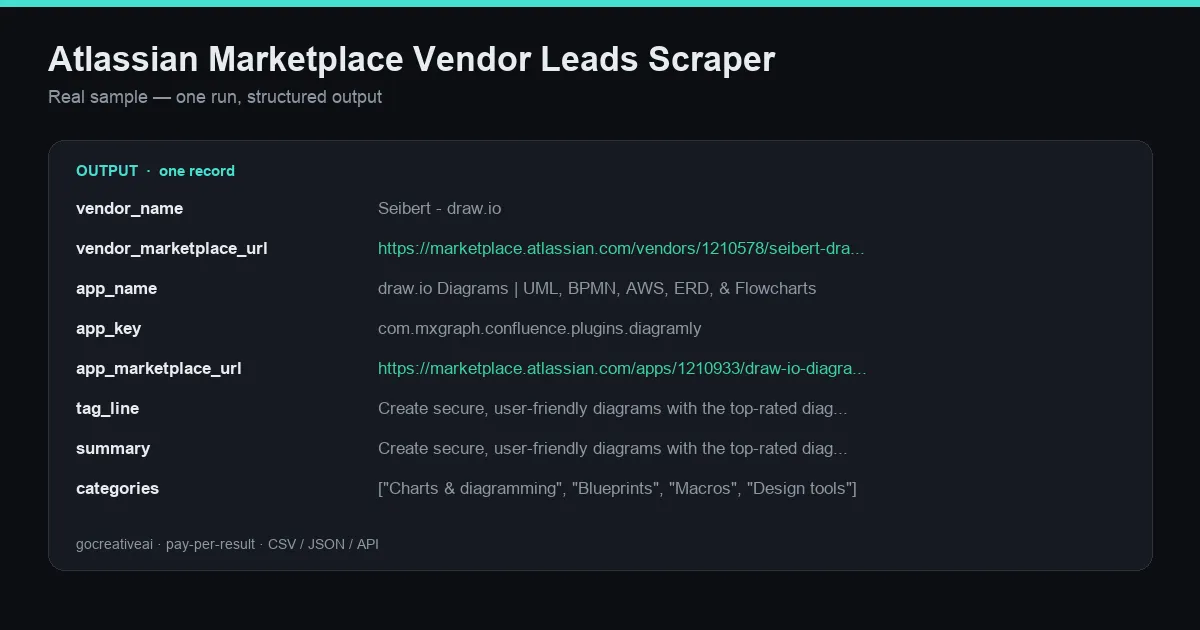
A real record from a live run — clean structured data, exported as CSV / JSON / Excel or via API.
Scrape ISV companies from the Atlassian Marketplace. Get vendor name, website, contact email, app name, tagline, and category for Jira, Confluence, Trello, and Bitbucket plugin developers. Perfect for B2B sales targeting the 5,000+ software vendors in the Atlassian ecosystem.
No API key, no signup, no subscription — pay only for what you scrape. Clean, structured output ready for CSV, JSON, Excel, or direct API export into your own pipeline.
What this scraper does
Scrape ISV companies from the Atlassian Marketplace. Get vendor name, website, contact email, app name, tagline, and category for Jira, Confluence, Trello, and Bitbucket plugin developers. Perfect for B2B sales targeting the 5,000+ software vendors in the Atlassian ecosystem.
Every run pulls fresh data straight from the source and pushes clean, typed records to the dataset — ready for your CRM, spreadsheet, AI agent, or data pipeline.
Use cases
- B2B lead generation — build targeted prospect lists with verified, structured data
- Sales prospecting — find companies and contacts that match your ICP
- Market research & competitive intelligence — track an industry or niche in structured form
- AI agents & automation — feed agents clean external data without scraping infra
- Data enrichment — append fresh fields to your existing lists
Input
| Field | Description |
|---|---|
hosting | Filter apps by hosting type. Use 'cloud' for Atlassian Cloud apps, 'server' for Server/Data Center. |
category | Optional: filter by a specific Atlassian Marketplace category name (e.g. 'Project management', 'Reporting', 'Developer tools'). Leave blank |
textFilter | Optional: keyword to search across app names and descriptions (e.g. 'CRM', 'time tracking', 'automation'). |
cost | Filter by pricing model. Leave blank for all apps. |
maxResults | Maximum number of unique vendor records to return. Each vendor is de-duplicated so you get one row per company. |
Output
Every result is a clean structured record. Export the full dataset as CSV, JSON, or Excel from the Apify console, or pull it via the Apify API straight into your own tools.
Why use this actor
- Scrape atlassian marketplace vendor leads — fast, structured, reliable.
- Atlassian marketplace vendor leads data export (csv, json, excel) — fast, structured, reliable.
- Atlassian marketplace vendor leads api alternative — no key required — fast, structured, reliable.
- Automated atlassian marketplace vendor leads monitoring on a schedule — fast, structured, reliable.
- Structured atlassian marketplace vendor leads records for ai agents and pipelines — fast, structured, reliable.
How it works
This actor pulls data directly from the source, structures it into clean rows, and pushes each result to the dataset. It runs on Apify's infrastructure — reliable, schedulable, and pay-per-result so you only pay for data you actually get.
Pricing
Pay-per-result via the Apify Store. No monthly subscription, no minimums — run it once or schedule it daily; you're only charged for the results returned.
FAQ
Do I need an API key or account? No. Just provide your input and run it.
Can I schedule it to run automatically? Yes — use Apify Schedules to run it hourly, daily, or weekly and get fresh data on autopilot.
What formats can I export? CSV, JSON, Excel, or via the Apify API.
Can I integrate it into my own app? Yes — call it via the Apify API and pull results directly into your pipeline.
Is the data accurate and fresh? Data is pulled live from the source on each run, so it reflects what's available at run time.


