

FINRA Broker-Dealer Scraper — Financial Firm Leads
Pricing
from $6.40 / 1,000 leads
FINRA Broker-Dealer Scraper — Financial Firm Leads
Scrapes FINRA BrokerCheck for registered broker-dealer and investment advisor firm leads. Returns CRD number, SEC registration, address, branch count, and active status — perfect for fintech sales, compliance tools, and financial services B2B outreach.
Pricing
from $6.40 / 1,000 leads
Rating
0.0
(0)
Developer

GoCreative AI
Maintained by CommunityActor stats
0
Bookmarked
3
Total users
1
Monthly active users
2 months ago
Last modified
Categories
Share
FINRA Broker-Dealer & Investment Advisor Scraper — Keyless Financial-Firm Leads, Pay Per Result
📊 Example output (real run)
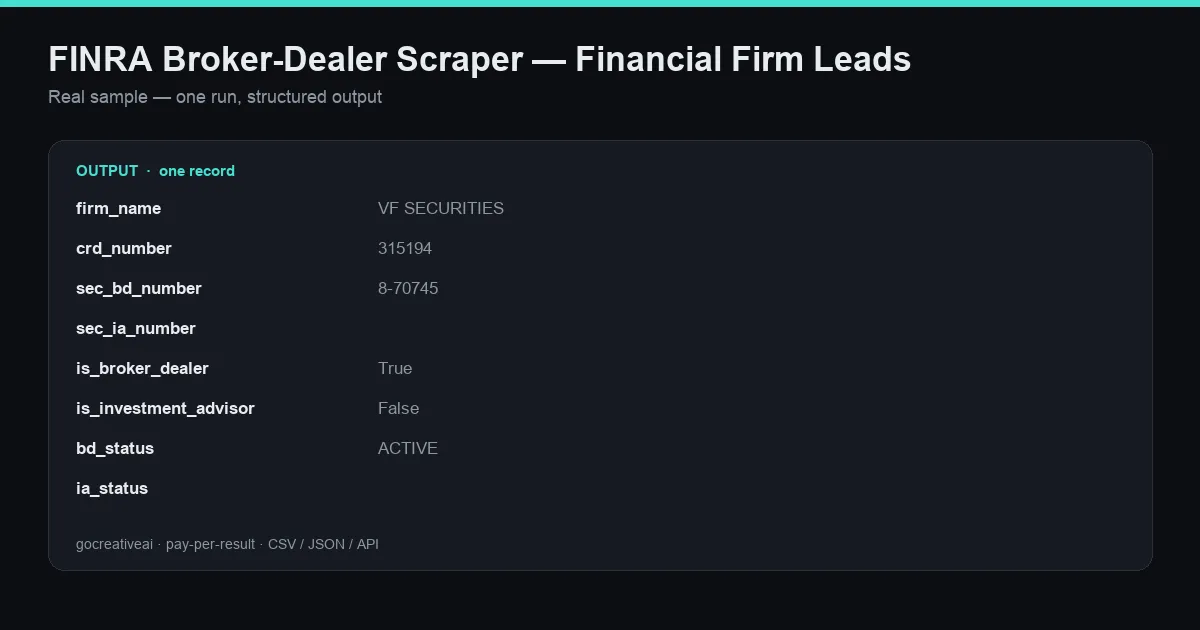
A real record from a live run — clean structured data, exported as CSV / JSON / Excel or via API.
Pull registered broker-dealer and investment-advisor firms straight from FINRA BrokerCheck — the official regulator source for every US securities firm. Search by keyword, filter to active firms, and get clean structured records with CRD number, SEC registration, address, phone, branch count, and disclosure flags.
Keyless. No signup. No sales call. Pay per result. Perfect for fintech sales, RegTech, compliance tooling, and financial-services B2B outreach — no seat license, no credit plan, no gated pages.
Where this fits: this is primary-source regulatory sales intent — a data shape the seat-based lead DBs (Apollo, ZoomInfo, Lusha) don't sell per-call. Every firm here is a regulated, verifiable entity with a CRD number you can cross-reference, not a scraped guess.
What you get
Every record returned by a live run (fields verified against real output):
| Field | Description |
|---|---|
firm_name | Registered firm name |
crd_number | FINRA Central Registration Depository number |
sec_bd_number | SEC broker-dealer registration number |
sec_ia_number | SEC investment-advisor registration number |
is_broker_dealer | Registered as a broker-dealer (bool) |
is_investment_advisor | Registered as an investment advisor (bool) |
bd_status / ia_status / overall_status | Registration status (e.g. ACTIVE) |
branch_count | Number of registered branch offices |
has_disclosures | Whether the firm has regulatory disclosures (bool) |
other_names | DBAs and alternate names |
street / city / state / zip / country | Firm address |
phone | Firm phone number |
profile_url | Direct link to the BrokerCheck firm summary |
search_query | The keyword that surfaced the firm |
Inputs
| Input | Type | Default | Notes |
|---|---|---|---|
queries | array | ["securities","capital","wealth","asset management"] | Search keywords |
maxResults | integer | 500 | Cap on firms returned |
activeOnly | boolean | true | Return only actively registered firms |
stateFilter | string | — | Optional US state filter |
Example output
Example use cases
- Fintech & RegTech sales — build targeted lists of active broker-dealers and RIAs by keyword and state.
- Compliance & due diligence — resolve a firm to its CRD/SEC numbers and check disclosure flags before onboarding a partner.
- Market mapping — size a competitive landscape of registered financial firms in a niche.
- Data enrichment — append CRD number, registration status, and branch footprint to an existing prospect list.
Why this over the incumbents
| This actor | Apollo / ZoomInfo / Lusha | |
|---|---|---|
| Access | Keyless, no signup | Seat license + credit caps |
| Pricing | Pay per result, no minimum | $49-99+/seat/mo |
| Source | Official FINRA BrokerCheck (regulator) | Aggregated / scraped web |
| Agent-native | Yes — callable from AI agents | No |
| Compliance signal | CRD + SEC numbers + disclosures | Not included |
Output formats
Export to CSV, JSON, or Excel, or stream through the Apify API into your CRM, compliance pipeline, or data warehouse. Agent-native and callable over MCP + x402 through the GoCreative gateway.
Tips
- Keep
activeOnly=true(default) to drop de-registered firms from outreach lists. - Add narrow, high-intent keywords to
queries(e.g."crypto","municipal","private wealth") to target a specific segment. - Pair with the GoCreative Keyless Sanctions Screening API to pre-screen each firm's principals against OFAC before you engage.


