

Business Email Lookup — Email Finder by Name and Domain
Pricing
from $20.00 / 1,000 business email founds
Business Email Lookup — Email Finder by Name and Domain
Business email lookup and email finder: give a person's name plus their company domain and get the single most-likely public business email, with confidence and the address pattern used, plus an MX check on the domain. Find email by name; pay only for people resolved.
Pricing
from $20.00 / 1,000 business email founds
Rating
0.0
(0)
Developer

NexGenData
Maintained by CommunityActor stats
0
Bookmarked
128
Total users
4
Monthly active users
a day ago
Last modified
Categories
Share
Business Email Lookup — Find Email by Name and Domain
Business Email Lookup is a NexGenData tool on Apify that returns the most likely business email for a person, with confidence and an MX check from the company's own website and mail server.
Business email lookup: a name and a company domain in, the most likely work address out, with a confidence level that says how it was confirmed — and you pay only for confirmed rows.
An email finder for one job: find email by name and company domain — you know who to reach, it returns their most likely business address.
Give it a name and a company domain, get back the most likely public business email — inferred from the standard address patterns companies use, with the company domain checked for DNS MX records. You pay only for a person we resolve.
Output is a prospect list for your sales team, assembled from public web and business sources. Use it in line with applicable outreach and privacy law.
#> Company names and LinkedIn company URLs are accepted — "company": "Stripe" or a linkedin.com/company/... URL is resolved to the company's mail domain before the lookup (since 0.0.21). A name that cannot be resolved is skipped and not charged.
📊 Sample Output
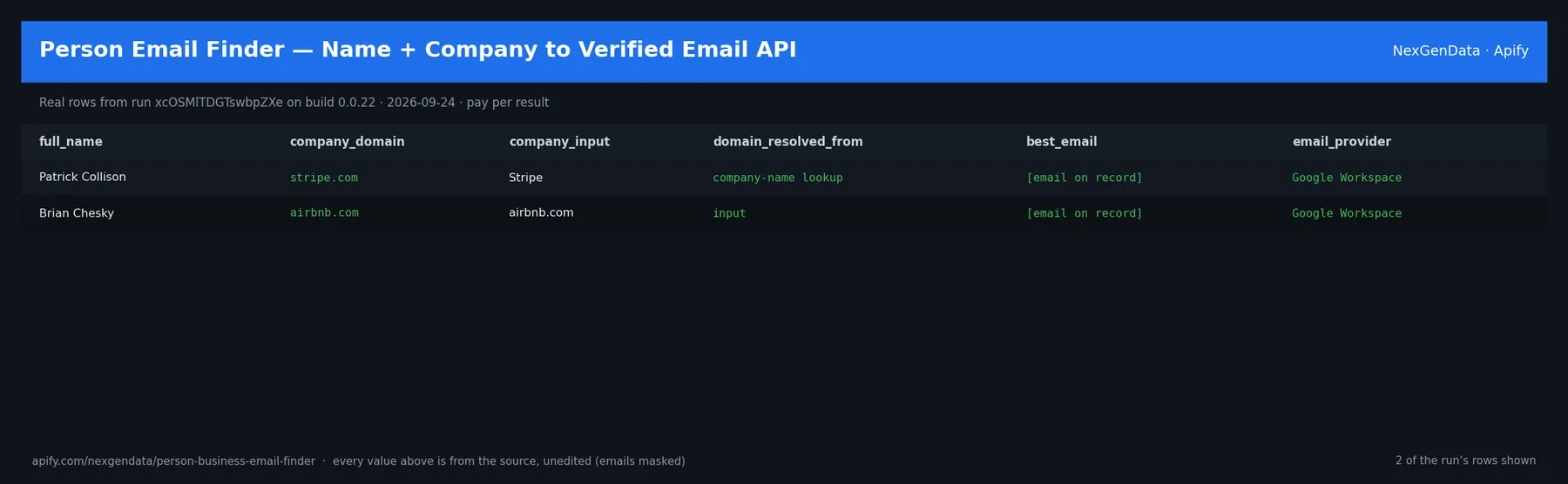
full_name | company_domain | company_input | domain_resolved_from | best_email | email_provider |
|---|---|---|---|---|---|
| Patrick Collison | stripe.com | Stripe | company-name lookup | [email on record] | Google Workspace |
| Brian Chesky | airbnb.com | airbnb.com | input | [email on record] | Google Workspace |
Real rows from run xcOSMlTDGTswbpZXe on build 0.0.22 (2026-09-24), unedited apart from masked emails/phones and shortened long text; fields the source does not publish are empty.
⚙️ Sample inputs
This is the Store example input — the same input Apify's automated check runs — so it is proven to return rows on the current build. Paste it into the input form, or send it through the API, CLI or a schedule:
🔧 Input reference
| Field | Type | Default | What it does |
|---|---|---|---|
people (required) | array | [{"fullName": "Patrick Collison", "company": "Stripe"}, {"f… | People to find business emails for. Each item is {"fullName": ..., "company": ...} where company can be a website domain (stripe.com), a company name (Stripe, Acme Inc) or a Linke… |
verify | boolean | true | When enabled (default), the company's mail server is also asked whether the exact mailbox exists (SMTP, port 25, when the platform allows it). The domain's mail records are always checked. |
notionConnector | string | Optional. Connect your Notion workspace and the resolved business emails are also written as a Notion page in the same run — the Actor never sees your Notion credentials. Authoriz… | |
notionParentId | string | Optional. The Notion page ID to create the page under. If blank, Notion creates a private page in your workspace. | |
supabaseConnector | string | Optional. Connect your own Supabase project and the results are also inserted into a table in the same run — the Actor never sees your Supabase credentials. Authorize a write-scop… | |
supabaseTable | string | "nexgendata_leads" | Target table in the public schema (created if missing, with id, a jsonb data column, and a scraped_at timestamp). Default: nexgendata_leads. |
supabaseProjectId | string | Your Supabase project reference (e.g. abcdefghijklmnop). Required unless your connector URL is already project-scoped. Find it in your project URL: supabase.com/dashboard/project/… | |
deliveryDedup | boolean | true | When on (default), records already delivered in a previous run are not delivered again to the same destination — so scheduled runs only push new items. Turn off to deliver every r… |
🧾 JSON sample record
One real record from run xcOSMlTDGTswbpZXe (emails/phones masked, long text shortened):
💰 Pricing
| Event | Price (USD) | When it is charged |
|---|---|---|
Actor Start (apify-actor-start) | $0.005 | Charged when the Actor starts running. Number of events charged depends on Actor memory (one event per GB, minimum one event). |
Business email found (result) | $0.02 | Charged per person with a resolved business email. |
Pay-per-event: you pay only for what the run delivers. A run that delivers nothing bills no result events (only the actor-start event, when the actor defines one). Example: a run that delivers 100 results costs 100 × $0.02 = $2.00 plus the start fee.
✅ Pay only for a confirmed result
Confidence, in plain words. Every row has a confidence of exactly one of: mailbox-confirmed — the company's mail server was asked over SMTP and accepted this exact mailbox, and it did not also accept a made-up mailbox (so it is not accept-all); only possible when the platform allows outbound port 25. pattern-confirmed — the company's address pattern (for example first.last) was found from a real address on the company's own website, matched to the person named next to it, and the domain accepts mail. domain-only — the domain accepts mail, but the pattern is a guess. Only mailbox-confirmed and pattern-confirmed rows are charged ($0.02 each). Domain-only rows are delivered free. If the company domain publishes no MX records, or the name/domain can't be used, that row is skipped — no row, no charge. If public DNS can't be reached at all, the run fails rather than finishing green and empty.
🔎 How it works
- The name is normalised (accents, titles, initials) and expanded into the 13 common business-email patterns (
first.last@,flast@,first@, …), ranked by real-world frequency. - The company domain is checked for DNS MX records on public DNS (3 attempts across the local, Cloudflare and Google resolvers). That tells us the domain can receive mail and which provider runs it (Google Workspace, Microsoft 365, Proofpoint, …).
- The company's own website (home, contact, about, team, staff and press pages) is read for real addresses next to a person's name to learn its pattern. If found, the pattern is applied to your person →
pattern-confirmed. - With
verifyon, the company's mail server is asked whether that exact mailbox exists (SMTP, port 25), and a made-up mailbox is tested too to rule out accept-all servers. A clear yes →mailbox-confirmed. If port 25 is closed on the platform, this step is skipped and the run status says so. - Otherwise the row is
domain-only(the domain accepts mail; the pattern is a guess) and is delivered free. No list purchase, no private data.
📊 What you get
Clean JSON, one record per resolved person:
full_name— Full name as suppliedcompany_domain— Normalised company domainbest_email— Highest-ranked inferred addresscandidate_emails— All patterns, rankeddomain_accepts_mail— Domain publishes MX records (not a mailbox check)pattern/pattern_evidence_url— the address pattern used, and the company web page it was found on (pattern-confirmed rows)mailbox_check— accepted / rejected / accept-all / not checked (and why)charged— true for mailbox-confirmed and pattern-confirmed rowsemail_provider— Mail provider detected from MX (e.g. Google Workspace)confidence— mailbox-confirmed / pattern-confirmed / domain-onlyis_free_provider— Domain is a consumer mail providermx_records— Top MX records observeddata_source— "Business email pattern inference + public DNS MX"as_of_timestamp— When the lookup ran
Pricing: $0.005 per Actor start (per GB of memory) plus $0.020 per result delivered (Pay-Per-Event) — about 50 confirmed people per $1. Only mailbox-confirmed and pattern-confirmed rows are charged; domain-only rows are free; skipped and failed lookups are never charged.
🤖 Use with AI agents
Point Claude, the OpenAI Agents SDK, an n8n flow or any MCP-aware client at it and run prospecting on demand.
Agentic payments (x402): Supports agentic payment via x402 — agents can call this actor with USDC, no API key required.
Run it on a schedule
This is a lookup, not a feed: the same name and domain give the same answer, so a schedule only makes sense on a list that keeps growing. A weekly run over a lead list that your team or another actor adds to works well, and between runs the only real change is new people on the list. If you deliver to Notion or Supabase, keep deliveryDedup on so people already sent in an earlier run are not sent again. Send each run's results onward with a webhook, Google Sheets, Zapier, Make or the Apify API.
Video guides from Apify: Schedule your Actor · Integrations
FAQ
Why use this instead of the official company website or a manual DNS check?
There is no official directory of work emails. You could guess the common address patterns and look up the domain's mail records yourself. This actor does that in bulk: it expands each name into 13 common business-email patterns ranked by how often companies use them, checks the domain's MX records on three public DNS resolvers, and returns the best guess with a confidence level and the mail provider. You pay only for people it resolves.
What does a typical run cost?
You pay per result, not for run time: $0.02 for each confirmed row in the results (domain-only rows are free), plus $0.005 per run start (charged per GB of run memory, minimum one). A run that returns one row, like the Store example, costs about $0.03. Live prices are always shown in the Pricing tab.
Does the actor check the mailbox itself?
Only for rows marked mailbox-confirmed: the company's mail server accepted that exact address and did not accept a made-up one. pattern-confirmed means the company's pattern was seen on its own website; domain-only means only that the domain accepts mail (free). For a large send, a mailbox-level check is still wise for anything below mailbox-confirmed.
Can I find someone's email with just their name and company name?
Yes. The company value can be a domain such as stripe.com, a company name such as Stripe, or a LinkedIn company URL. Names and URLs are resolved to the company's mail domain first. If the company cannot be resolved, or the domain has no MX records, that person is skipped and not charged.
What do I get back for each person?
The best email, every candidate address with its pattern and rank, a confidence level (mailbox-confirmed, pattern-confirmed or domain-only), the detected mail provider (such as Google Workspace or Microsoft 365), whether the domain is a free consumer provider, and the MX records found.
Related actors
- Email Verification API — Bulk Syntax, MX & Disposable Checks — check the found addresses before you send
- Company Email Finder — B2B Contact Discovery API — find contacts when you only know the company
- Person Enrichment API — Name & Company to Public Profile — add public profile details for the same name and company
- B2B Leads Finder — Prospects by Title, Industry & Location API — build the list of names to look up
- Leads to Notion CRM — push the finished leads into a Notion CRM


