
ASO & SEO Keyword Analyzer - App Store and Website Keywords
Pricing
from $1.00 / 1,000 keyword analyzeds
ASO & SEO Keyword Analyzer - App Store and Website Keywords
List the keywords any app or web page uses, with search popularity, App Store difficulty, your rank and new trending keyword ideas. For ASO and SEO. No login. $1 per 1,000 keywords.
Pricing
from $1.00 / 1,000 keyword analyzeds
Rating
0.0
(0)
Developer

Gosoul Data
Maintained by CommunityActor stats
0
Bookmarked
2
Total users
1
Monthly active users
2 days ago
Last modified
Categories
Features
Share
What does ASO & SEO Keyword Analyzer do?
Give it an app (App Store) or a web page, and it tells you:
- 🔤 Which keywords it uses: words and phrases from the title, description, meta tags and headings, with how many times each appears.
- 📈 How popular each keyword is right now: a score from 0 to 100, measured from live App Store and Google search suggestions.
- 🥊 How hard it is to rank (App Store): a difficulty score from 0 to 100 based on the top competing apps.
- 🏆 Where your app ranks for each keyword in App Store search, and the top 3 apps.
- 💡 The best new keywords to use: popular searches related to your keywords that you don't use yet.
- ✅ What to do with each keyword: keep it, use a longer variant, add it, or replace it.
Works for your own app or site and for your competitors', in any country. No account, no API key, no paid ASO tool.
What data do you get for each keyword?
| 🔤 Keyword | 📈 Popularity /100 | 🥊 Difficulty /100 (App Store) |
| 🏆 Your App Store rank | 📱 Top 3 apps for the keyword | 🔁 Times used in your content |
| 📍 Where it appears (title, description, headings...) | 💡 New idea or already used | ⭐ Opportunity score |
| ✅ Recommendation | 🔎 Related searches | 🌍 Country |
How do I find the best keywords for my app or website?
- Apps: type your app name (
notion), its App Store ID (1232780281) or paste its App Store link. Add competitors too. - Web pages: paste the URLs of your pages or your competitors' pages.
- Keywords to check (optional): add your own ideas and choose App Store or Google.
- Choose the country (
us,gb,fr,de...) and how many keywords and new ideas you want. - Click Start. Sort the results by opportunity to see your best keywords first.
⬇️ Input example
⬆️ Output example
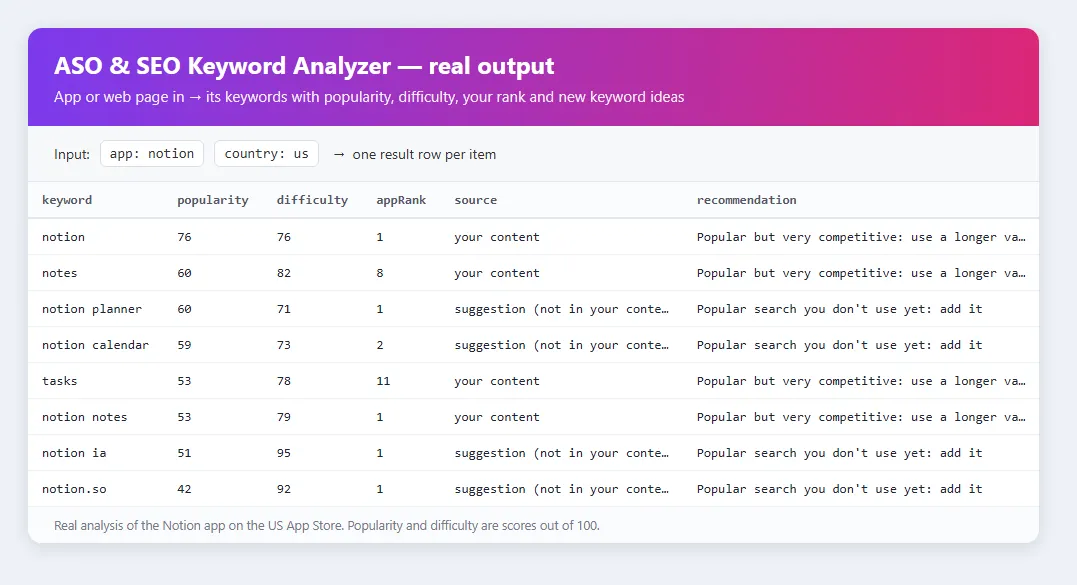
Real result for the Notion app (US App Store):
A new keyword idea found for the same app:
How are popularity and difficulty calculated?
- Popularity (0-100): the Actor types each keyword letter by letter in the App Store (or Google) search box, like a real user. The fewer letters needed before the keyword is suggested, the more people search for it.
100= suggested after one or two letters,0= never suggested. - Difficulty (0-100, App Store): based on the number of ratings of the top 10 apps for the keyword. Apps with millions of ratings = very hard to beat.
- Opportunity: popularity reduced by difficulty. High opportunity = searched a lot and still possible to rank.
These are estimates from live public data, not Apple's private numbers, but they are reliable for comparing keywords with each other.
What can you do with these keywords?
- ASO (App Store Optimization): choose the best words for your app title, subtitle and keyword field.
- SEO: check that your page targets keywords people really search, and find missing ones.
- Competitor research: see which keywords your competitors use and where they rank.
- Content and ads: find trending search phrases for blog posts, landing pages and Apple Search Ads.
- Agencies: quick keyword audits for clients' apps and sites.
How much does it cost?
$1 per 1,000 keywords analyzed. Example: 3 apps × 30 keywords = 90 keywords = $0.09. Errors (app not found, page blocked) are free.
Integrations
- Google Sheets, Slack, email, Make, Zapier, n8n.
- Schedules: run every week to follow your keyword ranks over time.
- API, Python and JavaScript SDKs, webhooks.
- AI agents: use it from Claude, ChatGPT or Cursor through the Apify MCP server.
❓ FAQ
Do I need an App Store Connect account or an API key?
No. The Actor uses public App Store and Google data. No login and no paid ASO tool are needed.
Can I analyze my competitors' apps?
Yes. Add any app name, ID or link. You see its keywords, their popularity and where it ranks.
Which countries are supported?
All App Store countries with a two-letter code (us, gb, fr, de, ca, au, es, it, br, in, jp...). Keywords and popularity are measured in the country you choose.
Does it support Google Play?
The App Store part works with the Apple App Store. For Android, you can check keyword ideas with the Keywords to check field on Google.
Why is my app's rank empty for some keywords?
Your app is not in the top 200 App Store results for that keyword in that country.
Why are some keyword ideas not related to my product?
Ideas come from what people really search. Some may be about other topics with the same words: just ignore them.
Can I track my keyword rankings every week?
Yes. Create an Apify schedule with the same input and send the results to Google Sheets to see your ranks change over time.
Some websites return an error. Why?
A few sites block automated visits. The page is skipped and not charged.
Other Actors you may like
- Keyword Suggestions Research: keyword ideas from Google, YouTube, Amazon and Bing.
- App Store Reviews Scraper: reviews and ratings of iPhone apps.
- Google Play Reviews Scraper: reviews and ratings of Android apps.
- SEO Audit & Broken Link Checker: find broken links and SEO issues.
- AI Readiness & GEO Audit: is a website visible in ChatGPT and AI search?
Support
A keyword or a country does not work as expected? Open an issue in the Issues tab.


