

Google Autocomplete Scraper - Long-Tail Keywords & Questions
Pricing
from $0.70 / 1,000 results
Google Autocomplete Scraper - Long-Tail Keywords & Questions
Google Autocomplete scraper for keyword research: expand seed keywords into long-tail suggestions, question keywords, 'vs' comparisons, A-Z and 0-9 ideas for any country and language. Deduplicated, tagged by modifier and position. No API key.
Pricing
from $0.70 / 1,000 results
Rating
0.0
(0)
Developer

Group Oject
Maintained by CommunityActor stats
0
Bookmarked
2
Total users
0
Monthly active users
11 days ago
Last modified
Categories
Security
Limited permissionsShare
Google Autocomplete Scraper - Long-Tail Keywords & Question Ideas
Scrape Google Autocomplete suggestions in bulk and turn a few seed keywords into hundreds of long-tail keywords, questions, comparisons, and modifiers that people actually type into Google. No API key, no proxy needed for normal volumes. $1.00 per 1,000 suggestions.
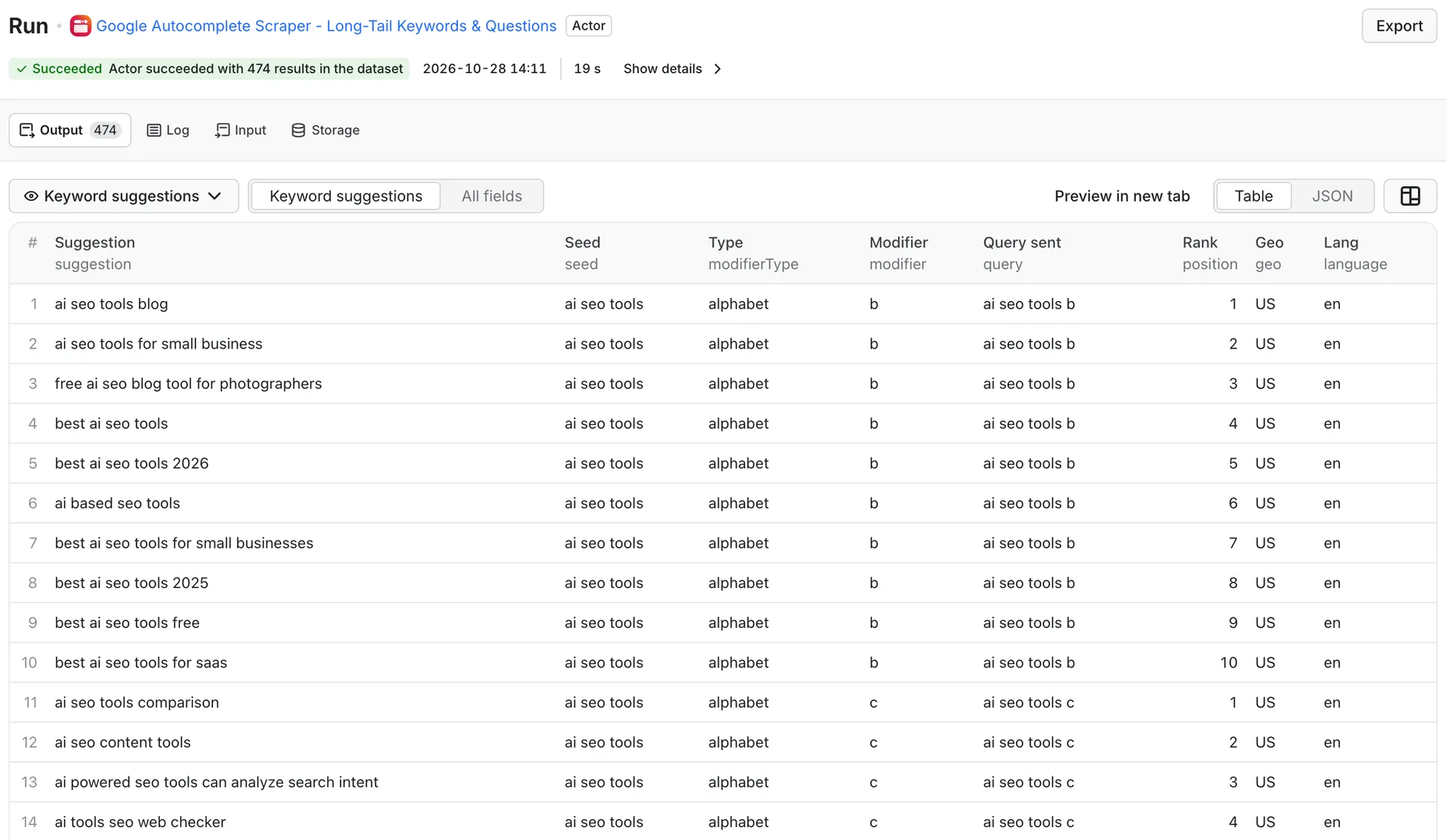
Real output from a default run of Google Autocomplete Scraper in Apify Console.
What can this Google Autocomplete scraper do?
- Expand seed keywords into Google search suggestions for any country (
geo) and language. - Five expansion strategies you can mix:
questions- how, what, why, when, where, who, which, can, is, does, should...prepositions- for, with, without, near, like, to, app, tool, software, alternative, examples, tutorialalphabet- "seed a" ... "seed z" (alphabet soup)numbers- "seed 0" ... "seed 9" (models, years, lists)comparisons- vs, or, versus, compared to (competitor discovery)
- Deduplicate across the whole run so every suggestion appears once.
- Tag every suggestion with its seed, the query that surfaced it, the modifier, and its position in the dropdown.
- Bulk input - paste seeds one per line or comma-separated.
- Ready-to-paste outputs - a flat
KEYWORDSlist andKEYWORDS_BY_TYPEgrouping in the key-value store.
What data can I extract?
One dataset row per suggestion:
| Field | Description |
|---|---|
seed | The seed keyword you entered |
query | The expanded query sent to Google Autocomplete |
suggestion | The autocomplete suggestion (your long-tail keyword) |
modifier | The modifier added to the seed, such as how or vs |
modifierType | seed, questions, prepositions, alphabet, numbers, or comparisons |
position | Position of the suggestion in Google's dropdown |
geo, language | Country and language used |
source, fetchedAt | Data source and timestamp |
The key-value store adds SUMMARY (queries sent, total and unique suggestions, top seeds), KEYWORDS, KEYWORDS_BY_TYPE, and ERRORS.
How much does it cost?
Pay-per-event: $0.001 per suggestion row ($1.00 per 1,000), plus a tiny Actor-start fee. Turn on dedupe (default) so you only pay once per unique keyword, and use maxSuggestionsPerQuery and fewer expansion strategies to control volume. Example: one seed with questions + comparisons usually produces well under 200 unique suggestions. Check the Pricing tab for current rates.
How to scrape Google Autocomplete keywords
- Enter one or more seed keywords.
- Pick expansion strategies (
questions,prepositions, andalphabetare on by default). - Set the country and language.
- Click Start and export results as CSV, Excel, JSON, or straight to Google Sheets.
Input example
Output example
Illustrative output shape.
Use cases
- Long-tail SEO keyword research - build topic clusters from real search phrasing.
- FAQ and content briefs - collect question keywords for H2s and FAQ sections.
- PPC - discover ad-group phrasings and negative keywords.
- Competitor discovery - "brand vs" and "brand alternative" suggestions show who buyers compare you with.
- Local SEO - "near" modifiers and country targeting reveal local intent.
- Ecommerce - product modifiers, sizes, and model numbers via
numbersandalphabet.
Integrations and API
Use the Apify API, schedules, webhooks, Make, Zapier, n8n, Google Sheets, or the Apify MCP server for AI agents.
FAQ
Do I need a Google API key? No. The default http mode uses Google's public suggest endpoint. A serpapi mode is available if you prefer your own SerpApi account.
Does it return search volume? No. Autocomplete shows what people type, not how often. Pair the output with a search-volume tool, or with the Google Trends Scraper to check direction of interest.
I'm getting rate limited. Lower maxConcurrency, raise requestDelayMs, or enable Apify Proxy.
Is it legal? Autocomplete suggestions are public. Use the data in line with applicable law and Google's terms.
Related Actors
- Google Trends Scraper - interest over time, rising queries, breakouts.
- Google AI Overview Tracker - see which of your keywords trigger AI Overviews and who gets cited.


