

Facebook Ads Library Scraper - Meta Ad Library, No Login
Pricing
from $2.10 / 1,000 results
Facebook Ads Library Scraper - Meta Ad Library, No Login
Facebook Ads Library scraper for competitor research: search the Meta Ad Library by keyword, page ID or URL across countries. Export ad copy, advertiser, Library ID, start/stop dates, CTA, landing domain and ad links. No login, cookies or Meta API token.
Pricing
from $2.10 / 1,000 results
Rating
0.0
(0)
Developer

Group Oject
Maintained by CommunityActor stats
1
Bookmarked
2
Total users
1
Monthly active users
11 hours ago
Last modified
Categories
Share
Search the public Meta Ad Library (Facebook Ads Library) by keyword, Facebook page ID, or a pasted Ad Library URL, and export every visible ad to JSON, CSV, or Excel. You get the ad copy, advertiser page, Library ID, start and stop dates, active status, landing domain, call-to-action button, and a direct link to the ad. No Facebook login, no cookies, no Meta API token.
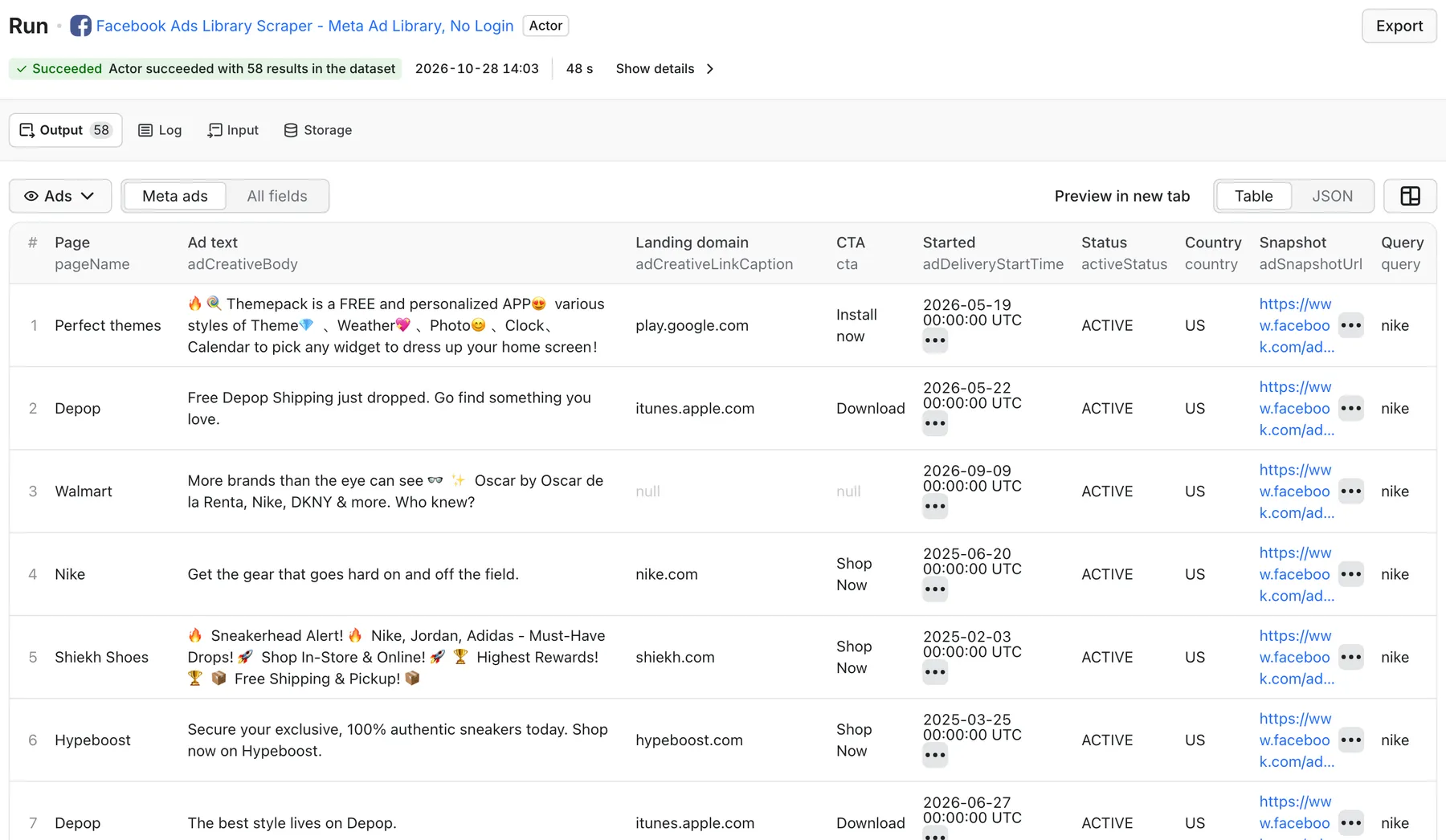
Real output from a default run of Facebook Ads Library Scraper in Apify Console.
What can this Facebook Ads Library scraper do?
- Keyword search across all advertisers - type
crm softwareorprotein powderand get ads from every page that mentions it, the same as the Ad Library search box. - Competitor ad tracking by page ID - pull the ads a specific Facebook page is running right now, or its inactive ads.
- Paste any Ad Library URL - set up filters in your browser (country, media, platform), copy the URL, and scrape exactly that view.
- Many countries in one run - run the same keywords against
US,GB,CA,AU,DEand up to 20 country codes. - Filter at the source - active / inactive / all ads, image or video ads, all ads or political and issue ads, sort by estimated impressions or relevancy.
- Bulk input - paste dozens of search terms one per line; duplicates are removed automatically.
- Deduplicated output - the same Library ID found by two keywords or two countries is saved once.
- Ready-made groupings - besides the dataset, the run saves
ADS_BY_PAGE(ads grouped by advertiser) and aSUMMARYwith the top pages by ad count.
What data can I extract from the Meta Ad Library?
| Field | Description |
|---|---|
adArchiveId | Meta Ad Library ID (unique per ad) |
adSnapshotUrl | Direct link: facebook.com/ads/library/?id=<ID> |
pageName | Advertiser (Facebook page) shown on the ad |
activeStatus | ACTIVE, INACTIVE, or UNKNOWN |
adCreativeBody | Primary ad text |
adCreativeLinkTitle | Headline under the creative, when shown |
adCreativeLinkDescription | Link description, when shown |
adCreativeLinkCaption | Landing domain, e.g. nike.com |
cta | Call-to-action button, e.g. Shop Now, Learn More, Sign Up |
adDeliveryStartTime | "Started running on" date (ISO) |
adDeliveryStopTime | "Stopped running on" date for inactive ads |
hasMultipleVersions | true when the ad has several creative versions |
hasEuTransparency | true when Meta shows an EU transparency panel |
publisherPlatforms | Platforms, only when Meta prints them as text (often empty) |
query, queryType, country, searchUrl | Which search produced the row |
rawText | Full visible text of the ad card, for your own parsing |
fetchedAt | Scrape timestamp |
The scraper reads what the public Ad Library page displays. Image and video file URLs, spend, and reach are not part of the output today (see FAQ).
How much does it cost to scrape the Facebook Ads Library?
This Actor uses pay-per-event pricing: you pay per ad saved, not for compute time.
| Ads saved | Price |
|---|---|
| 100 ads | $0.20 |
| 1,000 ads | $2.00 |
| 10,000 ads | $20.00 |
Plus a tiny Actor start event ($0.00005 per GB of memory, about $0.0001 at the default 2 GB). Searches that find nothing and failed queries cost nothing beyond the start event. Set Max total ads or a maximum run charge to cap spend. Check the Pricing tab for the current rate.
How to scrape the Meta Ad Library
- Open the Actor and click Try for free.
- Enter one or more Search terms (brands, products, or topics), or Facebook page IDs, or paste Meta Ad Library URLs.
- Pick Countries (default
US) and filters: active status, media type, ad type. - Set Max ads per query and Max total ads (default 100 so your first run is cheap).
- Click Start. Export from the Output tab as CSV, Excel, JSON, or via API.
Where do I find a page ID? Open the advertiser in the Ad Library; the number after view_all_page_id= in the browser URL is the page ID. You can also paste that whole URL into Meta Ad Library URLs.
Input example: competitor keyword research
Input example: one advertiser's active video ads
Input example: a filtered view from your browser
Output example
Fields are null when the ad card does not show them (for example, ads without a link have no landing domain or CTA). rawText is included in every row and omitted above for brevity.
Extra run outputs (key-value store)
| Key | Contents |
|---|---|
SUMMARY | Queries processed, total and unique ads, failed queries, top pages by ad count, duration |
ADS_BY_PAGE | All ads grouped by advertiser page name |
ERRORS | Any query that failed, with the reason |
RUN_METADATA | Input settings used for the run |
Use cases
- Competitor ad monitoring - schedule a saved task with your competitors' page IDs and compare which Library IDs appear or disappear week to week.
- Creative research - collect ad copy and CTAs for a niche before writing your own ads; long-running ads (old
adDeliveryStartTime, stillACTIVE) are usually the ones that work. - Find new advertisers - keyword search surfaces every page advertising on a topic, useful for agencies and B2B lead lists.
- Market and messaging analysis - export thousands of ad texts to a spreadsheet or LLM pipeline to find common hooks and offers.
- Landing page discovery - group ads by
adCreativeLinkCaptionto see which domains advertisers send traffic to.
Run the Meta Ad Library scraper via API
Python
JavaScript
cURL
Integrations
Connect results to Google Sheets, Slack, Airtable, Make, Zapier, or n8n with Apify integrations and webhooks, or call the Actor from AI agents through the Apify MCP server.
FAQ
Do I need a Facebook account, cookies, or a Meta API token?
No. The Actor opens the public Ad Library website in a headless browser, the same page anyone can view without logging in.
Does it return ad images, videos, spend, or reach?
Not today. The output covers the text and metadata visible on each ad card plus a direct link to the ad. Spend and impressions are only published by Meta for political and issue ads and for some EU transparency data, and this Actor does not extract them.
How many ads can I get per search?
Up to 500 ads per keyword, page ID, or URL (maxAdsPerQuery) and up to 10,000 per run (maxTotalAds). The Actor scrolls the results page; it stops early when Meta stops loading new ads.
Why do result counts vary between runs?
The Ad Library is live: ads start and stop all the time, and results differ by country, sort order, and filters.
Why did a query fail?
Meta occasionally shows a block page or loads slowly. Failed queries are listed in ERRORS and are not charged. Enabling an Apify residential proxy in Proxy configuration usually helps for large runs.
Is it legal to scrape the Meta Ad Library?
The Ad Library is a public transparency tool that Meta publishes for anyone to search. This Actor collects only what is publicly displayed. You are responsible for how you store and use the data, including compliance with Meta's terms and privacy laws such as GDPR.
Related Actors
- Facebook Page Posts Monitor - public posts and engagement from the same competitor pages.
- B2B Website Intelligence Scraper - tech stack and contacts for the landing domains you find in ads.
- Shopify Product & Price Scraper - pull the product catalog behind a Shopify advertiser's landing page.


