
Shopify Scraper - Products, Prices, Variants & SKUs
Pricing
from $2.10 / 1,000 products
Shopify Scraper - Products, Prices, Variants & SKUs
Shopify scraper for any public store: export full catalogs with prices, compare-at sale prices, discounts, every variant with SKU and stock status, images, vendors, product types and tags. Bulk stores per run, only-discounted filter, no Shopify API key.
Pricing
from $2.10 / 1,000 products
Rating
0.0
(0)
Developer

Group Oject
Maintained by CommunityActor stats
0
Bookmarked
2
Total users
1
Monthly active users
12 hours ago
Last modified
Categories
Share
Scrape the full product catalog of any public Shopify store: titles, prices, compare-at (sale) prices, discounts, every variant with SKU and stock status, images, vendors, product types, and tags. Paste store URLs, click Start, and export to JSON, CSV, or Excel. No Shopify API key and no store login.
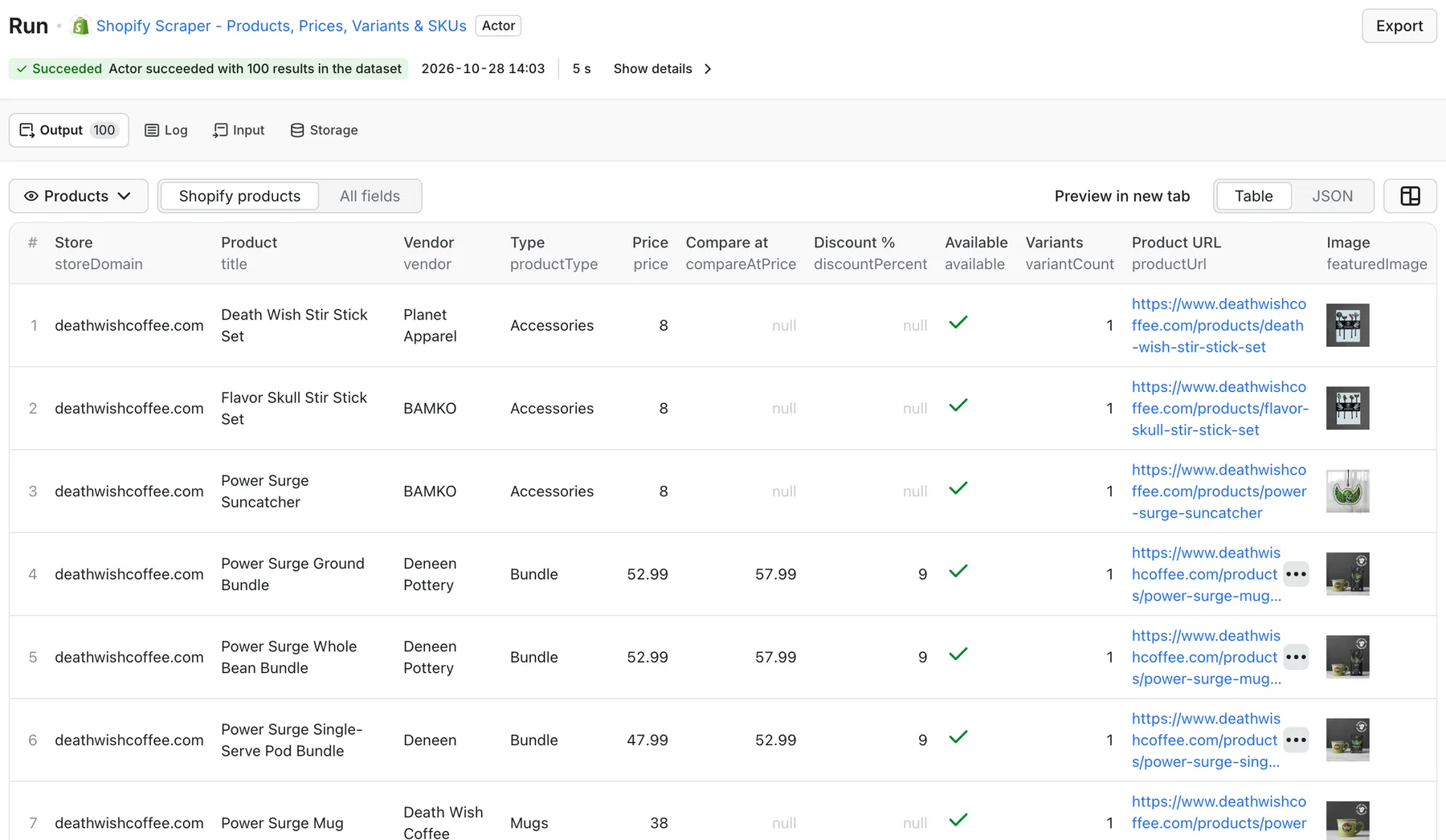
Real output from a default run of Shopify Scraper in Apify Console.
What can this Shopify scraper do?
- Scrape whole catalogs - up to 5,000 products per store and 20,000 per run, paginated automatically.
- Many stores in one run - paste store URLs or bare domains (
allbirds.com), one per line; up to 10 stores in parallel. - Variant-level data - SKU, price, compare-at price, availability, and option values (size, color, etc.) for every variant.
- Sale and discount detection -
discountPercentfrom compare-at vs. current price; optionally output only discounted products. - In-stock filter - output only products with at least one available variant.
- Clear failures - stores that are not Shopify or block their product feed are reported in
ERRORSand are not charged. - Lightweight - plain HTTP against Shopify's public product feed, no browser, fast and cheap.
What data can I extract from Shopify stores?
| Field | Description |
|---|---|
storeUrl, storeDomain | Store the product came from |
productId, handle, productUrl | Product identifiers and storefront link |
title, vendor, productType, tags | Catalog metadata |
price, minPrice, maxPrice | Lowest variant price and the price range |
compareAtPrice, discountPercent | Sale reference price and computed discount |
available, variantCount | Any variant in stock; number of variants |
variants[] | id, title, sku, price, compareAtPrice, available, option1-3 |
images, featuredImage | All product image URLs and the main image |
publishedAt, updatedAt | Shopify timestamps (useful for spotting new or changed products) |
scrapedAt | Scrape timestamp |
Prices are in the store's own currency as published in its product feed.
How much does it cost to scrape a Shopify store?
Pay per product saved:
| Products | Price |
|---|---|
| 100 | $0.30 |
| 1,000 | $3.00 |
| 10,000 | $30.00 |
Plus a negligible start event ($0.00005 per GB). Variants and images are included in the product price. Failed or blocked stores produce no product rows and are not charged. See the Pricing tab for current rates.
How to scrape a Shopify store
- Paste one or more store URLs into Store URLs (or bulk-paste into the text box).
- Set Max products per store and Max total products.
- Optional: turn on Only available or Only discounted, and turn off variants or images for a smaller export.
- Click Start and export the dataset.
Input example
Input example: sale and discount discovery
Output example
Illustrative record. Each run also saves SUMMARY (stores, products per store, failures) and ERRORS.
Use cases
- Competitor price tracking - schedule a saved task daily and compare
priceandcompareAtPriceperproductIdacross runs in Sheets or your database. - Product feed export - turn any Shopify catalog into a CSV for marketplaces, comparison sites, or a migration.
- Sale monitoring - find which competitors are discounting and by how much.
- Assortment and merchandising research - compare vendors, product types, tags, and variant depth between brands.
- Dropshipping and sourcing - list products, SKUs, and stock from supplier stores.
Run the Shopify scraper via API
Python
JavaScript
Connect to Google Sheets, Make, Zapier, n8n, Slack, or webhooks with Apify integrations, or call it from AI agents through the Apify MCP server.
FAQ
Do I need a Shopify API key or store access?
No. The Actor reads the public product feed that most Shopify storefronts expose.
Does it work on every Shopify store?
Most stores work. Some stores disable or protect their public product feed, and non-Shopify sites have none; those stores are listed in ERRORS with the reason and are not charged.
Does it detect price changes between runs?
Each run is a full snapshot with stable productId and variant id values plus Shopify's updatedAt, so you can diff two runs in a spreadsheet or database. Built-in cross-run change detection is not included yet.
Does it return inventory quantities?
It returns per-variant availability (available: true/false), not exact stock counts.
Which currency are prices in?
The store's default currency as published in its feed.
Can I scrape a single collection?
Not yet; the Actor scrapes the whole store catalog. Filter by productType or tags after export.
Related Actors
- Amazon Product Scraper & Price Tracker - prices, ratings, and price-change alerts on Amazon.
- Facebook Ads Library Scraper - see which Shopify brands are advertising and what they promote.
- B2B Website Intelligence Scraper - tech stack and contacts for the stores you track.


