

Site Speed Audit for Agencies: Mobile, Desktop & Regressions
Pricing
from $15.00 / 1,000 page audits
Site Speed Audit for Agencies: Mobile, Desktop & Regressions
Audit whole sites or URL lists on mobile and desktop with the open-source Lighthouse engine: median-of-N stable scores, regression alerts vs last run, performance budgets for CI and a client-ready HTML report per site. No Google API key. Not affiliated with Google.
Pricing
from $15.00 / 1,000 page audits
Rating
0.0
(0)
Developer

HaniDev
Maintained by CommunityActor stats
0
Bookmarked
2
Total users
1
Monthly active users
2 days ago
Last modified
Categories
Share
Site Speed Audit for Agencies — Mobile + Desktop, Regressions & Client Reports
Bulk website speed test for whole sites, sitemaps or URL lists. Every page is measured on mobile and desktop with the open-source Lighthouse engine running in Chromium, and you get stable median scores, regression alerts versus your last run, performance budgets for CI and a client-ready, white-label HTML report per site — in one run.
Not affiliated with or endorsed by Google. Lighthouse is an open-source project licensed under Apache-2.0. This Actor runs it locally; it does not call the PageSpeed Insights API or any other Google API, and needs no API key.
What does Site Speed Audit do?
- 🗺️ Audit whole sites, not just single URLs — give a sitemap or just a domain. Pages are sampled per template (e.g. 3 from
/blog/*, 3 from/products/*) up to your page limit, so you see every template without paying for 5,000 product pages. - 📱💻 Mobile + desktop in one run — one row per page and device.
- 📊 Stable scores — choose 1, 3 or 5 runs per page; the median run is reported together with the min–max range. (Lighthouse's own docs: the median of 5 runs is about twice as stable as a single run.)
- 🛠️ Site-wide fixes in plain English — "Images are larger than needed… affects 37 of 40 pages, ~1.2 s per page load", ranked by how many pages are affected and the estimated impact, with who usually fixes it (developer, hosting, content, marketing).
- 📉 Regression alerts — results are kept in a named key-value store per site. Each new run is compared with the median of your last 3 runs and flags drops beyond configurable noise thresholds. Optional webhook (Slack/Zapier/n8n/Make) when something regresses.
- ✅ Performance budgets for CI — set limits such as
performance ≥ 80,LCP ≤ 2500 ms,CLS ≤ 0.1,TBT ≤ 300 ms; each audit getspass/fail, theOUTPUTrecord gives an overall verdict, and you can make the run fail on a breach. - 🧾 White-label client reports — one self-contained HTML report per site with your agency name, logo and colour, plus a portfolio overview of all sites and an LLM-friendly Markdown summary (
summary.md) for AI agents, emails and tickets. - 🔍 Transparent measurements — every row records the Lighthouse and Chromium versions, CPU/memory, benchmarkIndex and throttling settings, so you can explain why a number differs from another tool.
- 🤝 Honest billing — unreachable pages, 404s, non-HTML URLs, login redirects, pages blocked by robots.txt and audits that fail are never charged.
Who is it for?
- Web agencies & freelancers: monthly performance reports for all clients, quick audits of prospects' sites for sales calls.
- SEO teams: lab Core Web Vitals per template, site-wide issues, accessibility and SEO checks.
- Developers: post-deploy regression checks and performance budgets in CI (call the Actor via API and read
OUTPUT). - AI agents & automations: compact JSON rows with a one-line
summaryand a ready-made Markdown report.
How to use it
- Add Page URLs, Sitemap URLs and/or Domains.
- Keep Devices on mobile + desktop, choose Runs per page (1 for quick checks, 3 for client reports).
- Optional: set Budgets, a Baseline name (runs with the same name are compared), a Webhook URL, and your agency name / logo URL / colour.
- Run it, or schedule it weekly/monthly. Open the reports from the run's Storage → Key-value store (
REPORT-<site>.html,PORTFOLIO.html,summary.md) or via the links inOUTPUT.
Example input
Output
Dataset — one row per page × device (views: Overview, Lab metrics, Top fixes, Regressions & budgets, Measurement environment):
status is one of ok, skipped_robots, http_404, not_html, login_redirect, lighthouse_error, timeout_limit, invalid_url, network_error, dns_error, private_address, not_audited_limit. Only ok rows are charged.
Named dataset site-speed-audit-site-summaries — one row per site and run: pages audited, median scores and metrics per device, lab Core Web Vitals distribution, site-wide commonIssues, worst pages, regressions, budget pass rate and the report URL.
Key-value store: REPORT-<site>.html, PORTFOLIO.html, summary.md, OUTPUT (CI summary: overall status, regression count, budget verdict, links), SITE-SUMMARIES; optional LH-… original Lighthouse HTML reports. Baselines live in the named store site-speed-baselines-<baselineName> in your account (one BASELINE-<site> record per site).
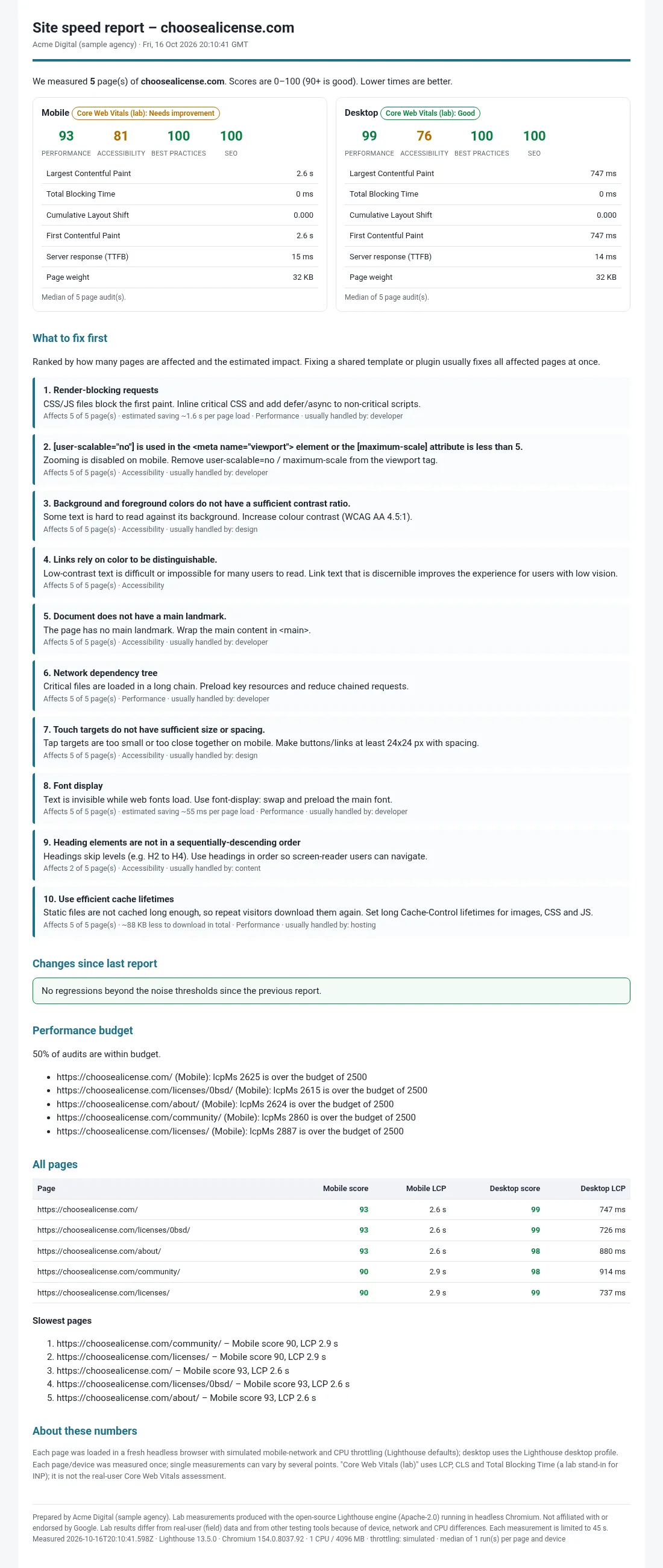
Sample report
Open the full sample HTML report – this is the white-label report the Actor saves for each site.
Pricing (pay per event)
| Event | What it is | Price |
|---|---|---|
page-audit | One page on one device, first run | $0.015 |
extra-run | Each additional run for the median (runs 2–5) | $0.01 |
site-report | Branded HTML report + summary for one site | $0.03 |
Free: failed or skipped pages, the portfolio overview, summary.md, regression checks, budget checks, webhooks. Apify also charges its standard small Actor start fee.
Examples: 1 page × mobile + desktop × 1 run = $0.03 (+ $0.03 for the site report). 10 client sites × 30 pages × 2 devices × 1 run + 10 reports = $9.30. The same with 3 runs per page = $21.30. You can cap spending with the run's maximum cost setting; the Actor stops cleanly before exceeding it.
How long does it take?
Audits run one at a time (running Lighthouse in parallel on one machine distorts the results), on 4 GB memory = 1 CPU core. In our 1-CPU tests a light page took about 13–24 s per device. Each measurement is capped by Max time per measurement (maxAuditSeconds, default 45 s, including browser start-up): a page that needs longer is stopped and reported as timeout_limit — not charged. Very heavy pages (large news/media home pages can need 45 s to 2.5 min on one CPU) therefore need a higher limit, e.g. "maxAuditSeconds": 150. With 3 or 5 runs per page, extra median runs are skipped for a page when one measurement took longer than 36 s (noted in extraRunsSkipped), so slow pages are never billed for extra runs. Plan roughly 1 hour for 100 typical pages × 2 devices.
FAQ
Why are my scores different from PageSpeed Insights or Chrome DevTools?
Lab scores depend on the machine's CPU, the network, the location and the Lighthouse/Chromium version. This Actor runs on one CPU core in the cloud with Lighthouse's default simulated throttling, so heavy pages often score lower than on a fast laptop. Every row records the versions, CPU, benchmarkIndex and throttling settings. For comparisons over time, always compare runs of this Actor with each other (that is what the baseline does), and use 3 or 5 runs for important pages.
Is this real-user (field) Core Web Vitals data?
No. These are lab measurements. cwvLabStatus combines LCP, CLS and Total Blocking Time (the lab stand-in for INP). It is not the real-user Core Web Vitals assessment.
Does it use a Google API or my API key? No. Lighthouse runs inside the Actor in open-source Chromium. No Google API is called and no key is needed.
How are regressions detected? For each page and device, the Actor stores the last 5 results in the named key-value store for your baseline name. A new result is compared with the median of the last 3; a drop of at least the threshold (default: performance 8 points, accessibility 3, SEO 3, LCP +500 ms) is flagged. Use 3 runs per page to reduce false alarms.
Does it respect robots.txt and the sites it tests? Pages discovered from sitemaps or domains are skipped when robots.txt disallows them (on by default). Pages you list yourself are audited with a warning (or skipped if you enable that option). Requests to the same host are spaced out (default 2 s), audits run sequentially, and no proxies, user-agent spoofing, login or CAPTCHA bypassing are used. Only audit your own or your clients' sites, or public pages you are allowed to test; you are responsible for complying with the tested sites' terms.
What about pages behind a login?
They are not supported in this version; redirects to a login page are reported as login_redirect (not charged).
Which pages fail?
Unreachable hosts, 404/410 pages, non-HTML URLs, login redirects and pages that block automated browsers (e.g. HTTP 403/429 to headless browsers) are reported with a clear status and are not charged. Very heavy pages that exceed Max time per measurement (default 45 s) are reported as timeout_limit (not charged, not retried); raise maxAuditSeconds if you need them measured.
Open-source credits & licenses
Built with Lighthouse (Apache-2.0), Chromium (BSD-3-Clause), the Apify SDK (Apache-2.0), chrome-launcher (Apache-2.0) and robots-parser (MIT). See THIRD_PARTY_NOTICES.md and licenses/ in the source. Lighthouse is used unmodified. Not affiliated with or endorsed by Google.


