

Yahoo Finance API & Scraper — Stock Quotes & Fundamentals
Pricing
from $0.70 / 1,000 symbols
Yahoo Finance API & Scraper — Stock Quotes & Fundamentals
Yahoo Finance quotes for stocks, ETFs, crypto, currencies and indexes: price, change, volume, P/E, market cap, dividends. Price history and fundamentals on request. Unofficial Yahoo Finance API. Historical stock prices, financial data API and crypto prices API.
Pricing
from $0.70 / 1,000 symbols
Rating
0.0
(0)
Developer

yestrue
Maintained by CommunityActor stats
0
Bookmarked
3
Total users
3
Monthly active users
2 days ago
Last modified
Categories
Share
Yahoo Finance Scraper — Stock Quotes, History & Fundamentals
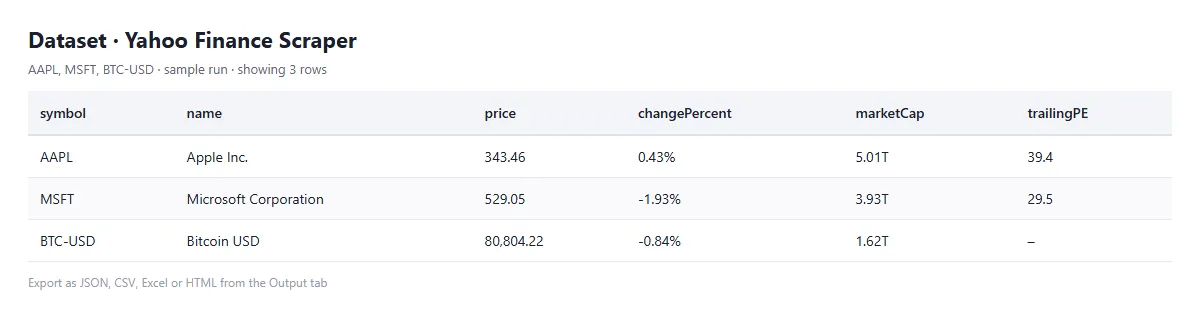
Try it in 1 minute: press Start — the prefilled input works as is (AAPL, MSFT and BTC-USD). You get:
price,marketCap,trailingPEandfiftyTwoWeekHighfor every symbol; switch on Company data or Price history for more. Price: $1.00 per 1,000 symbols on the Free plan, the same with or without the extras — that first run costs $0.003.
Use it to:
- Build a watchlist: price, change, volume, market cap, P/E and EPS for stocks, ETFs, crypto, currencies, futures and indexes in one run.
- Download price history: daily, weekly or intraday prices with dividends and splits, for any range or dates.
- Screen fundamentals: sector, revenue, margins, cash, debt, free cash flow and analyst targets, with one switch.
- Plan around the calendar:
earningsDate,dividendDate,dividendYieldandanalystRatingfor every symbol. - Feed a spreadsheet or a model: export as JSON, CSV or Excel, or call it from your own code.
Yahoo Finance Scraper gets Yahoo Finance data for any symbol: stocks on any exchange, ETFs, crypto, currencies, futures and indexes, with price, change, volume, market cap, P/E, EPS, dividends, 52-week range and more. Switch on price history for daily, weekly or intraday prices with dividends and splits, and company data for sector, revenue, margins, cash, debt and analyst targets. Quotes come 50 symbols to a request, and you pay only per symbol delivered.
What data does Yahoo Finance Scraper extract?
For every symbol:
symbol,name,quoteType,exchange,currency,marketState– what it is and where it tradesprice,change,changePercent,previousClose,open,dayLow,dayHigh,volume,bid,ask,marketTime– the quotefiftyTwoWeekLow,fiftyTwoWeekHigh,fiftyDayAverage,twoHundredDayAverage,averageVolume3Month– ranges and averagesmarketCap,sharesOutstanding,trailingPE,forwardPE,epsTrailingTwelveMonths,epsForward,priceToBook,bookValue– valuationdividendRate,dividendYield,dividendDate,earningsDate,analystRating– dividends, earnings, analystsprofile,financials,keyStatistics– with Company data on: sector, industry, website, employees, summary; revenue, growth, margins, EBITDA, cash, debt, free cash flow, ROE, analyst targets and recommendation; enterprise value, beta, PEG, short interesthistory– with Price history on:points(date, open, high, low, close, adjClose, volume),dividends,splitsinput,scrapedAt,status,error– what you typed, when it was read, and why a symbol gave nothing
Company data comes only for companies; crypto, currencies and indexes say so in fundamentalsUnavailable instead of returning empty fields.
How to use Yahoo Finance Scraper
- Open the Actor page and press Try for free. The Input tab is prefilled with a working example, so one click starts a run.
- Add Symbols, one per line, as Yahoo Finance writes them:
AAPL,VOD.L,SAP.DE,7203.T,SPY,BTC-USD,EURUSD=X,GC=F,^GSPC. - Switch on Company data and/or Price history, and pick the period and interval.
- Press Start, and download the results from the Output tab as JSON, CSV or Excel. For a daily watchlist, save the input as a task and schedule it after the market closes.
Example output
Values are examples, shortened from a live run:
How much does it cost?
$0.001 per symbol delivered on the Apify Free plan, $1.00 per 1,000 symbols; paid plans are lower, down to $0.70 per 1,000 on Gold and above. The price is the same whether or not you add company data and price history. Unknown symbols come back as free records with the reason.
Worked example: a live run of 12 symbols with company data and five years of weekly prices each took 3.3 seconds and cost $0.012. A 500-symbol watchlist refreshed daily costs $0.50 a day.
Use it from AI agents (MCP)
The Actor is available through the Apify MCP server. Add https://mcp.apify.com/?tools=highbrow_fame/yahoo-finance-quotes to Claude, ChatGPT or any MCP client and the assistant can fetch quotes, history and fundamentals with this Actor's own input fields. You pay per symbol delivered, at the same rate.
Is it legal to scrape Yahoo Finance?
The Actor reads public Yahoo Finance market data: quotes, price history and company fundamentals. It collects no personal data, so no phone numbers, names or addresses are involved and there is nothing to strip under GDPR. Prices are what Yahoo Finance shows, real-time for many US stocks and crypto and delayed for some exchanges; the output is not investment advice. You remain responsible for how you use the data and for Yahoo's terms. This is an independent tool, not affiliated with Yahoo.
FAQ
Are the prices real-time? They are what Yahoo Finance shows: real-time for many US stocks and crypto, delayed for some exchanges; exchangeDelayMinutes says by how much.
Which markets are covered? Every market Yahoo covers. Tested on US, UK (VOD.L), German (SAP.DE) and Japanese (7203.T) stocks, an ETF, Bitcoin and Ether, EUR/USD, the S&P 500 and gold futures.
Why no company data for Bitcoin or the S&P 500? They are not companies. The record says so in fundamentalsUnavailable.
Does history include dividends and splits? Yes: open, high, low, close, adjusted close and volume, plus dividends and splits, for any period and interval.
How fast is it? Quotes come 50 symbols to a request; 12 symbols with company data and five years of weekly prices took 3.3 seconds in a live run.
Last updated: 2026-10-15.
Integrate in 2 minutes: Python, n8n and LangChain
Copy-paste examples for Yahoo Finance Scraper: a Python script (apify-client), an importable n8n workflow and a LangChain tool for AI agents. yahoo-finance-quotes integration examples on GitHub
Related Actors
- SEC EDGAR Filings Scraper – 10-K, 10-Q and 8-K filings with full-text search
- Google Trends Scraper – interest over time, regions and related queries
- RSS & Atom Feed Reader – any news feed or website as one clean list
Useful? A short Store review helps — your feedback decides what we improve next.


