

YouTube Transcript API & Subtitles Scraper — Captions, SRT, VTT
Pricing
$1.00 / 1,000 transcripts
YouTube Transcript API & Subtitles Scraper — Captions, SRT, VTT
YouTube transcripts and captions from videos, playlists and channels: timestamps, plain text, SRT or WebVTT. Fast, no browser; videos without captions are free. Unofficial YouTube Transcript API. YouTube transcript scraper, video transcripts, YouTube channel transcripts.
Pricing
$1.00 / 1,000 transcripts
Rating
0.0
(0)
Developer

yestrue
Maintained by CommunityActor stats
0
Bookmarked
1
Total users
1
Monthly active users
4 hours ago
Last modified
Categories
Share
YouTube Transcript & Subtitles Scraper — Captions, SRT, VTT
Try it in 1 minute: press Start — the prefilled input works as is (a 3Blue1Brown video). You get: the whole transcript in
text, every line withstartandduration, plus thelanguage— add SRT or WebVTT with one tick. Price: $1.00 per 1,000 transcripts ($0.001 each); videos without captions, failed videos and playlist listings are free.
Use it to:
- Feed an LLM or a RAG index: the whole transcript sits in one
textfield, ready to chunk or embed. - Summarise or repurpose a video, a playlist or a whole channel into posts, notes or newsletters.
- Build subtitle files: tick SRT or WebVTT and get them per video.
- Search what was said across many videos, with a timestamp on every line.
- Run it on big lists without waste: videos without captions and failed links are reported and cost nothing.
YouTube Transcript Scraper gets the full transcript of any YouTube video, playlist or channel: every line with its timestamp, the whole text in one field, and SRT or WebVTT subtitle files if you want them. No browser is opened, so it is fast: in a test run fifteen videos were processed in nine seconds. Videos without captions, unavailable videos, bad links and failed fetches are reported in the dataset and cost nothing.
What data does YouTube Transcript Scraper extract?
For every video:
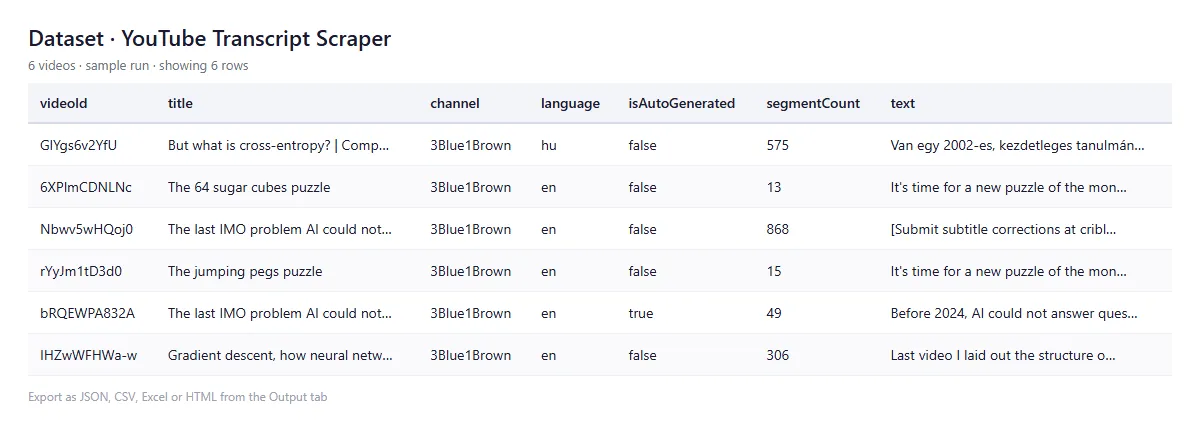
videoId,url,title,channel,channelId,lengthSeconds,viewCount– the videostatus–OK,NO_CAPTIONSorFAILEDtext– the whole transcript as one string, ready for an LLM, a summary or a search indexsegments,segmentCount– every line withstartanddurationin secondssrt,vtt– the transcript as a subtitle file, when you ask for itlanguage– the track you received, e.g.en,de-DEisAutoGenerated–truefor YouTube's automatic captionslanguageMatched–falseif your language was missing and another track was returnedavailableLanguages– every caption track the video hastranslationFailed– with machine translation on, when YouTube refused itsource– the playlist or channel link the video came fromerror– why a video has no transcript
A link that is not a YouTube video, playlist or channel gets its own INVALID_INPUT record, so you can see what was skipped.
How to use YouTube Transcript Scraper
Video walkthrough (62 seconds, fictional sample data): Get YouTube transcripts for a list of videos (text or SRT)
- Open the Actor page and press Try for free. The Input tab is prefilled with a working example, so one click starts a run.
- Paste links into YouTube links: regular video links,
youtu.beshort links, Shorts, embeds, live links, playlist links, channel links (@handleor/channel/…), or bare video ids. - For playlists and channels, set Max videos per playlist or channel (default 50, up to 1,000). A channel gives you its newest uploads first.
- Optionally set Language (default
en) and tick SRT or WebVTT. A human-written track is chosen over an auto-generated one; if your language is missing you get the video's best track, and the output says so. - Press Start and download the results from the Output tab.
Example output
Values are examples, shortened from a live run:
How much does it cost?
$0.001 per transcript delivered, $1.00 per 1,000 transcripts. Videos without captions are free, and so are failed videos, bad links and playlist or channel listings. If your run has a Maximum charge, the Actor stops cleanly when it is reached, delivers what fits and tells you how many videos were left.
Worked example: fifteen videos in nine seconds cost $0.015. A channel's newest 1,000 uploads, the maximum per channel, cost at most $1.00, and less when some videos have no captions.
Use it from AI agents (MCP)
The Actor is available through the Apify MCP server. Add https://mcp.apify.com/?tools=highbrow_fame/youtube-transcript-fast to Claude, ChatGPT or any MCP client and the assistant can pull a video's transcript into its context with this Actor's own input fields. You pay per transcript delivered, at the same rate.
Is it legal to scrape YouTube transcripts?
The Actor reads caption tracks that YouTube serves publicly for a video, plus the video's public title, channel name, length and view count. It collects no personal contact data: no phone numbers, e-mail addresses or private profiles, so there is nothing to strip under GDPR. Transcripts are the creator's content; use them within copyright law and YouTube's terms. Private and age-restricted videos are reported as FAILED with YouTube's own reason. You remain responsible for how you use the data. This is an independent tool, not affiliated with YouTube.
FAQ
A video came back as NO_CAPTIONS. The video has no captions and no automatic subtitles on YouTube, so there is nothing to download. You were not charged for it.
I asked for Hungarian but got English. The video has no Hungarian track. You get its best available track, a human-written English one if there is one, with languageMatched: false, and availableLanguages lists every language the video does have.
Are automatic captions included? Yes, when a video has no human-written track. isAutoGenerated tells you which one you got.
Can it machine-translate? Optionally, best effort. YouTube limits this heavily: in a test it came through for 1 of 8 videos. When it does not, you still receive the original transcript, marked translationFailed: true, at the normal price. It is off by default because each refusal is retried and runs get slower.
How many videos from a channel? Up to 1,000 per channel or playlist, set by Max videos per playlist or channel. The newest uploads come first.
Last updated: 2026-10-15.
Related Actors
- Apple Podcasts Scraper – shows, episodes, charts and ratings
- Substack Scraper – posts, likes, comments and full text
- PDF Text Extractor – pages and metadata from any PDF link
Useful? A short Store review helps — your feedback decides what we improve next.


