

Bulk PageSpeed Insights Test: Lighthouse & Core Web Vitals
Pricing
$3.00 / 1,000 successful audits
Bulk PageSpeed Insights Test: Lighthouse & Core Web Vitals
Bulk PageSpeed Insights test for many URLs via Google's official API: Lighthouse 13 scores, Core Web Vitals (LCP, INP, CLS), real-user CrUX data and top fixes. Mobile and desktop. No API key needed. $3 per 1,000 audits, failures free.
Pricing
$3.00 / 1,000 successful audits
Rating
0.0
(0)
Developer

Hill Country Bots
Maintained by CommunityActor stats
0
Bookmarked
2
Total users
1
Monthly active users
4 hours ago
Last modified
Categories
Features
Share
Run a bulk PageSpeed Insights test on a whole list of URLs in one click. This is a website speed test that returns Lighthouse scores, lab speed metrics, real-user Core Web Vitals (LCP, INP, CLS) and the top fixes. Results are ready for an SEO audit, a CSV export, or an AI agent. It uses Google's official PageSpeed Insights API, for mobile, desktop or both. $3.00 per 1,000 successful audits. Failed audits are free.
What does this bulk PageSpeed Insights checker do?
You give it URLs. For each URL and device, Google runs Lighthouse 13 on its own servers, and you get one clean row with:
- Lighthouse scores (0-100): Performance, Accessibility, Best Practices, SEO
- Lab metrics: LCP, CLS, TBT, FCP, Speed Index, server response time (TTFB)
- Real-user Core Web Vitals from the Chrome UX Report (CrUX): p75 LCP, INP, CLS, FCP and TTFB, each rated FAST/AVERAGE/SLOW, for the page and for the whole origin, when Google has enough traffic data
- Top 5 opportunities, sorted by estimated time savings
- A clear
statusanderrorCodefor any URL that could not be tested
Who is it for?
- SEO agencies and consultants: a bulk Core Web Vitals check across every client page, exported to CSV, Excel or Google Sheets
- Developers: compare Lighthouse performance before and after a release, or schedule a daily run
- AI agents and automations: stable JSON through the Apify API, MCP server, Make, Zapier or n8n, with a predictable price per result
Quick start
- Paste your URLs. A domain without
https://is fine. The form comes prefilled, so Start works right away. - Choose Device (mobile, desktop, or both) and the Lighthouse categories you want. The price is the same whether you pick one category or all four.
- Click Start, then download the results as JSON, CSV or Excel, or read them through the API.
To audit a whole site, first extract URLs with the Sitemap URL Extractor, then paste the url column here. Each audit takes Google about 15 seconds (median). Slow pages can take up to 2 minutes. Six audits run in parallel by default.
Sample output
This table is from a real run on November 10, 2026, at 9:35 PM CT (America/Chicago), using the prefilled Wikipedia and web.dev URLs on mobile. You pay about $3 per 1,000 successful audits. Failed audits are free.
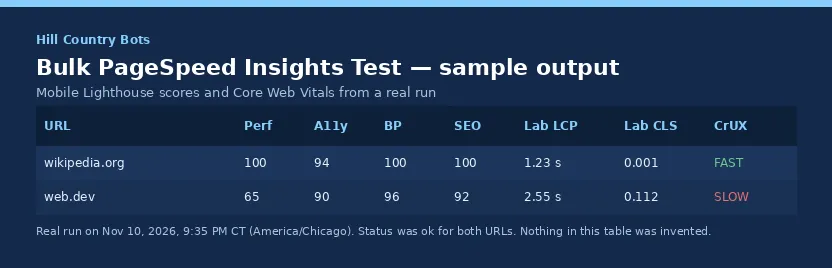
| URL | Perf | A11y | BP | SEO | Lab LCP | Lab CLS | CrUX |
|---|---|---|---|---|---|---|---|
| wikipedia.org | 100 | 94 | 100 | 100 | 1.23 s | 0.001 | FAST |
| web.dev | 65 | 90 | 96 | 92 | 2.55 s | 0.112 | SLOW |
If a URL cannot be tested, the run writes a row with status: "error", errorCode and errorMessage instead of finishing as a silent success with empty data. Those rows are not charged.
Example inputs
Mobile Core Web Vitals and Lighthouse scores for a short URL list:
Compare a page speed test on mobile and desktop (two rows, two charges per URL):
Performance-only bulk audit (same $0.003 price per successful audit):
Desktop SEO and accessibility audit:
Ready-to-run example tasks (pre-filled inputs on this Actor's Store page):
Input
| Field | Type | Default | What it does |
|---|---|---|---|
urls | array of strings | (required) | Public http(s) pages. Private, local and internal addresses are refused and not charged. |
strategy | mobile / desktop / both | mobile | both gives two rows and two charges per URL. |
categories | array | ["performance"] | Any of performance, accessibility, best-practices, seo. |
googleApiKey | secret string | (none) | Optional. Your own free Google PageSpeed Insights API key, used instead of the built-in key. Stored encrypted, sent only to Google, never logged. |
maxConcurrency | integer 1-10 | 6 | Audits in parallel. |
maxResults | integer | 1000 | Most audits per run. Spend is capped at maxResults × $0.003. |
requestTimeoutSecs | integer 30-180 | 120 | Seconds to wait on one audit. A timed-out audit is retried once, then marked TIMEOUT (free). |
Output example
Here is a real row from a test run on Nov 10, 2026, shortened to the first opportunity and the first field metric:
A failed audit is not charged and looks like this:
The key-value store also gets a RUN_SUMMARY record with totals (audited, failed, skipped, durationSecs).
Output fields (for AI agents and integrations)
status:okmeans audited and charged.errormeans not audited and not charged.errorCodeis one of:INVALID_URLorPRIVATE_URL: bad or internal addressLIGHTHOUSE_FAILED: Google could not load or render the page, e.g. a 404 page or a blockTIMEOUT,NETWORK_ERRORorHTTP_<code>: the request to Google failedINVALID_API_KEYorQUOTA_EXCEEDED_DAILY: the run stops cleanly
scores.performance|accessibility|bestPractices|seo: 0-100lab.lcpMs, cls, tbtMs, fcpMs, speedIndexMs, ttfbMs: lab measurementsfieldData/originFieldData: real-user p75 values plus a category. Null when Google has no CrUX data.opportunities[]:id,title,estimatedSavingsMs,metricSavings,displayValue
Use it from the API, MCP or an AI agent
- Actor ID:
hillcountrybots/bulk-pagespeed-checker - One API call runs the audit and returns the rows. It waits up to 5 minutes, so use the async run endpoints for big batches:
- MCP (Claude, Cursor, ChatGPT and other MCP clients): add
https://mcp.apify.com?tools=hillcountrybots/bulk-pagespeed-checkeras an MCP server. The tool takes the same input as above. - For agents: branch on
status(okorerror).scores.performanceis 0-100. Every row costs $0.003 whenstatusisokand nothing otherwise.
Use with n8n, Make, Zapier or on a schedule
You can run this Actor from the tools you already use. No extra plugin is required. Apify's official integrations start a run with your own Apify token and pass the results to the next step.
- On a schedule: in Apify Console, open this Actor, go to Schedules, and run it weekly (for example every Monday) on the same URL list or website. See Schedules.
- Make: use the official Apify Make integration to start a run and send the dataset to Sheets, Slack or email.
- Zapier: use the official Apify Zapier integration.
- n8n: use the official Apify n8n integration to add this Actor to a workflow.
A typical setup is: schedule a weekly run → export the dataset to Google Sheets or Slack → review the new rows. The input is the same as on this page.
How much does it cost?
$3.00 per 1,000 successful audits, which is $0.003 per url-audited event (one URL on one device). You pay nothing for:
- failed audits
- invalid or private URLs
- timeouts
- the run summary
The Actor's compute is included, so there's no separate platform usage charge. For example, 500 URLs on mobile and desktop is 1,000 audits, or $3.00. To cap spend, use maxResults or the run's maximum charge setting.
Limits
- Google limits how many tests the built-in key can run per day. If that quota runs out, the run stops cleanly and the remaining URLs are not charged. For very large or daily jobs, add your own free key in
googleApiKey. - Lighthouse scores vary a few points between runs. That is normal for Lighthouse.
- Real-user Core Web Vitals appear only for pages and origins with enough Chrome traffic.
- The Actor cannot test pages behind a login, and it does not crawl. It audits exactly the URLs you give it.
FAQ
Do I need a Google API key? No. A built-in key is included. Your own key only matters for very high volume.
Is this legal? Yes. It calls Google's public PageSpeed Insights API under Google's API terms, and it tests only the URLs you supply.
Does it collect personal data? No. It returns page performance metrics only.
Are the scores the same as pagespeed.web.dev? Yes. This uses the same Google PageSpeed Insights API, so the results match. Lighthouse lab scores still move a few points from one run to the next, on the website too.
Can I test a whole website (a sitemap)? Paste or upload the list of URLs. The Actor doesn't crawl, so you control exactly which pages get tested and charged.
Why did one URL fail? Check errorCode and errorMessage. LIGHTHOUSE_FAILED usually means the page returned an error, painted nothing, or blocked Google's tester.
More tools from Hill Country Bots
- Bulk Domain Availability Checker: Bulk available/taken checks from official registry RDAP, with registrar and expiry dates. $1 per 1,000 domains, invalid inputs and errors free.
- Sitemap URL Extractor: Every URL from a site's XML sitemaps (robots.txt, indexes, gzip). $0.50 per 1,000 URLs, failures free.
- Tech Stack Detector: CMS, ecommerce, analytics, CDN and frameworks for many websites. $0.50 per 1,000 sites, failures free.
- SEO Audit Tool: 0-100 SEO score per page, top 5 fixes and a client-ready HTML report. $2 per 1,000 pages, failures free.
Support
Found a bug or need a field added? Open an issue on this Actor's Issues tab with the run ID and the URL. We reply within 2 business days (US Central time), and we fix confirmed bugs as fast as we can. Built and maintained by Hill Country Bots.


