

SEO Audit Tool: Bulk Website Audit with Scores & Fixes
Pricing
$2.00 / 1,000 audited pages
SEO Audit Tool: Bulk Website Audit with Scores & Fixes
Run a website SEO audit on a whole site from its sitemap, or any list of URLs: 0-100 SEO score per page, a site summary with the top 5 fixes ranked by impact, duplicate titles, broken pages and a client-ready HTML report. $2 per 1,000 pages, failures free.
Pricing
$2.00 / 1,000 audited pages
Rating
0.0
(0)
Developer

Hill Country Bots
Maintained by CommunityActor stats
0
Bookmarked
2
Total users
1
Monthly active users
4 hours ago
Last modified
Categories
Features
Share
Run a website SEO audit on a whole website from its sitemap, or any list of URLs, and get back what an SEO client actually wants to see: a 0-100 score for every page, a site summary with the top 5 fixes ranked by impact, duplicate titles and descriptions, broken pages and broken links, and a clean HTML report you can send to a client. Every issue is written in plain English with why it matters and how to fix it. Plain HTTP, no browser, no login. $2 per 1,000 audited pages. Failed, blocked and broken pages are free.
What does this SEO audit tool do?
Give it example.com and it will:
- Find the site's XML sitemap (robots.txt, then
/sitemap.xml), or crawl internal links if there is none. - Audit the most important pages first (shallow URLs like
/pricingbefore deep ones like/blog/2019/03/post), up to your page limit. - Check each page for 31 on-page and technical SEO issues (plus 7 site-wide checks): title and meta description (missing, too long, too short), H1 (missing, several), canonical (missing, pointing elsewhere), noindex (robots meta and X-Robots-Tag), hreflang, Open Graph and Twitter cards, schema.org types and broken JSON-LD, images without alt text, thin content (word count), mobile viewport, HTTPS and mixed content, redirect chains, slow responses, page size, and broken links (404/410/5xx and dead domains).
- Score every page 0-100 and grade it A-F.
- Build one site summary per website: site score, the top 5 fixes ranked by impact (how bad x how many pages), issue counts by severity, duplicate titles and descriptions, broken pages, noindex pages listed in the sitemap, and the 10 lowest-scoring pages.
- Save a shareable HTML report (one link, no login needed) plus CSV-friendly rows.
Who is it for?
- SEO freelancers and agencies: run a full audit before a client call, send the HTML report, and turn the top 5 fixes into a proposal.
- Web designers and developers: check a site before and after a launch or migration. Catch noindex left on, broken links, missing titles and redirect chains.
- Lead generation / client pitches: audit a list of prospect homepages and open with a score and a short list of fixes you would actually do.
- In-house marketers: a cheap monthly health check of every page in your sitemap.
- AI agents and automations: stable JSON fields, one flat price per page, and machine-readable issue IDs plus human-readable text.
Quick start
- Paste one or more websites, sitemap URLs or page URLs into Websites, sitemaps or page URLs. The form comes prefilled, so Start works right away.
- Set Max pages per website (10 for a preview, 100 for a normal audit, 1,000+ for a deep one).
- Click Start. Open the HTML report from the Output tab (or the
REPORTrecord in the key-value store) and download the rows as CSV, Excel or JSON. The Page audits view shows one line per page.
Sample output
This table is from a real whole-site preview of crawlee.dev on November 10, 2026, at 9:34 PM CT (America/Chicago): 5 pages audited, site score 87 (B). You pay about $2 per 1,000 audited pages. Failed, blocked and broken pages are free. 23 further sitemap URLs were skipped by the preview cap.
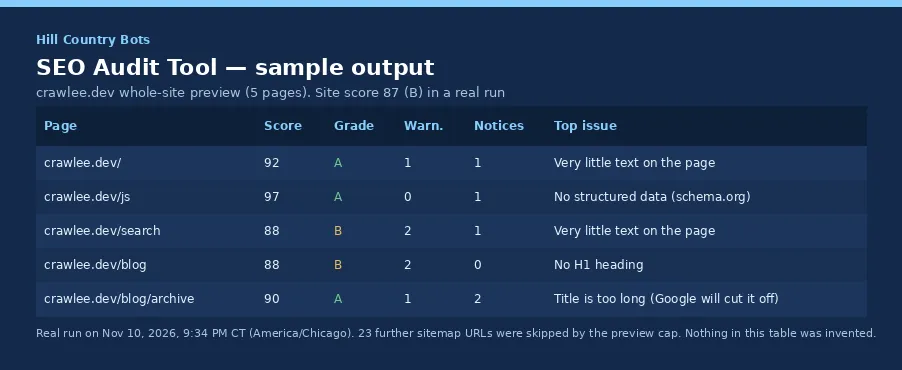
| Page | Score | Grade | Warnings | Notices | Top issue |
|---|---|---|---|---|---|
| crawlee.dev/ | 92 | A | 1 | 1 | Very little text on the page |
| crawlee.dev/js | 97 | A | 0 | 1 | No structured data (schema.org) |
| crawlee.dev/search | 88 | B | 2 | 1 | Very little text on the page |
| crawlee.dev/blog | 88 | B | 2 | 0 | No H1 heading |
| crawlee.dev/blog/archive | 90 | A | 1 | 2 | Title is too long (Google will cut it off) |
If a site or page cannot be audited, the run writes a row with status: "error", errorCode and errorMessage instead of finishing as a silent success with empty data. Those rows are not charged.
Example inputs
Whole-site audit, the 100 most important pages:
Audit exactly the pages in a sitemap (pairs with our Sitemap URL Extractor):
Prospect list: just the homepage of each site, spend capped at $1:
Only the blog, skipping tag pages, without the link check (fastest):
Ready-to-run example tasks (pre-filled inputs on this Actor's Store page):
Input
| Field | Default | What it does |
|---|---|---|
startUrls (required) | (none) | Homepage or bare domain = whole-site audit. Sitemap URL = its pages. Any other URL = just that page. |
maxPagesPerSite | 100 | Pages audited per website or sitemap, most important first. |
maxPages | 1000 | Spend cap for the run: maxPages x $0.002. Failed pages don't count. |
auditWholeSite | true | Off = only audit the homepage you give. |
includePatterns / excludePatterns | [] | Globs (*/blog/*) or /regex/ for sitemap and crawl URLs. |
checkBrokenLinks | true | Check links on each page (main-content links first, up to maxLinksPerPage new links per page, each link once per run). |
maxLinksPerPage | 20 | New links checked per page (1-100). |
htmlReport | true | Save the shareable HTML report. |
respectRobotsTxt | true | Skip pages that robots.txt disallows (free). |
maxConcurrency / maxConcurrencyPerSite | 10 / 4 | Parallel requests overall / per website. |
requestTimeoutSecs | 20 | Per-page timeout (one retry on timeouts, 429 and 5xx). |
Output example
Real row from a test run (shortened):
And the free site summary row for the same run (10 pages):
A page that cannot be audited comes back free, with a reason: {"status": "error", "errorCode": "HTTP_404", "url": "...", "errorMessage": "Page answered HTTP 404 (broken page)"}. Broken (404/410/5xx) pages also appear in the site summary as a critical site issue.
The HTML report
One self-contained page per run: a score circle per site, the top 5 fixes with why and how, duplicate titles and descriptions, every page sorted from the lowest score, and the pages that could not be audited. The run's RUN_SUMMARY record holds a signed reportUrl you can share directly.
How the score works
Every page starts at 100 and loses points per issue: critical 10-30 (noindex, missing title, no HTTPS, broken internal links), warning 4-8 (missing description or H1, no viewport, canonical elsewhere, broken JSON-LD, slow response, thin content, missing alt text...), notice 1-3 (polish items). Grades: A 90+, B 80+, C 70+, D 50+, F below 50. The site score is the average page score minus up to 15 points for site-wide problems (broken pages, duplicates, no sitemap), scaled by how many pages they affect. The rules are fixed and documented, so scores are comparable run to run.
Use it from the API, MCP or an AI agent
- Actor ID:
hillcountrybots/seo-audit - One call returns the rows:
- With the Apify MCP server, an agent can call
hillcountrybots/seo-auditwith the same input. Filter rows onrowType(page/site-summary) andstatus(ok/error).
Use with n8n, Make, Zapier or on a schedule
You can run this Actor from the tools you already use. No extra plugin is required. Apify's official integrations start a run with your own Apify token and pass the results to the next step.
- On a schedule: in Apify Console, open this Actor, go to Schedules, and run it weekly (for example every Monday) on the same URL list or website. See Schedules.
- Make: use the official Apify Make integration to start a run and send the dataset to Sheets, Slack or email.
- Zapier: use the official Apify Zapier integration.
- n8n: use the official Apify n8n integration to add this Actor to a workflow.
A typical setup is: schedule a weekly run → export the dataset to Google Sheets or Slack → review the new rows. The input is the same as on this page.
How much does it cost?
- $2.00 per 1,000 audited pages ($0.002 per page). One flat event,
page-audited. No start fee, platform compute included, broken-link checking included. - Free: site summary rows, the HTML report, and every page that fails (404, 403, 5xx, timeouts, robots.txt-blocked, bot challenges, non-HTML files, invalid or private URLs).
- Example: a 300-page site audit costs $0.60. A 5,000-page agency batch costs $10.
- For comparison, other SEO audit Actors in Apify Store list $4 to $40 per 1,000 pages on the Free plan (checked November 10, 2026).
- Set
maxPagesor the run's max total charge to cap spend. The Actor stops cleanly when the cap is reached.
Limits
- Plain HTTP, no browser. Content that only appears after JavaScript runs (some single-page apps) is not seen, so word counts and headings can read low on those sites. Core Web Vitals are not measured here; use our Bulk PageSpeed Checker for that.
- Some sites block bots. Sites behind strong bot protection answer 403 or a challenge page. Those pages are free and listed in the report. We use an honest User-Agent, no proxies and no tricks.
- robots.txt is respected by default, and login, account, admin, cart and checkout pages are never fetched.
- Broken-link checking samples up to
maxLinksPerPagenew links per page; only clear answers count as broken (404, 410, 500, 502, 504, dead domain, redirect loop, each confirmed with a full GET). A link that answers 403, 429, 503 or times out is treated as unknown, not broken. Links to social networks (X/Twitter, LinkedIn, Facebook, Instagram, TikTok, Threads, Pinterest) are not checked, because they block bots with misleading answers. - Public pages only; no cookies or credentials are ever sent, and no personal data is collected.
FAQ
Can I audit a client's whole site in one click? Yes. Put the homepage in, set maxPagesPerSite, and run. The sitemap (or a link crawl) does the rest.
Can I audit thousands of sites? Yes. Use auditWholeSite: false for homepage-only audits of a prospect list, or keep it on with a small maxPagesPerSite.
Why are failed pages free? You should pay for audits, not for a site that blocked us.
What's the difference between critical, warning and notice? Critical hurts visibility right now (noindex, missing title, no HTTPS, broken links). Warnings cost clicks or rankings. Notices are polish.
Does it follow nofollow or external links? It only audits pages on the same site. External links are counted and, with the link check on, tested for dead targets.
More tools from Hill Country Bots
- Bulk PageSpeed Insights Test: Lighthouse scores and Core Web Vitals for many URLs. $3 per 1,000 audits, failures free.
- Bulk Domain Availability Checker: Bulk available/taken checks from official registry RDAP, with registrar and expiry dates. $1 per 1,000 domains, invalid inputs and errors free.
- Sitemap URL Extractor: Every URL from a site's XML sitemaps (robots.txt, indexes, gzip). $0.50 per 1,000 URLs, failures free.
- Tech Stack Detector: CMS, ecommerce, analytics, CDN and frameworks for many websites. $0.50 per 1,000 sites, failures free.
Support
Found a wrong result or want a new check? Open an issue on this Actor's Issues tab with the run ID and the URL. We reply within 2 business days (US Central time). Built and maintained by Hill Country Bots.


