
YouTube Scraper — Videos, Transcripts, Comments, Channels
Pricing
from $0.0032 / video scraped
YouTube Scraper — Videos, Transcripts, Comments, Channels
All-in-one YouTube API: get video metadata, full transcripts, comments with replies, channel data, and search results in a single call. No setup, fast and cheap.
Pricing
from $0.0032 / video scraped
Rating
0.0
(0)
Developer

hiper soft
Maintained by CommunityActor stats
0
Bookmarked
46
Total users
15
Monthly active users
11 days ago
Last modified
Categories
Share
YouTube Scraper — Videos, Transcripts, Comments, Channels & Search
Scrape YouTube at scale into clean JSON, CSV, Excel or XML. This YouTube scraper extracts video metadata, full transcripts, comments with reply threads, channel profiles, playlists and search results — all from one Actor, with no API key and no quotas. A faster, lower-cost alternative to the official YouTube Data API.
Most YouTube scrapers make you run three or four separate tools — one for metadata, one for transcripts, one for comments — and bill you for each. This one does it all in a single run.
What does the YouTube Scraper do?
The YouTube Scraper crawls and extracts public YouTube data by video URL, playlist URL, channel URL or search term. Point it at a video, a Shorts link, a playlist, a @handle or channel, or a search query, and it returns structured data points — views, likes, duration, publish date, subscriber counts, transcripts, comments and more — ready for analytics, datasets, LLM pipelines or lead generation.
What data can you scrape from YouTube?
| Group | Fields |
|---|---|
| 🎥 Video | id, title, description, description links, view count, like count, duration (+ seconds), publish date, keywords/tags, thumbnails, is-monetized, comments-turned-off, is-Short, is-Live, family-safe flag, category |
| 📝 Transcript | full text, timestamped segments (start + duration), ready-to-use SRT subtitles, language, auto-generated flag, list of available languages |
| 💬 Comments | comment text, author handle, like count, published time, reply threads, creator/verified flags, reply count |
| 📺 Channel | name, handle, channel ID, subscriber count, total views, video count, country, join date, avatar, description, external & social links |
| 🔍 Search | every matching video with full metadata, ranked by YouTube relevance |
Use cases
- Feed transcripts to an LLM — summaries, RAG knowledge bases, content repurposing and translation at scale.
- Comment & sentiment analysis — mine top comments and reply threads for any video or channel.
- Influencer & lead generation — pull subscriber counts, contact emails and social links from channel profiles.
- Competitor & trend research — track a niche via search results, top videos and channel catalogs.
- Brand & content monitoring — watch mentions, engagement and new uploads over time.
- Build a video dataset — views, likes, duration and metadata for thousands of videos.
- Content strategy — find high-performing formats, keywords and titles in your space.
- Academic & market research — study engagement, topics and audience signals from public data.
How to scrape YouTube data
- Click Try for free / Start to open the YouTube Scraper.
- Paste video URLs, playlist URLs, a search query, or channel URLs (bare video IDs and
@handlesalso work). - Toggle the add-ons you want — transcripts, comments, and channel enrichment — and set limits.
- Click Run.
- Download the results as JSON, CSV, Excel or XML, or pull them from the API.
Input
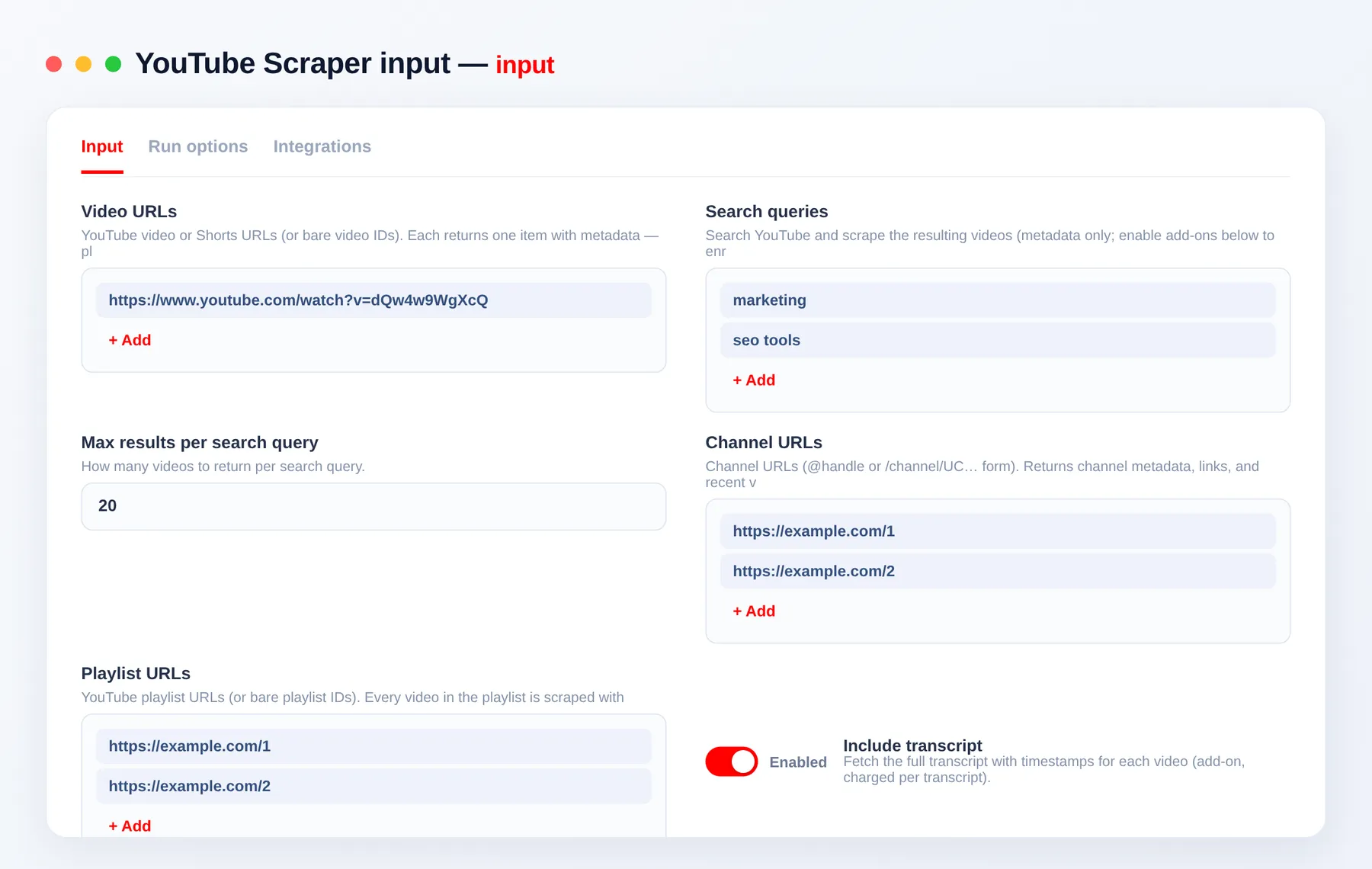
Provide any mix of video URLs, search queries and channel URLs, then toggle the add-ons.
| Field | Type | Description |
|---|---|---|
videoUrls | array | YouTube video or Shorts URLs (or bare 11-char video IDs). |
playlistUrls | array | Playlist URLs (or IDs) — every video in the playlist is scraped with full metadata. |
searchQueries | array | Search terms; each result is scraped as a video. |
maxResultsPerQuery | integer | Videos returned per search query, and per playlist (default 20). |
channelUrls | array | Channel URLs — @handle or /channel/UC…. |
includeTranscript | boolean | Attach the full transcript (text, segments, SRT) to each video. |
transcriptLanguage | string | Preferred transcript language code, e.g. en, es, de. |
includeComments | boolean | Attach comments with reply threads to each video. |
maxComments | integer | Max comments per video, including replies. |
includeChannel | boolean | Attach the uploader's channel profile to each video. |
Scrape YouTube by URL or search term
Pass exact videoUrls when you know the videos, or searchQueries to discover them — mix both in one run.
Scrape YouTube transcripts and subtitles
Enable includeTranscript for the full transcript, timestamped segments and downloadable SRT subtitles, with transcriptLanguage selection and an auto-generated fallback.
Scrape YouTube comments
Enable includeComments to pull top comments including reply threads, each with author, like count and verified/creator flags.
Output
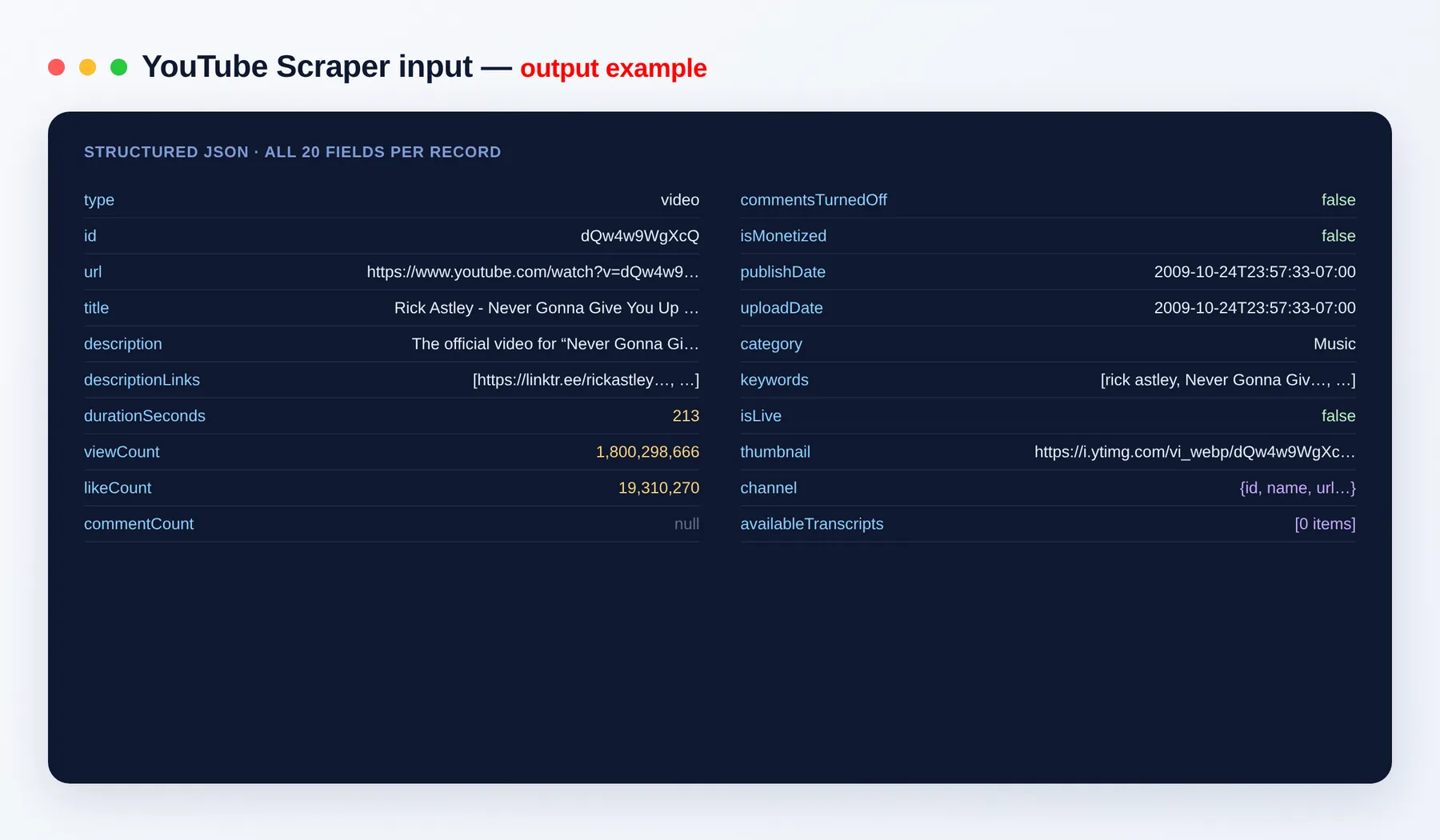
Each video is one dataset item:
Channels and standalone search results are emitted as type: "channel" and type: "search-result" items with their own fields.
Output schema (video items)
| Field | Type | Description |
|---|---|---|
type | string | Item type — video, channel or search-result. |
id | string | YouTube video ID. |
url | string (URL) | Canonical watch URL of the video. |
title | string | Video title. |
description | string | Full video description text. |
descriptionLinks | array | Links found in the description. |
durationSeconds | integer | Video length in seconds. |
viewCount | integer | Total view count. |
likeCount | integer | Total like count. |
commentCount | string | Number of comments (as shown by YouTube). |
commentsTurnedOff | boolean | Whether comments are disabled on the video. |
isMonetized | boolean | Whether the video appears to be monetized. |
publishDate | string (ISO date) | When the video was published. |
uploadDate | string (ISO date) | When the video was uploaded. |
category | string | YouTube category, e.g. Education. |
keywords | array | Video tags/keywords. |
isLive | boolean | Whether the item is a live stream. |
thumbnail | string (URL) | Thumbnail image URL. |
channel | object | Channel info — name, handle, subscriberCount and links. |
availableTranscripts | array | Transcript languages available for the video. |
When enabled, video items also include a transcript object (segments, fullText, srt) and a comments array (author, text, likeCount, replies).
Need YouTube comments, transcripts or other platforms?
This Actor already bundles comments, transcripts and channel data — but if you're building a wider dataset, pair it with our other scrapers:
- TVmaze Scraper — TV shows, episodes and cast with IMDb IDs and ratings.
- Spotify Scraper — tracks, artists, albums and playlists.
- SoundCloud Scraper — tracks, artists and play counts.
- Twitch Scraper — streams, channels and viewer stats.
- Apple Podcasts Scraper — podcast shows and episodes.
FAQ
Do I need a YouTube API key? No. The YouTube Scraper needs no official API key and has no quotas — just add your inputs and run.
How many videos can I scrape per run?
As many as you like. Set maxResultsPerQuery per search, and pass any mix of video URLs, search queries and channel URLs in one run to scale up to thousands.
Can I scrape YouTube transcripts and subtitles?
Yes — enable includeTranscript for the full text, timestamped segments and ready-to-use SRT subtitles, with language selection.
Can I scrape YouTube comments?
Yes — enable includeComments for top comments including reply threads, with author, like count and verified flags.
Can I scrape a whole YouTube playlist?
Yes — pass playlist URLs in playlistUrls and every video in the playlist is scraped with full metadata (and transcripts/comments if enabled). Use maxResultsPerQuery to cap how many videos per playlist.
Can I download videos or audio? No. This Actor extracts metadata, transcripts, comments and channel data — text and numbers only, not media files.
What export formats are supported? JSON, CSV, Excel and XML, plus webhooks and the Apify API.
Can I automate or integrate the YouTube Scraper? Yes. The YouTube Scraper can be connected with almost any cloud service or web app thanks to integrations on the Apify platform. It works with Make, Zapier, Slack, Airbyte, GitHub, Google Drive and many more, plus the Apify API, JavaScript/Python clients and MCP. Or use webhooks to trigger an action whenever a run finishes — get a notification, or kick off another process such as loading your data downstream.
Is scraping YouTube legal? The Actor collects only public data. You are responsible for how you use it and for complying with YouTube's terms and applicable laws.
Related Actors
- Reddit Scraper — posts, comments and subreddits.
- Google Trends Scraper — interest over time for any topic.
- Google News Scraper — headlines and articles by query.
- Steam Games Scraper — game prices, genres and reviews.
Notes
Original clean-room implementation. Collects only public YouTube data; you are responsible for how you use the data and for complying with YouTube's terms. This is an independent tool and is not affiliated with or endorsed by YouTube.


