

Amazon Search Results Scraper & Keyword Rank Tracker
Pricing
from $0.59 / 1,000 search results
Amazon Search Results Scraper & Keyword Rank Tracker
Amazon search results for any keyword or search link on 22 Amazon stores: ASIN, title, price, list price, rating, ratings count, sponsored flag, organic rank, bought in past month, badges, delivery, images. Filters, ship-to zip, ASIN rank tracking, optional product pages. Misses free.
Pricing
from $0.59 / 1,000 search results
Rating
0.0
(0)
Developer

Hyperbach
Maintained by CommunityActor stats
0
Bookmarked
2
Total users
1
Monthly active users
4 days ago
Last modified
Categories
Features
Share
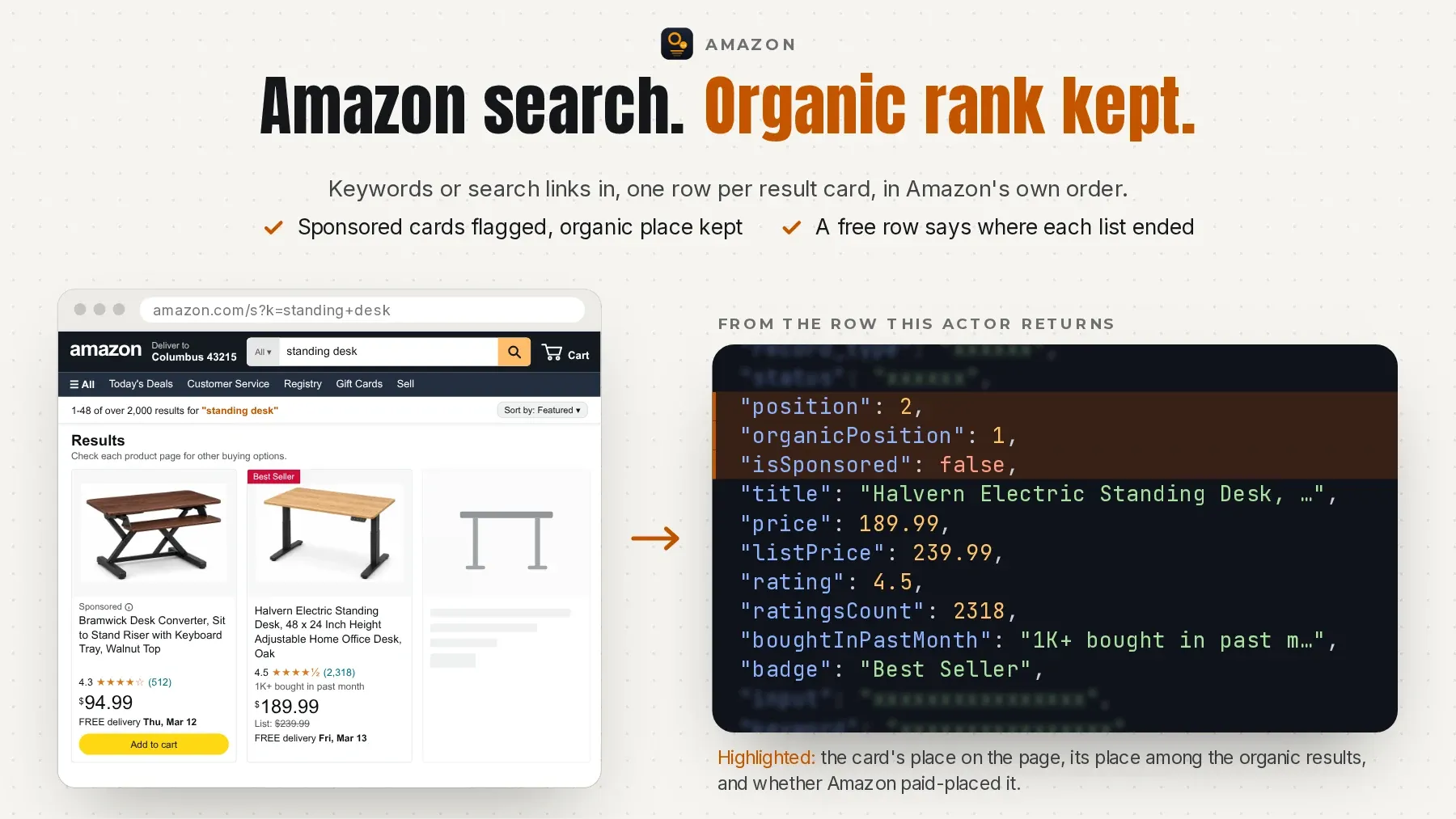
Amazon search results for any keyword or search link, on 22 Amazon stores: one row per result card in Amazon's own order — ASIN, title, link, price and list price in the store's currency, rating and rating count, sponsored flag, page, position and organic position, bought-in-past-month, badges, delivery, coupon, deal, variants, other offers, images — and one free row per search that says how far the list went and why it stopped. Optional: each product's full page, a ship-to postal code, ranks of the ASINs you track. No login, no cookie, no key, proxies handled for you.
From $1.00 per 1,000 rows (result) on the Free plan, $0.85 on Starter; every row and add-on is priced under Pricing below. A run start is $0.00244. The default input returns about 51 rows for about $0.05244. Every keyword or link also gets one free search row: its end (the list's last page, your cap, no result), pages read, Amazon's total, sponsored placements and the ranks of your tracked ASINs.
How it compares
- Faster than apt_marble's Amazon Search Results Scraper, with more data: 50 products in 17 s, against 23 s; 35 fields per product, against 29. It is cheaper: $0.55 per 1,000 products, against our $0.75.
- curious_coder's Amazon Products Scraper is faster: 54 products in 12 s, against our 50 products in 17 s. We give more data: 35 fields per product, against 12. The price is about the same: $0.75 per 1,000 products, against $0.76.
- Faster and cheaper than santamaria-automations's Amazon Search Scraper, with more data: 50 products in 17 s, against 24 s; $0.75 per 1,000 products, against $1.02; 35 fields per product, against 25.
Measured on 2026-11-15. Each line compares one job, run by both scrapers at the same time. Prices are per 1,000 products: Apify Actors at the Scale plan's prices.
Tested head-to-head on 2026-11-15
The job: The first 50 results of the Amazon search "wireless earbuds" on amazon.com (the input schema's example: keywords ["wireless earbuds"], maxResultsPerKeyword 50). Every Actor ran on it the same day from the same harness; every run's cost is at the Scale plan's prices: a rival's charged events at its price for that plan, this Actor's at its list price. Fields counts the filled fields of a typical row. Every actor ran the same search in the same minute; ours also marks each card sponsored or organic with its organic place and ends every search with a free row that says where the list ended. Re-measured monthly.
| Actor | Rows | First row | Run time | Cost | Fields | Failures |
|---|---|---|---|---|---|---|
| this Actor | 50 | 9.6 s | 17 s | $0.037 | 35 | none |
santamaria-automations/amazon-search-scraper | 50 | 14 s | 24 s | $0.051 | 25 | none |
apt_marble/amazon-search-results-scraper | 50 | 2.6 s | 23 s | $0.028 | 29 | none |
curious_coder/amazon-scraper | 54 | 7.4 s | 12 s | $0.041 | 12 | none |
Why this Amazon search results scraper
- 22 Amazon stores, each read from its own country. amazon.com, .co.uk, .de, .fr, .es, .it, .ca, .com.au, .co.jp, .in, .com.mx, .com.br, .nl, .se, .pl, .ae, .sa, .sg, .com.tr, .eg, .com.be and .ie: every store is read from an exit in its country, in its own currency and language; a page Amazon serves in another currency, language or store is read again elsewhere and never charged (our test read amazon.com from a German exit in German with euro prices, and from a Japanese one redirected to amazon.co.jp).
- Prices as each store writes them. "26,99 €", "2 209,00 kr", "8.394,21 TL", "¥9,990", "R$ 170,05", "297,95 $" all become the right number with its ISO currency (tested on a saved page of every store). A "Typical price" stays apart from a list price (
typicalPrice,listPrice, the store's own label inlistPriceLabel), so no discount is invented. - Amazon's order, sponsored and organic apart.
positionon the page,positionOverallacross the pages,organicPosition(null on a sponsored card),isSponsored; the search row lists every sponsored placement, the sponsored video ads included, and their share of the page. - Each product once. Amazon's 48-card grid repeats products across pages (10 of 144 on our test): an ASIN is delivered and charged once a search, at its first place.
- Honest ends. Amazon stops a search list near page 20 (about 300 results). Every search gets a free row with its verdict — CAPPED (your limit), LIST_END (the last page, read a second time on a fresh connection), NO_RESULTS, PARTIAL (with the page that failed) — the pages read, Amazon's own total and the spelling Amazon searched instead.
- Filters that are checked, not just sent. Price range, star rating, minimum ratings, brand, condition, sort, department and category go to Amazon as its own filters, and the price, rating, ratings and sponsored filters are checked again on every card: a card outside them is left out and not charged.
- Ship-to postal code and product codes.
zipCodeprices the search for a delivery address (checked on every page); a keyword that is a UPC, EAN or ISBN says whether the first product's page shows that code (codeMatches). - The full product page, on request.
includeDetailsadds each result's product page asdetails(description, bullets, Best Sellers rank, seller, specs, Amazon's review summary, images, videos), with the same fields as our Amazon Product Details Scraper, and the brand from the page's byline.
Who it's for
- Amazon sellers and brands — where your products and your competitors' rank for the keywords that sell, sponsored and organic apart, with price, rating and bought-in-past-month, on every store you sell on;
trackAsinsgives your own ASINs' ranks on the search row. - Agencies and PPC managers — the sponsored placements of a keyword (cards and video ads) and their share of the page, run on a schedule to see who advertises on your terms.
- Product researchers and analysts — a whole category or keyword list as typed rows — price, list price, rating, ratings, bought-in-past-month, badges — for a niche study, a price comparison across stores or a model.
- Data and AI teams — rows keyed by ASIN in Amazon's order, one free search row per keyword with its verdict and a run summary to check a pipeline against.
Quick start
The first 100 results of a keyword on amazon.com
Two keywords on amazon.de, sorted by price, 20 to 60 euros, 4 stars and up
Where your ASIN ranks, organic results only
A category link, with each product's full page
Switching from apt_marble/amazon-search-results-scraper?
Your input works as it is. Each name in the left column is read as this Actor's own field and the run log says so (read <theirs> as <ours>); a name marked not read is ignored with a note. A value in the other Actor's shape, an object list or its own date form, is read too.
| apt_marble/amazon-search-results-scraper | this Actor | what to know |
|---|---|---|
keywords | keywords | The same: one search per keyword, any language. |
maxResultsPerKeyword | maxResultsPerKeyword | The same; 0 here reads to the end of Amazon's list (near page 20). |
sortBy | sortBy | The same six values. |
excludeSponsored | excludeSponsored | The same; a left-out sponsored card is not charged and the search row still counts it. |
minPrice | minPrice | The same, in the store's currency; checked on every card too. |
maxPrice | maxPrice | The same, in the store's currency; checked on every card too. |
minRating | minRating | The same whole stars; 4 uses the store's own 4-star filter, every value is checked on the card. |
primeOnly | not read | Not read: Amazon does not apply the Prime filter to a logged-out search, so a Prime-only run would return the same list or nothing. The rows do not claim a Prime status either. |
marketplace | marketplace | The same 22 codes (us, uk, de, fr, es, it, ca, au, jp, in, mx, br, nl, se, pl, ae, sa, sg, tr, eg, be, ie). |
maxConcurrency | not read | Not read: the Actor sets its own parallel reads (4 searches, 4 pages each, every page on its own connection). |
What differs:
- The same input names and values:
keywords,maxResultsPerKeyword,sortBy(relevance, price-asc, price-desc, rating, newest, bestselling),excludeSponsored,minPrice,maxPrice,minRating,marketplace(the same 22 codes). primeOnlyis not offered: Amazon does not apply its Prime filter to a logged-out search (our test: the list unchanged on three reads, and the leader's own Prime-only run returned 0 rows).- The row names are the leader's where it has one (
asin,title,url,price,currency,listPrice,typicalPrice,rating,ratingsCount,isSponsored,organicPosition,boughtInPastMonth,deliveryText,image,imageLarge,badge,dealText,otherOffersText,variantCount);brandis the card's own brand line or the product page's, never the title. - Each search also gets one free search row (
record_type=search); filter onrecord_type=resultfor the products alone.
Output
One row per result card (and one free row per search):
| field | meaning |
|---|---|
record_type | result on a result row (charged); search on a keyword's or link's free search row. |
status | ok, or why a search gave no result row: no_results (Amazon found nothing), not_a_search (a product page or a category landing page), wrong_view (every read came in another currency, language, store or ship-to place), invalid_input (a value that names no search), failed (Amazon did not serve it), not_read (the run stopped first). |
input | The keyword or link you gave that this row answers. |
keyword | The words searched. |
searchUrl | The search page read (the first page on a search row). |
marketplace | The store, as the marketplace input names it (us, uk, de …). |
page | The results page the card was on. |
position | The card's place on its page, sponsored cards included, in Amazon's order. |
positionOverall | The card's place across the pages read. |
organicPosition | The card's place among the organic (not sponsored) results across the pages read; null on a sponsored card. |
isSponsored | True on a sponsored card. |
asin | Amazon's product id. |
title | The product title as the card shows it. |
url | The product page, tracking removed. |
brand | The brand: the card's own brand line (clothing and shoes) or the product page's byline (includeDetails); null where Amazon shows none, never the title. |
brandSource | Where brand came from: card or detail. |
price | The price on the card, as a number in currency; null where the card shows none. |
currency | The ISO currency of the prices (the store's own). |
priceText | The price as the card writes it. |
listPrice | The struck list price (List, RRP, UVP, Statt …). |
typicalPrice | The struck "Typical price" (the store's median, kept apart from a list price). |
listPriceLabel | The store's own label of the struck price. |
discountPercent | The discount from the struck price, in percent. |
unitPriceText | The unit price as the card writes it ("($0.50/count)"). |
rating | The star rating (1-5). |
ratingsCount | The number of ratings. |
ratingsCountExact | False where the store shows only a rounded count (amazon.ie's "45.9K"), so ratingsCount is that rounded figure. |
boughtInPastMonth | Amazon's "bought in past month" line as written ("3K+ bought in past month"). |
boughtInPastMonthMin | The number in that line (3K+ → 3000). |
badge | The card's first badge (Best Seller, Overall Pick …). |
badges | Every badge on the card. |
isBestSeller | True when a badge is a Best Seller badge. |
isAmazonsChoice | True when a badge is Amazon's Choice or Overall Pick. |
dealText | The deal label above the price (Limited time deal …). |
couponText | The coupon line. |
deliveryText | The delivery line as the card writes it. |
stockText | The stock line ("Only 3 left in stock"). |
variantCount | The number of other colors, sizes or options the card names. |
variantsText | That line as written ("+5 other colors/patterns"). |
otherOffersText | The other offers line ("More Buying Choices $3.40 (38+ used & new offers)"). |
otherOffersCount | The number of other offers in that line. |
otherOffersPrice | The lowest other offer's price in that line. |
image | The card's image. |
imageLarge | The same image at full size. |
productType | Amazon's product type of the card (HEADPHONES …), where the card carries it. |
authors | A book card's author line. |
bookFormat | The format whose price the card shows (Paperback, Kindle, Audiobook …). |
formats | A book card's formats with their prices. |
productCode | The UPC, EAN or ISBN you searched, on its first organic result. |
codeMatches | True when that product's page shows the code, false when it shows another code, null when it shows none. |
detailStatus | The product page add-on: served, light (the page without its lower half after its re-reads: not charged), not_found, wrong_view (every read came for another country: not charged), refused, cut or not_asked. |
details | The product page (includeDetails): the fields of our Amazon Product Details Scraper (title, price, brand, bullets, description, Best Sellers rank, sold by, ships from, specs, dimensions, review summary, images, videos …). |
language | The page's own language (en-us, de-de …). |
deliverTo | The page's "Deliver to" line, when you asked a postal code or a country. |
layout | list (16 results a page) or grid (48-60 a page), as Amazon served it. |
verdict | On a search row: CAPPED (your limit), LIST_END (the list's last page, read twice), NO_RESULTS, CODE (the ISBN's product), PARTIAL (stopped: note says why). |
rowsDelivered | On a search row: the result rows it delivered. |
pagesRead | On a search row: the results pages read. |
lastPage | On a search row: the last page number Amazon's page list names. |
totalResults | On a search row: Amazon's own count of results (an estimate: it moves between reads). |
cardsSeen | On a search row: the cards on the pages read, sponsored included. |
duplicatesSkipped | On a search row: cards of a product the search already delivered (not charged). |
droppedByFilters | On a search row: cards your filters left out (not charged). |
sponsoredCount | On a search row: the sponsored cards on the pages read. |
sponsoredShare | On a search row: the sponsored cards' share of the cards seen. |
sponsoredPlacements | On a search row: every sponsored placement (type product or video, page, position, asin). |
advertisedAsins | On a search row: the ASINs advertised. |
trackedAsins | On a search row: each tracked ASIN's first place (page, position, positionOverall, organicPosition, isSponsored) or found false. |
searchedAs | On a search row: what Amazon searched instead (its spelling correction), or the ISBN-10 a 978 ISBN read. |
relatedSearches | On a search row: Amazon's related searches. |
droppedParameters | On a search row: the names dropped from your link (tracking). |
note | Why a search row has the status or the verdict it has. |
scrapedAt | When this row was read (UTC). |
Example record:
Pricing
Pay for the results a run delivers, for the product-page add-on only on the rows that carry a full page, and one run start. No platform usage is billed to you, and the result's price falls with your Apify plan.
| event | unit | Free | Starter | Scale | Business |
|---|---|---|---|---|---|
Search result (result) | per 1,000 | $1.00 | $0.85 | $0.70 | $0.59 |
Product page on a result (detail) | per 1,000 | $4.00 | $3.79 | $3.79 | $3.79 |
Run start (start) | per run | $0.00244 | $0.00244 | $0.00244 | $0.00244 |
A result is $1.00 per 1,000 on the Free plan ($0.001 a result) and $0.85 on Starter, with everything its card carries. Each run that delivers a result also pays the run start, $0.00244 once; a run that delivers none pays nothing at all. So the first 50 results of a keyword cost $0.05244 on the Free plan and $0.04494 on Starter; 100 results of each of 10 keywords $1.00244 and $0.85244.
With includeDetails, each row that carries its full product page adds $0.004 on the Free plan and $0.00379 on Starter (one more page a row); a page Amazon served without its lower half (detailStatus light) costs nothing. Free: every search row, a card your filters leave out, a repeat of a product the search already delivered, a search Amazon answers with no result, a link that is no search, and a run that delivered nothing. A run that stops early (a timeout, an abort) is charged for the results it delivered.
Before the first request the log names the prices at your plan and the most the run can cost: maxResultsPerKeyword a search, maxItems over the whole run, and never more than your charge limit. Enterprise plans have their own rates — the Actor's Pricing tab shows the price for your plan.
Usage patterns
- Keywords and links —
keywords: what you would type in Amazon's search box, in any language and script, searched onmarketplace.searchUrls: an Amazon search link (/s?k=…, with any of Amazon's own filters in it), a category link (/b?node=…or/s?rh=n:…, read as the category's listing, because the category's landing page has no result list), or a short link (amzn.to, a.co, amzn.eu), on any of the 22 stores; tracking names (ref, crid, qid, tag, sprefix …) are dropped and listed on the search row (droppedParameters). A product link (/dp/…) is not a search: it gets a free row that says so. - What a row is —
record_type=result: one result card —page,position(on the page),positionOverall(across the pages read),organicPosition(null on a sponsored card),isSponsored, the card's fields, andlayout(list: 16 a page, orgrid: 48-60 a page; Amazon picks it).record_type=search: one free row a keyword or link —verdict,rowsDelivered,pagesRead,lastPage,totalResults(Amazon's own estimate: it moves between reads),sponsoredPlacements,trackedAsins,searchedAs,relatedSearches,note— or thestatusthat gave no result row. - How far a search goes — Amazon ends a search list near page 20 (about 300 results on the list layout, fewer on the grid).
maxResultsPerKeyword(50 by default; 0 = to the end) andmaxItems(the whole run) cap the charged rows; the search row says CAPPED, LIST_END (the page with no next link, read a second time on a fresh connection), NO_RESULTS or PARTIAL.startPagestarts later in the list. A search of more than one page is read on one connection with Amazon's session kept, because each Amazon session orders the list its own way. A results list is Amazon's view at the run's minute: the order moves by a few places and the sponsored cards come and go between reads. - Filters and the view —
sortBy,minPrice/maxPrice(the store's currency),minRating,minReviews,excludeSponsored,department(Amazon'si=value),categoryNode,brands,condition(new, used, renewed: the store's own filter; a store without one gets a free row).languageasks the store's page in another language (es_US on amazon.com, fr_CA on amazon.ca …); a store that does not offer it is read in its own language and its search row says so, and a pasted link keeps its ownlanguage=.zipCodesets a ship-to postal code once a store and checks it on every page (deliverToon each row); nl, com.be, ae, sa and eg set one only for signed-in customers and are read at their default.deliveryCountryasks amazon.com's view for shipping to a country. - Add-ons —
includeDetailsreads each result's product page and puts it on the row asdetails(the fields of our Amazon Product Details Scraper: description, bullets, Best Sellers rank, seller, ships from, specs, dimensions, Amazon's review summary and aspects, images, videos),detailStatussayingserved,light(Amazon served the page without its lower half after its re-reads: not charged),not_found,wrong_view(every read came for another country: not charged),refused,cut(the run stopped while it was read) ornot_asked.trackAsinsgives each tracked ASIN's first place on the search row, or "not found" in the pages read. A keyword that is a UPC, EAN or ISBN (with a valid check digit) getsproductCodeandcodeMatcheson its first organic result; a 978 ISBN-13 reads its print edition's page directly.
Input configuration
| field | type | default | what it does |
|---|---|---|---|
keywords | array | [] | What you would type in Amazon's search box, one search per line, in any language and script. A product code (UPC, EAN, GTIN or ISBN) works too: the row then says whether the first product's page shows that code. An Amazon link typed here is read as a link. |
searchUrls | array | [] | Links of Amazon search pages (/s?k=…), category pages (/b?node=…, /s?rh=n:…) or short links (amzn.to, a.co, amzn.eu) of any of the 22 stores. Amazon's own filter names in the link are kept; tracking names (ref, crid, qid, tag, …) are dropped and listed on the search row. A product page (/dp/…) is not a search: it gets a free row. |
marketplace | us / uk / de / fr / es / it / ca / au / jp / in / mx / br / nl / se / pl / ae / sa / sg / tr / eg / be / ie | "us" | The store your keywords are searched on. Each store is read from an exit in its own country, so prices come in its own currency and language. Links in searchUrls keep their own store. |
maxResultsPerKeyword | integer | 50 | The most result rows of each keyword or link. Amazon's own list ends near page 20 (about 300 results); the search row says when it ended first. 0 = to the end of the list. |
maxItems | integer | 0 | The most charged rows of the whole run; 0 = no cap beyond the per-search cap and your charge limit. |
startPage | integer | 1 | The first results page to read (1 = the top of the list). |
sortBy | relevance / price-asc / price-desc / rating / newest / bestselling | "relevance" | Amazon's own sort orders. |
minPrice | integer | In the store's own currency. Sent to Amazon as its price filter, and checked on every card: a card priced outside the range, or with no price, is left out and not charged. | |
maxPrice | integer | In the store's own currency; checked on every card as minPrice is. | |
minRating | integer | 1 to 5. 4 uses Amazon's own "4 Stars & Up" filter of the store; every value is checked on the card's rating, and a card below it or with no rating is left out and not charged. | |
minReviews | integer | Cards with fewer ratings (or none shown) are left out and not charged. | |
excludeSponsored | boolean | false | Sponsored cards are left out and not charged; the search row still counts them. |
department | string | Amazon's own search index name, as in its links' i= (electronics, stripbooks, fashion, beauty, …). | |
categoryNode | string | A browse node number (the node= of an Amazon category link). Without keywords, the category's own listing is read. | |
brands | array | Amazon's brand filter. Where the card shows its brand (clothing and shoes), it is checked on the card too. | |
condition | any / new / used / renewed | "any" | Amazon's condition filter of the store. A store whose own filter panel has no such choice (amazon.ie has none) gets a free row that says so. |
zipCode | string | Prices, delivery dates and stock as Amazon shows them for this postal code. Set once a store a run, and checked on every page: a page that does not show it is read again on another exit and never charged. nl, com.be, ae, sa and eg set a location only for signed-in customers and are read at their default. | |
deliveryCountry | string | A two-letter country code: amazon.com's prices and delivery for shipping to that country, import charges included where Amazon shows them. | |
language | string | The language of the store's pages, as Amazon names it (es_US on amazon.com, fr_CA on amazon.ca, ar_AE on amazon.ae, nl_BE on amazon.com.be). Empty: the store's own. Every page is checked for it. | |
trackAsins | array | Product ASINs to find in each search: the search row gives each one's page, position, organic position and sponsored flag, or "not found" in the pages read. | |
includeDetails | boolean | false | Reads each result's product page and adds it to the row as details (description, bullets, Best Sellers rank, seller, specs, Amazon's review summary, images, videos), the same fields as our Amazon Product Details Scraper. One more page a row, charged as its own event only on rows that carry the full page. |
feedback | string | A note to the people who maintain this Actor: what you needed and did not get. For example a missing field, a wrong or empty result, or the Actor you switch from or to, and why. The run does not read it: the rows and the charges stay the same. A person reads every note. |
Errors
A run does not fail because of your input. When an input cannot be used — a date that is not a date, an id in the wrong form, two settings that contradict each other — the run ends Succeeded, charges nothing, and says what to change:
- the status message starts with
INPUT REJECTED; - the dataset holds one row,
{"error": true, "code": "…", "message": "…"}, and no results; - the key-value store record
ERRORholds the same object.
From code, check error on the first row before reading results.
A search Amazon answers with no result is not an error: it gets one free row with status = no_results, and the run goes on with the other searches. A run that ends Failed is a fault on our side, never your input; it charges nothing, and we are alerted.
FAQ
Why do some rows have no price?
Amazon shows no price on some result cards ("See options", "No featured offers available"). Those rows come with price null rather than a guess; with a price filter they are left out and not charged.
Why do I get fewer results than I asked for?
Amazon's own list ends near page 20, sooner on the grid layout and on narrow searches. The search row says LIST_END with the pages read, so a short list is never a silent cut.
Why is there no Prime-only filter or Prime flag?
Amazon does not apply its Prime filter to a logged-out search and shows "Join Prime" on every card, so neither a filter nor a flag would be true. The delivery line (deliveryText) says what Amazon offers.
Is brand always filled?
Only where Amazon shows it: on clothing and shoe cards (a brand line above the title), and on the product page when includeDetails is on. Elsewhere it is null; it is never copied from the title.
Are the sponsored results the same every time?
No: Amazon shows a different set of sponsored cards between reads of the same page (sometimes none, sometimes six on page 1). isSponsored and the search row describe the page each run was served.
Do I need Apify Proxy or my own proxy?
No. The Actor uses its own connections, at no extra cost to you.
Integration
JavaScript
Python
CLI
REST
AI agents and MCP
Apify's MCP server offers this Actor as a tool to Claude, Cursor, VS Code and any other MCP client. Connect https://mcp.apify.com?tools=hyperbach/amazon-search-results-scraper and ask, for example: "Get the first 100 Amazon search results for wireless earbuds on amazon.com with price, rating, sponsored flag and organic position". The agent fills the input from the table above and reads the rows from the run's dataset. A field under the name another Actor gives it is read as this Actor's own: searchTerms, queries, searchQueries, keyword as keywords; startUrls, categoryOrProductUrls, searchUrl, urls as searchUrls; maxResults, maxResultsPerQuery, maxItemsPerQuery, maxProductsPerKeyword as maxResultsPerKeyword; country, countryCode, domain, amazonDomain as marketplace (and more). An agent or a person can add feedback to any run and say what was needed and not delivered: a missing field, a wrong or empty result, the Actor switched from or to, and why. The run returns the same rows at the same price, and a person reads every note.
n8n, Make and Zapier
The Apify node in n8n, the Apify app in Make and the Apify integration in Zapier run this Actor on a schedule or from a trigger and read its dataset. A webhook on the run's end (Integrations on the Actor page) sends the rows on to your own endpoint. Nothing to install on our side.
Support
Disagree with a charge? Write to apify@hyperbach.com with the run ID. We will ask Apify to compensate you, and the charge comes back to your Apify account as platform credit.
Did it do the job? A short review on the Store, at any rating, helps the next buyer choose.
See also
- Amazon Product Details Scraper — Amazon products by ASIN, URL or UPC / EAN / ISBN on 21 Amazon stores: the buy-box price, every best-seller rank, the rating and the review summary.
- AliExpress Product Details Scraper — AliExpress products by URL or item id: every SKU with its own price and stock, in the country and currency you choose.
- Shopify Store Scraper — every product of a Shopify store, with its variants, prices and images.
- Alibaba Products Scraper — the products of an Alibaba.com search: price range, minimum order and the supplier with its country and verification.
- Walmart Products Scraper — Walmart products by search, category or URL: the price with the was-price, the seller and the rating.
- Coles Scraper — Coles Australia products and specials, with the price, the was-price and the unit price.
This page is generated from the Actor's schemas and a live sample — it cannot describe a field the Actor does not have.


