

Facebook Search Posts Scraper: Keyword Search, No Login
Pricing
from $2.00 / 1,000 post scrapeds
Facebook Search Posts Scraper: Keyword Search, No Login
Facebook posts by keyword, hashtag or search link from Facebook's own post search: text, time, author, exact reactions by type, comments, shares, media, links, group, place. Top or recent, dates and words checked on every post, videos and reels search, first 10 comments. No login. Misses free.
Pricing
from $2.00 / 1,000 post scrapeds
Rating
0.0
(0)
Developer

Hyperbach
Maintained by CommunityActor stats
0
Bookmarked
20
Total users
12
Monthly active users
6 days ago
Last modified
Categories
Features
Share
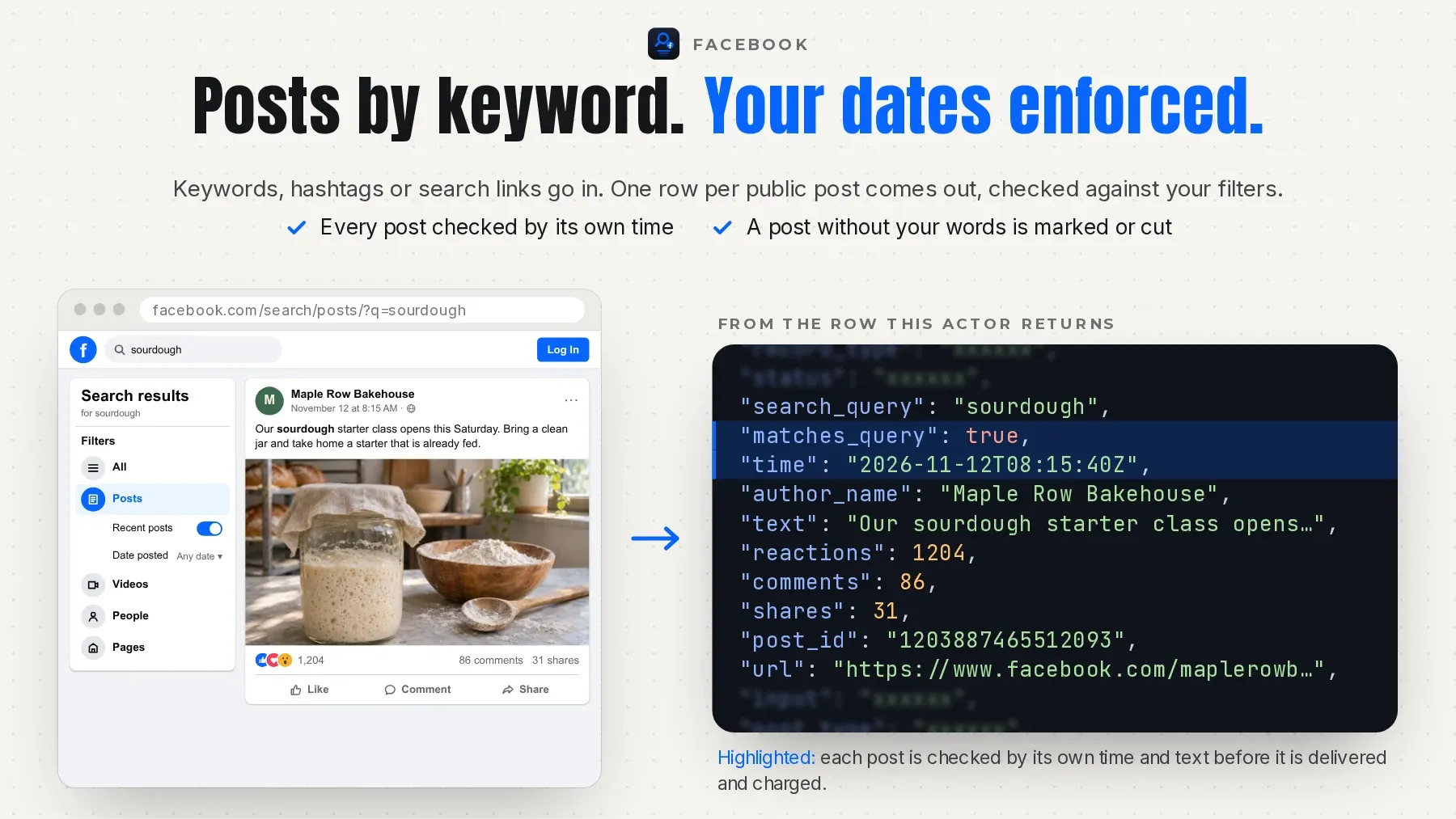
Facebook posts by keyword, from Facebook's own search, logged out. Give keywords, phrases, #hashtags or Facebook search links and get one row per public post: the whole text, the time to the second, the author (page or person, verified, the page id), the exact reactions by type (Like, Love, Care, Haha, Wow, Sad, Angry), the comments and shares counts, the photos and videos, the link preview, the shared post, the group and the tagged place. Top or most recent first, Facebook's date and place filters, every post checked again against your dates and words before any charge, date slicing for deeper reads, the videos search, the first 10 comments of each post on request. Every keyword ends with a free row that says where Facebook's list ended and what your filters left out. No login, no cookies, proxies handled for you.
From $5.00 per 1,000 rows (post-scraped) on the Free plan, $4.00 on Starter; every row and add-on is priced under Pricing below. A run start is $0.004344. The default input returns about 21 rows for about $0.104344. A keyword Facebook finds nothing for, a keyword Facebook answers with its help module, a link that is not a Facebook search, and the posts your filters or the date range leave out cost nothing: each keyword gets one free row that says what happened.
How it compares
- 2 times faster and cheaper than Apify's own Facebook Search Scraper, with more data: 20 posts in 10 s, against 21 s; $3.22 per 1,000 posts, against $4.05; 46 fields per post, against 18.
- Faster than scraper_one's Facebook Posts Search, with more data: 20 posts in 10 s, against 18 s; 46 fields per post, against 11. The price is about the same: $3.22 per 1,000 posts, against $3.00.
Measured on 2026-11-16. Each line compares one job, run by both scrapers at the same time. Prices are per 1,000 posts: Apify Actors at the Scale plan's prices.
Tested head-to-head on 2026-11-16
The job: The first 20 public Facebook posts for the keyword coffee from Facebook's own posts search, top results (the input form's own example). Every Actor ran on it the same day from the same harness; every run's cost is at the Scale plan's prices: a rival's charged events at its price for that plan, this Actor's at its list price. Fields counts the filled fields of a typical row. Every actor searched Facebook for the same keyword in the same minute; a keyword's list is each exit's own view of Facebook, so the posts differ between actors. Ours also says on a free row per keyword where Facebook's list ended. Re-measured monthly.
| Actor | Rows | First row | Run time | Cost | Fields | Failures |
|---|---|---|---|---|---|---|
| this Actor | 20 | 4.8 s | 10 s | $0.064 | 46 | none |
scraper_one/facebook-posts-search | 20 | 7.9 s | 18 s | $0.060 | 11 | none |
apify/facebook-search-scraper | 20 | 14 s | 21 s | $0.081 | 18 | none |
Why this Facebook search scraper
- Your dates and words are enforced on every post. Facebook's own date filter lets 7 to 37 % of a window's posts through from other days in our reads, and its search returns related posts without your words. Each post is checked by its own time and text before it is delivered: a post outside your dates, or without the query when
mustContainQueryis on, is left out and not charged, and the keyword's row counts how many each filter removed. Every row carriesmatches_query. - Honest about where Facebook's list ends. One search on Facebook is one view of the hour: its recent list ended after 76 to 95 posts and its top list after 95 to 377 posts per keyword in our reads. When a list ends under your cap the Actor reads it again from the start on a fresh connection and delivers the posts the second view adds; the keyword's row says
LIST_ENDwith the posts served and whether the reads agreed, never a silent short result. - Deeper with date slicing.
sliceBy(day, week or month) runs one search per window: four date windows of one keyword gave 292 posts, 260 of them not in the same hour's single search. A post is delivered and charged once however many windows or keywords list it. - Every reaction type, exact. The row carries the exact total and each of the 7 reaction types from Facebook's own counts (they add up to the total on every post we read), the comments and shares counts, and the views of video posts.
- Empty keywords cost nothing and say why. A keyword with no result (
no_results, read on two connections), one Facebook answers with its "Help is available" module (intercepted) and one whose every post your filters removed (filtered_out) each get a free row. - Videos search too.
searchType: videosreads Facebook's videos search: reels and videos with the exact view count where Facebook gives it, or Facebook's rounded count marked as such (video_views_exactfalse), the duration and the file links where the result carries them. - Comments and page facts on request.
includePostDetailsadds each post's first 10 comments as Facebook ranks them (charged only for posts that got them);includeAuthorDetailsadds a page author's exact followers, "talking about", category, creation date, ads and verification, free.
Who it's for
- Brand and social listening teams — every public post that mentions a brand, a product or a hashtag, recent posts first, with exact reactions by type, comments and shares, and a strict match that drops Facebook's related posts before any charge.
- Market and sentiment researchers — a topic's public posts over a date range, sliced by day or week to read past one search's limit, each post delivered once with its own time checked against the range.
- Lead and community finders — posts in public groups (
postSource: groups) or by business Pages, with the group's name and link, the tagged place, and withincludeAuthorDetailsthe page's exact followers.
Quick start
The newest posts about a topic from the last 7 days, strict match
Top posts for several keywords and a hashtag
A month of posts, one search per day
Videos and reels for a keyword
Switching from topapi/facebook-search-posts-scraper?
Your input works as it is. Each name in the left column is read as this Actor's own field and the run log says so (read <theirs> as <ours>); a name marked not read is ignored with a note. A value in the other Actor's shape, an object list or its own date form, is read too.
| topapi/facebook-search-posts-scraper | this Actor | what to know |
|---|---|---|
searchQueries | searchQueries | The same name: keywords, phrases, #hashtags or Facebook search links (posts, videos and hashtag links; a link's date, recent and location filters are kept). |
sortBy | sortBy | The same name and values: top or recent. |
startDate | startDate | The same forms: an absolute date, a time back from now (7 days, 3 weeks) or a day count (1 = today). |
endDate | endDate | The same forms; a date includes its whole UTC day. |
locationUid | locationUid | The same name: Facebook's numeric place id, or a place page link whose last number is the id. |
mustContainQuery | mustContainQuery | The same name: keep only posts whose text holds the query (as whole words in order). |
keywordFilter | keywordFilter | The same name: any of a comma list over the text, the author name and the link title. |
postType | postType | The same name and values: all, photo, video, link, text. |
postSource | postSource | The same name and values: all, groups, pages_and_profiles, business_pages. |
minReactions | minReactions | The same name. |
includePostDetails | includePostDetails | The same name: the first 10 comments of each delivered post, charged as post-details only on the posts that got them. |
monitorMode | not read | Read and not applied: only-new mode across runs is not in this Actor yet; a scheduled run with sortBy recent and a small maxPostsPerQuery reads the newest posts. |
monitorStoreName | not read | Read and not applied (only-new mode is not in this Actor yet). |
resumeStoreName | not read | Read and not applied: no resume across runs yet; sliceBy with a fixed date range reads a long backfill in one run. |
sliceBy | sliceBy | The same name and values: none, month, week, day (needs startDate). |
maxPagesPerSlice | maxPagesPerSlice | The same name: pages read per keyword and window. |
maxPostsPerQuery | maxPostsPerQuery | The same name: the cap per keyword after your filters (0 = up to 1,000). |
maxItems | maxItems | The same name: the cap for the whole run. |
compact | compact | The same name: the core fields only, the other columns left empty. |
proxyConfiguration | not read | Not read: the Actor brings its own connections. |
maxConcurrency | not read | No effect here (the leader's own text says the same of its own): each keyword is read on its own connection, several at once. |
What differs:
- The input names are the leader's own: its saved input runs here unchanged. monitorMode, monitorStoreName and resumeStoreName are read and not applied (the run's log says so); maxConcurrency has no effect here either.
- Facebook's search is served to residential connections only, so proxyConfiguration is not used. Nothing to set: the Actor brings its own connections.
- Rows carry the leader's fields under the posts scraper's names: message is text, published_at is time, reactions_count is reactions, reshare_count is shares, author is spread over author_id, author_name, author_url, author_type and page_id, and the reaction types are reactions_like to reactions_angry.
- includePostDetails adds the first 10 comments of each post (the leader: up to about 10); the video files and view counts come with every video post without it.
- Each keyword (and each date window with sliceBy) gets a free summary row (record_type target) with where Facebook's list ended, the posts read and what each filter left out; the leader writes a COVERAGE record instead.
- One more job and a few more filters: searchType videos (Facebook's videos search), excludeKeywords, minComments, minShares and includeAuthorDetails.
Output
One row per post (record_type post) and one free summary row per keyword and date window (record_type target):
| field | meaning |
|---|---|
record_type | post on a post or video row (charged), target on a keyword's free summary row. |
status | ok, or why a keyword gave no post: no_results (Facebook's search answered no post; two connections agreed), intercepted (Facebook showed its "Help is available" module instead of posts), filtered_out (posts were served and your filters or the date range left every one out), invalid_input (the value is not a keyword or a Facebook search link), refused (Facebook refused every connection tried for the keyword), failed (Facebook's answer could not be used, or the run stopped after Facebook refused several keywords in a row), not_read (the run stopped first). |
input | The value you gave that this row answers. |
post_id | Facebook's own id of the post (a video's id on a videos-search row). |
url | The post's link (a reel's or video's link on the videos search). |
post_type | The post's kind from its attachment: photo, album, video, reel, link, event, shared, text, other. |
is_video | True when the post carries a video or a reel. |
is_share | True when the post shares another post (see shared_post). |
time | When the post was published, UTC, to the second. Null on a videos-search result Facebook shows only with a date text (see date_text). |
timestamp | The same time as Unix seconds. |
date_text | The date as Facebook writes it on a videos-search result that carries no exact time ("Aug 23"); null on other rows. |
text | The post's whole text (a video's caption on the videos search); empty for a post with no text. |
text_length | The text's length in characters. |
hashtags | The hashtags of the text, without the #. |
mentions | The pages, profiles, groups and accounts the text tags: type, id, name, url. |
links_in_text | The outbound links written in the text. |
matches_query | True when the text holds the search query as whole words in order (any case, a hashtag's # ignored). Facebook's search returns related posts too; mustContainQuery keeps only the true ones. |
author_id | The author's Facebook id (the page's or the person's). |
author_name | The author's name as Facebook shows it. |
author_url | The author's link (a profile.php?id= link where Facebook gives none). |
author_type | page (a Facebook Page's post) or user (a person's post); null on a videos-search result that does not say. |
author_picture_url | The author's profile picture (Facebook's link; it expires after some days). |
author_verified | Facebook's verified badge on the author, as the post's header shows it (and the page's own verification with includeAuthorDetails); null where the answer does not say. |
author_is_business_page | True when the author is a business Page; false on a person's post; null where Facebook does not say. |
page_id | The author's Page id when the author is a Page (the id includeAuthorDetails reads the page by). |
reactions | The exact reactions total. |
reaction_types_count | How many of the 7 reaction types the post has. |
reactions_like | Like reactions (0 when none). |
reactions_love | Love reactions. |
reactions_care | Care reactions. |
reactions_haha | Haha reactions. |
reactions_wow | Wow reactions. |
reactions_sad | Sad reactions. |
reactions_angry | Angry reactions. |
comments | The comments count. |
shares | The shares count. |
engagement_total | Reactions + comments + shares (null when none is known). |
video_views | A video post's views: the exact count, or on a videos-search result Facebook's rounded count ("32K views" → 32000) with video_views_exact false. Null on posts without a video or a count. |
video_views_exact | True when video_views is Facebook's exact count, false when it is Facebook's rounded figure (a floor). |
video_duration_s | A video's length in seconds. |
media | The post's photos and videos, in order: type (photo or video), id, url, width, height, alt_text (Facebook's description of a photo), video_hd_url, video_sd_url, thumbnail_url, duration_s. The file links are Facebook's own and expire after some days: download what you keep. An album gives at most its first 5 photos (see media_truncated). |
media_count | How many photos or videos the post holds (an album's own count, which can be more than media lists). |
media_truncated | True when the post holds more photos than media lists. |
video_captions_url | A video's captions file, where Facebook gives one. |
link | A link post's preview: url (the target, unwrapped), title, description, domain, image_url. Null on other posts. |
shared_post | The post this post shares: post_id, url, author_id, author_name, author_url, and its text, time and media where the search result carries them (often null: Facebook's search result names the shared post and its author). |
is_group_post | True when the post is in a public group. |
group | The public group the post is in: id, name, url. |
place | The place the post is tagged at, or the place its header names ("… is in Memphis, TN"): id, name, url. |
privacy | The audience Facebook shows on the post (Public, Public group). |
ai_generated | True when Facebook labels the post's media as made with AI. |
ai_label_source | detected (Facebook's own detection) or self_disclosed (the author's label); null without a label. |
top_comments | With includePostDetails: the post's first 10 comments as Facebook ranks them: id, text, time, likes, replies, author_name, author_id, author_url, url. Empty for a post with no comment. |
details_status | With includePostDetails: ok (the comments were read; charged as post-details), failed (Facebook did not serve them), not_available (the post carries no comment key), not_read (past your charge limit), cut (the run's time limit came while the comments were read: the post is delivered without them and not charged for them); null without the add-on. |
page_followers | With includeAuthorDetails, on a page's post: the page's exact follower count. |
page_talking_about | With includeAuthorDetails: the page's "talking about this" count. |
page_category | With includeAuthorDetails: the page's category as Facebook writes it. |
page_created | With includeAuthorDetails: the day the page was created (Facebook's page transparency). |
page_running_ads | With includeAuthorDetails: true when the page runs ads now. |
author_details_status | With includeAuthorDetails: ok, no_followers (the page facts were read, the follower count was not served), failed, not_a_page (a person's post) or cut (the run's time limit came while they were read); null without the add-on. |
feedback_id | Facebook's key of the post's comments and reactions (the comments add-on reads by it). |
story_id | Facebook's story id of the post. |
search_query | The keyword this row was found by (a search link's own keyword). |
search_type | posts or videos: the search that found the row. |
sort | top or recent: the list the row was read from (a search link's own recent_posts filter reads the recent list); null on a videos row. |
search_window | The date window searched (a day, or first..last day), with a date range; null without one. |
position | The post's place in Facebook's list for this keyword and window (1 = first). |
read_from_country | The country of the connection the row was read from. |
verdict | On a keyword's row with posts: CAPPED (your maxPostsPerQuery or maxPagesPerSlice), LIST_END (Facebook's list ended under your cap; read again on a fresh connection), MAX_ITEMS (the run's maxItems), PARTIAL (stopped early: note says why). |
rows_delivered | On a keyword's row: the posts it delivered. |
posts_read | On a keyword's row: the posts Facebook served, before your filters. |
pages_read | On a keyword's row: the search pages read (5 to 7 posts a page), the fresh-connection reads included. |
filtered_out | On a keyword's row: the posts each filter left out, by filter (date, must_contain, keyword_filter, exclude, post_type, post_source, min_reactions, min_comments, min_shares); none of them is charged. |
duplicates | On a keyword's row: posts already delivered by another keyword or window of this run (not delivered or charged again). |
second_read | On a keyword's row whose list ended under your cap: what the fresh-connection reads added. |
note | Why a keyword's row has the status or the verdict it has, in words. |
scraped_at | When this row was read (UTC). |
Example record:
Pricing
Pay for the posts a run delivers, plus one run start. No platform usage is billed to you, and the post's price falls with your Apify plan.
| event | unit | Free | Starter | Scale | Business |
|---|---|---|---|---|---|
Post scraped (post-scraped) | per 1,000 | $5.00 | $4.00 | $3.00 | $2.00 |
Post details (first comments) (post-details) | per 1,000 | $1.00 | $0.85 | $0.70 | $0.50 |
Run start (start) | per run | $0.004344 | $0.004344 | $0.004344 | $0.004344 |
A post is $5.00 per 1,000 on the Free plan ($0.005 a post) and $4.00 on Starter, with everything its row carries: the text, the time, the author, the exact reactions by type, the comments and shares counts, the media, the link preview, the shared post, the group and the place. A video or reel of the videos search is a post at the same price. The first 10 comments of a post (includePostDetails) add $1.00 per 1,000 posts that got them; a post Facebook served no comments for is not charged for them. The page facts (includeAuthorDetails) cost nothing more. Each run that delivers a post also pays the run start, $0.004344 once; a run that delivers none pays nothing at all.
So the example input (20 posts for one keyword) costs $0.104344 on the Free plan and $0.084344 on Starter; 50 posts each of 5 keywords $1.254344 and $1.004344, or $1.504344 and $1.216844 with each post's first comments. Free: every keyword's summary row, a keyword with no result, a keyword Facebook answers with its help module, a link that is not a Facebook search, the posts your filters or the date range leave out, a post another keyword or window of the run already delivered, and a run that delivered no post (no run start either). A run that stops early (a timeout, an abort) is charged for the posts it delivered.
Before the first request the log names the prices at your plan and the most the run can cost: maxPostsPerQuery posts a keyword (0 = as many as Facebook serves, up to 1,000), maxItems over the whole run, and never more than your charge limit. Facebook's logged-out list of a keyword usually ends far sooner than 1,000 posts, and each keyword's free row says where it ended. Enterprise plans have their own rates — the Actor's Pricing tab shows the price for your plan.
Usage patterns
- Keyword monitoring — Give the keywords in
searchQueries,sortBy: recentand a date range (startDate: "1 day"), withmustContainQueryon for strict results. Each post comes once withsearch_queryand itspositionin Facebook's list; the keyword's free row (record_type target) says how the list ended and what the filters left out. - Long backfills — A single Facebook search is a limited list. Give
startDateandendDateandsliceBy(day, week or month): each keyword is searched once per window, every row carriessearch_window, and a post that two windows list is delivered once.maxPagesPerSlicebounds the pages per window andmaxPostsPerQuerythe posts per keyword over all windows. - Comments and page facts —
includePostDetailsadds each delivered post's first 10 comments (text, author, time, reactions, replies count) intop_comments;details_statussays whether Facebook served them.includeAuthorDetailsadds a page author's exact followers, "talking about", category, creation date, ads and verification, read once per page per run; a person's post getsauthor_details_status: not_a_page.
Input configuration
| field | type | default | what it does |
|---|---|---|---|
searchQueries | array | [] | Keywords, phrases or hashtags, one per line, e.g. "coffee", "#blackfriday", "iPhone 17 battery". A Facebook search link also works: https://www.facebook.com/search/posts/?q=coffee (its date, recent and location filters are kept, and its dates are checked on every post), https://www.facebook.com/search/videos/?q=coffee (the videos search) or https://www.facebook.com/hashtag/coffee. Facebook's search is fuzzy: it ranks related posts too, so turn on 'Only posts that contain the query' for strict results. The posts' language follows the keyword's language. |
searchType | posts / videos | "posts" | posts = Facebook's posts search (every public post kind). videos = Facebook's videos search: reels and videos, each with its view count (exact where Facebook gives it, else Facebook's rounded figure with video_views_exact false). |
sortBy | top / recent | "top" | top = Facebook's default ranking (popular posts of any age). recent = Facebook's recent list: recent public posts in Facebook's own order (mostly newest first, not strictly); it ends after about 75 to 95 posts on one view, so use a date range with 'Search the date range by' to read further back. |
startDate | string | "" | An absolute date (2026-09-01), a time back from now (7 days, 3 weeks, 2 months, 1 year) or a day count (1 = today, 2 = yesterday and today). Sent to Facebook as its date filter and checked again on every post by the post's own time (Facebook's filter lets 7 to 37 % of a window's posts through; those are left out free and counted). Leave empty for no lower bound. |
endDate | string | "" | An absolute date or a time back from now (e.g. 30 days). A date includes its whole UTC day. Combine with 'Posted after' for a window such as 2026-01-01 to 2026-06-30, or the same date in both for one day. Leave empty for up to today. |
locationUid | string | "" | Facebook's numeric id of a city or region, to keep posts tagged there, e.g. 108424279189115 (New York, NY), or a Facebook place page link whose last number is the id. A city name is not read: a value that is not an id runs the search without the location and the run says so. Leave empty for a global search. |
mustContainQuery | boolean | false | Keep only posts whose text holds the search query as whole words in order (case-insensitive; a hashtag's # ignored). Facebook's search also returns related posts without the words; every row says so in matches_query either way. Posts left out are not charged. When Facebook's first 3 pages for a keyword hold no post with its words (it answered related posts only), that keyword stops there and its row says so. |
keywordFilter | string | "" | Keep only posts whose text, author name or link title holds this word or phrase, e.g. "recipe" or "discount, sale, promo" (comma = any of them). Leave empty for no filter. |
excludeKeywords | string | "" | Leave out posts whose text holds any of these words or phrases, comma-separated, e.g. "giveaway, contest". Leave empty for no exclusion. |
postType | all / photo / video / link / text | "all" | Keep only one kind of post: photo (an image or an album), video (a video or a reel), link (a link preview), text (no media and no link); a shared post with nothing of its own counts as what the shared post carries (a shared reel is a video). |
postSource | all / groups / pages_and_profiles / business_pages | "all" | groups = posts in public groups; pages_and_profiles = posts outside groups; business_pages = posts by business Pages, outside groups. |
minReactions | integer | 0 | Keep only posts with at least this many reactions. 0 = no minimum. |
minComments | integer | 0 | Keep only posts with at least this many comments. 0 = no minimum. |
minShares | integer | 0 | Keep only posts with at least this many shares. 0 = no minimum. |
includePostDetails | boolean | false | Adds Facebook's first 10 comments of each delivered post (ranked as Facebook shows them: text, author, time, reactions, replies count) in top_comments. One extra request per post; charged as the post-details event only for posts that received them. |
includeAuthorDetails | boolean | false | For posts by a Facebook Page: the page's exact followers and 'talking about' count, its category, creation date, whether it runs ads and its verification, read once per page per run. Free; a few seconds per page. Posts by persons get author_details_status not_a_page. |
sliceBy | none / month / week / day | "none" | Facebook serves a limited list per search, so a long date range in one search returns a fraction of it. none = one search per keyword. month, week or day = one search per keyword and window; every row carries search_window, and a post is delivered once however many windows list it. Needs 'Posted after'. |
maxPagesPerSlice | integer | 0 | Pages read per keyword (and per window with 'Search the date range by'); a page holds 5 to 7 posts. 0 = no limit. |
maxPostsPerQuery | integer | 50 | The cap per search query, after your filters, over all its windows: your main cost control (you pay per delivered post). 0 = as many as Facebook serves, up to 1,000 per keyword. |
maxItems | integer | 0 | The most charged rows of the whole run; 0 = no cap beyond your charge limit. |
compact | boolean | false | Core fields only (id, link, text, time, author, counts, the query); the other columns are left empty. Sized for AI agents and MCP clients. |
feedback | string | A note to the people who maintain this Actor: what you needed and did not get. For example a missing field, a wrong or empty result, or the Actor you switch from or to, and why. The run does not read it: the rows and the charges stay the same. A person reads every note. |
Errors
A run does not fail because of your input. When an input cannot be used — a date that is not a date, an id in the wrong form, two settings that contradict each other — the run ends Succeeded, charges nothing, and says what to change:
- the status message starts with
INPUT REJECTED; - the dataset holds one row,
{"error": true, "code": "…", "message": "…"}, and no results; - the key-value store record
ERRORholds the same object.
From code, check error on the first row before reading results.
A keyword with no result, or a value that is not a keyword or a Facebook search link, is not an error: it gets one free target row with Facebook's own answer, and the run goes on with the others. A run that ends Failed is a fault on our side, never your input; it charges nothing, and we are alerted.
FAQ
Why did a keyword return fewer posts than my cap?
Facebook serves one search a limited list: its recent list ended after 76 to 95 posts and its top list after 95 to 377 posts per keyword in our reads, and the list is one view of the hour. When a list ends under your cap the Actor reads it again on a fresh connection and adds the posts that view serves; the keyword's row says LIST_END, the posts read and whether the reads agreed. To read further, give a date range and sliceBy.
Why are some posts not about my keyword?
Facebook's search ranks related posts too, and its own exact-match switch has no effect on the logged-out search. Every row says matches_query (the text holds your query), and mustContainQuery keeps only the matching posts, free for the ones it leaves out. When none of a keyword's posts holds its words, its row says so.
Can I choose the country or language of the posts?
The posts' language follows the keyword's language (a German keyword returns German posts), not the connection's country: we read the same keyword from five countries and got English posts in all of them. Every row says the country it was read from (read_from_country).
Does it need my Facebook login?
No. Everything is read logged out, with no cookies, through the Actor's own residential connections. Private groups and posts that need a login are not offered.
Do I need Apify Proxy or my own proxy?
No. The Actor uses its own connections, at no extra cost to you.
Integration
JavaScript
Python
CLI
REST
AI agents and MCP
Apify's MCP server offers this Actor as a tool to Claude, Cursor, VS Code and any other MCP client. Connect https://mcp.apify.com?tools=hyperbach/facebook-search-posts-scraper and ask, for example: "Find the newest public Facebook posts that mention cold brew from the last 7 days, with their reactions, comments and shares". The agent fills the input from the table above and reads the rows from the run's dataset. A field under the name another Actor gives it is read as this Actor's own: queries, query, keywords, keyword as searchQueries; resultsLimit, resultsCount, maxResults, maxPosts as maxPostsPerQuery; sort, sortType, sortOrder as sortBy; dateFrom, fromDate, since, postedAfter as startDate (and more). An agent or a person can add feedback to any run and say what was needed and not delivered: a missing field, a wrong or empty result, the Actor switched from or to, and why. The run returns the same rows at the same price, and a person reads every note.
n8n, Make and Zapier
The Apify node in n8n, the Apify app in Make and the Apify integration in Zapier run this Actor on a schedule or from a trigger and read its dataset. A webhook on the run's end (Integrations on the Actor page) sends the rows on to your own endpoint. Nothing to install on our side.
Support
Disagree with a charge? Write to apify@hyperbach.com with the run ID. We will ask Apify to compensate you, and the charge comes back to your Apify account as platform credit.
Did it do the job? A short review on the Store, at any rating, helps the next buyer choose.
See also
- Meta Ad Library Scraper — every ad a page runs on Facebook, Instagram, Messenger, WhatsApp and Threads, with the landing URL, media, run dates and EU reach.
- Threads Scraper — Threads profiles with the exact follower count, their posts and replies with view counts, and keyword and tag search, without a login.
- Instagram Reels Transcript Scraper — the spoken words of Instagram reels, by reel link or creator, with the exact posting time.
- Instagram Posts Scraper — the posts and reels of Instagram profiles, with the whole caption, the exact publish time, likes, comments and plays.
- Instagram Hashtag Scraper — Instagram's own ranked list of top reels for a hashtag or a search keyword.
- Facebook Pages Scraper — Facebook pages by URL, id, name or search words: the exact follower count, categories, address, phone, e-mail and websites, and the page transparency facts.
This page is generated from the Actor's schemas and a live sample — it cannot describe a field the Actor does not have.


