

Google Trends Scraper: Interest Over Time, Regions & Trending
Pricing
from $0.30 / 1,000 searches
Google Trends Scraper: Interest Over Time, Regions & Trending
Scrape Google Trends by search term: interest over time for 1 to 5 terms compared, by country or region, time range, category and web, news, image, Shopping or YouTube search, with interest by region and related queries. Plus Trending Now searches of any country.

Google Trends data by search term, logged out: search terms in, one row per search out — the interest over time (by minute, hour, day, week or month) for one term or up to five compared on one scale, the averages, the interest by region (countries, states or metro areas) and each term's related queries, top and rising — in any country or region, time range (the past hour to 2004), category and search type (web, news, images, Google Shopping, YouTube); plus the Trending Now searches of any country, one row each with its volume, its rise and its related searches. A search Google holds no data for gets a free row that says so. No login, no API key, no browser, proxies handled for you.
From $3.00 per 1,000 rows (search) on the Free plan, $1.00 on Starter; every row and add-on is priced under Pricing below. A run start is $0.004. The default input returns about 2 rows for about $0.01. A value that names nothing is a free row that says why.
Why this Google Trends scraper
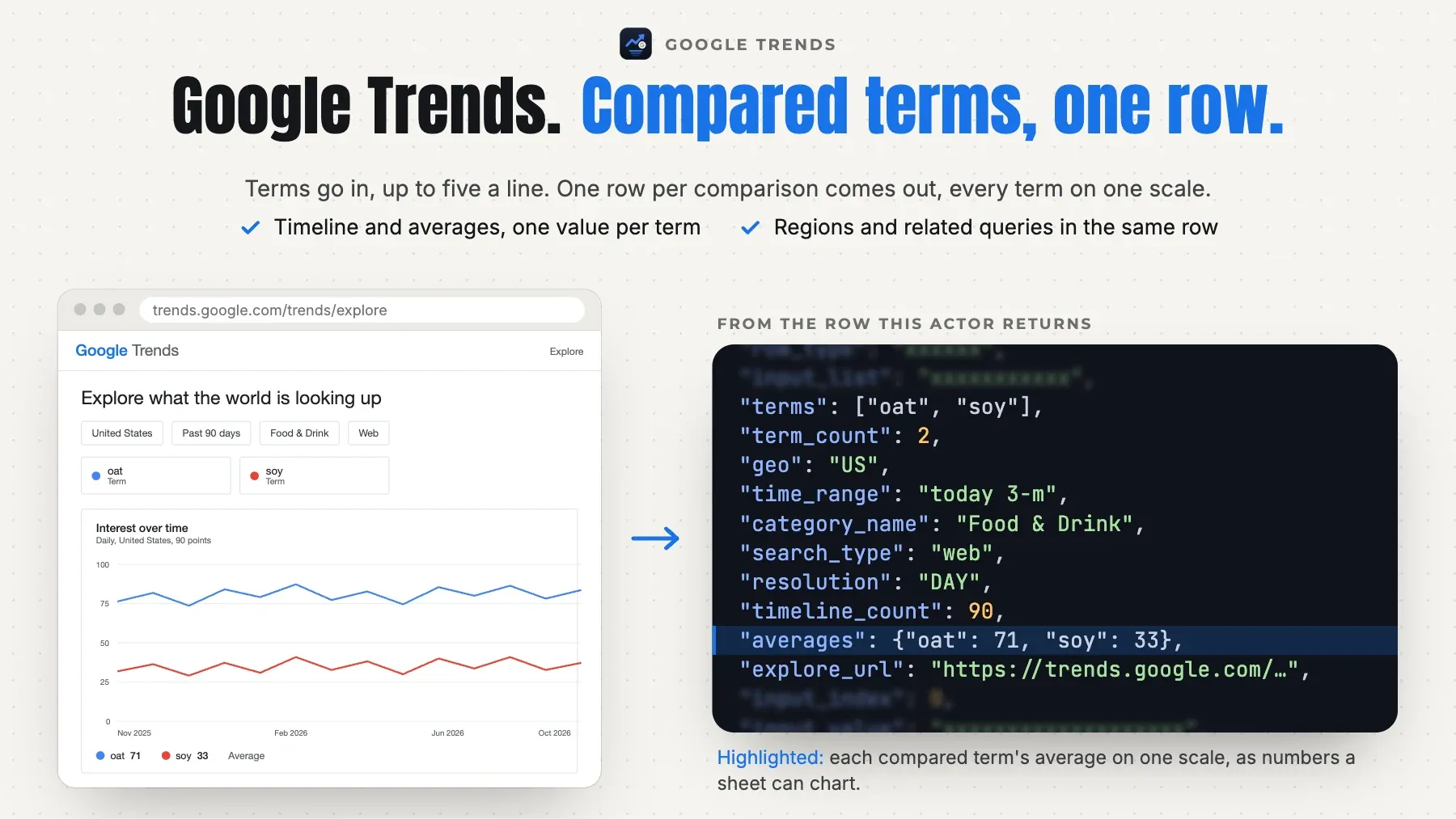
- A whole search in one row. The interest over time, the averages, the interest by region and the related queries of every term sit in one row, so 100 searches are 100 rows;
timelineandinterest_by_regioncarry one value per term, ready to chart. - Compare up to five terms. Write
coffee, tea, matchaon one line and the terms are read on one scale, the way Google Trends' compare does; one term per line reads each alone. Many searches in one run. - Every option of the Trends page. Any country or region (
US,US-CA,DE-BY) or the whole world, nine time ranges from the past hour (one point a minute) to 2004 (one a month), 25 categories, and web, news, image, Google Shopping or YouTube search. - Trending Now too. Give country codes and get every trending search of the past 24 hours, one row each, with its search volume, its rise, when it started and ended, its related searches and its categories (645 for the US on our test, 2026-10-31).
- Honest runs. Terms Google holds no data for are a free
no_datarow, a country or category Google refuses a freerefusedrow, a repeated search a freeduplicaterow. Only rows with data are charged. - Fast and light. Google Trends' own JSON over plain HTTP, three requests plus one per term a search, asked together. On our deployed test 100 searches took 46 s of reading and the US Trending Now list under a second (2026-11-01).
Who it's for
- SEO and content teams — which topic is rising, where, and which queries come with it, for a list of keywords every week, one row per keyword.
- Market and brand researchers — brands or products compared on one scale over 5 years or 2004 to today, by country and by state, into a sheet or a dashboard.
- News, social and AI agents — what a country searches right now: the Trending Now list with volumes and related searches, as typed rows for a feed or an agent's tool call.
Quick start
One keyword worldwide over the past 12 months
Three drinks compared in the US over 90 days
YouTube search interest in California since 2004
Trending Now in the US and the UK
Output
One row per search (and one per trending search; a free row for a value with no row):
| field | meaning |
|---|---|
row_type | search (one search's data, charged), trend (one trending search, charged) or input (the free row of a value with no row of its own, with the reason). |
input_list | The input list the row answers: searchTerms or trendingCountries. |
input_index | The 1-based position of the value in its input list. |
input_value | The search line or country code as you gave it. |
status | A search or trend row: ok. An input row: no_data, refused, invalid, duplicate, failed or not_read (see the FAQ). |
status_detail | Why, in words, when the status is not ok. |
scraped_at | When the row was read (ISO 8601, UTC). |
terms | The search's terms, in your order: one, or up to five compared on one scale. |
term_count | How many terms the search compares (1 to 5). |
geo | The country or region code the search ran in; empty for the whole world. On a trend row: the country of the list. |
time_range | The time range asked (today 12-m, now 7-d, all …). |
category | The Google Trends category id asked; empty for every category. |
category_name | The category's name (All categories, Food & Drink …). |
search_type | web, images, news, shopping or youtube. |
date_from | The first day (or minute) of the span Google answered. |
date_to | The last day (or minute) of the span Google answered. |
resolution | One timeline point per MINUTE, HOUR, DAY, WEEK or MONTH, as Google picks it for the time range. |
timeline_count | How many points timeline holds. |
timeline | The interest over time, oldest first: date (a day, or an ISO time for minutes and hours, UTC), timestamp (Unix seconds), label (Google's own label), values (0 to 100 per term, on one scale for the whole search; null where Google has no data) and is_partial (the current, still-filling point). |
averages | Each term's average over the span (0 to 100), on a comparison; empty for one term. |
region_resolution | What interest_by_region lists: COUNTRY (the whole world), REGION (states, provinces) or DMA (US metro areas). |
region_count | How many regions interest_by_region holds (the regions with data). |
interest_by_region | The interest by region, as Google orders it: geo_code, geo_name and values (0 to 100 per term). |
related_queries_top | Each term's top related queries: term, query, value (0 to 100), formatted_value, link (the query on Google Trends). |
related_queries_rising | Each term's rising related queries: term, query, value (the rise in %), formatted_value (+250% or Breakout), link. |
explore_url | The same search on trends.google.com. |
rank | The trending search's place in its country's Trending Now list (1 = first). |
title | The trending search as Google shows it. |
search_volume | Searches in the past 24 hours, as Google rounds them (200000 = 200K+). |
volume_increase_percent | How much the searches rose, in % (Google caps the figure at 1000). |
started_at | When the search started trending (ISO 8601, UTC). |
ended_at | When it stopped trending (ISO 8601, UTC); empty while it is still active. |
is_active | true while the search is still trending. |
related_terms | The searches Google groups under this trend. |
categories | The trend's Trending Now categories (Sports, Entertainment …). |
trend_url | The trending search's interest over the past day on Google Trends. |
Example record:
Pricing
Pay for the rows a run delivers, plus one run start; no platform usage is billed to you. The row price falls with your Apify plan.
| event | unit | Free | Starter | Scale | Business |
|---|---|---|---|---|---|
Search (search) | per 1,000 | $3.00 | $1.00 | $0.50 | $0.30 |
Trending search (trend) | per 1,000 | $5.00 | $4.25 | $3.50 | $2.50 |
Run start (start) | per run | $0.004 | $0.004 | $0.004 | $0.004 |
A search row is $3.00 per 1,000 on the Free plan ($0.003 a search), with its whole timeline, its region map and the related queries of each of its terms, for one term or five compared. A trending search row is $5.00 per 1,000 ($0.005 each). Each run that delivers a charged row also pays the run start, $0.004 once; a run that delivers no charged row pays nothing at all. A search Google holds no data for (no_data), a country or category Google refuses (refused), a value that is not a search (invalid), a repeated search (duplicate), a value left at the charge limit or the time limit (not_read) and a refusal the run could not pass (failed) get a free row and are never charged. A run that stops early (a timeout, an abort) is charged for the rows it delivered. maxItems counts the charged rows; before the first request the log names the price of each row at your plan. Enterprise plans have their own rates: the Actor's Pricing tab shows the price for your plan.
Usage patterns
- Searches —
searchTermstakes one search per line. Commas compare up to five terms on one scale (coffee, tea, matcha); a single term reads it alone.geo,timeRange,categoryandsearchTypeapply to every search of the run; run the Actor again (or a task) for another country or time range. - What the numbers mean — Google Trends gives relative interest, not search counts: 100 is the peak of the search's whole span and place, and every value of the row (every term, every point, every region) is on that one scale. A comparison's values are relative to the strongest term. Values of two different rows are not comparable.
- Trending Now —
trendingCountriestakes country codes (US,GB,DE). Each gives its Trending Now list of the past 24 hours, in Google's order: onetrendrow per search withsearch_volume,volume_increase_percent,started_at,ended_at,is_active,related_termsandcategories. A US list holds several hundred rows; setmaxItemsto cap them.maxItemscounts search and trend rows together, and the Trending Now lists are read first, so a small cap can be filled by a list before the searches. - What a row is —
row_type=search: one search line with its timeline, map and related queries.row_type=trend: one trending search.row_type=input: the free row of a value with no row, with itsstatusand the reason.
Input configuration
| field | type | default | what it does |
|---|---|---|---|
searchTerms | array | One search per line. A line with commas compares up to 5 terms on one scale, as Google Trends' compare does (coffee, tea, matcha); a line with one term reads it alone (web scraping). Up to 1,000 searches a run; one row each. | |
geo | string | "" | Where the searches come from: a country code (US, DE, IN) or a region code (US-CA, GB-ENG, DE-BY), as in a Google Trends URL's geo=. Empty for the whole world (the default). The interest by region lists countries for the world, regions or metro areas inside a country. |
timeRange | now 1-H / now 4-H / now 1-d / now 7-d / today 1-m / today 3-m / today 12-m / today 5-y / all | "today 12-m" | The span of the interest over time, ending now. One point a minute (past hour, 4 hours), 8 minutes (past day), an hour (past 7 days), a day (30 and 90 days), a week (12 months, the default; 5 years) or a month (2004 to today). |
category | `` / 3 / 47 / 44 / 22 / 12 / 5 / 7 / 71 / 8 / 45 / 65 / 11 / 13 / 958 / 19 / 16 / 299 / 14 / 66 / 29 / 533 / 174 / 18 / 20 / 67 | "" | Limit the searches to one Google Trends category (Food & Drink, Finance, Shopping …). Empty for every category (the default). |
searchType | web / images / news / shopping / youtube | "web" | Which Google search the interest is measured on: web search (the default), image search, news search, Google Shopping or YouTube search. |
trendingCountries | array | Country codes (US, GB, DE, IN, BR) whose Trending Now list of the past 24 hours you want: one row per trending search, with its search volume, its rise, when it started and ended, its related searches and its categories. A US list holds several hundred searches; maxItems caps the rows. Leave empty to read searches only. | |
maxItems | integer | 0 | The most search and trend rows this run delivers and charges, together. 0 = no limit. Free rows (no data, refused, invalid, duplicate) do not count. |
feedback | string | A note to the people who maintain this Actor: what you needed and did not get. For example a missing field, a wrong or empty result, or the Actor you switch from or to, and why. The run does not read it: the rows and the charges stay the same. A person reads every note. |
Errors
A run does not fail because of your input. When an input cannot be used — a date that is not a date, an id in the wrong form, two settings that contradict each other — the run ends Succeeded, charges nothing, and says what to change:
- the status message starts with
INPUT REJECTED; - the dataset holds one row,
{"error": true, "code": "…", "message": "…"}, and no results; - the key-value store record
ERRORholds the same object.
From code, check error on the first row before reading results.
A search Google Trends holds no data for is not an error: it gets one free row with status = no_data, and the run goes on with the others. A run that ends Failed is a fault on our side, never your input; it charges nothing, and we are alerted.
FAQ
Does it give related topics or interest by city?
No. Google Trends answers related topics with an empty list to a logged-out reader, so this actor does not offer them; the region map is read at Google's own level for the place (countries, states or metro areas), not by city. Related queries, top and rising, are in every search row.
Why is my search no_data?
Google Trends holds too few searches for the terms in that place, time range and category, and its own page shows "Hmm, your search doesn't have enough data to show here". Try a wider place or a longer time range. A no_data row is free.
Which status is which?
A search or trend row's status is ok. An input row's status is no_data (Google holds no data for the search), refused (Google refused the country, region or category code), invalid (an empty line or more than five terms), duplicate (the same search or country again: read once), failed (a refusal or an error the run could not pass; free) or not_read (left at maxItems, the charge limit or the run's time limit).
Does it need a Google account or API key?
No. Everything is read from Google Trends' public pages, logged out.
Integration
JavaScript
Python
CLI
REST
AI agents and MCP
Apify's MCP server offers this Actor as a tool to Claude, Cursor, VS Code and any other MCP client. Connect https://mcp.apify.com?tools=hyperbach/google-trends-scraper and ask, for example: "Compare the Google Trends interest in coffee, tea and matcha over the past year, with the top regions and related queries". The agent fills the input from the table above and reads the rows from the run's dataset. The input names are the ones in the table above. An agent or a person can add feedback to any run and say what was needed and not delivered: a missing field, a wrong or empty result, the Actor switched from or to, and why. The run returns the same rows at the same price, and a person reads every note.
n8n, Make and Zapier
The Apify node in n8n, the Apify app in Make and the Apify integration in Zapier run this Actor on a schedule or from a trigger and read its dataset. A webhook on the run's end (Integrations on the Actor page) sends the rows on to your own endpoint. Nothing to install on our side.
Support
Disagree with a charge? Write to apify@hyperbach.com with the run ID. We will ask Apify to compensate you, and the charge comes back to your Apify account as platform credit.
Did it do the job? A short review on the Store, at any rating, helps the next buyer choose.
See also
- ChatGPT Scraper — what ChatGPT, Gemini, Perplexity and Google's AI Mode and AI Overviews answer for your queries, with every source they cite.
- Keyword Search Volume & CPC Checker — Google search volume, CPC and competition for each keyword, with up to 104 months of history.
- Google Flights Scraper — every itinerary Google Flights lists for a one-way, round-trip or multi-city search, with the exact fare.
- Google Hotels Scraper — the hotels Google lists for a place and a stay, with the stay price and, on request, the price on each booking site.
- Google Play Reviews Scraper — Google Play reviews by app, language and country, with the app version each reviewer used.
- Google Maps Scraper — the places Google Maps lists for a search and an area: address, phone, website, rating and review histogram, hours, and new places only on request.
This page is generated from the Actor's schemas and a live sample — it cannot describe a field the Actor does not have.


