

Twitter Trends Scraper: X Trending Topics & Hashtags, No Login
Pricing
from $0.08 / 1,000 trends
Twitter Trends Scraper: X Trending Topics & Hashtags, No Login
X (Twitter) trends scraper: the live trend list of any of X's 467 places (Worldwide, 62 countries, 402 cities) with X's post volume, past hours, past days by date back to 2019, a week's top, 24-hour metrics, Global Trending posts. Trending hashtags in JSON, CSV, Excel. Misses free.
Pricing
from $0.08 / 1,000 trends
Rating
0.0
(0)
Developer

Hyperbach
Maintained by CommunityActor stats
0
Bookmarked
2
Total users
1
Monthly active users
a day ago
Last modified
Categories
Features
Share
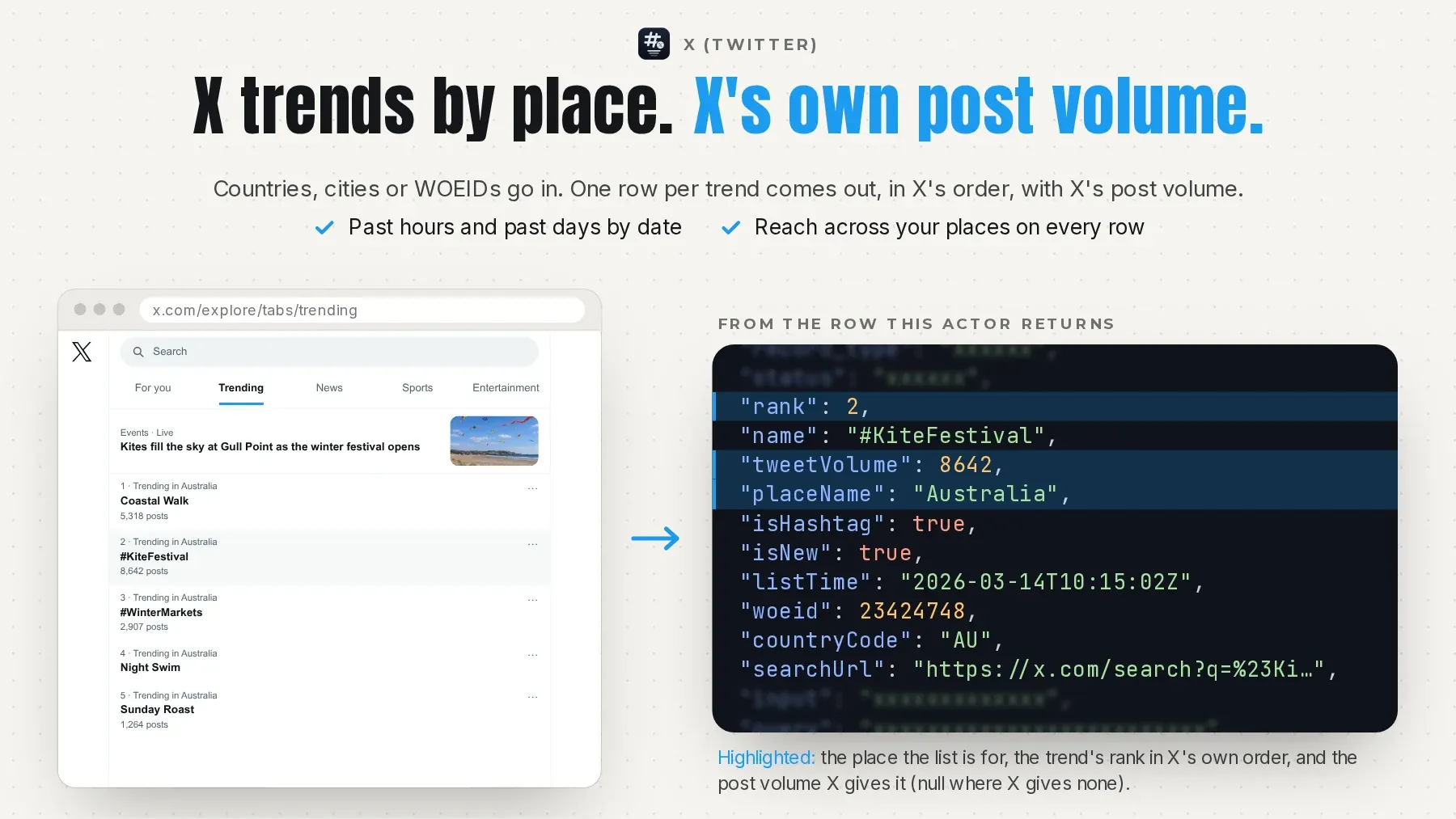
X (Twitter) trends without a login: the live trend list of any of X's 467 trend places (Worldwide, 62 countries, 402 cities), up to 50 trends each in X's own order with X's own post volume where X gives it, the lists of past hours, a past day's half-hour top-10 lists by date back to 2019, a period's top trends, 24-hour metrics per trend and X's Global Trending posts. Place names, ISO codes or WOEIDs in; one flat row per trend out (rank, name, query, X search link, volume, hashtag and cashtag flags, the place, the list's own time), and one free row per place that says what each list answered. No login, no cookies, no browser, proxies handled for you.
From $0.17 per 1,000 rows (trend) on the Free plan, $0.1445 on Starter; every row and add-on is priced under Pricing below. A run start is $0.0014. The default input returns about 51 rows for about $0.0099. A value that names nothing is a free row that says why.
How it compares
- xquik's X Trends Scraper is 3 times faster: 49 trends in 1.3 s, against our 3.6 s. We give more data: 28 fields per trend, against 10. The price is about the same: $0.15 per 1,000 trends, against $0.16.
- 2 times faster than feedminer's X Trends Scraper, with more data: 49 trends in 3.6 s, against 50 trends in 7.2 s; 28 fields per trend, against 8. It is cheaper: $0.12 per 1,000 trends, against our $0.15.
- Faster and cheaper than karamelo's Twitter Trends Scraper, with more data: 49 trends in 3.6 s, against 5.2 s; $0.15 per 1,000 trends, against $0.18; 28 fields per trend, against 3.
- Faster and cheaper than automation-lab's Twitter/X Trends Scraper, with more data: 49 trends in 3.6 s, against 50 trends in 4.9 s; $0.15 per 1,000 trends, against $0.24; 28 fields per trend, against 20.
- 2 times faster and 2 times cheaper than delicious_zebu's Twitter Trends Scraper, with more data: 49 trends in 3.6 s, against 50 trends in 7.8 s; $0.15 per 1,000 trends, against $0.30; 28 fields per trend, against 10.
Measured on 2026-11-23. Each line compares one job, run by both scrapers at the same time. Prices are per 1,000 trends: Apify Actors at the Scale plan's prices.
Tested head-to-head on 2026-11-23
The job: The United States' live X trend list (the input schema's example: places United States, maxItems 50). Every Actor ran on it the same day from the same harness; every run's cost is at the Scale plan's prices: a rival's charged events at its price for that plan, this Actor's at its list price. Fields counts the filled fields of a typical row. Each rival reads the same list, the United States' live X trends (the input schema's example, 50 trends): karamelo's Twitter trends scraper (the lane's most used), automation-lab's (the cheapest of the three most used), delicious_zebu's, xquik's (the cheapest row) and feedminer's. Re-measured monthly.
| Actor | Rows | First row | Run time | Cost | Fields | Failures |
|---|---|---|---|---|---|---|
| this Actor | 49 | 2.8 s | 3.6 s | $0.007 | 28 | none |
karamelo/twitter-trends-scraper | 49 | 5.1 s | 5.2 s | $0.009 | 3 | none |
automation-lab/twitter-trends-scraper | 50 | 5.0 s | 4.9 s | $0.012 | 20 | none |
delicious_zebu/x-global-trending-scraper | 50 | 6.2 s | 7.8 s | $0.015 | 10 | none |
xquik/x-trends-scraper | 49 | 1.4 s | 1.3 s | $0.008 | 10 | none |
feedminer/x-trends-scraper | 50 | 6.9 s | 7.2 s | $0.006 | 8 | none |
Why this X trends scraper
- Any of X's 467 places, many in one run. Worldwide, 62 countries and 402 cities (New York, London, Tokyo, São Paulo …), by name, ISO code, WOEID or a trends link, all in one run: one call a place, several at once. The lane's leader reads one of 35 countries a run.
- X's own list, X's own numbers. Each live row is X's trend list as X serves it now, in X's order, with X's own post volume (
tweetVolume) where X gives it and null where it does not (X filled it for 39 % of 21,975 trends over its 467 places on 2026-11-23, and for none on 2026-11-18), withvolumeAvailablesaying which. A past list's figure is its archive's own (archiveVolume), never put in X's column. - The past too, each list with its own time. The lists of 1 to 24 hours ago, a past day's 48 half-hour top-10 lists by date (back to 2019), one hour of a date, and the top trends of the last day, week, month or year. Every row says the list's own time (
listTime) and its real age (hoursAgo), so a list an archive kept 1 h 20 min ago is never sold as 1 hour ago. - Trends across places and over the day. On every live row: in how many of the run's places the trend is (
placeCount,placesTrendingIn,bestRankAcrossPlaces); on request its best rank, hours trending, first seen, rank an hour ago and the change over the place's hourly lists of the last day. - No mock rows, no empty success. A place with no list (X's own empty list, a place X does not know, a day an archive keeps as placeholder rows) gets a free row with the source's own words; only a real trend is a row and a charge.
maxTrendsPerPlaceandmaxItemscut the rows and the charges.
Who it's for
- Social media and marketing teams — what trends now in each market they work in, with X's post volume, to time posts and spot the topics to join.
- Journalists and researchers — what trended in a country on a given day or hour, back to 2019, and how a topic spread across countries and cities.
- Data, finance and AI teams — clean hourly trend rows (rank, name, volume, cashtag flag, place, time) for dashboards, alerts and models.
Quick start
Basic — newest postings
Switching from karamelo/twitter-trends-scraper?
Your input works as it is. Each name in the left column is read as this Actor's own field and the run log says so (read <theirs> as <ours>); a name marked not read is ignored with a note. A value in the other Actor's shape, an object list or its own date form, is read too.
| karamelo/twitter-trends-scraper | this Actor | what to know |
|---|---|---|
country | places | The leader's ids 1 to 35 (1 Worldwide, 2 United States, 35 Japan …) are read as the same places; places also takes names, ISO codes and WOEIDs, many at once. |
live | liveList | X's own live list of each place (on by default). |
hour1 | hoursAgo | The list of 1 hour ago (hoursAgo 1). |
hour3 | hoursAgo | The list of 3 hours ago (hoursAgo 3). |
hour6 | hoursAgo | The list of 6 hours ago (hoursAgo 6). |
hour12 | hoursAgo | The list of 12 hours ago (hoursAgo 12). |
hour24 | hoursAgo | The oldest hourly list the archives keep (23 hours ago), with its real age in hoursAgo. |
day2 | dateFrom | The UTC day of 2 days ago: its 48 half-hour top-10 lists (480 rows). |
day3 | dateFrom | The UTC day of 3 days ago; with day2, both days. |
proxyOptions | not read | Not read: the Actor runs its own connections, so no proxy is set or billed to you. |
What differs:
- The leader reads one of 35 countries a run (its
countryid); hereplacestakes any of X's 467 places and many at once. The leader's id works as it is:country"2" is the United States here too. - The leader's live list and past hours are its own site's lists; here the live list is X's own (
sourcex) and the past hours are X's lists as a public archive kept them (sourcearchive), each row with the list's own time (listTime) and age (hoursAgo). - The leader's
day2/day3give one 50-row list of that day from its site; here they read that UTC day's 48 half-hour lists of the top 10 (480 rows), the day archive's own: no source serves a 50-deep list of a past day. - X's own post volume is on the live rows only (
tweetVolume, null where X gives none); a past list's figure is its archive's own text (archiveVolume), never X's count. - Each row also carries the rank, X's query, an X search link, the hashtag and cashtag flags and the place's WOEID, country, country code and type; each place gets one free
targetrow.
Output
One row per trend of each list read (record_type trend), per Global Trending post (post) and per place of X's list (place), and one free target row per place:
| field | meaning |
|---|---|
record_type | trend on a trend row (charged), post on a Global Trending post (charged), place on a place of X's list (charged); target on a place's free summary row. |
status | ok, or why a place gave no row: unknown_place (X does not know it), empty_list (X's own list is empty), no_list (no archive keeps the list asked), invalid_input (the value names no place), failed (not served after the retries), not_read (the run stopped first). |
input | The value you gave that this row answers (a place as you wrote it, or globalTrendingPosts / listPlaces). |
rank | The trend's position in its list, 1 = the top. Under hashtags none a live row has X's own rank of the list without hashtags (X renumbers it); a past list keeps the archive's rank, so its ranks can have gaps. |
name | The trend as X shows it: a hashtag, a word or a phrase. |
query | X's own search query of the trend (URL-encoded, as X gives it on the live list). |
searchUrl | X's search page of the trend. |
xUrl | The search link as X gives it in its own answer (live rows only). |
tweetVolume | X's own post volume of the trend, null where X gives none (live and stored rows only). |
volumeAvailable | Whether X gave a post volume for this trend. |
archiveVolume | A past list's own figure, as its archive writes it (a count, "74.0K tweets", a score); never X's count. |
isHashtag | The name starts with #. |
isCashtag | The name starts with $ (a stock or crypto ticker). |
isPromoted | X marks the trend as promoted (live rows). |
isNew | Not in the place's hourly list of about an hour before this list; null when that list was not read. |
placeName | The place's name as X lists it. |
woeid | The place's WOEID (X's place id). |
country | The place's country (empty for Worldwide). |
countryCode | The country's ISO code (US, GB, JP …). |
placeType | X's type of the place: Supername (Worldwide), Country, Town or Unknown. |
parentWoeid | The WOEID of the place's parent (a city's country; 1 for a country). |
listType | live (X's list now), hourly (a past hour), day (a day's half-hour lists), dateHour (one hour of a date), topOfPeriod (a period's top list), globalTrending (a post). |
listTime | The list's own time (UTC): X's read time for a live list, the archive's snapshot time for a past one. |
hoursAgo | How old the list was when this run read it, in hours. |
askedHoursAgo | The hour you asked for (hoursAgo) that this list answers. |
source | x (X's own list, read now), x-stored (X's own list as this Actor read it in that hour), archive (a public archive of X's lists), table (X's places list as of 2026-11-23, when X did not answer). |
asOf | X's as_of of the list (the second X answered). |
createdAt | X's own created_at stamp of the list object; it is not the list's age (X sends a stamp up to a day old). |
recordDate | On a topOfPeriod row: when the trend had its record in the period, in the archive's own words ("2 hours ago", "3 days ago", "Now"), relative to the list's time (listTime). |
placeCount | On a live row: in how many of the run's places the trend is, read over each place's whole live list as X served it (before maxTrendsPerPlace; under hashtags none X serves its list without hashtags). |
placesTrendingIn | On a live row: the run's places whose whole live list has the trend. |
bestRankAcrossPlaces | On a live row: the trend's best rank over the run's places' whole live lists. |
bestRank24h | With withHistoryMetrics: the trend's best rank over the place's hourly lists of the last day and the live list. |
hoursInTop24h | With withHistoryMetrics: in how many hours of the last day the trend was in the place's list. |
firstSeen24h | With withHistoryMetrics: the time of the oldest hourly list of the last day with the trend (the live list's time if none). |
rankHourAgo | With withHistoryMetrics: the trend's rank in the place's list of about an hour before; null when it was not in it. |
rankChange | With withHistoryMetrics: rankHourAgo minus rank (positive: up). |
historyHours | With withHistoryMetrics: the hours the place's hourly lists span (the metrics' window). |
listsIn | With dedupe: in how many of the lists read the trend was. |
postId | A Global Trending post's id. |
postUrl | The post's page. |
text | The post's text. |
postCreatedAt | When the post was published (UTC). |
lang | The post's language code as X gives it. |
authorHandle | The post author's handle. |
authorName | The post author's name. |
authorId | The post author's numeric X id. |
authorVerified | The author has X's verified or blue check. |
authorFollowers | The post author's follower count as X's feed gives it. |
likes | The post's likes. |
reposts | The post's reposts. |
replies | The post's replies. |
quotes | The post's quotes. |
bookmarks | The post's bookmarks. |
views | The post's views. |
mediaUrls | The post's images and video covers. |
verdict | On a target row: COMPLETE (every list asked answered), PARTIAL (the run stopped first, or a list was not served: lists says which), CAPPED (maxItems stopped it). |
rows_delivered | On a target row: the rows it delivered. |
lists | On a target row: each list asked (listType, askedHoursAgo or date, status, source, listTime, its own length, the rows delivered, the source's words). |
note | Why a target row has the status or the verdict it has. |
scraped_at | When this row was read (UTC). |
Example record:
Pricing
Pay for the trends a run delivers, plus one run start. No platform usage is billed to you, and the price falls with your Apify plan.
| event | unit | Free | Starter | Scale | Business |
|---|---|---|---|---|---|
Trend (trend) | per 1,000 | $0.17 | $0.1445 | $0.119 | $0.0765 |
Global Trending post (post) | per 1,000 | $0.255 | $0.21675 | $0.1785 | $0.1275 |
Place of X's list (place) | per 1,000 | $0.1275 | $0.108375 | $0.08925 | $0.06375 |
Run start (start) | per run | $0.0014 | $0.0014 | $0.0014 | $0.0014 |
A trend of any list (X's live list, a past hour, a day's half-hour list, a date's hour, a period's top list) is $0.17 per 1,000 on the Free plan ($0.00017 a row), $0.1445 on Starter. A Global Trending post is $0.255 per 1,000, a place of X's places list (listPlaces) $0.1275 per 1,000. Each run that delivers a charged row pays the run start, $0.0014 once.
So the example (the United States' live list, 50 trends in the build's test) costs $0.0099 on the Free plan and $0.008625 on Starter; a past day's 48 half-hour lists of the top 10 (480 trends) $0.083 and $0.07076; the live lists of Worldwide and the 62 countries at 50 trends each (3,150 trends) $0.5369 and $0.456575; X's 20 Global Trending posts $0.0065 and $0.005735; X's 467 places $0.060943 and $0.052011. Free: every place's own row (its status, verdict and the lists it asked), a name that is no place, a place X does not know, X's empty list, a past list no archive keeps, an archive's placeholder day, a trend your filters or maxTrendsPerPlace leave out, a trend X lists twice (charged once) or dedupe folds, and a run that delivered no charged row (no run start either). A run that stops early (a timeout, an abort, the charge limit) is charged for the rows it delivered.
Before the first request the log names the prices at your plan and what the run can cost: "at most" under maxItems (the dearer rows counted first), plus the run start, and never more than your charge limit; with no maxItems it says "about", the cost if every list asked is full (50 trends a list, 480 a day). Enterprise plans have their own rates: the Actor's Pricing tab shows the price for your plan.
Usage patterns
- What trends now, in many places — Put the countries and cities in
places(United States, Japan, London, 23424829 …) and run: each place's live list, X's order, with the cross-place fields on every row. - An hourly feed — Schedule a task every hour on your places with
withHistoryMetricson: each run gives the live list with each trend's best rank, hours trending, first seen and rank change, andisNewmarks a trend that was not in the place's list of an hour before. - A past day or hour — Set
dateFrom(anddateTofor a range) and switchliveListoff: each day's 48 half-hour lists of the top 10, back to 2019; addhour(UTC) for that hour's two lists. - The last hours, the week's top —
hoursAgo1, 3, 6, 12, 24 gives the lists of those hours;topOfPeriodweek gives the place's most tweeted trends of the last 7 days.
Input configuration
| field | type | default | what it does |
|---|---|---|---|
places | array | [] | Any of X's 467 trend places: Worldwide, 62 countries and 402 cities. Write a name (United States, Japan, New York, São Paulo or Sao Paulo), an ISO country code (US, GB or UK, JP), a WOEID (23424977), a slug (united-kingdom/london) or a trends page link of the place. A city name two countries share takes its country: Birmingham, GB. listPlaces lists every place with its WOEID. A value that names no place gets a free row that says so. |
liveList | boolean | true | X's own trend list of each place as X serves it now: up to 50 trends in X's order, X's post volume where X gives it (X fills it for about 4 trends of 10), the query and the search link. Switch it off to read only past lists. |
hoursAgo | array | [] | The lists of past hours, one number an hour: 1, 3, 6, 12, 24. Each row says the list's own time (listTime) and its real age (hoursAgo), which can be up to 40 minutes off the hour asked. Up to 50 trends an hour. A place X lists but no archive keeps an hour of gets a free row that says so. |
dateFrom | string | A past day, YYYY-MM-DD (UTC), back to 2019: the day's 48 half-hour lists of the top 10 trends (480 rows a day). Countries and Worldwide only; a city gets a free row. With dateTo, every day of the range (at most 31 days). | |
dateTo | string | The last day of a date range, YYYY-MM-DD (UTC), not after today. Empty: dateFrom alone. | |
hour | integer | One hour of each date asked: the two half-hour top-10 lists of that hour (20 rows a day), or X's 50-deep list of the hour when this Actor read it then. Empty: the whole day. | |
topOfPeriod | none / day / week / month / year | "none" | The most tweeted trends of the place over the last day, week, month or year, as an archive of X's lists ranks them (20 to 100 rows, its own score in archiveVolume). |
withHistoryMetrics | boolean | false | Adds to each live trend: its best rank, the hours it trended, when it was first seen, its rank an hour ago and the change, over the place's hourly lists of the last day (historyHours says the span read, about 17 hours). One page more a place. |
globalTrendingPosts | boolean | false | The posts X shows a visitor on its Global Trending page (about 20 posts, the same for every visitor): text, author, likes, reposts, replies, quotes, bookmarks, views, media. One row a post. |
listPlaces | boolean | false | One row per place X has trends for (467): name, WOEID, country, country code, type (Country, Town) and parent WOEID. Works with no places given. |
placeNameContains | string | Only the places whose name or country contains these letters (case- and accent-insensitive: sao finds São Paulo), such as united or brazil. | |
maxTrendsPerPlace | integer | 50 | The first N trends of each list read (the live list, each past hour, each half hour, the top list); X's list is up to 50 long and some places have fewer. A trend past N is not delivered and not charged. At 50 (the most) every list is whole: a year's top list is up to 100 trends. |
maxItems | integer | 0 | The most charged rows of the whole run; 0 = no cap beyond your charge limit. |
hashtags | all / only / none | "all" | All trends, hashtags only (names that start with #), or no hashtags (X's own filter on the live list, the same rule on the past lists). |
includeKeywords | array | [] | Keep a trend only when its name or query contains one of these words or phrases (case-insensitive). A trend left out is not charged. |
excludeKeywords | array | [] | Leave out a trend whose name or query contains one of these words or phrases (case-insensitive). |
dedupe | none / perPlace / acrossPlaces | "none" | none: every trend of every list. perPlace: one row per trend name per place over every list read, the newest list's row with listsIn (the lists it was in). acrossPlaces: one row per trend name over the whole run. |
feedback | string | A note to the people who maintain this Actor: what you needed and did not get. For example a missing field, a wrong or empty result, or the Actor you switch from or to, and why. The run does not read it: the rows and the charges stay the same. A person reads every note. |
Errors
A run does not fail because of your input. When an input cannot be used — a date that is not a date, an id in the wrong form, two settings that contradict each other — the run ends Succeeded, charges nothing, and says what to change:
- the status message starts with
INPUT REJECTED; - the dataset holds one row,
{"error": true, "code": "…", "message": "…"}, and no results; - the key-value store record
ERRORholds the same object.
From code, check error on the first row before reading results.
A value that names no place of X's trends (a typo, a city X has no list for, a name two cities share without its country) is not an error: it gets one free target row that says why (invalid_input, unknown_place), and the run goes on with the others. A place whose list X serves empty gets a free empty_list row, a past list no archive keeps a free no_list row. A run that ends Failed is a fault on our side, never your input; it charges nothing, and we are alerted.
FAQ
Why is tweetVolume null on some trends?
X gives a post volume for some trends only, and how many changes by the day: on 2026-11-23 X filled it for 8,638 of 21,975 trends over its 467 places (17 of 39 on the United States' list); on 2026-11-18 for none. The row says null and volumeAvailable false where X gives none; this Actor never makes one up.
Why does a place give fewer than 50 trends?
X's own list can be shorter: the United States' list had 39 to 50 trends between reads on 2026-11-23, and 19 of X's 467 places had an empty list (a free empty_list row). The place's target row says the list's own length. X's list can also name one trend twice in a row (on 2026-11-23 the United States' and Japan's lists did, at ranks 2 and 3): such a trend is one row, X's ranks are kept, and the place's row says so. maxTrendsPerPlace takes the first N distinct trends of each list.
How old are the past hours?
Each row says it: listTime is the list's own time and hoursAgo its real age. The hourly lists come from public archives of X's lists that keep a snapshot about every hour, so the list of 1 hour ago can be 40 minutes off the hour; the oldest hour kept is 23 hours ago.
How far back can I read by date?
To 2019, a UTC day at a time (at most 31 days a run), for Worldwide and the 62 countries: each day's 48 half-hour lists of the top 10 trends. A city gets a free no_list row, and a day an archive keeps as placeholder rows (Qatar on 2026-11-22) too.
Do I need an X account or a proxy?
No. Every list comes from what X and the public archives serve a logged-out reader, and the Actor runs its own connections: no login, no cookies, no proxy setting.
Is a trend charged twice?
A trend is one row a list: the same name in the live list and in the list of an hour ago is two rows. dedupe perPlace keeps one row per trend per place (the newest list's, with listsIn), acrossPlaces one per trend in the run.
What is a WOEID?
The place id X keys its trends by (23424977 the United States, 1 Worldwide, 2459115 New York). listPlaces lists all 467 with their names and countries; any of them works in places by name too.
Do I need Apify Proxy or my own proxy?
No. The Actor uses its own connections, at no extra cost to you.
Integration
JavaScript
Python
CLI
REST
AI agents and MCP
Apify's MCP server offers this Actor as a tool to Claude, Cursor, VS Code and any other MCP client. Connect https://mcp.apify.com?tools=hyperbach/x-trends-scraper and ask, for example: "Get the top trending topics on X right now in the United States and Japan with their post volumes". The agent fills the input from the table above and reads the rows from the run's dataset. A field under the name another Actor gives it is read as this Actor's own: country, countries, locations, location as places; live, includeLive, currentTrends as liveList; hour1, hour3, hour6, hour12 as hoursAgo; date, day2, day3, startDate as dateFrom (and more). An agent or a person can add feedback to any run and say what was needed and not delivered: a missing field, a wrong or empty result, the Actor switched from or to, and why. The run returns the same rows at the same price, and a person reads every note.
n8n, Make and Zapier
The Apify node in n8n, the Apify app in Make and the Apify integration in Zapier run this Actor on a schedule or from a trigger and read its dataset. A webhook on the run's end (Integrations on the Actor page) sends the rows on to your own endpoint. Nothing to install on our side.
Support
Disagree with a charge? Write to apify@hyperbach.com with the run ID. We will ask Apify to compensate you, and the charge comes back to your Apify account as platform credit.
Did it do the job? A short review on the Store, at any rating, helps the next buyer choose.
This page is generated from the Actor's schemas and a live sample — it cannot describe a field the Actor does not have.


