

X Tweet Scraper: Twitter Profile Posts & Tweets, No Login
Pricing
from $0.06 / 1,000 posts
X Tweet Scraper: Twitter Profile Posts & Tweets, No Login
Twitter scraper API, no login: an account's tweets newest first, tweets by URL with likes, reposts, views and the whole text, X Articles as Markdown, replies, community top posts. Export to JSON, CSV or Excel. Misses free.
Pricing
from $0.06 / 1,000 posts
Rating
0.0
(0)
Developer

Hyperbach
Maintained by CommunityActor stats
0
Bookmarked
6
Total users
4
Monthly active users
6 days ago
Last modified
Categories
Features
Share
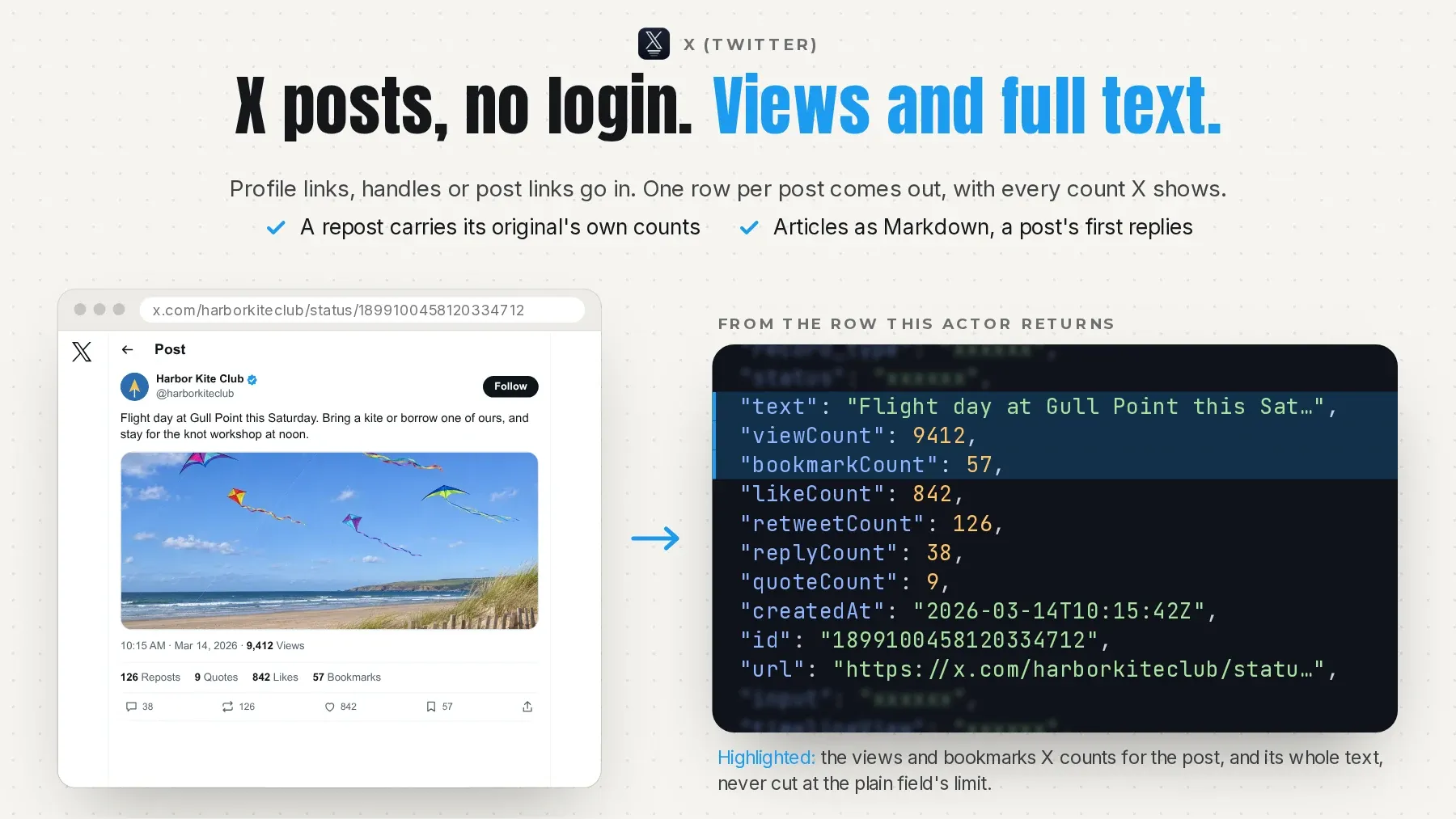
X (Twitter) posts without a login: an account's timeline newest first (its own posts, replies and reposts, to the end X serves a logged-out reader or your cap), posts by link or id with every count and the whole text, X Articles with their whole body as text and Markdown, a post's first replies, a community's top posts and an account's Highlights tab. Profile, post, community and search links, handles, from: search terms and conversation ids in; one row per post out, with its likes, reposts, replies, quotes, bookmarks and views, its author, media, poll, card, place and Community Note, and one free row per input with a verdict: COMPLETE, LIST_END (X's own end, with the account's count), TOP_LIKED, CAPPED or PARTIAL. No login, no cookies, no browser, proxies handled for you.
$0.1275 per 1,000 tweet rows on the Free plan, $0.10837 on Starter. A run start is $0.002188. The default input returns about 51 rows for about $0.008563. A value that names nothing is a free row that says why.
How it compares
- Faster and 3 times cheaper than apidojo's Tweet Scraper V2, with more data: 50 tweets in 11 s, against 18 s; $0.13 per 1,000 tweets, against $0.40; 30 fields per tweet, against 24.
- Faster and cheaper than kaitoeasyapi's Tweet Scraper, with more data: 50 tweets in 11 s, against 16 s; $0.13 per 1,000 tweets, against $0.20; 30 fields per tweet, against 22.
Measured on 2026-11-16. Each line compares one job, run by both scrapers at the same time. Prices are per 1,000 tweets: Apify Actors at the Scale plan's prices.
Tested head-to-head on 2026-11-16
The job: the latest 50 posts of the X account NASA (the input schema's example: its profile link, maxItems 50). Every Actor ran on it the same day from the same harness; every run's cost is at the Scale plan's prices: a rival's charged events at its price for that plan, this Actor's at its list price. Fields counts the filled fields of a typical row. Each Actor reads the latest 50 posts of NASA: ours from the account's timeline (its posts, replies and reposts), the two rivals from X's search for from:NASA, which needs their own logged-in access. Re-measured monthly.
| Actor | Rows | First row | Run time | Cost | Fields | Failures |
|---|---|---|---|---|---|---|
| this Actor | 50 | 8.5 s | 11 s | $0.007 | 30 | none |
apidojo/tweet-scraper | 50 | 13 s | 18 s | $0.020 | 24 | none |
kaitoeasyapi/twitter-x-data-tweet-scraper-pay-per-result-cheapest | 50 | 8.0 s | 16 s | $0.010 | 22 | none |
Why this X tweet scraper
- No login, ever. Every post comes from what X serves a logged-out reader: no account, no cookies, no session of yours at risk. What X shows only to a logged-in reader (keyword and hashtag search, lists, likes, a post's quotes, the replies past the first ones) is named on a free row, never faked.
- The end of a timeline, named. X serves a logged-out reader only part of a large account's timeline: our walks to the end of 2026-11-16 ended at 833 of NWS's 47,276 posts, 779 of NASA's 74,542, 323 of NASAMoonBase's 335 and 85 of Tesla_Optimus's 212. The walk reads to that end and reads the end a second time on a fresh connection with a new guest token; the account's
targetrow then says COMPLETE when the walk reached the account's own count, or LIST_END with the count, never a silent short list. - Every count, the right way round. Likes, reposts, replies, quotes, bookmarks and views on every post; a repost row carries the original post with its own counts in
retweet(X gives the repost itself 0 likes); a post from before X's view counter (December 2022) hasviewCountnull with the reason, never 0. - The whole text. A long post's whole text (X cuts it at 280 characters in its plain field), a repost's whole original, and an X Article's whole body as plain text and as Markdown (headings, lists, quotes, links, bold and italic, images), read from the Article's own blocks.
- Filters that hold. A date window, sinceId, language, minimum likes, reposts, replies, views and bookmarks, images, videos, quotes, replies, reposts, verified authors and words: each decides on the delivered post's own values, so a post outside the window is never delivered, and a post a filter leaves out is free.
- One charge per post. A post listed by two of your inputs (an account and its post link) is delivered and charged once;
maxItemsand the per-input cap are checked before each push.
Who it's for
- Brand and social media teams — an account's latest posts with every count, to track what lands, what a competitor posts and when.
- Researchers and journalists — a set of posts by link with their whole text, Community Notes, places and counts, or an official account's timeline over a date window.
- Data and AI teams — clean post rows (text, counts, media, links, author) for analysis, monitoring dashboards or model inputs, with X's own object on request.
Quick start
Basic — newest postings
Switching from apidojo/tweet-scraper?
Your input works as it is. Each name in the left column is read as this Actor's own field and the run log says so (read <theirs> as <ours>); a name marked not read is ignored with a note. A value in the other Actor's shape, an object list or its own date form, is read too.
| apidojo/tweet-scraper | this Actor | what to know |
|---|---|---|
startUrls | startUrls | Profile, post and community links, and search links whose term names one author; the leader's {url: …} objects are read too. |
searchTerms | searchTerms | Terms whose author is one handle (from:NASA since:2026-10-01 lang:en min_faves:100): read as that handle's timeline. Other terms: a free not_served row. |
twitterHandles | twitterHandles | Handles with or without @: each handle's timeline. |
conversationIds | conversationIds | Each post with the first replies X shows a logged-out reader (3 on its page); the rest of the conversation needs a login. |
maxItems | maxItems | The post rows of the whole run (the charged rows). |
sort | sort | Latest is X's own timeline order; Top needs X's search (a login), so posts come newest first and the run says so. |
tweetLanguage | tweetLanguage | A language code; keeps the posts X marks with it. |
onlyVerifiedUsers | onlyVerifiedUsers | Posts whose author carries any verification. |
onlyTwitterBlue | onlyTwitterBlue | Posts whose author is blue-verified. |
onlyImage | onlyImage | Posts with a photo. |
onlyVideo | onlyVideo | Posts with a video or a GIF. |
onlyQuote | onlyQuote | Quote posts. |
author | twitterHandles | The author's handle: that account's timeline. |
inReplyTo | not read | A search operator (to:), and X's search needs a login: not read. |
mentioning | not read | A search operator (@mention search), and X's search needs a login: not read. includeKeywords with @name keeps an account's posts that mention it. |
geotaggedNear | not read | A search operator (near:), and X's search needs a login: not read. A geotagged post carries its place. |
withinRadius | not read | A search operator (within:): not read, as geotaggedNear. |
geocode | not read | A search operator (geocode:): not read, as geotaggedNear. |
placeObjectId | not read | A search operator (place:): not read, as geotaggedNear. |
minimumRetweets | minimumRetweets | On each post's own reposts (a repost by its original's). |
minimumFavorites | minimumFavorites | On each post's own likes (a repost by its original's). |
minimumReplies | minimumReplies | On each post's own replies. |
start | start | Posts on or after this date; the walk stops at the first older post. |
end | end | Posts on or before this date (the whole day included). |
includeSearchTerms | not read | Every row always carries the input that gave it (input): nothing to switch on. |
customMapFunction | not read | No code runs on the rows: use the dataset's fields and views, or includeRaw for X's own object. |
outputConnector | not read | Use the platform's integrations (Notion, Sheets, webhooks) on the run's dataset. |
deliverTarget | not read | Use the platform's integrations on the run's dataset. |
deliverMode | not read | Use the platform's integrations on the run's dataset. |
deliverMaxItems | not read | Use the platform's integrations on the run's dataset; maxItems bounds the run. |
What differs:
- No login: X's search (keywords, hashtags,
to:,near:, Top) needs one, so a search term is read only when its author is one handle (from:NASA …): the handle's timeline, with the term's other parts (dates, language, minimum counts, media, words) applied to the posts. Any other term gets a freenot_servedrow. - An account's timeline is the posts X serves a logged-out reader: on our walks to the end of 2026-11-16, 85 to 833 of the latest (NWS 833 of 47,276, NASA 779 of 74,542; the
targetrow says LIST_END with the account's count). For a few large accounts X serves a logged-out reader the account's most-liked posts in place of its timeline: those rows saytimelineViewtop_liked, after the profile page's latest originals. createdAtis ISO 8601 UTC (2026-11-13T22:07:09Z), not X's own date text.endincludes the whole day it names (the leader passes it to X'suntil:, which leaves that day out).- A row is a post with the leader's field names (
text,likeCount,author.userName,retweet,quote…) plusrecord_type,statusandinput; each input also gets one freetargetrow.
Output
One row per post (record_type tweet), and one free target row per input:
| field | meaning |
|---|---|
record_type | tweet on a post row (charged); target on an input's free summary row. |
status | ok, or why an input gave no post: not_found (two connections agree), suspended, protected, withheld (X withholds the account in the US, the country this Actor reads from), not_served (X shows it only to a logged-in reader), invalid_input, failed (X refused every connection), not_read (a cap or the time limit came first), duplicate (another form of an input given before, such as @nasa after NASA: read once, its posts are on that input's rows). |
input | The input you gave that this row answers. |
community | On a community's posts and its target row: the community {id, name} (the target row adds members, description, joinPolicy, createdAt). |
timelineView | Which list the post came from: latest (the timeline, newest first), top_liked (an account X serves by its most-liked posts), highlights_tab, community_top_liked, post, replies. |
route | Which X call served the row: timeline, highlights_tab, by_id, by_id_web, embed (no views, reposts, quotes or bookmarks), profile_page, post_page, community_page. |
replyOf | On a reply read from a post's page: the post it was listed under. |
raw | With includeRaw: X's own post object as served. |
verdict | On a target row: COMPLETE (the list's end at the account's count, the window's start or the post read), LIST_END (X's own end below the account's count, read twice), TOP_LIKED (X serves this account or community by its top posts), CAPPED (your cap), PARTIAL (stopped: note says why). |
rows_delivered | On a target row: the post rows it delivered. |
note | Why a target row has the status or the verdict it has: posts read, left out by filters, X's own count. |
scraped_at | When this row was read (UTC). |
id | The post's id. |
url | The post's page on x.com (on a target row: the account's, the post's or the community's page). |
twitterUrl | The same post on twitter.com. |
text | The post's whole text: a long post's full text, a repost as RT @author: and the original's whole text. |
fullText | The same as text (the leader's second name for it). |
createdAt | When the post was posted (ISO 8601, UTC); a repost row's is the repost's time. |
lang | The language X marks the post with (en, es, ja …). |
likeCount | Likes (a repost row: the repost's own, 0; the original's are in retweet). |
retweetCount | Reposts. |
replyCount | Replies. |
quoteCount | Quote posts. |
bookmarkCount | Bookmarks. |
viewCount | Views; null when X shows none (posts before December 2022): viewCountNote says why. |
viewCountNote | Why viewCount is null, when it is. |
isRetweet | The row is the account's repost of another post (the original is in retweet). |
isReply | The post is a reply. |
isQuote | The post quotes another post (in quote). |
isPinned | The account's pinned post (from a timeline; null for a post read by link). |
author | The author: {id, userName, name, url, isVerified, verifiedType, isBlueVerified, followers, following, statusesCount, mediaCount, description, location, website, profilePicture, coverPicture, createdAt, protected, withheldInCountries}. On a target row: the account's profile. |
conversationId | The id of the conversation's first post. |
inReplyToId | The post this one replies to. |
inReplyToUserId | The id of the account this post replies to. |
inReplyToUsername | The handle of the account this post replies to. |
retweet | On a repost row: the original post {id, url, text, createdAt, lang, likeCount, retweetCount, replyCount, quoteCount, bookmarkCount, viewCount, media, isReply, conversationId, author} with its own counts. |
quote | On a quote post: the quoted post, as retweet; {id, url, note} when X names it without its content. |
media | Photos, videos and GIFs: {type, url, expandedUrl, id, width, height, altText, durationMs, variants: [{url, contentType, bitrate}]}; no file is stored. |
hashtags | The post's hashtags. |
mentions | The accounts the post mentions: {id, userName, name}. |
urls | The post's links: {url, expandedUrl, displayUrl}. |
card | The post's card: {name, url, title, description, domain, image}. |
poll | A poll: {choices: [{label, count}], totalVotes, endsAt, durationMinutes, countsAreFinal, updatedAt}. |
place | A geotagged post's place: {id, name, fullName, country, countryCode, type, boundingBox}. |
communityNote | The Community Note X shows on the post: {id, text, title, url}. |
article | An X Article: {id, title, previewText, coverImage, publishedAt, text, markdown} (the whole body as plain text and Markdown). |
source | The app the post was made with, where X's answer names it (on a few posts only). |
possiblySensitive | X's sensitive-content flag, where its answer carries one. |
editIds | The ids of the post's versions (more than one when it was edited). |
isEdited | The post was edited. |
withheldInCountries | The countries X withholds the post in: the post's own list, else its account's (X names a withheld account's countries on the account). |
Example record:
Pricing
Pay for the posts a run delivers, plus one run start. No platform usage is billed to you, and the post's price falls with your Apify plan.
| event | unit | Free | Starter | Scale | Business |
|---|---|---|---|---|---|
Post (tweet) | per 1,000 | $0.1275 | $0.10837 | $0.08925 | $0.06375 |
Run start (start) | per run | $0.002188 | $0.002188 | $0.002188 | $0.002188 |
A post is $0.1275 per 1,000 on the Free plan ($0.0001275 a post) and $0.10837 on Starter, with everything its row carries: the whole text, the likes, reposts, replies, quotes, bookmarks and views, the author, the media, the card, the poll, the place, the Community Note and an X Article's whole body. Each run that delivers a post pays the run start, $0.002188 once, on every plan.
So the latest 50 posts of one account cost $0.008563 on the Free plan and $0.0076065 on Starter; 10 posts by link $0.003463 and $0.0032717; 1,000 posts $0.129688 and $0.110558. Free: every input's target row, an account or a post X does not have, a suspended, protected or withheld account, what X shows only to a logged-in reader (not_served), a value that names nothing, an input given twice in another form (duplicate), the posts a filter leaves out, a post already delivered for another input, and a run that delivered no post (no run start either). A run that stops early (a timeout, an abort) is charged for the posts it delivered.
Before the first request the log names the prices at your plan and the most the run can cost: maxItems over the whole run, maxTweetsPerTarget each input, one post a post link, and never more than your charge limit. With no cap (maxItems 0, the default of a run started over the API), each account's timeline is read to the end X serves a logged-out reader: 85 to 833 posts on our walks to the end of 2026-11-16 (NWS 833 of its 47,276 posts, NASA 779 of 74,542, NASAMoonBase 323 of 335, Tesla_Optimus 85 of 212); each account's target row names X's own count. NWS's 833 posts cost $0.1083955 on the Free plan and $0.09246021 on Starter, so the charge limit is what bounds an uncapped run of many accounts. Enterprise plans have their own rates: the Actor's Pricing tab shows the price for your plan.
Usage patterns
- An account's latest posts — Put the profile link or the handle in, set
maxItems(or the per-input cap), run. Each post is a row; the account's freetargetrow holds its profile and says where the walk ended. - Only what is new since your last run — Give
sinceIdthe newest post id of your last run: the walk stops at the first post that is not newer, so a scheduled run reads and charges only the new posts. - Posts by link, with Articles and replies — Put post links or ids in
startUrls. An X Article's post comes with the Article's whole body as text and Markdown; switch onpostReplies(or useconversationIds) for the first replies X shows a logged-out reader. - A search term with one author — Put
from:NASA since:2026-10-01 lang:en min_faves:100 artemisinsearchTerms: it is read as NASA's timeline with the term's dates, language, counts and words applied, and the term'stargetrow says so.
Input configuration
| field | type | default | what it does |
|---|---|---|---|
startUrls | array | [] | Profile links (x.com/NASA, twitter.com/NASA), post links (x.com/NASA/status/123…, also with /photo/1 or from a share mirror such as fxtwitter.com), bare post ids, community links (x.com/i/communities/ |
twitterHandles | array | [] | X handles, with or without @ (NASA, @SpaceX). Each handle's timeline is read: its own posts, its replies and its reposts, newest first. |
searchTerms | array | [] | X search terms whose author is one handle, such as from:NASA since:2026-10-01 lang:en min_faves:100 filter:media artemis. X serves its search only to a logged-in reader, so such a term is read as that handle's timeline and its other parts (since:, until:, since_id:, max_id:, lang:, min_faves:, min_retweets:, min_replies:, filter: / -filter: media, images, videos, links, replies, retweets, quote, words and "phrases") are applied to the posts the timeline serves. Any other term gets a free row that says why. |
conversationIds | array | [] | Post ids or post links: each post is read with the first replies X shows a logged-out reader (3 on its page). |
maxItems | integer | 0 | The most post rows of the whole run (the charged rows); 0 = no cap beyond your charge limit: each input is read to its end (an account's timeline to the end X serves a logged-out reader, 85 to 833 posts on our walks of 2026-11-16). The free summary row of each input does not count. |
maxTweetsPerTarget | integer | 0 | The most post rows of one input (one account, one search term, one community); 0 = no cap per input. |
start | string | Keep posts posted on or after this date (YYYY-MM-DD, UTC). A timeline walk stops at the first post older than it (the pinned post aside). | |
end | string | Keep posts posted on or before this date (YYYY-MM-DD, the whole day included, UTC). | |
sinceId | string | A post id: keep only posts with a higher id (newer); a timeline walk stops at the first older post. Give the newest id of your last run to read only what came after it. | |
tweetLanguage | string | A language code (en, es, ja …): keep only posts X marks with this language. | |
sort | Latest / Top / Latest + Top | "Latest" | Latest: newest first, X's own timeline order. Top and Latest + Top are search sorts, and X's search needs a login: the posts still come newest first and the run says so. |
includeRetweets | boolean | true | Keep the account's reposts (each with the original post and its own counts in retweet). |
includeReplies | boolean | true | Keep the account's replies that its timeline shows. |
includePinned | boolean | true | Keep the account's pinned post (isPinned true; it is not one of the newest and never stops the walk). |
onlyReplies | boolean | false | Keep only replies. |
onlyImage | boolean | false | Keep only posts that carry a photo. |
onlyVideo | boolean | false | Keep only posts that carry a video or a GIF. |
onlyQuote | boolean | false | Keep only posts that quote another post. |
onlyVerifiedUsers | boolean | false | Keep only posts whose author carries any verification (blue, business or government). |
onlyTwitterBlue | boolean | false | Keep only posts whose author is blue-verified. |
minimumFavorites | integer | 0 | Keep posts with at least this many likes (a repost is read by its original's counts). |
minimumRetweets | integer | 0 | Keep posts with at least this many reposts. |
minimumReplies | integer | 0 | Keep posts with at least this many replies. |
minimumViews | integer | 0 | Keep posts with at least this many views (a post with no view count from X, before December 2022, counts as 0). |
minimumBookmarks | integer | 0 | Keep posts with at least this many bookmarks. |
includeKeywords | array | [] | Keep only posts whose text or links contain at least one of these words (not case-sensitive). |
excludeKeywords | array | [] | Leave out posts whose text or links contain any of these words (not case-sensitive). |
postReplies | boolean | false | For every post link or id: also deliver the first replies X shows a logged-out reader on the post's page (3). Each reply is a post row (replyOf names the post). |
includeRaw | boolean | false | Add raw: the post object exactly as X served it (larger rows). |
feedback | string | A note to the people who maintain this Actor: what you needed and did not get. For example a missing field, a wrong or empty result, or the Actor you switch from or to, and why. The run does not read it: the rows and the charges stay the same. A person reads every note. |
Errors
A run does not fail because of your input. When an input cannot be used — a date that is not a date, an id in the wrong form, two settings that contradict each other — the run ends Succeeded, charges nothing, and says what to change:
- the status message starts with
INPUT REJECTED; - the dataset holds one row,
{"error": true, "code": "…", "message": "…"}, and no results; - the key-value store record
ERRORholds the same object.
From code, check error on the first row before reading results.
An input that is not an X account, post or community (another site, a t.co short link, a list, a hashtag, a keyword search) is not an error: it gets one free target row that says why (invalid_input, or not_served for what X shows only to a logged-in reader), and the run goes on with the others. A run that ends Failed is a fault on our side, never your input; it charges nothing, and we are alerted.
FAQ
Can it search X for a keyword or a hashtag?
No. X serves its search only to a logged-in reader, and this Actor never logs in. A term whose author is one handle (from:NASA …) is read as that handle's timeline; any other term gets a free row that says so.
Why did an account give fewer posts than its count?
X serves a logged-out reader only part of a large account's timeline: our walks to the end of 2026-11-16 ended at 833 of NWS's 47,276 posts, 779 of NASA's 74,542, 323 of NASAMoonBase's 335 and 85 of Tesla_Optimus's 212. The walk reads to that end, reads the end once more on a fresh connection, and the account's target row says LIST_END with the account's own count. An account with fewer posts is read to its count (COMPLETE).
What is timelineView top_liked?
For a few large accounts X serves a logged-out reader the account's most-liked posts (about 100, the pinned post first, ordered by likes) in place of its timeline. Those rows come after the profile page's latest original posts, and the account's target row says TOP_LIKED.
Does a repost show 0 likes?
The repost row carries its own counts (X gives a repost 0 likes) and the original post in retweet, with the original's likes, reposts, replies, quotes, bookmarks and views. The like and repost filters read the original's counts.
What does a community link give?
The community's own record and the top posts its page shows a logged-out reader at that hour (about 20, by likes): timelineView community_top_liked. The set is the view X serves at the hour, and it can differ between two runs and between X's views for different networks (on 2026-11-16 one run read posts of the last week, another posts of the last month). X shows the newest community posts only to a logged-in reader.
What does a run with no maxItems read?
Every input to its end: each account's timeline to the end X serves a logged-out reader (on 2026-11-16 our walks ended at 85 to 833 posts: NWS 833, NASA 779), each post with its first replies when asked, each community's top posts. The Console form fills maxItems 50; a run started over the API or by an agent without it reads everything, so set maxItems or maxTweetsPerTarget, or a charge limit, to bound the run. The run's first log line names the most it can cost.
Is a post I get twice charged twice?
No. A post is delivered and charged once a run, whichever inputs list it.
Do I need Apify Proxy or my own proxy?
No. The Actor uses its own connections, at no extra cost to you.
Integration
JavaScript
Python
CLI
REST
AI agents and MCP
Apify's MCP server offers this Actor as a tool to Claude, Cursor, VS Code and any other MCP client. Connect https://mcp.apify.com?tools=hyperbach/x-tweet-scraper and ask, for example: "Get the latest 100 posts of the X account NASA with their likes, reposts and views". The agent fills the input from the table above and reads the rows from the run's dataset. A field under the name another Actor gives it is read as this Actor's own: urls, url, links, tweetUrls as startUrls; author, handles, usernames, userNames as twitterHandles; queries, searchQueries, query, searchTerm as searchTerms; conversationId, replyThreadIds as conversationIds (and more). An agent or a person can add feedback to any run and say what was needed and not delivered: a missing field, a wrong or empty result, the Actor switched from or to, and why. The run returns the same rows at the same price, and a person reads every note.
n8n, Make and Zapier
The Apify node in n8n, the Apify app in Make and the Apify integration in Zapier run this Actor on a schedule or from a trigger and read its dataset. A webhook on the run's end (Integrations on the Actor page) sends the rows on to your own endpoint. Nothing to install on our side.
Support
Disagree with a charge? Write to apify@hyperbach.com with the run ID. We will ask Apify to compensate you, and the charge comes back to your Apify account as platform credit.
Did it do the job? A short review on the Store, at any rating, helps the next buyer choose.
See also
- Telegram Profile Scraper — Telegram channels, groups, bots and users by username or link, with the exact subscriber or member count.
- YouTube Channel Search Scraper — the YouTube channels a keyword finds, with subscribers, the exact video and view counts and the country.
- Threads Scraper — Threads profiles with the exact follower count, their posts and replies with view counts, and keyword and tag search, without a login.
- Substack Scraper — the posts of a Substack newsletter with the full text of free posts, the date, the paywall flag and the likes.
- Weibo Scraper — Weibo posts, profiles, search, comments and the hot-search boards, without a login.
- Pinterest Search Scraper — the pins of a Pinterest search, with the link each pin points to, the image and the pinner.
This page is generated from the Actor's schemas and a live sample — it cannot describe a field the Actor does not have.


