
Yandex Search Scraper | Yandex SERP Results, Ads, Neuro AI
Pricing
from $1.75 / 1,000 search results
Yandex Search Scraper | Yandex SERP Results, Ads, Neuro AI
Scrape Yandex search results (SERP) logged out: up to 25 pages a query on yandex.ru, .com, .com.tr, .kz, .by, .uz, any region. One row per organic result: rank, URL, title, snippet, sitelinks, date. Ads, the Neuro AI answer, entity card and related searches free. Misses free.
Pricing
from $1.75 / 1,000 search results
Rating
0.0
(0)
Developer

Hyperbach
Maintained by CommunityActor stats
0
Bookmarked
2
Total users
1
Monthly active users
5 days ago
Last modified
Categories
Features
Share
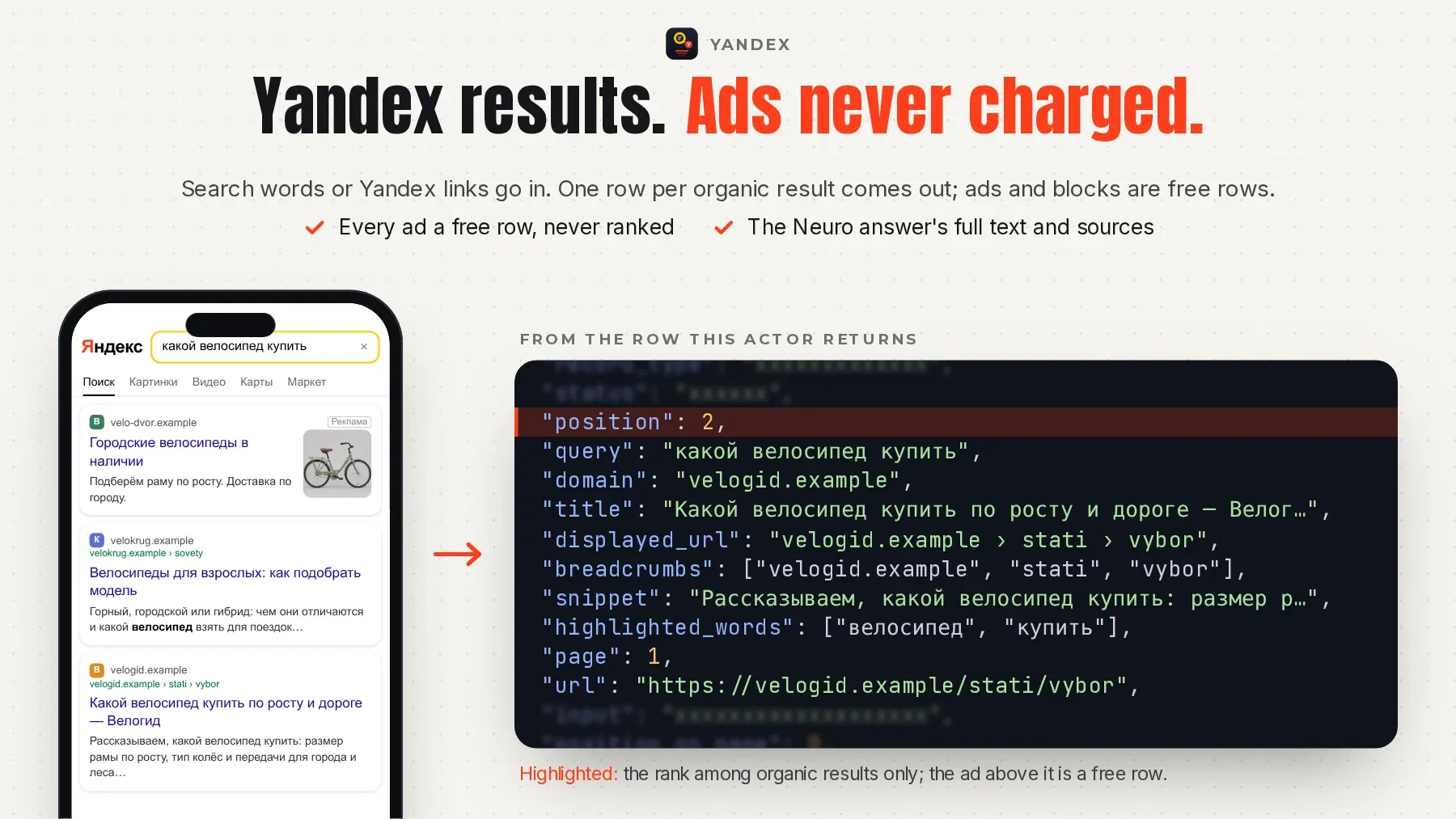
Yandex web search results, logged out: search words or Yandex search links in, one row per organic result out — the rank, the URL, the title, the snippet, the displayed URL and its breadcrumbs, the highlighted words, sitelinks, the site's rating and the date and file type where Yandex labels them — up to 25 pages a query, on yandex.ru, .com, .com.tr, .kz, .by or .uz with any Yandex region. Every ad, the Neuro (AI) answer with its full text and sources, the entity card, related searches and the other blocks come as free rows of their own, and one free row per query carries Yandex's count and the verdict. No login, no API key, no browser, proxies handled for you.
From $3.50 per 1,000 rows (search_result) on the Free plan, $2.975 on Starter; every row and add-on is priced under Pricing below. A run start is $0.002. The default input returns about 16 rows for about $0.037. Every query gets one free target row with Yandex's count, the query Yandex searched and the verdict; every ad and every block of the page (the Neuro answer, the entity card, related searches, images, videos, local businesses, products) is a free row too. Only organic results are charged.
How it compares
- 21 times cheaper than zen-studio's Yandex Search Scraper, with more data: $2.65 per 1,000 results, against $55.06; 23 fields per result, against 3.
- 16 times cheaper than johnvc's Яндекс Yandex: $2.65 per 1,000 results, against $42.51.
Measured on 2026-11-16. Each line compares one job, run by both scrapers at the same time. Prices are per 1,000 results: Apify Actors at the Scale plan's prices.
Tested head-to-head on 2026-11-16
The job: the first Yandex results page of one Russian query (как выбрать ноутбук on yandex.ru, the input schema's example). Every Actor ran on it the same day from the same harness; every run's cost is at the Scale plan's prices: a rival's charged events at its price for that plan, this Actor's at its list price. Fields counts the filled fields of a typical row. One query's first page on yandex.ru. zen-studio's and johnvc's actors return one dataset item per results page with the page's results inside it, so their row counts are pages; johnvc's charges by the page plus a setup fee, zen-studio's and ours by the result. Re-measured monthly.
| Actor | Rows | First row | Run time | Cost | Fields | Failures |
|---|---|---|---|---|---|---|
| this Actor | 10 | 5.3 s | 5.9 s | $0.026 | 23 | none |
zen-studio/yandex-search-engine-scraper | 1 | 7.2 s | 7.9 s | $0.055 | 3 | none |
johnvc/yandex-scrape-yandex-search-results-at-scale---per-result | 2 | 6.4 s | 6.4 s | $0.085 | 25 | none |
Why this Yandex search scraper
- Only organic results are charged. Every ad Yandex shows (2 to 8 a page on our tests) and every block of the page is a free row of its own with
record_typeadorblock; an ad is never counted, ranked or charged as a result. A query that delivers no result costs nothing. - The Neuro answer's full text and its sources. Yandex shows its AI answer either in full or as a short card; for the short card this Actor asks the page's own answer call and waits for the finished text (2 of 2 completed on our test, 661 and 1,328 characters with 5 sources each, 2026-11-16). The full card's text and its source links are read from the page (2,640 characters and 11 sources on our test query).
- Up to 25 pages, the end said. Pages 1-3 come from Yandex's phone results page in seconds; pages 4-25 from the desktop page. Yandex shows 25 pages at most (its page 26 is its own 404): a query whose list ends earlier ends there, with the verdict LIST_END and the reason. A URL two pages list is one row with one rank.
- Any region, six domains.
languagetakes the leader's 13 values (each a Yandex domain and a region),regionany Yandex region code or a city name; the row carries the region Yandex answered for and the domain, and a page Yandex served for another region is read again, never delivered (our tests: the answered region equal to the asked one on 81 of 81 pages, 2026-11-16). - Yandex's own filters. Time (past day, two weeks, month), newest first with Yandex's date label on each result, one results language (8 languages), the family filter, search exactly as typed, and a pasted Yandex search link with its own region and filters. Each one changed the list against an unfiltered read in the same minute on our tests.
Who it's for
- SEO teams and rank trackers — where a site ranks on Yandex for its keywords, by region and domain, read on a schedule: the rank, the URL and the page on each row, your domains flagged with
trackedDomainsand their best rank on the query's row. - Marketers and ad analysts — who advertises on a keyword in Yandex Direct: every ad of the page as its own row with its title, text, domain and sitelinks, beside the organic results it sits above.
- AI and data teams — Yandex's Neuro answer and its sources for a set of questions, the entity card and the related searches, as typed rows keyed by query and URL, with a free row per query to check a pipeline against.
Quick start
The first page for one query in Moscow
Three pages of results on yandex.com for the USA
News of the past day, newest first, in Saint Petersburg
Switching from zen-studio/yandex-search-engine-scraper?
Your input works as it is. Each name in the left column is read as this Actor's own field and the run log says so (read <theirs> as <ours>); a name marked not read is ignored with a note. A value in the other Actor's shape, an object list or its own date form, is read too.
| zen-studio/yandex-search-engine-scraper | this Actor | what to know |
|---|---|---|
query | queries | One query, read as a list of one; queries takes many (search words or Yandex search links). |
maxPages | maxPages | The same name: pages per query, about 10 results each; values above 25 read Yandex's 25 pages. |
language | language | The same 13 values (en, ru, uk, de, fr, tr, be, kk, uz, az, lv, lt, et), each a Yandex domain and a region: ru is yandex.ru with Moscow, en yandex.com with the USA. |
feedback | feedback | The same: a note to the maintainers, never read by the run. |
What differs:
- One row per result, not one item per query: the leader's
organic_resultsarray is this Actor'ssearch_resultrows, itsadstheadrows, its AI answer and entity cardblockrows, itssearch_infothe query'stargetrow. - Many queries in one run:
queriesis a list; the leader's singlequeryis read as a list of one. maxPagesabove 25 reads 25: Yandex shows 25 pages a query at most (page 26 is its own 404).- The Neuro answer comes with its text: the leader's run gave its label and sources, no text.
- The leader's
languagevalues pick the same thing here (a domain and a region);regionanddomainset them directly.
Output
One row per organic result (and free rows for the ads, the blocks and each query):
| field | meaning |
|---|---|
record_type | search_result on an organic result (charged); ad on an ad, block on a block of the page and target on a query's summary row (all free). |
status | ok, or why a query gave no row: no_results (Yandex's own empty page), invalid_input (not a search), failed (the first page could not be read, or Yandex served another region), not_read (the run stopped before it). |
input | The value you gave that this row answers. |
query | The search words sent to Yandex. |
page | The results page the row came from (1 = the first). |
position | On a result: its rank among the query's organic results over the pages read (ads and blocks left out; a URL two pages list keeps its first rank). |
position_on_page | The row's place among the results (or the ads) of its own page. |
url | The result's page (on an ad: Yandex's click link). |
domain | The result's site (on an ad: the domain the ad shows). |
title | The title Yandex shows (on a block: its heading). |
snippet | The text Yandex shows under the title. |
displayed_url | The site and path Yandex shows under the title. |
breadcrumbs | The parts of the displayed URL (the site, then the path's parts). |
highlighted_words | The words Yandex shows in bold in the title and the snippet. |
sitelinks | The result's sitelinks, each with its title and url. |
rating | The site's rating Yandex shows on the result (out of 5). |
reviews_count | The number of reviews behind that rating. |
date | The date label Yandex shows on the result ("8 минут назад", "23 октября"), where it shows one: on most results of a date-sorted or news query. |
file_type | The document type Yandex labels on the result (pdf, doc), where it labels one. |
favicon_url | The site's icon (Yandex's favicon service). |
tracked | On a result: true when its domain is one of your trackedDomains (null when you gave none). |
deep_fee | On a result: 1 on the one result that carried its query's deep_query fee (the query's first result from a page past 3 or from the desktop view), else 0. |
block_type | On a block: what it is, by Yandex's own name: neuro_answer, entity_search (the entity card), related_searches, images, video-unisearch, companies (local businesses), ecommerce_constr (products), bank, stocks and the others. |
block_subtype | On a block or an ad: Yandex's own variant name (the Neuro answer's offline_bsa, teaser_bsa or teaser; the entity card's subtitle). |
text | On a block: its text (the Neuro answer's full text, one paragraph a line). |
sources | On the Neuro answer: its source links, each with its title and url (and the source's own text when Yandex gives it). |
items | On a block: its links, each with its title and url (the related searches, the entity card's links, the videos). |
answer_status | On the Neuro answer: on_page (the text was on the page), complete (read from the page's own answer call), incomplete (Yandex had not finished it in time), refused or not_asked (includeNeuroAnswer off). |
view | phone (Yandex's phone results page) or desktop (the desktop page: pages 4-25, and device desktop). |
yandex_domain | The Yandex domain that answered (yandex.ru, yandex.com, …). |
region_id | The region Yandex says it answered for (its lr code: 213 Moscow, 84 USA, …). |
results_total | Yandex's count for the query, as a number ("нашлось 3 тыс." = 3000); Yandex rounds it. |
results_total_text | On a query's row: Yandex's count as Yandex words it. |
searched_query | On a query's row: the query Yandex says it searched (the corrected one when Yandex fixed a typo). |
correction | On a query's row: Yandex's own note when it corrected the query or added results for another spelling. |
search_url | The Yandex results page the row was read from. |
verdict | On a query's row: COMPLETE (every page asked was read), LIST_END (Yandex's list ended first: note says how), CAPPED (maxResultsPerQuery or the run's cap), PARTIAL (stopped: note says why). |
rows_delivered | On a query's row: the result rows it delivered. |
pages_read | On a query's row: the result pages read. |
best_tracked_position | On a query's row: the best rank of your trackedDomains among its results (null when none ranked). |
note | Why a query's row has the status or the verdict it has, and a pasted link's parameters that were not sent. |
scraped_at | When this row was read (UTC). |
Example record:
Pricing
Pay for the organic results a run delivers, plus one run start, and one small fee for each query that reads Yandex's pages past 3 or its desktop view. No platform usage is billed to you, and the result's price falls with your Apify plan.
| event | unit | Free | Starter | Scale | Business |
|---|---|---|---|---|---|
Search result (search_result) | per 1,000 | $3.50 | $2.975 | $2.45 | $1.75 |
Deep or desktop query (deep_query) | per query | $0.008 | $0.008 | $0.008 | $0.008 |
Run start (start) | per run | $0.002 | $0.002 | $0.002 | $0.002 |
A result is $3.50 per 1,000 on the Free plan ($0.0035 a result) and $2.975 on Starter, with everything its row carries: the rank, the URL, the title, the snippet, the displayed URL and breadcrumbs, the highlighted words, sitelinks, the rating, the date and the file type. Each run that delivers a result pays the run start, $0.002 once. Pages 1-3 of the phone view cost nothing more. Pages 4-25 and the desktop view come from a slower page route that costs us the same for each page whatever it gives, so a query that reads them pays $0.008 once (deep_query), with its first result from such a page (the row's deep_fee is 1); its later pages cost nothing more. A query that reads no such page, or gets no result from one, pays none.
So one query's first page (about 10 results) costs $0.037 on the Free plan and $0.03175 on Starter; three pages (about 30 results) $0.107 and $0.09125; one query read to the end of Yandex's list $0.3635 and $0.310475 on our walk of 2026-11-16 (Yandex ended it at 13 pages and 101 results; the list's end differs by query), $0.885 and $0.75375 at Yandex's 25 pages (about 250 results) at most; the first page of the desktop view $0.045 and $0.03975. Free: every ad, every block of the page (the Neuro answer, the entity card, related searches and the others), each query's own row, a query Yandex finds nothing for, a value that names nothing, a result already delivered for the same query, and a run that delivered no result (no run start either). A run that stops early (a timeout, an abort, the charge limit) is charged for the results it delivered.
Before the first request the log names the prices at your plan and what the run can cost: "at most" under maxItems, maxResultsPerQuery or your charge limit, "about" when only maxPages bounds it (a Yandex page holds 7 to 13 results). Enterprise plans have their own rates: the Actor's Pricing tab shows the price for your plan.
Usage patterns
- Queries —
queriesis a list, one search a line: words as you would type them into Yandex (its operators work:site:example.com, quotes,-word) or a Yandex search link (https://yandex.ru/search/?text=…&lr=213: its words, its region, its pagep(the walk starts there) and its filterswithin,family,how,noreaskandlangare read; any other parameter is named on the query's row as not sent; a link inside a redirect or a Google link is read as its own search). A query given twice is read once, and its row names the other forms; a link to another site is a freeinvalid_inputrow. - Region, domain and language —
languagepicks a Yandex domain and a region in one go (Russian: yandex.ru with Moscow; English: yandex.com with the USA; Turkish: yandex.com.tr with Istanbul; Kazakh, Belarusian and Uzbek: yandex.kz, .by and .uz with their capitals).regionoverrides the region with Yandex's region code (lr: 213 Moscow, 2 Saint Petersburg, 54 Yekaterinburg, 143 Kyiv, 162 Almaty) or a city name;domainoverrides the domain. The page's own words follow the domain.resultsLanguagekeeps documents in one language only. - What a row is —
record_type=search_result: one organic result, charged —position(its rank over the pages read),page,position_on_page,url,domain,title,snippet,displayed_url,breadcrumbs,highlighted_words,sitelinks,rating,reviews_count,date,file_type,favicon_url,tracked.ad: one ad, free.block: one block of the page, free —block_type(neuro_answer,entity_search,related_searches,images,video-unisearch,companies,ecommerce_constr…), itstitle,text,items(links) and, for the Neuro answer,sourcesandanswer_status.target: the free row of one query — Yandex's count, the query Yandex searched, a correction, the pages read, the verdict and itsnote. - How far a query goes —
maxPagespages from the first (1 by default; 25 at most, Yandex's own limit), each about 10 results. Pages 1-3 come in seconds from Yandex's phone page; pages 4-25 take 30-80 s each, read up to 10 at once, and their rows sayview=desktop. A walk to the end of Yandex's list takes minutes: 13 pages in 527 s (Yandex's list ended there) and 19 pages in 500 s on our tests of 2026-11-16, so give a deep query a run timeout of 900 s or more (the default is 3,600 s); a run cut by its timeout keeps and is charged for the results it delivered, and the query's row says PARTIAL. At some hours Yandex walls pages 2-3 of the phone page for every automated visitor; the run then reads them from the desktop page too, so no page is lost.maxResultsPerQuerykeeps the first N results of each query and reads only the pages they need;maxItemscaps the charged rows of the whole run.
Input configuration
| field | type | default | what it does |
|---|---|---|---|
queries | array | [] | One search per line: words as you would type them into Yandex (its operators work: site:, quotes, -word) or a Yandex search link (https://yandex.ru/search/?text=…&lr=213: its text, region and filters are read; other parameters are named on the query's row as not sent). A link to another site is a free row that says why. |
maxPages | integer | 1 | How many result pages to read for each query, from the first. Yandex shows 25 pages at most (about 250 results); a larger number reads all 25. Pages 1-3 come in seconds; pages 4-25 take 30-80 s each, read up to 10 at once. |
maxResultsPerQuery | integer | 0 | The most organic results of one query; 0 = every result of the pages asked. Only the pages these results need are read. |
language | ru / en / uk / de / fr / tr / be / kk / uz / az / lv / lt / et | "ru" | Which Yandex and which region's ranking you see: each value is a Yandex domain and a region (Russian = yandex.ru with Moscow, English = yandex.com with the USA). Yandex reads the query's own language whatever you pick. A region or a domain below overrides this. |
region | string | Optional: the region whose results you see, as Yandex's region code (lr: 213 Moscow, 2 Saint Petersburg, 54 Yekaterinburg, 143 Kyiv, 157 Minsk, 162 Almaty, 84 USA) or a name: Moscow, Saint Petersburg, Novosibirsk, Kazan, Almaty, Minsk, Istanbul, London … Empty = the region of Language & region. A code sent through the API as a number goes under lr ("lr": 162); this field takes it as text ("162"). | |
domain | auto / yandex.ru / yandex.com / yandex.com.tr / yandex.kz / yandex.by / yandex.uz | "auto" | Optional: the Yandex domain to search on. The page's own words follow the domain (yandex.com English, yandex.com.tr Turkish, the others Russian). Auto = the domain of Language & region or of the region. |
resultsLanguage | any / ru / en / uk / be / kk / tr / de / fr | "any" | Optional: only documents written in this language (Yandex's own language filter). |
timePeriod | any / day / two_weeks / month | "any" | Optional: only pages Yandex found new or updated in this period. |
sortByDate | boolean | false | Sort the results by date, newest first, instead of by relevance. Each result then carries Yandex's own date label. |
familyFilter | moderate / strict / off | "moderate" | Yandex's family (safe search) filter: moderate is Yandex's default; strict hides adult pages; off shows everything. |
noAutoCorrect | boolean | false | Do not let Yandex correct a typo in the query. Off: Yandex may search a corrected query, and the query's row says which one it searched. |
device | phone / desktop | "phone" | Phone: Yandex's phone results page (fast: a page in seconds). Desktop: Yandex's desktop results page (30-80 s a page); desktop and phone rankings can differ. |
includeNeuroAnswer | boolean | true | When Yandex shows its Neuro (AI) answer as a short card, ask the page's own answer call for the full text and its sources (about 8 s more for that query, free). The answers Yandex shows in full are read either way. |
trackedDomains | array | [] | Optional: domains whose results you want flagged (example.com covers its subdomains). Each result row then says tracked true or false, and each query's row gives the best position of your domains. |
maxItems | integer | 0 | The most charged rows of the whole run; 0 = no cap beyond your charge limit. |
feedback | string | A note to the people who maintain this Actor: what you needed and did not get. For example a missing field, a wrong or empty result, or the Actor you switch from or to, and why. The run does not read it: the rows and the charges stay the same. A person reads every note. |
Errors
A run does not fail because of your input. When an input cannot be used — a date that is not a date, an id in the wrong form, two settings that contradict each other — the run ends Succeeded, charges nothing, and says what to change:
- the status message starts with
INPUT REJECTED; - the dataset holds one row,
{"error": true, "code": "…", "message": "…"}, and no results; - the key-value store record
ERRORholds the same object.
From code, check error on the first row before reading results.
A query Yandex finds nothing for is not an error: it gets one free row with status = no_results (Yandex's own empty page), and the run goes on with the others. A run that ends Failed is a fault on our side, never your input; it charges nothing, and we are alerted.
FAQ
Are ads charged?
No. Only organic results are charged. Every ad is a free row with record_type ad (its title, text, domain, sitelinks and Yandex's click link), and no ad takes a rank among the results.
Why does a Neuro answer row say incomplete?
Yandex writes its short-card answers while you wait; the Actor asks for the finished text and waits up to about 45 s. An answer Yandex had not finished by then keeps its sources without the text (answer_status incomplete). includeNeuroAnswer off skips that call.
Phone or desktop results?
Phone by default: Yandex's phone results page, a page in a few seconds. device = desktop reads Yandex's desktop page instead (30-80 s a page); the two rankings can differ. Pages 4-25 always come from the desktop page, and each row says its view.
Which region do I get?
The region of language (Moscow by default) or the region you give. Every row carries region_id, the region Yandex says it answered for; a page Yandex served for another region is read again and never delivered.
Do I need Apify Proxy or my own proxy?
No. The Actor uses its own connections, at no extra cost to you.
Integration
JavaScript
Python
CLI
REST
AI agents and MCP
Apify's MCP server offers this Actor as a tool to Claude, Cursor, VS Code and any other MCP client. Connect https://mcp.apify.com?tools=hyperbach/yandex-search-engine-scraper and ask, for example: "Get the top 30 Yandex search results for как выбрать ноутбук in Moscow, with the ads and the Neuro answer". The agent fills the input from the table above and reads the rows from the run's dataset. A field under the name another Actor gives it is read as this Actor's own: query, keywords, keyword, searchQueries as queries; pages, maxPagesPerQuery, pagesPerQuery, numPages as maxPages; resultsPerQuery, maxResults, numResults, num as maxResultsPerQuery; lr, regionId, regionCode, location as region (and more). An agent or a person can add feedback to any run and say what was needed and not delivered: a missing field, a wrong or empty result, the Actor switched from or to, and why. The run returns the same rows at the same price, and a person reads every note.
n8n, Make and Zapier
The Apify node in n8n, the Apify app in Make and the Apify integration in Zapier run this Actor on a schedule or from a trigger and read its dataset. A webhook on the run's end (Integrations on the Actor page) sends the rows on to your own endpoint. Nothing to install on our side.
Support
Disagree with a charge? Write to apify@hyperbach.com with the run ID. We will ask Apify to compensate you, and the charge comes back to your Apify account as platform credit.
Did it do the job? A short review on the Store, at any rating, helps the next buyer choose.
See also
- ChatGPT Scraper — what ChatGPT, Gemini, Perplexity and Google's AI Mode and AI Overviews answer for your queries, with every source they cite.
- Keyword Search Volume & CPC Checker — Google search volume, CPC and competition for each keyword, with up to 104 months of history.
- Google Trends Scraper — Google Trends interest over time for up to five terms by country, time range and category, with interest by region, related queries and Trending Now.
- Google News Scraper — Google News articles by keyword or topic in 84 regions and languages, with the publisher, the date and the publisher's own article URL.
- Bing Search Results Scraper — Bing's organic results by keyword in 40 countries and 30 languages: the position, the title, the result's own URL, the snippet, the date and Bing's result count.
- Douyin Hot Search Scraper — Douyin's trending boards (抖音热榜) logged out: the hot search list, the rising list, seeding, entertainment, social and challenge, with rank, heat, views, label and links; videos and translation as add-ons.
This page is generated from the Actor's schemas and a live sample — it cannot describe a field the Actor does not have.


