

Instagram Posts Scraper
Pricing
from $0.20 / 1,000 posts
Instagram Posts Scraper
Instagram posts scraper, no login, from $0.20/1K — 5× cheaper than the official one. Every carousel slide (image & video links), paid-partnership label, likes, comments, caption, tags, location, music; reposts & views with one tick. Up to 5,000 posts per profile, date filter. 80 fields.
Pricing
from $0.20 / 1,000 posts
Rating
0.0
(0)
Developer

Instagram Data API
Maintained by CommunityActor stats
0
Bookmarked
120
Total users
56
Monthly active users
8 hours ago
Last modified
Categories
Features
Share
Instagram posts scraper: every carousel slide, date range and full history
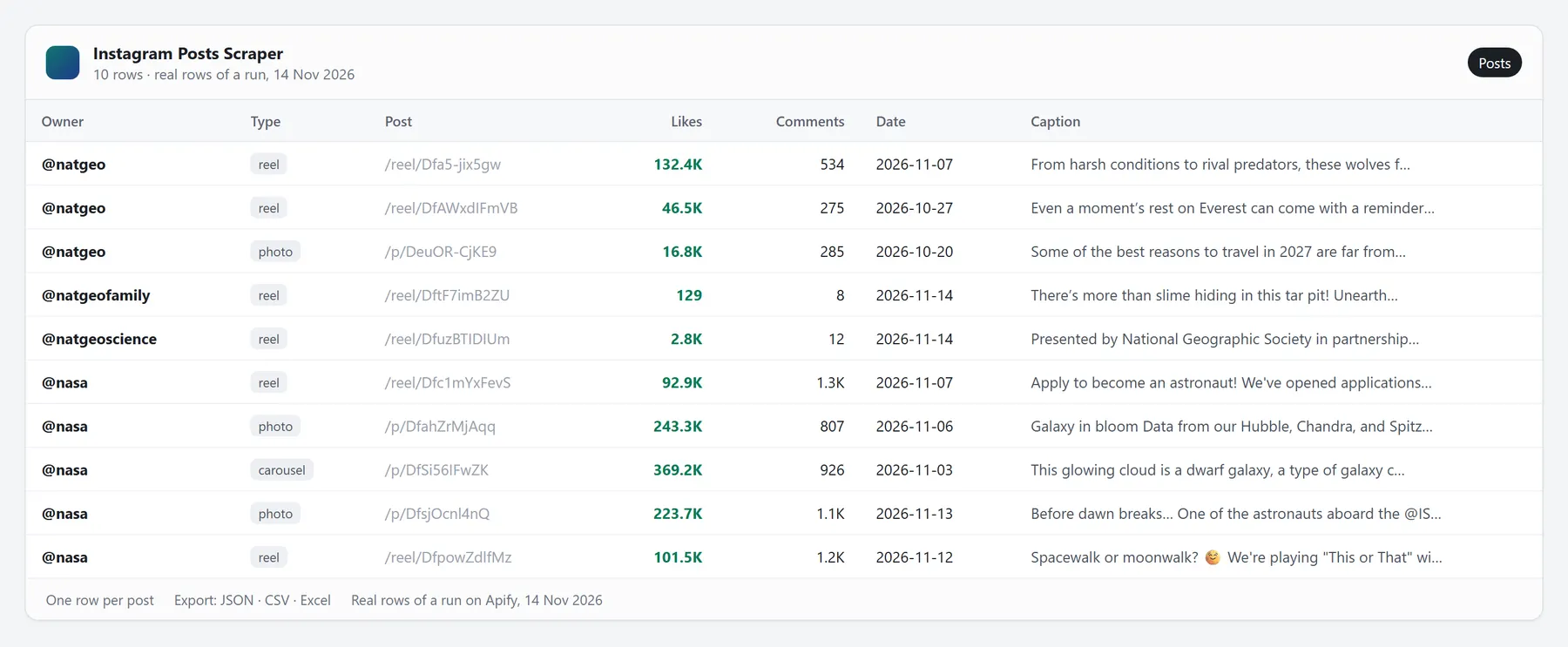
Paste usernames and get each profile's posts — photos, carousels with every slide and reels from the grid — with likes, comments, caption, tagged users, location and music. No login, no cookies. $0.28 per 1,000 posts on Starter; the official Post Scraper charges $1.50.
- 🖼️ Every carousel slide — each image or video link with its size, not just the cover.
- 🔄 Views, saves, shares & reposts with one tick — same price, read by our accounts (paid Apify plans).
- 📅 Date range and skip pinned — for example only the last 30 days, with pinned posts kept or skipped as you choose.
- 📏 Up to 5,000 posts per profile — the run stops at your limit, your date or the end of the grid.
- ⏱️ Speed, measured 13–16 Nov 2026 — paid plans: 90% of an order's profiles done within 4 s (median of 189 client orders); free plan: 2 profiles × 20 posts in 7–11 s on Apify. Big histories: see How fast is it?
- 🔓 Never charged: private or missing profiles and duplicates.
Try it: press Start — the prefilled natgeo returns its latest 24 posts, pinned ones included.
⭐ Recommended: Instagram Posts Scraper · No Login — alt text, latest comments and reel views with no login; 2 profiles × 20 posts in 5.9–7.4 s on Apify's free plan (16 Nov 2026).
Why scrape Instagram posts?
- Content audits: a brand's full posting history with likes, comments and reposts.
- Competitor monitoring: schedule it with Only items newer than (e.g. 7 days) — a fresh week of posts on every run.
- Design inspiration and AI datasets: carousels with every slide.
What data can I scrape from Instagram posts?
| Data | What it is |
|---|---|
| Link | Link to the post or reel on instagram.com |
| Type | Kind of post: reel, photo, carousel or video |
| Author | Username of the author |
| Posted | When it was posted (UTC, ISO 8601) |
| Likes | Likes; empty if the author hid the counts (likesHidden) |
| Comments | Number of comments |
| Reposts | How many times it was reposted |
| Saves | How many people saved the reel (Instagram gives saves only for reels) |
| Shares | How many times the post was sent or shared |
| Caption | Post text as the author wrote it |
Up to 74 fields per row in total — the Output tab lists every one of them.
Compared with Apify's Instagram Post Scraper
| This Actor | Apify's Instagram Post Scraper (Starter) | |
|---|---|---|
| Price per 1,000 posts | $0.28 | $1.50 (+$0.80 for post details) |
| Reposts | ✅ | not in the output yet |
Their prices and fields as listed on Apify on 28 October 2026 — check their page for today's.
How to scrape Instagram posts
- Paste usernames or links into the input, one per line.
- Press Start — rows stream into the Output tab while the run goes.
- Download them as JSON, CSV, Excel or HTML, or get them through the API.
Works with any public profile on Instagram — no login, no cookies, no proxies to set up, no Instagram account of yours.
No input at hand? Press Start with an empty input — you get a 3-row sample.
Input example
Output example: Instagram posts data
Each row has up to 74 fields — the Output tab describes every one of them. Fields Instagram
doesn't show come as null, never as a fake 0.
Coming from Apify's official Instagram scrapers? Turn on Also add Apify-style field names: every row also gets
likesCount, commentsCount, videoPlayCount, timestamp, displayUrl, followersCount, followsCount, verified
and more with the same values, and the post type as Video, Image or Sidecar — your sheets, code and n8n flows keep
working. Long list of usernames? Upload it as a CSV or TXT file in Or upload a list.
Limits
- Saves and shares: Instagram gives them for reels, not for photos and carousels (
null). - Private accounts: one free row.
- About 12 posts per request; a carousel comes as one row with every slide.
- Dates far back on a big profile: the run reads from the newest post backwards, so rows start only when it reaches your dates.
- Above 1,000 posts per profile we read Instagram's public web view from many servers at once: about 100–175 posts a minute, without
reposts,savesandshares(listed innotCollected); views of reels and videos come from the grid. - Free Apify plan: the full result, no cap — read from Instagram's public view and paid from your monthly Apify credit at the Free price. Options that need a logged-in read (business contacts, views, saves, shares) are for paid Apify plans.
How much does it cost to scrape Instagram posts?
Pay per event: you pay for the rows you get, plus $0.0005 per run. No subscription to this Actor.
| Apify plan | Per 1,000 posts | What $5 of free credit gets you |
|---|---|---|
| Free | $0.308 | ≈ 16,200 posts |
| Starter | $0.28 | — |
| Business and higher | $0.20 | — |
Every event of this Actor on the Starter plan:
| Event | What it is | Price |
|---|---|---|
| Post | Each post, carousel or reel returned | $0.28 per 1,000 |
Typical jobs on Starter:
- A brand's last 300 posts ≈ $0.08
- Weekly new posts of 20 competitors (≈ 5 each) ≈ $0.03 a week
Always free: private or missing profiles and duplicates. Set Maximum cost per run in the run options to cap any run.
Chain it with other Actors
Use the rows of an earlier run as the input: paste its dataset ID into Or: dataset from another run. For example, run Instagram Followers Scraper · No Login on a brand, then give its dataset to Instagram Email & Phone Scraper — you get the emails of the brand's followers. Works with the datasets of Apify's own Instagram Actors too.
Instagram posts API: Python, n8n, Make, Zapier and AI agents
Python:
n8n, Make, Zapier or any HTTP client: one request runs the Actor and returns the rows —
POST https://api.apify.com/v2/acts/instagram-data-api~instagram-posts-scraper/run-sync-get-dataset-items?token=YOUR_APIFY_TOKEN
with the input JSON as the body.
AI agents (MCP) — your agent gets this Actor as a tool:
- Claude Code:
claude mcp add --transport http apify "https://mcp.apify.com?tools=instagram-data-api/instagram-posts-scraper" - Claude, Cursor, VS Code, n8n: add
https://mcp.apify.com?tools=instagram-data-api/instagram-posts-scraperas a remote MCP server and sign in to Apify. - Ask it: “Export the last 30 posts of @natgeo with likes and comments.” · “Which posts of @nike got the most comments this month?”
FAQ: scraping Instagram posts
How do I download all posts from an Instagram profile? Paste the username, set Max posts per profile (up to 5,000) and press Start. Each post comes with its caption, numbers and media links — every carousel slide included. Export JSON, CSV or Excel.
Are reels included? Yes, reels that appear in the profile grid are included — turn off Include reels from the grid to get only photos and carousels. For reels with saves and shares, use Instagram Reels Scraper.
How far back can it go?
As far as the profile's grid goes, up to 5,000 posts per profile per run. Set Only items newer than to stop at a date (2026-10-01) or a period (30 days).
Do I pay for private profiles?
No. Private or missing profiles come back as one free row with an error field (private, not_found).
What does a carousel row look like?
One row per post with type: "carousel" and a slides list — type, image or video link, width and height of every slide.
How fast is it?
Measured 13–16 November 2026: on paid plans 90% of an order's profiles are done within 4 seconds of its start (median of 189 client orders); on the free plan 2 profiles × 20 posts take 7–11 seconds on Apify. Big histories — above 1,000 posts per profile — come at about 100–175 posts a minute: 5,000 posts from one profile take 30–50 minutes, and such runs skip reposts, saves and shares (listed in notCollected).
What does a typical run cost? A brand's last 300 posts ≈ $0.08 on the Starter plan, run start included.
Do I need an Instagram account or cookies? No. You only paste usernames, links or keywords. Nothing to log in, no proxies to set up, nothing to install, and your own Instagram account is never involved.
What am I charged for — and what's free?
Only the events in the pricing table, plus $0.0005 per run. Rows with an error field are free, and duplicates are never returned or charged. Each run's SUMMARY record shows results and free rows.
Can I try it for free? Yes. On Apify's free plan you get the full result, read from Instagram's public view and paid from the monthly free credit Apify gives every account. Options that need a logged-in read are for paid plans.
Can I cap what a run costs?
Yes. Set Maximum cost per run in the run options — the run stops at your limit and SUMMARY shows stoppedAtChargeLimit: true.
Can I use it from n8n, Make, Zapier or an AI agent? Yes, like any Apify Actor: REST API, webhooks, the n8n, Make and Zapier integrations, and the Apify MCP server for Claude, Cursor, VS Code and other MCP clients. Short timeout in your workflow or agent? Set Return what's ready after (seconds): the run stops on time with what it has collected, and you pay only for that.
For AI agents
More Instagram Actors from us
⭐ Recommended — the No Login line: All-in-one Instagram Scraper · Profiles · Followers · Reels · Posts · Threads · Comments
Specialist tools:
| Content | People | Stories |
|---|---|---|
| Reel views checker · Hashtags · Search · Transcripts · Tagged posts · Audio · Locations · Hashtag stats | Followers count · Account age · Emails & phones · Similar accounts · Similar accounts with profiles · Likers · Engagement rate · Username checker · User ID · Follower checker | Stories · Highlights |
What changed and when — see the Changelog tab.


