Actor Troubleshooter
Pricing
Pay per usage
Actor Troubleshooter
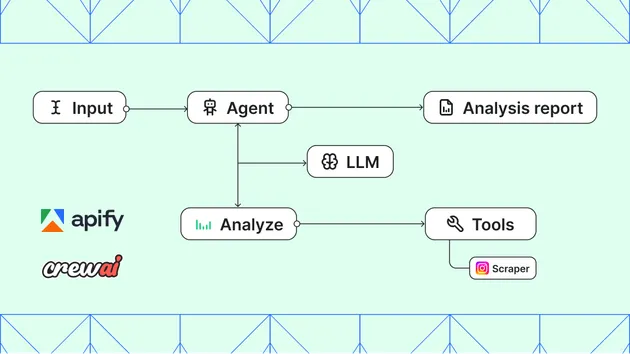
Diagnoses problems with any Apify Actor and (optionally) drafts a reply for the maintainer to send to the user. Investigates via MCP: input schema, README, run logs, and dataset samples. Returns structured analysis plus a per-step debug trace.
Pricing
Pay per usage
Rating
0.0
(0)
Developer

Jiří Spilka
Maintained by CommunityActor stats
0
Bookmarked
7
Total users
2
Monthly active users
5 months ago
Last modified
Categories
Share
What does Actor Troubleshooter do?
Actor Troubleshooter diagnoses problems with any Apify Actor and (optionally) drafts a polished reply for the maintainer to send back to the user. Provide the Actor's ID plus whatever context you have — a failing run ID, the input the user used, an error message, or a thread of issue comments — and the Actor uses the Apify MCP server to investigate: it fetches the Actor's input schema and README, inspects the run logs and dataset, and traces the problem to its real root cause.
The output is a single dataset item containing the structured analysis (summary, root cause, evidence, fix steps, verification, confidence), a pre-formatted debugTrace for the maintainer to review, and a trace array with every tool call the underlying agent made — so you can audit its reasoning end-to-end.
Why use Actor Troubleshooter?
- Faster triage — investigation steps that would take minutes (open the Actor, read the schema, find the run, scan logs, sample the dataset) happen in one call.
- Consistent diagnoses — every run produces the same structured fields, so you can pipe the output into a CRM, dashboard, or webhook.
- Auditable reasoning — every tool call and result is captured in the
tracefield on the same dataset item. - Optional drafted reply — when the input includes an issue thread, the Actor produces a friendly, ready-to-post comment in the user's voice.
How to use Actor Troubleshooter
-
Get your Apify API token.
-
Call the Actor synchronously, providing whatever context you have:
curl -X POST "https://api.apify.com/v2/acts/jiri.spilka~actor-troubleshooter/run-sync-get-dataset-items?token=YOUR_TOKEN" \-H "Content-Type: application/json" \-d '{"actorId": "apify/rag-web-browser","runId": "abcdef0123","errorMessage": "Run failed with timeout after 40s.","task": "diagnose-and-draft-reply"}' -
Read the first dataset item — it contains the structured analysis, the pre-formatted
debugTrace, and the per-steptrace.
Input
actorId is required. Everything else is optional — provide what you have.
| Field | Type | Description |
|---|---|---|
actorId | string | Apify Actor ID or username/actor-name slug (e.g. apify/instagram-scraper). |
runId | string | Failing run ID. The agent inspects status, logs, input, and dataset. |
userInput | object | The input the user passed to the Actor (validated against the Actor's schema). |
errorMessage | string | Error message reported by the user or the run. |
issueTitle | string | Title of the issue / ticket the user filed. |
issueComments | array | Thread comments, each { "author": "...", "content": "..." }. |
task | enum | diagnose, draft-reply, or diagnose-and-draft-reply (default). |
Output
A single dataset item per run, containing the structured analysis and the per-step debug trace.
userFacingReply is null when task is diagnose; fix.exampleInput is null when no input change is required. debugTrace is a pre-formatted block that maintainers can prepend to the reply for review and delete before posting. trace carries one entry per LLM step (tool calls, tool results, usage) so reviewers can audit the agent's reasoning end-to-end.
Pricing
You are billed for two things on each call:
- Apify platform runtime — the compute units this Actor consumes, typically a few minutes of standard runtime per call.
- OpenRouter LLM usage — the underlying model calls (investigation + formatting), billed via OpenRouter Actor.
Both runs are visible in the Apify Console, so you can audit the full cost of every call.