

Docs MCP Server Starter — Live Docs: Claude, Cursor & AI Agents
Pricing
Pay per usage
Docs MCP Server Starter — Live Docs: Claude, Cursor & AI Agents
Persistent MCP server that gives Claude, Cursor, and any MCP-compatible AI assistant queryable access to technical documentation. Indexes any docs site, exposes search and fetch tools over MCP, caches pages for speed. Ships with templates for Next.js, Tailwind, React, TypeScript, Prisma.
Pricing
Pay per usage
Rating
0.0
(0)
Developer

Joe Slade
Maintained by CommunityActor stats
1
Bookmarked
1
Total users
1
Monthly active users
3 months ago
Last modified
Categories
Share
Give Claude, Cursor, and any MCP-compatible AI assistant queryable access to up-to-date technical documentation. This Apify Actor runs a persistent MCP server that indexes docs sites, exposes search and fetch tools over the Model Context Protocol, and caches pages for fast follow-up queries.
Ships with five ready-to-use templates (Next.js, Tailwind CSS, React, TypeScript, Prisma). Fork it for any docs site by supplying a URL and a CSS content selector — no code changes required.
Who is this for?
- Developers using AI coding assistants who want answers grounded in the current docs, not training-data snapshots that may be months out of date
- Teams with internal documentation who want their AI tooling to answer questions against their own docs, not just public sources
- MCP builders who want a working Standby-mode reference implementation to fork
What it does
- Crawls and indexes up to 10 documentation sources on startup
- Exposes four MCP tools over JSON-RPC on a persistent HTTP endpoint
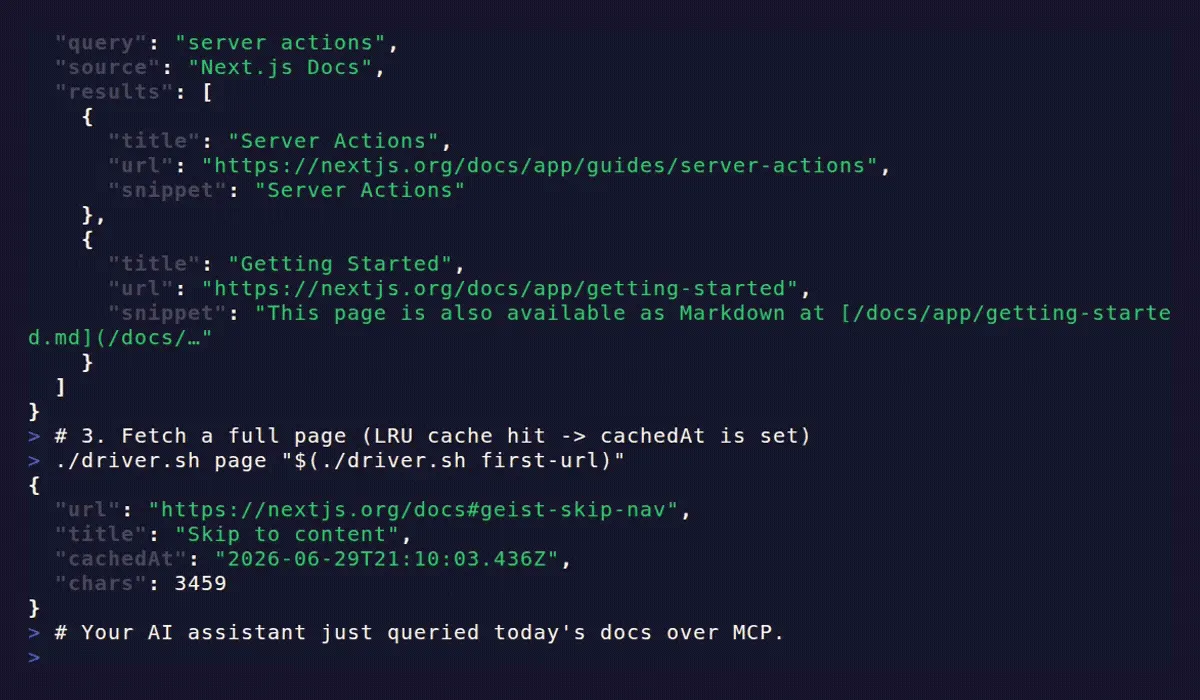
- Caches fetched pages in an LRU cache (default 50) so repeat queries return instantly
- Returns content as clean markdown by default, or raw text on request
Use cases
- Keep your AI assistant current. Point it at the Next.js, React, or TypeScript docs so Claude or Cursor answers from today's API surface instead of a months-old training snapshot.
- Query your team's internal docs. Index a private or internal documentation site (any static HTML) and let your AI tooling answer against your own sources, not just public ones.
- A RAG-free docs layer. Give an AI agent searchable, fetchable docs without standing up a vector store, embedding pipeline, or re-indexing job — keyword search over live pages.
- Fork it as an MCP reference implementation. Shipping your own Standby-mode MCP server? Start here — the indexing, caching, and JSON-RPC wiring is already done.
Input
| Field | Type | Default | Notes |
|---|---|---|---|
sources | array (1–10) | required | Each source needs a name plus either a template ID or a custom url + contentSelector. Optional sitemapUrl. |
maxPagesPerSource | integer (1–500) | 200 | Cap on how many pages per source get indexed at startup. Lower this to speed up boot for large docs sites. |
cacheMaxPages | integer (1–200) | 50 | LRU page cache shared across all sources. Raise this if you query the same pages repeatedly. |
markdownOutput | boolean | true | Convert extracted page HTML to markdown. Set false to return raw text. |
Curated templates
nextjs, tailwind, react, typescript, prisma
Custom source example
MCP tools
| Tool | Purpose | Required args |
|---|---|---|
list_sources | List configured sources with page counts | — |
get_toc | Return the page index (table of contents) for a source | source |
search_docs | Case-insensitive keyword search across titles and cached content | query (optional: source, maxResults ≤ 30) |
get_page | Fetch full page content; checks LRU cache first | url |
Example tool calls
Example tool output
Each tool returns JSON inside the standard MCP result.content[].text envelope. The inner payloads look like this:
search_docs →
get_page → page content as markdown (or raw text when markdownOutput is false):
list_sources → { "sources": [{ "name": "Next.js Docs", "url": "https://nextjs.org/docs", "pageCount": 200 }] }
How it works
- Boot:
Actor.init(), validate input, resolve any curated templates - Index: for each source, fetch the sitemap (or discover from the entry URL), cap at
maxPagesPerSource, and build a page index (url+title) - Serve: start an HTTP server on
ACTOR_STANDBY_PORT(default4321); accept POST requests carrying JSON-RPC MCP messages - Cache:
get_pagereturns cached content when available; on miss it fetches, extracts via the source'scontentSelector, optionally converts to markdown, and stores in the LRU - Search:
search_docsscans page titles in all source indexes and content in the LRU cache only — page bodies are not pre-indexed; warm the cache by callingget_pageon the pages you want searchable
Running on Apify
This actor runs in Standby mode — a persistent HTTP server, not a batch job. Connect an MCP client to the Standby URL exposed by Apify after deploy. The server starts after indexing completes; check the run logs for MCP server listening. before sending requests.
Running on Apify also means the platform's advantages come for free: scheduling to re-index on a cadence, monitoring and alerts on the server's health, API access to every run, and integrations with the rest of your stack — none of which you'd get from a docs server you host yourself.
Pricing
This Actor runs in Standby mode, so it bills for the Apify compute time the server is active — there's no per-result charge. Because Standby scales to zero when idle, you pay only while it's actually serving MCP requests (plus a short keep-warm window), not around the clock.
- Indexing happens once at boot, then queries are answered from the in-memory page index and the LRU cache — so steady-state cost stays low even under frequent use.
- Lower
maxPagesPerSourcefor faster, cheaper boots on large docs sites; raisecacheMaxPagesif you query the same pages repeatedly. - Try it on the Apify free tier to see real compute usage for your sources before committing to a plan.
See the Pricing section on the Actor's detail page for current rates.
Connect your AI assistant
This actor speaks MCP over JSON-RPC at its Standby URL. Grab the exact URL and your access token from the actor's Standby tab in the Apify Console after the first run.
Claude Desktop / Cursor (stdio clients)
Most desktop MCP clients speak stdio, so bridge to the remote HTTP endpoint with mcp-remote. Add this to your MCP config — claude_desktop_config.json for Claude Desktop, or your Cursor MCP settings:
Replace <your-standby-url> and <APIFY_TOKEN> with the values from the Standby tab. (The token can also be sent as an Authorization: Bearer header if your client supports custom headers.)
HTTP / streamable MCP clients
Clients that speak MCP over HTTP can point straight at the Standby URL and supply the Apify token per their auth settings. Once connected, the four tools — list_sources, get_toc, search_docs, get_page — appear automatically.
Design choices (v1)
- Keyword search, not vectors. No embedding costs, no vector store to maintain, predictable behavior. Good fit for docs lookups where terminology is precise.
- Static HTTP fetching only. Works with any docs site served by a static generator (Hugo, Next.js static export, Docusaurus, WordPress, MkDocs, etc.). Sites that require JS execution or sit behind bot challenges (Cloudflare, login walls) won't index — pick the underlying static source instead.
- Search reads cached bodies; uncached pages match on title. Warm the cache by calling
get_pageon the pages you want full-text searchable. - Caps. Max 10 sources, 500 pages per source, 200 pages in cache.
FAQ
How do I connect this to Claude Desktop or Cursor?
See Connect your AI assistant. Desktop clients bridge to the Standby URL with mcp-remote; HTTP-capable clients point at the URL directly.
Does it work with private or internal docs?
Yes — any static-HTML docs site reachable over HTTP. Supply a url + contentSelector instead of a curated template. Sites behind login walls or bot challenges (Cloudflare, auth gates) won't index; point it at the underlying static source.
How is this different from a vector RAG pipeline? No embeddings, no vector store. It runs keyword search over page titles and cached page bodies — so there are no embedding costs and the results are predictable and debuggable. That's a good fit when docs terminology is already precise. For fuzzy semantic recall across a huge corpus, a vector approach may suit you better.
Which docs sites are supported out of the box?
Five curated templates: Next.js, Tailwind CSS, React, TypeScript, and Prisma. Any other static docs site works via a custom url + contentSelector.
Why does search miss some pages?
search_docs matches titles across every indexed page, but full-text matching only covers pages already in the cache. Warm the cache by calling get_page on the pages you want fully searchable (see How it works).
Does it support JavaScript-rendered docs? No — v1 uses static HTTP fetching only. JS-rendered or bot-challenged sites won't index; use the underlying static source instead.
Local development
Other Actors in this collection
Part of a small suite of focused, composable dev-tool Actors — same philosophy: do one thing, stay testable, wire into a pipeline.
- GitHub Repo Intelligence MCP — an MCP server that gives your AI agent an opinionated verdict on whether a GitHub repo is actively maintained or abandoned.
- Changelog Triage Agent — monitors product changelogs and classifies every entry as BREAKING, WARNING, or INFO so you catch deprecations early.
- SERP Topic Gap Monitor — finds the topics your competitors rank for that your site is missing.
License
Apache-2.0


