

GitHub Repo Health Check—Maintained or Abandoned? (MCP Server)
Pricing
Pay per usage
GitHub Repo Health Check—Maintained or Abandoned? (MCP Server)
Is this dependency still maintained? Get a deterministic, opinionated verdict for any GitHub repo—Actively maintained, Slowing, At-risk, or Likely abandoned—across 5 agent-callable MCP tools.
Pricing
Pay per usage
Rating
0.0
(0)
Developer

Joe Slade
Maintained by CommunityActor stats
1
Bookmarked
2
Total users
2
Monthly active users
4 months ago
Last modified
Categories
Share
A maintainability verdict, not another dashboard.
GitHub Repo Health Check is an MCP server that answers the one question your dependency list can't: is this repo still maintained, or am I building on sand? Last-commit date lies. Star count lies. One signal isn't a verdict. So it returns a four-way read — Actively maintained, Slowing, At-risk, or Likely abandoned — synthesized across four dimensions (activity, issues, PRs, contributors), backed by the transparent, inspectable thresholds that produced it. Point it at any owner/name (or GitHub URL) and your agent gets a verdict it can act on, plus the raw numbers so it can see exactly why. Same repo state + config → the same verdict, every time.
It runs as a Standby Actor on the Apify platform — always warm, reachable over the Streamable HTTP transport at the /mcp path, with API access, scheduling, and monitoring included.
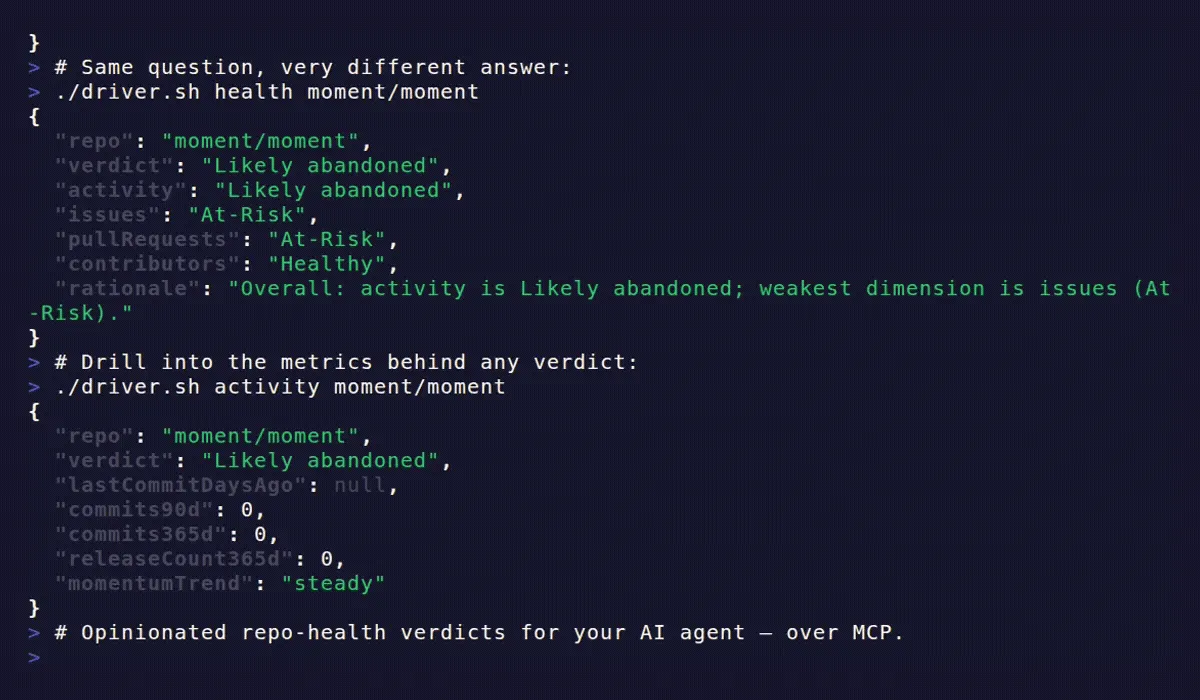
See it in action
Two repos, two very different verdicts — then a drill-down into the metrics behind them, all over MCP:
Who is this for?
- Agent developers whose agents need to decide whether to adopt, recommend, or monitor an open-source library or tool
- Dependency due-diligence — vetting whether a package's upstream is alive before committing to it
- OSS vendor evaluation — checking the health of a project before building on it
- Repo triage at scale — ranking a list of candidates by health before a human reviews them
- Automated monitoring — scheduling recurring checks and alerting when a dependency starts slowing
If you've ever asked "is this repo abandoned?" or run a GitHub repo health check by hand, this server does it programmatically at any scale.
Why use GitHub Repo Health Check?
Most GitHub tools hand an agent raw API access and leave the judgment to the model — inconsistent, hand-rolled heuristics on every call. This server does the synthesis for you.
The differentiator is judgment, not raw access: every verdict ships alongside the pinned thresholds and raw metrics that produced it, so the agent (and you) can audit the reasoning. Same repo state + same config always yields the same verdict.
One GitHub fetch per repository is cached and shared across all five tools. Drilling from the headline verdict into a specific dimension costs no extra upstream calls.
How to use GitHub Repo Health Check
- Deploy the Actor — run it in Standby mode on Apify. It boots with no input required.
- Connect your MCP client to the Standby endpoint (
https://<your-standby-url>/mcp) using the Streamable HTTP transport. - Call
get_repo_healthwith arepoargument ("owner/name"or anyhttps://github.com/owner/nameURL) to get the headline verdict. - Add a GitHub token — this is effectively required. The Actor's primary data source (GitHub's GraphQL API) rejects unauthenticated requests, and Apify's shared egress IPs exhaust GitHub's anonymous quota almost immediately. Without a token the Actor returns rate-limit errors, not verdicts. See Input for setup.
- Drill into dimensions — call
get_activity_metrics,get_issue_health,get_pr_health, orget_contributor_insightswhen you need detail beyond the headline. All five tools read from the same cached payload.
The five tools
All tools take a single repo argument — either "owner/name" or any https://github.com/owner/name[/...] URL (case-insensitive).
get_repo_health — headline verdict
Returns the overall verdict, a per-dimension breakdown, and a rationale string explaining the worst dimension.
get_activity_metrics — commit cadence and momentum
Commit volumes over trailing windows, release frequency, and a momentum trend.
momentumTrend is accelerating / steady / declining, derived from the 30-day commit rate vs the 90-day rate. Repos that tag rather than cutting GitHub Releases will show releaseCount365d: 0 and lastReleaseDaysAgo: null — this does not by itself degrade the verdict.
get_issue_health — responsiveness and backlog hygiene
How quickly maintainers respond to issues and how much of the backlog has gone stale.
An issue is stale if untouched for more than 90 days. Medians are null when no qualifying events exist in the analysis window — absence is not the same as zero.
get_pr_health — PR throughput and queue age
How effectively the project merges or closes contributions, and how old the oldest open PR is.
mergeRate excludes still-open PRs from the denominator. It is null when no PRs have been decided in the analysis window.
get_contributor_insights — concentration and bus-factor risk
How many contributors the project has and whether commit activity is dangerously concentrated.
busFactorFlag is true when the top contributor owns more than 50% of commits, or the top two together own more than 80%. totalContributors is the repository's all-time contributor count (sourced from GitHub's stable /contributors list endpoint) — it is not a 90-day-active count.
Verdict thresholds
Verdicts come from pinned, transparent thresholds — same repo state plus same config always yields the same verdict.
| Dimension | Healthy | Moderate | At-Risk | Notes |
|---|---|---|---|---|
| Activity | last commit ≤ 30d | 30–180d | 180–365d | Likely abandoned if > 365d |
| Issues | median first response ≤ 7d and staleOpenRatio ≤ 0.40 | ≤ 30d and ≤ 0.60 | otherwise | null median → judged on staleOpenRatio alone |
| Pull requests | mergeRate ≥ 0.60 and oldestOpenPr ≤ 30d | mergeRate ≥ 0.30 or oldestOpenPr ≤ 90d | otherwise | null mergeRate → judged on oldestOpenPr alone |
| Contributors | totalContributors ≥ 3 and not bus-factor | 1–2 contributors, or ≥ 3 with bus-factor | 0 contributors | solo active maintainer → at most Moderate |
Overall verdict is activity-dominant, evaluated top-down (first match wins):
- Likely abandoned — activity is
Likely abandoned(no commits in > 365 days). - At-risk — activity is
At-Risk, or any two of {issues, PRs, contributors} areAt-Risk. - Actively maintained — activity is
Healthyand no dimension isAt-Risk. - Slowing — everything else (e.g. activity
Moderate, orHealthyactivity with oneAt-Riskdimension).
Input
The server boots with no input required (a Standby constraint — all fields are optional in the schema so the container never crash-loops on startup). In practice, you must provide a GitHub token for the Actor to return verdicts rather than rate-limit errors.
| Field | Type | Default | Description |
|---|---|---|---|
githubToken | string (secret) | — | Effectively required. GitHub's GraphQL API (this Actor's primary data source) rejects unauthenticated requests, and on Apify's shared IPs the anonymous REST quota (~60 req/hour per IP) is typically already exhausted by other traffic. A token gives 5,000 req/hour and enables private-repo analysis. |
cacheTtlMinutes | integer | 20 | How long a repo's fetched payload is reused before refetching. Lower = fresher data; higher = fewer GitHub API calls. |
analysisWindowDays | integer | 90 | Trailing window (30–365 days) over which issue and PR activity is measured. |
GitHub token setup. A classic token with no scopes is sufficient for public repositories. A fine-grained token scoped to specific repos works for private-repo analysis. For Standby deployments the recommended approach is to set a
GITHUB_TOKENenvironment variable on the Actor (stored as a secret) rather than pasting the token into the input field — it persists across restarts. Both paths work; both are stored as secrets and never exposed in logs.
Output
Each tool returns a single structured JSON object (shown above in each tool's section). Responses are deterministic — same repo state plus same config always produces the same verdict. Each response includes a fetchedAt timestamp reflecting when the underlying GitHub payload was pulled. A cached read returns the same timestamp as the original fetch for that TTL window.
Data fields reference
| Field | What it tells you |
|---|---|
overallVerdict | The headline: Actively maintained / Slowing / At-risk / Likely abandoned |
lastCommitDaysAgo | Days since the most recent commit; null if no commits found |
commits30d / commits90d / commits365d | Commit counts over trailing 30, 90, and 365-day windows |
momentumTrend | Whether commit rate is accelerating, steady, or declining (30d vs 90d rate) |
medianFirstResponseDays | Median time (days) until a maintainer first responds to a new issue |
staleOpenRatio | Fraction of open issues that have had no activity in 90+ days |
mergeRate | Merged PRs ÷ (merged + closed-unmerged) — excludes still-open PRs |
oldestOpenPrDaysAgo | Age of the oldest PR that is still open |
totalContributors | All-time contributor count (not a 90-day-active figure — see FAQ) |
busFactorFlag | true when commit activity is dangerously concentrated on 1–2 people |
Pricing
This Actor runs in Standby mode and is billed for the compute used while warm and serving requests. Health reads are lightweight — each repo's GitHub data is fetched once, cached (default 20 minutes), and shared across all five tools. Drilling into multiple dimensions for the same repo costs a single upstream fetch.
A GitHub token is required in practice (see Input) and adds no extra Apify cost.
Tips
- Start with
get_repo_healthfor the headline verdict, then call a dimension tool only when you need detail — they all share the same cached payload. - Raise
cacheTtlMinuteswhen triaging a long list of repos in a batch to minimize GitHub API calls. Lower it when you need fresh reads. - Set
GITHUB_TOKENas an environment variable on the Actor rather than in the input field — it persists across Standby restarts without re-supplying input. - Adjust
analysisWindowDays(30–365) to match how recent you need issue and PR signals to be. A shorter window surfaces recent trajectory; a longer window averages over a steadier baseline.
How it works
- An MCP client sends a tool call (e.g.
get_repo_health) with arepoargument. - The server checks an in-memory LRU cache. On a miss, it fires a single GraphQL query to GitHub's API (plus a REST call for contributor data) and caches the raw payload.
- Pure metric-computation functions derive counts, medians, and ratios from the payload — no further network calls.
- Verdict functions compare each metric against the pinned thresholds in
config.tsand return a dimension verdict. - The overall verdict is composed from the four dimension verdicts using the activity-dominant rule above.
- The full result — verdict, per-dimension breakdown, raw metrics, and
fetchedAt— is returned to the MCP client.
All five tools share step 2's cached payload. The verdict logic is deterministic and clock-injected (testable without network).
Works well with
Part of a small slate of agent-focused Apify Actors:
- SERP Topic Gap Monitor — finds topic gaps in search-result coverage and produces scored gap reports.
- Changelog Triage Agent — monitors product changelogs across services, classifies each new entry as BREAKING / WARNING / INFO, and delivers a de-duplicated triage report so teams catch deprecations before they bite.
- Docs MCP Server — an MCP server giving AI assistants queryable access to framework documentation (Next.js, React, Tailwind, TypeScript, Prisma).
FAQ and support
Does it work on private repositories?
Yes — provide a githubToken with read access to the repo.
Is the verdict subjective or configurable? No. Every verdict comes from the pinned thresholds documented above. Same repo state always yields the same verdict. The raw metrics are returned alongside it so you can audit every call.
Why is totalContributors not a 90-day-active count?
GitHub's per-period contributor stats endpoint (/stats/contributors) is unreliable on a cold cache — it returns 202 and rarely warms within a request cycle. Contributors are sourced from the stable all-time /contributors list instead. The field reflects repository-lifetime contributor breadth, not recent activity.
What does the rationale field contain?
It names the activity verdict and the weakest non-activity dimension, e.g. "Overall: activity is Healthy; weakest dimension is issues (Moderate)." It's designed for agent logs and human audit trails, not user-facing copy.
The Actor returned a rate-limit error — what do I do? Add a GitHub token. See Input. A classic token with no scopes is free and takes under a minute to create at github.com/settings/tokens.
Found a bug or want a feature? Open an issue on the Actor's Issues tab. Custom variations are available on request.
License
Copyright © 2026 Joe Slade.
Licensed under the LICENSE (AGPL-3.0). You're free to use, study, modify, and self-host this software; if you run a modified version as a network service, the AGPL requires you to offer your modified source to its users under the same license. For a commercial license not subject to the AGPL's network-copyleft, contact the author.


