

Document Compare API: Redline PDF, Word & Text Diff
Pricing
Pay per event
Document Compare API: Redline PDF, Word & Text Diff
Compare two versions of a PDF, Word, HTML or text document: get a redline PDF, a Word file with tracked changes and every change listed, with edited amounts, dates and shall/may flagged.
Pricing
Pay per event
Rating
0.0
(0)
Developer

Jumble Mog
Maintained by CommunityActor stats
0
Bookmarked
2
Total users
1
Monthly active users
12 days ago
Last modified
Categories
Security
Limited permissionsShare
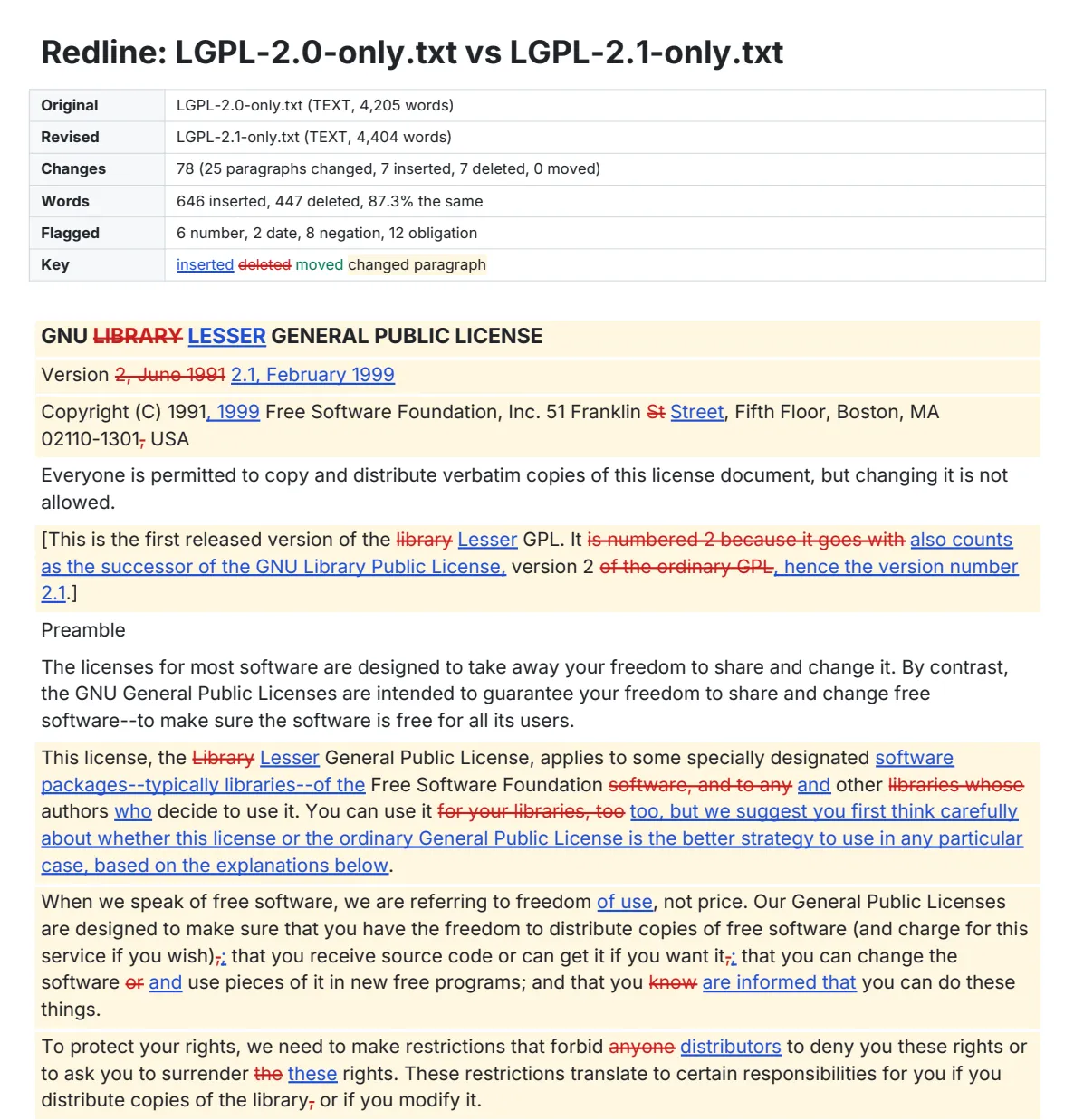
Compare two versions of a document and see exactly what changed. Give the original and the revised version (PDF, Word .docx, HTML, Markdown or plain text; a link, base64 or the text itself) and you get a redline back: a PDF with insertions underlined in blue and deletions struck through in red, a Word file with real tracked changes you can accept or reject, an HTML page, and every change listed as data.
- Word-level redline of the whole document, or of the changed paragraphs only. Changed paragraphs are highlighted, moved paragraphs are shown in green at their old and new place, and every change in the PDF and HTML links to its row in the change list.
- Word file with tracked changes: the revised text with each change as a Word revision. Accept All gives the revised document, Reject All the original, so you can review it in Word, Google Docs or LibreOffice like a colleague's edits.
- A change list for code and AI agents: each change's type (inserted, deleted, replaced, moved), section ("7. Notices"), page in each version, the old and new wording, and its context marked
[-old-]{+new+}. - Flags on the edits that matter: changed numbers, money, dates, negations (not, unless, except) and obligation words (shall, must, may), so a reviewer sees "$1,000 → $1,250" and "is liable → is not liable" first.
- Compare across formats: a PDF against a Word file works. PDF line breaks, hyphenation, repeated page headers and footers and page numbers are ignored, so only real wording changes count. Optionally ignore case, punctuation or renumbered clauses.
It's made for:
- Contract and policy review: what did the other side change in their markup, what changed between this year's terms and last year's, which clauses moved.
- AI agents and assistants that need the differences between two documents as data instead of reading both in full.
- Compliance, regulatory and publishing work: version-to-version diffs of filings, standards, manuals, terms of service and privacy policies.
- Automations in Zapier, Make or n8n that redline every new version of a document and send the PDF on.
How to use it
- Put the original document and the revised document in the form: a link, the text itself, or base64. Or upload two files (the original first).
- Optionally choose what counts as a change (ignore case, punctuation or list numbering), whether the redline shows the whole document or only the changes, and which files to make.
- Click Start. Each pair is a row in the results with its summary, the redline's first page and links to the PDF, Word, HTML and CSV files.
To compare several pairs in one run, add them under More pairs.
What you can send
| Field | What it takes |
|---|---|
original, revised | A https link (Google Drive, Google Docs and Dropbox share links work), a data: URI, base64 of a PDF or .docx, or the text itself. In More pairs also accepted as old/new, before/after, v1/v2, or one line "link1 vs link2". |
uploads | Two uploaded files: the original first, then the revised. |
ignoreCase, ignorePunctuation, ignoreNumbering | true to leave capitalization, punctuation, or the clause number at the start of a paragraph (1., 2.3, (a), iv.) out of the comparison. All off by default. |
show | all (the whole document, default) or changes (only changed paragraphs, with one unchanged paragraph either side) in the PDF and HTML. |
outputs | Any of pdf, docx, html, csv (all by default). |
pageSize | letter (default) or a4 for the PDF. |
author | The name Word shows on each tracked change. |
title | A title for the result (in More pairs). |
Examples
- LGPL 2.0 against LGPL 2.1 (two text files) → 78 changes: 25 paragraphs changed, 7 inserted, 7 deleted; 646 words inserted and 447 deleted (87.3% the same), including "GNU
LIBRARYGENERAL PUBLIC LICENSE" and "Version2, June 1991". - The MIT license against the X11 license → 6 changes: the copyright line replaced, "THE
AUTHORS OR COPYRIGHT HOLDERS", and two paragraphs added (one flagged for shall not). - The IRS Form W-9 of 2018 against the 2024 revision (two PDFs) → 227 changes, with the new "Before you begin" text and the reworded line 1 and 3 instructions.
- A services agreement where the fee went from $1,000 to $1,250, payment from 30 to 45 days, the Supplier became "not liable", clause 3 moved below clause 4 and a notices clause was added → 10 changes, with the fee flagged number, money, the liability edit flagged negation, and the move shown once with the edit inside it.
How-to examples
Each example below is a complete input. The result line is what the run says in summary.
How to compare two versions of a contract
Paste the two versions as text, or give links to the files:
Result: "5 changes from original text to revised text: paragraphs 3 changed, 1 inserted, 0 deleted; 17 words inserted and 6 deleted (67.6% the same). Check 3 number changes, 1 money change, 1 negation, 1 shall/may/must change." The first change in changes is "1. Fees. The Customer shall pay [-$1,000-]{+$1,250+} per month...", flagged number and money.
How to compare two PDFs and see only what changed
Result: "227 changes from fw9--2018.pdf to fw9.pdf: paragraphs 75 changed, 34 inserted, 23 deleted; 1,912 words inserted and 1,465 deleted (72.9% the same)..." The redline PDF shows only the changed paragraphs, each with one unchanged paragraph around it. Page headers, footers and PDF line breaks don't count as changes.
How to get a Word file with tracked changes from two versions
Set outputs to ["docx"] and author to the name reviewers should see:
docxUrl is the revised document with each change as a Word revision. In Word, Accept All gives the revised version and Reject All gives the original. A PDF and a Word file can be compared with each other.
How to let an AI agent compare documents
Add this Actor to the Apify MCP server with https://mcp.apify.com/?tools=jumblemog/document-compare. The agent gets the changes as data (type, section, the old and new wording, and flags for money, dates, negations and shall/must/may) instead of reading both documents in full, and can give the user pdfUrl for the redline.
FAQ
Which formats can it compare? PDF, Word .docx, HTML, Markdown and plain text, in any mix, such as a PDF against a Word file.
Does it work on scanned PDFs? No. A scanned PDF is a picture with no text to compare. Run it through OCR first.
Can it ignore renumbered clauses? Yes. ignoreNumbering leaves clause numbers such as "2.3" or "(a)" out, and ignoreCase and ignorePunctuation leave those out too.
Does it show moved paragraphs? Yes. A moved paragraph is shown once, in green, at its old and new place, with any edits inside it.
Does it work with Zapier, Make or n8n? Yes. Call the Actor with its Apify app or an HTTP request and send the redline PDF on to email or Slack.
Output
One dataset item per pair, also saved together in the run's OUTPUT record:
Every item also has warnings (for example when the two documents share little wording), notes, a Markdown report with the change table and its link. Up to 1,000 changes are listed in the item; the CSV has all of them. A pair that can't be read has "status": "failed" and the reason in error, and isn't billed.
How it works
- Reading: PDFs are read with PDFium, page by page; lines are joined back into paragraphs, words hyphenated at a line break are rejoined, and lines repeated at the top or bottom of most pages (headers, footers) and page numbers are dropped. Word files are read with python-docx, in order, with headings, list items and table rows (tracked deletions already in the file are left out). HTML, Markdown and text keep their headings, list items and table rows.
- Lining up paragraphs: unchanged paragraphs are matched first; within each changed stretch, paragraphs are paired by how much wording they share, so an edited paragraph is compared with its old self. A deleted paragraph that turns up almost the same elsewhere is a move.
- Word by word: each changed paragraph is diffed as words, numbers and punctuation, and one short word left between two edits is folded into them so the redline reads as phrases. Curly and straight quotes and dashes count as the same.
- Redlines: the PDF is laid out with ReportLab in the Inter font; the Word file is written as Office Open XML with
w:insandw:delrevisions.
Pricing
You pay one low price per pair compared, at the price shown on this page. The redline PDF, Word file, HTML, CSV and report are included. Pairs that can't be read are never charged. If you set a maximum cost per run, the Actor stops before a pair that wouldn't fit.
Speed
Two 20-page contracts compare in about a second, plus the download; a 4,000-word license pair with 78 changes takes under two seconds including all four files. A run through the API answers in about 10 seconds, including the cloud container starting.
Tips and limits
- Scanned PDFs have no text to compare; the error says so. Run OCR on them first.
- The Word output is plain: it keeps headings and indents list items but not the originals' fonts, tables or layout. It's for reviewing and accepting changes, not for replacing the formatted original.
- Formatting-only changes (bold, font, colour, page breaks) don't count; this compares wording.
- Old .doc files need to be saved as .docx or PDF first.
- The PDF redline uses the Inter font, which covers Latin, Greek and Cyrillic; for other scripts use the HTML or Word output.
- Limits: 50 pairs per run; 50 MB, 2,000 pages and 500,000 words per document.
For AI agents and developers
This Actor works with the Apify MCP server, so AI agents can call it as a tool: pass original and revised and read summary and changes (each with context marked [-old-]{+new+} and flags). A direct API call that waits for the answer:
run-sync instead returns the run's OUTPUT: the status, the counts and every result as JSON.
In Python, with the apify-client package, comparing two local files:
Credits
- pypdfium2 and PDFium (Apache-2.0 / BSD-3-Clause) read PDFs and draw the preview; python-docx (MIT) reads and writes Word files; ReportLab (BSD) lays out the PDF, in the Inter font (SIL Open Font License); Python's difflib lines up the text.
- The examples compare license texts from the SPDX License List and the IRS Form W-9, a public US government form.


