

Word Template to PDF API: Fill DOCX from JSON or CSV
Pricing
Pay per event
Word Template to PDF API: Fill DOCX from JSON or CSV
Fill your own Word .docx template's {{ placeholders }} or mail-merge fields from JSON, CSV, Excel or a Google Sheet: one Word file and PDF per row, with table rows, conditions, money and dates.
Pricing
Pay per event
Rating
0.0
(0)
Developer

Jumble Mog
Maintained by CommunityActor stats
0
Bookmarked
2
Total users
1
Monthly active users
a month ago
Last modified
Categories
Features
Share
Turn your own Word template into finished documents. Write {{ client.name }}, {{ total|money }} or a Word mail-merge field where the values go, send the template with your data, and get back a filled Word file and a PDF for every row: invoices, contracts, offer letters, certificates, quotes, reports. Your layout, fonts, logo, headers and footers stay as you designed them in Word.
- Your own .docx template, made in Word, Google Docs or LibreOffice: no HTML to rebuild, no designer tool. Placeholders work in the body, tables, headers and footers. Word mail-merge fields («FirstName») and placeholders typed as
{Name},[Name],<<Name>>or${Name}are filled too when your data has a column with that name. - Data from anywhere: one JSON object, a list of rows, a CSV or Excel file, a Google Sheet or pasted CSV text. Each row becomes its own document (mail merge), up to 500 per template.
- Repeating table rows for line items (
{% for item in items %}on its own row), conditions ({% if discount %}...{% endif %}) that remove whole paragraphs, calculations ({{ item.qty * item.price }}) and formats:money,number,percentanddate. Images from a link or base64. - Word and PDF for each document (PDF/A if you need archival PDFs), a picture of the first page, and a list of any placeholder the data had no value for, so nothing goes out half-filled by accident.
- Send a template alone to see what it asks for: every placeholder, which ones repeat, and a sample of the data to send.
It's made for:
- AI agents and assistants that write contracts, letters, quotes or invoices for people: the agent fills a template the company already uses and hands back a PDF.
- Back offices and SaaS apps that turn database records, CRM deals or form submissions into documents.
- Mail merge without Word: certificates for a course's attendees from a spreadsheet, renewal letters from a CSV, payslips from an Excel export.
- Zapier, Make and n8n automations that need "fill this Word template and give me the PDF" as one step.
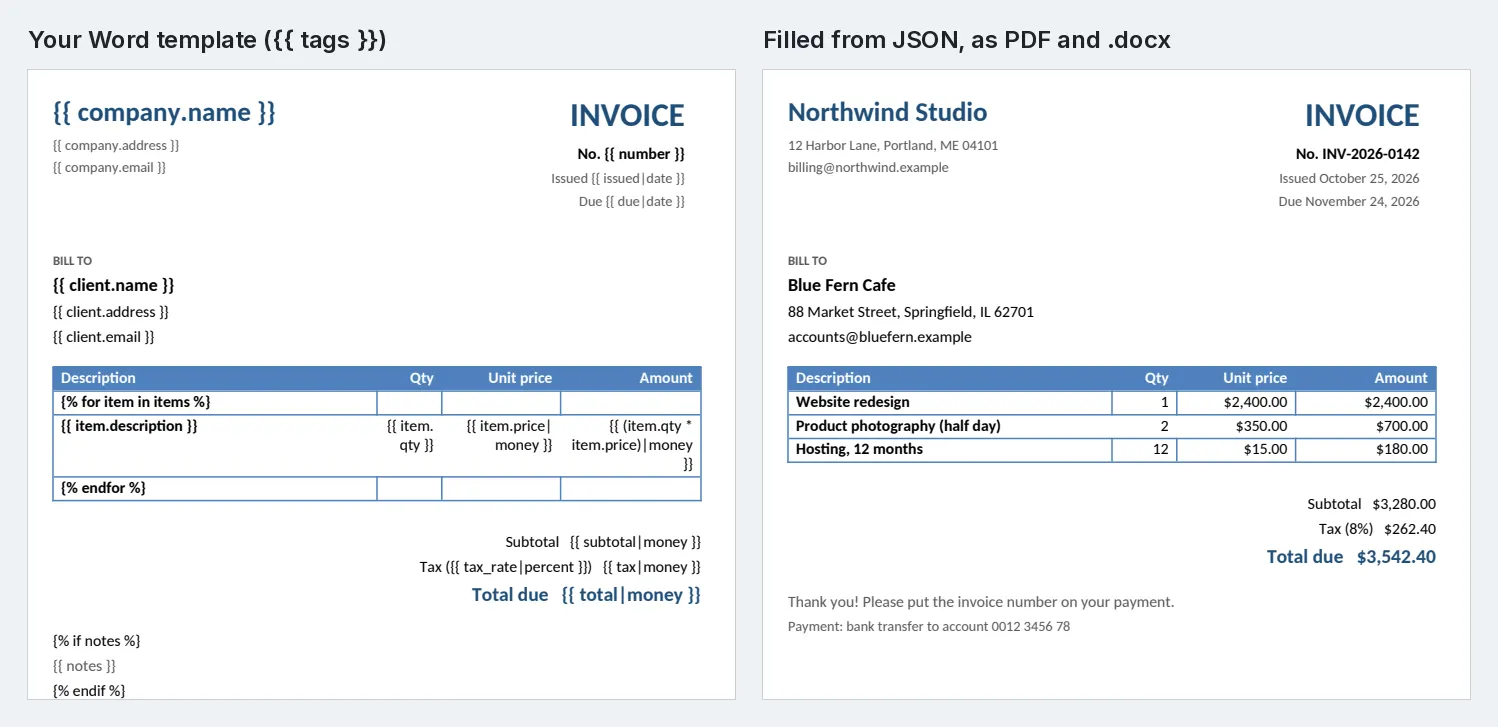
How to use it
- Put placeholders in your Word document where values go:
{{ name }},{{ client.address }},{{ start_date|date }}. Save it as .docx. - Give the template (a link, a Google Docs or Drive link, or upload it) and the data: values for one document, a list of rows, or a spreadsheet.
- Click Start. Each document is a row in the results with its first page, summary, Word file and PDF.
Not sure what a template needs? Run it with no data: you get its placeholders and a ready-to-fill sample.
Writing a template
| In Word | Becomes |
|---|---|
{{ name }} | The value of name. |
{{ client.name }} | A value inside an object: {"client": {"name": "Blue Fern Cafe"}}. |
{% for item in items %} alone on a table row, the item's cells {{ item.description }} on the next row, {% endfor %} alone on the row after | One table row per item. |
{% if notes %} alone on a line, then the text, then {% endif %} alone on a line | The text only when notes has a value; the lines holding the tags disappear. |
| `{{ price | money }}, {{ price |
| `{{ count | number }}, {{ rate |
| `{{ start | date }}, {{ start |
{{ item.qty * item.price }}, `{{ name | upper }}, {{ title |
A Word mail-merge field «FirstName», or {First Name}, [First Name], <<First Name>>, ${First Name} | Filled from the column First Name (also first_name: case, spaces and underscores don't matter). |
Numbers given as text ("15.50" from a CSV) count as numbers, so they add and multiply. A value with line breaks keeps them. An image is {"image": "https://.../logo.png", "width": "40mm"} (PNG, JPEG, GIF or BMP; width and height in mm, cm or in).
What you can send
| Field | What it takes |
|---|---|
template | A link to the .docx (Google Docs, Google Drive and Dropbox share links work), a data: URI or base64. Or upload it in uploads. |
data | Values for one document, as an object. |
rows | A list of objects, one document each. |
dataUrl | A CSV, Excel (.xlsx) or JSON file or a Google Sheet link, or CSV text: one document per row, columns named in the first row. |
fileName | Each document's name, with placeholders. |
outputs | docx, pdf or both (default). |
missing | blank (default: leave it empty and list it), keep (leave the {{ tag }} in) or error (don't make the document). |
pdfA | true for PDF/A-2b. |
requests | More templates in one run, each {"template": ..., "data": ...}. |
Examples
- The invoice template above with the JSON in the input form → "Invoice INV-2026-0142.pdf" and .docx: three line items with amounts calculated, $3,542.40 due, dates written out.
- An offer letter with «FirstName» mail-merge fields and a Google Sheet of 40 new hires → 40 PDFs named "Offer letter - Ana Lee" and so on.
- The same template with no data → its 11 placeholders,
itemsrepeating with description, qty and price, and a sample to fill in.
How-to examples
Each example below is a complete input. The result line is what the run says in summary.
How to fill a Word template from JSON and get a PDF
Put {{ tags }} in the .docx, then send the values:
This is shortened. With the full example data from the input form (company, due date, notes and totals as well), the result is "Filled invoice.docx with row 1 of 1 (11 of 11 placeholders): 1 page, as Word and PDF.", with files named "Invoice INV-2026-0142". Values the data leaves out are listed in missing.
How to mail merge Word documents from a CSV, Excel file or Google Sheet
Each row becomes its own document. Word mail-merge fields such as «First_Name» and placeholders such as [Project Name] or <<Amount>> are filled from the columns with those names.
Result: two PDFs, "Reminder - Ana" and "Reminder - Bo", each "Filled payment-reminder.docx with row 1 of 2 (6 of 6 placeholders): 1 page, as PDF." Put a Google Sheet link or a link to a .csv or .xlsx file in dataUrl instead of the text to merge from a spreadsheet.
How to see which fields a Word template needs
Send the template with no data:
Result: "invoice.docx has 11 placeholders: client, company, due, issued, items, notes, number, subtotal, tax, tax_rate, total; 1 repeat for each item of a list (items: description, qty, price)." The sample in the result is the data to fill in and send back.
How to let an AI agent fill contracts, letters or invoices
Add this Actor to the Apify MCP server with https://mcp.apify.com/?tools=jumblemog/docx-template-filler. The agent calls it once with the template to get placeholders and sample, fills in the values, calls it again with data, and gives the user pdfUrl. Anything the data didn't cover is listed in missing.
FAQ
Do I need to learn a template language? No. Typing {{ name }} where a value goes is enough. Loops, conditions and formats (money, date) are there if you need them, and Word mail-merge fields work as they are.
Does it keep my formatting? Yes. The Word file is your template with the values put in: fonts, logos, headers, footers and tables stay as they are.
Can I make hundreds of documents at once? Yes, up to 500 per template in one run, one per row of your data.
Does it work with Zapier, Make or n8n? Yes. Call the Actor with its Apify app or an HTTP request and pass the row or record from an earlier step in data.
Can it fill Google Docs? Give a Google Docs link as the template and it is read as a Word file. The output is a .docx and a PDF.
Output
One dataset item per document, also saved together in the run's OUTPUT record:
A template sent without data gives "type": "describe" with placeholders, a sample of the data and a picture of the template. Every item has warnings (placeholders with no value), notes (data columns no placeholder uses, often a typo) and a Markdown report. A template that can't be filled has "status": "failed" and the reason in error (with the text near a broken tag), and isn't billed.
How it works
- Reading the template: the .docx is checked (a .dotx is accepted; PDFs, old .doc files and macro files are refused with the reason). Word mail-merge fields and other placeholder styles that name a data column become
{{ tags }}; a{% for %}or{% if %}alone on a line or table row is set to repeat or remove that whole line or row. - Filling: docxtpl renders the document's XML with Jinja2, joining tags that Word split across formatting runs and fixing Word's curly quotes inside tags. Values are escaped, so
&and<in your data are safe. - PDF: LibreOffice Writer converts the documents in batches, with metric-compatible fonts for Calibri, Cambria, Arial and Times New Roman so lines break where Word breaks them. PDFium draws the first page.
Pricing
You pay one low price per document made, at the price shown on this page; the Word file, PDF and page picture are included. Listing a template's placeholders counts as one document. Templates that can't be filled are never charged. If you set a maximum cost per run, the Actor makes only the documents that fit.
Speed
A one-page document takes about a second including its PDF; a run of 100 rows takes about a minute. A run through the API answers in about 10 to 15 seconds for one document, including the cloud container and LibreOffice starting.
Tips and limits
- PDF fidelity: LibreOffice lays out the PDF. Ordinary documents come out as in Word; very complex layouts (text boxes anchored in odd ways, Word-only fonts other than Calibri, Cambria, Arial, Times New Roman and Courier New) can differ slightly. The Word file is always exactly your template, filled.
- Tags split by Word: if you type a tag, then change the formatting of part of it, Word splits it; that's handled. If a tag still isn't filled, retype it in one go.
- Fields that aren't mail merge (page numbers, dates, tables of contents) are kept as Word fields.
- Limits: 20 templates and 500 documents per template per run; 50 MB per template; 50 images per document.
For AI agents and developers
This Actor works with the Apify MCP server, so AI agents can call it as a tool: first call it with the template alone to get placeholders and sample, then call it with data filled in. A direct API call that waits for the answer:
run-sync instead returns the run's OUTPUT: the status, the counts and every result as JSON.
In Python, with the apify-client package, a mail merge from a local template and CSV:
Credits
- docxtpl (LGPL-2.1) and python-docx (MIT) fill the template with Jinja2 (BSD-3-Clause); LibreOffice (MPL-2.0) makes the PDFs with the Carlito, Caladea and Liberation fonts (SIL Open Font License); openpyxl (MIT) reads Excel files; pypdfium2 and PDFium (Apache-2.0 / BSD-3-Clause) draw the page pictures.


