

LaTeX to PDF Compiler API: Papers, Resumes, Slides & Theses
Pricing
Pay per event
LaTeX to PDF Compiler API: Papers, Resumes, Slides & Theses
Compile LaTeX to PDF: papers, theses, resumes, beamer slides and whole projects downloaded from Overleaf or GitHub. BibTeX, TikZ, pgfplots and Unicode fonts work out of the box, and errors come back with file, line and context so people and AI agents can fix them.
Pricing
Pay per event
Rating
0.0
(0)
Developer

Jumble Mog
Maintained by CommunityActor stats
0
Bookmarked
2
Total users
1
Monthly active users
15 hours ago
Last modified
Categories
Share
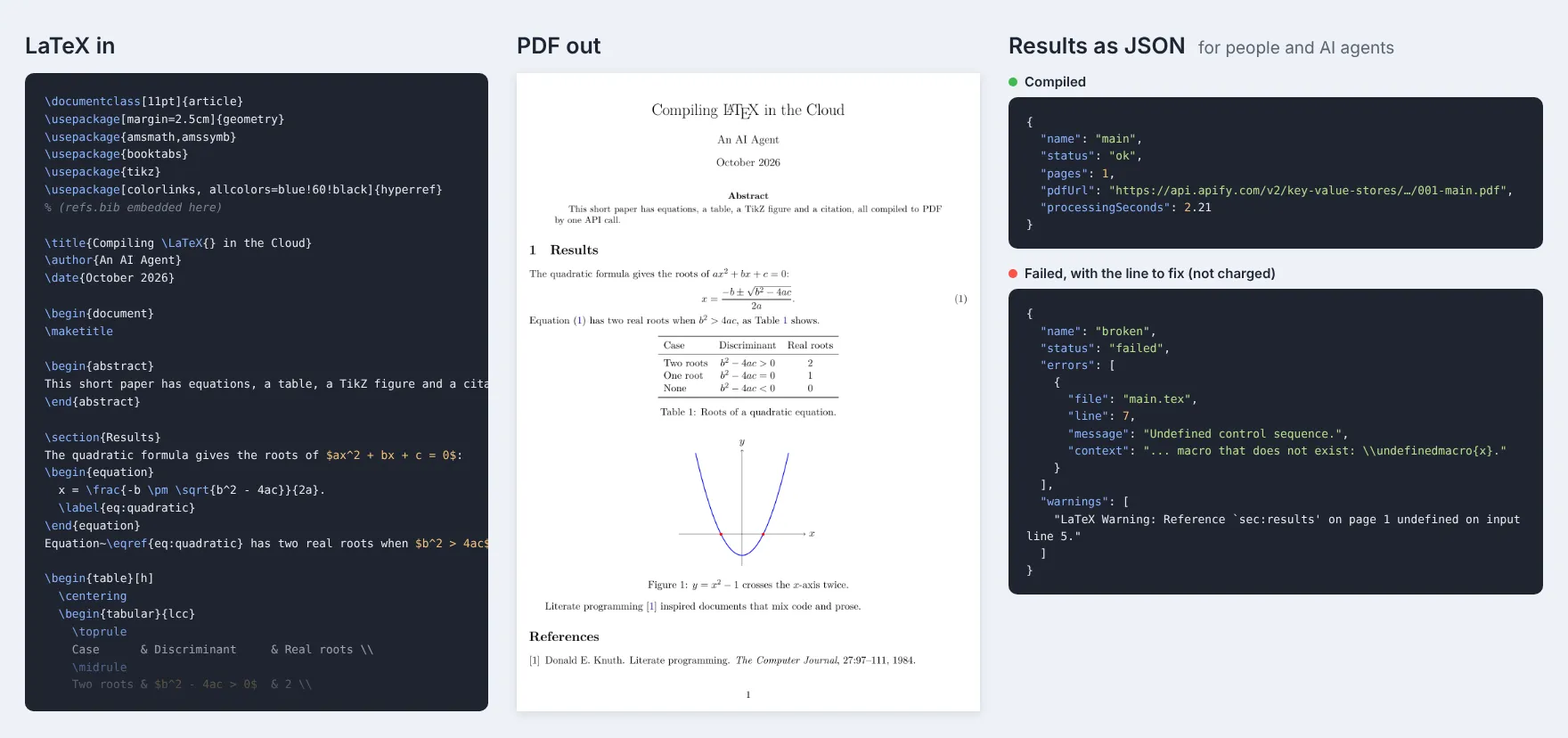
Compile LaTeX to PDF without installing anything. Send a LaTeX document, a link to a whole project (a ZIP downloaded from Overleaf, a GitHub repository or folder, or a single .tex file) or upload it, and get back a PDF with a download link. BibTeX bibliographies, cross-references and the table of contents are resolved automatically, packages load on demand, and when something is wrong you get the errors with file, line and the exact source where TeX stopped, so a person or an AI agent can fix them and try again. Many documents per run, pay per PDF, and documents that don't compile are free.
What it does
- Complete LaTeX: articles, reports, books, theses, letters,
beamerslides and resumes (moderncv, Jake's resume), with the packages people actually use: amsmath, TikZ and pgfplots, booktabs, siunitx, listings, algorithms, hyperref, cleveref, tcolorbox, natbib and biblatex (BibTeX backend), and thousands more from TeX Live, loaded the first time a document asks for them. - Journal and conference templates ready: IEEE (
IEEEtran), ACM (acmart), Elsevier (elsarticle), Springer LNCS (llncs), APS (revtex4-2), AMS (amsart), KOMA-Script andmemoirare already in the Actor with their citation styles, so they compile without waiting for downloads. - Whole projects:
\inputand\includefiles in subfolders, images,.bibfiles and custom.clsand.styfiles. The main file is found automatically (main.tex, else the file with\documentclass), or you name it. - Links that just work: ZIP files (Overleaf's Download > Source), GitHub repository and folder links (downloaded as a ZIP), raw
.texlinks, GitHub file pages, Google Drive and Dropbox share links, and files uploaded in the input form. - Errors you can act on: each error comes back as
{"file", "line", "message", "context"}, for examplemain.tex:8: Undefined control sequence. (at: \undefinedmacro{x}), plus the full log file. Warnings tell you about undefined references and citations, lines too wide for the page and characters missing from the font. - Unicode and fonts: the engine is XeTeX, so UTF-8 text, accents and other scripts work directly, and
fontspeccan use TeX Gyre, Latin Modern, Liberation and DejaVu fonts by name. - pdfLaTeX templates too: common pdfTeX-only commands (
\pdfgentounicode,glyphtounicode,\pdfminorversion,\pdfinfoand others) are handled, so templates written for pdfLaTeX compile without edits. - Batch compiling: send a list of documents, each with its own name, main file and extra files.
- The PDF straight from the API: the first PDF is also the run's
OUTPUT, so the run-sync endpoint answers with the PDF itself, or with the errors as JSON. - Safe with untrusted LaTeX: shell escape is off, the engine runs as an unprivileged user in a throwaway folder with a time limit, and it can't read the Actor's environment or other runs' files.
Who it's for
- AI agents and LLM apps that write LaTeX (resumes, cover letters, papers, math worksheets, invoices, slides) and need a PDF to send. The error report lets an agent fix its own LaTeX in a loop.
- Automation builders in n8n, Make or Zapier who fill LaTeX templates with data: certificates, reports, letters, quotes.
- Researchers and students who want a quick PDF from a project or a GitHub repository without installing TeX Live.
- Developers who need LaTeX rendering in an app without running TeX on their own servers.
How to use it
- Paste a LaTeX document into LaTeX document, add links in Links to LaTeX projects, or upload a project ZIP.
- If your project has extra files (images, a
.bibfile), add them in Extra files, or include them in the ZIP. - Click Start. Each document appears in the Output tab with its PDF link, or with its errors.
You can also run it through the Apify API, on a schedule, or from Make, n8n, Zapier and other integrations.
Input
| Field | What it does |
|---|---|
latex | One complete LaTeX document. |
projectUrls | Links to projects: ZIP files, GitHub repository or folder links, .tex files, Google Drive or Dropbox share links. |
uploads | Project ZIPs or .tex files uploaded in the input form. |
files | Extra files for the documents: objects with a name (relative path such as images/logo.png) and a url, or the content of a text file. |
mainFile | The main .tex file inside projects. Empty (default): found automatically. |
documents | More documents: a list of LaTeX strings, or objects with latex or url and optional name, mainFile and files. |
compileTimeoutSecs | Time limit per document, 10 to 900 seconds (default 120). |
maxDocuments | Stop after this many documents (default 100). |
Example with a batch:
Output
Each document becomes one dataset item, and the PDF and log are saved in the run's key-value store:
When a document has a mistake, the item says where, and isn't billed:
A missing package or file says so too, for example LaTeX Error: File 'foo.sty' not found. Download your files within your plan's data retention period, or copy them to your own storage, because run storage expires.
Pricing
You pay per document compiled to PDF, at the price shown on this page. Documents that don't compile are never charged. If you set a maximum cost per run, the Actor stops when the next document wouldn't fit.
Speed
Measured on Apify with the default 4 GB of memory (one CPU core, which is all a TeX engine uses): the example paper above (math, a table, a TikZ figure and a BibTeX bibliography) compiled in 2.2 seconds, Jake's resume straight from GitHub in 1.4 seconds including the download, an IEEE conference paper in 1.0 second, beamer slides in 2.3 seconds, a moderncv resume in 3.8 seconds and an ACM acmart paper, the heaviest common template, in 12 seconds. A document with a mistake fails in under half a second. Starting a run adds a few seconds, so send many documents in one run when you can.
Tips and limits
- The engine is XeTeX (through Tectonic), which compiles nearly all pdfLaTeX documents as well. Shell escape is off, so packages that run outside programs (
minted,\write18,gnuplottex) aren't supported; uselistingsinstead ofminted. - Bibliographies run through BibTeX:
\bibliography{...}with natbib or a\bibliographystyle, and biblatex withbackend=bibtex. Biber isn't available, so setbackend=bibtexin biblatex's options. - A single document can carry its own bibliography: put the BibTeX entries in a
filecontents*environment namedrefs.bibbefore\begin{document}, as the example input does. - Paths are relative to the main file's folder, as on Overleaf.
- TeX packages come from a pinned TeX Live 2022 snapshot. The common packages, fonts, citation styles and templates are already in the Actor; others are downloaded the first time a document uses them, which adds a few seconds.
- System fonts for
fontspec: TeX Gyre (Pagella, Termes, Heros, Bonum, Schola, Adventor, Cursor and their math fonts), Latin Modern, Liberation and DejaVu. Fonts in your project folder can be loaded by file name, for example\setmainfont{MyFont.otf}. - Projects can have up to 3,000 files and 300 MB unpacked, and each download up to 100 MB.
For AI agents and developers
This Actor works with the Apify MCP server, so AI agents can call it as a tool: pass the document in latex (or a project link in projectUrls) and read pdfUrl from the dataset item. If status is failed, the errors list says what to fix, with the file, line and source text: fix it and call again. For a direct API call that waits for the result:
To get the PDF itself as the response, call run-sync instead. It returns the run's OUTPUT, which is the first PDF (or the first document's errors as JSON):
Credits
- Tectonic (MIT), built on XeTeX and the TeX Live distribution, whose packages keep their own free licenses. Fonts: TeX Gyre (GUST Font License), Latin Modern, Liberation (OFL) and DejaVu. This Actor isn't affiliated with these projects or with Overleaf.


