

PDF Form Filler API (Fill, Flatten & List Fields)
Pricing
Pay per event
PDF Form Filler API (Fill, Flatten & List Fields)
Fill any fillable PDF form from field names or the labels printed on the page, flatten it, or list its fields with a numbered preview. Text, checkboxes, radio buttons, dropdowns.
Pricing
Pay per event
Rating
0.0
(0)
Developer

Jumble Mog
Maintained by CommunityActor stats
0
Bookmarked
2
Total users
1
Monthly active users
12 days ago
Last modified
Categories
Security
Limited permissionsShare
Fill any fillable PDF form from a few values. Give a link to the PDF and {"Name": "Jane Example", "SSN": "123-45-6789"} and you get the filled PDF back, flattened if you like, with a preview of each page. You don't need the form's internal field names (topmostSubform[0].Page1[0].f1_01[0]): use the label printed next to the box, the field's number from the preview, or its name.
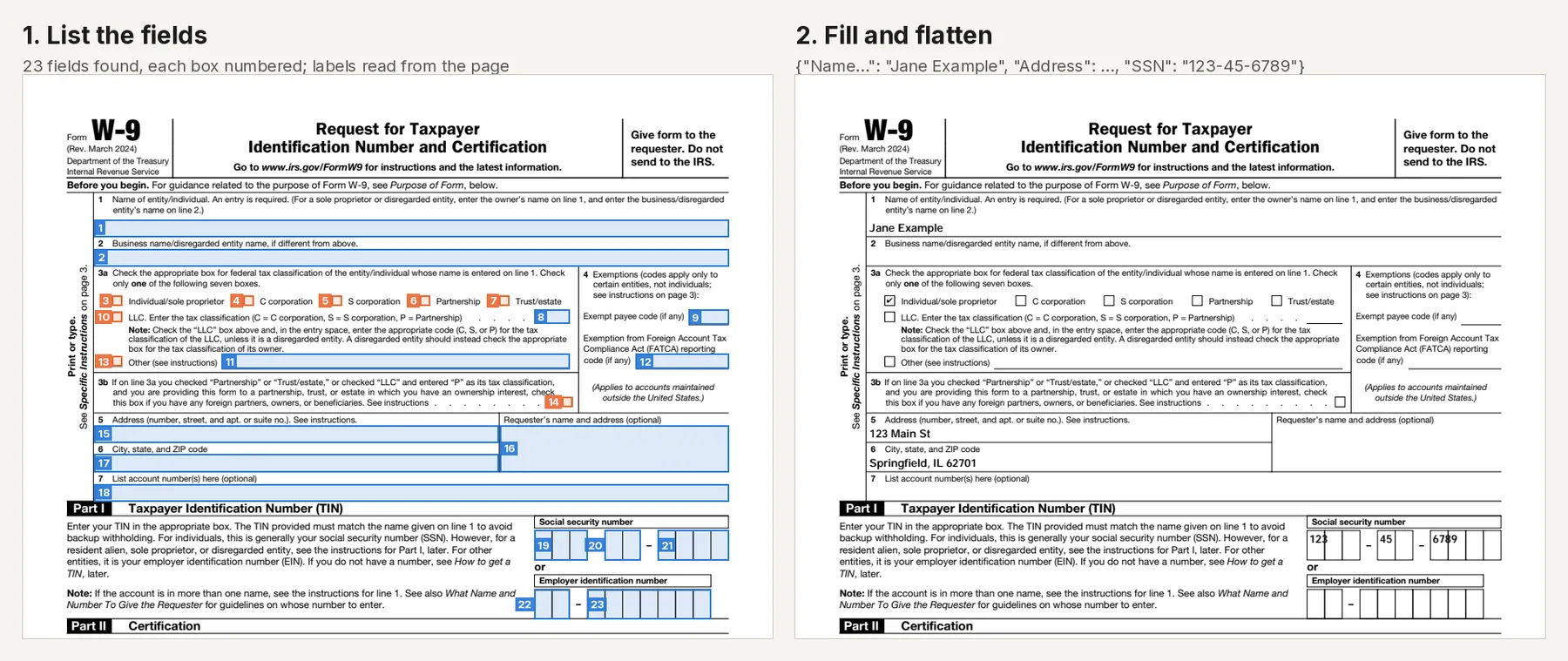
- List the fields of any fillable PDF: number, internal name, type, the label printed next to it (or its tooltip), page, current value, options, length limit, required and read-only flags. A preview image draws every box with its number, and a ready-to-fill template lists every field with its current value.
- Fill text boxes, checkboxes, radio buttons, dropdowns and list boxes (several choices for a multi-select list). A value for a row of boxes that share one label, such as an SSN in 3 + 2 + 4 boxes or a phone number in three parts, is split across them.
- Match values loosely: the start of a label (
Address), its words in any order, small typos (busines name), common abbreviations (SSN, EIN, DOB, ZIP, tel). A value that matches no field, or isn't one of the field's options, is reported with the reason and the closest fields, and the rest are still filled. - Flatten the result so the values become part of the page and can't be edited.
It's made for:
- AI agents and assistants that fill tax, HR, insurance, school or government forms for people: an agent reads the field list once, then sends the values by label.
- Back offices and SaaS apps that turn database records or form submissions into completed PDFs (W-9, W-4, I-9, applications, claim forms, contracts with fields).
- Anyone who fills the same PDF form over and over and wants to do it from a spreadsheet, Zapier, Make or n8n.
How to use it
- Add Requests, one per PDF. A link on its own lists the form's fields; an object with
fieldsfills it. The form has an example of each. - Optionally choose to flatten filled PDFs and how many preview pages to draw.
- Click Start. Each PDF is a row in the results, with its summary, preview, filled PDF link and report.
The quickest way to fill a new form: run it once with just the link, look at the numbered preview, then send the values by label or by number ("#12": "5").
What you can send
| Field | What it takes |
|---|---|
pdf | A https link (Google Drive and Dropbox share links work), a data:application/pdf;base64,... URI or the PDF as base64 text. Also accepted as url or file. |
fields | {"field name, printed label or #number": value}, or a list of {"name": ..., "value": ...}. Leave it out to list the fields. Also accepted as values or data. |
flatten | true to draw the values into the page so they can't be edited. |
fileName | The name for the output files. |
previewPages | How many pages with fields to draw (0 to 20; 2 by default). |
title | A title for the result. |
Values by field type: text and numbers for text boxes (cut to the box's length limit, with a warning); true/false (or yes/no, x, checked) for checkboxes; the choice's name or the label printed beside it for radio buttons ("Pro"); one of the options for dropdowns (any text if the dropdown is editable); one option or a list of options for list boxes.
Examples
https://www.irs.gov/pub/irs-pdf/fw9.pdf→ 23 fields (15 text boxes, 8 checkboxes), all with labels such as "Name of entity/individual", "Exempt payee code (if any)" and "Social security number", and a numbered preview of page 1.- The W-9 filled with the values above → 7 fields filled (the SSN split as 123 / 45 / 6789), flattened, with a preview.
{"pdf": ..., "fields": {"Membership plan": "Gold"}}on a form whose plans are Basic, Pro and Team → not filled: "'Gold' isn't a choice of Membership plan: basic (Basic), pro (Pro), team (Team)".
How-to examples
Each example below is a complete input. The result line is what the run says in summary.
How to list the fields of a fillable PDF
Result: "fw9.pdf has 23 form fields (15 text boxes, 8 checkboxes) on 1 of its 6 pages; 23 have a label. Fill them by name, label or number (#)." Each field comes with its label, type and options, and a preview draws its number on the page.
How to fill a W-9 automatically
Use the labels printed on the form. You don't need the internal field names.
Result: "Filled 7 fields of fw9.pdf from 5 of 5 values (1 split across boxes); flattened so it can't be edited." The SSN is split into its three boxes.
How to fill the same PDF form for many people
Send one request per person. Short keys such as Name, LLC and EIN find their fields too.
Result: two filled PDFs, "Filled 7 fields of W-9 Ana Lee.pdf from 5 of 5 values (1 split across boxes)" and "Filled 6 fields of W-9 Blue Fern Cafe.pdf from 5 of 5 values (1 split across boxes)", both flattened. Up to 100 PDFs fit in one run.
How to let an AI agent fill PDF forms
Add this Actor to the Apify MCP server with https://mcp.apify.com/?tools=jumblemog/pdf-form-filler. The agent calls it once with the PDF link to read the fields and their labels, asks the user for the values, then calls it again with fields and gives the user pdfUrl. Values that couldn't be placed are listed in notFilled with the closest fields, so the agent can fix them.
FAQ
Do I need the PDF's internal field names? No. The label printed next to a box, the start of it, or the field's number from the preview all work. Internal names work too.
Which PDFs can it fill? Fillable PDFs, the ones with form fields (an AcroForm), such as IRS, HR, insurance and school forms. A scanned or flat PDF has no fields to fill.
Can the filled PDF be locked? Yes. Set "flatten": true and the values become part of the page.
Does it work with Zapier, Make or n8n? Yes. Call the Actor with its Apify app or an HTTP request, and pass the values from a form, a spreadsheet row or a database record in fields.
Does it sign the form? No. Signature fields are listed but not signed. Sign the filled PDF in your e-signature tool.
Output
One dataset item per PDF, also saved together in the run's OUTPUT record:
Listing a form ("type": "describe") gives form, fields, a template of every fillable field and the numbered previews. Every item has warnings (values cut short, values not filled, required fields left empty), notes, a Markdown report and its link. A PDF that can't be read or filled has "status": "failed" and the reason in error, and isn't billed.
How it works
- Reading: the form's AcroForm fields are read with pypdf, with inherited types, flags and values, and each box is matched to its page. Fields are numbered top to bottom, left to right.
- Labels: a field's tooltip if it has one, otherwise the text printed to the left of the box, on its top edge, or (for checkboxes and radio buttons) to its right, read with PDFium. Dot leaders are followed back to their label and wrapped label lines are joined.
- Filling: text and choices are written with new appearances so every viewer shows them; checkboxes and radio buttons get their on state. XFA data, which would hide the new values in Adobe Reader, is removed.
- Flattening and previews: PDFium draws each field into its page and the form is removed; previews are rendered by PDFium.
Pricing
You pay one low price per PDF read or filled, at the price shown on this page. Previews, the filled PDF and the report are included. PDFs that can't be read or filled are never charged. If you set a maximum cost per run, the Actor stops before a PDF that wouldn't fit.
Speed
A form takes well under a second to read or fill, plus the download. A run through the API answers in about 10 seconds, including the cloud container starting.
Tips and limits
- Fillable PDFs only: the PDF needs form fields (an AcroForm). A scanned or flat PDF has none; the error says so. XFA-only forms (some older government forms that open only in Adobe Reader) have no AcroForm fields to fill.
- Check the labels against the numbered preview on a new form: they're read from the page layout, and on crowded forms a box can pick up its neighbour's caption. Fill by number when two boxes share a label.
- Signatures: signature fields are listed but not signed; add a signature in your e-signature tool after filling.
- Encrypted PDFs open if they need no password to view.
- Limits: 100 PDFs per run; 50 MB and 1,000 pages per PDF.
For AI agents and developers
This Actor works with the Apify MCP server, so AI agents can call it as a tool. Call it with just the PDF link to get fields (with label, type and options) and the template, then call it again with fields set to the values. A direct API call that waits for the answer:
run-sync instead returns the run's OUTPUT: the status, the counts and every result as JSON.
In Python, with the apify-client package, filling a local file:


