Traffic Signal Timing Calculator: Webster Cycle, Yellow, LOS
Pricing
Pay per event
Traffic Signal Timing Calculator: Webster Cycle, Yellow, LOS
Fixed-time traffic signal timing from plain text: Webster's cycle and green splits from phase volumes, ITE yellow and all-red intervals, pedestrian walk and clearance checks, and HCM capacity, v/c, delay and level of service, with a timing diagram.
Pricing
Pay per event
Rating
0.0
(0)
Developer

Jumble Mog
Maintained by CommunityActor stats
0
Bookmarked
2
Total users
1
Monthly active users
9 days ago
Last modified
Categories
Features
Share
Fixed-time signal timing from one line of text. List the phases and their volumes (phase 1: NB 450 vph 2 lanes, SB 380 vph 2 lanes; phase 2: EB 300 vph, WB 260 vph), or ask for an approach's clearance intervals (yellow and all-red for 45 mph, 3% downgrade, 80 ft intersection). You get back:
- Cycle and splits: Webster's optimum cycle from the critical flow ratios and lost time, rounded up to 5 s and kept under a maximum, the shortest cycle for v/c 0.9, and effective and displayed green for each phase.
- Clearance intervals: the ITE yellow change interval from approach speed and grade, and the red clearance from the intersection width, or the values you give.
- Pedestrians: the green a crossing needs (walk plus flashing don't walk at 3.5 ft/s, with the yellow and all-red as buffer), and the cycle needed when phases fall short.
- Performance: capacity, v/c, HCM control delay and level of service for every movement, the critical v/c and the intersection's average delay and LOS.
- Checks: give a cycle and greens (
cycle 90 s, greens 40 30) to rate an existing timing instead of designing one. - A chart: the timing diagram for one cycle with each movement's delay coloured by LOS, or the yellow interval against approach speed.
US units (mph, ft) or metric (km/h, m); volumes in vehicles per hour.
It's made for:
- Traffic engineers and technicians making a first-cut timing or checking one in the field.
- Developers' consultants writing traffic impact studies.
- Transportation engineering students working Webster, clearance interval and LOS problems (and checking PE exam answers).
- AI agents that need correct signal timing numbers instead of a guess.
How to use it
- Write Intersections and approaches, one per entry. The form has examples.
- Optionally set the Units for speeds and distances written without one (US by default).
- Click Start. Each request is a row in the results, with its summary, chart and report.
What you can write
| You write | It means |
|---|---|
phase 1: NB 450 vph 2 lanes, SB 380 vph 2 lanes; phase 2: EB 300 vph, WB 260 vph | Phases (split by ; or phase 2:) and their movements' volumes and lanes |
critical flow ratios 0.25, 0.20, 0.15 or critical lane volumes 650, 420, 300 | The critical values directly |
saturation flow 1900, PHF 0.92, lost time 4 s per phase (or 12 s total) | Capacity inputs (defaults 1800 veh/h/lane, PHF 1.0, 4 s per phase) |
45 mph, 3% downgrade, 70 ft intersection | Approach speed, grade and width for the yellow and all-red |
yellow 4 s, all-red 1.5 s | Fixed clearance intervals instead |
60 ft crosswalk, walk 7 s, walking speed 3.5 ft/s | Pedestrian timing |
max cycle 120 | The longest cycle allowed (150 s by default) |
cycle 90 s, greens 40 30 | A timing to check |
yellow and all-red for 45 mph, 80 ft intersection | Clearance intervals only |
The same as an object: {"type": "timing", "phases": [{"name": "North-south", "movements": [{"name": "NB", "volume": 620, "lanes": 2}, {"name": "SB", "volume": 540, "lanes": 2}]}, {"name": "East-west", "movements": [{"name": "EB", "volume": 410}, {"name": "WB", "volume": 380}]}], "speed": "40 mph", "width": "60 ft"}.
Examples
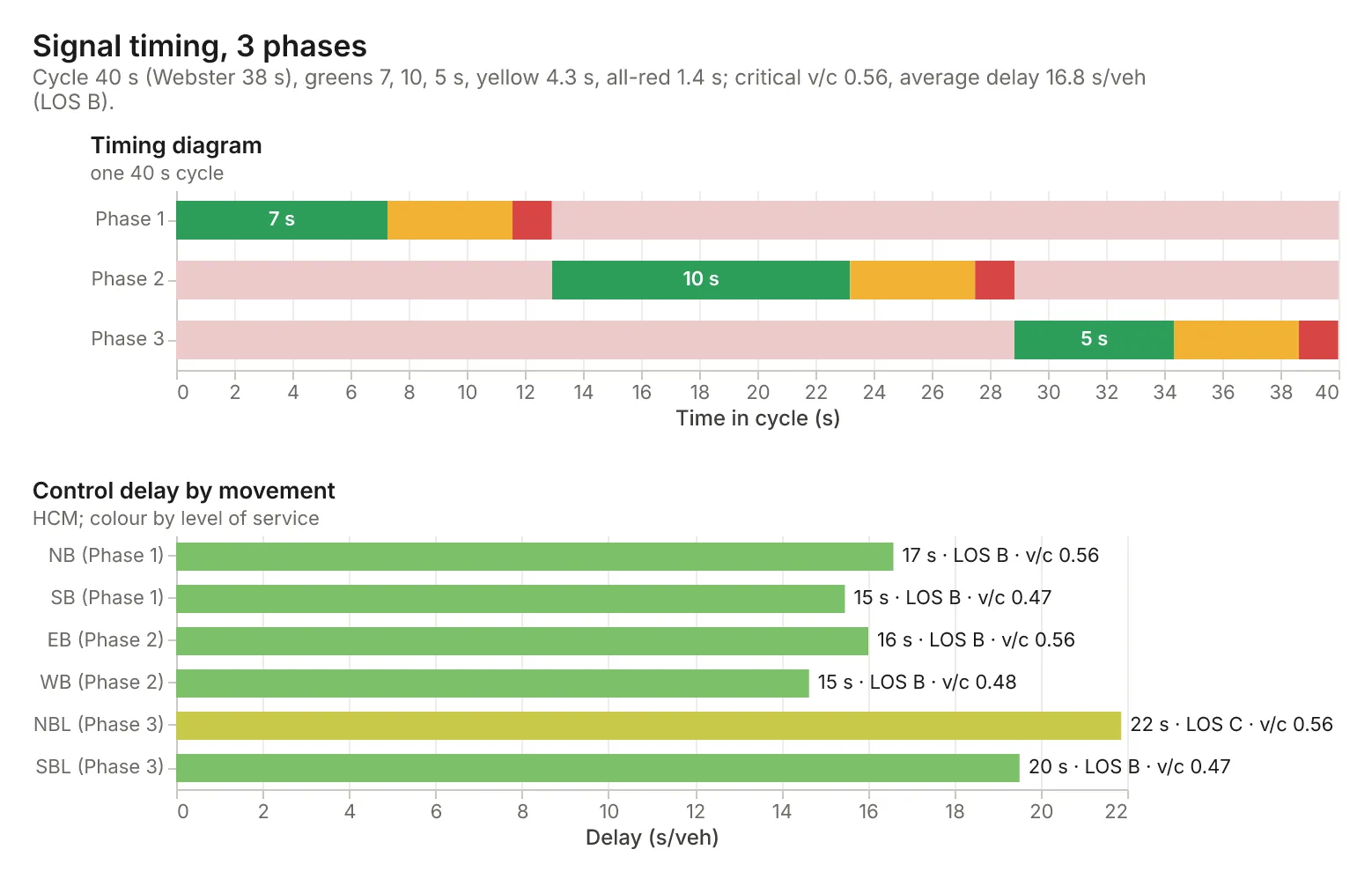
- The three-phase intersection above, at 45 mph with a 70 ft intersection → Webster 37.8 s, cycle 40 s, greens 7, 10 and 5 s, yellow 4.3 s, all-red 1.4 s; critical v/c 0.56, average delay 16.8 s/veh (LOS B).
yellow and all-red for 45 mph, 3% downgrade, 80 ft intersection→ yellow 4.7 s (4.65), all-red 1.6 s (1.52).critical lane volumes 650, 420, 300; saturation flow 1900; max cycle 120→ Webster 82 s, cycle 85 s, greens 34, 21 and 15 s; LOS D.check: cycle 90 s, greens 40 30; NS 600 vph 2 lanes; EW 400 vph 1 lane, PHF 0.92→ EW v/c 0.70, 32.0 s/veh (LOS C); a warning that the greens and clearances add up to 80 s, not 90.
How-to examples
Each example is a complete input; the results are from runs of the Actor (also listed under Examples).
How to time a fixed-time traffic signal (Webster's method)
Result: Webster 37.8 s, cycle 40 s, greens 7, 10 and 5 s, yellow 4.3 s and all-red 1.4 s; critical v/c 0.56 and average delay 16.8 s/veh (LOS B).
How to calculate yellow and all-red clearance intervals (ITE)
Result: yellow 4.7 s (4.65) and all-red 1.6 s (1.52).
How to check the delay and level of service of an existing timing
Result: EW v/c 0.70 and 32.0 s/veh (LOS C), with a warning that the greens and clearances add up to 80 s, not 90.
How to let an AI agent time signals
Add this Actor to the Apify MCP server with https://mcp.apify.com/?tools=jumblemog/traffic-signal-calculator. The agent lists the phases and volumes in one line and answers with the cycle, the greens, the clearances and the level of service.
FAQ
Which methods does it use? Webster's cycle and splits, the ITE clearance formulas and HCM uniform and incremental delay for the level of service.
Does it do actuated or coordinated signals? No. It times one fixed-time intersection, though the cycle and splits are the usual starting point for both.
Which saturation flow does it use? 1800 per lane by default, without the full HCM adjustments; give a measured or adjusted value for a better answer.
Why is my cycle so short? Light volumes give short cycles. Most agencies set a minimum (often 60 s); use cycle to set one.
Input
| Field | What it is |
|---|---|
requests | The intersections and approaches, as lines of text or objects (up to 200 per run) |
units | For speeds and distances without a unit: us (mph, ft) or metric (km/h, m) |
charts | Draw a chart for each request (default on) |
Output
One dataset item per request, also saved together in the run's OUTPUT record:
Clearance results have clearance (yellow and all-red, exact and rounded up to 0.1 s). Every item has units, summary, warnings, notes (the method and every assumed value), a Markdown report and links to the chart and report. A request that can't be computed has "status": "failed" and the reason in error, and isn't billed.
How it works
- Flow ratios: each movement's v/(N·s), with v the hourly volume divided by the PHF; a phase's critical ratio is its largest.
- Cycle: Webster's C0 = (1.5L + 5)/(1 − Y), L the total lost time and Y the sum of critical ratios; rounded up to 5 s, at least 30 s and at most the maximum.
- Splits: effective green (C − L)·yi/Y; displayed green = effective green − yellow − all-red + lost time per phase.
- Clearance: ITE yellow t + v/(2a + 2Gg) with t 1 s and a 10 ft/s² (3.05 m/s²); all-red (W + L)/v with a 20 ft (6.1 m) vehicle.
- Delay: HCM uniform delay 0.5·C·(1 − g/C)²/(1 − min(1, X)·g/C) plus incremental delay 900T[(X − 1) + √((X − 1)² + 8kIX/(cT))], pretimed k 0.5 over 15 minutes; LOS A to F by delay.
Pricing
You pay one low price per request, at the prices shown on this page; clearance-only requests cost less. The chart and report are included. Requests that can't be computed are never charged. If you set a maximum cost per run, the Actor stops before a request that wouldn't fit.
Speed
Each request takes a few milliseconds. A run through the API answers in about 10 seconds, including the cloud container starting.
Tips and limits
- Fixed-time timing for one intersection: actuated control, coordination and offsets aren't covered, though the cycle and splits are the usual starting point for both.
- Saturation flow is one value per lane (1800 by default); the full HCM adjustment factors for lane width, heavy vehicles, turns and so on aren't applied, so give a measured or adjusted value when you have one.
- Webster overstates the cycle near saturation (sum of ratios over about 0.85); the result warns, and Y of 1 or more can't be timed.
- Short cycles come out when volumes are light; most agencies set a minimum (often 60 s) for pedestrians and drivers' expectations; use
cycleto set one. - Limits: up to 8 phases per intersection and 200 requests per run.
For AI agents and developers
This Actor works with the Apify MCP server, so AI agents can call it as a tool. Pass requests as plain text and read summary, timing, phases, movements, clearance and warnings. A direct API call that waits for the answer:
run-sync instead returns the run's OUTPUT: the status, the counts and every result as JSON.
In Python, with the apify-client package:
Credits
- Charts: Vega-Lite and vl-convert (BSD-3-Clause), with the Inter font (SIL Open Font License).
- Methods: Webster, Traffic Signal Settings (1958); ITE, Guidelines for Determining Traffic Signal Change and Clearance Intervals; MUTCD 2009 section 4E.06; Highway Capacity Manual, signalized intersections.