
Meta Ad Library & Facebook Ad Library Checker
Pricing
from $2.80 / 1,000 lookups
Meta Ad Library & Facebook Ad Library Checker
Facebook Ads Library checker: see whether a Facebook Page or brand runs ads, its ad count, the day its latest ad started, and its latest ads with text, links and dates. Enter Page links, IDs or brand names; a Page with no ads is answered too.
Pricing
from $2.80 / 1,000 lookups
Rating
0.0
(0)
Developer

Kaleidoscope Labs
Maintained by CommunityActor stats
1
Bookmarked
2
Total users
1
Monthly active users
10 hours ago
Last modified
Categories
Security
Limited permissionsShare
What can Facebook Ad Library Checker do?
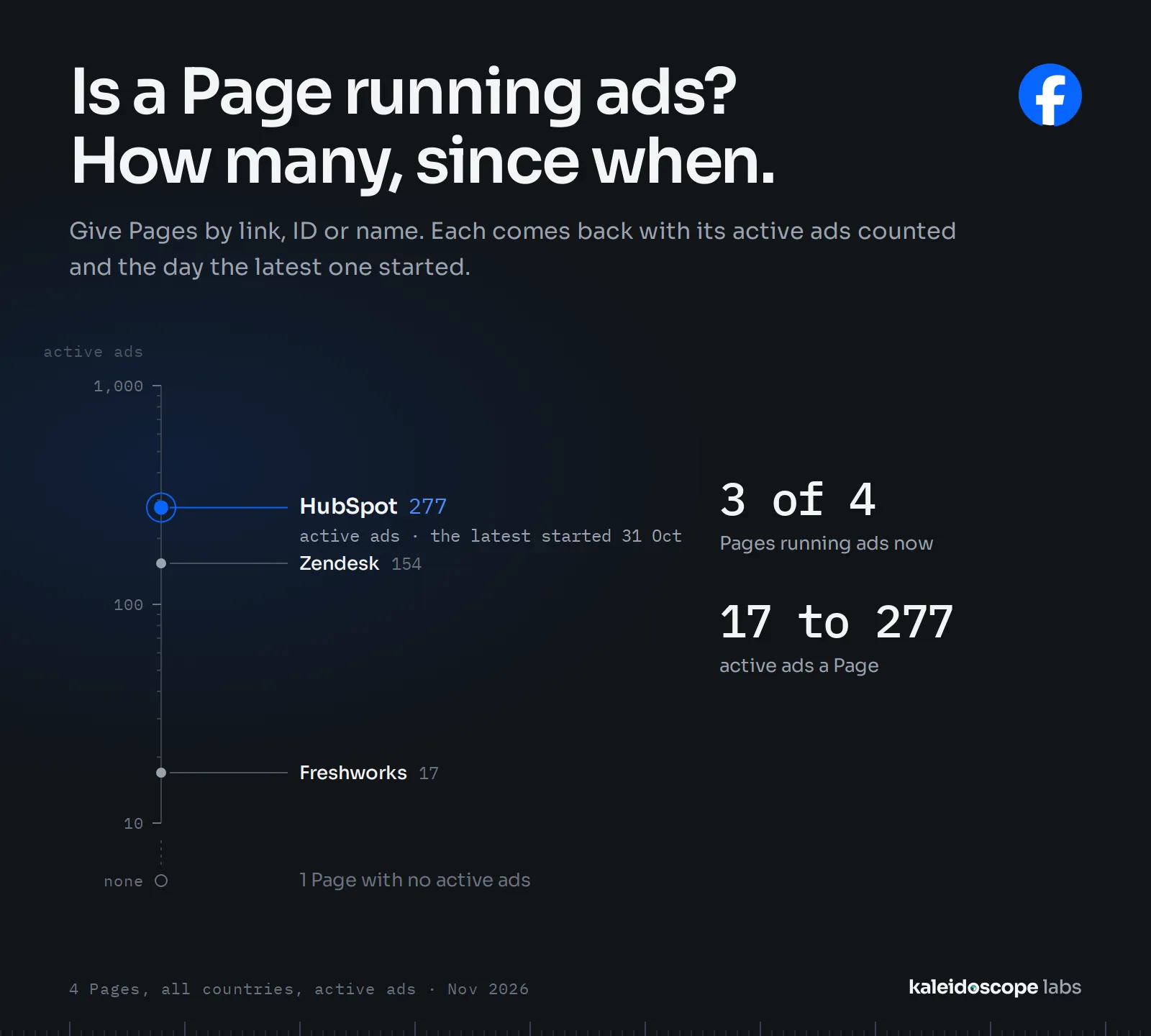
Check in the Facebook Ads Library whether a Facebook Page or a brand runs ads: how many, the day its latest ad started, and its latest ads, one record per Page or name.
- 🔎 Is it advertising? Each Page or brand gets a clear answer under your filters, a Page with no ads included.
- 🔢 How many ads: the library's own count of the Page's ads, for a country or anywhere, running now or all.
- 📅 Since when: the day its newest ad started.
- 🖼️ The latest ads: up to 1,000 per Page, newest first, with their text, headline, link, button, dates, platforms and format.
- 🔗 Page links: a Page ID or an Ad Library link of a Page goes straight to that Page; a Facebook Page link is found by its username, and when it can't be, the record says so and isn't charged.
- 🏷️ Brand names: enter a brand as you would type it in the library's search box; the run takes the first Page the library suggests with that name (accents, punctuation and a legal form such as Inc aside), and says how sure the match is.
Run it from Apify Console, through the API, on a schedule, or from an AI agent.
What data can you get from the Facebook Ad Library?
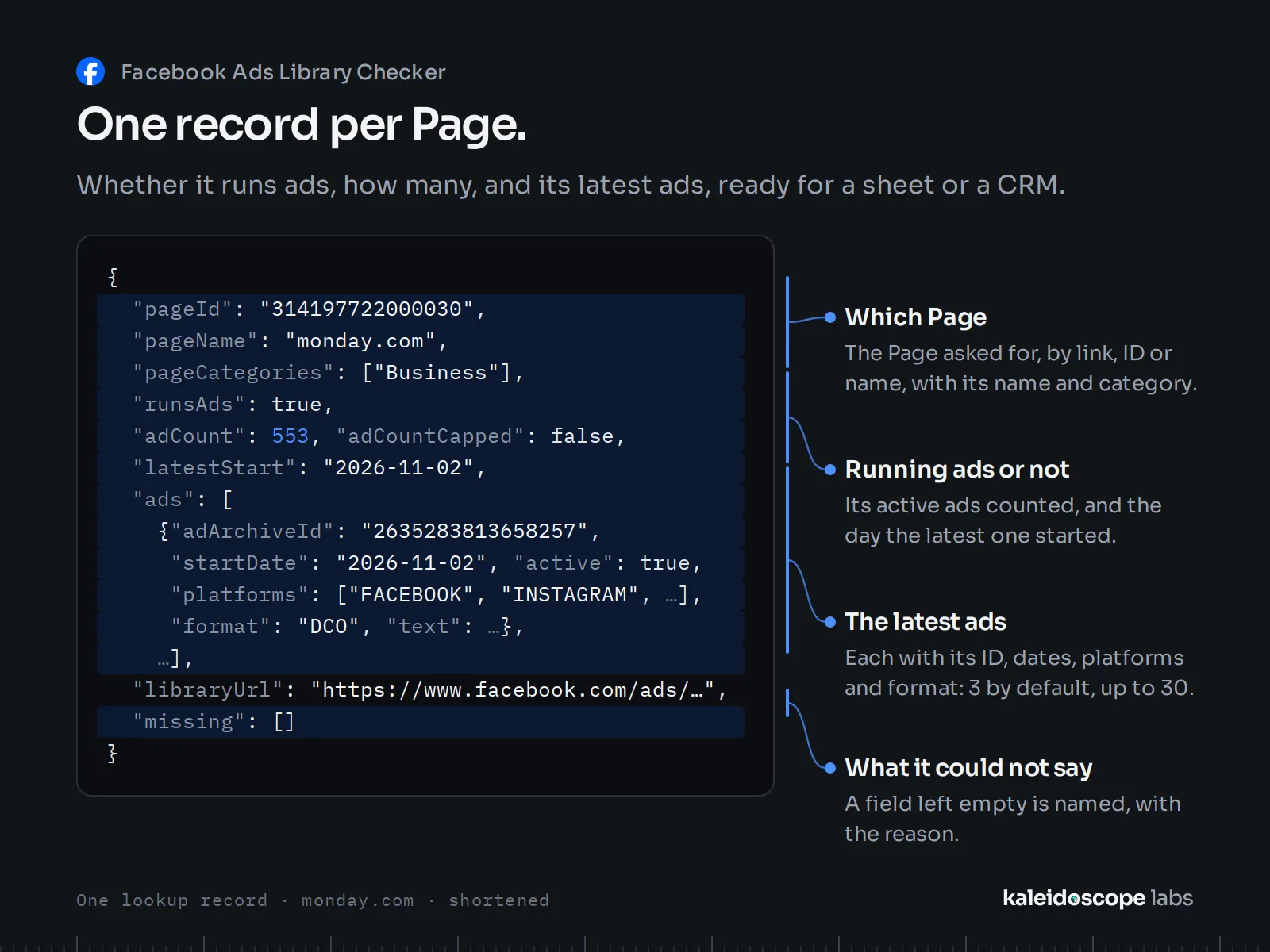
One record per Page or name:
| Data | Field |
|---|---|
| The line as you gave it, whether it was a Page or a name, and the record's type | query, queryType, recordType |
| Whether the Page runs ads under the filters | runsAds |
| The library's count of its ads, and whether it shows more than 50,000 | adCount, adCountCapped |
| The day its newest ad started | latestStart |
| The Page's ID, name, link, picture, categories and likes | pageId, pageName, pageUrl, pagePictureUrl, pageCategories, pageLikes |
| The Page's list in the Ad Library, as the run read it (Most recent) | libraryUrl |
| Whether the Page is labelled as a person's (to leave such Pages out) | personLabelled |
| How the Page was found, whether Meta verified it, at least how many other Pages carry the same name, the match's place among the library's suggestions, how its name compares with yours, and how sure the match is | matchedBy, pageVerified, sameNamePages, suggestionPlace, matchedTier, retriedBare, matchStrength |
| Its latest ads: ID, link, dates and days active, text, headline, link with its description and domain, button, platforms, format, versions, the AI-media flag, image and video links, and a carousel's cards | ads |
| With a monitor: the new ads, whether anything changed, and how many ads were read (see below) | newAds, changed, adsChecked |
| The filters the record was read under, and when | country, activeOnly, readAt |
| What the record lacks, and why | missing |
With Only ads running now on, runsAds: false means no ads running now, not that the Page never advertised. When the library counts a Page's ads but shows none of them, the record answers with the count (runsAds, adCount) and says its ads were not given (missing). Start dates are days: ads that started on the same day have no order among them. A carousel ad's cards come with it, each with its own text, link, button and media.
Media links (imageUrls, videos, the cards' and pagePictureUrl) are Meta's and expire, usually within a few days: mediaExpires gives the day for an ad's links. Download them within your run's flow.
How to use Facebook Ad Library Checker
- Create a free Apify account and open Facebook Ad Library Checker.
- In Facebook Page links or IDs, enter Pages, one per line (a Page ID or an Ad Library link is the surest); or in Brand or Page names, enter names, for the best match.
- Choose the Country (a two-letter code, or ALL), whether to count only ads running now, and how many of each Page's latest ads you want.
- Click Start. Records appear in the Output tab; export them as JSON, CSV or Excel, or read them from the API.
How to monitor Pages for new ads
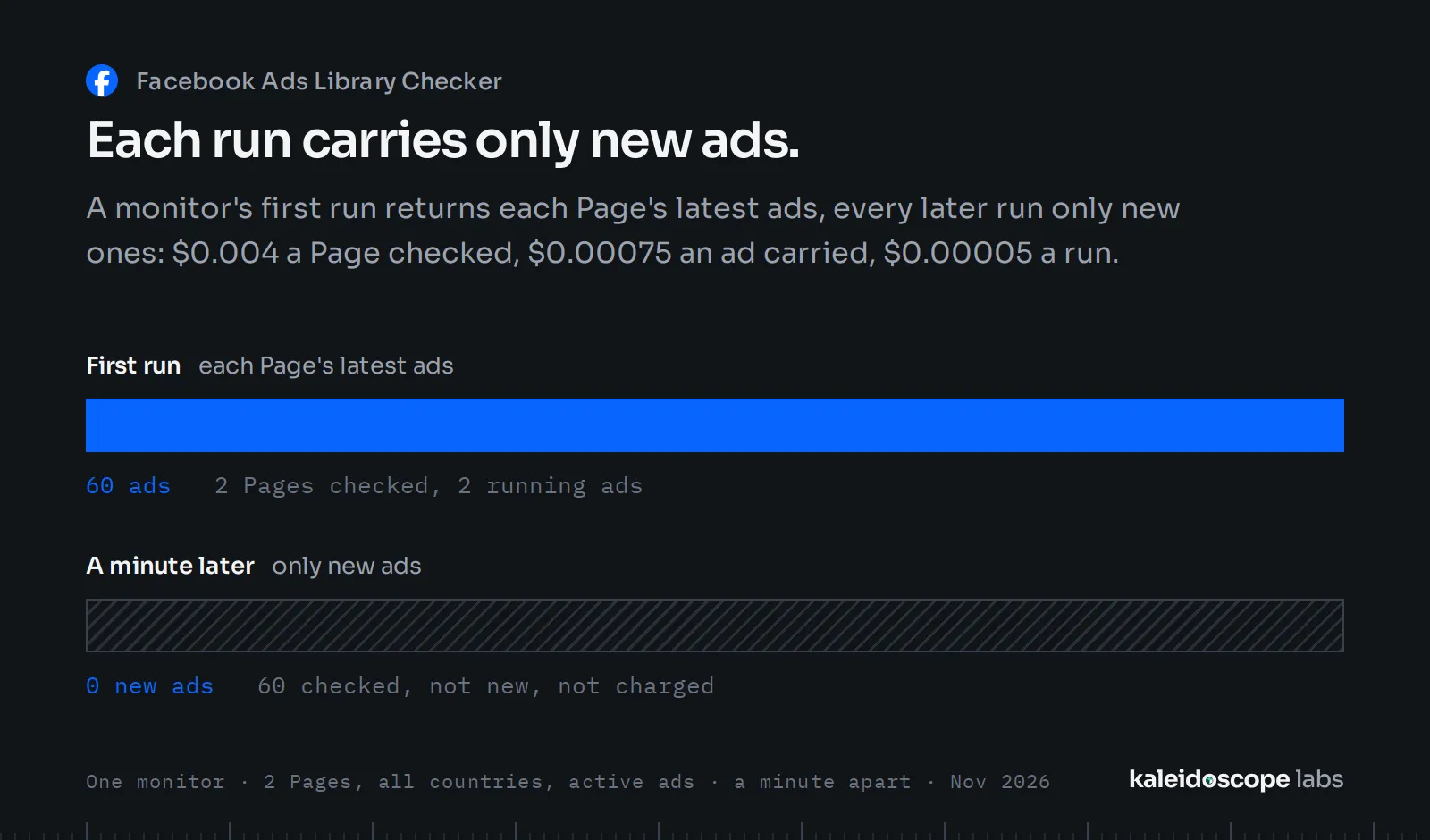
Enter a Monitor name and run the same input on a schedule. Each run checks every Page and name, one record each, and carries only ads the monitor has not seen before:
newAdscounts every ad that is new since the monitor's last run. The record carries the newest of them, up to 30 unless Latest ads per Page is set; the rest are counted, not returned, and later runs do not return them. With 0 the monitor counts new ads and returns none.- A new ad is one that started after you began monitoring the Page, or any ad newly listed while the Page fits in one read (30 ads or fewer). An older ad that only now comes among the 30 a check reads is not new, so a monitor can show fewer new ads than a plain comparison of two lookups.
- On a Page with more than 30 ads in the current month, the library lists them by relevance, so a run sees 30 of them; a new ad past them is returned in a later run, once it is among them.
adsCheckedis how many ads the run read, the first the library lists for the Page (up to 30);newAdscounts the new ones among them.changedis true when the Page has new ads, or started or stopped running ads, since the monitor's last run. Filter onchangedfor alerts.- Each Page's first run returns its latest ads as a lookup does, 3 unless Latest ads per Page is set, and
newAdsandchangedare absent: there is no earlier run to compare with. The monitor starts from that run: the ads it returned are never returned again, and an ad that ran before it is not new later, unless it is newly listed on a Page that fits in one read.
The monitor keeps what it has seen in a key-value store of its own in your account, fb-ads-monitor-<name>. If a run cannot save what it found, after trying again at its end, it says so in its status, and its next run may return those ads again. To start a monitor over, delete that store or use a new name; a Page checked under another Country or Only ads running now setting starts over too. Let a monitor's runs not overlap: two at once may both return the same new ads. A Page given twice in one input (by its link and its ID, or by a name that finds it) is checked twice, and its new ads come in one of the two records. Each check is charged as a lookup, and each ad a record carries as an ad.
How much does it cost to check a Page's ads?
Facebook Ad Library Checker is priced per event, with no usage fees on top:
| Event | Price | When |
|---|---|---|
| Lookup | $0.004 each | each Page or name looked up, whether it runs ads or not |
| Ad | $0.00075 each | each ad a record carries: Latest ads per Page, 3 when left empty (a monitor's later runs: up to 30 new ads), 0 for the check only |
The platform also charges $0.00005 when a run starts. A line that is not a Page, a Facebook Page link whose Page could not be found, or a line the run could not look up, is not charged, and a Page with fewer ads than you ask for costs less. The prefilled input (one name, a lookup with 3 ads) costs at most $0.00625, plus the start. A run's spending limit must cover a whole record, a lookup and its ads: below that, nothing is stored.
| You check | Latest ads per Page | It costs at most |
|---|---|---|
| 1,000 Pages or names | 0 (the check only) | $4.00 |
| 1,000 Pages or names | 3 (left empty) | $6.25 |
| 1,000 Pages or names | 30 | $26.50 |
- Apify's free plan credit of $5 a month covers about 1,250 checks, or 800 lookups with 3 ads each.
Input example
A Page link and two brand names, in the United States, the check only:
Output example
The record for HubSpot from a run of the input above, as returned (the picture link shortened). With Latest ads per
Page at 0 it carries no ads, and missing says they were not asked for:
Did it save you time? A rating on this page helps others find it; an Issue tells us what to fix.
FAQ
Is it legal to read the Facebook Ad Library?
The Ad Library is public: Meta publishes it so that anyone can see the ads Pages run. This Actor reads what any visitor sees, without an account. Check the rules that apply to your use of the data.
Does it collect personal data?
The names, links, categories and likes of persons' Pages (public figures, creators, artists) and the creators of partnership ads are left out by default: such a Page's record keeps whether it runs ads, the count, the latest start and its ads, without naming the Page. Turn Pages of persons or Creators of partnership ads on only with a lawful basis of your own under the GDPR. Each record's personLabelled field lets you leave persons' Pages out. A Page whose category can't be read is treated as a person's. Apify runs in the United States.
How sure is a match by name?
A Page ID or an Ad Library link of a Page goes straight to that Page, with no match to make. A name is matched to one Page, and the record shows which: pageName, pageId and pageUrl (a person's Page aside, above). The match is the first Page the library suggests whose name is yours, or yours with other accents, punctuation or "&" for "and" (matchedTier marks), or with a legal form such as Inc, plc or Group added or left out (matchedTier suffix). Many brands' own Pages are not verified, and a common word can be the name of several Pages, or of another business than the one you mean. matchStrength says how sure the match is: strong when Meta verified the Page and suggested it first for the name, weak otherwise. Weak matches are worth a look. Enter the name as the Page writes it (monday.com, not Monday), or for a sure answer, the brand's Page ID or Ad Library link.
Why does a name find no Page?
No Page the library suggests carries that name, even with other accents or punctuation, or with or without a legal form; when the library suggests nothing at all, the name is tried once more without its legal form (retriedBare). Enter the brand's Page ID or Ad Library link instead, or the name as the Page writes it.
A record has no Page name: was no Page found?
Not always. When no Page is found, missing says so (the Page not found, or not found by link) and runsAds stays empty. When a Page is found but its category is one persons use, the run withholds its name, link, categories and likes, and for a name or username also its ID: personLabelled is true and missing says the Page was not requested. runsAds and adCount then answer for that Page. If you looked up a business by name, such a match is often another Page with the same name: check matchStrength, or enter the brand's Page ID or Ad Library link.
Why does a Facebook Page link find no Page?
A Facebook Page link (facebook.com/name) carries the Page's username, which the Ad Library does not look up directly. The run looks for the Page whose username is exactly that one, and never takes another Page instead. When it can't find it, the record says so in missing (the Page not found by link), runsAds and adCount stay empty (never false), and the line is not charged. Enter that Page's ID or its Ad Library link instead: a Page's Ad Library link carries its ID (view_all_page_id).
Support and feedback
Open an issue on the Issues tab with the run's ID and the Ref from the run's last message: it tells us what happened without your data.
Other Actors
| Actor | Use it with this one to |
|---|---|
| Google Ads Transparency Center Scraper & Monitor | See whether the same companies advertise on Google too, and what their ads say |
Facebook Ad Library Checker is an independent tool, not affiliated with, endorsed by or sponsored by Meta Platforms, Inc. Facebook is a trademark of Meta Platforms, Inc.


