
Google Ads Transparency Center Scraper & Monitor
Pricing
from $1.90 / 1,000 results
Google Ads Transparency Center Scraper & Monitor
Scrape the Google Ads Transparency Center by advertiser, website or link: Search, YouTube, Maps, Play, Shopping ads, with text and Google Ads IDs where Google keeps them and EU/EEA impressions. Check by name or ID if a company advertises, track YouTube ads, or monitor competitor ads: only new ones.
Pricing
from $1.90 / 1,000 results
Rating
0.0
(0)
Developer

Kaleidoscope Labs
Maintained by CommunityActor stats
1
Bookmarked
1
Total users
1
Monthly active users
6 hours ago
Last modified
Categories
Share
What can Google Ads Transparency Scraper do?
Scrape the Google Ads Transparency Center: every Google ad of an advertiser or a website, as data, with its text, countries and EU impressions where Google gives them.
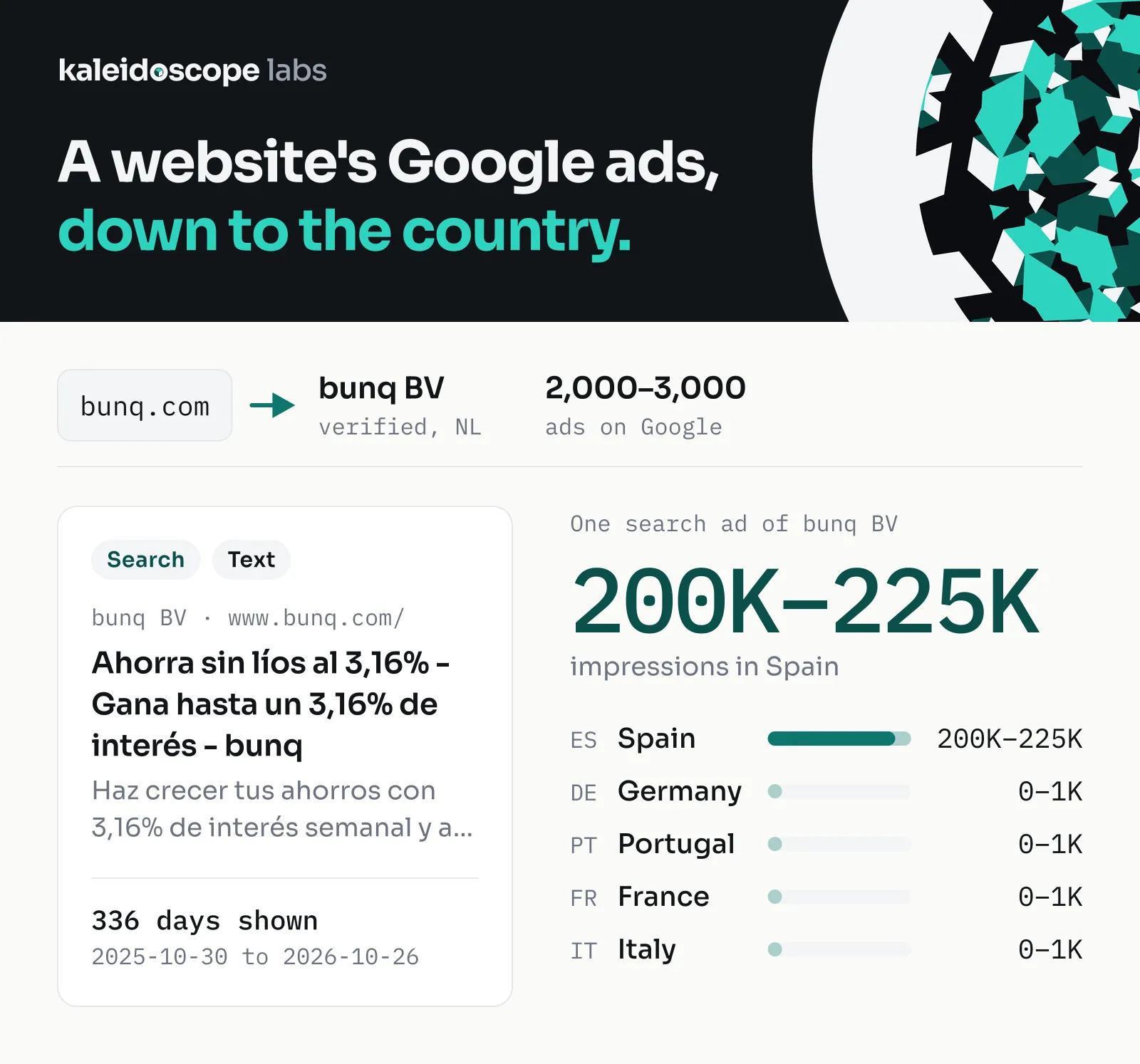
- 🔎 Ads: every ad of the websites, advertisers or Transparency Center links you give it, on Google Search, YouTube, Maps, Play and Shopping, filtered by country, format, platform and date.
- ✅ Lookup: one row per company: does it run Google ads, how many, the latest day one was shown, and who runs them. Built for CRM and Clay lists.
- 🏢 Advertisers: the advertisers behind a name or a website, with their verified legal name, country, D-U-N-S number and ad count.
- 🔔 Monitor: run it on a schedule and each run stores only the ads that are new since the last one.
- 🧾 Ad details: the ad's text where Google keeps one, the last day it ran in each country (and the first, with impressions per platform, in EU/EEA countries and Turkey), targeting and who paid.
- 🖼️ Text in pictures: the headline, description and display URL of text ads that the Center shows only as a picture, read from the picture (Latin script).
Run it from Apify Console, through the API, on a schedule, or from an AI agent. The prefilled input reads 200 of one website's ads from the last 30 days in seconds, so you can see the output before a larger run.
| You want to know | Use | What it costs |
|---|---|---|
| Does a company run Google ads? | Lookup output, with its website or name | $0.004 per company |
| A competitor's current ads | Ads output, with its website or advertiser ID (the last 30 days unless you set Shown from, or Every date) | $1.90 per 1,000 ads, plus $0.004 per query |
| The ads' text, countries and EU impressions | Add ad details ($) | $1.00 per 1,000 ads on top |
| The words of text ads shown only as a picture | Read text in pictures ($) | $1.50 per 1,000 ads whose headline is read, on top |
| Only the new ads, every day | A monitor name and a daily schedule | $0.004 per advertiser or website checked, plus the new ads |
| Who advertises under a name | Advertisers output, with the name | $1.90 per 1,000 advertiser records |
What data can you get from the Google Ads Transparency Center?
| Data | Ads output | With Ad details | Lookup output |
|---|---|---|---|
| Ad ID, format, first and last day shown, days shown, the ad's page | ✓ | ✓ | |
| Preview or picture address | ✓ | ✓ | |
| Google Ads account, ad group and ad ID | ads with a text version | all ads that have them | |
| Advertiser ID, name, verified legal name, country, D-U-N-S number | ✓ | ✓ | ✓ |
| Who paid for the ad | ✓ | ||
| Last day shown per country; the first day too in EU/EEA countries and Turkey | ✓ | ||
| Impressions ranges for EU/EEA countries and Turkey, in all and per platform | ✓ | ||
| Targeting kinds used and excluded (demographics, location, contextual, topics, customer lists) | ✓ | ||
| Product category, number of versions | ✓ | ||
| Headline, description, display URL, landing page, call to action | where Google keeps a text version | ||
| Headline, description and display URL read from the ad's picture | with Read text in pictures | with Read text in pictures, where Google keeps no text version | |
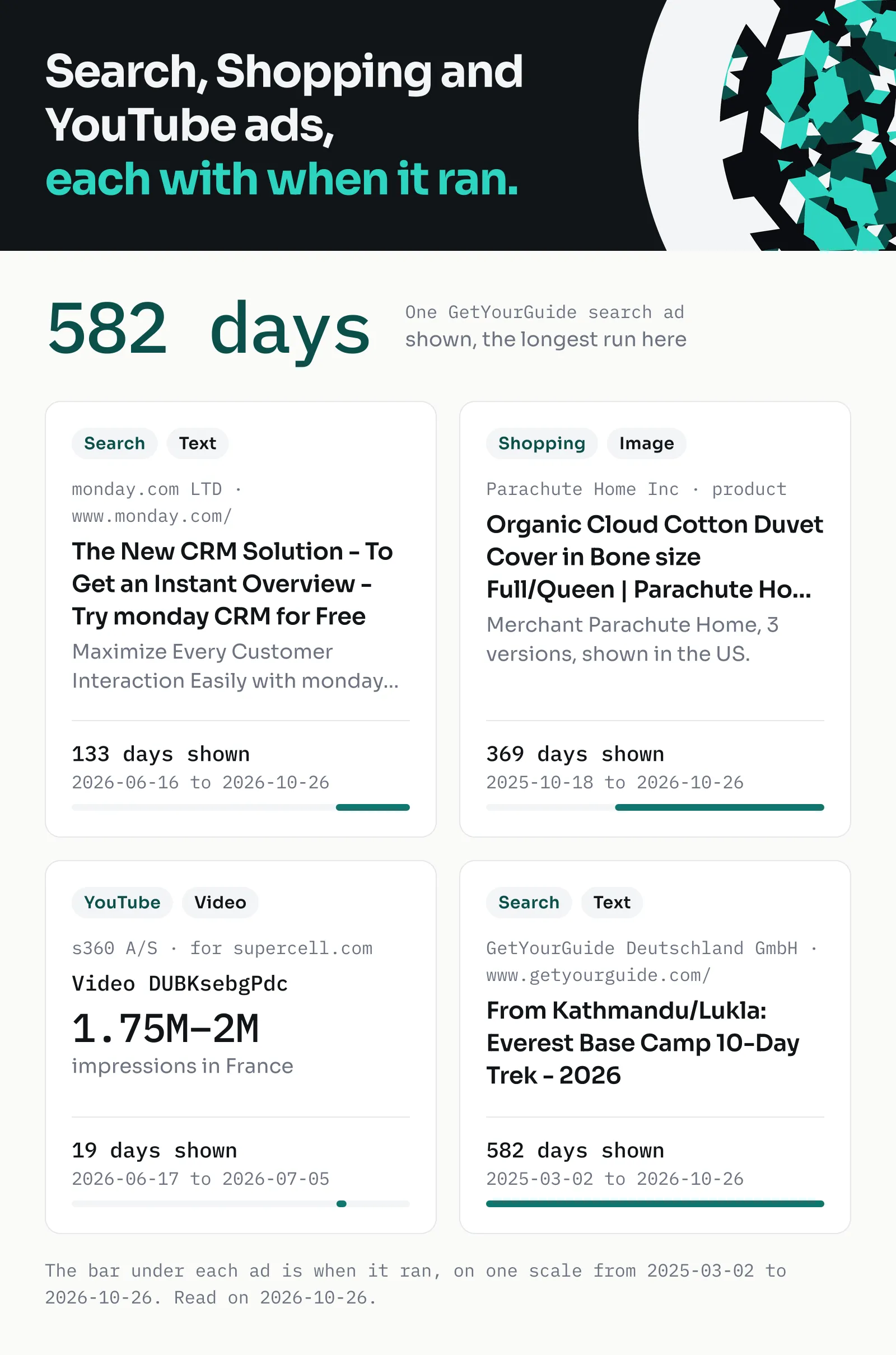
| Shopping product, price and product ID (a GTIN, or the merchant's own ID); local stores; Play app; YouTube video ID | where the ad has them | ||
| Advertises or not, ad count, latest day shown, advertisers | in the run's QUERIES record | ✓ |
Advertisers output gives one record per advertiser found, with its ad count for your filters, instead of ads. The Transparency Center gives no spend, clicks or audience size (see Limits).
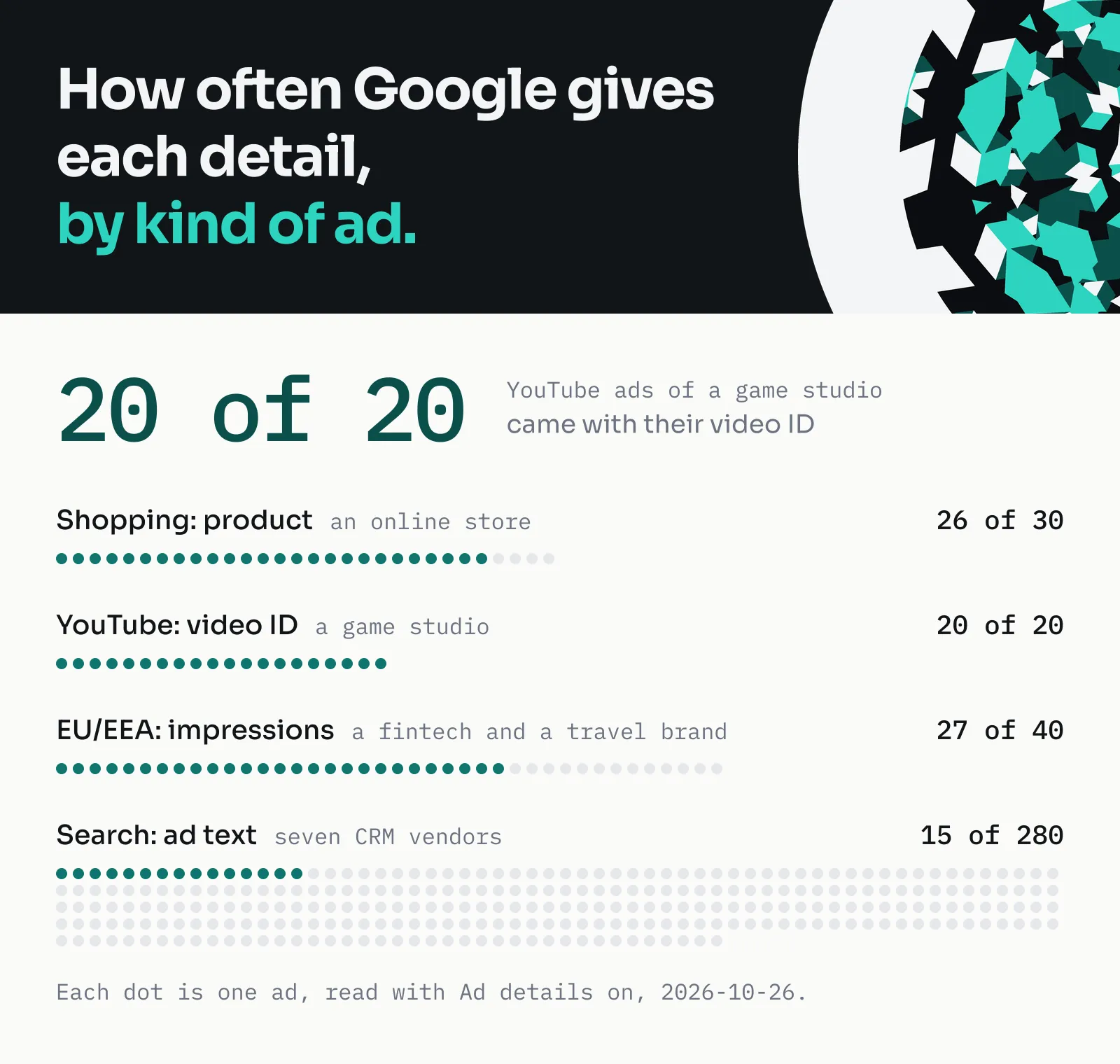
How often a detail is filled depends on the kind of ad. Measured on 2026-10-26 with Ad details on:
| Kind of ad | Detail | Filled |
|---|---|---|
| Shopping, an online store | product | 26 of 30 |
| YouTube video, a game studio | YouTube video ID | 20 of 20 |
| Shown in the EU/EEA, a fintech and a travel brand | impressions | 27 of 40 |
| Search, seven CRM vendors | ad text | 15 of 280 |
That row measured a game studio's earlier video ads, shown until September 2026; the app-install video ads game studios run now name no YouTube video ID (none of 100 on 2026-10-28), and each says so in missing. Other brands' video ads mostly do: 14 of 20 of zoho.com's on 2026-10-28.
Why it is different:
- The ad's text, including ads the Center shows as pictures. Where Google keeps a text version of an ad, or of one of its variations, the Actor reads its words; how often depends on the kind of ad (the table above). The others keep their picture's address, and each such record says so in
missing; with Read text in pictures ($), a text ad's words are read from its picture instead, and marked as read so. - Where and when, per country. With details, each ad lists the countries it was shown in with its last day there; for EU/EEA countries and Turkey also its first day and impressions ranges, in all and per platform.
- Its place in Google Ads. The advertiser's Ads account (obfuscated), the ad group and the ad's ID, so you can group ads the way the advertiser built them.
- Records that say what they lack. When a part you asked for is missing (the text, the details or one of them, such as the category, or the Google Ads ID), the record's
missingfield says which and why, never a silent blank. - Limits that hold. A run never stores more than Ads per advertiser or website, and it stops before your maximum charge.
How to use Google Ads Transparency Scraper
- Create a free Apify account and open Google Ads Transparency Scraper in Apify Console.
- In Advertisers, websites or names, enter what to read, one per line: a website such as pipedrive.com, an advertiser ID (AR and 20 digits), a Transparency Center link, or an advertiser's name.
- Choose the output: Ads, Advertisers or Lookup.
- Set the filters you need: the country, format, platforms and the days shown.
- Turn on Add ad details ($) for the ads' text, countries and impressions, Read text in pictures ($) for the words of text ads shown only as a picture, or give a Monitor name to store only new ads in each run.
- Click Start, then download the results as JSON, CSV, Excel or HTML, or read them through the API.
How much does it cost to scrape Google Ads Transparency data?
Google Ads Transparency Scraper is priced per event, with no usage fees on top:
| Event | Price | When |
|---|---|---|
| Result | $1.90 per 1,000 | each ad, or advertiser record, stored |
| Query | $0.004 each | each advertiser, website, link or name a run reads |
| Ad details | $1.00 per 1,000 | each ad stored with its details |
| Text read from a picture | $1.50 per 1,000 | each ad stored with a headline read from its picture |
The platform also charges $0.00005 when a run starts, once per GB of memory ($0.0001 for a run that reads pictures, at 2 GB). Filters, the QUERIES record and a monitor's memory are not charged by the Actor. The prefilled input (200 ads of one website) costs about $0.38.
| Ads stored | Without details | With Ad details |
|---|---|---|
| 100 | $0.19 | $0.29 |
| 1,000 | $1.90 | $2.90 |
| 10,000 | $19.00 | $29.00 |
| 100,000 | $190.00 | $290.00 |
Each advertiser, website, link or name read adds $0.004.
- A month of daily monitoring of one competitor: the first run stores the current ads (588 ads, a website's whole list in GB, in our test: $1.12; with the default 30 days, fewer). Each later run costs $0.004 per advertiser or website checked, plus the new ads. How many are new varies by advertiser: in our tests, 4 of a website's 588 ads were first shown in the last 7 days and 31 in the last 30, and 3 of an advertiser's 600 newest ads in 7 days, 22 in 30. At about one new ad a day, the rest of the month costs about $0.17.
- 1,000 company lookups: 1,000 × $0.004 = $4.00, in one run or in one run per row.
Apify's free plan credit of $5 a month covers about 2,600 ads or 1,250 lookups. Set a maximum total charge in the run options to cap a run: the Actor stops before it.
Input recipes
Each recipe is a complete input: paste it into the JSON tab of the input form, or send it through the API. Fields left out take their defaults.
A website's newest ads, last 30 days (the prefilled input):
Only new ads, every day. Two CRM vendors' own advertiser accounts in the US. Schedule it daily: the first run stores the ads shown in the last 7 days (1,445 on 2026-10-27, in 15 seconds), each later run only the new ones (the next run, right after: 0 new, the 1,400 already seen left out, in 10 seconds). A monitor reads each list to the end, so Ads per advertiser or website is 0:
A large advertiser can have tens of thousands of ads: the same two vendors' websites, every region and every date, gave 43,805 ads in a first run, about $83 at the result price. Bound a monitor's first run with a country and Shown from, as above, or give advertiser IDs instead of websites.
A competitor's longest-running ads that are still live. One CRM vendor's own account, ads shown in the US in the last 7 days. Each record's firstShown and daysShown say how long the ad has run; sort by daysShown in your sheet. On 2026-10-27: 297 ads in 13 seconds, 206 shown for 180 days or more, 74 for a year or more, the longest 482 days. A long run means the advertiser kept the ad running; it does not say how well the ad did:
One row per company for a CRM list. Does each company run Google ads in the UK, how many, and since when:
Does each company advertise? (by website) Websites are what most lists hold. Each row says whether ads lead to the website, how many, and whose:
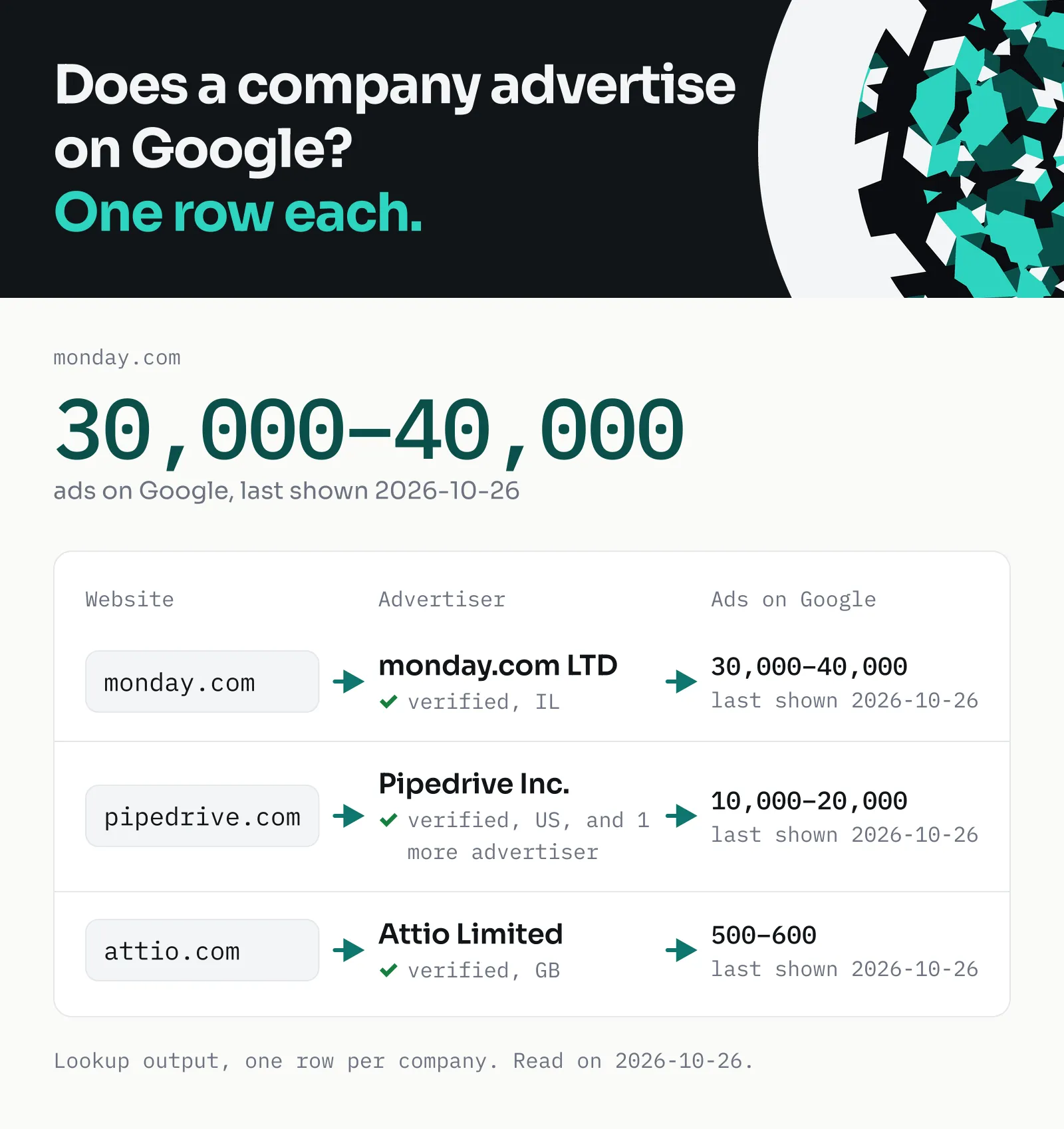
From Clay, Make or another tool, send the input as above, one company or many per run. A row limit set in the calling tool does not reach the Actor: set Ads per advertiser or website (maxAds), or use Lookup output, and a maximum charge in the run itself.
| You see | Why, and what to do |
|---|---|
| Far more ads, and cost, than expected | A website gathers the ads that lead to it from any advertiser. Use Lookup output, or set maxAds |
advertising is false | No ads under your filters for that website or name; the company may advertise under another name or website |
advertising is empty | The query was not read (missing says notRead), or the line could not be read (missing says invalid; the log says why). Neither is charged |
A brand's YouTube video ads, with each ad's YouTube video ID where Google names one (14 of 20 for this one on 2026-10-28):
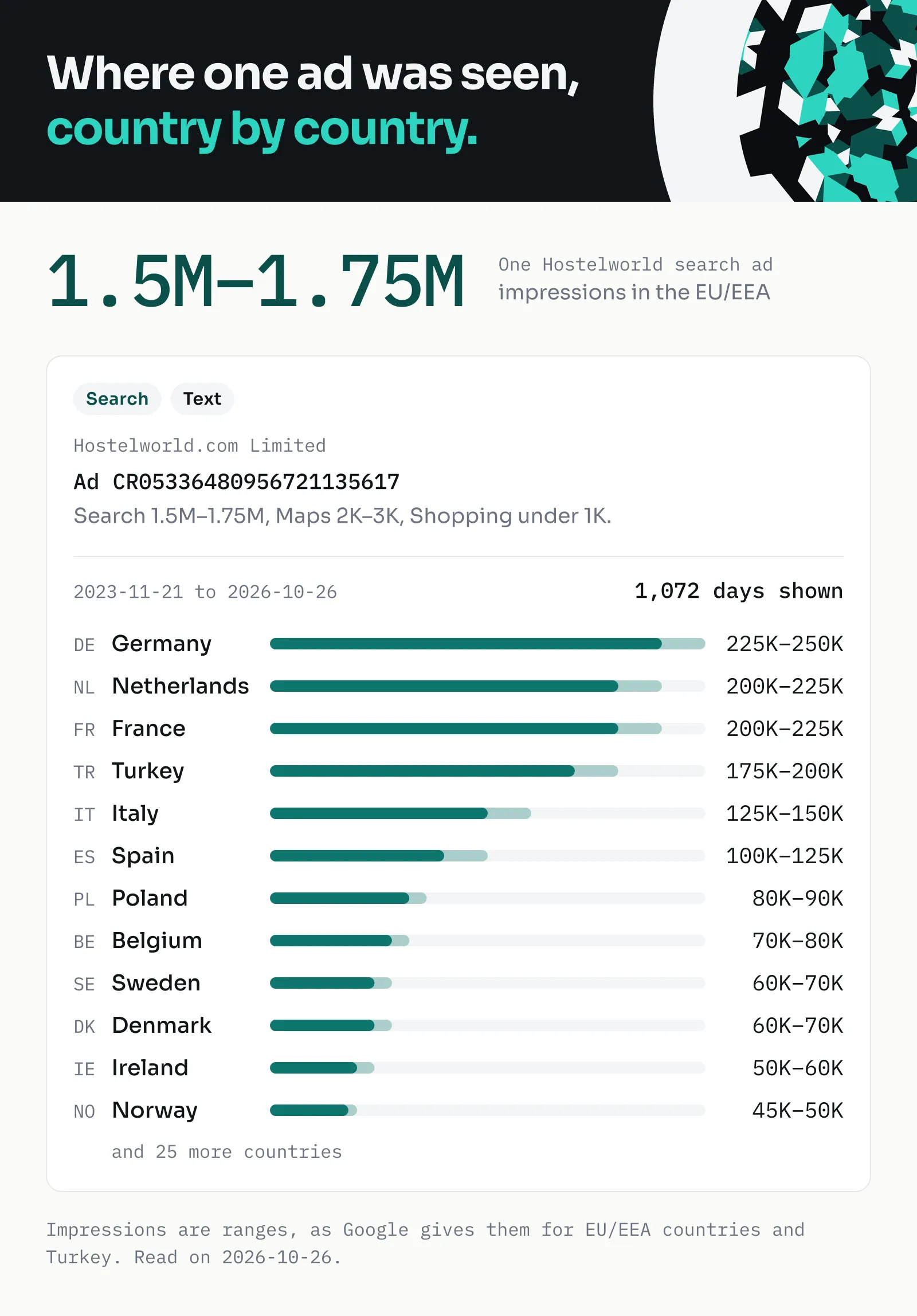
Impressions by EU country for a fintech and a travel brand:
Shopping ads of an online store, with the products they show:
API and agent calls that leave maxAds out get up to 10,000 ads per advertiser or website, and a list stopped there is named in RUN_SUMMARY's cutByCount; the run's maximum charge is what caps the cost. Without Shown from, Ads and Advertisers output read the last 30 days; Lookup output reads every date, so its "no" means the Transparency Center lists no ad for it. For every date in Ads and Advertisers output, turn on Every date (allDates), or send "dateFrom": "all"; a long span is not the same, as the Center filters dates only within about the last 13 months.
Output example
An ad with its details, from the "Impressions by EU country" recipe (shortened: one country, and one of its platforms; eea shows them all):
The days per country (regions, eea) go back no further than 2023-03-01: an ad shown since 2021, as this one, says 2023-03-01 there, and its own firstShown has the true day.
Where Google keeps a text version of the ad, the record also holds a content part: a search ad's headline, description and display URL, or a Shopping ad's product. This is the part of a Shopping ad from the "Shopping ads of an online store" recipe (its picture address left out):
With Read text in pictures, a text ad shown only as a picture holds the words read from it instead, marked with source, and ocrCheck says whether the display URL read is on the website the ad was found for. This is what the Actor stored from the picture of a Spanish ad of hostelworld.com (a run on 2026-10-27; the first line is the advertiser's logo and name, as read):
A lookup (Lookup output), as a run stored it for the name Aspect Maintenance in GB:
In Ads and Advertisers output, the run's default key-value store also holds QUERIES: one such lookup for each advertiser, website, link or name the run read, the result the query event pays for (in Lookup output the lookups are the dataset itself, and QUERIES is not written). In a monitor's run a lookup covers the period the run read: what was shown since the monitor's last complete run. RUN_SUMMARY holds what the run did, complete false when a page, a detail or a picture's text could not be read, or the run ended short (its time, an abort, the maximum charge); RUN_PROGRESS carries that from one part of a run to the next when the platform moves or resurrects it.
The dataset has views for each job: Ads, Ad text (headline, description, display URL and landing page), Advertisers, Details and Lookups.
Monitoring: only new ads, run after run
Give a monitor name and keep it the same in every run. The monitor remembers, for each advertiser, website and link, the ads it found, in a key-value store in your account named gat-monitor-
To hear about new ads in Slack, open the Actor's (or your task's) Integrations tab, add Slack, and choose the run succeeded event and a channel. The message is a template that can link to the run's dataset, where the new ads are; a webhook on the same event sends them on to any other tool.
A monitor moves forward only when it reads a list to the end: set Ads per advertiser or website to 0, or above the list's size. A list stopped by that limit, by the maximum charge or by an error is read again from the same day in the next run, so nothing new is skipped, but older ads not stored yet are stored then, as new; the run's log says when this happens.
Integrations and API
- Clay: Lookup output through Clay's Apify integration, one run per row, or as an HTTP request.
- Make, Zapier, n8n, Gmail: send a monitor's new ads on when a run finishes; the Slack integration posts when a run finishes.
- Google Sheets, webhooks, the Apify API and clients for JavaScript and Python.
- AI agents: through Apify's MCP server, an agent can call the Actor as a tool.
Run a recipe and get its records in one call (with your Apify API key in the APIFY_TOKEN variable):
For AI agents
Connect an MCP client (Claude, Cursor and others) to https://mcp.apify.com?tools=kaleidoscopelabs/google-ads-transparency-data with your Apify API key, then ask, for example:
-
"Which of these companies run Google ads in the UK: Aspect Maintenance, Dyno-Rod, Pimlico Plumbers?"
-
"List the newest 20 Google ads leading to pipedrive.com, with their headline where there is one."
-
Minimal input:
{"queries": ["example.com"]}gives up to 10,000 of that website's ads from the last 30 days, in every region. For "does this company advertise?", add"output": "lookup": one record per query. An empty input ({}) reads the default line, pipedrive.com, the same way, so always sendqueries. -
Fields to read: in Ads output,
advertiserName,adId,format,firstShown,lastShownandurl; with details,content(adType,headline,description,landingUrl),regionsandeea. In Lookup output,advertising,adCount,lastShownandadvertisers. -
What to know:
- A list that stops at Ads per advertiser or website with more ads to read is named in RUN_SUMMARY's
cutByCount(and the closing status says how many): raisemaxAds, or set it to 0, for the whole list. - An input the Actor cannot read (no readable line, a setting out of range) ends the run SUCCEEDED with nothing read or charged and an empty dataset: the key-value record RUN_SUMMARY then has inputError (noQuery, noReadableLine, invalidSetting or memoryTooLow) and
message; otherwise inputError is null. Check it before reading an empty dataset as "no ads". - A website's ads are the ads that lead to it from any advertiser (see Tips); check
advertiserNameto tell its own from resellers' and agencies'. - A name finds advertisers whose names match, not ads that mention it.
adCountis a range, as the Transparency Center gives it.- Every record carries the input line it came from in
query(andqueryType), so the records of a run with many lines split back by line. An ad or an advertiser that more than one line finds is stored once, under the first line that found it; each line's lookup still lists it. missinglists what a record lacks and why, such as the reason inPicture for an ad whose text is only in its picture; an empty field is never silent.- With
readPictureText,contentof an ad shown only as a picture is read from the picture:sourcesays so, and its words can hold misread characters. - Dates filter within about the last 13 months; for every date, send
"dateFrom": "all". Regions are two-letter country codes oranywhere.
- A list that stops at Ads per advertiser or website with more ads to read is named in RUN_SUMMARY's
Tips
- Try it cheap: the prefilled input reads 200 ads in seconds; raise Ads per advertiser or website once the output looks right.
- A website or an advertiser? A website gives every ad that leads to it, from any advertiser; an advertiser ID gives one account's ads. A brand can have several accounts: the Lookup output's
advertiserslists them. - A name is a search: it finds advertisers in the Transparency Center's order, not by size. Narrow it with the region, or give the advertiser's ID.
- A monitor needs 0 in Ads per advertiser or website; its first run reads the last 30 days unless you set Shown from, and each later run reads from its last complete run (see Monitoring).
- Links keep their filters: a Transparency Center link's own region, format or dates apply over the input's.
FAQ
Is it legal to scrape the Google Ads Transparency Center?
The Transparency Center is a public site that Google publishes so anyone can see who advertises and what. The Actor reads only what the site shows to every visitor, at a modest pace. How you use the data is your responsibility: check the laws that apply to you and the purpose you use it for.
Does it collect personal data?
Mostly not: the data is about advertisers and their ads. But some advertisers are individuals, and Google publishes their name as the advertiser name and the verified legal name. The Actor keeps these names as Google publishes them and never enriches them. If you store or process them, you need a lawful basis for it under the GDPR or the laws that apply to you.
Why does the output differ from what I see in the Transparency Center?
The Center's page opens on your own country and its default filters, while the Actor reads every region unless you set one. The lists also move from day to day as ads start and stop, and ad counts are ranges. To compare, open the record's url, or set the same country, format, platform and dates in both.
Does "advertising: false" mean a company never runs Google ads?
No. It means the Transparency Center lists no ads for that website or name under the run's filters (country, format, platform, dates). A company can advertise under another name or account, or lead its ads to another website. A row whose query was not read leaves advertising empty instead, and says so in missing.
Why does an ad have no text?
The Transparency Center shows many ads only as a picture. When Google keeps a text version of the ad, the Actor reads the text from it; otherwise the ad keeps its picture's address, and its missing field says the text is in the picture. Turn on Read text in pictures to read a text ad's words from its picture. Video ads give their YouTube video ID, and banners shown only as an animation say so in missing.
How exact is the text read from pictures?
Close, not exact. In our test of 131 search ads shown as pictures, in English, German, French, Spanish, Dutch, Italian, Polish and Turkish (2026-10-27), the headline was read exactly for 85%, and the description with at most one character in ten wrong for 93%. Most misses are single characters: a capital I read as a lowercase l ("AI" as "Al"), an ellipsis as dots, or a logo read as a word. Such text has source set, and is charged only where a headline was read. A picture in another script (Japanese, Greek, Arabic, Cyrillic and others) is not read: its missing says unsupportedScript, and it is not charged. A picture that could not be read says notRead, and one without words noText.
A run with Read text in pictures starts with 2 GB of memory unless you set another: on 2026-10-27 it read the pictures of 229 ads leading to three CRM vendors' websites in about 9 minutes, a headline from 223 of them. With less memory it works, more slowly.
Why does a lookup list ads for a website that does not advertise itself?
A website's ads in the Transparency Center are the ads that lead to it, from any advertiser: resellers, agencies and marketplaces included. The lookup's advertisers say whose ads they are, so you can tell the website's own ads from others'.
Is this the Google ads library?
The Google Ads Transparency Center is Google's ad library: the public list of the ads Google shows and who pays for them. This Actor reads it. (Meta and TikTok have ad libraries of their own, which it does not read.)
Something went wrong: what should I check?
Check that each line is an advertiser ID, a website, a Transparency Center link or a name, and that the period is within about the last 13 months. The run's last message says how it ended:
| The run's last message says | What it means |
|---|---|
| Done … Stored N ads | It read everything you asked for |
| … up to the run's maximum cost | It stopped at your maximum charge; what it stored is kept and charged |
| The input's own message, such as "No line of Queries could be read: …" | Nothing was read or charged: correct the input as it says and run it again (RUN_SUMMARY's inputError names the kind, for a program) |
| … stopped answering … / … did not answer after several attempts | Usually temporary: run it again later |
| … answers in a form this Actor does not read yet | The source changed: open an issue with the Ref |
If a run ends with an error, open an issue with the Ref from its log: it lets us find the cause without your data.
Limits and what this Actor does not do
- The Transparency Center publishes no spend, clicks or audience sizes, and impressions only as ranges for EU/EEA countries and Turkey; outside them, only each country's last day shown.
- Date filters work within about the last 13 months; Every date reads with no date filter.
- Many ads exist only as a picture; their text is not in the record unless Read text in pictures is on.
- Read text in pictures reads the Latin script only, and text ads only: banners (image ads) are not read. Text read from a picture can misread characters ("AI" as "Al", a dropped accent), so its
contentsayssourceocr. - A name search matches advertiser names, not the words of ads.
- It reads what any visitor sees without signing in: ads the Transparency Center shows only to signed-in users are not included.
- It does not read the political ads view or other ad libraries (Meta, TikTok).
- A line it cannot read is left out, and the log says why; in Lookup output it gets its own row saying so, not charged. Invalid settings, or a list with no line it can read, end the run at once with a message saying what to correct, before anything is read or charged.
Other Actors
| Actor | Use it with this one to |
|---|---|
| YouTube Transcript Scraper | Read what a competitor's video ads say: give it the youtubeVideoId of the video ads found here and get their transcripts, where YouTube has captions for them (ads without speech are stored free) |
Support and feedback
Open an issue on the Issues tab for a bug or a feature you need; we answer within 24 hours. If the Actor saves you time, bookmark it and leave a review in Apify Store: it helps others find it.
Google Ads Transparency Scraper is an independent tool, not affiliated with, endorsed by or sponsored by Google LLC. Google, Google Ads and YouTube are trademarks of Google LLC.


