
Google Trends Scraper: Trending Searches & Queries
Pricing
from $2.80 / 1,000 line reads
Google Trends Scraper: Trending Searches & Queries
Google Trends data and API: the trending searches of any country, interest over time and by region, and related and rising queries, for any time range, category and search type. Compare up to 5 terms on one scale, or paste a Google Trends link.
Pricing
from $2.80 / 1,000 line reads
Rating
0.0
(0)
Developer

Kaleidoscope Labs
Maintained by CommunityActor stats
1
Bookmarked
2
Total users
1
Monthly active users
a day ago
Last modified
Security
Limited permissionsShare
What can Google Trends Scraper do?
Google Trends Scraper: scrape the trending searches of any country, interest over time, interest by region, and related and rising queries from Google Trends, as data you can export, schedule and call from an API.
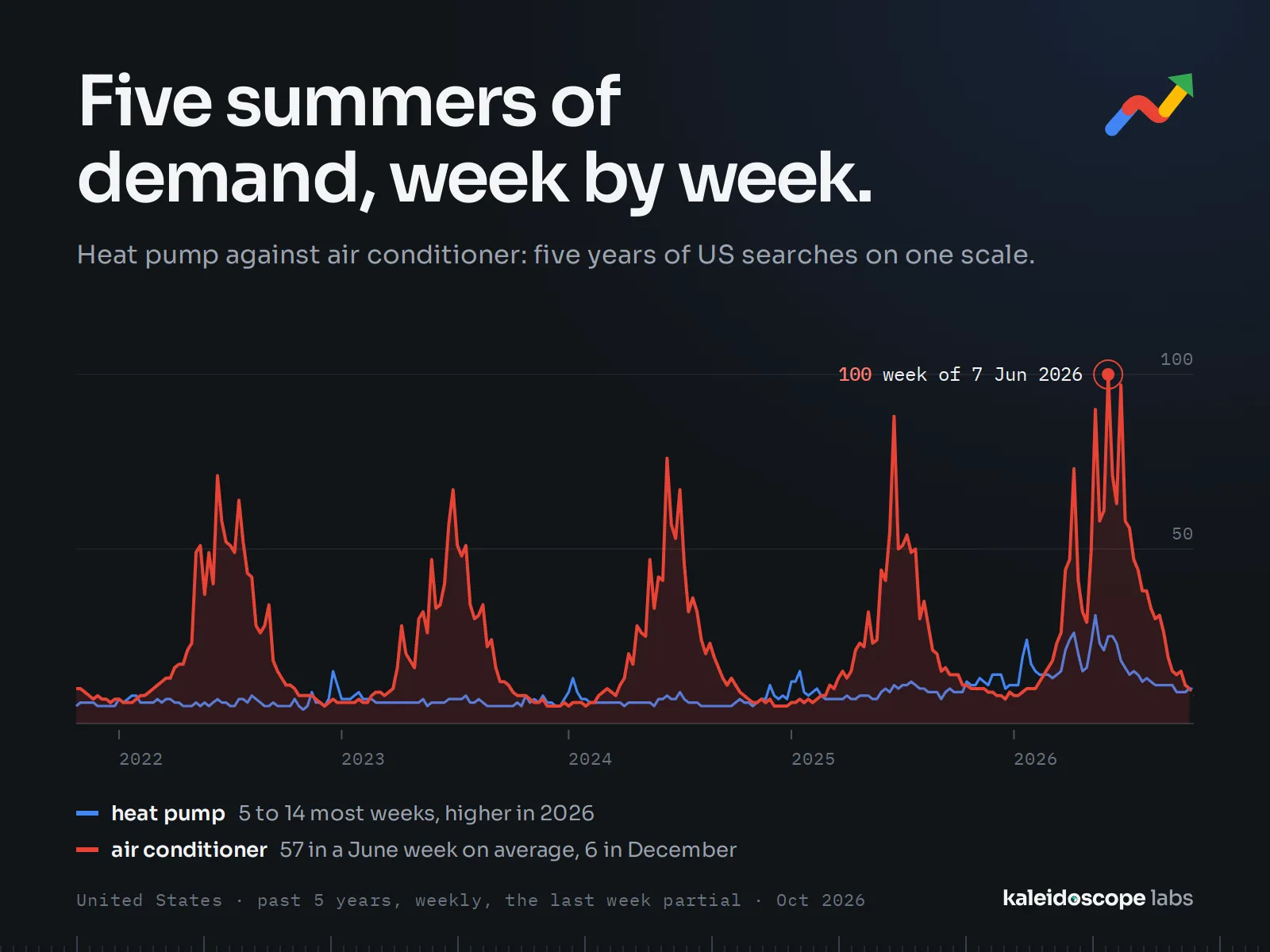
- 📈 Interest over time: each term's 0–100 interest, week by week (or hour, day or month, as Google Trends gives it), for any country, region, time range, category and search type.
- ⚖️ Comparisons: up to 5 terms on one scale, as Google Trends compares them; one record per term.
- 🗺️ Interest by region: each term's interest per region of the country you choose, or per country worldwide.
- 🔍 Related and rising queries: the top searches made with each term, and the rising ones with their growth, Breakout included.
- 🔥 Trending now: a country's trending searches of the past 4 hours, 24 hours, 48 hours or 7 days, with search volume, growth, start and the searches each trend groups; by category.
- 🔗 Google Trends links: paste an explore link and its region, time range, category and search type are kept.
Run it from Apify Console, through the API, on a schedule, or from an AI agent. The prefilled input reads one term in a few seconds, so you can see the output before a larger run. In our test run of 2026-10-29, 1,000 lines with a restart midway, every line ended with its data or the reason Google Trends gave none, and every country's trending list was stored whole.
| You want to know | Use | What it costs |
|---|---|---|
| How demand for a product moves through the year | A term, or up to 5 compared, with Interest over time | $0.004 per line |
| Where a term is searched most | Interest by region, with a country | included in the line |
| What people search around a topic, and what is rising | Related queries | included in the line |
| What a country is searching for right now | Trending now, with its countries | $0.50 per 1,000 trending searches |
What data can you get from Google Trends?
One record per term and part: a line with every part on gives three records per term. A trending search is one record.
| Data | Record kind | Filled in our test of 2026-10-28 |
|---|---|---|
| The term's 0–100 interest at each time, the last point marked partial while it is still running | interestOverTime | 99.5% of 1,250 terms (53 weekly points for 12 months) |
| The term's 0–100 interest per region, with the region's code and name | interestByRegion | 99.2% of 1,250 terms (51 US states, 0.5% of them without data) |
| Top related queries (median 25) and rising ones (median 17) with their growth; 12% of rising queries are Breakout | relatedQueries | 98.4% of 1,250 terms |
| A trending search: search volume, growth, started, ended or still active, the searches it groups, its categories | "trendingNow" | every search listed: 272 to 536 a country over 24 hours, up to 3,390 over 7 days |
| What a record lacks and why: "notGiven" when Google Trends has not enough search volume for the term, region or time | every record's missing | 16 of 3,750 records (0.4%) |
Every record also carries the line it came from (line, query, term), the region, time range, category and search type it was read for, and trendsUrl, the same view on Google Trends.
How to use Google Trends Scraper
- Create a free Apify account and open Google Trends Scraper.
- In Search terms, enter one term per line, or up to 5 separated by commas to compare them, or paste a Google Trends explore link.
- Choose the Region (worldwide, a country such as US, or a region such as US-CA), the Time range and what to read.
- For trending searches, enter countries under Trending now; leave Search terms empty to read trending searches only.
- Click Start. Records appear in the Output tab; export them as JSON, CSV or Excel, or read them from the API.
How much does it cost to scrape Google Trends?
Google Trends Scraper is priced per event, with no usage fees on top:
| Event | Price | When |
|---|---|---|
| Line read | $0.004 each | each line with data: a term, or up to 5 terms compared, with every part you ask for |
| Trending search | $0.50 per 1,000 | each trending search stored |
| Monitor check | $0.002 each | with a monitor: each trending list (a country, its window and categories) checked in a run, whether or not anything is new |
The platform also charges $0.00005 when a run starts. The prefilled input (one term, every part) costs $0.004.
Prices shown are for Apify's free plan; on paid plans they are up to 30% lower.
| You read | It costs |
|---|---|
| 100 lines (one term each, or up to 5 compared) | $0.40 |
| 1,000 lines | $4.00 |
| The trending searches of 6 countries over 24 hours (about 2,400) | about $1.20 |
| The same over 7 days (about 15,700) | about $7.85 |
- A weekly report of 100 lines on a schedule: $0.40 a run, about $1.73 a month.
- Apify's free plan credit of $5 a month covers about 1,250 lines, or 10,000 trending searches.
- A trending monitor stores and charges only the searches not listed in its earlier runs, plus $0.002 per list checked. In our test of 2026-10-30, 6 countries' 24-hour lists checked one hour apart had 233 new searches of 2,445 (about 10%):
- daily, 6 countries, 24 hours: checks $0.36 a month; a day's list is mostly new, about $1.20 a day in new searches, so about $36 a month;
- hourly, 6 countries, 24 hours: checks $8.64 a month; about 233 new searches an hour, so about $84 a month;
- hourly, one narrow list (one country, Climate): checks $1.44 a month, plus the few new searches.
If a run cannot save what it found, after trying again at its end, it says so in its status, and its next run may store some of those searches again.
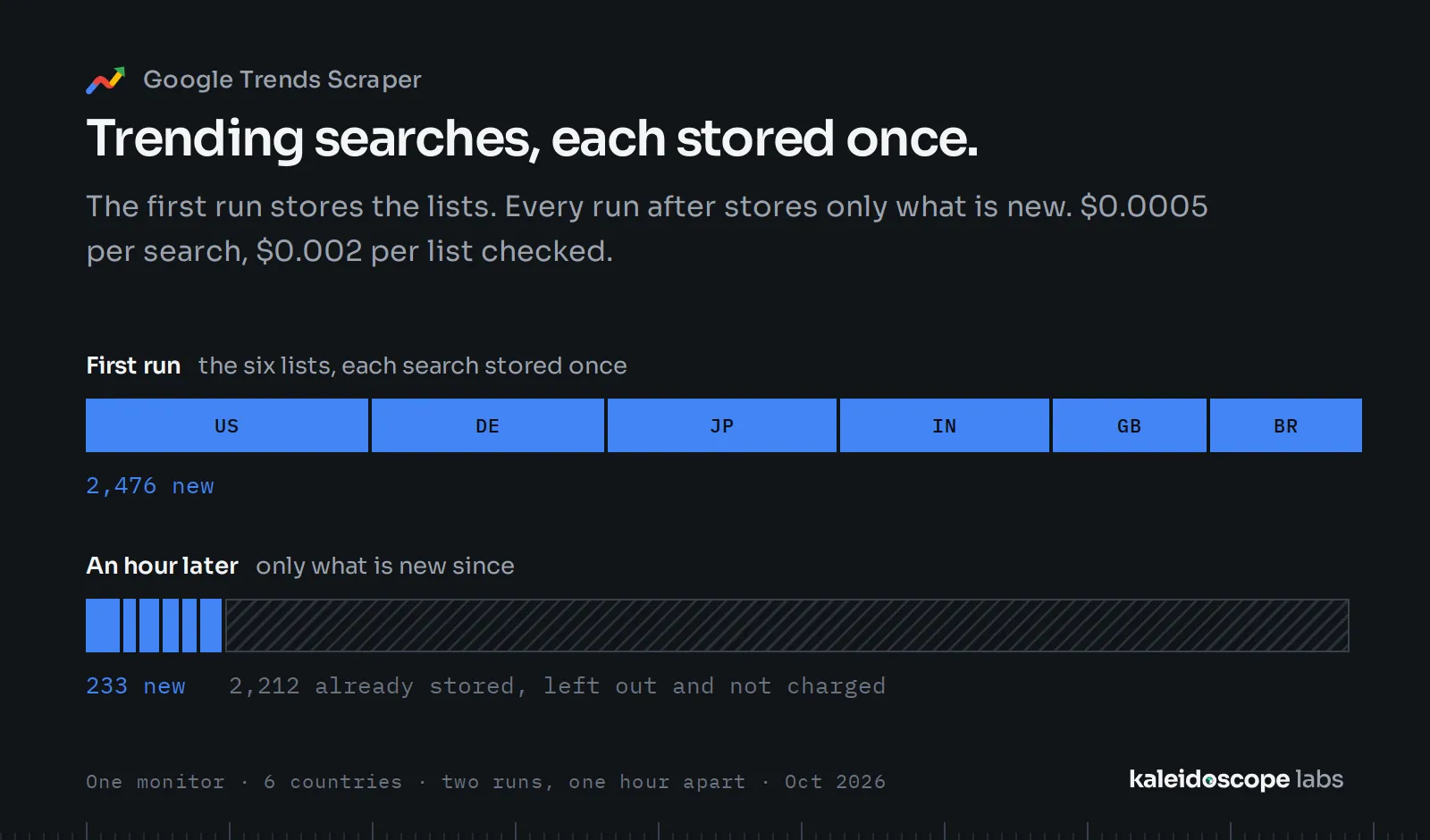
Not charged: a line Google Trends has no data for (every part "notGiven"), a line it refuses as asked, a line that asks the same as an earlier one (read once), and anything the run could not read. Set a maximum total charge in the run options to cap a run: the Actor stops before it.
Input recipes
Each recipe is a complete input to paste; each was run as given.
Seasonal demand: two products over 5 years
Where a product is searched: German states
What is rising around a topic: the last 90 days
A Google Trends link, as set on the site: YouTube searches in the UK
Trending now: weather searches in the US over 48 hours
Output example
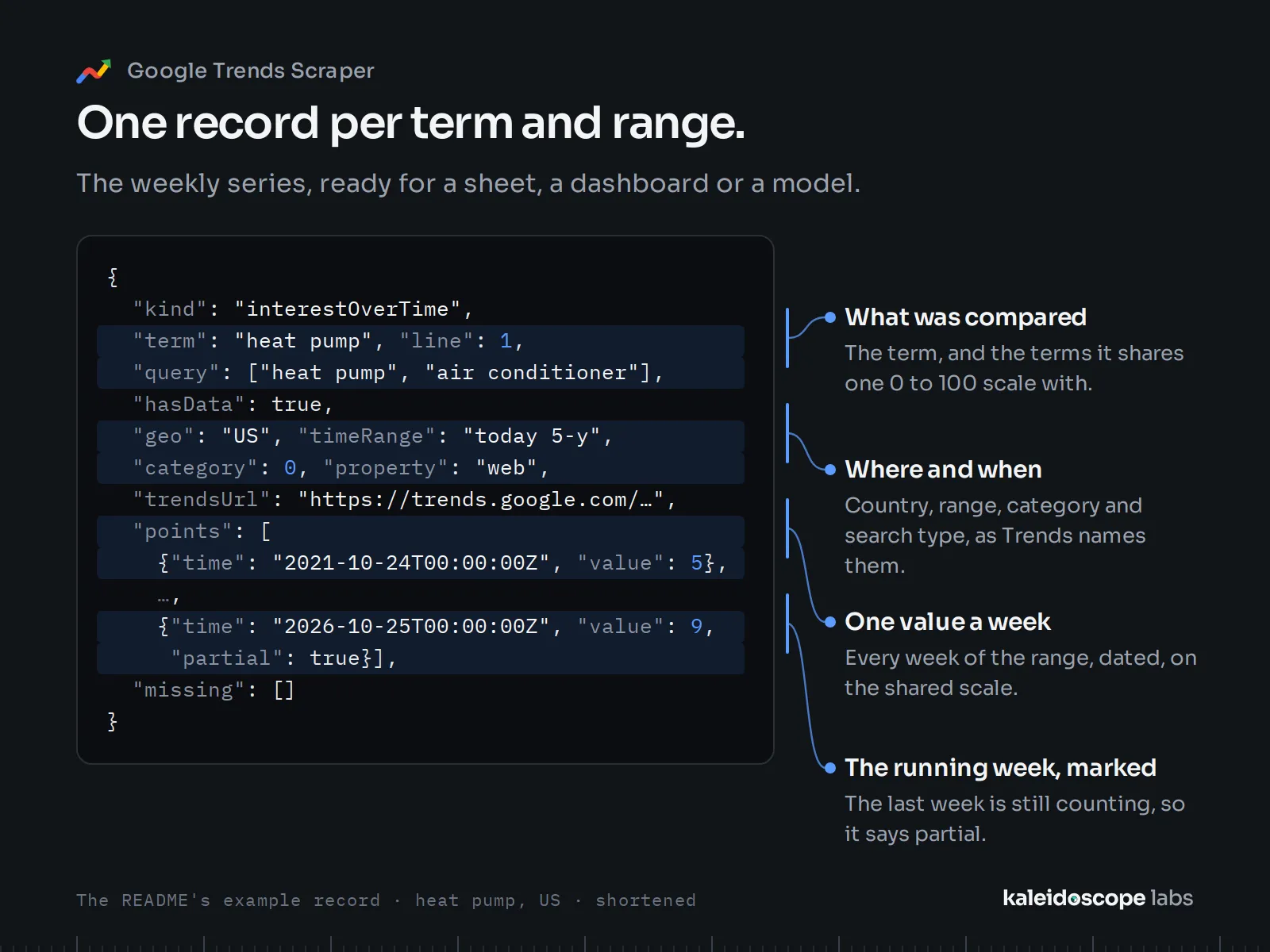
Shortened records from the recipes' runs (2026-10-29): a series' middle points, a map's lower regions and a list's lower entries are left out here.
Interest over time (the seasonal recipe, one of its two terms):
Interest by region (German states, the three highest):
A trending search (weather in the US):
Related queries (heat pump in the US over 90 days, the first three of each list; the rising list as Google Trends gives it, generic searches included):
Integrations and API
Use it as a Google Trends API: start a run from any language and read its records as JSON, CSV or Excel.
- Make, Zapier, n8n: start a run and send its records on when it finishes.
- Google Sheets, webhooks, the Apify API and clients for JavaScript and Python.
- AI agents: through Apify's MCP server, an agent can call the Actor as a tool.
Run a recipe and get its records in one call (with your Apify API key in the APIFY_TOKEN variable):
Building on this Actor
- Output stability: fields are added, never renamed or removed without a new major version; every change is in the changelog.
- What a run's end means: a finished run read every line and list it was given, or names what it could not read in the run's
RUN_SUMMARYrecord (linesNotRead,partsNotRead,trendingNotRead) and says so in its closing status. An input the Actor cannot read ends the run SUCCEEDED with nothing read or charged, its reason as the status message and inRUN_SUMMARY'sinputError; on a normal runinputErroris null. - Cost per call: the events and their prices are on the Pricing tab; what is not charged is listed above; your maximum charge holds.
- Notice: price changes follow Apify's 14-day notice.
For AI agents
Connect an MCP client (Claude, Cursor and others) to https://mcp.apify.com?tools=kaleidoscopelabs/google-trends-dataset with your Apify API key, then ask, for example:
-
"How has interest in heat pumps and air conditioners moved in the US over the last 5 years?"
-
"What are the rising searches around heat pumps in the US over the last 90 days?"
-
"Which weather searches are trending in the US right now?"
-
Minimal input:
{"queries": ["heat pump"]}reads one term worldwide over the past 12 months with every part; add"geo": "US"for one country.{"trendingGeos": ["US"]}reads the US's trending searches of the past 24 hours. A call reads only the terms and countries it gives:{}reads nothing and says so. -
Fields to read:
kind,term,points(time,value),regions(code,name,value),topandrising(query,value,growth,breakout); for trending searchesrank,term,searchVolume,growthPercent,startedAt,active,breakdown,categories. -
What to know:
- Values are Google Trends' own 0–100 scale: relative to the highest point of the line's terms, region and time, not search counts. Terms are on one scale only within one line.
hasDatafalse withmissing"notGiven" means Google Trends has not enough search volume for it; an empty related list is Google Trends' answer.- Rising lists are Google Trends' own and can include generic searches that have nothing to do with the term; the Actor returns them as given.
- A Google Trends link's own region, time range, category and search type win over the form's for its line.
- An empty dataset with
inputErrorset inRUN_SUMMARYis an input mistake, not "no data".
Tips
- Compare in one line: up to 5 terms separated by commas share one scale; terms in different lines are each scaled to their own highest point.
- Links keep their settings: set the view on Google Trends and paste its link.
- Categories: the form offers Google Trends' 25 top-level categories (Food & Drink, Health, Shopping and the others); for one of its 1,400 sub-categories, set it on Google Trends and paste the link.
- A long input: a run that would not finish in its timeout says so at its start, reads what fits and lists the lines left; give it a longer timeout or split the input.
- Trending searches alone: leave Search terms empty and enter the countries.
- One row per point in CSV or Excel: a series is one record with its points inside. For a table with one row per time, read the dataset with
fields=term,geo,points&unwind=points(for examplehttps://api.apify.com/v2/datasets/<dataset ID>/items?format=csv&fields=term,geo,points&unwind=points); for regions,fields=term,regions&unwind=regions.
Did it save you time? A rating on this page helps others find it; an Issue tells us what to fix.
FAQ
Is there an official Google Trends API?
Google runs an official Google Trends API as an alpha, announced in July 2025: developers apply, and access opens to a limited number of them; it gives consistently scaled search interest for up to 5 years, daily to yearly, by region and sub-region. This Actor needs no application: it reads what the Google Trends site shows anyone, including related and rising queries, trending searches and the view of a Google Trends link, and returns it as records you call from the Apify API.
Why are the numbers 0–100 and not search volumes?
Google Trends gives relative interest: 100 is the highest point for the terms, region and time you asked for. Trending searches are the exception: they carry Google Trends' search volume bucket, such as 200K+.
Why does a term have no data?
Google Trends has not enough search volume for that term, region or time; the record says "notGiven" in its missing field and is not charged.
Why do my numbers differ a little from what I see on Google Trends?
Google Trends samples its data: the same view read an hour apart, or in another comparison, can differ by a few points at single weeks, while its share over the whole range held within about 1% in our measurement of 2026-10-28.
Why does a rising list include searches unrelated to my term?
Rising queries are Google Trends' own list, the same one you see on Google Trends in your browser, returned as given. It can include generic searches, such as a hotel booking or a flight, that rose among the people searching your term but are not about it; read rising lists with that in mind, and use the top list for what people search with the term.
Does it include related topics?
Related topics are not included; related queries cover the searches people make with each term.
Is it legal to scrape Google Trends?
Google Trends publishes aggregated, anonymous search interest, and the Actor reads only what the site shows anyone. Trending searches are Google Trends' own list, stored as it publishes them: searches often name people in the news, and the Actor adds nothing about any person and reads no news articles. Whether your use of the data is lawful depends on what you do with it; if you are unsure, ask a lawyer.
Limits
- Up to 5 terms on one scale, as Google Trends allows; 1,000 lines a run.
- Trending now by country (two-letter codes); regions within a country are not offered.
- Related topics and Google Trends' "Year in Search" are not read.
Other Actors
| You want to | Actor |
|---|---|
| See which companies advertise on the searches that are rising | GAT-TITLE-AT-DEPLOY (Google Ads Transparency; its live title is taken when this README is deployed) |
Support and feedback
Open an issue on the Issues tab for a bug or a feature you need; we answer within 24 hours. If the Actor saves you time, bookmark it and leave a review in Apify Store: it helps others find it.
Google Trends Scraper is an independent tool, not affiliated with, endorsed by or sponsored by Google LLC. Google and Google Trends are trademarks of Google LLC.


