
TikTok Ad Library Checker: Advertiser Ads
Under maintenancePricing
from $2.80 / 1,000 lookups
TikTok Ad Library Checker: Advertiser Ads
Under maintenanceTikTok Ad Library checker: see whether a TikTok advertiser runs ads in Europe, about how many, since when, and its latest ads with text and video links. Enter library links, advertiser names or brand names; an advertiser with no ads is answered too. Its TikTok ads monitor returns only new ads.
Pricing
from $2.80 / 1,000 lookups
Rating
0.0
(0)
Developer

Kaleidoscope Labs
Maintained by CommunityActor stats
1
Bookmarked
2
Total users
1
Monthly active users
6 days ago
Last modified
Categories
Features
Share
What can TikTok Ad Library Checker do?
Check in the TikTok Ad Library whether a TikTok advertiser runs ads in Europe: about how many, since when, and its newest ads, one record per advertiser or brand. Then follow the same advertisers with a TikTok ads monitor that returns only their new ads.

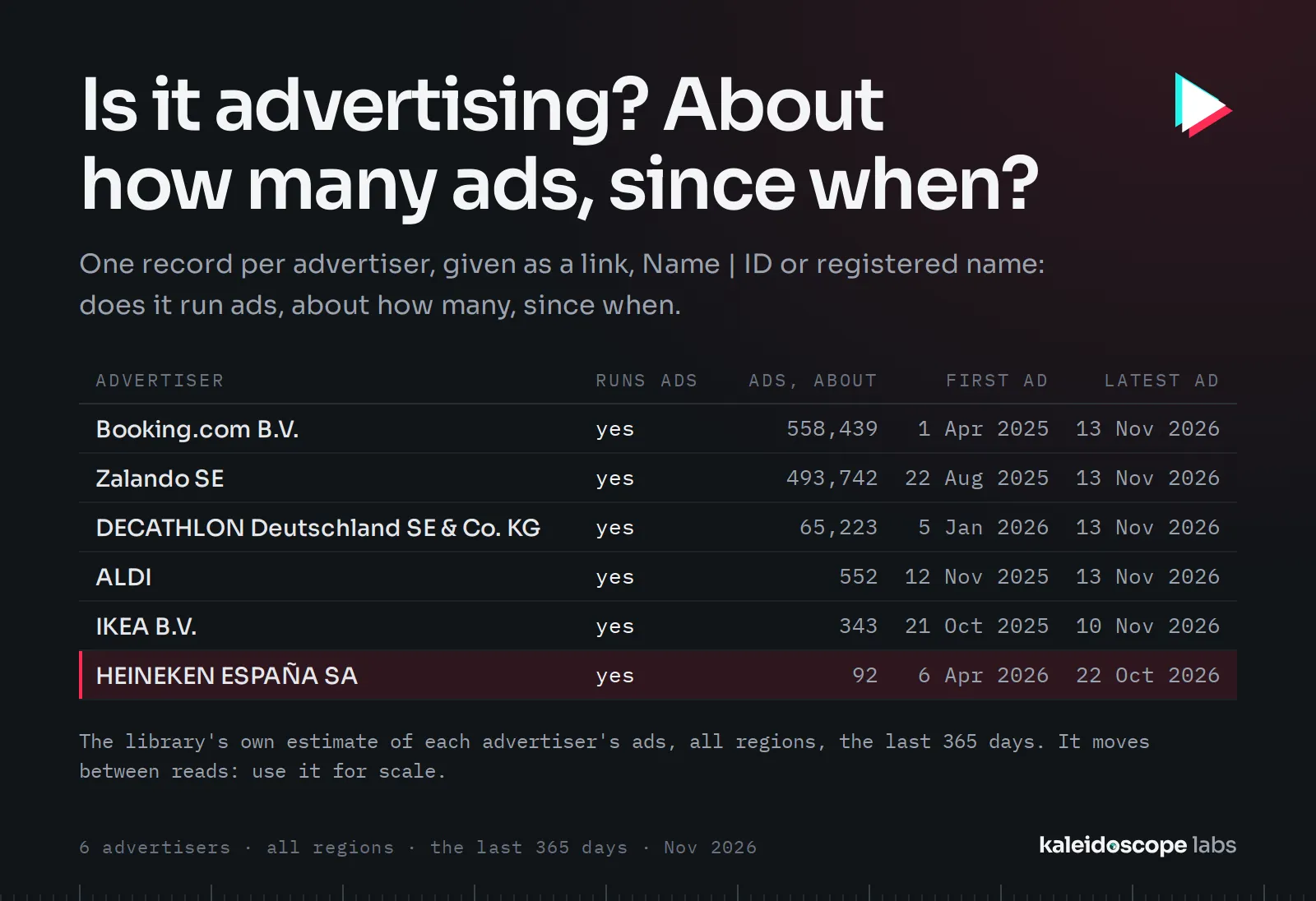
- 🔎 Is it advertising? A clear answer for your region and period, an advertiser with no ads included.
- 🔢 About how many ads: the library's own estimate, for one region or all of them.
- 📅 Since when: the first and the latest day an ad of it started, among the ads the library lists for the period.
- 🎬 The newest ads: up to 60 per advertiser, in a lookup and in each run of a monitor, with their text, dates, audience range and video links.
- 🔔 TikTok ads monitor, new ads only: give the run a monitor name and schedule it; each run returns only ads it has not returned before.
- 🔗 Links, "Name | ID", registered names and brands: a name the library does not list under that ID gives no advertiser, never a false "no".
Use it to track competitors' TikTok ads, new ads included, and to generate leads: find which companies on your list advertise on TikTok, and about how much.
Run it from Apify Console, through the Apify API, or on a schedule, and export the records as JSON, CSV or Excel.
What data can you get from the TikTok Ad Library?
One record per advertiser or brand:
| Data | Field |
|---|---|
| Whether the advertiser shows ads in the region and period | runsAds |
| The library's estimate of how many (advertisers only) | adCountEstimate |
| The first and the latest day an ad of it started | firstAdStart, latestAdStart |
| The advertiser's IDs, name and library search | advertiserIds, advertiserName, libraryUrl |
| Its newest ads: ID, link, text, days shown, format, video, images, audience range, audit status, and impressions and spend where given | ads |
| For a brand: its advertisers; with no match: the library's suggestions | advertisers, candidates |
| With a monitor: new ads, whether anything changed, how many ads were checked | newAds, changed, adsChecked, complete |
| What the record lacks, and why | missing |
The library covers ads shown in the EU's 27 member states, Iceland, Liechtenstein, Norway, Switzerland, the UK and Turkey. runsAds: false means no ad in the region and period you chose, not that the advertiser never advertised. adCountEstimate is the library's own estimate and moves between reads: use it for scale. Media links are TikTok's and expire.
How to use TikTok Ad Library Checker
- Create a free Apify account and open TikTok Ad Library Checker.
- In Advertisers, enter one per line: an Ad Library link,
Name | ID, or a registered name. In Brand names, enter brands. - Choose the Region (a two-letter code such as DE, or all), the Period in days (7 to 730) or a Start date and End date, and how many newest ads you want. A Start date wins over the Period. The library decides which ads belong to a window, so an ad's first or last shown day can fall a little outside it.
- Click Start, then export the records from the Output tab or read them from the API.
To get an advertiser's link, search for it in the Ad Library, pick it from the suggestions, and copy the address. A link or a "Name | ID" is the surest way to name an advertiser.
How to monitor advertisers for new ads
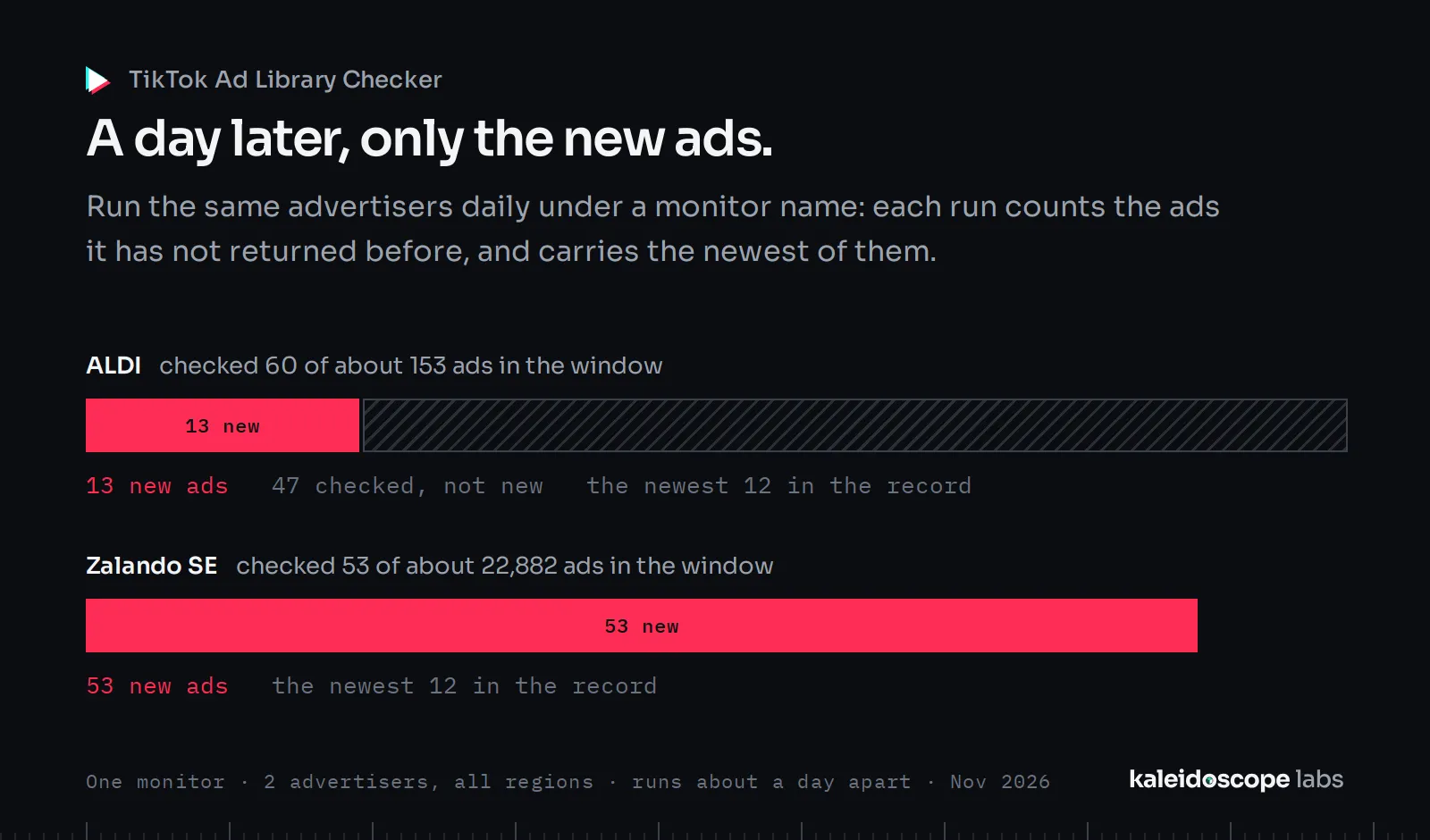
Enter a Monitor name and run the same advertisers on a schedule, daily for example. Enter each advertiser as the Name | ID a lookup's record gives: the monitor remembers an advertiser by its ID. Each run gives one record per advertiser:
newAdscounts the ads first shown since the day before the last run that the monitor had not seen; the record carries the newest of them, up to Latest ads per advertiser (12 if you leave it empty, at most 60).notSeenBeforecounts unseen ads that started earlier: counted, not returned as new.changedis true when the advertiser has new ads, started showing ads again, or stopped (no ad on two runs in a row). Filter on it for alerts.- An advertiser's first run returns the newest ads of the last 3 days, with no
newAdsorchanged. - A run reads the days since the last run, from three days before it (the library adds a day's ads the next day), at most 30; Period is not used, and a Start or End date is not accepted. Brand names are not monitored.
For a large advertiser the library lists only part of its ads, a different part on each read: then complete is false and adsCheckedNote says how many of about how many were checked. A new ad missed once is returned on a later run that lists it.
The monitor keeps the IDs it has seen in a key-value store in your account, tt-ads-monitor-<name>; delete it or use a new name to start over. Don't let a monitor's runs overlap.
How much does it cost to check an advertiser's TikTok ads?
TikTok Ad Library Checker is priced per event:
| Event | Price | When |
|---|---|---|
| Lookup | $0.004 each | each advertiser or brand looked up, whether it runs ads or not |
| Ad | $0.00075 each | each ad a record carries: Latest ads per advertiser, 3 by default (12 in a monitor), 0 for the check only |
| Example | Latest ads per advertiser | Cost |
|---|---|---|
| 1,000 advertisers or brands | 0 (the check only) | $4.00 |
| 1,000 advertisers or brands | 3 (the default) | $6.25 |
| 1,000 advertisers or brands | 12 (a monitor's default) | $13.00 |
A monitor is charged the same way on every run: 100 advertisers checked daily for 30 days cost $12.00 in lookups, plus $0.00075 for each new ad a record carries, and nothing more on days with no new ads.
Prices shown are for Apify's free plan; on paid plans they are up to 30% lower. The prefilled input (one brand, a lookup with 3 ads) costs at most $0.00625. Apify's free plan gives you $5 of usage a month, which covers about 1,250 checks, or 800 lookups with 3 ads each. A line that cannot be read is not charged. The platform also charges $0.00005 when a run starts.
Input
Enter advertisers (Ad Library links, Name | ID, or registered names) and brand names. The library answers an ID only beside its name, so a line of IDs alone is skipped and not charged: add the name, or paste the link. Each different line is its own lookup; a repeated line, or a link and its Name | ID, is looked up once. Within the default one-hour timeout about 2,000 lines fit at the default ads per advertiser; for a longer list, raise the timeout or split it.
Check a list of advertisers, every input shape
Only the check, for a long list
Whether each advertiser runs ads, the estimate and the dates, with no ads: $0.004 a line.
Find a brand's advertisers
Each record lists the advertisers found, with their IDs where the library gives them, to look up as "Name | ID":
New ads of competitors, every day
Run it on a daily schedule: each run returns only ads the monitor has not returned before.
Output
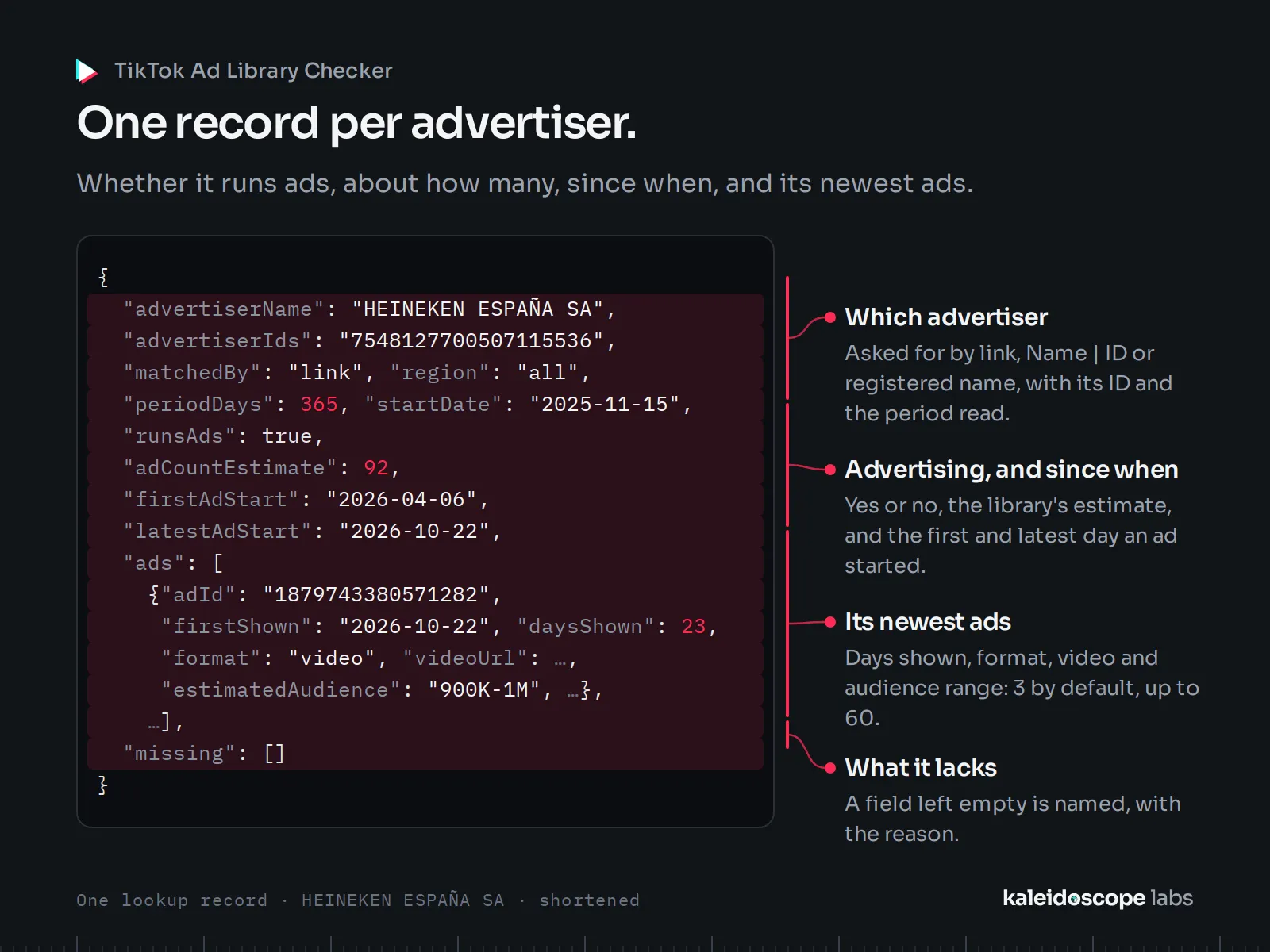
One record per line. Here is a lookup of an Ad Library link, shortened to 1 of its 3 ads, with its media links cut:
An advertiser in a daily monitor, the day after a run: its window, the new ads it found, and 1 of the 12 it returned, with its media links cut:
The Output tab has two views: Lookups and Monitor.
Building on this Actor
AI agents can call it through the Apify MCP server (setup prompt for your agent).
- What a run's end means: each run writes a
RUN_SUMMARYrecord to its key-value store:endedsays how it ended (finished, timedOut, maximumCost and others),completewhether it looked up all it was asked, andqueriesNotReadwhat could not be looked up. - An input it cannot read ends SUCCEEDED, empty and uncharged, with
inputErrorandmessagesaying what to correct. - A "no" is read, not assumed:
runsAdsis false only when the library answered with no ad; a line that found no advertiser hasrunsAdsempty andmissingsays why.
Good to know
- The cheapest way to try: Latest ads per advertiser at 0 checks an advertiser for $0.004.
- A brand name under Advertisers is matched as a registered name, exactly, and usually finds none: enter brands under Brand names.
- A lookup, like each run of a monitor, carries up to 60 ads per advertiser.
latestAdStartis rarely today: the library's newest ads usually started the day before. Dates are days in UTC.
Did it save you time? A rating on this page helps others find it; an Issue tells us what to fix.
FAQ
Is it legal to read the TikTok Ad Library?
The library is public, and shows what large platforms must publish about ads in the EU. This Actor reads it signed out, and never logs in. Whether your use is allowed depends on what you do with the data and where you are; ask a lawyer when in doubt.
Does it collect personal data?
It returns what the library publishes about an ad: the advertiser's name, which can be a person's for a sole trader or a creator, and the ad's text as published, which can name people. It reads no TikTok profile and no targeting. If you store or use personal data from the results, you are responsible for doing so lawfully under the GDPR or similar law; ask a lawyer when in doubt.
Why does a name give no advertiser?
The library lists advertisers by their registered names, often one legal entity per market, so a brand name rarely matches one exactly. With no exact match, candidates lists the library's suggestions: enter one as Name | ID. To find a brand's advertisers, enter it under Brand names.
Why does a "Name | ID" give no advertiser?
The library answers an ID only beside the advertiser's name as it spells it. The run checks the library's suggestions for a different spelling; if none lists your ID, the record says no advertiser was found and lists the suggestions, rather than a "no". Copying the advertiser's link avoids this.
Why does a brand miss some ads, or list advertisers that are not the brand?
A brand matches advertisers whose name holds it as whole words, among the library's newest results and the advertisers its suggestions name. A group named otherwise can be missed, and a company of the same name or a reseller can match: check advertisers, and look up the ones you mean under Advertisers.
Why does a monitor say complete is false?
The library lists only part of a large advertiser's ads, a different part on each read. adsChecked and adsCheckedNote say how many were read of about how many; a new ad missed this time is returned on a later run that lists it.
Limits
- Only what the library publishes, for the regions above: no targeting and no TikTok profile.
- Up to 60 ads per advertiser per run; the ad count is the library's estimate.
- IDs alone are not accepted.
- Impressions and spend only where the library gives them; media links expire.
- Brand names are looked up, not monitored.
Support and feedback
Open an issue on the Issues tab with the run's ID and the ref from its RUN_SUMMARY record: it tells us what happened without your data.
Other Actors
| Actor | Use it with this one to |
|---|---|
| Meta Ad Library & Facebook Ad Library Checker | See whether the same companies run ads on Facebook and Instagram too, how many, and their latest ads |
| Ads Transparency Center: Google Ads Scraper | See whether the same companies advertise on Google too, and what their ads say |
TikTok Ad Library Checker is an independent tool, not affiliated with, endorsed by or sponsored by TikTok or its owners. TikTok is a trademark of TikTok Ltd.


