

Capterra Reviews Scraper
Pricing
from $5.00 / 1,000 results
Capterra Reviews Scraper
Capterra reviews scraper that collects verified user reviews, including ratings, pros, cons, and reviewer profiles, so businesses can monitor software reputation and track competitor feedback at scale.
Pricing
from $5.00 / 1,000 results
Rating
0.0
(0)
Developer

Kawsar
Maintained by CommunityActor stats
0
Bookmarked
11
Total users
1
Monthly active users
2 months ago
Last modified
Categories
Share

Scrapes verified user reviews from any Capterra product page and returns structured data. Each record includes review text, overall star rating, sub-category scores (ease of use, features, value for money, customer service), reviewer job title and industry, pros, cons, and the product the reviewer switched from.
Capterra reviews show up in buying decisions and analyst reports. If you're keeping tabs on a product — yours or a competitor's — checking the page manually doesn't scale. This actor handles pagination and URL normalization automatically. Give it a URL and a review count, and it does the rest.
Why people use this
Some use it to monitor their own product. Run it on a schedule, route new reviews to Slack or a spreadsheet, and you stop finding out about problems weeks after they were posted.
Some use it for competitor research. Pull reviews for two or three competing products, look at what changed over the last quarter, and you get a clearer picture than any analyst summary.
Some run it specifically to find cons from 1-3 star reviews and route those directly into a feature backlog. Real complaints from paying users are better input than most internal feedback sessions.
Some need review text in bulk for NLP or sentiment analysis and don't want to scrape it by hand.
What it collects
For each review, the actor returns:
| Field | Description |
|---|---|
softwareName | Name of the software product |
reviewerName | Reviewer name or initials |
reviewerTitle | Job title of the reviewer |
reviewerIndustry | Industry or company type |
usageDuration | How long they have used the software |
reviewTitle | Headline of the review |
reviewDate | Date the review was submitted |
overallRating | Overall star rating out of 5 |
easeOfUse | Ease of use score out of 5 |
customerService | Customer service score out of 5 |
features | Features score out of 5 |
valueForMoney | Value for money score out of 5 |
likelihoodToRecommend | Score out of 10 |
reviewText | Full body text of the review |
pros | Positive points from the reviewer |
cons | Negative points from the reviewer |
switchedFrom | Previous software the reviewer left |
pageUrl | Source page URL |
scrapedAt | ISO 8601 timestamp of collection |
Input
| Field | Required | Default | Description |
|---|---|---|---|
startUrl | Yes | — | Capterra product or reviews page URL |
maxItems | No | 25 | Maximum reviews to collect (up to 1,000) |
requestTimeoutSecs | No | 30 | Per-request timeout in seconds |
URL formats accepted
The actor accepts any of these — /reviews/ is added automatically if the path is missing:
Only URLs from capterra.com are accepted. Anything else fails with a clear error message.
Pagination
Each Capterra page shows 25 reviews. The actor calculates how many pages it needs and fetches them in order.
maxItems: 25— 1 page (default)maxItems: 100— 4 pagesmaxItems: 250— 10 pagesmaxItems: 1000— up to 40 pages (stops when no more reviews exist)
Example input
Example output
Running on a schedule
To track new reviews automatically, use Apify's scheduler:
- Open the actor in Apify Console
- Go to Schedules and create a new schedule
- Set a cron expression —
0 8 * * 1runs every Monday at 8am - Connect the output to a webhook, Google Sheets integration, or a downstream dataset
Your team gets updated review data without anyone running the actor by hand.
Screenshots
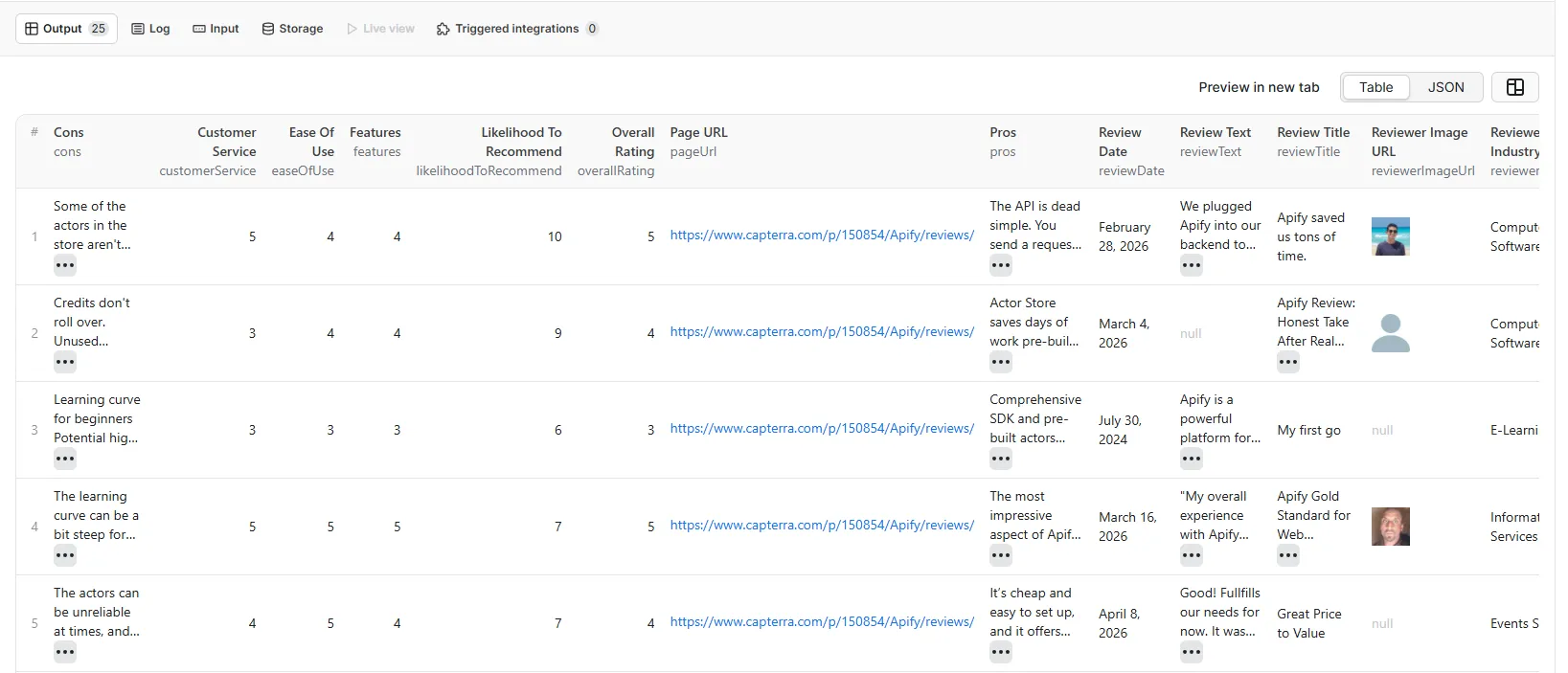
Sample output data in the Apify dataset view
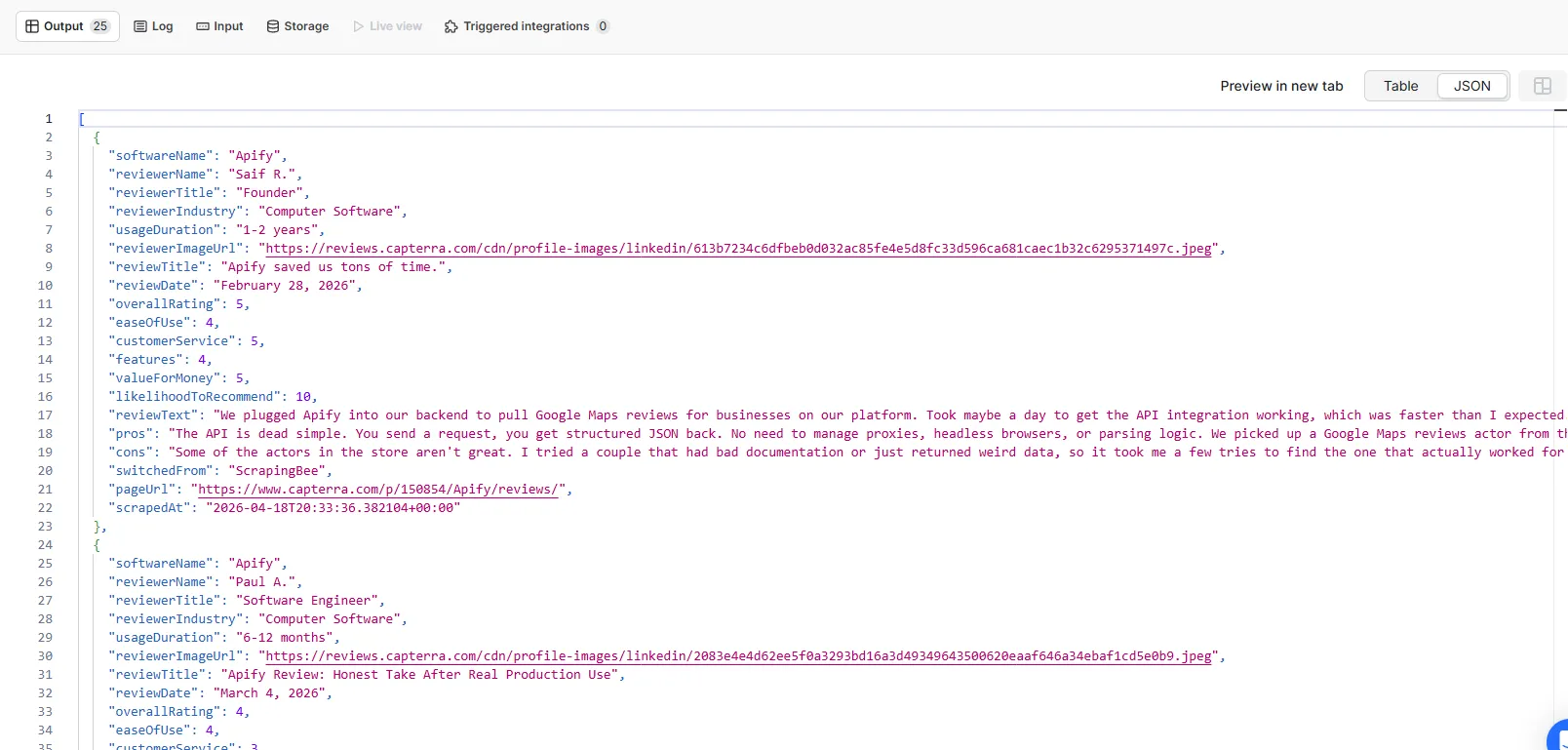
Sample output data in the Apify dataset view
Notes
- Reviews with short text may not have pros or cons sections. Those fields will be
null. - The
switchedFromfield is only populated if the reviewer mentioned a previous product. - Setting
maxItemshigher than the actual review count is fine — the actor stops when pages run out. - The actor only processes
capterra.comURLs. Paste any product page URL and it adds/reviews/automatically.


