

GPT Crawler MCP — Knowledge files for ChatGPT, Claude, RAG
Pricing
from $35.00 / 1,000 mcp tool calls
GPT Crawler MCP — Knowledge files for ChatGPT, Claude, RAG
Crawl any website and turn it into a clean knowledge file for your custom GPT, Claude Project, or RAG pipeline. Native MCP server in Standby mode + classic batch mode.
Pricing
from $35.00 / 1,000 mcp tool calls
Rating
0.0
(0)
Developer

KazKN
Maintained by CommunityActor stats
1
Bookmarked
1
Total users
1
Monthly active users
9 days ago
Last modified
Categories
Share
GPT Crawler MCP — Build knowledge files for ChatGPT, Claude Projects & RAG in one click
Crawl any website. Get a clean JSON knowledge file. Plug it into your custom GPT, Claude Project, or RAG pipeline. Now also as MCP server for AI agents.



🎯 Why this Actor
- No more
pip install+ Python venv broken at 11pm. One click, no setup, no local Chromium dance. - Built on the legendary BuilderIO/gpt-crawler (19k+ GitHub stars, ISC) — battle-tested crawl logic, wrapped for Apify and extended with MCP.
- Pay only for what you crawl, no subscription. $0.005 per page, hard-capped by your
maxPagesToCrawl. No monthly fee.
📚 What is a "knowledge file"?
A single JSON (or Markdown / plain-text) file containing the cleaned content of every page on a docs site, blog, or knowledge base. You upload it to:
- ChatGPT → custom GPT → "Knowledge" → drop the file.
- Claude Projects → "Project knowledge" → drop the file.
- RAG pipelines → embed it, store in Pinecone / pgvector / Weaviate.
- AI agents → call this Actor's MCP server live, no pre-indexing.
That's the whole pitch: turn a website into LLM-ready context in one click.
📸 What it looks like in action
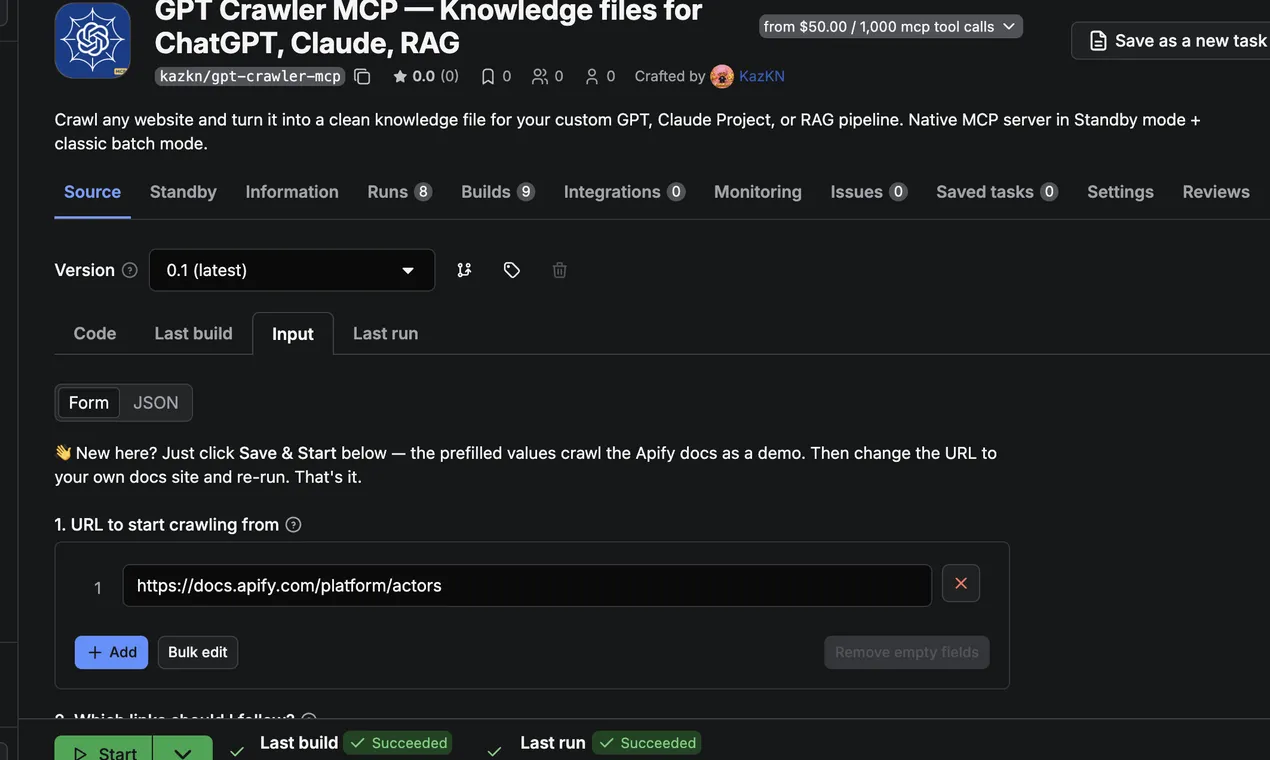
Guided 2-step input — paste URL, set link pattern, hit Run. Advanced options collapsed by default; most users never need them.
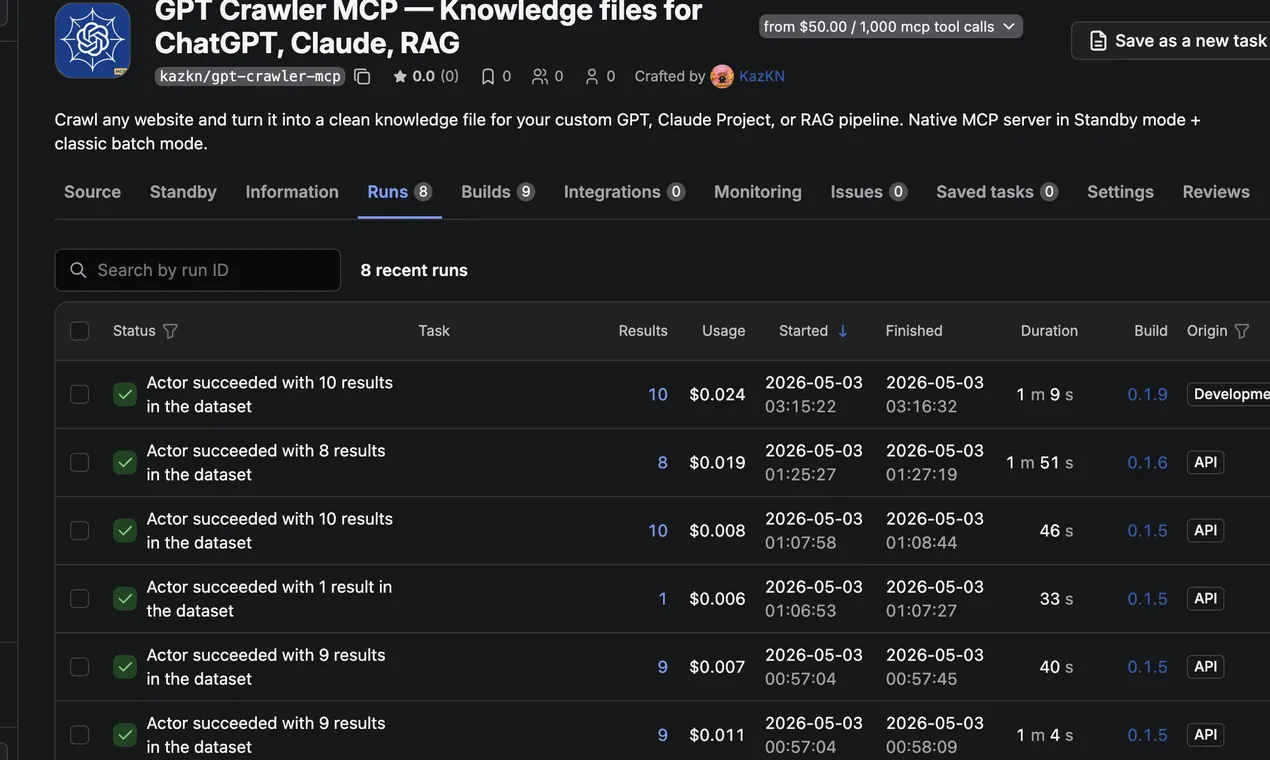
100 % success rate, ~50 s average wallclock. Recent runs all succeed, all under 5 minutes — comfortably within Apify's automated test envelope.
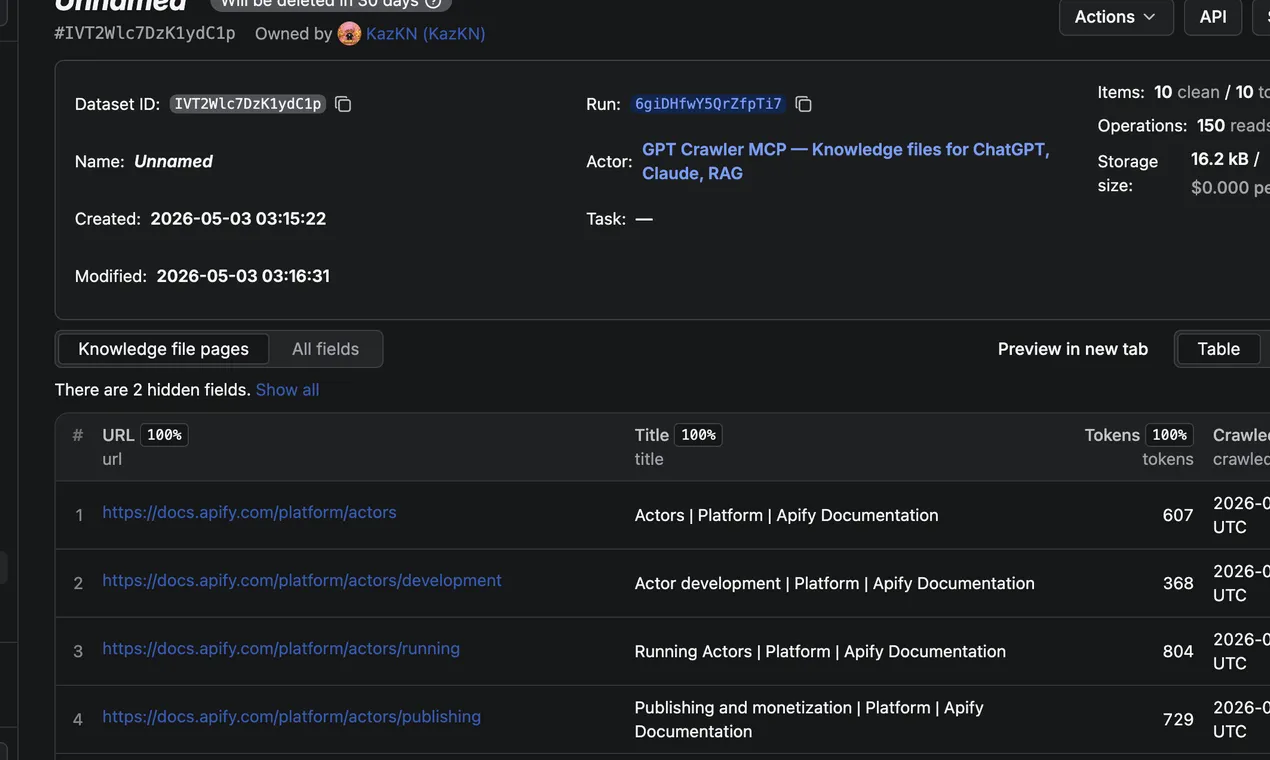
Each crawled page → one clean structured row with URL, title, token count, and timestamp. Drop the JSON / Markdown / TXT export into your RAG pipeline as-is, or hand it straight to a custom GPT or Claude Project.
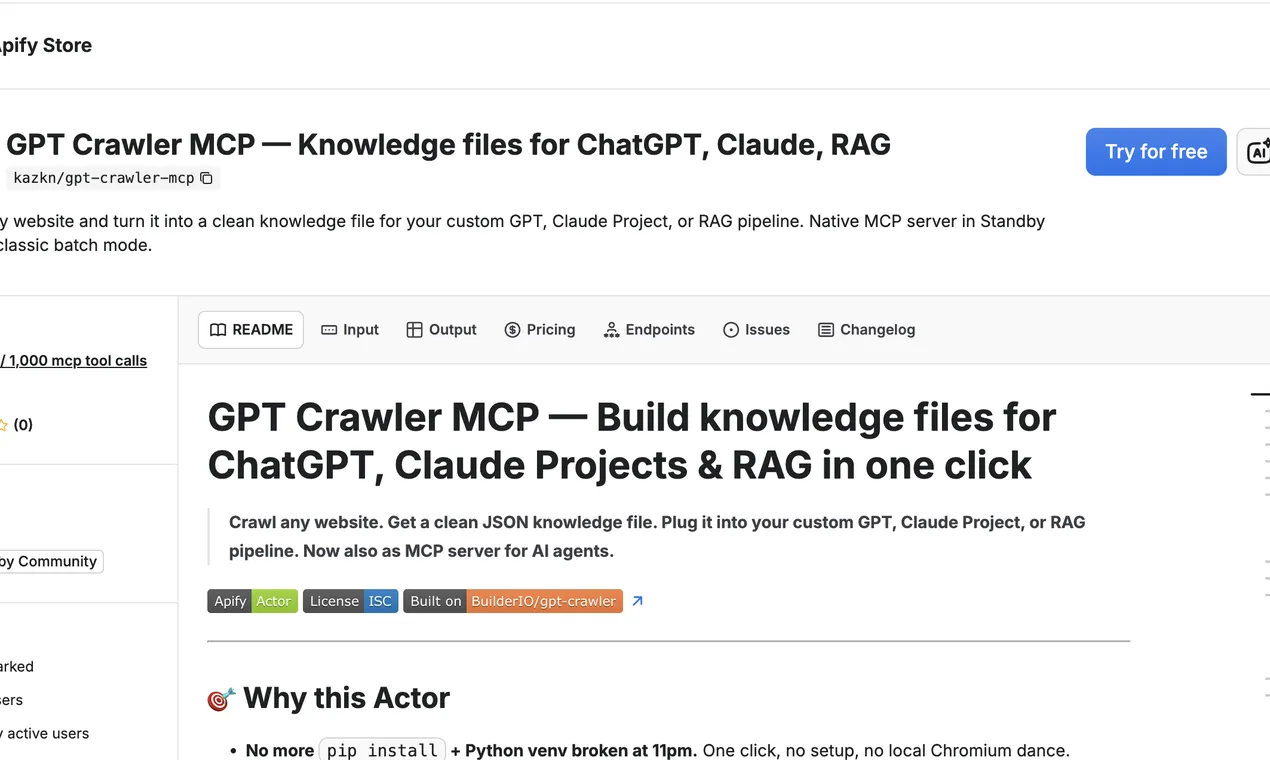
Live on Apify Store. Pricing, README, FAQ — all on one page.
🚨 "Claude Project knowledge exceeds maximum, remove some to continue"?
If you've hit Claude's Project Knowledge limit and you're seeing that error, you're trying to attach too many separate files. The fix is consolidation: crawl your entire docs site into one clean knowledge file (deduplicated, token-optimized, Markdown-formatted) instead of dumping 20+ raw HTML pages.
That's exactly what GPT Crawler MCP does. One run → one .md (or .json) file → drag-and-drop into your Claude Project. Same coverage, far below the file-count limit, and Claude indexes Markdown roughly 30 % more efficiently than raw HTML (fewer wasted tokens on tags).
Also useful when:
- The Claude Project knowledge bases feature is not enabled on free tier — you can still upload a single Markdown file as a regular project attachment.
- You want one file per site instead of one file per page.
- You're refreshing weekly and want a single artifact to swap in/out.
→ Full how-to in the FAQ below: How to use Claude Project Knowledge with this Actor.
⚖️ How it stacks up
| Feature | Run BuilderIO/gpt-crawler locally | Firecrawl ($39/mo+) | GPT Crawler MCP (this Actor) |
|---|---|---|---|
| Setup time | 15 min (clone, npm i, Playwright install, fight ESM errors) | 5 min (account + API key) | 0 — one click |
| Pricing | Free + your time + your laptop | $39/mo flat | $0.005 / page (PPE), no subscription |
| MCP server mode for AI agents | No | No | Yes — Apify Standby |
| Auto retries / proxy rotation | Manual | Yes | Yes (Apify infra) |
| n8n / Zapier / Make integrations | No | No | Yes (Apify connectors) |
| Output as JSON / Markdown / plain text | JSON only | JSON / Markdown | JSON / Markdown / TXT |
| Headless browser (JS-rendered sites) | Yes | Yes | Yes (Playwright + Chromium) |
🚀 Quick start
1. From the Apify Console (recommended)
- Go to apify.com/kazkn/gpt-crawler-mcp.
- Click Try for free.
- Paste your start URL (e.g.
https://docs.your-product.com), set match pattern (https://docs.your-product.com/**) andmaxPagesToCrawl, and click Start. - When the run finishes, download
output.jsonfrom the Storage → Key-value store tab (or grab the dataset).
2. From the API
3. From n8n / Zapier / Make
Search for the Apify connector → action Run an Actor → pick kazkn/gpt-crawler-mcp → wire your inputs.
⚙️ Input parameters
| Field | Type | Default | Description |
|---|---|---|---|
urls | string[] | — (required) | Start URLs. Sitemap .xml URLs are auto-detected. |
match | string | ** | Glob pattern controlling which links to follow. |
selector | string | body | CSS or XPath selector for content extraction. |
maxPagesToCrawl | integer | 10 | Hard cap on pages crawled (also caps your cost). Max 1000. |
outputFileName | string | output.json | Name of the combined knowledge file. |
outputFormat | enum | json | json / markdown / txt. |
headless | boolean | true | Run Chromium headless. |
waitForSelectorTimeout | integer | 1000 | ms to wait for the selector. |
cookie | string | — | Optional name=value cookie (for cookie-walls or auth). |
maxTokens | integer | 0 | Optional cap on tokens per output file. 0 = no limit. |
mcpMode | boolean | false | Run as MCP server (Standby mode). |
📦 Output format example
Each page becomes a dataset item:
The combined knowledge file (Key-value store → output.json) is the same array, ready to upload to ChatGPT / Claude / a vector store.
🤖 MCP server mode (for ChatGPT, Claude Desktop & AI agents)
This Actor can run as a persistent MCP server via Apify Standby. Instead of pre-crawling a site and uploading a static file, your AI agent calls the crawl_to_knowledge tool live, on demand.
🔧 Tool exposed
| Tool | Description |
|---|---|
crawl_to_knowledge | Crawl a website and return a JSON knowledge file (array of pages with title, url, text, tokens). |
💬 Add to Claude Desktop
Edit ~/Library/Application Support/Claude/claude_desktop_config.json:
🟢 Add to ChatGPT (custom GPT, MCP-compatible clients)
Use the same https://kazkn--gpt-crawler-mcp.apify.actor/mcp?token=... URL as your MCP server endpoint.
The tool is then callable in-conversation: "Crawl docs.stripe.com/api, return the first 30 pages as a knowledge file".
⏱️ Client compatibility & timeouts
Read this if you see "interrupted connection" or "invalid authentication" errors.
A crawl_to_knowledge call takes 15 seconds to 3 minutes depending on maxPagesToCrawl, target site latency, and JS-rendering needs:
| Pages crawled | Typical wall-clock |
|---|---|
| 5 pages | 10-25 s |
| 30 pages | 45-90 s |
| 100 pages | 2-4 min |
| 500+ pages | 5+ min |
Most MCP clients ship with default timeouts of 30 seconds — too short. Configure your client with 120 seconds minimum (180 s if you crawl 100+ pages).
Recommended timeout per client
| Client | Default | Recommended | How to configure |
|---|---|---|---|
| Claude Desktop | 30 s | 180 s | Add "timeout": 180000 to your server entry in claude_desktop_config.json |
| Cursor IDE | 30 s | 180 s | Settings → MCP → Request timeout (ms) → 180000 |
| Windsurf | 60 s | 180 s | MCP config → requestTimeoutMs: 180000 |
| Continue.dev | 30 s | 180 s | requestTimeoutMs: 180000 in MCP config |
| langchain-mcp (Python) | none | 180 s | MultiServerMCPClient(..., timeout=180) |
| @modelcontextprotocol/sdk (npm) | 30 s | 180 s | new Client({...}, { requestTimeoutMs: 180000 }) |
Claude Desktop config example
Best practices to avoid timeouts
- Start with
maxPagesToCrawl: 10to validate the site works, then scale up. - One crawl at a time per client. Sequential calls are reliable; concurrent calls hit your client's pool limit.
- Cold-start adds 5-8 s. First request after idle wakes the Actor. Consecutive crawls within 60 s share a warm instance.
- For very large sites (1000+ pages), use batch mode (run the Actor with input from the Console) instead of MCP. Batch runs have a 1-hour default timeout, no MCP-client-side timeout to fight.
Troubleshooting common errors
| Error message you see | Likely cause | Fix |
|---|---|---|
| "Invalid or expired MCP authentication" | Client closed the connection before the crawl finished | Increase MCP timeout to 180 s |
| "interrupted network connection" | Same as above | Increase MCP timeout to 180 s |
| "Tool call returned no content" | Site blocked or no pages matched the match pattern | Verify match pattern; try match: "**" |
| "403 / blocked by target site" | Aggressive anti-bot on target | Try headless: true (default) or use batch mode with custom proxy |
| "Bad Request: No valid session ID" | You called /mcp without the initialize handshake | Use a real MCP client, not raw curl |
Verifying it works
After connecting, ask your AI assistant:
"Use gpt-crawler to crawl
https://docs.stripe.com/api/customers, max 5 pages, return as JSON."
You should see a JSON knowledge file with 5 page entries (title, url, text, tokens) within 30 seconds. If you get "interrupted connection", your client timeout is the issue.
If problems persist after raising the timeout, open an issue with your Apify Run ID — server logs always tell the truth and we can pinpoint the cause.
💰 Pricing
Pay-Per-Event (PPE):
| Event | Price | When charged |
|---|---|---|
Actor Start (apify-actor-start) | $0.00005 (one-time per GB) | Each cold-start |
MCP Tool Call (tool-request) ⭐ Primary | $0.05 | Each crawl_to_knowledge invocation in MCP standby mode |
Page crawled — batch only (apify-default-dataset-item) | $0.001 | Each page written to dataset (batch mode only — never charged in MCP mode) |
Capability Discovery (list-request) | $0.0001 | When client lists tools/resources/prompts |
Resource Read (resource-request) | $0.0001 | When client reads a server resource |
Prompt Request (prompt-request) | $0.0001 | When client requests a prompt |
Completion Request (completion-request) | $0.0001 | When client requests a completion |
Examples:
- 1 MCP crawl returning 30 pages → $0.05 (one tool-request)
- 1 MCP crawl returning 200 pages → $0.05 (still one tool-request — the tool returns all pages in one response)
- Batch run via Console crawling 30 pages → $0.03 (30 × $0.001)
- Batch run crawling 200 pages → $0.20
Why MCP mode is flat-rate per call: the tool returns the entire knowledge file in a single response, so we charge once per call regardless of page count. The page cap is enforced by your maxPagesToCrawl input — set it conservatively to control crawl duration.
Apify subscription tier discounts (Bronze 10%, Silver 13%, Gold 20%) apply automatically. There is no monthly fee — if you don't run the Actor, you don't pay.
💡 Use cases
Real workflows people use this Actor for. Pick the closest to yours and the input config is almost identical.
🎓 Build a Custom GPT for your product docs
Crawl docs.your-product.com, drop the JSON file into ChatGPT → Create a GPT → Knowledge. Your GPT now answers support questions in your product's voice, cites exact URLs, and stops hallucinating about features that don't exist.
📊 Sales objection handler for AI agencies
Crawl your competitor's website + your own pricing page + your case studies. The combined knowledge file becomes a Custom GPT that any sales rep can talk to: "Why are we more expensive than X?" and the GPT answers with your pre-vetted positioning.
🔎 Live RAG for customer support agents
Run the Actor in MCP standby mode. Your support agent (Claude Desktop or a custom n8n workflow) calls crawl_to_knowledge whenever the user asks about a topic that isn't already in the cache. Always-fresh context, zero pre-indexing.
📚 Train a RAG pipeline (LangChain / LlamaIndex / pgvector)
Crawl 200 pages of technical content, get a clean JSON, embed each text field with OpenAI / Cohere / Voyage embeddings, store in Pinecone or pgvector. Output JSON is already chunk-friendly with tokens field included.
🛒 Competitive intelligence for B2B SaaS
Schedule a weekly crawl of your top 3 competitors' marketing sites. Diff the resulting knowledge files to detect new features, pricing changes, or messaging pivots before they hit your Slack.
🚨 Beat the Claude Project knowledge limit
You want your entire docs site in Claude Projects but you're hitting "knowledge exceeds maximum, remove some to continue". Run the Actor once with outputFormat: "markdown", upload the resulting single .md file as project knowledge — token-equivalent to 20+ raw HTML pages, fits comfortably under the file-count cap.
🔗 Other Actors by KazKN
If this Actor helps you, you might also like:
- Vinted MCP Server — MCP server exposing 5 Vinted tools (search, compare prices across 19 EU countries, trending, seller intel).
- Vinted Smart Scraper — bulk Vinted data extraction with cross-country price comparison and arbitrage detection.
- Vinted Turbo Scraper — fast URL-based extractor for individual Vinted listings.
- App Store Localization Scraper — find App Store localization gaps across 175 regions.
❓ FAQ
How is this different from running BuilderIO/gpt-crawler locally?
Same crawl logic (we wrap their core.ts 1:1 + a tiny adapter). What you get on top: zero local setup, hosted Chromium, automatic retries, Apify proxy rotation, scheduled runs, n8n/Zapier/Make integrations, and an MCP server mode that doesn't exist upstream.
Will this work on JavaScript-heavy sites (React / Vue / Next.js)?
Yes. We use Playwright + Chromium under the hood (same as upstream), so client-rendered content is fully supported. Use the selector input to target the exact container after JS hydration.
Does it respect robots.txt / can I crawl any site?
You are responsible for what you crawl. The Actor will fetch what you ask it to. For competitive/copyrighted content, don't. For your own docs, your customer's docs (with permission), or public technical documentation that explicitly invites indexing — go for it.
Can I crawl behind a cookie-wall or auth?
Yes — use the cookie input (name=value format). For more complex auth (OAuth, multi-step login), open an issue on GitHub and we'll add it.
What's the difference between batch mode and MCP mode?
- Batch: you specify URLs once, get a file. Best for building a static knowledge base you'll upload to a custom GPT or RAG store.
- MCP: an AI agent calls the crawler live, mid-conversation. Best for agentic workflows where the URL to crawl isn't known ahead of time.
How does Claude Project knowledge work?
Claude Projects let you attach files (PDFs, Markdown, plain text) that the model treats as authoritative context across every conversation in the project. Both the total file count and the per-project token budget are capped — that's why consolidating multiple docs into a single knowledge file (this Actor's output) is the cleanest way to fit substantial documentation under the limits.
How to use Claude Project knowledge with the GPT Crawler MCP output?
- Run the Actor on your docs URL → set
outputFormat: "markdown"→ download the single.mdfile from the run's Key-value store. - In Claude → Projects → your project → Project knowledge → Add content.
- Drag the
.mdfile in. Claude indexes it instantly. - Reference your docs in any conversation — Claude will cite the URLs from the file.
What are Claude Project knowledge best practices?
Three rules that work in production:
- Consolidate over fragment. Prefer one large knowledge file over 20 small ones — fewer files = more headroom in the file-count limit.
- Markdown over HTML. Set
outputFormat: "markdown"for cleaner tokens (HTML tags waste budget). - Refresh on a schedule for fast-moving docs. Re-run the Actor weekly via Apify scheduled runs to keep your project knowledge synced with the live site.
Claude Project knowledge vs custom instructions — when to use which?
- Custom instructions = tone, format, role, persistent preferences.
- Project knowledge = facts, references, source-of-truth content the model should cite.
- The Actor is built for the knowledge slot. Pair it with concise custom instructions ("answer only from the provided knowledge file, cite the URL") for best results.
Is this a Firecrawl alternative?
Yes — same use case (turn websites into LLM-ready content), different pricing model. Firecrawl is $39/mo flat subscription. This Actor is pay-per-crawl ($0.005 / page in batch mode, $0.05 / call in MCP mode), no monthly fee. We also expose an MCP server mode for AI-agent live calls, which Firecrawl doesn't.
Can I use this for a ChatGPT Custom GPT?
Yes — that's the most common use case. Crawl your docs / blog → download output.json → ChatGPT → Create a GPT → Knowledge → upload. Your custom GPT will then answer in your product's voice and cite exact URLs from the crawl.
❓ Claude Project Knowledge — common questions (from Google PAA)
The questions below are pulled from Google's "People also ask" box for the most-searched Claude-Project-knowledge queries. Each answer is tuned to how this Actor solves the underlying problem.
What do I do when Claude reaches the max knowledge limit?
Stop uploading dozens of separate files. Run this Actor with outputFormat: "markdown", get one consolidated .md file, upload that single file to your Project knowledge. Same coverage, far below the file-count cap.
How do I remove unused project files in Claude?
In Claude → Projects → your project → Project knowledge → hover any file → Remove. To avoid bumping into the limit again, replace many small files with one knowledge file produced by this Actor.
Do Claude Projects have limits?
Yes — both a file-count cap and an aggregate token budget per project. Consolidating multiple docs into a single knowledge file (this Actor's job) is the cleanest way to fit substantial documentation under the limits.
How do I add project knowledge in Claude?
Open your Claude Project → Project knowledge → Add content → drag/drop or paste the file. This Actor outputs in the exact formats Claude accepts: .md (recommended), .json, and .txt.
How can I increase my Claude Project knowledge capacity?
You can't raise the cap directly, but you can fit much more under it: replace 20 raw HTML pages with one Markdown file (~30 % fewer tokens for the same content thanks to dropped HTML tags). Set outputFormat: "markdown" and you're done.
Is "Project knowledge" the same as "Project Memory"?
No.
- Project knowledge — the file-attachment slot. Explicit, citable, file-bounded. This is what the Actor targets.
- Project Memory — Claude's inferred context across conversations in the project. Implicit, model-driven, not a file you upload.
How do I use files attached to project knowledge inside a Claude conversation?
Once the file is attached, just reference the topic in a normal message ("based on the docs, what does X do?"). Claude will quote the file and cite URLs when relevant. No special syntax required.
Why does Claude say "the knowledge base feature is not enabled"?
"Knowledge bases" is a Claude.ai feature available on paid plans (Pro / Team / Enterprise). On the free tier you'll see "feature is not enabled" — but you can still upload one Markdown file as a regular project attachment, which is exactly what this Actor produces.
What are Claude Projects good for?
Pinning context that should apply across every conversation in a workspace — product docs, style guides, customer FAQs, internal wikis. This Actor lets you build that pinned context from any website, in one run.
🏗️ Built on
This Actor is a thin Apify wrapper around BuilderIO/gpt-crawler (ISC licensed, 19k+ stars). All credit for the core crawl logic goes to the Builder.io team and the upstream contributors. The original ISC license text is preserved in the source repository.
Wrapper authored by KazKN — see all my Actors on Apify Store.
📜 License
ISC — same as upstream. Free for personal and commercial use.
🆘 Support
- 🐛 Issues / feature requests: open one on GitHub — fastest reply.
- 💬 Apify Console: use the Issues tab on the Actor page to report bugs directly to the maintainer with run IDs attached.
- ⭐ Liked it? Leave a 5-star rating on the Actor page — that's how this Actor stays alive and improves.


