

YouTube Channel Finder — Qualified Creator Leads
Pricing
from $13.50 / 1,000 qualified creator delivereds
YouTube Channel Finder — Qualified Creator Leads
YouTube channel finder and creator lead finder for agencies, brands, SaaS, and sponsors. Qualify active channels by niche, language/country signals, upload cadence, recent views, format, and engagement. Public contacts come from channel descriptions with source URLs—no private or guessed emails.
Pricing
from $13.50 / 1,000 qualified creator delivereds
Rating
0.0
(0)
Developer

KazKN
Maintained by CommunityActor stats
0
Bookmarked
13
Total users
2
Monthly active users
2 months ago
Last modified
Categories
Share



Find YouTube influencers and active creators by niche, language, country, audience size, upload frequency, and recent performance—without collecting channel URLs one by one. This YouTube channel finder turns public YouTube data into a deduplicated outreach shortlist with explainable scores and exact contact provenance when a business contact is publicly listed.
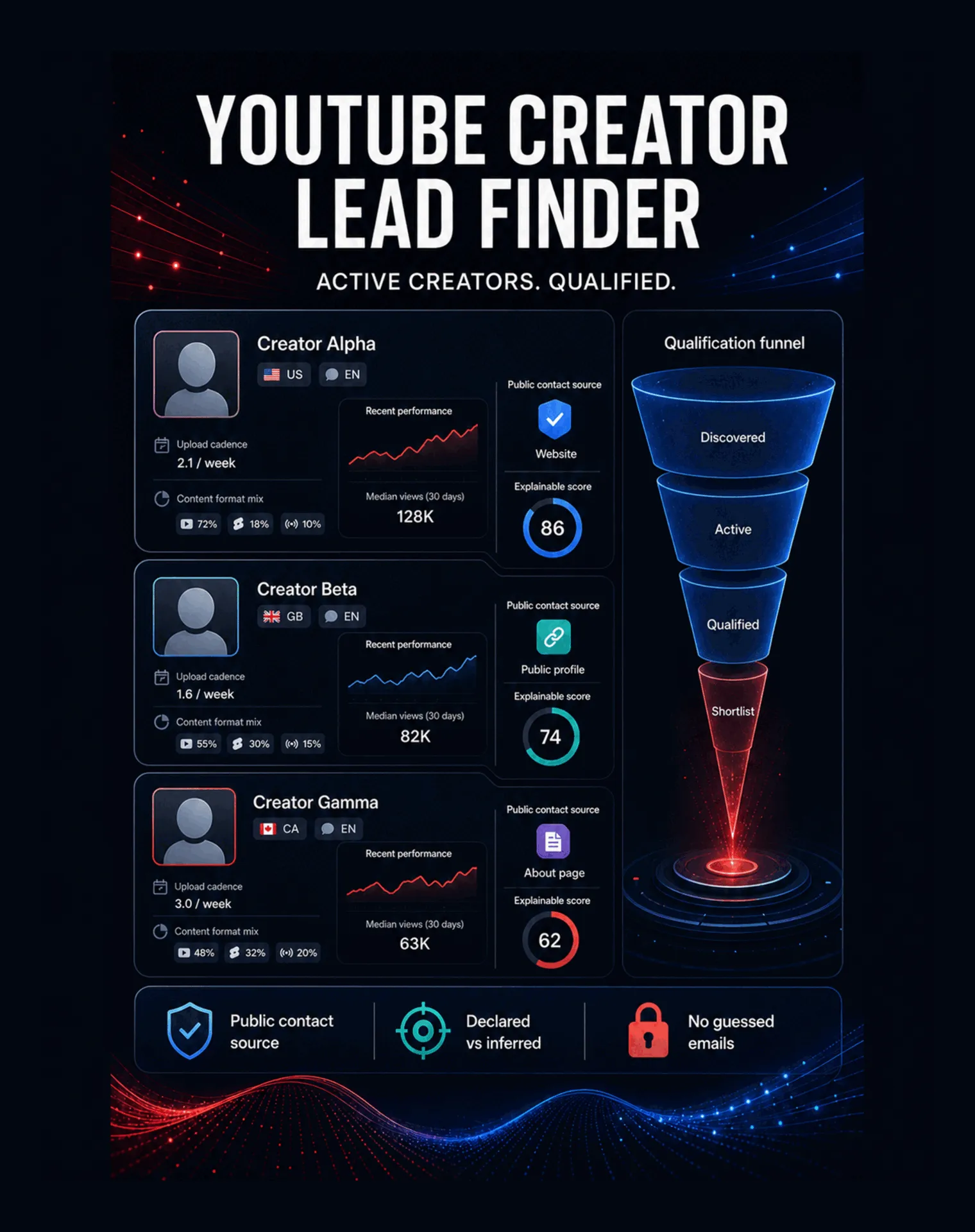
Choose the result you need
| Your intent | Outcome preset | Dataset result |
|---|---|---|
| Find a small creator list quickly | quick_leads | Standard qualification using the smaller limits you set in the form |
| Rank active creators for outreach | qualified_shortlist | Standard qualification using your explicit performance and analysis controls |
| Keep only contact-ready prospects | contact_ready | Qualified rows with an explicitly public business contact and exact source URL |
What does YouTube Creator Lead Finder do?
YouTube Creator Lead Finder is a YouTube influencer finder, YouTube channel finder, and creator lead generation tool in one Actor. Use it to find YouTube influencers from niches or search queries, enrich a bounded pool of min(200, maxChannels × 5), then apply qualification, scoring, sorting, and the requested output limit.
For every delivered channel, it can:
- confirm recent activity and calculate publishing cadence over 30 and 90 days;
- compare median and average views across a bounded recent-video sample;
- estimate engagement when public view, like, and comment counts are available;
- separate Shorts, long-form videos, and live streams using documented heuristics;
- distinguish declared country from inferred geography;
- detect the primary language and preserve a confidence level;
- collect only business contacts explicitly published in the channel description;
- produce an explainable opportunity score with the reasons behind it.
It is designed for influencer agencies, brands, sponsors, affiliate teams, B2B SaaS companies, recruiters, talent managers, and service providers looking to find YouTube creators for targeted outreach.
Why use this YouTube creator finder?
- No seed list required: start with niches and search queries; channel URLs remain optional.
- Multi-market discovery: combine several languages and countries in one run, or search a language worldwide.
- Activity-first qualification: filter inactive channels before they reach your outreach list.
- Recent-performance context: use recent median views and cadence instead of subscriber count alone.
- Transparent contact evidence: every public contact keeps its type, value, source URL, collection time, status, and confidence.
- Explainable ranking: every
opportunityScoreincludesopportunityReasonsand component evidence. - Export-ready leads: one Dataset row per
channelId, ready for CSV, JSON, Excel, API, webhooks, or downstream automation.
Unlike a raw YouTube email finder, the Actor does not invent addresses or treat missing protected email data as a result. Unlike a flat YouTube influencer database, every run is generated from your current niche, geography, activity, and performance criteria.
How to use it
- Open the Actor input and choose the outcome preset that matches your workflow.
- Add one or more niches, such as
B2B SaaS,AI automation, orfitness coaching. - Select one or more creator languages. Leave Search each language worldwide enabled if country should not restrict qualification.
- Optionally add countries, audience-size limits, recent-activity filters, view thresholds, or required contact types. Disable
worldwideLanguageModeto apply selected countries. - Set the maximum number of qualified channels you want.
- Run the Actor and open the default Dataset to inspect, filter, or export the delivered creator leads.
Quick start
quick_leads and qualified_shortlist use the same runtime qualification engine and respect the limits you choose. Use smaller maxChannels, videosAnalyzedPerChannel, and maximumSearchCalls values for a quicker run. contact_ready is the only preset that changes a filter automatically: it requires at least one qualifying public contact.
Input
The input form follows the prospecting decision: Find the right creators, Audience size, Activity & performance, Public contacts, Refine discovery, Result order, and Advanced controls.
| Input | Purpose | Default |
|---|---|---|
preset | Select quick leads, a qualified shortlist, or contact-ready prospects | qualified_shortlist |
niches[] | Topics or commercial niches used for discovery and qualification | ["B2B SaaS"] |
languages[] | One or more creator languages | ["en"] |
countries[] | One or more target countries; applied only when worldwide mode is off | [] |
worldwideLanguageMode | Search selected languages worldwide and ignore country hints | true |
maxChannels | Maximum qualified rows delivered | 25 |
minSubscribers, maxSubscribers | Audience-size range | 1,000 to 1,000,000 |
minVideosPerMonth, maxVideosPerMonth | Estimated upload-frequency range | 0 to 200 |
lastUploadWithinDays | Maximum age of the most recent sampled upload | 90 days |
minRecentMedianViews, maxRecentMedianViews | Recent median-view range | no effective restriction |
minEngagementRate | Minimum calculable engagement rate | 0 |
contentFormats[] | Long-form, Shorts, and/or live | all formats |
requirePublicBusinessContact | Exclude channels without a qualifying public contact | false |
contactTypes[] | Public business email, website, or social profile | all currently supported |
searchQueries[] | Extra discovery phrases | [] |
seedChannelUrls[] | Optional channels to qualify alongside discovery | [] |
excludedKeywords[], excludedChannelUrls[] | Remove unwanted themes or channels | [] |
videosAnalyzedPerChannel | Recent-video sample size | 10 |
maximumSearchCalls | Hard search-budget ceiling | 20 |
minChannelAgeMonths | Minimum public channel age when calculable | 0 |
sortBy, sortDirection | Result metric and ordering direction | score, highest first |
maximumLinkedHostsPerChannel | Reserved linked-site inspection cap; no linked-site fetch runs today | 3 |
deduplicationMode | Stable duplicate handling | channel_id |
At least one discovery source is required across niches, searchQueries, or seedChannelUrls. The public form supplies a useful default niche, so a first run can be configured in seconds.
Output
The default Dataset contains one item per qualified channel. Important fields include:
- identity:
channelId,channelName,channelUrl,handle,description,thumbnailUrl; - geography and language:
declaredCountry,inferredCountries,countryConfidence,primaryLanguage,detectedLanguages,languageConfidence; - activity:
lastUploadAt,videosLast30Days,videosLast90Days,estimatedVideosPerMonth; - performance:
subscriberCount,recentMedianViews,recentAverageViews,engagementRate; - format mix:
shortsRatio,longFormRatio,liveRatio; - public contacts:
publicBusinessEmail,contactType,contactSourceUrl,websiteUrls,socialProfiles,managementContact(currentlynullin live provider output); - qualification:
niches,opportunityScore,opportunityReasons,matchedQueries,matchedCountries,matchedLanguages; - auditability:
scrapedAt,dataFreshness,warnings.
Example Dataset item
This item is sanitized example data, not a real creator claim. Unavailable upstream metrics remain null and add a warning; they never silently become zero.
Run summary
The default Key-value store record RUN_SUMMARY reports:
- channels discovered, qualified, and delivered;
- channels with a public business contact;
- language, country, and niche distributions;
- exclusion reasons;
- provider calls, quota use, limits, and partial-result status.
Explainable qualification
- Cadence is computed separately over 30 and 90 days.
estimatedVideosPerMonthuses the bounded 90-day sample divided by three. - Recent median and average views use only the sampled recent videos.
- Engagement is calculated only when the required public counts are available.
declaredCountrycomes from YouTube channel metadata.inferredCountriesstays separate and identifies the inference method.- YouTube search language and region parameters guide discovery; they are not silently presented as confirmed channel attributes.
- Niche classification normalizes punctuation, accents,
AI/IA, and simple singular/plural variants, then requires evidence in the public description or recent video titles. - Shorts classification from the official API is a duration heuristic and produces
SHORTS_CLASSIFICATION_HEURISTIC_NOT_EXACTwhen relevant. - The score rescales across known components. An unknown metric has no points assigned; it is not treated as a failed zero.
Public-contact contract
A usable contact contains type, value, exact sourceUrl, collectedAt, confidence, and a public status such as explicit_public. The Actor never guesses email patterns, enriches private addresses, bypasses CAPTCHA, signs in, or defeats technical protections.
YouTube Data API does not expose the protected YouTube business-email field. The current provider extracts only professional email addresses, website URLs, and social-profile URLs that creators explicitly publish in the public channel description, with the channel URL retained as provenance. It does not fetch linked websites yet. A missing or protected contact therefore produces an honest warning instead of an invented lead.
The input reserves contact_form and management for future providers, but the current live provider does not produce them. They are visibly labeled as reserved and are not selected by default.
Export and integrations
Every qualified creator is written to the default Apify Dataset. From there you can:
- export directly to CSV, JSON, XML, RSS, or Excel;
- retrieve results with the Apify API or
ApifyClient; - connect a run to Make, Zapier, n8n, Google Sheets, a CRM, or your own data pipeline;
- schedule recurring searches after validating your preferred input and quota budget;
- use webhooks to trigger a downstream qualification or outreach-review workflow.
The Actor only prepares research data. Review public-contact context and your outreach rules before sending any message.
Copy to your AI assistant
Copy the entire block into ChatGPT, Claude, Claude Code, Codex, Kimi Code, or an IDE assistant:
Recovery, limits, and data freshness
- Deduplication is by
channelIdinside a run, with a fingerprinted checkpoint for restart recovery. - Separate runs use separate default Datasets and can deliver the same channel again.
- Live discovery uses the official YouTube Data API and the deployment-provided
YOUTUBE_API_KEY; users do not paste this provider key into Actor input. - One run is capped at 40 search calls, 200 output channels, 3–20 analyzed videos per channel, 500 HTTP calls, and 5,000 locally tracked quota units.
- Network or quota failures produce explicit partial results and summary warnings.
- Public fields can be hidden or unavailable. Subscriber, engagement, country, language, and format confidence therefore remain nullable.
- This independent tool is not affiliated with, endorsed by, or sponsored by YouTube or Google.
Pricing
The Actor uses pay per event. A qualified creator is charged only when one channel row is written to the default Dataset; excluded candidates, searches, analyzed videos, and missing contacts do not create extra result events.
| Apify plan | Price per qualified creator | Price per 1,000 |
|---|---|---|
| Free | $0.0180 | $18.00 |
| Bronze | $0.0150 | $15.00 |
| Silver | $0.0140 | $14.00 |
| Gold | $0.0135 | $13.50 |
| Platinum | $0.0130 | $13.00 |
| Diamond | $0.0126 | $12.60 |
Each run also has Apify's synthetic run-start event at $0.00005. Platform usage is included in the current pricing configuration. The live Pricing tab remains the source of truth.
FAQ
Do I need to provide YouTube channel URLs?
No. Add niches or search queries and the Actor discovers candidates. seedChannelUrls is optional.
Can I find French-speaking creators worldwide?
Yes. Select fr, keep countries empty, and leave worldwideLanguageMode enabled.
Does it work as a YouTube email finder?
It returns a business email only when the creator explicitly publishes it in accessible public channel text. It does not reveal protected YouTube emails, crawl linked sites, guess patterns, or enrich private addresses.
Can I search several niches, languages, and countries at once?
Yes. niches, languages, and countries are multi-value inputs. Search-cell planning stays bounded by maximumSearchCalls.
To enforce selected countries, disable worldwideLanguageMode. When it remains enabled, country hints are intentionally ignored.
Why is a field null?
The upstream public field was unavailable, hidden, or not calculable from the bounded sample. Check warnings and the corresponding confidence fields.
How are creators ranked?
The Actor combines known evidence for niche fit, target language and geography, activity, cadence, audience, recent views, engagement, public-contact availability, and consistency. opportunityReasons explains the delivered score.
Can I export the shortlist to Excel or a CRM?
Yes. Export the Dataset to Excel, CSV, or JSON, or retrieve it through the API for a CRM, spreadsheet, or automation workflow.
Support
If a run behaves unexpectedly, open the run detail and keep the run ID, input, RUN_SUMMARY, Dataset item, and warning text. Use the Issues or Contact developer action on the Actor page and remove any secret or private information before sharing diagnostic material.
KazKN Creator & Market Intelligence Suite
| KazKN · Creator & Market Intelligence Suite • creator discovery, public signals, and commercial research | |||
 YouTube Creator Lead Finder ▶ You are here Discover and qualify active creators for targeted outreach. |  Vinted Smart Scraper Collect listings and market signals for resale research. |  Shopify Apps Spy Reveal products, reviews, catalog signals, and installed apps. |  App Store Localization Compare localized App Store metadata across countries. |


