Scrape Apify Store — All Actors with Stats & Pricing
Pricing
from $0.005 / actor start
Scrape Apify Store — All Actors with Stats & Pricing
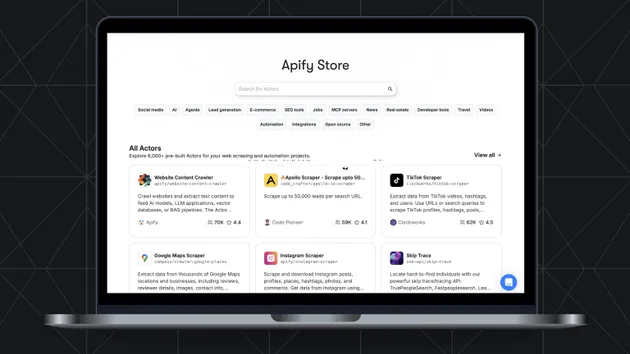
Extract the Actors listed in Apify Store, 21,000+ in total, with titles, descriptions, pricing, total and monthly users, success rate, ratings and categories. Works with Apify MCP and the API.
Pricing
from $0.005 / actor start
Rating
0.0
(0)
Developer

Khadin Akbar
Maintained by CommunityActor stats
0
Bookmarked
8
Total users
4
Monthly active users
3 days ago
Last modified
Categories
Share
What is Apify Store Scraper — Extract All Actor Listings?
Apify Store Scraper is an Apify Actor for analysts, developers, and automation workflows that need structured catalog data from the Apify Store. It accepts category filters, sort order, pricing filters, maintainer scope, an item cap, and optional detail enrichment. Each output record represents one Apify Store actor listing, so one record means one listing with fields such as the actor slug, title, URL, description, developer info, categories, pricing model, entry price, pricing events, user stats, ratings, bookmarks, deprecation status, and scrape timestamp. The result is a dataset you can use for catalog analysis, workflow routing, reporting, and Apify MCP-driven lookups.
Best fit and connected workflows
This Actor fits workflows that start with Apify Store discovery and end with structured catalog analysis. It routes well when you want to:
- review actors by category, pricing model, or maintainer scope
- compare listings by popularity, total users, ratings, and pricing structure
- build a dataset for internal search, reporting, or downstream enrichment
- use Apify MCP to ask about the store and receive structured results
- monitor store listings with repeatable runs and dataset exports
This Actor also works well when a broad store question needs to become a shortlist of actor listings and their metadata.
Practical scenario
Mina, an automation specialist, starts with a request to find paid Developer Tools actors maintained by Apify and ordered by popularity. She sets categoryNames to ["Developer Tools"], pricingModels to PAID, and maintainedBy to apify. The returned records include full_name, url, developer_username, pricing_model, entry_price_usd, and rating_average. Mina uses those fields to shortlist listings for a team review, then opens the matched store pages to compare the README summary and pricing details.
Input fields
| Field | Type | Default | Purpose |
|---|---|---|---|
categoryNames | array | [] | Filter by one or more Apify Store categories. Leave empty for all categories. |
sortBy | string | popularity | Sort order: popularity, newest, lastUpdate, totalUsers, or relevance. |
pricingModels | string | All | Filter by pricing: All, FREE, or PAID. |
maintainedBy | string | All Developers | Narrow results to all developers or apify. |
maxItems | integer | 0 | Cap the number of actors to scrape. 0 returns the full catalog. |
enrichDetails | boolean | true | Add detail-page fields such as publish date, last modified, version, build number, defaults, SEO text, and README summary. |
detailConcurrency | integer | 10 | Set parallel detail fetches per batch, from 1 to 20. |
Focused JSON input example
Output fields
| Field | Type | Purpose |
|---|---|---|
actor_id | string or null | Internal Apify identifier for the actor. |
title | string or null | Store display title. |
full_name | string or null | Actor slug in khadinakbar/apify-store-scraper-name format. |
url | string or null | Direct Apify Store URL. |
description | string or null | Short store description. |
developer_username | string or null | Developer username. |
developer_url | string or null | Developer profile URL. |
is_official_apify | boolean | Indicates whether the actor is built and maintained by Apify. |
categories | array | Categories assigned in the store. |
pricing_model | string or null | Pricing model, such as PAY_PER_EVENT. |
is_free | boolean or null | Free or paid flag. |
entry_price_usd | number or null | Lowest pricing tier value, if available. |
pricing_events | array | Pricing event objects with title, description, and price. |
total_users | number or null | All-time unique users. |
monthly_users | number or null | Unique users in the last 30 days. |
success_rate | number or null | Successful-execution percentage. |
bookmarks | number or null | Saved/bookmarked count. |
rating_average | number or null | Average star rating. |
rating_count | number or null | Total number of ratings. |
picture_url | string or null | Icon image URL. |
is_deprecated | boolean | Deprecation flag from the developer. |
scraped_at | string | ISO 8601 timestamp for the record. |
Illustrative dataset record
How it works
This Actor uses the Apify Store API as its source and paginates through the catalog to collect listing data. When enrichDetails is enabled, it fetches each actor's detail page to add publish date, last modified time, current version, build number, memory and timeout defaults, SEO title, SEO description, and README summary. You can lower enrichDetails for a faster shallow scan or keep it enabled for richer dataset records. detailConcurrency controls how many detail fetches run in parallel per batch.
Pricing
This Actor uses Apify's Pay per event pricing model plus standard Apify platform usage. The record schema includes pricing_model, is_free, entry_price_usd, and pricing_events, so you can review how listings are priced in the store.
Open the live Pricing tab in the Apify Console for current event pricing and platform usage details. For example, if a execution processes one hundred scraped actor records, the event-based charge pattern shown in the Pricing tab applies to those records, and Apify platform usage applies separately for the run.
Use with AI agents (MCP)
This Actor is usable through Apify MCP as a structured tool for Apify Store catalog lookups. An agent can pass filters, retrieve listing records, and use the returned dataset for analysis, routing, and follow-up actions.
Tool description: Apify Store catalog scraper for listing metadata, pricing fields, ratings, user stats, developer information, and optional detail enrichment.
Exact Actor identity: khadinakbar/apify-store-scraper
Find all free AI actors from the Apify Store, sort them by popularity, and return the fields needed to compare titles, pricing, ratings, and developer info.
The dataset returns one record per Apify Store actor listing. full_name is the slug for API and CLI usage, actor_id is the internal identifier, and scraped_at shows when each record was captured. When enrichDetails is enabled, the dataset can include richer listing context from the detail page. Pagination is handled by the Actor, while cost follows the selected pay-per-event pattern shown in the live Pricing tab and the Apify platform usage that applies to the run.
Apify API example
Best results and outcome guidance
Start with a narrow category filter when you already know the part of the store you want to analyze. Use sortBy: "popularity" for broad discovery, sortBy: "newest" for recent listings, and sortBy: "totalUsers" when comparing established actors. Keep enrichDetails enabled when your next step depends on publish date, version, build number, or README summary. Lower maxItems for a quick sample and raise it when you need a broader catalog slice.
Continue the workflow
- Then use Apple App Store All-in-One Scraper to extend Apify Store Scraper — Extract All Actor Listings with a neighboring software ecosystem research source when the brief calls for App Store data.
- Then use Shopify App Store Scraper to extend Apify Store Scraper — Extract All Actor Listings with a neighboring software ecosystem research source when the brief calls for Shopify App Store data.
Design note
I found that the dataset contract separates overview fields from full-detail fields, and the full view includes bookmarks, is_deprecated, and scraped_at alongside the core listing metadata. That makes it practical to document both lightweight discovery and richer detail enrichment from the same Actor.
FAQ
How should I route a category-based research task?
Use categoryNames with one or more store categories, then read full_name, title, and pricing_model from the dataset.
How do I find actors maintained by Apify?
Set maintainedBy to apify and keep sortBy aligned with your review goal, such as popularity or totalUsers.
How do I compare free and paid listings?
Set pricingModels to All, FREE, or PAID, then inspect is_free, entry_price_usd, and pricing_events.
Which field should an API workflow use to call a specific actor later?
Use full_name for CLI and API calls, and actor_id when you need the internal Apify identifier.
Can an AI agent use this Actor for Apify Store lookups?
Yes. Through Apify MCP, the agent can query this Actor, read structured dataset items, and use the returned metadata for routing or analysis.
Responsible use
Use the results for catalog research, workflow routing, analysis, and store discovery. Review returned pricing and listing metadata directly in the Apify Store before taking actions that depend on current store details.