

AI Search Visibility Tracker: ChatGPT & Perplexity
Under maintenancePricing
from $0.01 / 1,000 results
AI Search Visibility Tracker: ChatGPT & Perplexity
Under maintenanceType your brand: the Actor generates buyer prompts, suggests competitors and audits AI search visibility (ChatGPT, Perplexity, Gemini). Mentions, rank, sentiment, citations, trends, an outreach gap list and a client-ready HTML report. Works with any OpenAI-compatible API.
Pricing
from $0.01 / 1,000 results
Rating
0.0
(0)
Developer

Denis Kordyukov
Maintained by CommunityActor stats
0
Bookmarked
1
Total users
0
Monthly active users
3 days ago
Last modified
Features
Share
AI Search Visibility Tracker (GEO/AEO)
Find out whether ChatGPT, Perplexity, Gemini and other AI assistants actually recommend your brand — and what they say about your competitors instead. Just type your brand name: the Actor generates the customer questions, suggests your competitors and produces an audit with a ready-to-action outreach list.
Scores your visibility: mentions, recommendation rate, ranked position, sentiment, citations, share of voice, answer stability — plus weekly trends with deltas, multi-engine and multi-client reports, a gap-to-outreach list and a client-ready HTML report.
Start with one field: zero-config mode
Only brand is required:
- The Actor generates 20 realistic buyer questions itself (best-of lists, comparisons, alternatives, pricing —
promptCountup to 50). - If
competitorsis empty, it asks the AI to identify your top 5 direct competitors. - It checks every prompt, computes the scores and, for every answer where competitors are recommended but you are not, collects the cited pages into an outreach list.
No prompt writing, no competitor research — a complete GEO audit from a single input. Provide prompts/competitors explicitly to take full control.
Why GEO/AEO tracking matters
Buyers no longer Google "best CRM" — they ask ChatGPT. GEO/AEO (Generative Engine Optimization), also called AI search visibility or LLM SEO, is about being visible in those answers. This AI rank tracker gives you the same data as enterprise GEO tools (Profound, Peec AI, Otterly) at the price of a few LLM API calls: set up a weekly schedule per client or product and track your visibility over time.
How it works
- You provide
brand(plus optional aliases),competitors, and a list ofprompts— the questions your customers actually ask. Or let the auto-prompt generator create realistic customer questions for you. - The Actor asks every prompt through one or several engines (
engineslist) — e.g. ChatGPT and Perplexity in the same run. - For each answer it extracts with an LLM extraction pass (regex fallback):
- whether the brand was mentioned and whether it was recommended as an option,
- its position in ranked recommendations (
rankedPosition) and among mentioned competitors (position), - sentiment of the mention (positive / neutral / negative),
- which competitors were mentioned,
- cited sources (URLs) — from engine citations (Perplexity, grounded Gemini) and links inside the answer.
- With
runsPerPrompt> 1 the same prompt is asked several times and the Actor measures answer stability — where your visibility flickers. - The final visibility report (KV key
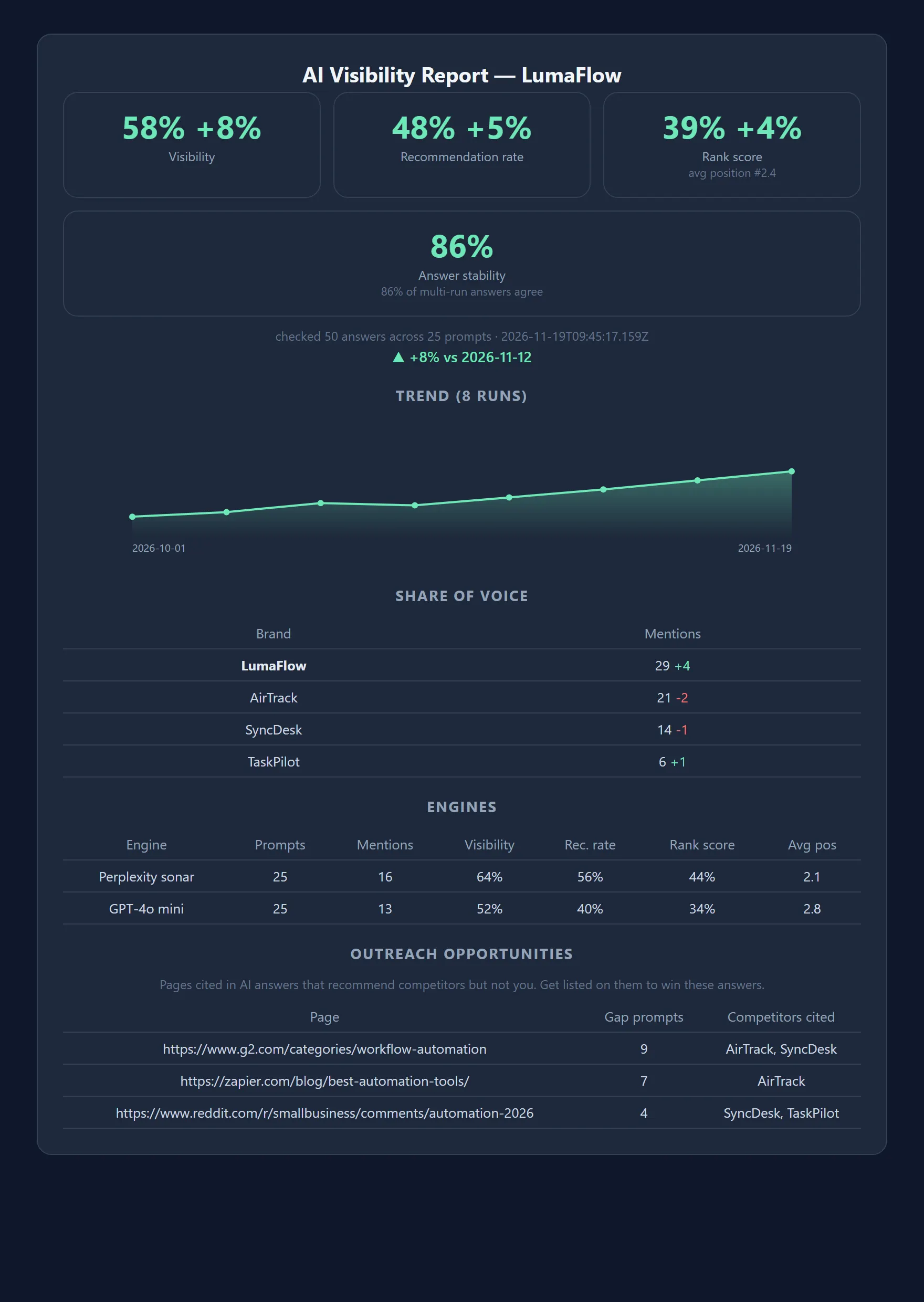
report) aggregates: visibility score (% of answers mentioning the brand), recommendation rate, rank score, per-engine breakdown, share of voice and delta versus the previous run. - A client-ready HTML report (key
report.html) is generated with a visibility trend chart — open it right in the Output tab of the run or share the link with a client. Multi-brand runs get a section per client. - An outreach list (key
outreach) is built from the answers where competitors are recommended but you are not: every cited page is ranked by how many gap prompts cite it — a ready-made outreach target list, not just a dashboard. - Optional
webhookUrl: a JSON summary (scores, deltas per brand, outreach counts) is POSTed when the run finishes — connect Slack, Make, n8n or your backend. - Every brand gets share assets (KV key
share): a public share page with social preview (Open Graph) tags, an "Share on X" button with the score, a data-driven verdict line and a live SVG badge you can embed on your site.
Outreach opportunities (gap list)
Monitoring tells you that you are invisible. The outreach list tells you where to fix it.
For every answer that recommends competitors but not your brand, the Actor collects the cited pages (review sites, roundups, comparison articles, forum threads) and aggregates them:
- KV
outreach— the full list, ranked by the number of gap prompts (gapPrompts). - The HTML report shows the top 10 as an Outreach opportunities table.
- Use it as a pitch list: get listed on these pages and those AI answers start recommending you too. The outreach count is also included in the webhook payload.
Attention score (what makes it actionable)
The report separates three levels: mentioned → recommended (the AI presents you as a viable option) → ranked #1. A brand mentioned only as "overpriced" is visible but not recommended — comparing the two rates over weeks shows whether GEO work actually converts mentions into recommendations.
Metrics
| Metric | Meaning |
|---|---|
| Visibility | % of answers that mention your brand |
| Recommendation rate | % of answers where the AI actually recommends your brand (not just mentions it) |
| Rank score | How high you rank when ranked: 100% = always the #1 recommendation |
| Answer stability | How consistent the AI is across repeated runs of the same prompt |
| Share of voice | Mentions of you vs each competitor |
Supported engines
One universal path — any OpenAI-compatible API. Just change baseUrl + model, or provide an engines list to compare models in one run:
| Engine | baseUrl | Model |
|---|---|---|
| OpenAI (ChatGPT) | https://api.openai.com/v1 | gpt-4o-mini |
| Perplexity Sonar | https://api.perplexity.ai | sonar |
| Gemini | https://generativelanguage.googleapis.com/v1beta/openai | gemini-2.0-flash |
| Groq | https://api.groq.com/openai/v1 | openai/gpt-oss-120b |
| OpenRouter | https://openrouter.ai/api/v1 | any from the catalog |
Plus Google SERP engines in the same engines list:
| Engine | Entry | Auth |
|---|---|---|
| Google AI Overviews | {"provider": "serpapi", "apiKey": "..."} | SerpAPI key (reliable, Google's own AI Overview block) |
| Google AI Mode (experimental) | {"provider": "google-ai-mode"} | Apify residential proxy (proxyGroup, default RESIDENTIAL) |
Mix them freely: [{"name": "ChatGPT", "baseUrl": "...", "model": "...", "apiToken": "..."}, {"provider": "serpapi", "apiKey": "..."}] — the report compares AI assistants and Google AI results side by side. Prompt generation and competitor suggestions require at least one LLM engine, so provide prompts/competitors explicitly when running SERP engines only.
Your API key goes into the apiToken field (stored as a secret). You pay the LLM provider directly at their rates — the Actor adds no markup on top of the event price.
Multi-client (agency mode)
Use the brands list to track several clients in one run — each brand keeps its own prompts, competitors, report, trend history and delta. The HTML report contains a section per brand.
Try it for free
Enable useMockEngine and run — it produces deterministic demo answers without any API key and is not charged under Pay Per Event pricing. Use it to inspect the output format and the report before spending anything.
Cost
You are charged $0.02 per prompt check (the prompt-check event). Examples:
- 25 prompts in one run ≈ $0.50
- Weekly schedule on 25 prompts ≈ $2/month
- 3 engines × 25 prompts ≈ $1.50 per full comparison run
A minimal one-time platform fee applies at each run start. Your own LLM API usage is paid directly to the engine provider (the LLM extraction pass is included in the per-check price — with Groq's gpt-oss-120b it costs well under $0.001 per answer).
Input
Main fields (all options and defaults are in the Input schema below):
| Field | Description |
|---|---|
brand | Brand or product name to track (required) |
brands | Multi-client list: {brand, brandAliases, competitors, prompts} per client |
brandAliases | Extra spellings: domain, abbreviation, alternate form |
competitors | Rivals to detect — enables position, rank score and share of voice. Empty = auto-suggested |
prompts | Questions your audience asks, up to 200 per run. Empty = auto-generated |
autoPrompts + promptCount | Force regeneration of prompts / how many to generate (up to 50) |
autoSuggestCompetitors | Ask the AI to suggest the top 5 competitors when the list is empty (default on) |
engines | Several {name, baseUrl, model, apiToken} — compare models in one run |
baseUrl + model + apiToken | Single-engine mode (backwards compatible) |
runsPerPrompt | 1–3 repeats per prompt for answer-stability tracking |
webhookUrl | POST target for run summaries |
alertThresholdPct | Drop threshold in percentage points — the webhook payload gets alert: true when visibility falls by this much since the previous run |
Output
- Dataset (
results): one item per prompt check — mention, ranked position, recommendation, sentiment, competitors, citations, answer excerpt, extraction method. - KV
report: aggregated JSON report (single object, orbrandsarray for multi-brand runs). - KV
report.html: client-ready HTML report with trend chart, metric cards, share of voice, engine tables and the outreach section. - KV
outreach: gap-to-outreach list — pages cited for competitors but never for you, ranked by gap prompts. - KV
share: public share page URL, X share intent, live badge URL + HTML snippet, and a one-line verdict for every brand. - KV
history: per-brand trend history across runs (up to 52 points, kept across runs in a named store).
Share your score
Every run produces a shareable artifact — turn your GEO audit into a post or put a live badge on your site:
share.shareUrl— a self-contained HTML report page with Open Graph tags: paste the link into X, LinkedIn or Slack and it unfurls with the score and verdict.share.xIntentUrl— a ready "Share on X" link:LumaFlow scores 58/100 in AI search (ChatGPT, Perplexity, Gemini). Is your brand visible?share.roast— a one-line data-driven verdict (e.g. "ChatGPT and Perplexity recommend AirTrack — not LumaFlow. 2 of 6 answers mention you (33/100).").share.badgeUrl+share.badgeSnippet— a live SVG badge ("LumaFlow · AI visibility 58/100"), updated after every scheduled run. Embed it once:
For multi-brand runs the share record is an object keyed by brand — each client gets their own share page and badge.
Weekly tracking recipe
- Run once with your prompts (or leave them empty — they are generated for you).
- Add a schedule (e.g. every Monday 6:00).
- Add your webhook (Slack/Make/n8n) and
alertThresholdPct(e.g. 5) — you'll get scores and deltas after every run,alert: truewhen visibility drops past the threshold, and the HTML report builds a trend line automatically.


