
Google Ads Transparency Scraper: Ad Text & Videos, $0.99/1K
Pricing
from $0.69 / 1,000 ads
Google Ads Transparency Scraper: Ad Text & Videos, $0.99/1K
$0.99/1K ads, no start fee. Full ad text: headlines, descriptions, sitelinks. No login. Every Google ad of a domain, advertiser name or ID from the Ads Transparency Center: YouTube links of video ads, EU reach and targeting. Region, format, platform and date filters.
Pricing
from $0.69 / 1,000 ads
Rating
0.0
(0)
Developer

Laptime
Maintained by CommunityActor stats
0
Bookmarked
2
Total users
1
Monthly active users
a day ago
Last modified
Categories
Features
Share
Google Ads Transparency Scraper gets every Google ad a company runs (Search, YouTube, Display, Shopping, Play and Maps) by domain or advertiser name, with dates, format, days live, ad text and EU reach. No login, no API key.
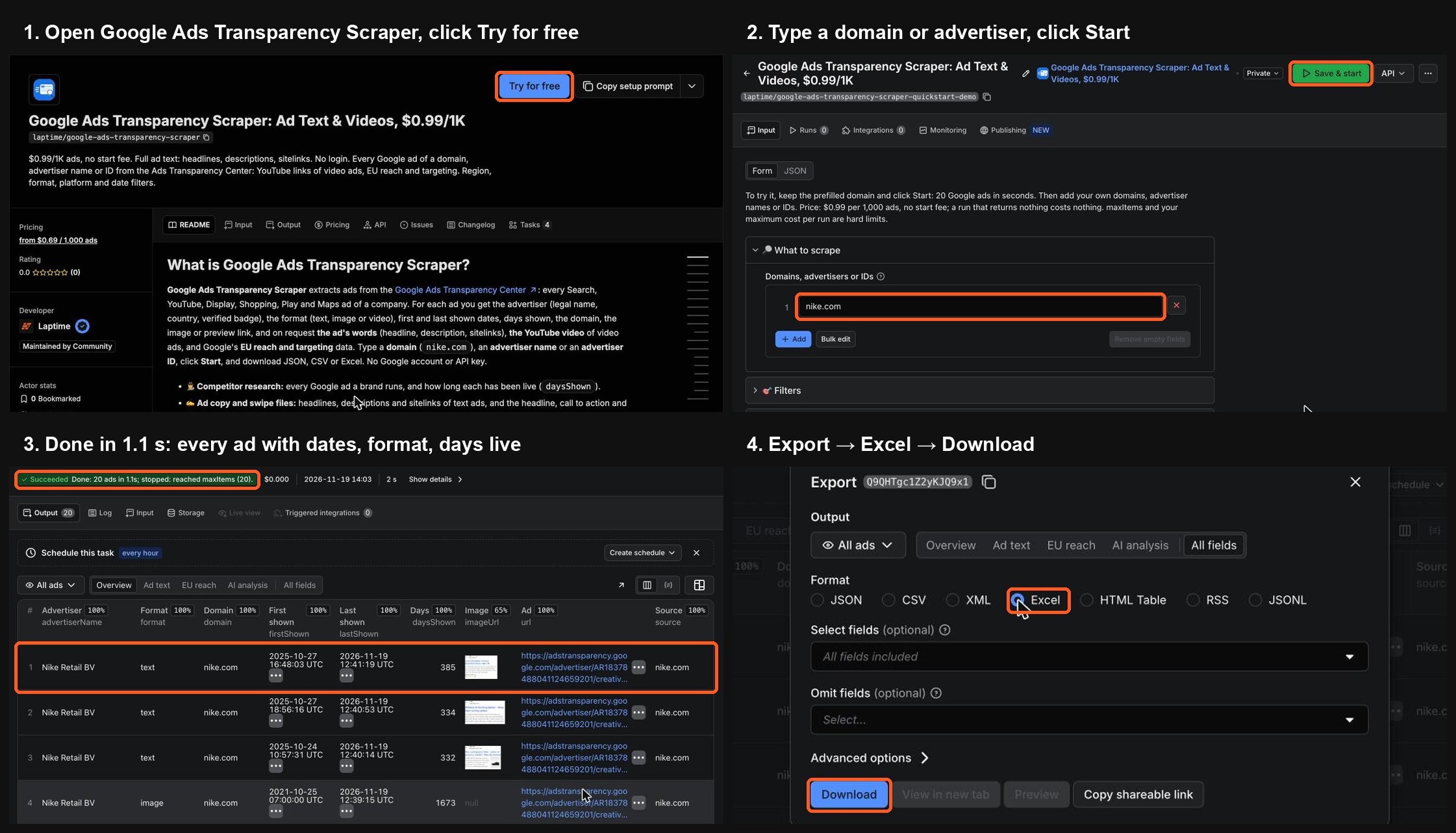
No coding: click Try for free, keep the example input, click Start, export to Excel.
Why this one
- 💰 $0.99 per 1,000 ads, about half the $2.00 of the scraper we tested against: 1,000 ads = $0.99. No start fee; empty runs are free.
- ⚡ Fast: 20 ads in under 5 s, 1,000 ads in a 7.7 s run, and 5,000 ads from 5 companies in 13.3 s (benchmarks).
- ✍️ More ad text: on the same 20 HubSpot ads we returned the words of 11 ads, the other scraper 2; video ads come with their YouTube link (head-to-head).
- 🎯 Ad check for lead lists: "does this company advertise on Google?" for a whole list of domains, one row each.
- 🔔 Only new ads: schedule it and get only new creatives. A run with nothing new costs $0.
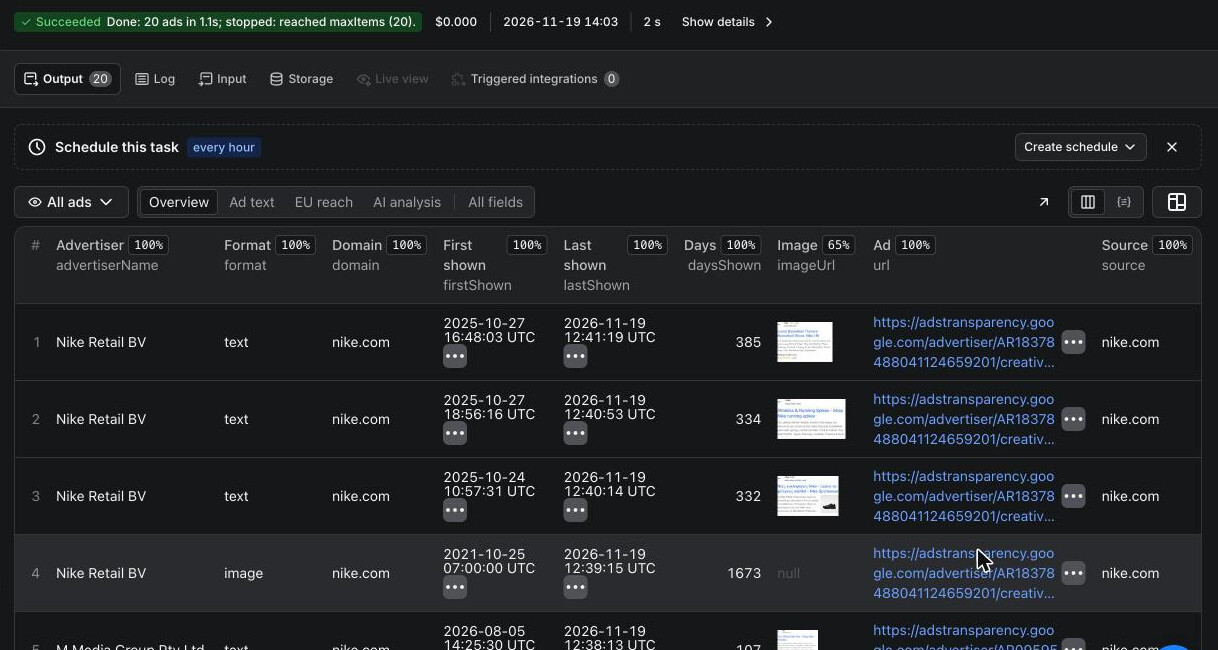
A real run of the default input: 20 nike.com ads in 1.1 s, one row per ad with format, first and last shown, days live and its image.
What is Google Ads Transparency Scraper?
Google Ads Transparency Scraper extracts ads from the Google Ads Transparency Center: every Search, YouTube, Display, Shopping, Play and Maps ad of a company. For each ad you get the advertiser (legal name, country, verified badge), the format (text, image or video), first and last shown dates, days shown, the domain, the image or preview link, and on request the ad's words (headline, description, sitelinks), the YouTube video of video ads, and Google's EU reach and targeting data. Type a domain (nike.com), an advertiser name or an advertiser ID, click Start, and download JSON, CSV or Excel. No Google account or API key.
- 🕵️ Competitor research: every Google ad a brand runs, and how long each has been live (
daysShown). - ✍️ Ad copy and swipe files: headlines, descriptions and sitelinks of text ads, and the headline, call to action and YouTube link of video ads.
- 🎯 Lead generation: "does this company advertise on Google?" for a whole list of domains, one row each (Ad check mode).
- 🔔 Monitoring: schedule it and get only new creatives. A run with nothing new costs $0.
- 🌍 Market research: filter by country, format, platform and dates, and keep only ads with (or without) your keywords.
- 🤖 AI creative analysis (optional): ad category, offer type, hook, angle, offer, audience and funnel stage of every ad with words.
✅ Verified working on 18 November 2026: the default input below returned 20 ads in a 2.6–4.4 s run on Apify (three runs).
What data can you extract?
| 🏢 Advertiser legal name and ID | 🆔 Creative ID and Transparency Center link | 🏷️ Format: text, image or video |
| 📅 First shown, last shown, days shown | 🔗 Advertised domain | 🖼️ Image URL with size, or preview link |
| 🎞️ Every variation of the creative (details) | 🌍 Countries it ran in, with dates (details) | 📊 Google's ad count for the search |
| ✍️ Headline, description, display URL, sitelinks (ad text) | ▶️ YouTube link, channel, duration, call to action (ad text) | 📍 Business name and address of local ads (ad text) |
| 👁️ Times shown in the EU, per country and platform (details) | 🎯 Audience targeting chosen: demographics, location, topics, customer lists (details) | 🏢 Advertiser country, verified badge, Google Ads account and ad group IDs |
Ad check rows carry advertisesOnGoogle, the ad count range, the latest ad's date and a sample ad link.
How to scrape the Google Ads Transparency Center
- Create a free Apify account.
- Open Google Ads Transparency Scraper and add domains, advertiser names or IDs, one per line.
- Pick region, format, platform and dates if you need them.
- Set Max ads and click Start.
- Download the ads as JSON, CSV or Excel, or fetch them via the API.
Quick start input:
How much does it cost?
| Event | Price |
|---|---|
| Ad (or one Ad check row) | $0.99 per 1,000 |
| Creative details (only when you turn it on) | $1.00 per 1,000 |
| Ad text (only when you turn it on, only ads where words or a video are found) | $1.00 per 1,000 |
| AI creative analysis (only when you turn it on, only ads with words; never with your own LLM key) | $1.50 per 1,000 analysed ads |
| You want | Cost |
|---|---|
| 1,000 ads | $0.99 |
| 10,000 ads | $9.90 |
| 1,000 ads with ad text (typically 5–55% have words) | $0.99 + up to $1.00 |
| Ad check of 1,000 domains | $0.99 |
| 1,000 ads with ad text and AI analysis (say 400 with words) | $0.99 + $0.40 + $0.60 = $1.99 |
| A run that finds nothing new | $0 |
Works on the Apify free plan: the $5 of monthly platform credit covers about 5,100 ads with this Actor, no card needed.
Input
- Domains, advertisers or IDs: one per line.
- A domain (
nike.com) returns every advertiser running ads for that site. - A name (
Nike) finds the advertiser with the most ads under that name (Nike, Inc., not a one-ad namesake), plus the same brand's other big accounts. The status message says which one was used. If no account has the name, its website is searched instead (Temu→temu.com). - An advertiser ID (
AR16735076323512287233) picks one exact advertiser. - An adstransparency.google.com link (advertiser, single ad or domain search) keeps the filters set on it (region, format, platform, dates), so you get what the link shows; the form's filters fill in the rest.
- A domain (
- Region: any of the 240+ countries Google offers, or anywhere.
- Ad format: text, image or video.
- Platform: Google Search, YouTube, Shopping, Play or Maps (each row's
searchPlatformsays which). - Shown on or after / before: dates or relative times like
30 daysorlast month. Google's date filter covers the last 12 months. - Max ads for the whole run, Max ads per domain or advertiser, and Advertisers per name (set 1 for only the best match).
- Include creative details: every variation, the countries each ad ran in with first and last shown dates, and for ads shown in the EU the times shown (per country and platform) and the audience targeting.
- Include ad text: the words of text ads (headline, description, display URL, sitelinks), local ads (business name, address) and video ads (headline, long headline, call to action, YouTube link, channel, duration).
- Ad must / must not contain: keep only ads whose advertiser name or website has (or lacks) your words; with Include ad text on, the ad's own words count too. Dropped ads are free.
- AI creative analysis: ad category, offer type, hook, hook type, angle, offer, audience, funnel stage, tone and a summary per ad with words, plus your own questions (
aiCustomLabels). Bring your own OpenRouter, OpenAI, Anthropic or Gemini key and AI is not charged. - Coming from another Google ads scraper? Its input works as is:
queries,domains,searchQuery,startUrls,regionCode,adFormat,platforms,startDate/endDate,maxAdsPerSearch,maxResults,includeAdText,onlyNewAdsandmonitorStoreNameare all understood. - Ad check: one row per input instead of the ads (each row counts toward Max ads).
- Only new ads and Monitor name: for scheduled monitoring.
Output
A trimmed real row:
With Include ad text, a text ad and a video ad (real rows, trimmed):
With Include creative details, ads shown in the EU also carry impressionsMin/impressionsMax (e.g. 15,000–20,000), platforms (["SEARCH"]), platformImpressions, and audienceSelection ({"demographicInfo": "included", "contextualSignals": "included and excluded", "customerLists": "excluded", …}).
Recipes
Qualify a lead list (who advertises on Google in the US):
YouTube creatives of a competitor, last 30 days:
Competitors' free-trial ads, with AI labels:
New-ad monitor (schedule weekly):
Integrations and API
- Schedule runs and use Only new ads to receive fresh creatives.
- Integrate with Make, Zapier, n8n, Google Sheets or webhooks.
- AI agents and MCP: available through the Apify MCP server.
Benchmarks
Runs on Apify, 18 November 2026, 512 MB.
| Job | Ads | Run time |
|---|---|---|
| Default input ×3 | 20 | 4.4 / 3.6 / 2.6 s |
| nike.com | 1,000 | 7.7 s |
| 5 companies × 1,000 | 5,000 | 13.3 s |
| nike.com, US, with details | 200 | 22.9 s |
| hubspot.com, US, with ad text (11 with words) | 20 | 13.4 s |
| shopify.com, with ad text (79 with words), 2 GB | 200 | 24.4 s |
Head-to-head
Same input on Apify, 18 November 2026: hubspot.com, region US, 20 ads, ad text on.
| Ads | Ads with words | Video ads with headline + YouTube link | Price per 1,000 ads + text | |
|---|---|---|---|---|
| Laptime | 20 | 11 | yes | $0.99 + $1.00 |
| scrapesage/google-ads-transparency-scraper | 20 | 2 | no | $2.00 + $2.00 |
Related Actors
The same engine, with a form made for one job:
- Facebook Ad Library Scraper: Meta ads by keyword, page or advertiser, with spend and EU reach, $0.49/1K.
- Google Ads Scraper: a company's Google ads with headlines and sitelinks, $0.99/1K.
Other Laptime scrapers that pair well with this one, all with no start fee:
- Company Data Enrichment: one row per domain: emails, socials, tech stack, DNS, $1.50/1K.
- Google Trends Scraper: interest over time, regions, related queries, Trending Now, from $0.50/1K.
- AI Visibility Tracker: your brand in ChatGPT, Perplexity, Gemini and AI Overviews, $0.03/answer.
FAQ
Is it legal to scrape the Google Ads Transparency Center?
The Transparency Center is a public site Google publishes for anyone, without a login. This Actor reads only that public data. Use it in line with your local law; if unsure, ask a lawyer.
Why do some ads have no ad text?
Google keeps many text ads only as a picture of the ad (imageUrl), and image ads have their words inside the image. Those rows get adTextStatus: "no-preview" and are not charged for text. Ads with a preview script (previewUrl) get their words, and video ads their YouTube link.
Is it reliable?
The Transparency Center's own endpoints answer in about 0.25 s and need no login, cookie or browser. A slow or refused request moves to another IP at once, maxItems and your maximum cost are hard limits, and a run that finds nothing says why instead of returning an empty success. A daily automated check runs the default input and alerts us when it returns nothing or a key field goes empty.
How far back does it go?
Without dates you get every ad Google still shows for the advertiser or domain, some first shown years ago (firstShown, lastShown and daysShown are on every row). Google's date filter only covers the last 12 months, so a date range that ends earlier stops at once with the reason, free.
Which advertiser does a brand name pick?
Many companies share a name: "Delta" is an airline, a faucet maker and dozens of small firms. A name picks the account with the most ads under that name, plus the same brand's other big accounts, and the status message names them ("Nike" = Nike, Inc. (US)). The log lists the other advertisers with that name and their IDs: paste an ID to get exactly that one. To collect every legal entity behind a brand (e.g. "Nike Retail BV" and "Nike, Inc."), search its domain.
Does it cover political ads?
Yes, by advertiser: type a political advertiser's name (Harris for President) or ID, or paste its Transparency Center page, and you get its ads with dates, format and regions.
Feedback and support
Found a bug or missing a field? Open an issue on the Issues tab; we answer within a day.
If Google Ads Transparency Scraper saved you time, a short review on the Reviews tab helps other people find it. We read every one, thank you!


