

Google Trends Scraper: Interest, Regions & Queries, $1.50/1K
Pricing
from $0.90 / 1,000 keyword results
Google Trends Scraper: Interest, Regions & Queries, $1.50/1K
From $0.50/1K, no start fee: $1.50/1K keywords, $0.50/1K Trending Now. No API key. Fastest Google Trends scraper in our head-to-head tests (2 keywords in 3 s), built for Google's throttling: failed keywords are free. Interest over time by country, state and metro, rising queries, comparisons.

What is Google Trends Scraper?
Google Trends Scraper gets Google Trends data without an API key, a login or a browser:
- interest over time, with a ready-made trend summary (rising, falling or stable, change %, peak)
- interest by country, state and US metro area
- related queries (top and rising)
- comparisons of up to 5 terms
- Google's full Trending Now list
It works for any location, time range (including hourly), category and search property (web, news, images, YouTube, Google Shopping). Type your keywords, pick a country, click Start, and download JSON, CSV or Excel.

It reads the same JSON that trends.google.com's own charts load, and it is built for Google's throttling: every IP gets its own cookie, a refused request moves to another IP at once, and keywords Google still refuses get a second round at the end. So runs finish in seconds instead of minutes, they finish, and a keyword that fails is never charged.
- 📈 Keyword and SEO research: 12-month or 5-year interest curves for hundreds of keywords, with rising queries and a ready-made summary: average, peak, change in % and direction, as plain table columns.
- 🆚 Compare brands and products: up to 5 terms on one 0–100 scale, by state or metro area, to see who wins where.
- 🔥 Trend alerts: every trending search in a country, with search volume, growth, start and end time, related searches and news. Schedule it to get only the new ones, optionally only those that mention your words (
trendingIncludeKeywords); a run with nothing new costs $0. - 🤖 Feed dashboards and AI agents: flat rows for spreadsheets and SQL, or one nested row per keyword. The field names match apify/google-trends-scraper.
✅ Verified working on 22 November 2026: the default input (2 keywords, worldwide, 12 months) returned both keywords in 3.2–4.5 s on all 6 runs, start-up included. We re-run the benchmarks every month and update this date.
🛡️ Reliable under load: on 22 November 2026 we ran 500 keywords, 570 keyword × country pairs and 57 five-term comparisons at the same time on one Apify account. Google answered "too many requests" 1,054 times; the runs absorbed every one and delivered 1,127 of 1,127 results. 55 of our 56 QA runs that day succeeded; the other asked for an hourly range Google refuses, which now loads daily data instead (details).
⚡ Fastest in our head-to-head tests: the same 2 keywords took 3.0 s here (median), against 7–20 s on scrapesage/google-trends-scraper and 29–31 s on apify/google-trends-scraper. 500 keywords take 1.5–4 minutes, with every keyword delivered (benchmarks).
💰 $1.50 per 1,000 keywords (each with every data type), $0.50 per 1,000 trending searches. No start fee, no proxy costs, and keywords Google has no data for, or that fail, are free.
🔁 Drop-in for
apify/google-trends-scraper: paste your input as is (searchTerms,isMultiple,timeRange,customTimeRange,geo,category,startUrls,maxItems). You get the same output field names (interestOverTime_timelineData,interestBySubregion,relatedQueries_top...) at a quarter of its Free-plan price (migration guide).
How does it compare to other Google Trends scrapers?
Speed, measured head to head on Apify on 18 November 2026. Every Actor got the same task: "coffee" and "matcha" in the US over the past 12 months, with interest over time, by region and related queries. Time is the run's total time as Apify reports it, start-up included.
| Task | Laptime | scrapesage | apify |
|---|---|---|---|
| 2 keywords: interest over time, by state, related queries | 3.0 s (median, current version; 3.9 s over all 37 runs) | 7.3 s / 19.5 s (2 runs) | 29.0 s / 31.1 s (2 runs) |
| The same with city and metro maps (apify's default) | 11.9 s | – | 29.0 s / 31.1 s |
| Keywords returned | 2 of 2 | 2 of 2 | 2 of 2 |
Run success. apify/google-trends-scraper's own Store statistics showed 81% of its 38,513 runs in the previous 30 days succeeding (19 November 2026); the rest failed, timed out or were aborted. Here, every run of our 22 November 2026 test series with a valid input succeeded, including three big jobs running side by side (details).
data_xplorer/google-trends-fast-scraper takes one keyword per run: 6.5 s for "coffee" alone, plus a $0.025 start fee.
Price per 1,000 keywords at each Actor's Free plan list price (18 November 2026). Every Actor here, ours included, costs the same or less on paid Apify plans.
| Job | Laptime | scrapesage | apify | data_xplorer (fast) |
|---|---|---|---|---|
| 1,000 keywords, all data | $1.50 | $4.00 | $6.00 | $27.00 (1 keyword per run + $0.025 start fee) |
| 1,000 Trending Now searches | $0.50 | $1.50 | n/a | $1.00 + $0.02 per run (separate Actor) |
| A keyword Google has no data for | $0 | $0.004 | $0.006 | $0.027 |
| A keyword Google keeps refusing (429s) | $0 (free row with the reason) | – | – | – |
One price per keyword, not per data point. Several Google Trends scrapers bill every data point as a result: each week of the curve, each region, each related query. A keyword with 12 months of weekly data (53 points), 51 US states and 50 related queries is about 154 billed rows there, and one keyword result here:
| One keyword, 12 months, US states, related queries (≈154 data points) | Price for that keyword | Per 1,000 keywords |
|---|---|---|
| Laptime (per keyword) | $0.0015 | $1.50 |
| $0.25 per 1,000 data points + platform usage | ≈ $0.039 + usage | ≈ $39 + usage |
| $0.45 per 1,000 data points | ≈ $0.069 | ≈ $69 |
| $0.50 per 1,000 data points + $0.01 per run | ≈ $0.077 + $0.01 per run | ≈ $77 + run fees |
Prices are each Actor's Free-plan list price on 18 November 2026; data points counted from our own output for "coffee" in the US. Checked with a run on 18 November 2026: the 12-month curve alone was billed as 53 results ($0.024) by one of these Actors.
What data can you extract from Google Trends?
| 📈 Interest over time (minutes, hours, days, weeks or months) | 🗺️ Interest by country, subregion (state/province) and US metro area (DMA) | 🔍 Related queries: top and rising, with Breakout flagged |
| 🆚 Up to 5 terms on one scale, Google's averages | 🧮 Per-term summary: average, peak and peak date, latest, change %, direction, top region | 🧠 Knowledge Graph topic suggestions (topic ids that track a subject across languages) |
| 🔥 Trending Now: every trend of the last 4 h, 24 h, 48 h or 7 days | 📊 Search volume ("200K+"), growth %, active or ended, start and end time | 📰 Related searches, categories and news stories with pictures |
| 🌍 Any country or subregion, any category, web/news/images/YouTube/Shopping | 🕐 Presets, custom date ranges and hourly ranges | 🔗 A trends.google.com link for every row |
Every field is documented (type, meaning, when it's empty) in the Output tab's schema.
How to scrape Google Trends
- Open the Actor and type your keywords in Search terms, one per line.
- Pick a Location from the list (empty = worldwide; codes like
US-CAwork too) and a Time range. - To compare terms, turn on Compare terms on one chart and write them comma-separated in one line:
coffee, tea, matcha. - Optional sections: several countries at once, exact dates, a category, YouTube/News/Shopping search, trends.google.com links, a Google Sheet, and Trending Now (pick countries).
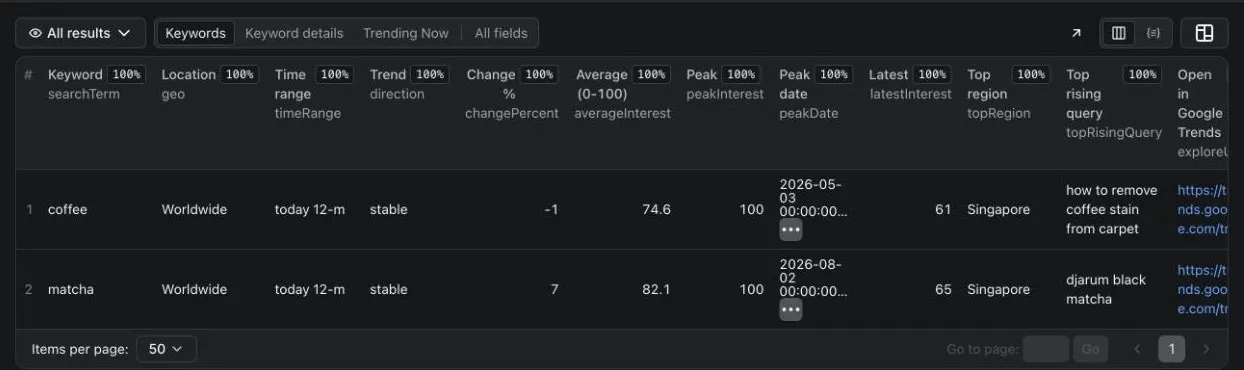
- Click Start. The Keywords table shows each keyword's trend, change % and top rising query; Keyword details has every data point. Download JSON, CSV or Excel, or get the data by API.
Recipes (copy-paste inputs)
Compare 5 AI assistants over 5 years, by US state and metro area
Daily trend alerts: only new trending searches in the US and UK (schedule it daily; a run with nothing new costs $0)
Bulk SEO keywords into a spreadsheet: one row per data point
One keyword in 5 countries in one run: where to launch first (one row and one keyword result per country)
YouTube search interest in the UK, hour by hour for a week
How much does it cost to scrape Google Trends?
You pay per result, at the same price on every plan:
| What | Price |
|---|---|
| Keyword result: one search term, or one comparison of up to 5 terms, with every data type you chose | $1.50 per 1,000 ($0.0015 each) |
| Trending search: one Trending Now row | $0.50 per 1,000 |
| Start fee, proxy, compute | $0 |
| A keyword Google has no data for, a keyword that failed or loaded only partly, filtered trends, trends already delivered (monitoring) | $0 |
Examples:
- 100 keywords with interest over time, by state and related queries: $0.15.
- The full US Trending Now list for 24 hours (about 500 searches): $0.25.
- A daily trend alert for a month in two countries: usually under $1.
Set a maximum cost per run in Apify, and the Actor stops there.
Works on the Apify free plan: the $5 of monthly platform credit covers about 3,300 keywords with this Actor, no card needed.
Input
Everything is optional except something to look up: search terms, start URLs or Trending Now countries. The main fields:
| Field | What it does |
|---|---|
searchTerms | Keywords, one per entry (up to 100 characters each). Topic ids such as /m/02vqfm work too. Case and extra spaces don't matter; duplicates are skipped. |
isMultiple | true = compare comma-separated terms in one entry (up to 5). |
startUrls | trends.google.com explore links (they keep their own q, geo, date, cat and gprop) and Trending Now links. |
timeRange / customTimeRange | A preset (now 1-H … all), or 2024-01-01 2024-12-31, or hourly 2026-11-01T00 2026-11-07T23 (up to 7 days; longer hourly ranges load daily data). |
geo | US, US-CA, US-NY-501, GB, … or a country name (Germany, UK). Empty = worldwide. |
geos | Several locations in one run: every term (or comparison) runs in each, e.g. ["US", "GB", "DE"]. An unknown entry is skipped with a note. |
category, property | A Google category id; web, news, images, youtube or shopping. |
dataTypes, regionLevels | Which data to load (default: interest over time, by region, related queries) and which region maps: countries, states/regions, US metros. |
outputFormat | nested (one row per keyword) or flat (one row per data point). |
trendingGeos, trendingHours, trendingCategory, trendingOnlyActive, maxTrendingPerGeo | Trending Now. |
onlyNew, monitorName | Monitoring: skip trending searches delivered in earlier runs. |
The Input tab explains every field, including the defaults.
Output
One row per keyword (dataType: "keyword"), shortened:
One row per trending search (dataType: "trending"):
In the Output tab, the Keywords view shows one line per keyword (trend, change %, average, peak, latest, top region, top rising query), Keyword details shows every data type, and Trending Now shows the trending searches. RUN_STATS in the key-value store has the run's counts, speed, retries and any errors.
If Google keeps refusing a keyword after the retry round, you still get a row for it, free: dataType: "error" with the reason in error, or, when only part of the data failed, the keyword row with complete: false and missingData saying what is missing. The run's status message counts them.
Integrations and API
Run it from the Apify API, the Python or JavaScript client, or send the results to Google Sheets, n8n, Make, Zapier or Slack through Apify's integrations. AI agents can call it as a tool through the Apify MCP server: https://mcp.apify.com?tools=laptime/google-trends-scraper.
Use Google Trends Scraper as a Google Trends API in Python
JavaScript
Switch from apify/google-trends-scraper
- Copy your input JSON from apify/google-trends-scraper and paste it here.
searchTerms,isMultiple,timeRange,customTimeRange,geo,category,startUrlsandmaxItemsmean the same thing.viewedFrom,maxConcurrency,maxRequestRetries,spreadsheetIdandskipDebugScreenare accepted, and they don't change anything. - Your pipeline keeps reading the same fields:
inputUrlOrTerm,searchTerminterestOverTime_timelineDataandinterestOverTime_averagesinterestBy,interestBySubregion,interestByCity,interestByMetrorelatedQueries_top/_risingandrelatedTopics_top/_rising
- Differences:
- Metros are opt-in. Add
"regionLevels": ["subregion", "metro"]to get them, at about 2 s more per keyword. - Every related entry carries a
termfield (handy for comparisons). - There are new fields:
summaryand its one-term columns (direction,changePercent,averageInterest…),exploreUrl,noData,completeandmissingData.
- Metros are opt-in. Add
Coming from another Google Trends scraper? These input names are read as they are too: keywords, keyword, timeframe, predefinedTimeframe, countries, searchType, compareTerms, trendingSearchesGeo, trendingSearchesCountry, maxResults, monitorKey, and compare_keywords: true, trends_urls, predefined_timeframe, common_geo, gprop.
Benchmarks
Measured on Apify on 18 November 2026 with the default memory (512 MB) and Apify datacenter IPs (residential only as a fallback).
Times are the Actor's own scraping time; Apify's start-up adds about 1 s. Retries count Google's "too many requests" answers, each sent again at once on another IP.
| Job | Results | Time | Throughput | Retries | Success |
|---|---|---|---|---|---|
| Load test, 22 November 2026 (version 0.4): three jobs at once on one account | |||||
| 500 keywords, worldwide | 500 | 182 s | 2.7 keywords/s | 438 | 500 of 500 |
| 285 keywords × US and UK | 570 | 218 s | 2.6 keywords/s | 457 | 570 of 570 |
| 57 five-term comparisons, US, 5 years, states and metros | 57 | 87 s | 0.7 comparisons/s | 159 | 57 of 57 |
| Default input during the load test | 2 | 2.0 s | – | 0 | 2 of 2 |
| Default input: 2 keywords, worldwide, 12 months (version 0.3, 3 runs, 19 November 2026) | 2 | 1.2–3.2 s | – | – | 3 of 3 |
| Default input: 2 keywords, US, 12 months (version 0.1, 6 runs) | 2 | 1.8–4.1 s (median 2.3 s) | – | 0–1 | 6 of 6 |
| Default input, all 37 runs during development | 2 | 1.0–18 s (median 3.2 s) | – | 0–26 | 37 of 37 |
| 10 keywords | 10 | 7.6 s | 1.3 keywords/s | 11 | 10 of 10 |
| 100 keywords (2 runs) | 100 | 14.4 s, 18.0 s | 5.6–6.9 keywords/s | 0, 24 | 200 of 200 |
| 500 keywords (3 runs) | 500 | 93 s, 179 s, 231 s | 2.2–5.4 keywords/s | 72–339 | 1,500 of 1,500 |
| Compare 5 terms over 5 years, by state and metro | 1 comparison | 10.9 s | – | 2 | 1 of 1 |
| Trending Now, US, 24 hours | 516 trends | 2.3 s | 224 rows/s | 0 | 516 of 516 |
| Trending Now, 5 countries, 7 days | 11,396 trends | 5.3 s | 2,150 rows/s | 0 | 11,396 of 11,396 |
| Trend alert, US + UK, second run (nothing new) | 0 | 2.5 s | – | 0 | $0 charged |
The 500-keyword runs used $0.005–0.056 of Apify platform usage, which we pay. You pay only the per-result price above.
Related Actors
Laptime scrapers that pair well with this one, all with no start fee:
- Pinterest Trends Scraper: top, growing and seasonal searches for 34 regions, $0.49/1K.
- AI Visibility Tracker: your brand in ChatGPT, Perplexity, Gemini and AI Overviews, $0.03/answer.
- Google Ads Scraper: a company's Google ads with headlines and sitelinks, $0.99/1K.
- Reddit Search Scraper: keyword search across Reddit or inside one subreddit, from $0.49/1K.
FAQ
Is it legal to scrape Google Trends?
Google Trends data is public and aggregated: it contains no personal data, only relative search interest. This Actor reads the same public data trends.google.com shows any visitor, with no login. Check that your use complies with Google's terms and the laws that apply to you, and if in doubt, ask a lawyer.
How many keywords can I scrape?
As many as you like: the Actor spreads them over many IPs. 100 keywords take about 15 seconds. For very large jobs, split them into runs of a few thousand.
Why are the values different from what I see on trends.google.com?
Google Trends values come from a sample of searches. Google itself returns slightly different numbers for the same query from one request to the next, especially for small regions and short periods. The shape of the curve and the rankings stay the same.
Why are related topics and city values empty?
Google currently serves related topics and city-level values only to signed-in users, so every scraper gets an empty topics list and cities without numbers (we checked 285 keywords: none had topics). Related topics are therefore off by default; if you ask for them or for cities, missingData explains the empty list, and the keyword is still delivered in full. Related queries always come back, US metro areas and states give local detail, and Topic suggestions gives the Knowledge Graph topics for each term.
What happens when Google throttles?
Google answers busy clients with "too many requests" (HTTP 429). The Actor sends the request again at once on another IP, and keywords that still fail get a second round at the end of the run on rested and fresh IPs. Anything Google keeps refusing after that comes back as a free row with the reason (dataType: "error", or complete: false when only part of the data failed), and the status message counts them. You never pay for a keyword that failed.
Why does a keyword say noData: true?
Google has too few searches for it with these settings. Try a longer time range, a wider location or a broader term. Those rows are free. A keyword with only a few spikes gets direction: "sparse": too few searches to call it a trend.
Can I get only new trending searches since my last run?
Yes. Set onlyNew: true and a monitorName, then schedule the task. Trending searches you've already received are skipped, and a run with nothing new costs nothing.
Is it reliable?
Yes, and we test it under load. Google answers busy clients with "too many requests"; this Actor gives every IP its own cookie, paces requests, sends a refused request again at once on another IP (residential when datacenter IPs are busy), and gives keywords that still fail a second round at the end. On 22 November 2026:
- Three big jobs at the same time on one account (500 keywords; 285 keywords in the US and the UK; 57 five-term comparisons over 5 years with state and metro maps): 1,127 of 1,127 results in 89–219 s, while Google answered "too many requests" 1,054 times.
- Every option of the input form, 50+ runs with odd input too (emoji, Chinese, Arabic and Cyrillic terms,
AT&T,c++, 100+ character terms, unknown countries, broken links): every valid run succeeded; bad entries got a clear note or a free error row instead of a crash. - The default input: 3.2–4.5 s on all 6 runs (start-up included), also while the big jobs were running.
A run that can't get any data fails with the reason instead of ending empty, and a daily automated check runs the default input and alerts us when it returns nothing or a key field goes empty.
Google Trends scraper not working?
Open an issue on the Issues tab with your run link: we answer within a day. Each run's RUN_STATS record shows what Google answered.
Feedback and support
Found a bug or missing a field? Open an issue on the Issues tab: we answer within a day.
If Google Trends Scraper saved you time, a short review on the Reviews tab helps other people find it. We read every one, thank you!


