

Google Flights Scraper: Fares, Calendar & Sellers, $0.50/1K
Pricing
from $0.33 / 1,000 flights
Google Flights Scraper: Fares, Calendar & Sellers, $0.50/1K
$0.50/1K flights, no start fee. One of the fastest Google Flights scrapers, with price alerts. No login. Input airports or cities and dates: one-way, round trip, multi-city, cheapest-date calendar, price insight, every seller's fare, nearby airports, Anywhere.
Pricing
from $0.33 / 1,000 flights
Rating
0.0
(0)
Developer

Laptime
Maintained by CommunityActor stats
0
Bookmarked
2
Total users
1
Monthly active users
4 days ago
Last modified
Categories
Features
Share
Google Flights Scraper turns Google Flights into a spreadsheet of fares: type a route like JFK → LAX and dates, click Start, export to Excel. Every itinerary with price, times, stops, airlines, CO2 and Google's price insight. No login.
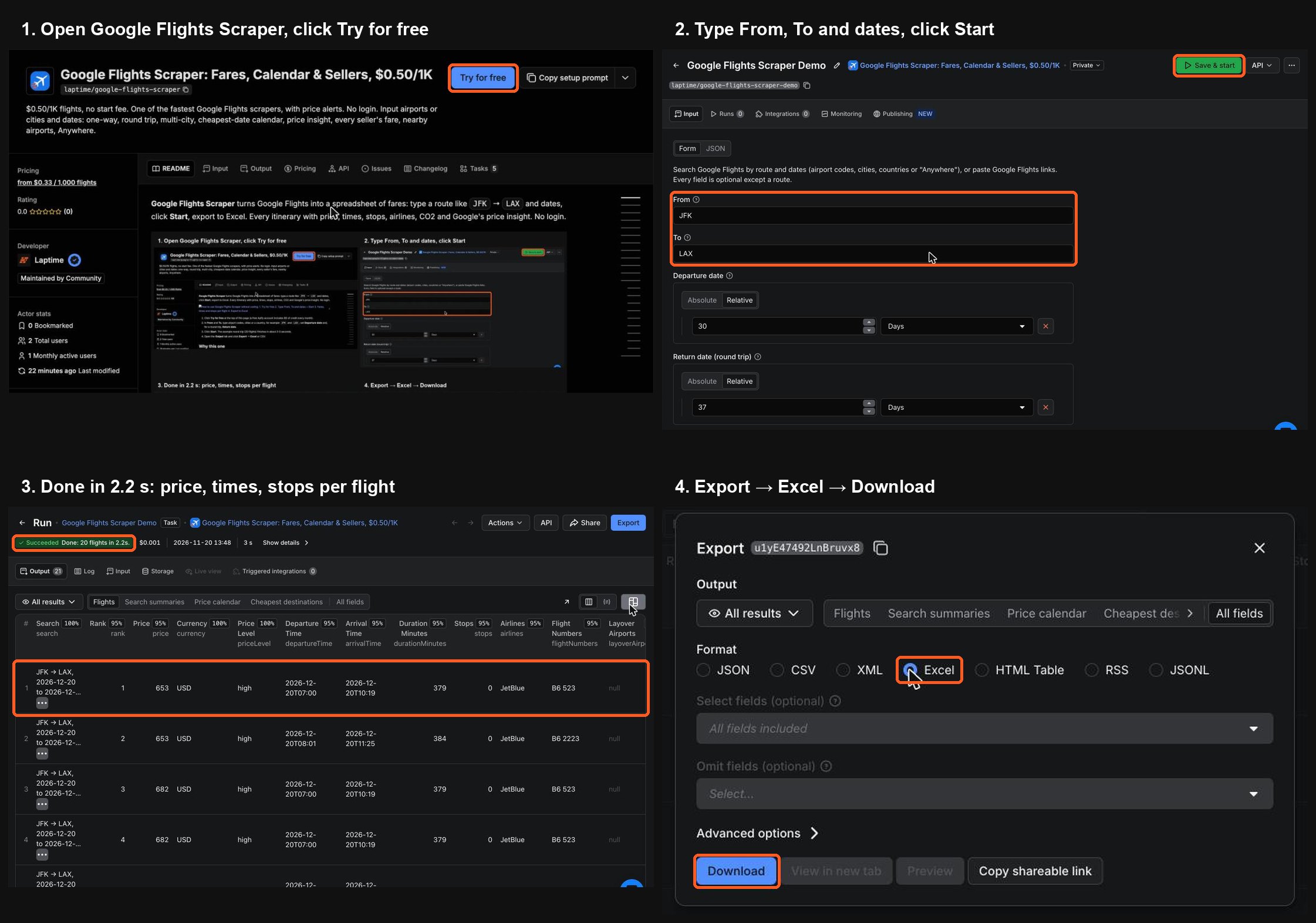
- Click Try for free at the top of this page (a free Apify account includes $5 of credit every month).
- In From and To, type airport codes, cities or a country, for example
JFKandLAX; set Departure date and, for a round trip, Return date. - Click Start. The example round trip (20 flights) finishes in about 1–3 seconds.
- Open the Output tab and click Export → Excel or CSV.
Why this one
- 💰 $0.50 per 1,000 flights, no start fee, search summaries free: the example round trip (20 flights) costs $0.01. Half the price of the most used Google Flights scraper ($1 per 1,000).
- ⚡ One of the fastest: a 20-flight round trip in 1.2–3.4 s, 10 round trips (200 flights) in 6.1 s, 40 routes in 5.1 s (Apify, 19 November 2026, benchmarks).
- ✈️ Whole trips, not half trips: round trips come as outbound + return pairs with the trip total; multi-city too.
- 📈 Is it a good price? Google's typical range, the price level, 60 days of price history and a plain book now / wait signal on every search, free.
- 🔔 Price-drop alerts to Slack, Discord or any webhook, only when a fare drops; a run where nothing changed costs $0.

| Rank | Price | Outbound | Return | Stops | CO2 | Price level |
|---|---|---|---|---|---|---|
| 1 | $605 | JetBlue B6 618, B6 1187 · 19 Dec 18:30 → 00:59 | B6 2388, B6 117 · 26 Dec 16:30 | 1 | 985 kg | high (typical $285–580) |
| 2 | $713 | JetBlue B6 2223 · 19 Dec 08:01 → 11:25 | B6 2388, B6 117 · 26 Dec 16:30 | 0 | 920 kg | high |
A real run of the example input (JFK ⇄ LAX, 19–26 Dec 2026). The search summary said: "605 USD is above Google's typical range (285–580 USD) and was 409 USD within the last 61 days" → wait; a cheaper nearby date: 16 Dec at $383.
Common mistakes
- You get fewer flights than Flights per search → Google lists only that many for the route and filters; loosen Stops, Max price or the time windows.
- A city returns flights from airports you didn't expect → a city searches all its airports (New York = JFK, EWR, LGA). Type airport codes to pin one.
- Children or infants return fewer itineraries → Google prices some itineraries for children only after you pick them; adults-only shows the full schedule.
Questions or problems? Open an issue (we read every one and usually answer within a few hours). Need a custom version (another site, extra fields, a private build)? Ask in an issue.
What is Google Flights Scraper?
Google Flights Scraper extracts flight prices from Google Flights for any route and dates: every itinerary with total price, departure and arrival times, duration, stops and layovers, airlines and flight numbers, aircraft, legroom and Wi-Fi, CO2 against the route's typical, and a link that opens the same flight on Google. Each search also gets a free summary with Google's price insight (typical range, low / typical / high, 60-day history) and our booking advice. Type airport codes, cities, a country or "Anywhere", pick dates, click Start, and download JSON, CSV or Excel. No login, no API key, no browser.
- 💸 Fare tracking and price alerts: schedule a route and get a Slack or Discord message only when the fare drops or falls under your target.
- 📅 Cheapest dates: the cheapest fare for every departure day for up to 330 days (round trips keep your trip length), ranked, at $0.10 per 1,000 days.
- 🌍 Cheapest destinations: "Anywhere", "Europe" or "Asia" as the destination lists the cheapest fare to every place from your airport (Google Flights Explore as data).
- 🧾 Sellers and fares: for the top flights, every airline and travel agency price with the fare name (Basic Economy, Main Cabin…), checked-bag fees and booking links.
- 📊 Travel apps, research and AI agents: many routes per run, flat documented fields, an API and an MCP server.
Use from Claude, Cursor or any MCP client
Add https://mcp.apify.com?tools=laptime/google-flights-scraper as a remote MCP server and sign in to Apify (Claude: Settings → Connectors → Add custom connector). Claude Code:
Then ask, for example: "Find the cheapest round trip from Amsterdam to Lisbon for a long weekend next month, and say if the price is good" or "Which cities in Europe can I fly to from Chicago for under $500 in March?"
Google Flights API: route and dates in, JSON out
One request runs the Actor and returns the rows as JSON:
- Many routes: put them in
routes(up to 200 searches per run, 6 at a time); 40 routes return in about 5 seconds. - Stable output: every row has
recordType(flight,search-summary,price-date,destination) and the same fields every time (null when Google shows nothing). - Relative dates (
"30 days","2 weeks") keep scheduled runs valid forever. - Why not an official API: Google has no public Google Flights API (the QPX Express API closed in 2018).
Price-drop alerts (recipe)
- Fill From, To and the dates (relative dates like
60 dayskeep working on a schedule). - Set a Monitor name (e.g.
nyc-london), turn on Only new flights and changed prices, optionally set Alert only below this price. - Paste your Slack or Discord webhook in Alert webhooks, save as a task and add a daily schedule.
You get one message per run, only when a fare dropped (by at least Min price change, default 1) or fell under your target. Monthly cost example: one route checked daily with 20 flights ≈ 600 flights a month ≈ $0.30/month at most, and $0 on days when nothing changed.
Input
Every field is optional except a route. Accepted places: airport codes in any case (JFK, jfk), several (JFK,EWR), metro codes (NYC, LON), cities in English or their own language (New York, München, 東京, Portland, Maine), countries (Japan = its main airports), airport names (Schiphol) and, as the destination, Anywhere or a continent. Small typos are corrected (Londn → London) and said in the log. Dates: YYYY-MM-DD, Dec 20 2026, 12/20/2026, 20.12.2026 or relative (30 days, 2 weeks, tomorrow), up to about 330 days ahead. An entry that can't run (unknown place, past date, same origin and destination) gets a free row with the reason in error; the other searches still run. Via the API, a search without maxResults returns 20 flights.
| Field | What it does |
|---|---|
origin, destination | Airport, city, country; Anywhere/continent as destination = cheapest destinations. One per line for several. |
departureDate, returnDate, tripLength | Dates (absolute or relative). No return date = one-way. |
routes | Many searches: [{"origin","destination","departureDate","returnDate"}] or "JFK-LAX 2026-12-19". |
multiCityLegs | One multi-city ticket: [{"origin","destination","date"}, …]. |
startUrls | Google Flights search links (with tfs=, or ?q=Flights to LAX from JFK on …); route, dates, cabin and travellers are read from them, and their currency when Currency is left at USD. |
cabinClass, adults, children, infantsOnLap, infantsInSeat | Cabin and travellers (up to 9). Prices are the total for all travellers. |
maxStops, airlines, excludeAirlines, maxPrice, maxDurationHours, departureTimeFrom/To, arrivalTimeFrom/To, checkedBags, carryOnBag, excludeBasicEconomy, lessEmissionsOnly, maxLayoverHours, sortBy | Google's own filters (airlines also take ONEWORLD, SKYTEAM, STAR_ALLIANCE). |
maxResults | Flights per search (default 20, up to 300). |
returnFlights | Round trips: how many top outbounds get every return flight (default 3). |
bookingOptions | Sellers, fares and bag fees for the top N flights. |
calendarDays, calendarOnly | Cheapest fare per departure day (up to 330). |
nearbyAirports, nearbyRadiusKm | Also search airports within the radius (same country). |
currency, country, language | Market: prices and sellers differ by country. |
monitorName, onlyChanged, minPriceDrop, alertBelowPrice, alertWebhookUrls | Price tracking and alerts. |
aiVerdict | Optional AI verdict per search. |
maxItems | Hard cap on charged rows for the whole run. |
Output
Four kinds of rows (recordType), every field documented in the dataset schema, with views Flights (route, total price, local times, airline, stops, return flight, link), Flight details, Search summaries, Price calendar and Cheapest destinations. price is always the total for all travellers (pricePerTraveller divides it); times are local at each airport, so an overnight arrival shows the next day's date.
flight (one itinerary; a round trip is an outbound + return pair), real row, shortened:
With bookingOptions, the top flights also carry bookingOptions (seller, price, fare name, checked-bag fees, link), cheapestSeller and fareNames. With a monitor: monitorStatus (new / changed / unchanged), previousPrice, priceChange.
search-summary (one per search, free): cheapestPrice, cheapestFlight, fastestFlight, nonstopAvailable, priceLevel, typicalPriceLow/High, bookingAdvice (book_now: below the typical range or at its 60-day low; wait: above it and ≥10% cheaper within 60 days; else typical) with bookingAdviceReason, priceTrend, lowestPrice60Days, priceHistory, cheapestNearbyDate/Price, cheapestCalendarDate/Price, the AI verdict when on, and error when a search failed, found no flights (with the reason, e.g. no non-stop flights on the route) or was skipped.
price-date: departureDate, returnDate, weekday, price, priceLevel, isCheapest, rankByPrice, link. destination: destination, country, airport, price, dates, airline, stops, duration, coordinates, image, link.
Pricing
Pay per event, Apify platform usage included, lower prices on paid Apify plans:
| Event | Price per 1,000 | Charged when |
|---|---|---|
flight | $0.50 (down to $0.33) | a flight row is delivered |
booking-options | $1.00 | a flight row carries its sellers (only with bookingOptions) |
date-price | $0.10 | a calendar day is delivered |
destination | $0.30 | an explore destination is delivered |
ai-verdict | $1.00 | a search gets an AI verdict (only with aiVerdict, never with your own key) |
Search summaries, failed searches, filtered and unchanged monitored flights are free. No start fee.
Examples: the example round trip (20 flights) ≈ $0.01. 1,000 flights ≈ $0.50. A 60-day calendar for 10 routes ≈ $0.06. Top 5 flights with every seller on 10 routes ≈ $0.15. Works on the free plan: $5 of monthly credit covers about 10,000 flights. Cap any run with Maximum cost per run in the run options.
Ready-made examples
- Flight price-drop alert to Slack or Discord (daily)
- Cheapest dates to fly: 60-day price calendar
- Cheapest destinations from your airport (Anywhere)
- Compare airline and agency prices, fares and bag fees
- Fares for many routes in one run
Benchmarks
Measured on Apify on 19 November 2026 (tools/benchmarks/google-flights-bench.sh), default memory. "Scrape" is the work after start-up; "run" is the total time Apify reports.
| Job | Scrape | Run | Result |
|---|---|---|---|
| Example input (JFK ⇄ LAX round trip), 9 runs | 1.2–3.4 s (one run 27 s, a slow retry) | 3.0–5.0 s | 20 flights each time |
| 10 round trips | 6.1 s | 7.6 s | 200 flights |
| 40 one-way routes | 5.1 s | 6.7 s | 406 flights, 40 summaries |
| 2 transatlantic routes, up to 100 flights each | 11.3 s | 12.8 s | 108 flights |
| One-way + 60-day calendar + sellers for 3 flights + an "Anywhere" search | 13.4 s | 15.0 s | 10 flights, 60 days, 10 destinations |
| Monitored route, second run with no change | 1.2 s | 2.8 s | 0 rows, $0 |
Platform cost per 1,000 rows on these runs: $0.005–0.03, included in the price.
Switch from another Google Flights Actor
Your old input works as is. Understood names: origin/destination, departure_id/arrival_id, outbound_date/return_date, departDate, travel_class, max_stops, hl/gl, market, searches and routes lists, multiCityLegs/multi_city_json, startUrls/searchUrls/flightUrl, maxItems/limit, exploreOrigin, returnFlightsTop, maxBookingResolutions, fetch_booking_options, priceGraphDays, onlyNewSinceLastRun, targetPrice. The run log lists the names it understood.
FAQ
Is this cheaper than other Google Flights scrapers?
Yes for what you get: $0.50 per 1,000 flights with no start fee, half of the most used Google Flights scraper ($1 per 1,000) and a quarter of others at $2 per 1,000 plus a start fee (Free-plan list prices, 19 November 2026). Round trips are priced per whole trip, search summaries with the price insight are free, and the calendar costs $0.10 per 1,000 days.
How many flights can I get per search?
Up to 300 (maxResults). Google typically lists 10–150 itineraries per route and date; long lists come through Google's own "all flights" answer.
Does it do round trips and multi-city properly?
Yes. Round trips: the top returnFlights outbounds (default 3) each get every return flight, and each pair is a row with the trip total, sorted by price. Multi-city: every leg is chained into a whole ticket. Multi-city answers come slower from Google (expect 30–60 s).
How does the "best time to book" signal work?
It uses Google's own data for your exact search: the price against Google's typical range and the last ~60 days of prices. book_now when the price is below the typical range or at its 60-day low; wait when it is above the range and was at least 10% lower within 60 days; otherwise typical. The reason, with the numbers, is in bookingAdviceReason.
What does the AI option add?
With AI on, each search gets aiVerdict (great_deal, good_price, fair_price, expensive, very_expensive), aiBestOption (which of the top flights to book, balancing price, time, stops and layovers) and a one-line aiReason. It costs $1 per 1,000 searches; with your own LLM key it's not charged.
Why are some prices or itineraries missing?
Google shows no price for some itineraries (sold out, or priced only after you choose a flight); those rows have price: null. Parties with children or infants get fewer pre-priced itineraries. Nearby-airport and multi-airport searches don't get Google's typical price range.
Can I cap what a run costs?
Yes: set Maximum cost per run in the run options, or maxItems. The run stops cleanly before going over and says so.
Is it reliable?
It reads the same data Google Flights' own page loads, through two routes (Google's flights API and the search page), and retries refused or slow requests on other IPs at once. A search that still fails is listed in the summary and RUN_STATS and costs nothing; a run with no results at all fails with the reason instead of finishing empty.
Is it legal to scrape Google Flights?
It reads public flight prices only, without logging in, and collects no personal data. You are responsible for how you use the data. Unofficial; not affiliated with Google.
Laptime tools
Travel
- Google Flights Scraper (this tool) – fares, calendar, sellers and alerts, $0.50/1K
- Google Hotels Scraper – every booking site's price per hotel, price calendar, $1/1K
- Google Trends Scraper – search interest for destinations and anything else
More
- Reddit Scraper – posts and comments, one of the fastest
- Google Jobs Scraper – job listings from Google
- All Laptime scrapers: apify.com/laptime
Questions or problems? Open an issue (we read every one). Need a custom version? Ask in an issue.
Found it useful? A short review on this page helps other travellers and developers find it.


