

Telegram Channel Monitor — Public Channel Posts Scraper
Pricing
from $1.50 / 1,000 posts
Telegram Channel Monitor — Public Channel Posts Scraper
Scrape and monitor public Telegram channels with no login or API key. Get posts with text, views, reactions, media, links, forwards and replies. Filter by date or keyword, or schedule it with 'only new posts' for alerts and a webhook.
Pricing
from $1.50 / 1,000 posts
Rating
0.0
(0)
Developer

LatentLark
Maintained by CommunityActor stats
0
Bookmarked
2
Total users
1
Monthly active users
27 minutes ago
Last modified
Categories
Share
Scrape and monitor public Telegram channels. You don't need a login, phone number or API key. Give it channel names or links. Each post comes back as one clean row with text, date, views, reactions by emoji, media, links, hashtags, mentions, forwards, replies, polls and edit status.
Schedule it with Only new posts to get just the posts published since the last run, with an optional webhook to Slack, Zapier, Make or n8n.
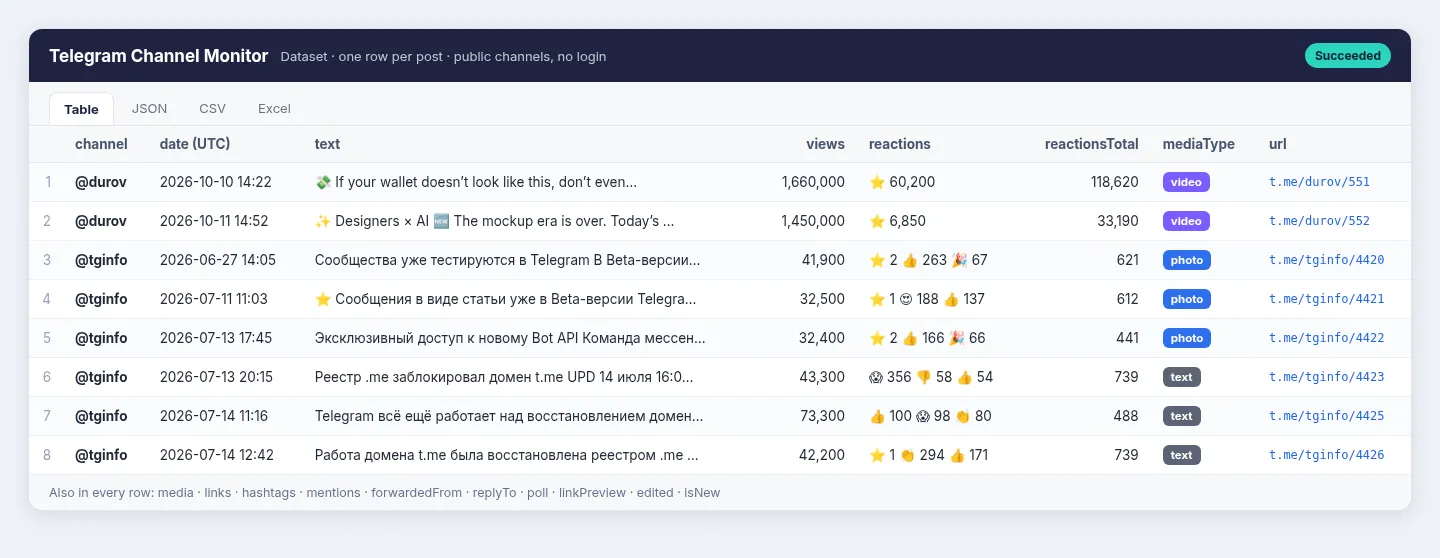
Real output from a test run. Built and maintained by LatentLark.
Quick start (first run in about 30 seconds)
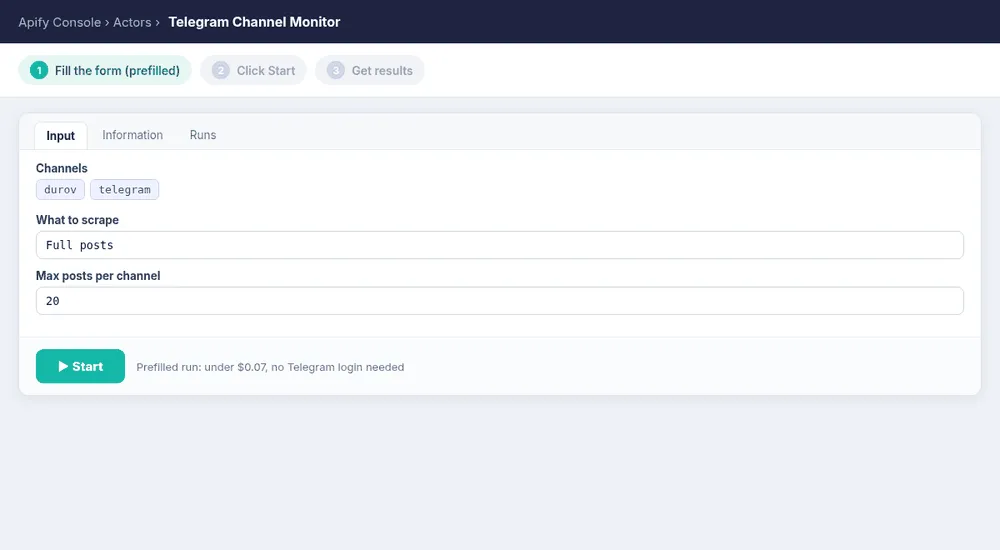
- Click Try for free (or Start in Console). The form is prefilled with the
durovandtelegramchannels and 20 posts per channel. - Click Start. You get up to 40 posts in the Output tab for less than $0.07.
- Replace the channels with your own. Usernames,
@namesandt.melinks all work. - For monitoring, set What to scrape to Only new posts since last run, choose a Monitor name, then Save as task and add a Schedule (for example hourly). Add a Webhook URL if you want each batch of new posts pushed to Slack, Zapier, Make or n8n.
How the first run looks (fill the form, click Start, get results):
What you can do with it
- News and crypto alerts: watch breaking-news, exchange and project channels and get new posts within minutes of your schedule.
- Brand and keyword monitoring: track mentions of your product, ticker or competitor across many channels with include and exclude keywords.
- Market and media research: export a channel's history with views and reactions to find the posts with the most engagement.
- AI and RAG pipelines: feed clean post text, links and dates into LLM summaries, sentiment analysis or a vector database.
- Channel due diligence: pull exact subscriber counts, descriptions and verified status for a list of channels.
Input
| Field | What it does |
|---|---|
channels | Usernames (durov), @names or links (https://t.me/durov, https://t.me/s/durov, https://t.me/durov/123). There is no limit on how many. |
mode | full (newest first, back through history), lastNDays, fromDate (date range with fromDate / toDate), or onlyNew (monitoring). |
maxPostsPerChannel | Cap per channel and run (default 100; 0 = no limit). |
includeKeywords / excludeKeywords | Case-insensitive match on the text, link previews, polls and file names. |
messageTypes | e.g. photo, video, album, document, audio, voice, poll, link, text. Empty = all. |
minViews | Only keep posts with at least this many views. |
includeChannelProfile | Adds one profile row per channel with the exact subscriber count, description, photo and verified flag. |
monitorKey | Name of the saved state for onlyNew (use one per monitor). |
webhookUrl | Optional: POST the run summary and up to 100 new posts as JSON when the run finishes. |
Example inputs
Export the last 30 days of two channels with channel profiles:
Scheduled keyword monitor with a webhook (replace the webhook URL with your own):
Output
One dataset item per post:
Posts can also include document (file or audio title and size), poll (question, type, options with percentages), linkPreview (site, title, description, image), cashtags, isNew (in onlyNew mode) and textHtml (optional). With includeChannelProfile, a row with "type": "profile" is added for each channel: title, subscribers, description, verified, entityType (channel or group), photoUrl, and photo, video and link counters. A per-channel SUMMARY record (pages fetched, channels without a preview, errors) is written to the run's key-value store.
How monitoring works
In onlyNew mode the Actor remembers the last post ID per channel under your monitorKey. The first run returns the latest firstRunMaxPosts posts (20 by default) per channel as a baseline. Every later run returns, and charges for, only posts published since then. Schedule it every 15 minutes, hourly or daily.
Pricing
Pay per event, no subscription:
| Event | Price |
|---|---|
| Actor start (per run, at the default 256 MB memory) | $0.005 |
| Post saved | $0.0015 ($1.50 per 1,000 posts) |
| Channel profile saved | $0.001 ($1 per 1,000 profiles) |
Example: an hourly onlyNew check on 20 channels that finds 30 new posts costs about $0.05 per run. Posts dropped by your filters or by onlyNew are not charged. Set a maximum cost per run in Apify and the Actor stops cleanly when it reaches it.
Limitations
- Works with public channels that have a web preview (
t.me/s/<name>). Private channels, invite links (t.me/+...), groups and comment threads are not available. For names without a preview, the run reports it inSUMMARY, and the profile row still works. - Reactions with custom (premium) emoji come back as a
customEmojiIdwithout a printable emoji. - Large videos and some media only open in the Telegram app. You get the thumbnail, duration and post link, and
mediaTypeisunsupportedfor posts the web preview cannot show. Media URLs from Telegram's CDN are temporary, so download files soon after the run if you need them. - View counts are rounded by Telegram (for example 1.45M). Profile subscriber counts are exact.
- Keyword search in
fulland date modes uses Telegram's own channel search, which matches whole words. Turn offuseTelegramSearchto scan every post for substring matches. - This Actor reads only public pages that anyone can open in a browser. It does not log in or use the Telegram API.
FAQ
Can I get alerts in Slack or email? Yes. Use webhookUrl, or schedule the Actor with onlyNew and connect an Apify integration (Slack, email, Zapier, Make).
Can I export to Google Sheets? Yes. Use Apify's Google Sheets integration or LatentLark's Google Sheets Export & Import.
A channel returned 0 posts. Why? It is probably private, a group, or has no web preview. Open https://t.me/s/<name> in a browser: if you see no posts there, the Actor can't see them either. The SUMMARY record lists channels without a preview.
Why are some reactions missing an emoji? Those are custom (premium) emoji. You get the customEmojiId and the count.
Found a problem? Open an issue on the Actor's Issues tab.
More from LatentLark
- Career Page Jobs API: every open job from Workday, Personio, Greenhouse, Lever, Ashby and 3 more ATS as clean JSON, with only-new-jobs monitoring.
- Google Sheets Export & Import (No OAuth): send any Actor's results to a Google Sheet on a schedule without Google login or expiring tokens.
- Competitor Ads Monitor: track competitor ads from Google Ads Transparency Center and LinkedIn Ad Library, with new-ad alerts.
- Google Maps Leads Website Audit & Pitch Generator: audit local business websites from Google Maps leads (SSL, speed, tracking, booking), find owner contacts and get a one-line cold-email pitch.


