

Career Page Jobs API (Workday, Personio, Greenhouse +5)
Pricing
$1.50 / 1,000 job results
Career Page Jobs API (Workday, Personio, Greenhouse +5)
Get all open jobs from company career pages as clean JSON. Paste websites or job board URLs; Workday, Personio, Recruitee, Greenhouse, Lever, Ashby, Workable and SmartRecruiters are auto-detected. Filter by keyword, location, remote, date, or get only new jobs.
Pricing
$1.50 / 1,000 job results
Rating
0.0
(0)
Developer

LatentLark
Maintained by CommunityActor stats
0
Bookmarked
2
Total users
1
Monthly active users
13 hours ago
Last modified
Categories
Share
Career Page Jobs API: Workday, Personio, Greenhouse, Lever, Ashby, Recruitee, Workable, SmartRecruiters
Get every open job from any company's career page as clean, normalized JSON. Give it a company website (celonis.com), a job board URL (https://jobs.lever.co/spotify, https://nvidia.wd5.myworkdayjobs.com/NVIDIAExternalCareerSite) or ats:slug (personio:ottonova). The actor finds which applicant tracking system (ATS) the company uses and pulls the jobs from that ATS's official public job-board feed. It doesn't use a browser or proxies, and it doesn't break when a page layout changes.
One actor covers the enterprise ATS Workday (used by most Fortune 500 companies), the DACH/EU systems Personio and Recruitee, and the startup favourites Greenhouse, Lever, Ashby, Workable and SmartRecruiters.
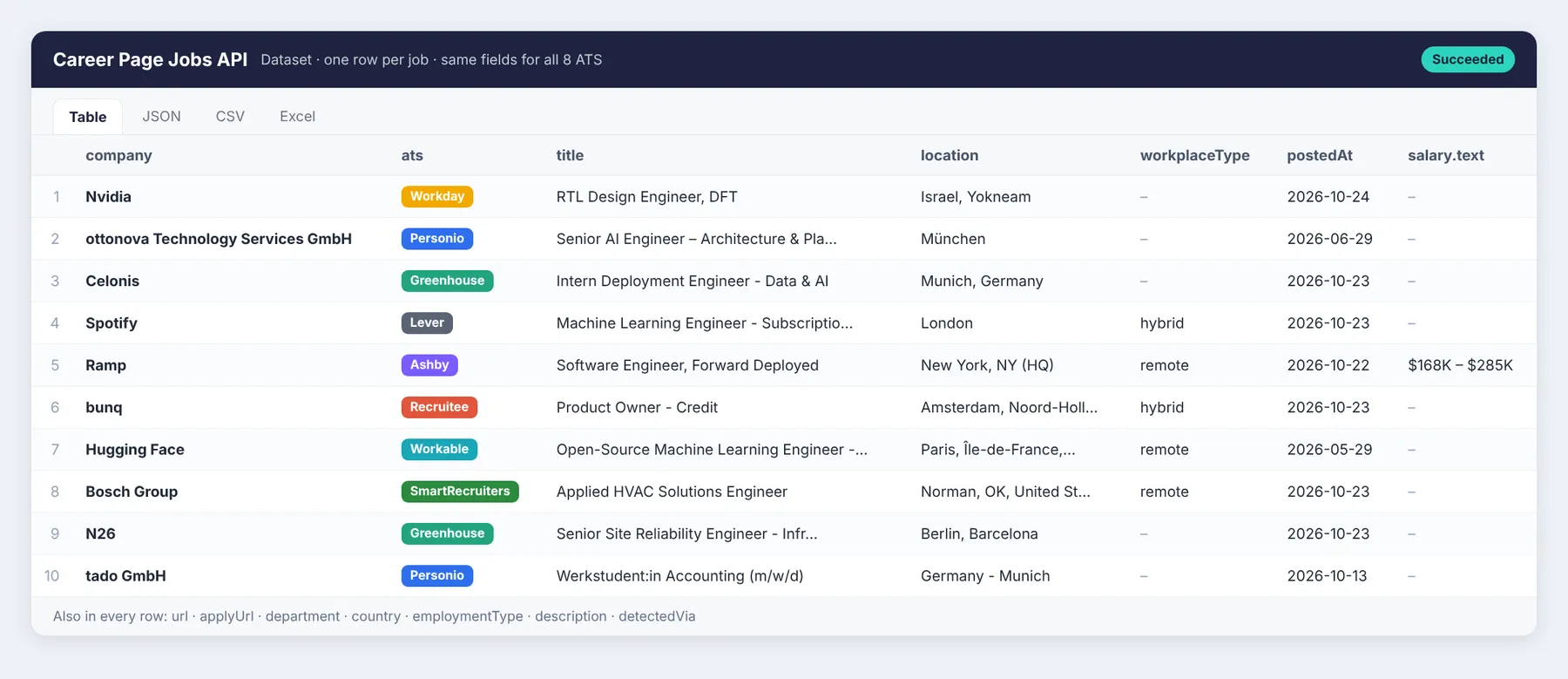
Real output from our test runs: 8 different ATS, one schema. Want it in a spreadsheet? Send every run to Google Sheets with Google Sheets Export & Import (No OAuth) — see Export jobs to Google Sheets.
Use cases
- Hiring-signal lead lists (sales, agencies, investors): a company opening 10 data roles is likely shopping for data tools. Feed your target accounts in, filter by
keywords(e.g.data,security,sales), and turn new openings into warm leads for your CRM. - Job aggregators and niche job boards: pull hundreds of company boards into one normalized feed every day, e.g. all AI jobs in Berlin, all remote Rust roles, all climate-tech companies.
- Recruiter and agency monitoring: watch your client and target companies and see new roles as soon as they appear on the company's own career page.
- Competitor hiring tracking: see which teams, locations and seniority levels your competitors are hiring for. Run it weekly and compare.
- German & EU career pages: Personio and Recruitee power a large share of DACH and EU companies (Mittelstand, startups, scale-ups) that most US-focused scrapers ignore. German titles like
(m/w/d)andWerkstudentcome through as-is, andexcludeKeywordscan drop them. - Scheduled runs with "only new jobs": set
onlyNewSinceLastRunKey, schedule the actor daily, and each run returns (and bills) only jobs that weren't there yesterday. Connect it to Google Sheets, Slack, email, Make, Zapier or n8n. - AI agents and LLM pipelines: structured job data with plain-text descriptions, ready for RAG, matching or classification.
- Market research: salary ranges where boards publish them (Ashby, some Greenhouse and Lever boards), remote share, team growth.
Why this instead of a single-ATS scraper
- 8 systems in one actor: Workday, Personio, Recruitee, Greenhouse, Lever, Ashby, Workable and SmartRecruiters. A company list usually mixes them; with single-ATS scrapers you need one actor, one input format and one output format per system.
- Auto-detection from the company domain: paste
celonis.comand the actor finds the board for you. No need to look up which ATS a company uses or what its board slug is. - One output schema: the same fields (
company,title,location,workplaceType,postedAt,url,salary, ...) for every ATS, so you can merge, filter and export without per-source mapping. - Pay per result: you pay only for jobs saved to the dataset. Companies where no board is found cost nothing, and monitor mode only bills new jobs.
- Workday without the 2,000-job cap: large Workday boards are split and merged automatically.
Supported ATS
| ATS | Typical URL | Notes |
|---|---|---|
| Personio | company.jobs.personio.de | XML feed, DE/EN |
| Recruitee | company.recruitee.com | Includes salary when published |
| Greenhouse | boards.greenhouse.io/company | US and EU instances |
| Lever | jobs.lever.co/company | US and EU instances, salary range |
| Ashby | jobs.ashbyhq.com/company | Compensation included |
| Workable | apply.workable.com/company | |
| SmartRecruiters | jobs.smartrecruiters.com/Company | Full descriptions |
| Workday | company.wd5.myworkdayjobs.com/Site or wd5.myworkdaysite.com/recruiting/company/Site | Exact posting date, country code, all locations. Boards over 2,000 jobs are split automatically |
Input
| Field | What it does |
|---|---|
companies (required) | A list of websites, job board URLs, ats:slug values or bare slugs |
keywords / excludeKeywords | Match against the title (and the description if searchInDescription is on) |
locations, includeRemoteForLocations, remoteOnly | Location filters |
postedWithinDays | Keep only recent postings |
includeDescription, descriptionFormat | text or html |
onlyNewSinceLastRunKey | Monitor mode: output only jobs not seen in earlier runs that used the same key |
maxJobsPerCompany, maxResults, maxConcurrency | Limits |
Example:
Output
Each dataset item is one job:
A run summary showing each input, the board it was detected as, its job count and any errors is saved in the key-value store under SUMMARY.
How detection works
ats:slugvalues and job board URLs are used directly.- For a website, the actor loads the homepage and common career paths (
/careers,/jobs,/karriere, ...) and looks for embedded ATS links or widgets. - If nothing is found, it tries the domain name as a slug on each ATS (except Workday, whose board address can't be guessed: give the Workday URL or the company website that links to it).
- For a Workday URL without a site path (e.g.
https://adobe.wd5.myworkdayjobs.com/), the public career site is read from the tenant's robots.txt.
If no board is found, the input is logged and listed in SUMMARY. Bad inputs never fail the whole run.
Export jobs to Google Sheets
Get a job sheet that fills itself every morning with Google Sheets Export & Import (No OAuth). No "Sign in with Google" and no OAuth token that expires and silently stops your schedule:
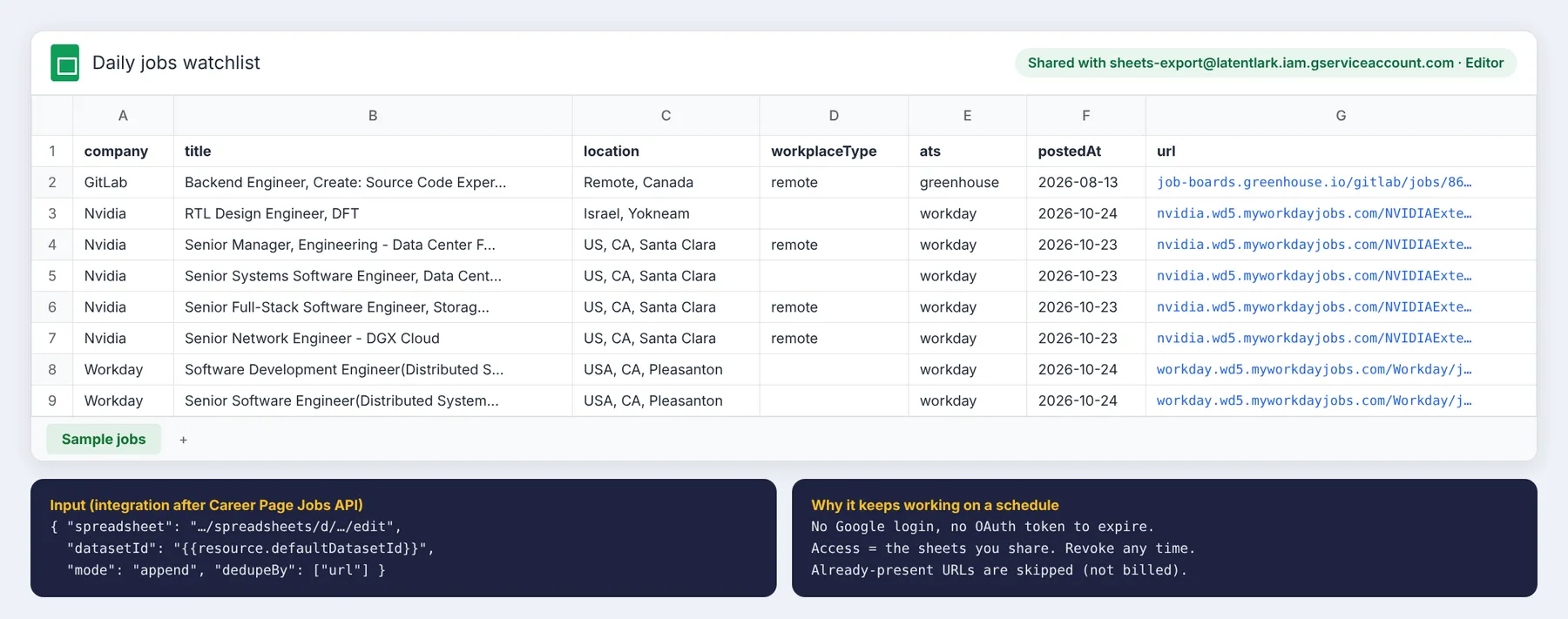
- Share your sheet with
sheets-export@latentlark.iam.gserviceaccount.comas Editor. - On this Actor (or your saved task), open Integrations → Add integration → Actor, pick Google Sheets Export & Import (No OAuth) and set the trigger to Run succeeded.
- Use this input:
{"spreadsheet": "YOUR_SHEET_URL", "datasetId": "{{resource.defaultDatasetId}}", "mode": "append", "dedupeBy": ["url"]}
Schedule this Actor daily (with onlyNewSinceLastRunKey set) and your sheet only gets the new jobs. Rows already in the sheet are skipped by url, and skipped rows aren't billed.
Pricing
Pay per result: $1.50 per 1,000 jobs ($0.0015 per job). You only pay for jobs saved to the dataset. Inputs with no board found cost nothing. Use maxResults, keywords and location filters to control spend, and monitor mode so scheduled runs only pay for new jobs.
Speed
It uses plain HTTP API calls with no browser or proxies. In tests on Apify, 20 companies (2,035 jobs) took 55 seconds and 5 companies (326 jobs) took 19 seconds.
FAQ
Does it need proxies? No. The ATS feeds are public APIs.
How do I find a company's board? Just give its website. The actor checks the homepage and common career paths. If you already know the board, greenhouse:stripe or the board URL is fastest.
Can I get only new jobs every day? Yes. Set onlyNewSinceLastRunKey (for example my-watchlist) and schedule the actor. Seen job IDs are stored in a named key-value store in your account.
How do I add a Workday company? Paste any URL from its Workday career site, e.g. a job link like https://mastercard.wd1.myworkdayjobs.com/CorporateCareers/job/..., or use workday:mastercard.wd1/CorporateCareers. The company website also works if it links to Workday.
Workday shows max 2,000 jobs per search. Do I get them all? Yes. Above 2,000 the actor splits the search by Workday's own filters (job category, location) and merges the results without duplicates. In tests, NVIDIA's 2,743 jobs were all returned.
Which country is covered? All of them. DACH/EU coverage is strong because of Personio and Recruitee.
Legal and data notes
The actor reads only the public job-board APIs that ATS vendors provide so that job postings can be syndicated. It doesn't collect applicant data or personal profiles. Recruiter contact emails that some feeds expose are dropped on purpose. You are responsible for how you use the data.
Limitations
- It only covers companies whose career page runs on one of the supported ATS. Custom in-house career sites aren't supported.
- Salary appears only where the company publishes it.
- Workday: with
includeDescriptionoff,postedAtis derived from Workday's relative "Posted N Days Ago" text and is empty for "30+ Days Ago". With descriptions on (the default), the exact posting date is used. Workday has no department field. - Some field names vary between ATS, and
extrakeeps ATS-specific fields.
More from LatentLark
- Competitor Ads Monitor: track competitor ads from Google Ads Transparency Center and LinkedIn Ad Library, with new-ad alerts.


