

FDIC Bank Branch Finder: Locations and Change Monitoring
Pricing
$3.00 / 1,000 branch results
FDIC Bank Branch Finder: Locations and Change Monitoring
Find FDIC bank branches by state or bank certificate. Export office addresses, coordinates and source-linked records. Monitor unseen branch versions on a schedule with clear scan limits and per-result pricing.
Pricing
$3.00 / 1,000 branch results
Rating
0.0
(0)
Developer

Ledger Star
Maintained by CommunityActor stats
0
Bookmarked
2
Total users
1
Monthly active users
a month ago
Last modified
Categories
Security
Limited permissionsShare
Refresh bank territory lists each week with FDIC Bank Branch Finder, built for field-service teams and analysts who need usable branch addresses, stable identifiers and traceable source data.
What you get
- Branch locations from the official FDIC locations dataset, filtered by state or bank certificate, with business addresses and available coordinates.
- A repeatable snapshot or optional monitoring mode that returns previously unseen versions of branches within your selected scope.
- Downloadable records and a run summary showing delivered results, source rows examined, duplicates and whether the scan finished.
What data you get
Each successful row describes one bank office. Unknown source values stay null. An uncharged diagnostic contains status and provenance instead of an invalid branch. There are no contact-person fields or fuzzy matches between companies.
| Field | What it means |
|---|---|
branchId | Stable FDIC office identifier (UNINUM). Use this to reconcile a branch across exports. |
bankCertificate | FDIC certificate number identifying the bank that owns the office. |
businessName | Source-reported bank name, rather than an individual contact. |
officeName | FDIC office or branch name; it can differ from the owning bank name. |
address | Business street address of the bank office, as published by FDIC. |
city | Office city from the source record. |
state | Two-letter office state code, such as TX. |
zip | Source-reported office ZIP code, retained as text. |
serviceTypeCode | FDIC numeric office service type. Consult FDIC definitions before categorizing services. |
mainOffice | Whether FDIC identifies this office as the bank main office. |
establishedDate | Office establishment date in the source format; not a newly opened branch alert. |
latitude | Source-reported latitude, or null when unavailable. |
longitude | Source-reported longitude, or null when unavailable. |
status | ok for a usable branch; source_error for an uncharged row diagnostic. |
error | Plain explanation for a diagnostic, otherwise null. Raw rejected records are omitted. |
source | Source label: FDIC locations. |
sourceUrl | Official FDIC locations endpoint for verification. |
retrievedAt | UTC timestamp when the Actor handled this record. |
scrapedAt | UTC start timestamp for the run. |
sourceUpdatedAt | Null: this endpoint provides no verified row-level revision timestamp. |
indexUpdatedAt | Source index creation time, not the date this branch changed. |
freshnessDays | Null because a meaningful branch revision date is unavailable. |
recordVersion | Hash of normalized business fields, excluding retrieval and index timestamps. |
dedupeId | Branch identifier plus content version, used to suppress retained alert duplicates. |
Quick start
- Click Try for free or Start in Apify Console and choose a state such as
TX. Leave bank certificates empty for every bank in that territory. - Keep Maximum results at
20and choose Snapshot on every run. Start the Actor and wait for its output dataset. - Review branch identifiers and source links, then export JSON, CSV or Excel. Check the run summary before treating an export as a complete territory list.
The Apify example captured on September 29, 2026 returned 20 Texas branch records from 20 source rows and recorded exactly 20 result events. At $0.003 per delivered result, 20 billable results cost $0.06. The example completed in 9.5 seconds; timing varies with source and platform conditions. A capped sample is not all branches in Texas.
Who uses it
- Field-service operations teams refresh bank-office territories for equipment, facilities and commercial service planning.
- Banking market researchers compare source-reported branch footprints with stable office and institution identifiers.
- Data operations teams maintain structured branch reference tables and review changed versions before updating internal systems.
Input
| Input | Purpose |
|---|---|
state | Optional two-letter branch state. Omit for a nationwide scope. |
certificates | Optional list of numeric FDIC bank certificates. These identify banks, not branches. |
maxItems | Delivered-result cap, from 1 to 10,000; default 20. |
newSince | off for repeat snapshots; lastRun for retained content-version monitoring. |
Tips for good input
- Good:
"state": "TX". Bad:"state": "Texas"; use the two-letter source code. - Good:
"certificates": ["3066"]. Bad: a bank name or website URL; this field accepts certificate numbers. - Good: raise
maxRowsScannedwhen many alert records are unchanged. Bad: assumemaxItems: 20guarantees 20 changed branches exist.
Sample output
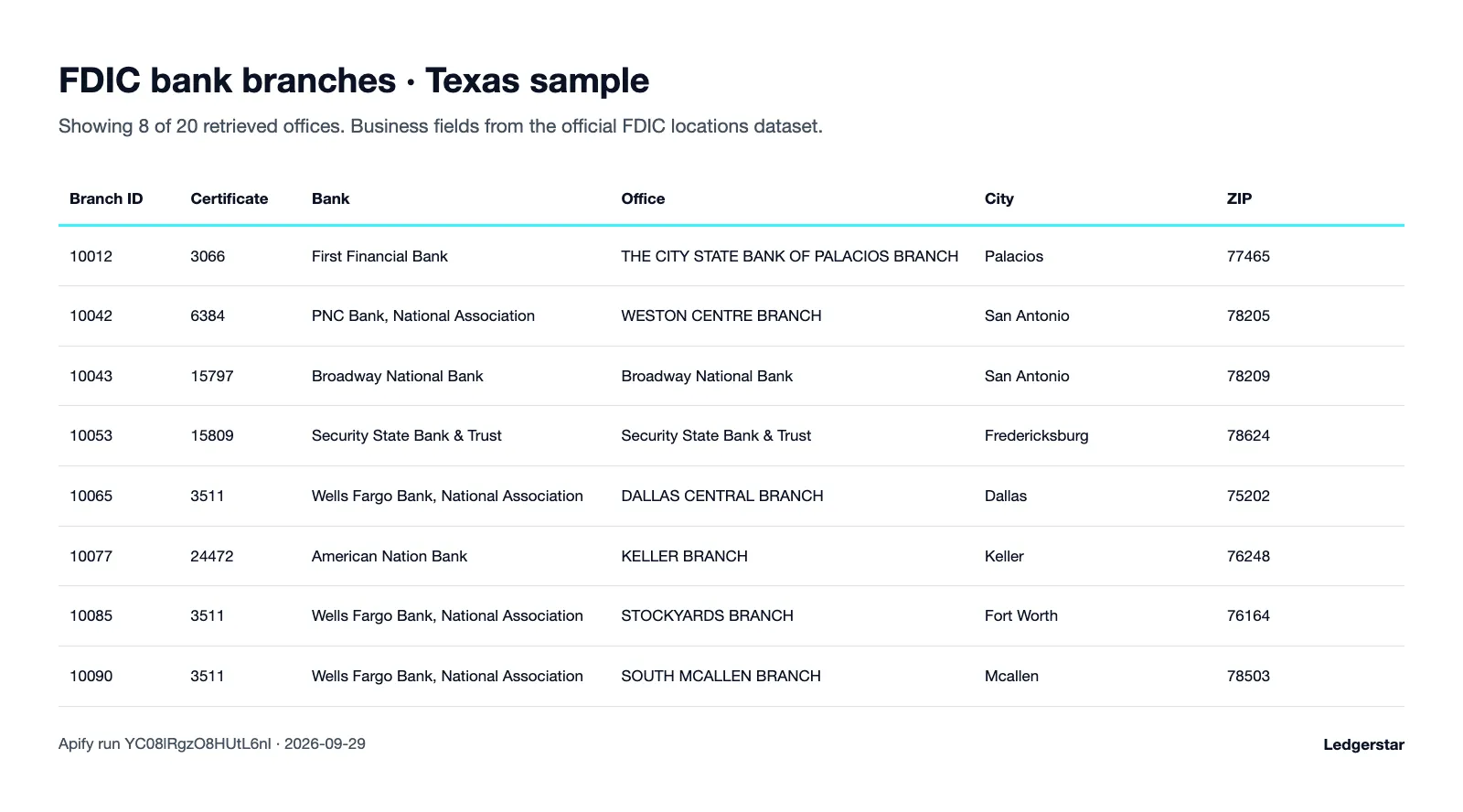
Twenty Texas branches returned by Apify run YC08lRgzO8HUtL6nI on September 29, 2026; the table displays a readable subset. This is a bounded sample in source identifier order.
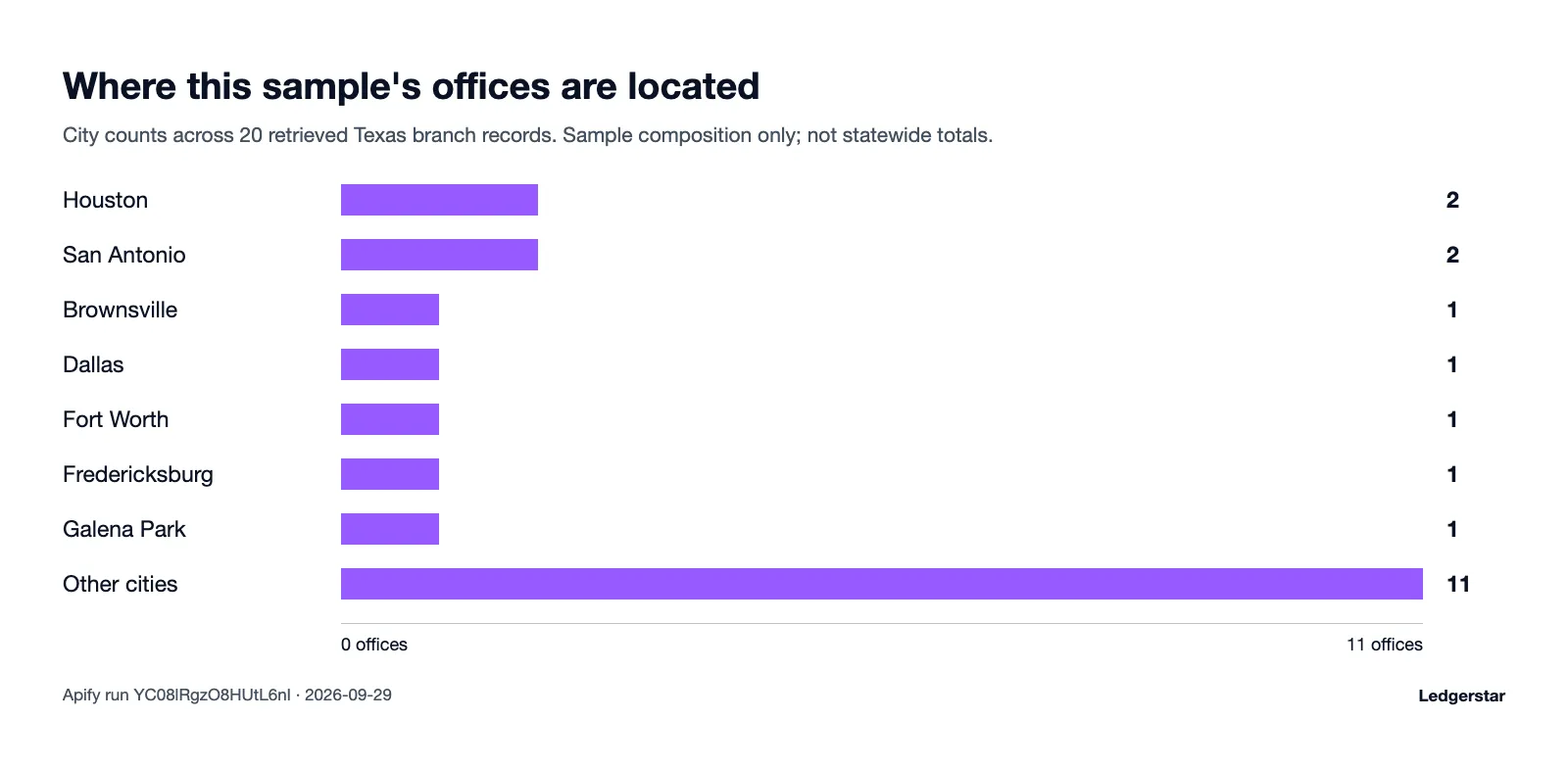
Counts by city within those same 20 records. This is sample composition, not statewide market share or a historical trend.
Alert mode: only new records
Set newSince to lastRun for a scheduled baseline and subsequent change checks. A branch is considered unseen when its identifier and normalized business values have not already been retained. An index rebuild alone does not create a new version. This mode scans the selected scope; it does not use an inferred branch-change date.
A partial monitoring scan saves its position for the next run. If FDIC rebuilds the index between runs, scanning restarts from the beginning and the retained version ledger suppresses known rows. A rebuild during pagination stops the run for a fresh retry. The default off mode starts a new snapshot each run; repeated snapshot rows are billable deliveries.
Monitoring retains up to 200,000 versions for 3,650 days. Pruned versions can reappear. Dataset and ledger writes are separate operations, so a crash between them can produce a repeat. Avoid overlapping runs on the same monitoring scope. A missing branch never proves closure.
Pricing
$3.00 per 1,000 results, or $0.003 per saved usable branch row. Retained alert duplicates and diagnostic rows are not billable results. Snapshot mode charges for each delivered row, including branches present in earlier snapshots. Use the maximum total charge control in Apify Console to bound your run.
| Results | Cost |
|---|---|
| 100 | $0.30 |
| 1,000 | $3.00 |
| 10,000 | $30.00 |
These are result-price calculations. You pay for delivered results rather than the number requested. No result is promised when a filter has no matching branches or when monitoring finds no unseen versions.
Use it through the API
Supply your Apify token through an environment variable. The Actor itself does not require an FDIC credential under the current public API access conditions.
Integrations
Export CSV for Google Sheets, or use the Apify API to maintain a branch reference table. Zapier and Make can process completed datasets. Send a Slack notification when an alert dataset contains usable new versions. Filter status: ok, retain provenance, and use dedupeId in downstream processing. Review the summary's complete and truncated values before replacing a full internal directory with a bounded export.
Data source and compliance
The source is the FDIC Bank Data API, specifically its locations dataset. FDIC data downloads describe published coverage and update schedules. Location snapshots update weekly. FDIC index creation time is provided separately from record freshness; this Actor does not manufacture a row revision date.
Only official bank and office fields are returned. The Actor has no individual contact enrichment, customer accounts or officer records. Public access conditions can change, including future API key requirements; an access failure is surfaced rather than represented as an empty successful search. Ledgerstar is independent of FDIC. AI-assisted software development does not make these outputs financial advice. Verify source records before a client or financial decision.
FAQ
Is it legal to use this data? The Actor reads publicly available official business records. Your reuse must follow applicable source terms and your own obligations; public availability does not remove those responsibilities.
How often is the data updated? FDIC location snapshots update weekly. Running more frequently does not create fresher branch facts.
How do I get only new records?
Select lastRun. The first scan establishes a baseline; later scans suppress retained identical versions within that monitoring scope.
Does a missing branch mean it closed? No. Absence can result from filtering, incomplete scans or source changes. Verify any closure against primary records.
Can I use a bank name as a filter? No. Use numeric FDIC certificates to identify banks, and state codes to select territory.
Why are freshness fields null? The locations endpoint has no verified branch-level revision timestamp. The separate index time describes the source index.
Why did I receive fewer results than requested? The scope may be small, records may be unchanged, or a scan limit may have stopped processing. The summary explains the stopping condition.
Will a repeat snapshot cost money? Yes. Snapshot mode delivers current rows again. Only retained duplicates in monitoring mode are suppressed.
What happens when a row is malformed? An uncharged diagnostic explains the omission without exposing the rejected payload. A source-wide request failure fails the run.
Can monitoring repeat a previously delivered version? Yes, after retention expires, when old ledger entries are pruned, or after a crash between separate dataset and state writes. There is no absolute exactly-once guarantee.
Are coordinates available for every office? The Actor returns source-reported coordinates when present. It does not geocode missing values or certify a physical entrance location.
Can I schedule the Actor? Yes. Weekly schedules suit the source cadence. Keep monitoring filters stable and schedule runs far enough apart to avoid overlap.
More from Ledgerstar
Explore Texas New Business Leads, Nonprofit Finder and Building Permits for other source-linked business research workflows.
Support
Support: open an issue on this Actor's Issues tab in Apify Console.


