

FDA Enforcement History Research
Pricing
$3.00 / 1,000 fda research results
FDA Enforcement History Research
Historical corporate research across FDA food, drug, and device enforcement index records. Not for safety alerts or recall lifecycle tracking.
Pricing
$3.00 / 1,000 fda research results
Rating
0.0
(0)
Developer

Ledger Star
Maintained by CommunityActor stats
0
Bookmarked
2
Total users
1
Monthly active users
25 days ago
Last modified
Categories
Share
Research FDA food, drug, and device enforcement history for corporate supplier intelligence.
What you get
- One structured row for a qualifying family-specific corporate enforcement record.
- The report date, source classification, product family, and direct FDA record link.
- Optional family, report-date, classification, state, company, and alert filters.
What data you get
| Field | What it means |
|---|---|
| recallNumber | FDA recall number, unique within its product family. |
| eventId | FDA event identifier, when supplied. |
| businessName | Corporate recalling firm named in the source. |
| productFamily | Food, drug, or device dataset. |
| classification | Source classification such as Class II, when available. |
| reportDate | Source report date. |
| initiationDate | Source recall initiation date. |
| reportedRecallStatus | Historical status as reported in that indexed row. It may be stale. |
| productType | Source product type, when available. |
| voluntaryMandated | Source voluntary or mandated code, when available. |
| state | Source two-letter state, when available. |
| country | Country name from the source, when available. |
| status | ok for a mapped source record. |
| sourceRecordId | Product family and recall number. |
| dedupeId | Stable identifier used to avoid repeat delivery. |
| source | Name of the FDA enforcement dataset. |
| sourceUrl | Direct FDA API lookup for this family and recall number. |
| retrievedAt | When the source page was fetched. |
| scrapedAt | When the result was mapped. |
| sourceUpdatedAt | FDA index date, not the record update date. |
| freshnessDays | Calendar days between retrieval and source index date. |
Quick start
- Choose one or more product families and a report-date window or company name.
- Set maximum results and source requests for your budget.
- Run the Actor and inspect the returned dataset and source links.
The September 29, 2026 cloud canary used the exact families: ["food"] filter and a report-date window from August 30 through September 29, 2026. It scanned the first 20 source rows and saved all 20. FDA metadata reported 95 matches for that selected query and an index date of September 23, 2026. The run stopped at the result cap, so this is a partial food-only sample; it does not cover the drug or device families or represent a complete current recall list. At the listed $0.003 event price, the 20 saved results correspond to $0.060 in result events.
Who uses it
- Medtech supplier-quality researchers reviewing historical enforcement records across relevant product families.
- Contract manufacturers building company lists for a supplier portfolio.
- Market researchers checking a historical event's dates and basic source classification.
Input
| Input | Use |
|---|---|
| dateFrom | Inclusive lower report-date limit in real YYYY-MM-DD format. |
| dateTo | Inclusive upper report-date limit in real YYYY-MM-DD format. |
| families | An array containing food, drug, device, or any combination. |
| classification | Exact source class: Class I, Class II, or Class III. |
| state | Exact two-letter source state code. |
| businessName | Bounded substring of a corporate recalling-firm name. |
| newSince | Optional alert date or lastRun for technical change monitoring; off disables alerts. |
| alertLookbackDays | Alert lookback window from 1 to 30 days. |
| maxItems | Maximum delivered rows, 1 to 1,000; default 20. |
| maxRequests | Maximum FDA pages, 1 to 20; default 5. |
Tips for good input
- Good:
2026-01-01asdateFrom. Bad:01/01/26, which is ambiguous. - Good:
["food", "device"]for two families. Bad:Devices, which is not a supported family code. - Good:
CAas a state. Bad:California, because the source uses two-letter codes. - Good:
Medicalin the company substring. Bad: a person's name or contact details.
Sample output
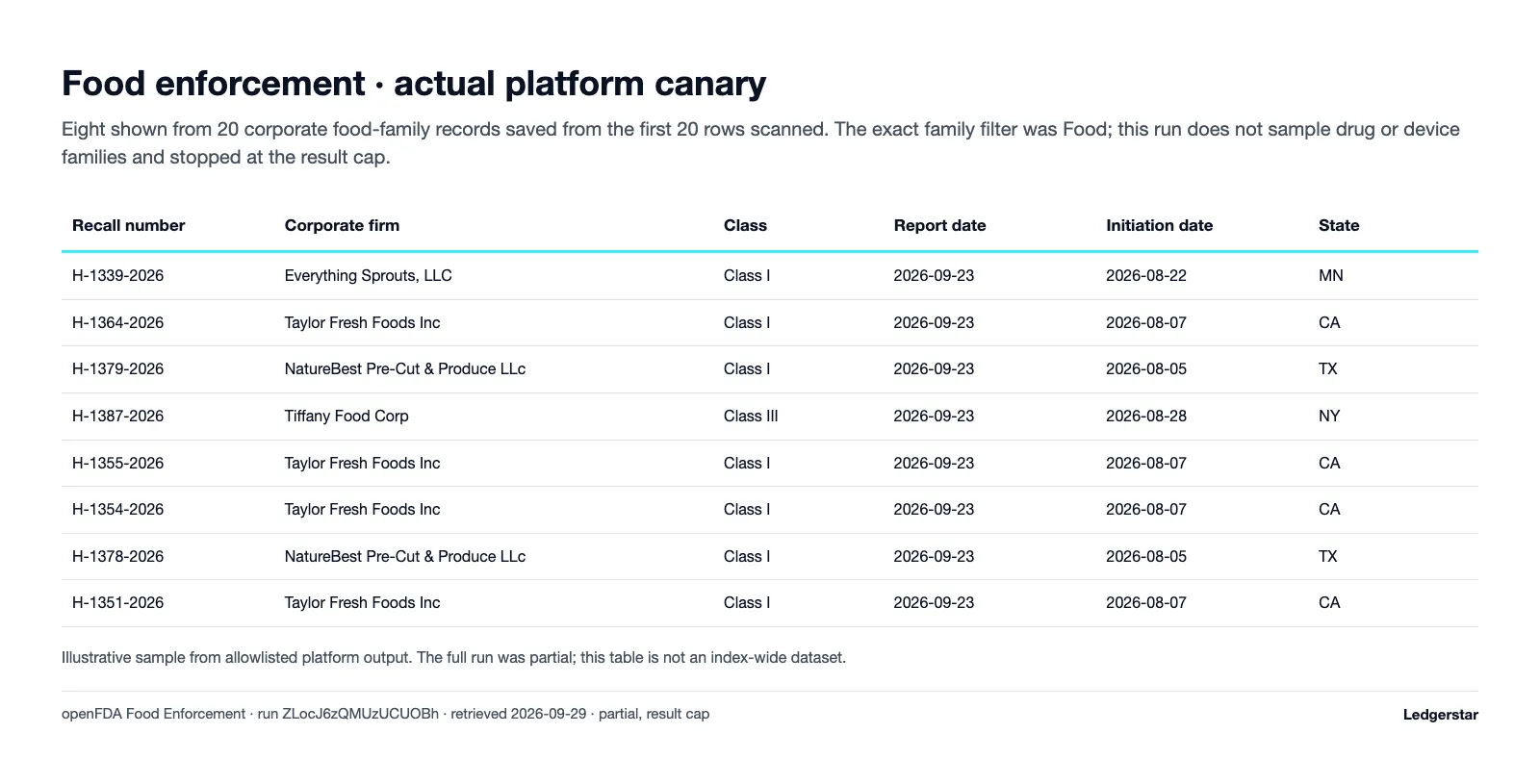
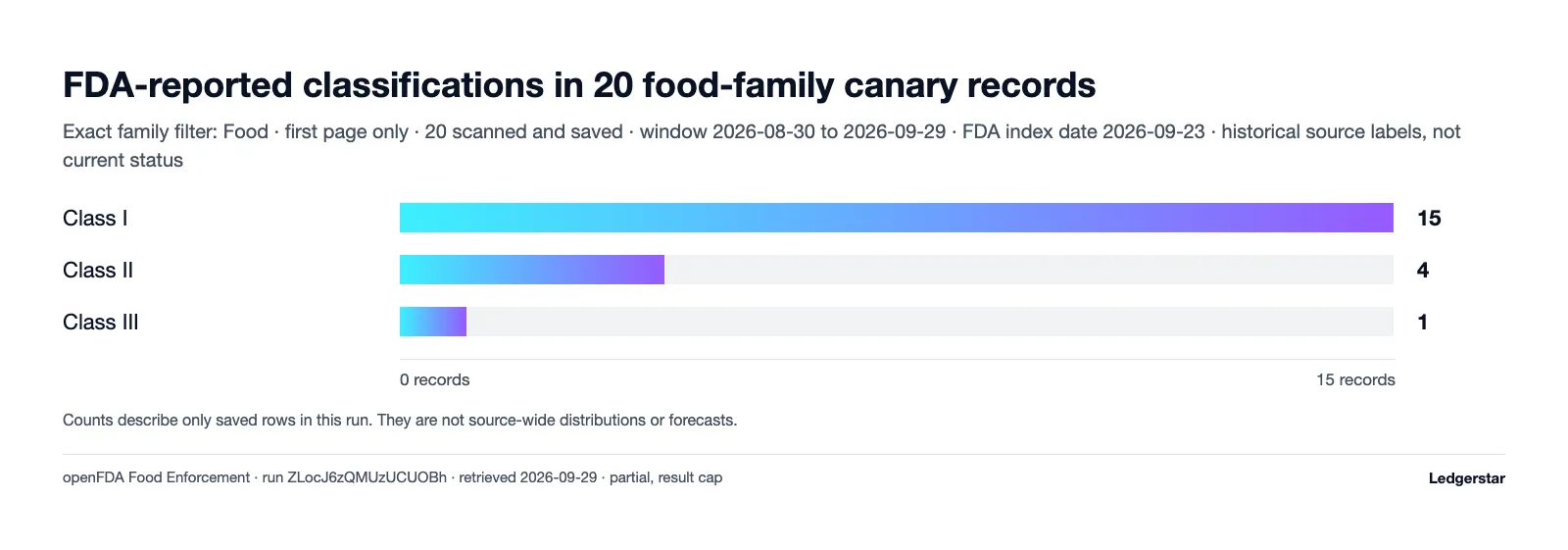
The table and chart below use the actual cloud canary output. The table shows 8 of 20 saved food-family records; the chart counts FDA-reported classification labels across all 20. This exact food-only first-page sample says nothing about drug or device results. The classification and reported status are historical source values, not current safety guidance.
Alert mode: only new records
Set newSince to a date or lastRun to filter delivery by report date for historical research. This technical feature is not a safety alert and does not track a recall lifecycle. Alert mode stores delivered version identifiers so scheduled runs can avoid charging the same record version again. The enforcement source datasets are updated weekly according to FDA documentation, but individual families or filtered runs may return no matching rows. The cursor keeps a pending bounded scan across migrations and alert runs. If FDA changes its index during a scan, the Actor stops rather than combining pages from different index versions. An interrupted process can still leave uncertainty at the boundary; this is not an exactly-once delivery guarantee. Omit newSince or set it to off for a repeatable snapshot without alert tracking.
Pricing
Proposed price: $0.003 per successfully delivered result.
That equals $3.00 per 1,000 results when every result is delivered.
| Results | Cost |
|---|---|
| 100 | $0.30 |
| 1,000 | $3.00 |
| 10,000 | $30.00 |
These examples assume every requested record qualifies and is delivered. Empty searches, failed runs, and excluded rows are not successful result events. Platform configuration and charges should be checked on the Actor listing before use.
Use it through the API
Python:
JavaScript:
Integrations
Send dataset rows to Google Sheets for review, schedule a run in Zapier or Make, or use Slack to notify a team when an alert-mode run delivers a new version. Apify API clients can start runs and retrieve datasets from your own systems. Keep your API token private and apply your organization's access controls to downstream copies.
Data source and compliance
The sources are the U.S. FDA openFDA food, drug, and device enforcement endpoints. FDA explicitly says this data must not be used for public recall alerts or recall lifecycle tracking. Reported status is historical and may be stale. The product is for business research only. FDA's index may be incomplete or change. Verify important facts directly with FDA and the manufacturer. The Actor applies a conservative corporate-name filter and does not return people, contact information, street addresses, raw narratives, third-party documents, or licensed GMDN material. It is for business research, not clinical, purchasing, safety, or regulatory decisions. Check FDA terms and the source documentation for your intended use.
FAQ
Is it legal to use this data?
The Actor uses FDA's public openFDA API. You are responsible for following the source terms, applicable law, and your own organization's policies.
How often is the data updated?
FDA describes the food, drug, and device enforcement indexes as weekly classified data. Source updates do not make the reported status current. Check sourceUpdatedAt on each run for the index date.
How do I get only new records?
Set newSince to an ISO date or lastRun and schedule runs. This is technical change monitoring, not a safety alert.
Can this Actor issue public recall alerts?
No. FDA explicitly prohibits using these datasets for public recall alerts or recall lifecycle tracking. Use official safety communications for those purposes.
Does the Actor show all FDA enforcement history records?
No. Runs are bounded by date filters, request limits, and result limits. Corporate-name filtering excludes uncertain entities.
Why did my search return no rows?
Your family, report dates, classification, state, or firm filters may not match a corporate record in the selected window.
Can I search several product families at once?
Yes. Choose any combination of food, drug, and device. Family-specific IDs remain distinct in the results.
Are results updated when an old record changes?
Changes to mapped business historical event fields create a new record version. Changes to fields outside the output contract are not versioned.
Can I use this for clinical or safety decisions?
No. FDA warns against public alert or lifecycle uses. This Actor is for historical supplier research only.
What does freshnessDays measure?
It is the number of calendar days between retrieval and the source index date, not the age or current state of an individual enforcement record.
Why do rows omit contact and address fields?
The output is limited to selected business and historical event fields and excludes personal and contact data.
What happens when the source changes during a scan?
The Actor stops the pending scan so it does not silently combine pages from different source-index versions.
More from Ledgerstar
Related research Actors include FDA Drug Application Decisions, FDA 510(k) Device Clearances, and FDA PMA Supplement Decisions. Check each listing for its current availability and source scope.
Support
Support: open an issue on this Actor's Issues tab in Apify Console.


